
Global Parameters

Account Information
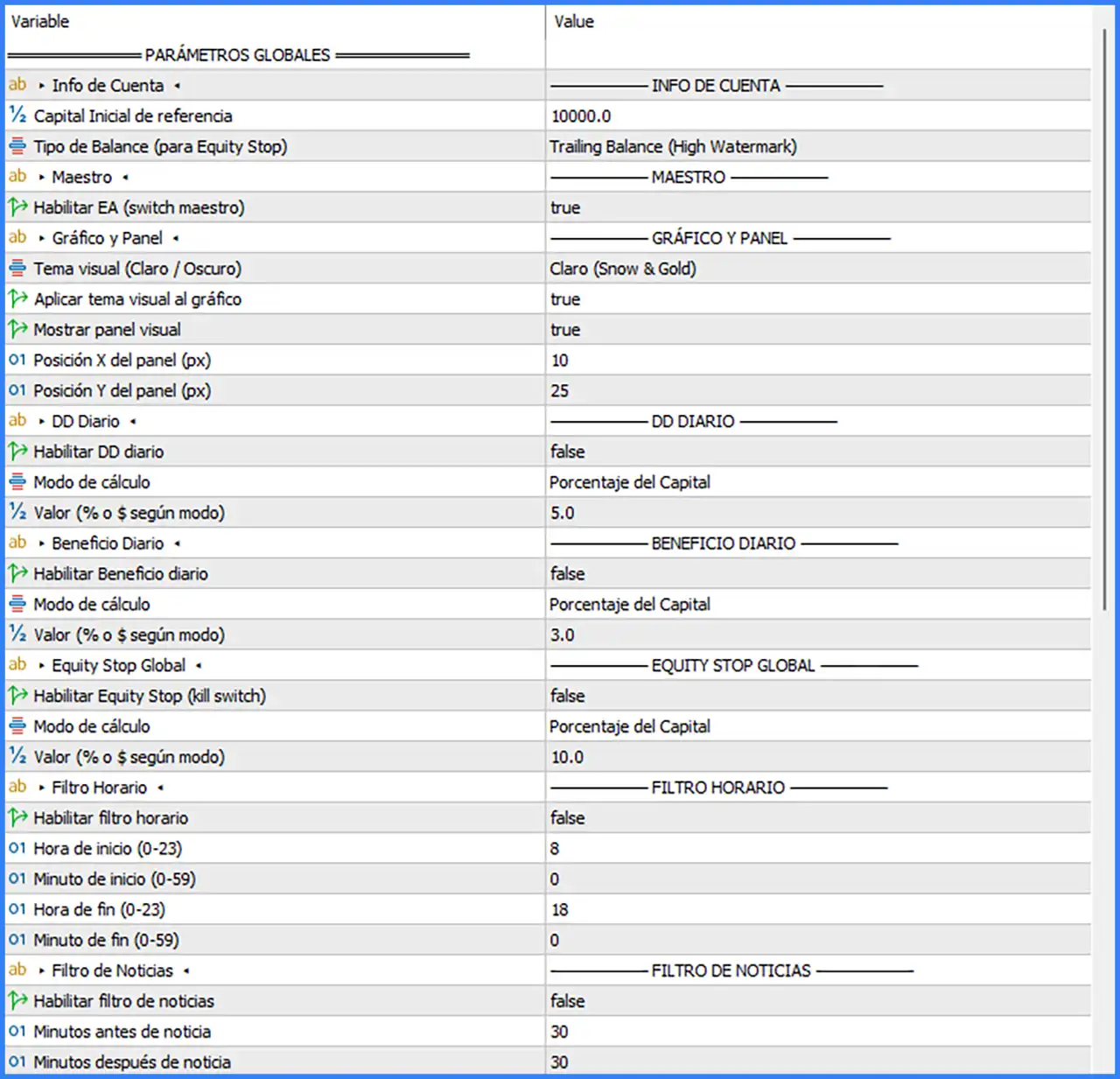
🔹 Reference Initial Capital — Default: 10000.0 — Defines the reference starting capital used by the robot for account-related calculations and percentage-based protection settings.
🔹 Balance Type (for Equity Stop) — Default: Trailing Balance (High Watermark) — Selects the balance reference method used by the Equity Stop function. The Trailing Balance (High Watermark) option uses a high-watermark reference.
Master EA
🔹 Enable EA (Master Switch) — Default: true — Main switch controlling the Expert Advisor. When enabled, the robot is allowed to operate according to its individual strategy and global settings.
Chart & Panel
🔹 Visual Theme (Light / Dark) — Default: Claro (Snow & Gold) — Selects the visual appearance of the robot's chart and interface. The default Snow & Gold theme uses a light colour scheme.
🔹 Apply Visual Theme to Chart — Default: true — Enables automatic application of the selected visual theme to the trading chart.
🔹 Show Visual Panel — Default: true — Displays or hides the robot's on-chart information panel.
🔹 Panel X Position (px) — Default: 10 — Sets the horizontal position of the visual panel in pixels.
🔹 Panel Y Position (px) — Default: 25 — Sets the vertical position of the visual panel in pixels.
Global Risk Management
Daily Drawdown
🔹 Enable Daily DD — Default: false — Activates or disables the daily drawdown protection function. When enabled, the robot uses the selected calculation mode and value to define the daily drawdown threshold.
🔹 Calculation Mode (Daily DD) — Default: Porcentaje del Capital — Determines how the daily drawdown limit is calculated. The displayed default means Percentage of Capital.
🔹 Value (% or $ According to Mode) — Default: 5.0 — Defines the daily drawdown threshold. With Percentage of Capital selected, the value represents 5.0% of the applicable capital reference.
Daily Profit
🔹 Enable Daily Profit — Default: false — Activates or disables the daily profit target function. When enabled, the robot uses the selected calculation mode and target value.
🔹 Calculation Mode (Daily Profit) — Default: Porcentaje del Capital — Determines whether the daily profit target is calculated as a percentage of capital or according to the selected calculation mode.
🔹 Value (% or $ According to Mode) — Default: 3.0 — Defines the daily profit target. With Percentage of Capital selected, the target is 3.0% of the applicable capital reference.
Global Equity Stop
🔹 Enable Equity Stop (Kill Switch) — Default: false — Activates or disables the global Equity Stop protection. When enabled, this function acts as a kill switch based on the selected calculation mode and threshold.
🔹 Calculation Mode (Equity Stop) — Default: Porcentaje del Capital — Determines how the global equity protection threshold is calculated. The displayed default means Percentage of Capital.
🔹 Value (% or $ According to Mode) — Default: 10.0 — Defines the Equity Stop threshold. With Percentage of Capital selected, the value represents 10.0% of the applicable capital reference.
Trading Hours Filter
🔹 Enable Time Filter — Default: false — Activates or disables the trading-hour restriction. When enabled, the robot follows the configured start and end times.
🔹 Start Hour (0–23) — Default: 8 — Sets the hour when the permitted trading session begins.
🔹 Start Minute (0–59) — Default: 0 — Sets the minute component of the trading session start time.
🔹 End Hour (0–23) — Default: 18 — Sets the hour when the permitted trading session ends.
🔹 End Minute (0–59) — Default: 0 — Sets the minute component of the trading session end time.
News Filter
🔹 Enable News Filter — Default: false — Activates or disables the news filter to restrict trading around scheduled economic news events.
🔹 Minutes Before News — Default: 30 — Defines how many minutes before a news event the news filter applies its trading restriction.
🔹 Minutes After News — Default: 30 — Defines how many minutes after a news event the news filter continues applying its trading restriction.
Global Trading Extras
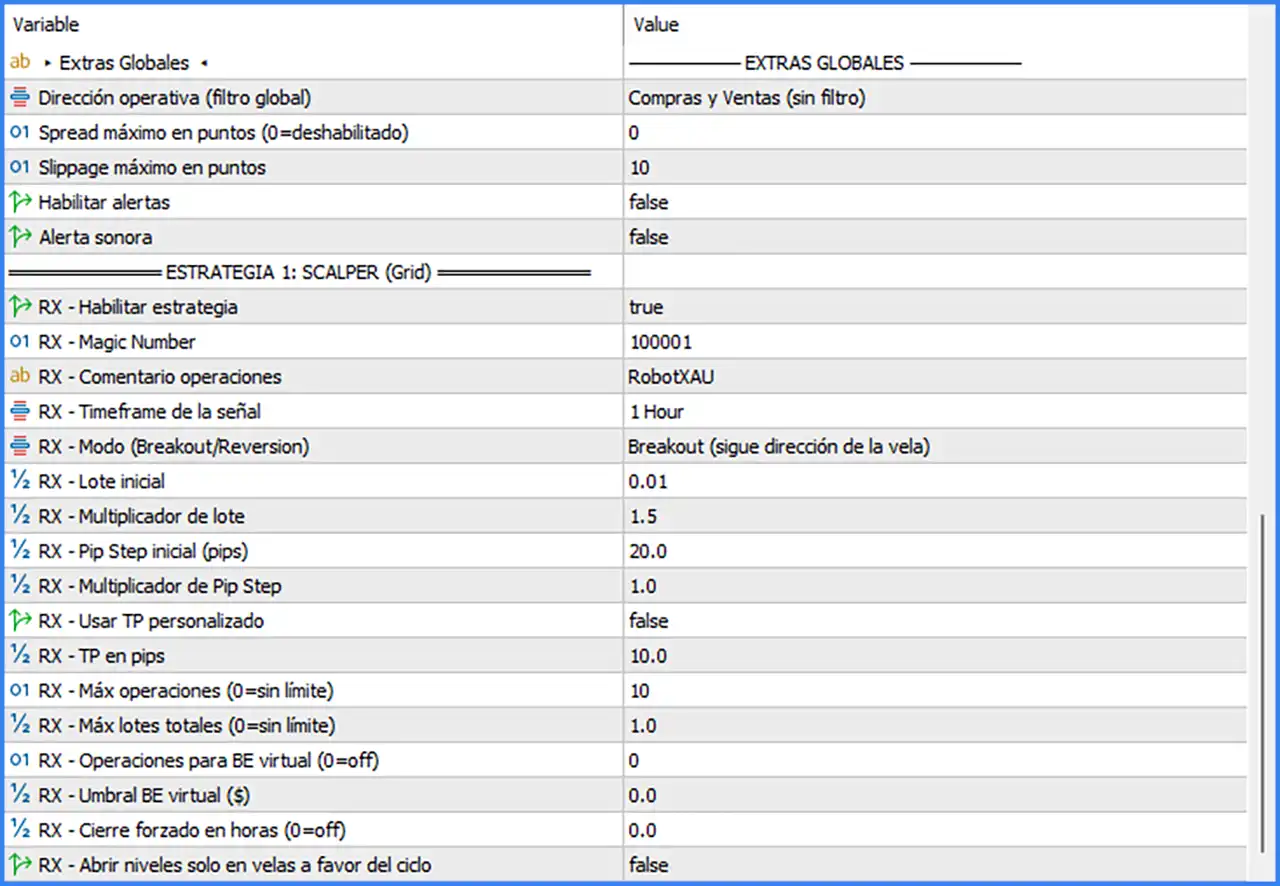
🔹 Trading Direction (Global Filter) — Default: Compras y Ventas (sin filtro) — Controls the permitted trading direction across the robot. The default allows both BUY and SELL trades without a directional restriction.
🔹 Maximum Spread in Points (0 = Disabled) — Default: 0 — Sets the maximum spread allowed for trading. A value of 0 disables this spread restriction.
🔹 Maximum Slippage in Points — Default: 10 — Defines the maximum permitted execution slippage in points when the robot sends trading orders.
🔹 Enable Alerts — Default: false — Activates or disables the robot's alert notifications.
🔹 Sound Alert — Default: false — Enables or disables sound notifications when an alert is triggered.
Strategy 1 – RX Scalper (Grid)
Strategy Activation & Identification
🔹 RX – Enable Strategy — Default: true — Activates the RX Scalper (Grid) trading strategy. When enabled, this strategy can operate under the global EA switch and its own configuration.
🔹 RX – Magic Number — Default: 100001 — Assigns a unique identification number to trades opened by the RX strategy. This helps distinguish its positions from other Expert Advisors or manual trades.
🔹 RX – Trade Comment — Default: RobotXAU — Sets the comment attached to orders opened by the RX strategy, making the robot's trades easier to identify in the trading terminal.
Signal & Trading Mode
🔹 RX – Signal Timeframe — Default: 1 Hour — Defines the timeframe used by the RX strategy to evaluate trading signals. The default setting is H1.
🔹 RX – Mode (Breakout / Reversion) — Default: Breakout (follows candle direction) — Selects the strategy's operating mode. The default Breakout mode follows the direction of the candle when determining the trading direction.
Lot & Grid Management
🔹 RX – Initial Lot — Default: 0.01 — Defines the starting lot size for the RX strategy's initial position.
🔹 RX – Lot Multiplier — Default: 1.5 — Controls the lot-size scaling factor applied as the strategy adds positions. A multiplier of 1.5 represents a 1.5-times scaling factor.
🔹 RX – Initial Pip Step (pips) — Default: 20.0 — Defines the initial distance between grid levels in pips.
🔹 RX – Pip Step Multiplier — Default: 1.0 — Controls how the pip-step distance changes between successive grid levels. A value of 1.0 keeps the step multiplier unchanged.
Take Profit Settings
🔹 RX – Use Custom TP — Default: false — Enables or disables the custom take-profit setting for the RX strategy.
🔹 RX – TP in Pips — Default: 10.0 — Defines the take-profit distance in pips when the custom TP function is enabled.
Trading Limits
🔹 RX – Maximum Operations (0 = Unlimited) — Default: 10 — Sets the maximum number of operations allowed for the RX strategy. A value of 0 means there is no operation limit.
🔹 RX – Maximum Total Lots (0 = Unlimited) — Default: 1.0 — Defines the maximum combined lot size permitted for the RX strategy. A value of 0 removes this total-lot restriction.
Virtual Break-Even & Forced Closing
🔹 RX – Operations for Virtual BE (0 = Off) — Default: 0 — Defines the number of operations required to activate the virtual Break-Even function. A value of 0 disables this feature.
🔹 RX – Virtual BE Threshold ($) — Default: 0.0 — Defines the monetary threshold used by the virtual Break-Even function. Its effect depends on the activation setting and the robot's internal implementation.
🔹 RX – Forced Close in Hours (0 = Off) — Default: 0.0 — Defines the forced-closing time setting in hours. A value of 0.0 disables this function.
🔹 RX – Open Levels Only on Candles in the Direction of the Side — Default: false — Controls whether new grid levels are opened only when candles move in the direction of the corresponding trade side. When disabled, this additional candle-direction restriction is not applied.
Recommended Starting Configuration
🔹 Global Trading Direction — Keep Compras y Ventas (sin filtro) when both BUY and SELL trading directions are permitted.
🔹 Maximum Spread — The default 0 disables the spread filter. Consider configuring a suitable limit based on the broker's XAUUSD trading conditions.
🔹 Maximum Slippage — The default 10 provides the configured execution-slippage limit in points.
🔹 Master EA — Keep Enable EA = true when the robot is intended to operate.
🔹 RX Strategy — Keep RX - Enable Strategy = true to activate the RX Scalper (Grid) module.
🔹 Signal Timeframe — The default 1 Hour provides H1 signal evaluation.
🔹 Initial Lot — The default 0.01 is the starting position size shown in the supplied configuration.
🔹 Lot Multiplier — Review 1.5 carefully because it controls lot scaling as additional grid positions are opened.
🔹 Grid Distance — The default 20.0 pips is the initial grid spacing, while 1.0 keeps the pip-step multiplier unchanged.
🔹 Maximum Operations — The default 10 limits the number of RX operations.
🔹 Maximum Total Lots — The default 1.0 sets the combined lot-size limit for the RX strategy.
🔹 Risk Protection — Daily DD, Daily Profit, and Global Equity Stop are disabled by default. Review and configure these protections before live trading.
🔹 Trading Filters — The time filter and news filter are disabled by default. Enable them if trading-hour or scheduled-news restrictions are required.
Conclusion
Robot XAUUSD MT5 provides a configurable trading environment built around the RX Scalper (Grid) strategy. Its settings cover signal timeframe, Breakout mode, initial lot size, lot multiplication, grid spacing, take-profit configuration, and maximum trading exposure.
The robot also includes account-level controls for daily drawdown, daily profit targets, Equity Stop, trading hours, and news filtering. However, several of these protections are disabled in the displayed default configuration. The 1.5 lot multiplier and grid-based position management should be reviewed carefully because additional positions can increase total market exposure. Proper testing on a demo account and suitable risk configuration are important before using the robot on a live XAUUSD account.