

Introduction
EA Super Trend XAUUSD MT5 is an automated trading Expert Advisor (EA) designed specifically for Gold (XAUUSD) trading on MetaTrader 5. The EA uses the SuperTrend indicator, powered by Average True Range (ATR), to identify market trends, detect potential reversals, and generate automated trading signals.
Purchase the UNLIMITED version of EA Super Trend XAUUSD MT5 here

Its configuration includes automatic lot sizing based on account balance, adjustable Stop Loss (SL) and Take Profit (TP) levels, grid position management, partial profit closing, and trailing stop functionality. Traders can also customize the SuperTrend indicator parameters, visualize trend signals directly on the chart, and control trading sessions through a configurable time filter.
With flexible risk management and trading schedule settings, EA Super Trend XAUUSD MT5 provides a structured approach to automated Gold trading on the H1 timeframe.
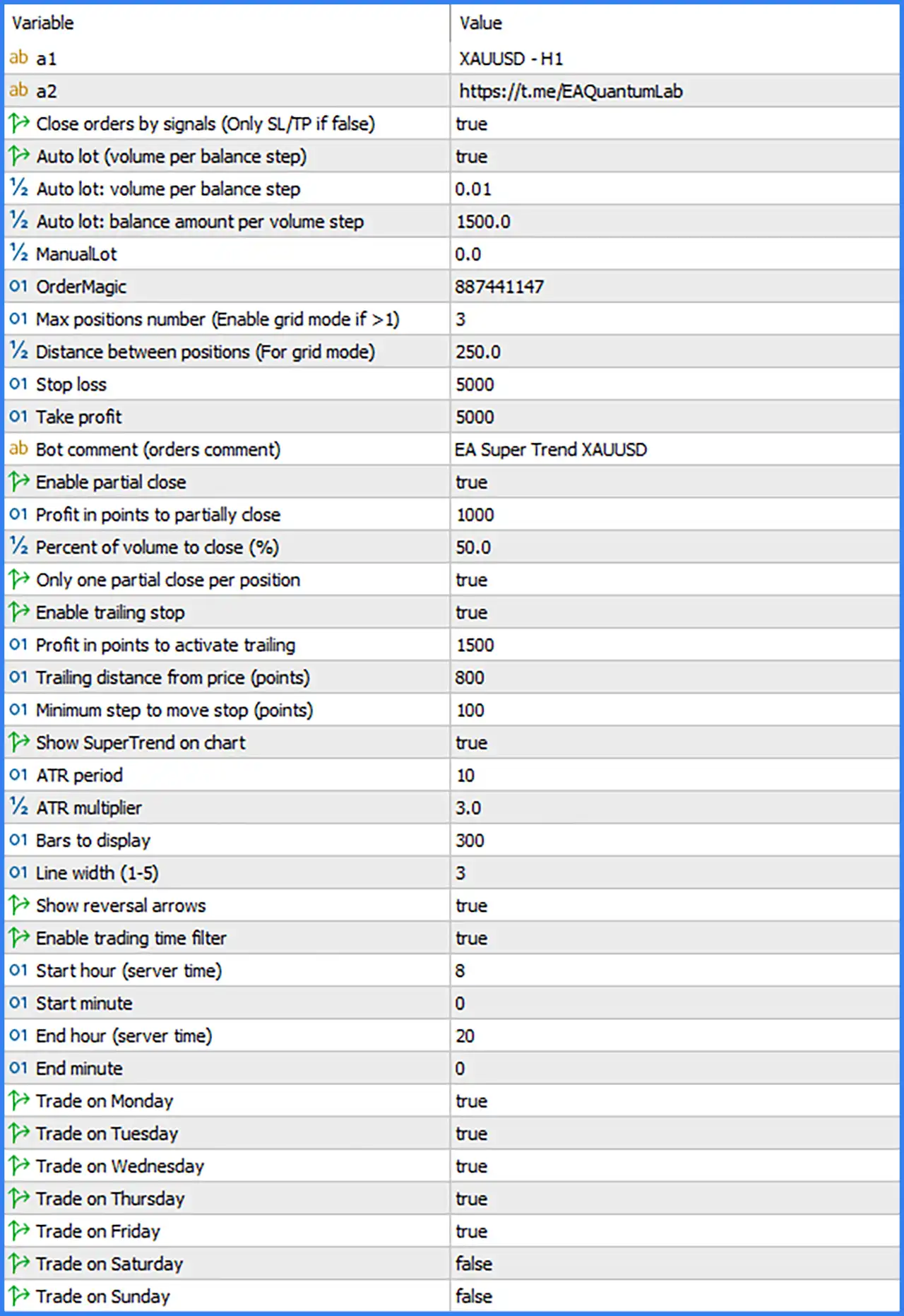
MONEY MANAGEMENT AND LOT SIZING SETTINGS
This section controls how EA Super Trend XAUUSD MT5 calculates trading volume according to account balance or manually configured lot sizes.
🔹 Auto Lot (Volume per Balance Step): Set to true. Enables automatic lot sizing based on the configured account balance step, allowing the EA to adjust trading volume as the account balance changes.
🔹 Auto Lot: Volume per Balance Step: Set to 0.01. Defines the trading volume added for each qualifying balance step. The current configuration uses 0.01 lots per balance step.
🔹 Auto Lot: Balance Amount per Volume Step: Set to 1500.0. Specifies the account balance amount required for each 0.01-lot volume step, meaning the automatic lot calculation uses 1,500 balance units as its reference.
🔹 ManualLot: Set to 0.0. Defines the manually specified trading volume. The current value of 0.0 leaves the manual lot size unset while automatic lot sizing is enabled.
🔹 OrderMagic: Set to 887441147. Assigns a unique Magic Number to the EA's trading orders, allowing MetaTrader 5 to identify and distinguish its positions from trades opened by other Expert Advisors.
POSITION AND GRID MANAGEMENT SETTINGS
This section controls the maximum number of simultaneous positions and the minimum distance between entries when grid trading is used.
🔹 Max Positions Number (Enable Grid Mode if Greater Than 1): Set to 3. Limits the EA to a maximum of 3 trading positions. A value greater than 1 enables grid mode according to the parameter description.
🔹 Distance Between Positions (For Grid Mode): Set to 250.0. Defines the minimum distance of 250.0 points between consecutive positions when grid mode is active, helping regulate the spacing of additional entries.
STOP LOSS AND TAKE PROFIT SETTINGS
These parameters define the protective exit levels for automated trading positions.
🔹 Stop Loss: Set to 5000. Defines the Stop Loss distance at 5,000 points, establishing the configured loss-protection level for each applicable position.
🔹 Take Profit: Set to 5000. Defines the Take Profit distance at 5,000 points, specifying the target profit level for closing positions.
PARTIAL CLOSE SETTINGS
The Partial Close feature allows the EA to secure part of a position's profit by closing a percentage of its trading volume after reaching a predefined profit threshold.
🔹 Bot Comment (Orders Comment): Set to EA Super Trend XAUUSD. Defines the comment attached to orders opened by the EA, making its trading positions easier to identify in the MT5 terminal.
🔹 Enable Partial Close: Set to true. Activates the partial closing mechanism, allowing the EA to close a portion of an open position when the configured profit condition is reached.
🔹 Profit in Points to Partially Close: Set to 1000. Specifies the profit threshold of 1,000 points required to trigger the partial closing operation.
🔹 Percent of Volume to Close (%): Set to 50.0. Determines the percentage of the original position volume to close when the partial close condition is triggered, allowing the EA to secure 50% of the position.
🔹 Only One Partial Close per Position: Set to true. Restricts the EA to performing only one partial closing operation for each position, preventing repeated partial closures on the same trade.
TRAILING STOP SETTINGS
The Trailing Stop feature automatically adjusts the Stop Loss level as a position moves into profit. These settings determine when trailing protection activates and how frequently the stop level is adjusted.
🔹 Enable Trailing Stop: Set to true. Activates the trailing stop mechanism, allowing the EA to dynamically adjust protective stop levels as the market moves favorably.
🔹 Profit in Points to Activate Trailing: Set to 1500. Requires a position to reach 1,500 points in profit before the trailing stop mechanism becomes active.
🔹 Trailing Distance from Price (Points): Set to 800. Maintains a trailing distance of 800 points between the current market price and the adjusted Stop Loss level.
🔹 Minimum Step to Move Stop (Points): Set to 100. Requires the market price to move by at least 100 points before the EA makes another trailing stop adjustment, helping reduce unnecessary stop modifications.
SUPERTREND INDICATOR SETTINGS
The SuperTrend section controls the indicator parameters used to analyze market direction and identify potential trend reversals. The indicator combines ATR-based volatility calculations with a configurable multiplier to establish dynamic trend boundaries.
🔹 Show SuperTrend on Chart: Set to true. Displays the SuperTrend indicator directly on the trading chart, allowing traders to monitor trend direction and potential trading signals visually.
🔹 ATR Period: Set to 10. Defines the Average True Range calculation period using 10 candles to measure market volatility for the SuperTrend indicator.
🔹 ATR Multiplier: Set to 3.0. Sets the ATR multiplier to 3.0, determining the distance of the SuperTrend bands from the calculated price reference and influencing the indicator's sensitivity to market movements.
🔹 Bars to Display: Set to 300. Specifies that the EA displays SuperTrend indicator information across the most recent 300 chart candles.
🔹 Line Width (1–5): Set to 3. Defines the SuperTrend indicator line thickness at 3, providing a clearly visible chart display.
🔹 Show Reversal Arrows: Set to true. Enables visual arrows on the chart to identify potential SuperTrend direction changes and market reversal signals.
TRADING TIME FILTER SETTINGS
The Trading Time Filter allows traders to control when EA Super Trend XAUUSD MT5 can execute trading operations. It uses broker server time to define the permitted trading session.
🔹 Enable Trading Time Filter: Set to true. Activates the trading schedule restriction, allowing the EA to execute trades only within the configured time window and permitted trading days.
🔹 Start Hour (Server Time): Set to 8. Defines the trading session start hour at 08:00 according to the broker's server time.
🔹 Start Minute: Set to 0. Specifies the trading session starting minute as 00, resulting in a start time of 08:00.
🔹 End Hour (Server Time): Set to 20. Defines the trading session end hour at 20:00 according to the broker's server time.
🔹 End Minute: Set to 0. Specifies the trading session ending minute as 00, resulting in an end time of 20:00.
WEEKLY TRADING DAYS SETTINGS
These settings determine which days of the week the EA is permitted to open new trades.
🔹 Trade on Monday: Set to true. Enables automated trading on Monday within the configured trading hours.
🔹 Trade on Tuesday: Set to true. Enables automated trading on Tuesday within the configured trading hours.
🔹 Trade on Wednesday: Set to true. Allows the EA to execute trading signals on Wednesday.
🔹 Trade on Thursday: Set to true. Enables automated trading on Thursday according to the configured session.
🔹 Trade on Friday: Set to true. Allows the EA to continue trading on Friday until the configured session end time of 20:00 server time.
🔹 Trade on Saturday: Set to false. Disables automated trading on Saturday.
🔹 Trade on Sunday: Set to false. Disables automated trading on Sunday.