

This guide walks through the inputs of US30 and XAUUSD Hedging Scalper MT4 with the values recommended for live trading. The set files that come with the EA already contain these settings, so you can load them in one click and adjust only what your broker or account needs.
🔢 Us30 and XAUUSD Hedging Scalper EA MT4 Settings Guide: Complete Input Parameters Explained
Us30 and XAUUSD Hedging Scalper EA is an automated trading Expert Advisor configured for scalping strategies on the US30 index and XAUUSD (Gold). Its input parameters control the initial trading volume, stop-loss and take-profit distances, lot-size scaling, upper limits, and trade identification.
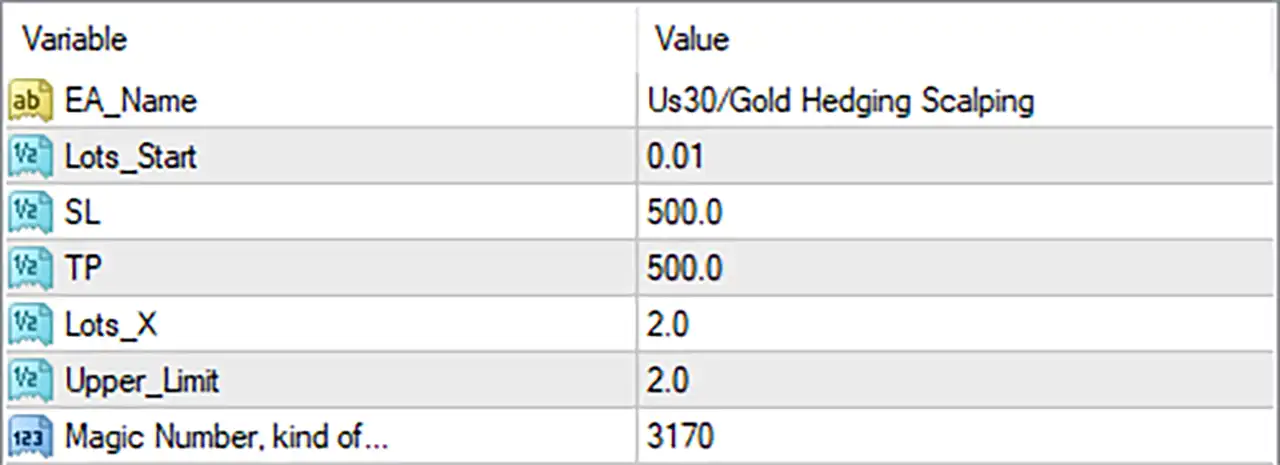
⚙️ Lot Size Settings
🔹 Lots_Start = 0.01: Sets the initial trading volume to 0.01 lots, a micro-lot-sized starting position on many Forex instruments. The actual exposure depends on the broker's contract specifications for US30 or XAUUSD.
🔹 Lots_X = 2.0: Sets a lot-size multiplier of 2.0. If the EA applies this multiplier when increasing position sizes, the next calculated lot may be twice the previous lot, for example, 0.01 becoming 0.02. The exact progression depends on the EA's implementation and should be verified through testing.
🔹 Upper_Limit = 2.0: Sets an upper limit of 2.0 for the parameter controlled by this setting. It may serve as a maximum lot-size or scaling limit, but the input name does not explicitly identify the unit or the variable being limited. Confirm its exact behavior before live trading.
⚙️ Stop-Loss and Take-Profit Settings
🔹 SL = 500.0: Sets the stop-loss parameter to 500.0 in the EA's configured distance units. This value may represent points, pips, or instrument-specific units, depending on the programming. Verify the resulting stop-loss price on both US30 and XAUUSD before use.
🔹 TP = 500.0: Sets the take-profit parameter to 500.0 in the EA's configured distance units. If SL and TP use the same units and are applied symmetrically, their nominal distance ratio is 1:1 before commissions, spread, swaps, and slippage.
⚙️ Trade Identification
🔹 Magic Number, kind of... = 3170: Assigns the trade identifier or magic number 3170, which can help MT4 distinguish the EA's orders from trades opened by other Expert Advisors. Using unique magic numbers for different strategies helps reduce the risk of overlapping trade-management rules.
🔢 Conclusion
The visible configuration for Us30 and XAUUSD Hedging Scalper EA MT4 contains six inputs. The EA name is Us30/Gold Hedging Scalping, the starting lot size is 0.01, the stop-loss and take-profit values are both 500.0, the lot multiplier is 2.0, the upper limit is 2.0, and the magic number is 3170.
Before using this setup on a live account, three details deserve particular attention:
- Confirm SL and TP units: The meaning of
500.0may differ between US30 and XAUUSD and between brokers. - Check lot scaling and limits: A multiplier of
2.0can increase exposure quickly if successive positions use progressively larger lots. - Verify the upper limit: Confirm whether
Upper_Limit = 2.0restricts lot size, trade count, or another internal variable.
The name suggests a hedging scalper, but these six inputs alone do not establish how hedging entries, simultaneous positions, or recovery trades are executed. Demo testing and careful review of the EA's actual order behavior are recommended before live deployment.
Get US30 and XAUUSD Hedging Scalper MT4
Download US30 and XAUUSD Hedging Scalper MT4 with its set files, read the full product details and requirements here: US30 and XAUUSD Hedging Scalper MT4 →