





SEMI HFT EA MT5 v4.40 with SetFiles (Unlimited)

Subscriptions for Special Plan
- 30 EA package is more economical!
- Special package with 99%
- Download 1 EA/Day

Subscriptions for Premium Membership
- Download Unlimited in 1 Year
- Get 100% Discount
- Get free access to all

Subscriptions for Gold Membership
- 1 Year Membership
- Get 100% Discount
- Access EA+Indicator+Course
Frequently bought together 🎁
Add these products to enhance your purchase



What is SEMI HFT EA MT5?
SEMI HFT EA MT5 is an advanced Expert Advisor (EA) designed for automated trading with a high-frequency sell method. The EA combines intelligent indicators, adaptive execution capabilities, and multi-layered risk management to enhance stability and adaptability. The system focuses on precise entry points, volatility control, and efficient trade processing for consistent performance.
SEMI HFT MT5 Review
Key Features of SEMI HFT MT5
🔹 Semi High-Frequency Execution Engine: Executes trades rapidly with optimized signal processing and precision timing.
🔹 Advanced News Filtering System: Avoids high-impact events to protect capital from sudden volatility spikes.
🔹 Adaptive Grid & Layer Management: Uses structured order spacing to maintain stability and reduce overtrading.
🔹 Smart Trailing & Hidden Protection: Dynamic Trailing and hidden Stop Loss (SL), Take Profit (TP) help secure profits efficiently.
🔹 Flexible Time & Session Filters: Custom trading hours improve execution control and reduce market exposure.
Why Choose & Use SEMI HFT EA MT5?
🔹 Consistent Automated Performance: Designed for continuous trading with structured and reliable execution.
🔹 Enhanced Risk Control Framework: Combines filters, trailing and timing logic to protect capital.
🔹 Adaptability to Market Conditions: Adjusts behavior based on volatility, news and trading sessions.
SEMI HFT EA MT5 Review
🔹 Efficient Trade Management System: Optimizes entries and exits without requiring manual intervention.
🔹 Marketplace-Ready Trading Solution: Ideal for traders seeking a balanced EA with controlled automation.
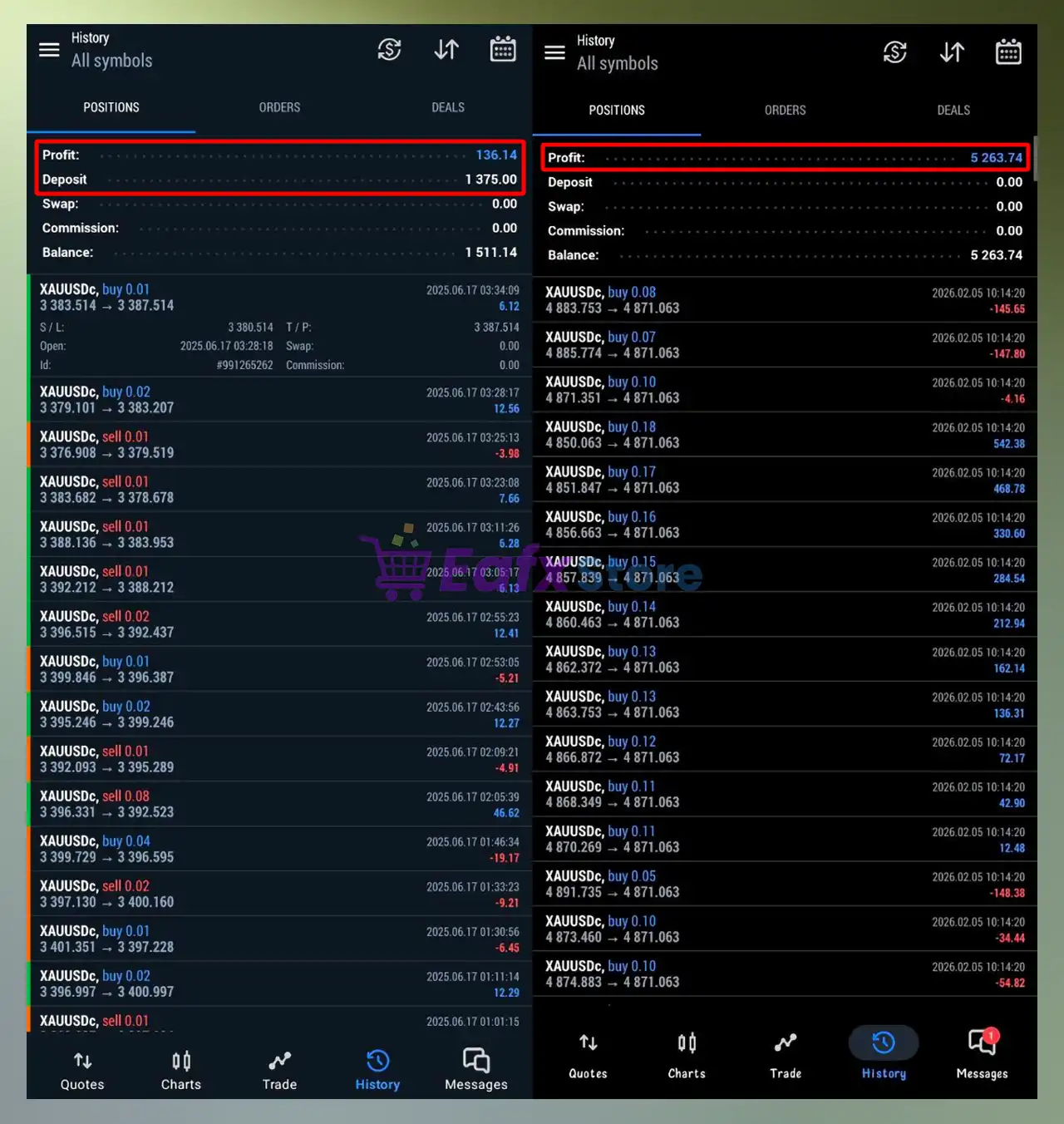
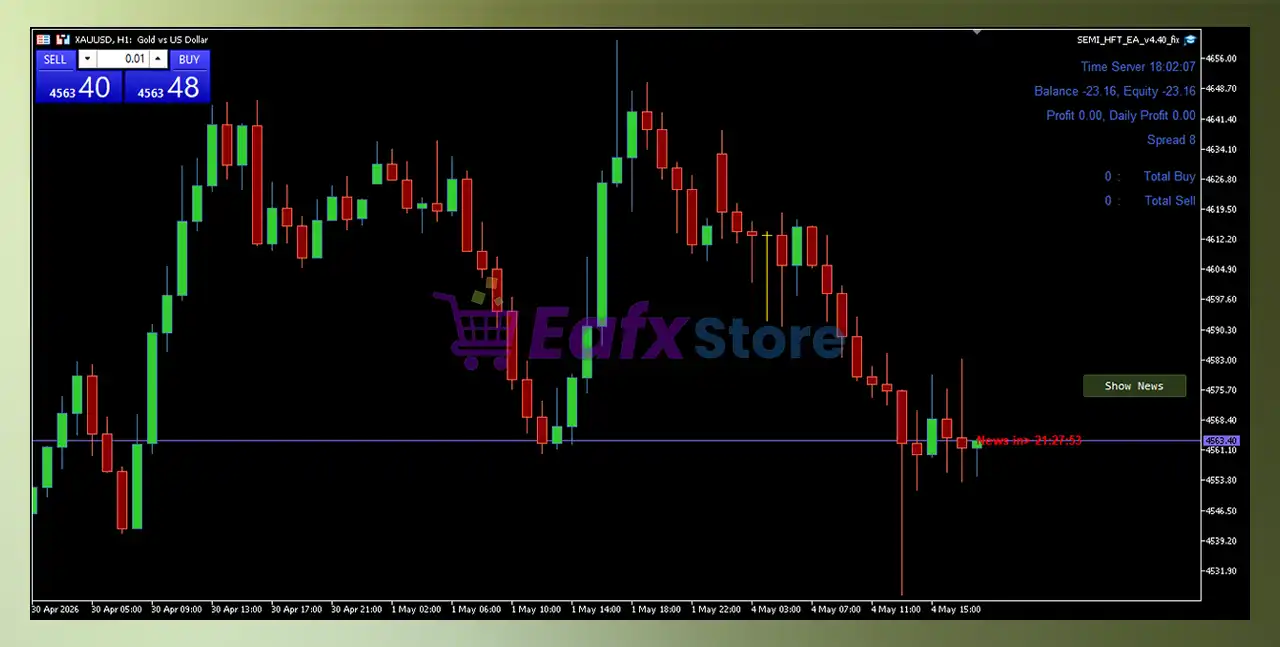
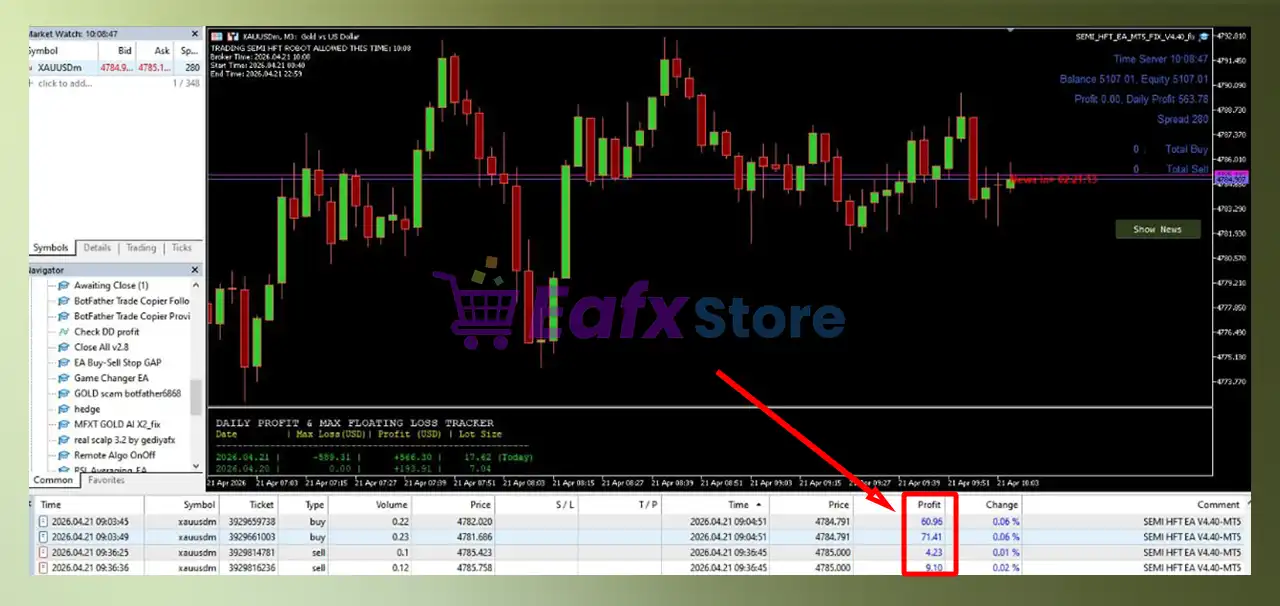
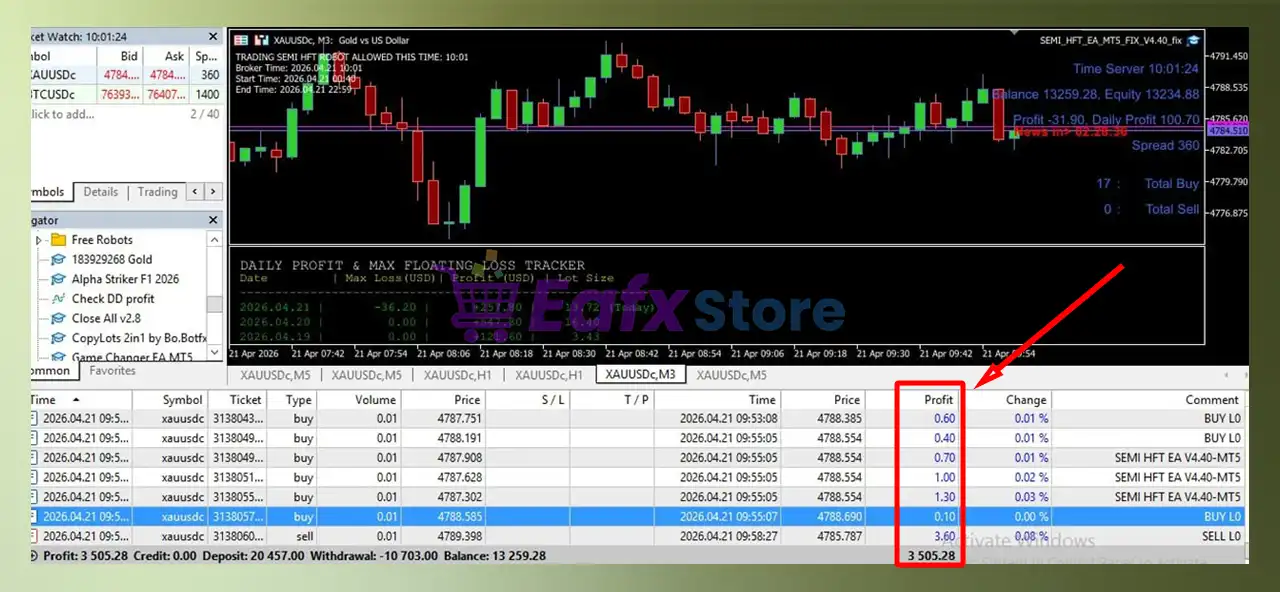
SEMI HFT EA MT5 Trading Results
SEMI HFT EA MT5 Review
What is the SEMI HFT EA MT5 Trading Strategy?
🔹 Signal-Based Dual Direction Trading: Executes both buy and sell trades based on multi-layer signal confirmation.
🔹 Structured Layered Entry System: Places trades at fixed distances to manage price fluctuations effectively.
🔹 Dynamic Position Adjustment Logic: Adjusts exposure progressively to stabilize performance during volatility.
🔹 Trailing Profit Optimization Model: Locks gains once trades reach defined profit thresholds.
🔹 News-Aware Trading Behavior: Suspends new trades during major economic events to reduce risk exposure.
Recommended settings
Recommended settings and parameters to pay attention to from developers and experts:
| Features | Type |
|---|---|
| Trading platform | MetaTrader 5 (MT5) |
| Time frames | M1, M5, M15, M30, H1 |
| Currency pairs | XAUUSD (Gold) & Forex pairs |
| Minimum / Recommended deposit | $500 |
| Minimum / Recommended leverage | 1:20+ |
| Account type | ECN and Raw accounts |
| Product type | NoDLL |
| Additional services | Unlock and Decompile |
| Recommended brokers | Exness Broker, Icmarkets Broker |
| Recommended VPS | MyfxVPS.com ( Blue VPS, Golden VPS). Lowest Latency, 2 week Free Trial, 100% Free for 12-18 Months. |
 Reviewed by David Easton
Product Download Package?
The download package of the product suite includes:
1. Experts:
 SEMI_HFT_EA_v4.40_fix.ex5
2. SetFiles:
Semi HFT_v4.40_Gold_M30.set
Semi HFT_v4.40_Gold_M5_$5k.set
Semi HFT_v4.40_Gold_M1_$10k.set
Conclusion
In short, SEMI HFT EA MT5 is a powerful semi High-Frequency Trading system designed to capture frequent market opportunities using Grid and Martingale strategies. With built-in news filters and trailing logic, it offers flexibility and automation. However, proper risk management is essential to control drawdown and ensure stable long-term performance with SEMI HFT.
SEMI HFT EA MT5 Settings Explained
SEMI HFT EA MT5 is a high-frequency sell-trades Expert Advisor (EA) designed for MetaTrader 5 (MT5), incorporating news filtering, Martingale strategies, Grid trading and intelligent risk control. The EA allows traders to automate entry points with high accuracy while managing volatility through advanced filters and multi-layered recovery logic.
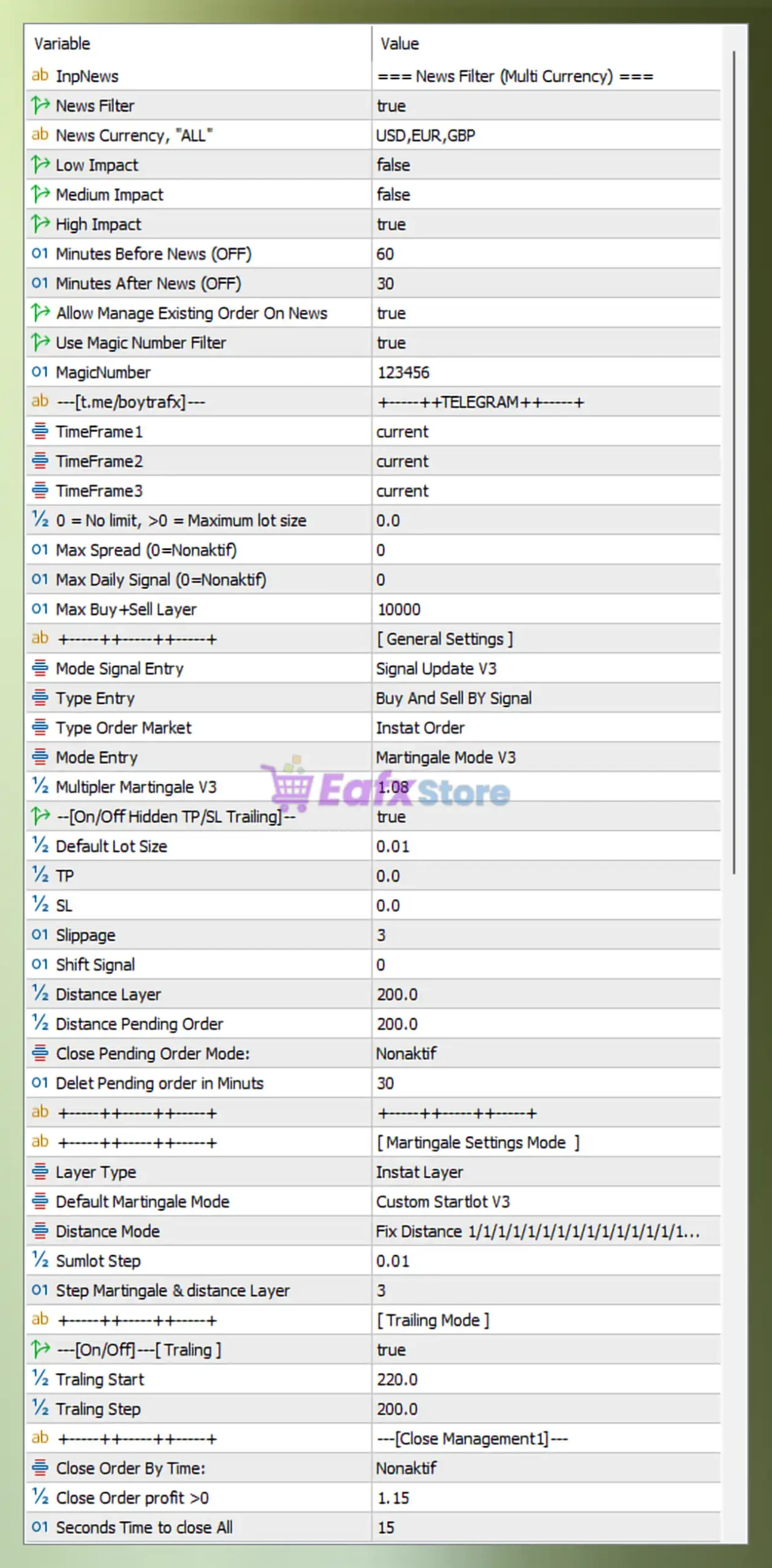
 News Filter (Multi Currency)
- InpNews = === News Filter (Multi Currency) === – Section label defining all news filter configurations.
- News Filter = true – Activates trading restriction during economic news events.
- News Currency, “ALL” = USD,EUR,GBP – Applies news filtering to USD, EUR, and GBP currencies.
- Low Impact = false – Low-impact news is ignored and does not affect trading.
- Medium Impact = false – Medium-impact news is ignored.
- High Impact = true – High-impact news events block new trades.
- Minutes Before News (OFF) = 60 – Stops opening trades 60 minutes before news release.
- Minutes After News (OFF) = 30 – Resumes trading 30 minutes after news release.
- Allow Manage Existing Order On News = true – Existing orders are still managed during news.
- Use Magic Number Filter = true – Filters trades by a unique identifier.
- MagicNumber = 123456 – Unique ID used to track EA trades.
Signal & Timeframe Settings
- [t.me/boytrafx] = +++++TELEGRAM+++++ – Informational label referencing signal provider.
- TimeFrame1 = current – Uses the current chart timeframe as primary signal source.
- TimeFrame2 = current – Uses current timeframe as secondary confirmation.
- TimeFrame3 = current – Uses current timeframe as third confirmation layer.
General Trading Limits
- 0 = No limit, >0 = Maximum lot size = 0.0 – No maximum lot restriction applied.
- Max Spread (0=Nonaktif) = 0 – Spread filter disabled (no spread limit).
- Max Daily Signal (0=Nonaktif) = 0 – Unlimited number of signals per day.
- Max Buy+Sell Layer = 10000 – Allows up to 10,000 total grid layers.
Entry & Execution Settings
- Mode Signal Entry = Signal Update V3 – Uses version 3 signal processing logic.
- Type Entry = Buy And Sell By Signal – Executes both buy and sell trades based on signals.
- Type Order Market = Instant Order – Orders are executed instantly at market price.
- Mode Entry = Martingale Mode V3 – Applies Martingale strategy version 3.
- Multiplier Martingale V3 = 1.08 – Each new position increases lot size by 1.08x.
Lot Size & Risk Parameters
- [On/Off Hidden TP/SL Trailing] = true – Enables hidden take profit, stop loss, and trailing.
- Default Lot Size = 0.01 – Initial trade lot size is 0.01.
- TP = 0.0 – No fixed take profit level.
- SL = 0.0 – No fixed stop loss level.
- Slippage = 3 – Maximum slippage allowed is 3 points.
- Shift Signal = 0 – No delay applied to signal execution.
Grid & Distance Configuration
- Distance Layer = 200.0 – Distance between grid layers is 200 points.
- Distance Pending Order = 200.0 – Pending orders are spaced 200 points apart.
- Close Pending Order Mode = Nonaktif – Pending order auto-close is disabled.
- Delet Pending order in Minutes = 30 – Pending orders expire after 30 minutes.
Martingale Settings Mode
- Layer Type = Instat Layer – Orders are placed instantly without delay.
- Default Martingale Mode = Custom Startlot V3 – Uses custom starting lot configuration.
- Distance Mode = Fix Distance 1/1/1/1/1/1/1/1/1/1/1/1/… – Maintains fixed spacing across all layers.
- Sumlot Step = 0.01 – Lot size increases in increments of 0.01.
- Step Martingale & distance Layer = 3 – Martingale scaling applied every 3 layers.
Trailing Mode Settings
- [On/Off] Trailing = true – Enables trailing stop functionality.
- Trailing Start = 220.0 – Trailing activates after 220 points profit.
- Trailing Step = 200.0 – Trailing adjusts every 200 points.
Close Management Settings
- Close Order By Time = Nonaktif – Time-based auto close is disabled.
- Close Order profit >0 = 1.15 – Closes orders when profit exceeds 1.15.
- Seconds Time to close All = 15 – All orders close within 15 seconds when triggered.
Floating & Balance Control
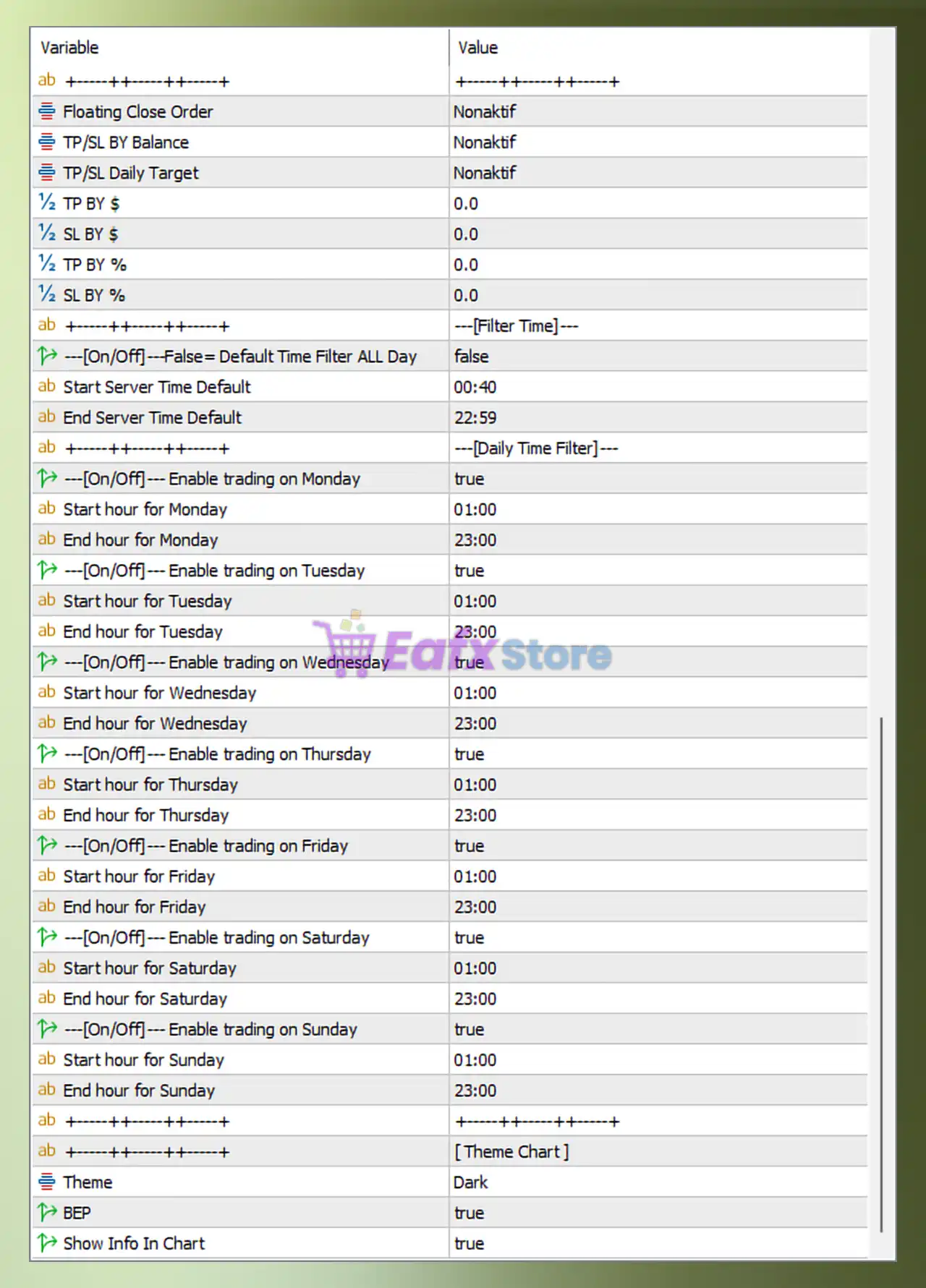
- Floating Close Order = Nonaktif – Floating profit/loss auto-close disabled.
- TP/SL By Balance = Nonaktif – No TP/SL based on account balance.
- TP/SL Daily Target = Nonaktif – Daily profit/loss target disabled.
- TP By $ = 0.0 – No fixed take profit in USD.
- SL By $ = 0.0 – No fixed stop loss in USD.
- TP By % = 0.0 – No percentage-based take profit.
- SL By % = 0.0 – No percentage-based stop loss.
Time Filter Settings
- [On/Off] Default Time Filter ALL Day = false – Time filter is active (not 24h trading).
- Start Server Time Default = 00:40 – Trading starts at 00:40 server time.
- End Server Time Default = 22:59 – Trading stops at 22:59 server time.
Daily Trading Schedule
- Enable trading on Monday = true – Trading allowed on Monday.
- Start hour for Monday = 01:00 – Starts trading Monday at 01:00.
- End hour for Monday = 23:00 – Stops trading Monday at 23:00.
- Enable trading on Tuesday = true – Trading allowed on Tuesday.
- Start hour for Tuesday = 01:00 – Starts trading Tuesday at 01:00.
- End hour for Tuesday = 23:00 – Stops trading Tuesday at 23:00.
- Enable trading on Wednesday = true – Trading allowed on Wednesday.
- Start hour for Wednesday = 01:00 – Starts trading Wednesday at 01:00.
- End hour for Wednesday = 23:00 – Stops trading Wednesday at 23:00.
- Enable trading on Thursday = true – Trading allowed on Thursday.
- Start hour for Thursday = 01:00 – Starts trading Thursday at 01:00.
- End hour for Thursday = 23:00 – Stops trading Thursday at 23:00.
- Enable trading on Friday = true – Trading allowed on Friday.
- Start hour for Friday = 01:00 – Starts trading Friday at 01:00.
- End hour for Friday = 23:00 – Stops trading Friday at 23:00.
- Enable trading on Saturday = true – Trading allowed on Saturday.
- Start hour for Saturday = 01:00 – Starts trading Saturday at 01:00.
- End hour for Saturday = 23:00 – Stops trading Saturday at 23:00.
- Enable trading on Sunday = true – Trading allowed on Sunday.
- Start hour for Sunday = 01:00 – Starts trading Sunday at 01:00.
- End hour for Sunday = 23:00 – Stops trading Sunday at 23:00.
Chart Display Settings
- Theme = Dark – Uses dark mode for chart interface.
- BEP = true – Displays break-even point on chart.
- Show Info In Chart = true – Displays EA information overlay on chart.
Summary
The SEMI HFT EA MT5 settings showcase a powerful combination of Martingale, Grid spacing, trailing logic, and strict news filtering (USD, EUR, GBP). This configuration is optimized for controlled high-frequency trading with flexible risk management and continuous market engagement.
User Reviews
Only logged in customers who have purchased this product may leave a review.
❓ What is SEMI HFT EA MT5 and how does it work?
SEMI HFT EA MT5 is a semi high-frequency trading system that combines grid trading, martingale scaling, and news filters to automate precise trade execution.
❓ Is SEMI HFT EA MT5 suitable for beginners?
SEMI HFT EA MT5 can be used by beginners, but its grid and martingale logic requires careful risk control and understanding of exposure management.
❓ What trading strategy does SEMI HFT EA MT5 use?
SEMI HFT EA MT5 uses a hybrid strategy combining martingale scaling, grid layering, and signal-based entries to capture frequent market movements.
❓ Does SEMI HFT EA MT5 use martingale or grid strategies?
Yes, SEMI HFT EA MT5 uses both martingale and grid strategies, gradually increasing lot size and opening multiple layered trades.
❓ How does SEMI HFT EA MT5 manage risk?
SEMI HFT EA MT5 uses news filters, trailing stops, and controlled martingale scaling, but lacks fixed SL/TP and daily limits by default.
❓ What is the role of the news filter in SEMI HFT EA MT5?
SEMI HFT EA MT5 includes a news filter that blocks trades during high-impact events to reduce volatility risk and improve trade stability.
❓ Can SEMI HFT EA MT5 trade automatically?
Yes, SEMI HFT EA MT5 is fully automated, executing buy and sell trades instantly based on signals and predefined trading rules.
❓ What are the main risks of SEMI HFT EA MT5?
SEMI HFT EA MT5 carries risks such as high exposure from grid layers, no fixed stop loss, and potential drawdown during strong trends.
❓ What markets is SEMI HFT EA MT5 suitable for?
SEMI HFT EA MT5 is suitable for forex markets, especially major currencies like USD, EUR, and GBP with high liquidity and volatility.
❓ How can SEMI HFT EA MT5 be optimized for safety?
SEMI HFT EA MT5 can be optimized by limiting grid layers, adding stop loss rules, reducing lot size, and controlling trading sessions.
🔥 Get This EA for FREE with Our Membership! 🚀🚀
Unlock access to this EA, premium Indicators, and exclusive trading tools completely FREE with any of our Membership Plans! Thousands of traders already benefit from our VIP library—join them and level up your trading instantly. Choose Your Membership:
- SPECIAL – 1 Month Membership
- GOLD – 1 Year Membership
- PREMIUM – 1 Year Membership
-
 Price range: $65.00 through $599.00
 -
 Price range: $89.00 through $599.00
 -
 Price range: $89.00 through $599.00
 -
 Price range: $60.00 through $599.00
-
 1Original price was: $599.00.$59.00Current price is: $59.00.
 -
 1Original price was: $950.00.$59.00Current price is: $59.00.
 -
 3Original price was: $499.00.$59.00Current price is: $59.00.
 -
 2Original price was: $898.00.$59.00Current price is: $59.00.
There are no reviews yet.