


Trading Configuration
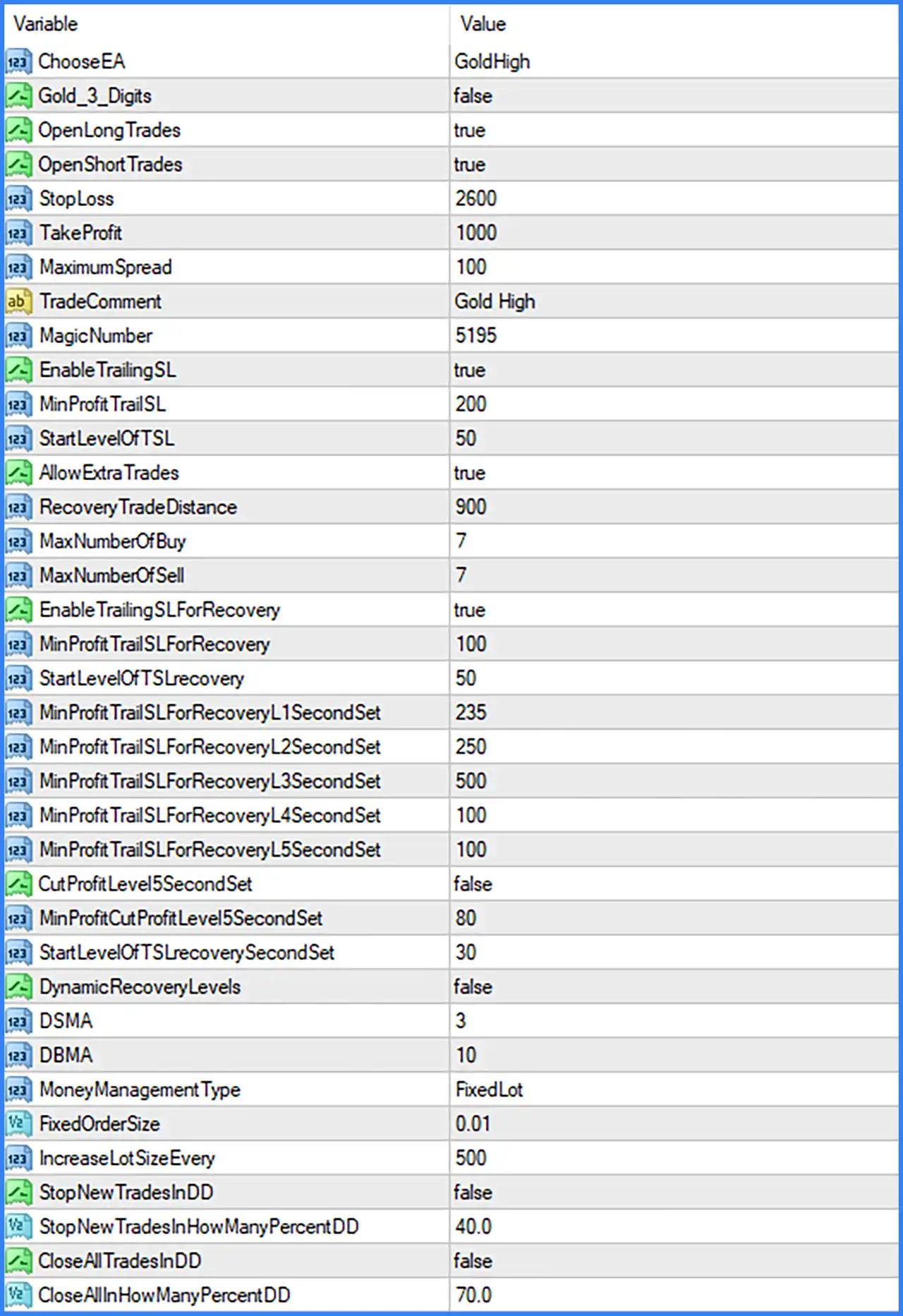
🔹 Choose EA [ChooseEA] — Default: GoldHigh — Selects the EA's operating configuration. The displayed default is GoldHigh, indicating the selected Gold trading mode.
🔹 Gold 3 Digits [Gold_3_Digits] — Default: false — Controls the 3-digit Gold price configuration. When enabled, the EA can use its corresponding 3-digit handling mode.
🔹 Open Long Trades [OpenLongTrades] — Default: true — Allows the EA to open BUY positions. When set to false, new long trades are disabled.
🔹 Open Short Trades [OpenShortTrades] — Default: true — Allows the EA to open SELL positions. When set to false, new short trades are disabled.
🔹 Stop Loss [StopLoss] — Default: 2600 — Sets the Stop-Loss parameter for the EA's trades. The screenshot does not specify the measurement unit, so the value should be interpreted according to the EA's internal settings.
🔹 Take Profit [TakeProfit] — Default: 1000 — Sets the Take-Profit parameter used to define the trade's profit target. The exact measurement unit is not specified in the Inputs panel.
🔹 Maximum Spread [MaximumSpread] — Default: 100 — Defines the maximum spread allowed for opening trades. The EA uses this parameter as a spread condition when evaluating trade execution.
🔹 Trade Comment [TradeComment] — Default: Gold High — Sets the comment attached to trades opened by the EA, helping identify Alpha Gold EA positions in the MT4 terminal.
🔹 Magic Number [MagicNumber] — Default: 5195 — Assigns a unique identification number to the EA's trades, allowing them to be distinguished from manual positions and trades opened by other Expert Advisors.
Standard Trailing Stop
🔹 Enable Trailing SL [EnableTrailingSL] — Default: true — Activates or disables the standard trailing Stop-Loss function. When enabled, the EA can manage the Stop-Loss as a trade moves into profit.
🔹 Minimum Profit for Trailing SL [MinProfitTrailSL] — Default: 200 — Defines the minimum profit threshold associated with the standard trailing Stop-Loss function.
🔹 Start Level of TSL [StartLevelOfTSL] — Default: 50 — Sets the starting level for the standard trailing Stop-Loss mechanism. Its exact unit and activation calculation are determined by the EA's internal implementation.
Extra Trades & Recovery Settings
🔹 Allow Extra Trades [AllowExtraTrades] — Default: true — Enables or disables the opening of additional trades under the EA's extra-trade management logic.
🔹 Recovery Trade Distance [RecoveryTradeDistance] — Default: 900 — Defines the distance parameter used when managing recovery trades. It controls the configured spacing associated with the recovery trading process.
🔹 Maximum Number of Buy Trades [MaxNumberOfBuy] — Default: 7 — Sets the maximum number of BUY positions allowed by the recovery or additional-trade management system.
🔹 Maximum Number of Sell Trades [MaxNumberOfSell] — Default: 7 — Sets the maximum number of SELL positions allowed by the recovery or additional-trade management system.
Recovery Trailing Stop
🔹 Enable Trailing SL for Recovery [EnableTrailingSLForRecovery] — Default: true — Activates the trailing Stop-Loss function specifically for recovery trades. This setting is separate from the standard trailing Stop-Loss option.
🔹 Minimum Profit for Recovery Trailing SL [MinProfitTrailSLForRecovery] — Default: 100 — Defines the minimum profit threshold associated with trailing Stop-Loss management for recovery positions.
🔹 Start Level of Recovery TSL [StartLevelOfTSLRecovery] — Default: 50 — Sets the starting level for the recovery trailing Stop-Loss mechanism.
Recovery Trailing – Second Set
🔹 Minimum Profit for Recovery Trailing SL – L1 Second Set [MinProfitTrailSLForRecoveryL1SecondSet] — Default: 235 — Defines the minimum profit parameter for the L1 recovery trailing configuration in the second set.
🔹 Minimum Profit for Recovery Trailing SL – L2 Second Set [MinProfitTrailSLForRecoveryL2SecondSet] — Default: 250 — Defines the minimum profit parameter for the L2 recovery trailing configuration in the second set.
🔹 Minimum Profit for Recovery Trailing SL – L3 Second Set [MinProfitTrailSLForRecoveryL3SecondSet] — Default: 500 — Defines the minimum profit parameter for the L3 recovery trailing configuration in the second set.
🔹 Minimum Profit for Recovery Trailing SL – L4 Second Set [MinProfitTrailSLForRecoveryL4SecondSet] — Default: 100 — Defines the minimum profit parameter for the L4 recovery trailing configuration in the second set.
🔹 Minimum Profit for Recovery Trailing SL – L5 Second Set [MinProfitTrailSLForRecoveryL5SecondSet] — Default: 100 — Defines the minimum profit parameter for the L5 recovery trailing configuration in the second set.
🔹 Cut Profit Level 5 Second Set [CutProfitLevel5SecondSet] — Default: false — Enables or disables the separate profit-cut function associated with Level 5 of the second recovery set.
🔹 Minimum Profit Cut Profit Level 5 Second Set [MinProfitCutProfitLevel5SecondSet] — Default: 80 — Defines the minimum profit threshold associated with the Level 5 profit-cut function.
🔹 Start Level of Recovery TSL Second Set [StartLevelOfTSLRecoverySecondSet] — Default: 30 — Sets the starting level for the recovery trailing Stop-Loss mechanism in the second set.
Dynamic Recovery Levels
🔹 Dynamic Recovery Levels [DynamicRecoveryLevels] — Default: false — Enables or disables the Dynamic Recovery Levels function. When enabled, the EA can use its dynamic recovery-level management logic.
🔹 DSMA [DSMA] — Default: 3 — Provides a numerical parameter for the DSMA component used in the EA's recovery configuration. Its exact calculation is not specified in the supplied Inputs panel.
🔹 DBMA [DBMA] — Default: 10 — Provides a numerical parameter for the DBMA component used in the EA's recovery configuration. The screenshot does not explain its internal calculation.
Money Management & Lot Sizing
🔹 Money Management Type [MoneyManagementType] — Default: FixedLot — Selects the position-sizing method used by the EA. The displayed default is FixedLot, indicating a fixed-lot configuration.
🔹 Fixed Order Size [FixedOrderSize] — Default: 0.01 — Defines the lot size used for orders when the FixedLot money-management mode is selected.
🔹 Increase Lot Size Every [IncreaseLotSizeEvery] — Default: 500 — Sets the numerical interval associated with increasing the lot size. The exact calculation basis and adjustment formula are not specified in the screenshot.
Drawdown Protection
🔹 Stop New Trades in DD [StopNewTradesInDD] — Default: false — Enables or disables the function that prevents the EA from opening new trades when the configured drawdown condition is reached.
🔹 Stop New Trades in How Many Percent DD [StopNewTradesInHowManyPercentDD] — Default: 40.0 — Defines the drawdown percentage threshold associated with stopping new trades. The default threshold is 40.0%.
🔹 Close All Trades in DD [CloseAllTradesInDD] — Default: false — Enables or disables the function that closes all EA trades when the configured drawdown condition is reached.
🔹 Close All in How Many Percent DD [CloseAllInHowManyPercentDD] — Default: 70.0 — Defines the drawdown percentage threshold associated with the close-all-trades function. The default threshold is 70.0%.
Recommended Starting Configuration
🔹 Trading Mode — The displayed configuration uses ChooseEA = GoldHigh and Gold_3_Digits = false. Confirm that the selected mode matches the broker's Gold symbol specifications.
🔹 Trading Direction — Both OpenLongTrades = true and OpenShortTrades = true allow BUY and SELL trading.
🔹 Trade Protection — The default StopLoss = 2600 and TakeProfit = 1000 define the main protection and profit-target parameters. Confirm their units before live trading.
🔹 Spread Control — The default MaximumSpread = 100 sets the spread threshold for trade execution.
🔹 Standard Trailing — The default configuration enables EnableTrailingSL = true, with MinProfitTrailSL = 200 and StartLevelOfTSL = 50.
🔹 Recovery Trading — AllowExtraTrades = true enables extra trades, with RecoveryTradeDistance = 900, MaxNumberOfBuy = 7, and MaxNumberOfSell = 7.
🔹 Recovery Trailing — The default EnableTrailingSLForRecovery = true activates recovery trailing management, with MinProfitTrailSLForRecovery = 100 and StartLevelOfTSLRecovery = 50.
🔹 Second Recovery Set — Review the L1–L5 values individually: 235, 250, 500, 100, and 100. These settings provide separate profit thresholds for the corresponding recovery levels.
🔹 Dynamic Recovery — DynamicRecoveryLevels = false disables the dynamic recovery-level function in the displayed configuration.
🔹 Lot Sizing — The default MoneyManagementType = FixedLot and FixedOrderSize = 0.01 specify fixed-lot position sizing.
🔹 Drawdown Controls — Both StopNewTradesInDD and CloseAllTradesInDD are disabled by default. Consider configuring these functions according to the account's risk limits before live trading.
Conclusion
Alpha Gold EA MT4 provides a range of configurable trading and risk-management inputs for Gold trading. Its settings cover BUY and SELL execution, maximum spread, Stop-Loss, Take-Profit, standard trailing protection, extra trades, and recovery trade management.
One of its notable configuration areas is the separate recovery trailing system, which includes individual L1–L5 profit thresholds and an optional Level 5 profit-cut function. The EA also provides fixed-lot money management and two drawdown-related controls for stopping new trades or closing existing positions.
The displayed defaults enable both trading directions, standard trailing Stop-Loss, extra trades, and recovery trailing management. However, both drawdown protection functions are disabled, while recovery trading permits up to 7 BUY and 7 SELL positions. These settings should be reviewed carefully because recovery and additional positions can increase total exposure. Demo testing and appropriate risk limits are recommended before deploying Alpha Gold EA on a live account.