

This guide walks through the inputs of Trade Explorer EA MT4 with the values recommended for live trading. The set files that come with the EA already contain these settings, so you can load them in one click and adjust only what your broker or account needs.
🔢 Trade Explorer EA MT4 Settings Guide
Trade Explorer EA is a configurable automated trading Expert Advisor that combines amplitude-based signal settings, money management, trade limits, averaging/martingale controls, trailing-stop options, and a moving-average filter. Its configuration panel provides detailed control over entry behavior, lot sizing, basket protection, recovery logic, and trade management.
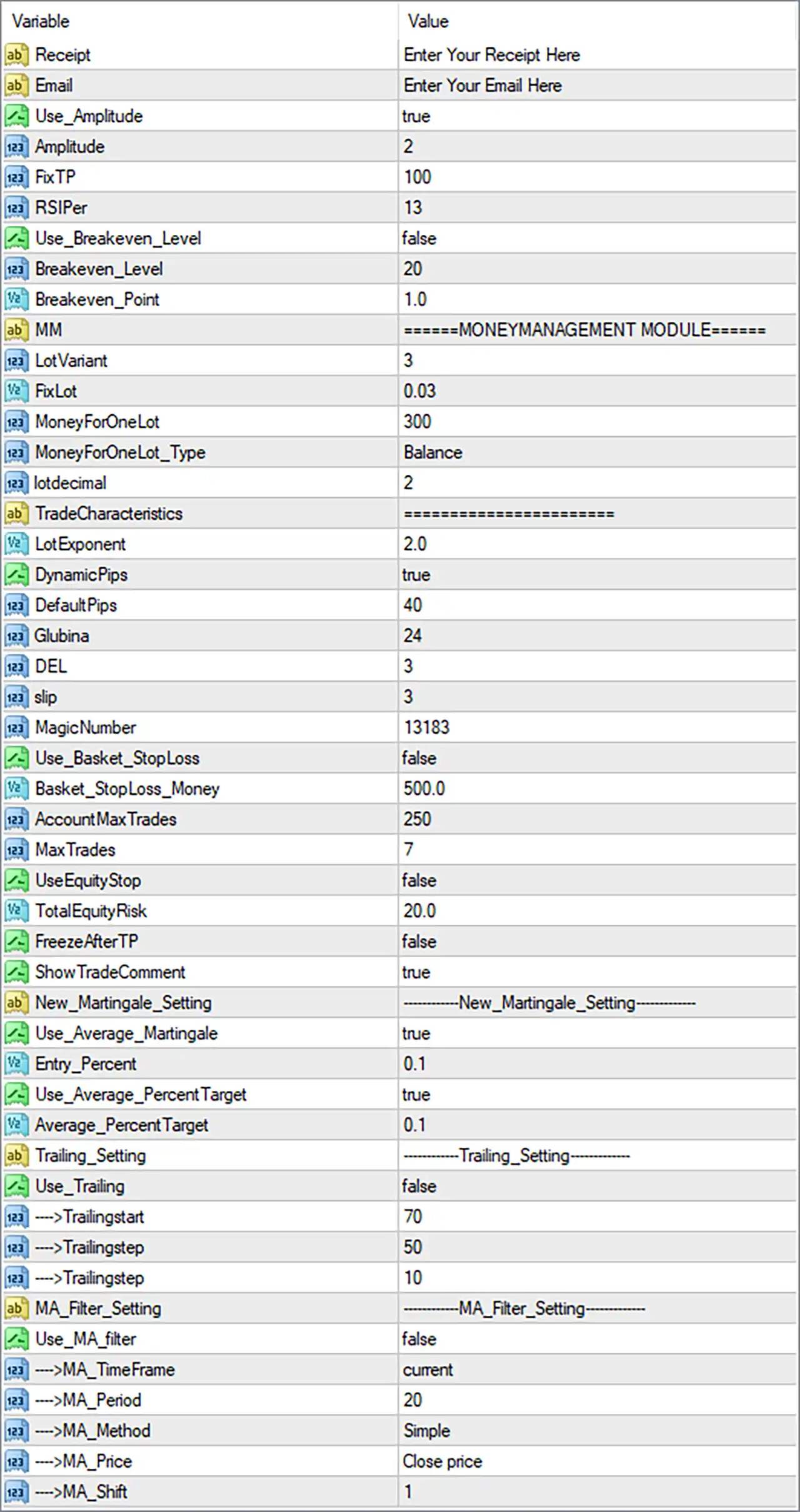
🔶 General & Signal Settings
🔹 Receipt: Enter Your Receipt Here — A receipt or license-related field where the required receipt information can be entered.
🔹 Email: Enter Your Email Here — A field for entering the user's email address when required by the EA.
🔹 Use_Amplitude: true — Enables the amplitude-based trading component of the EA.
🔹 Amplitude: 2 — Sets the amplitude parameter to 2, controlling the configured amplitude threshold or signal sensitivity.
🔹 FixTP: 100 — Sets the fixed Take Profit parameter to 100.
🔹 RSIPer: 13 — Sets the RSI-related period/parameter to 13.
🔹 Use_Breakeven_Level: false — Disables the break-even level management function.
🔹 Breakeven_Level: 20 — Sets the break-even trigger level to 20 when the feature is enabled.
🔹 Breakeven_Point: 1.0 — Sets the break-even adjustment/offset to 1.0.
🔶 Money Management Module
🔹 LotVariant: 3 — Selects money-management lot calculation variant 3.
🔹 FixLot: 0.03 — Sets the fixed lot reference to 0.03 lots.
🔹 MoneyForOneLot: 300 — Defines 300 as the account-money reference associated with one lot under the selected money-management configuration.
🔹 MoneyForOneLot_Type: Balance — Uses account Balance as the basis for the MoneyForOneLot calculation.
🔹 lotdecimal: 2 — Sets the lot-size decimal precision to 2.
🔶 Trade Characteristics
🔹 LotExponent: 2.0 — Sets the lot multiplier/exponent parameter to 2.0, affecting how position size can scale according to the EA's internal trade-management logic.
🔹 DynamicPips: true — Enables dynamic pip-distance calculations.
🔹 DefaultPips: 40 — Sets the default pip-distance value to 40.
🔹 Dubina: 24 — Sets the Dubina parameter to 24, which can be used by the EA's internal trading logic for depth-related calculations.
🔹 DEL: 3 — Sets the DEL parameter to 3.
🔹 slip: 3 — Sets the allowed slippage parameter to 3.
🔹 MagicNumber: 13183 — Sets the unique Magic Number to 13183, allowing the EA to identify and manage its own trades.
🔶 Basket & Trade Protection
🔹 Use_Basket_StopLoss: false — Disables the basket-level Stop Loss mechanism.
🔹 Basket_StopLoss_Money: 500.0 — Sets the basket Stop Loss monetary threshold to 500.0 if basket protection is enabled.
🔹 AccountMaxTrades: 250 — Sets the maximum account-level trade/order capacity parameter to 250.
🔹 MaxTrades: 7 — Limits the EA to a maximum of 7 trades according to its configured trade-management logic.
🔹 UseEquityStop: false — Disables the equity-based stop mechanism.
🔹 TotalEquityRisk: 20.0 — Sets the total equity-risk parameter to 20.0 when equity protection is used.
🔹 FreezeAfterTP: false — Disables the freeze function after Take Profit is reached.
🔹 ShowTradeComment: true — Enables the display/use of trade comments associated with EA positions.
🔶 New Martingale Settings
🔹 New_Martingale_Setting: New_Martingale_Setting — A configuration heading for the EA's new martingale/recovery-related parameters.
🔹 Use_Average_Martingale: true — Enables the averaging/martingale function.
🔹 Entry_Percent: 0.1 — Sets the entry percentage parameter to 0.1.
🔹 Use_Average_PercentTarget: true — Enables the percentage-based average target mechanism.
🔹 Average_PercentTarget: 0.1 — Sets the average percentage target to 0.1.
🔶 Trailing Settings
🔹 Trailing_Setting: Trailing_Setting — A configuration heading for the EA's trailing-stop parameters.
🔹 Use_Trailing: false — Disables the trailing-stop system in the supplied configuration.
🔹 →Trailingstart: 70 — Sets the trailing-start threshold to 70 when trailing is enabled.
🔹 →Trailingstep: 50 — Sets the main trailing step parameter to 50.
🔹 →Trailingstep: 10 — Sets the additional/second trailing-step parameter to 10.
Note: The screenshot contains two parameters displayed with the same label
→Trailingstep, with values50and10. Both are preserved exactly as shown.
🔶 MA Filter Settings
🔹 MA_Filter_Setting: MA_Filter_Setting — A configuration heading for the Moving Average filter.
🔹 Use_MA_filter: false — Disables the Moving Average filter in the supplied configuration.
🔹 →MA_TimeFrame: current — Configures the MA filter to use the current chart timeframe if the filter is enabled.
🔹 →MA_Period: 20 — Sets the Moving Average period to 20.
🔹 →MA_Method: Simple — Uses the Simple Moving Average (SMA) calculation method.
🔹 →MA_Price: Close price — Calculates the Moving Average using the Close price.
🔹 →MA_Shift: 1 — Sets the Moving Average shift to 1.
🔢 Trade Explorer EA MT4 Settings Summary
🔹 Amplitude Trading: true — The amplitude-based component is enabled.
🔹 Amplitude: 2 — Configured amplitude value.
🔹 Fixed Take Profit: 100 — Configured FixTP value.
🔹 RSI Parameter: 13 — Configured RSI value.
🔹 Break-Even: false — Break-even management is disabled.
🔹 Break-Even Level: 20 — Trigger value when break-even is enabled.
🔹 Break-Even Point: 1.0 — Break-even adjustment value.
🔹 Lot Variant: 3 — Selected lot-management variant.
🔹 Fixed Lot: 0.03 — Configured fixed lot value.
🔹 Money For One Lot: 300 — Account-money reference for lot calculation.
🔹 Lot Decimal: 2 — Lot precision setting.
🔹 Lot Exponent: 2.0 — Position-size scaling parameter.
🔹 Dynamic Pips: true — Dynamic pip calculation is enabled.
🔹 Default Pips: 40 — Default pip parameter.
🔹 Dubina: 24 — Configured depth-related value.
🔹 DEL: 3 — Configured DEL value.
🔹 Slippage: 3 — Maximum configured slippage value.
🔹 Magic Number: 13183 — Unique EA trade identifier.
🔹 Basket Stop Loss: false — Basket-level monetary Stop Loss is disabled.
🔹 Basket Stop Loss Money: 500.0 — Configured basket loss threshold.
🔹 Account Maximum Trades: 250 — Account-level trade capacity parameter.
🔹 Maximum Trades: 7 — EA trade limit.
🔹 Equity Stop: false — Equity protection is disabled.
🔹 Total Equity Risk: 20.0 — Configured total equity-risk parameter.
🔹 Freeze After TP: false — Post-TP freezing is disabled.
🔹 Show Trade Comment: true — Trade comments are enabled.
🔹 Average Martingale: true — Averaging/martingale management is enabled.
🔹 Entry Percent: 0.1 — Configured entry percentage.
🔹 Average Percent Target: 0.1 — Configured average percentage target.
🔹 Trailing: false — Trailing management is disabled.
🔹 Trailing Start: 70 — Trailing activation threshold.
🔹 Trailing Steps: 50 and 10 — Both values shown in the supplied panel.
🔹 MA Filter: false — Moving Average filtering is disabled.
🔹 MA Timeframe: current — Uses the active chart timeframe when enabled.
🔹 MA Period: 20 — Moving Average period.
🔹 MA Method: Simple — Uses SMA calculation.
🔹 MA Price: Close price — Uses closing prices.
🔹 MA Shift: 1 — Moving Average shift.
🔢 Conclusion
Trade Explorer EA MT4 provides an extensive set of controls for automated trading, combining amplitude-based signals, RSI parameters, configurable Take Profit, money management, averaging/martingale logic, basket protection, equity controls, trailing management, and Moving Average filtering.
The supplied configuration has Use_Amplitude = true, FixTP = 100, RSIPer = 13, and DynamicPips = true. Its money-management section uses LotVariant 3, FixLot 0.03, and LotExponent 2.0, while the EA's MagicNumber is 13183.
Several protective features are currently disabled, including Break-Even, Basket Stop Loss, Equity Stop, and Trailing, while Use_Average_Martingale = true is enabled. The MA filter is also disabled, although it is configured with Period 20, Simple method, Close price, and Shift 1 for potential use.
Because averaging/martingale functionality is enabled, traders should carefully evaluate the resulting exposure and drawdown characteristics through backtesting and forward testing before considering live deployment.
Get Trade Explorer EA MT4
Download Trade Explorer EA MT4 with its set files, read the full product details and requirements here: Trade Explorer EA MT4 →