

This guide walks through the inputs of Swap Master EA MT5 with the values recommended for live trading. The set files that come with the EA already contain these settings, so you can load them in one click and adjust only what your broker or account needs.
🔢 Swap Master EA MT5 Settings Explained – Complete Parameter Guide
Swap Master EA is an automated MetaTrader 5 Expert Advisor designed to trade USDJPY while taking advantage of positive swap opportunities and long-term trend movements.
The EA combines ATR-based Stop Loss (SL) and Take Profit (TP) calculations, time filtering, break-even protection, and optional equity scaling to provide flexible risk management for both conservative and aggressive traders.
🔢 Installation Panel Parameters
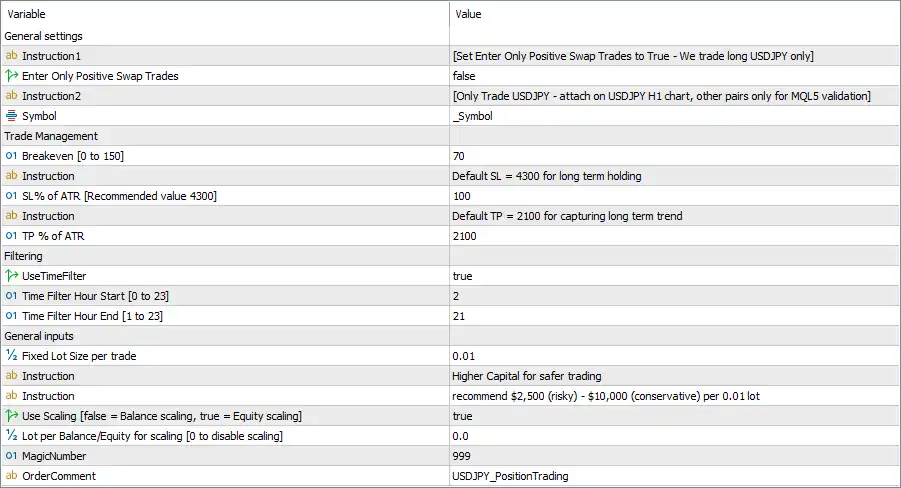
Below are the details of the parameters in the advisor’s trading system settings table:
🔶 General Settings
🔹 Instruction1 = [Set Enter Only Positive Swap Trades to True - We trade long USDJPY only] – Recommendation to enable positive swap trading when using long-term USDJPY long positions.
🔹 Enter Only Positive Swap Trades = false – Enables or disables trading only when the swap is positive; current value false allows normal trading regardless of swap direction.
🔹 Instruction2 = [Only Trade USDJPY - attach on USDJPY H1 chart, other pairs only for MQL5 validation] – Reminder to attach the EA to the USDJPY H1 chart. Other symbols are intended only for MQL5 validation.
🔹 Symbol = _Symbol – Uses the current chart symbol automatically for trading.
🔶 Trade Management
🔹 Breakeven [0 to 150] = 70 – Moves the Stop Loss to the break-even level after the trade reaches 70 units of profit.
🔹 Instruction = Default SL = 4300 for long term holding – Developer recommendation indicating that a Stop Loss of 4300 is suitable for long-term positions.
🔹 SL% of ATR [Recommended value 4300] = 100 – Sets the Stop Loss calculation to 100% of the selected ATR-based value.
🔹 Instruction = Default TP = 2100 for capturing long term trend – Recommended Take Profit value of 2100 for long-term trend-following trades.
🔹 TP % of ATR = 2100 – Sets the Take Profit using an ATR-based multiplier/value of 2100.
🔶 Time Filtering
🔹 UseTimeFilter = true – Enables the trading time filter.
🔹 Time Filter Hour Start [0 to 23] = 2 – Trading begins at 02:00 server time.
🔹 Time Filter Hour End [1 to 23] = 21 – Trading stops opening new positions after 21:00 server time.
🔶 General Inputs
🔹 Fixed Lot Size per trade = 0.01 – Opens every position with a fixed volume of 0.01 lots.
🔹 Instruction = Higher Capital for safer trading – Recommends using a larger account balance to reduce trading risk.
🔹 Instruction = recommend $2,500 (risky) - $10,000 (conservative) per 0.01 lot – Suggested capital requirement ranges from $2,500 for aggressive trading to $10,000 for conservative trading when using 0.01 lots.
🔹 Use Scaling [false = Balance scaling, true = Equity scaling] = true – Uses Equity Scaling, automatically adjusting position sizing according to account equity.
🔹 Lot per Balance/Equity for scaling [0 to disable scaling] = 0.0 – Scaling ratio is 0.0, effectively disabling automatic lot scaling despite Equity Scaling being selected.
🔹 MagicNumber = 999 – Unique identifier 999 used to distinguish the EA's trades from other Expert Advisors.
🔹 OrderComment = USDJPY_PositionTrading – Adds the trade comment "USDJPY_PositionTrading" to every order for easier identification.
🔢 Conclusion
Swap Master EA MT5 is designed specifically for USDJPY H1 trading with an emphasis on long-term trend following and swap optimization. Its ATR-based Stop Loss and Take Profit system, break-even protection, configurable trading hours, equity scaling option, and conservative money management recommendations make it suitable for traders seeking stable position trading with controlled risk.
🔢 FAQs
❓ Which symbol should I use with Swap Master EA MT5?
The EA is designed to trade USDJPY and should be attached to a USDJPY H1 chart.
❓ What does "Enter Only Positive Swap Trades" do?
When enabled, the EA opens trades only if the position earns a positive overnight swap, making it suitable for long-term holding strategies.
❓ How does the EA calculate Stop Loss and Take Profit?
It uses ATR-based Stop Loss and Take Profit settings, allowing exits to adapt to current market volatility.
❓ Can Swap Master EA MT5 automatically adjust lot sizes?
Yes. It supports Equity Scaling or Balance Scaling, although scaling is disabled when the scaling value is set to 0.0.
❓ What account balance is recommended for 0.01 lots?
The developer recommends approximately $2,500 for higher-risk trading and around $10,000 for a more conservative approach using 0.01 lots.
Get Swap Master EA MT5
Download Swap Master EA MT5 with its set files, read the full product details and requirements here: Swap Master EA MT5 →