

This guide walks through the inputs of Leprechaun EA MT4 Unlimited with the values recommended for live trading. The set files that come with the EA already contain these settings, so you can load them in one click and adjust only what your broker or account needs.
🔢 Leprechaun EA MT4 Settings Guide
Leprechaun EA is an automated trading Expert Advisor designed with configurable order-entry, indicator, risk-management and position-management parameters. Its settings provide control over trading timeframes, Buy/Sell shifts, indicator detection, pending orders, stop loss, take profit, lot sizing and automated money management.
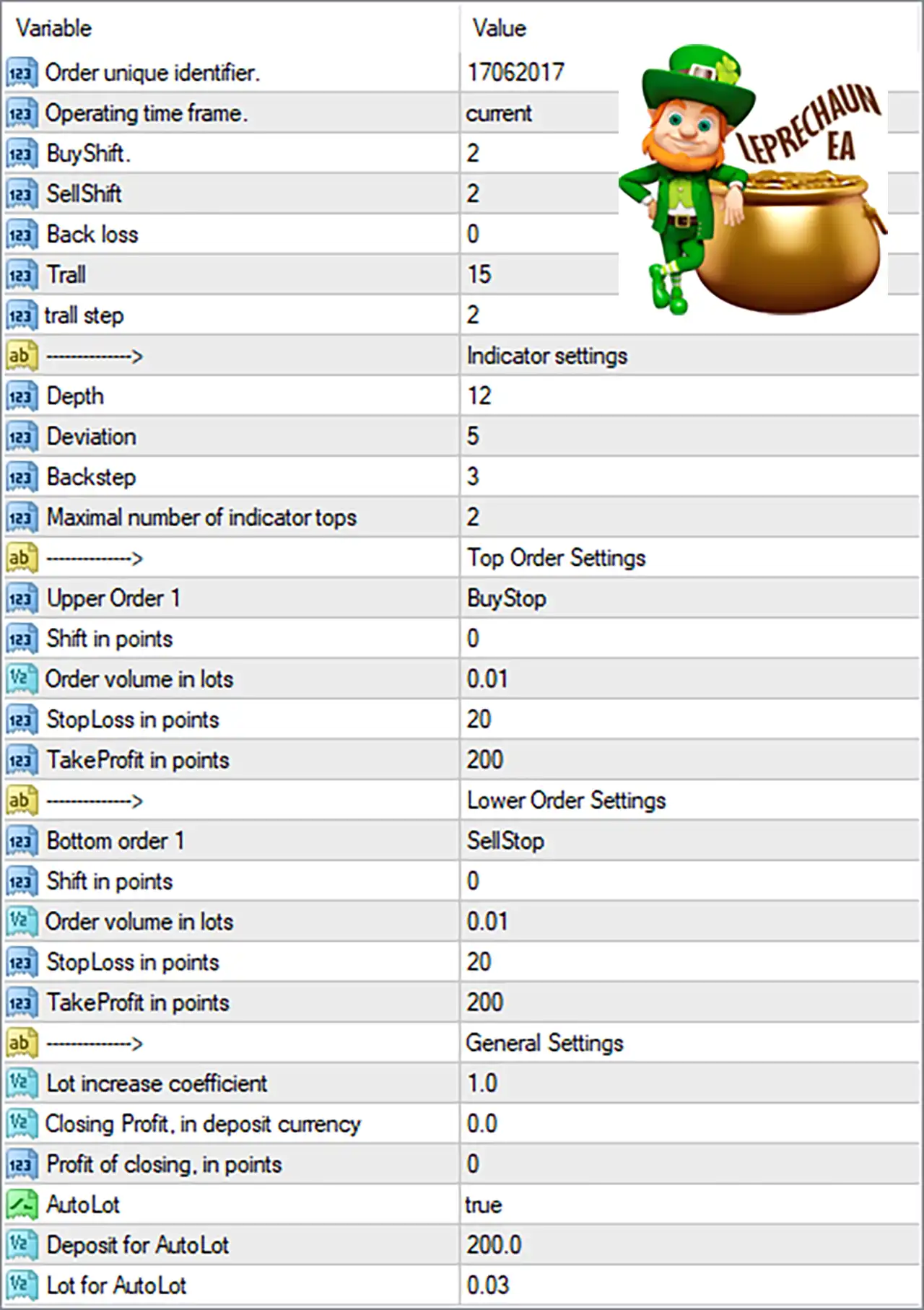
🔄 Core Trading Settings
🔹 Order unique identifier: 17062017 — A unique identifier used by the EA to distinguish its orders from positions managed by other EAs.
🔹 Operating time frame: current — Uses the currently active chart timeframe for the EA's trading calculations.
🔹 BuyShift: 2 — Defines the Buy-side shift value used by the EA when evaluating its trading conditions.
🔹 SellShift: 2 — Defines the Sell-side shift value used for determining the relevant trading conditions.
🔹 Back loss: 0 — Sets the Back Loss parameter to 0, according to the supplied configuration.
🔹 Trall: 15 — Sets the EA's Trall parameter to 15, controlling the corresponding trailing/position-management behavior.
🔹 trall step: 2 — Sets the trailing step to 2, defining the incremental distance used when the trailing mechanism adjusts a position.
🔄 Indicator Settings
🔹 Depth: 12 — Defines the indicator depth used for identifying relevant market points or structures.
🔹 Deviation: 5 — Sets the indicator deviation parameter to 5, controlling the required price deviation for signal identification.
🔹 Backstep: 3 — Sets the indicator backstep to 3, determining the minimum separation used when processing detected indicator points.
🔹 Maximal number of indicator tops: 2 — Limits the number of indicator tops considered by the EA to 2.
🔄 Top Order Settings
🔹 Upper Order 1: BuyStop — Configures the first upper pending order as a Buy Stop order.
🔹 Shift in points: 0 — Sets the price shift for the upper order to 0 points.
🔹 Order volume in lots: 0.01 — Sets the upper pending order volume to 0.01 lots.
🔹 StopLoss in points: 20 — Sets the Stop Loss distance for the upper order to 20 points.
🔹 TakeProfit in points: 200 — Sets the Take Profit distance for the upper order to 200 points.
🔄 Lower Order Settings
🔹 Bottom order 1: SellStop — Configures the first lower pending order as a Sell Stop order.
🔹 Shift in points: 0 — Sets the lower order price shift to 0 points.
🔹 Order volume in lots: 0.01 — Sets the lower pending order volume to 0.01 lots.
🔹 StopLoss in points: 20 — Sets the Stop Loss distance for the lower order to 20 points.
🔹 TakeProfit in points: 200 — Sets the Take Profit distance for the lower order to 200 points.
🔄 General Settings
🔹 Lot increase coefficient: 1.0 — Sets the lot-size increase coefficient to 1.0, meaning the configured lot progression does not apply an additional multiplier above the base coefficient.
🔹 Closing Profit, in deposit currency: 0.0 — Sets the closing profit target in the account's deposit currency to 0.0.
🔹 Profit of closing, in points: 0 — Sets the closing profit threshold in points to 0, according to the supplied settings.
🔹 AutoLot: true — Enables automatic lot-size calculation.
🔹 Deposit for AutoLot: 200.0 — Defines the deposit reference value for automatic lot calculation as 200.0.
🔹 Lot for AutoLot: 0.03 — Sets the lot-size reference used by the AutoLot calculation to 0.03 lots.
🔄 Leprechaun EA Settings Summary
🔹 Order Identifier: 17062017 — Unique order-management identifier.
🔹 Timeframe: current — Uses the active chart timeframe.
🔹 BuyShift / SellShift: 2 / 2 — Configures the Buy and Sell signal shifts.
🔹 Back loss: 0 — Configured Back Loss value.
🔹 Trall / Trall Step: 15 / 2 — Configures the corresponding trailing-management parameters.
🔹 Indicator Depth / Deviation / Backstep: 12 / 5 / 3 — Controls the indicator's structural detection parameters.
🔹 Maximum Indicator Tops: 2 — Limits detected indicator tops to 2.
🔹 Upper Pending Order: BuyStop — Uses a Buy Stop for the upper order.
🔹 Upper Order Volume: 0.01 lots — Initial upper pending-order volume.
🔹 Upper Stop Loss / Take Profit: 20 / 200 points — Defines the upper order's SL and TP distances.
🔹 Lower Pending Order: SellStop — Uses a Sell Stop for the lower order.
🔹 Lower Order Volume: 0.01 lots — Initial lower pending-order volume.
🔹 Lower Stop Loss / Take Profit: 20 / 200 points — Defines the lower order's SL and TP distances.
🔹 Lot Increase Coefficient: 1.0 — Configured lot progression coefficient.
🔹 Closing Profit: 0.0 deposit currency — No positive deposit-currency closing target is configured.
🔹 Closing Profit: 0 points — Closing-profit point threshold is set to 0.
🔹 AutoLot: true — Automatic position sizing is enabled.
🔹 AutoLot Deposit: 200.0 — Reference deposit value for AutoLot calculation.
🔹 AutoLot Volume: 0.03 lots — Reference lot size for the automatic lot calculation.
🔢 How the Leprechaun EA Configuration Works
The configuration combines indicator-based market detection with two-sided pending orders. The upper order is configured as a BuyStop, while the lower order uses a SellStop, both with a volume of 0.01 lots.
Both order types use the same predefined 20-point Stop Loss and 200-point Take Profit, creating a clearly defined risk/reward structure at the individual order level.
The indicator configuration uses Depth 12, Deviation 5, Backstep 3, and a maximum of 2 indicator tops, while the EA operates on the current timeframe.
With AutoLot = true, the EA is configured to calculate position sizing automatically using the supplied Deposit for AutoLot = 200.0 and Lot for AutoLot = 0.03 parameters.
🔢 Conclusion
Leprechaun EA MT4 offers a structured configuration system combining indicator detection, Buy Stop and Sell Stop pending orders, predefined Stop Loss and Take Profit levels, trailing-related parameters, and automatic lot management.
The supplied configuration uses 0.01 lots for both upper and lower pending orders, with 20 points Stop Loss and 200 points Take Profit. The indicator engine is configured with Depth 12, Deviation 5, and Backstep 3, while AutoLot is enabled with a reference deposit of 200.0 and a reference lot value of 0.03.
Before deploying Leprechaun EA MT4 on a live account, traders should test the configuration under their specific broker's contract specifications, spreads, execution conditions, and account size. Particular attention should be paid to the automatic lot-sizing behavior because AutoLot = true.
🔢 FAQs
❓ What is the Magic Number of Leprechaun EA MT4?
The supplied configuration uses Order unique identifier 17062017, which is used to distinguish the EA's orders.
❓ What type of pending orders does Leprechaun EA MT4 use?
The configuration uses BuyStop for the Upper Order 1 and SellStop for the Bottom Order 1.
❓ What are the Stop Loss and Take Profit settings?
Both the upper and lower orders use Stop Loss 20 points and Take Profit 200 points.
❓ Is automatic lot sizing enabled?
Yes. AutoLot = true, with Deposit for AutoLot = 200.0 and Lot for AutoLot = 0.03.
❓ What are the main indicator settings?
The indicator uses Depth 12, Deviation 5, Backstep 3, and allows a maximum of 2 indicator tops.
Get Leprechaun EA MT4 Unlimited
Download Leprechaun EA MT4 Unlimited with its set files, read the full product details and requirements here: Leprechaun EA MT4 Unlimited →