

TradeXcel EA is a sophisticated automated trading robot designed for the MetaTrader 5 (MT5) platform. It combines martingale logic, news filtering, and signal-based entries to optimize performance while managing risk. Here's a full breakdown of the EA settings based on the uploaded panel.
📌📌📌 Buy this unlimited TradeXcel EA MT5 product here 📌📌📌
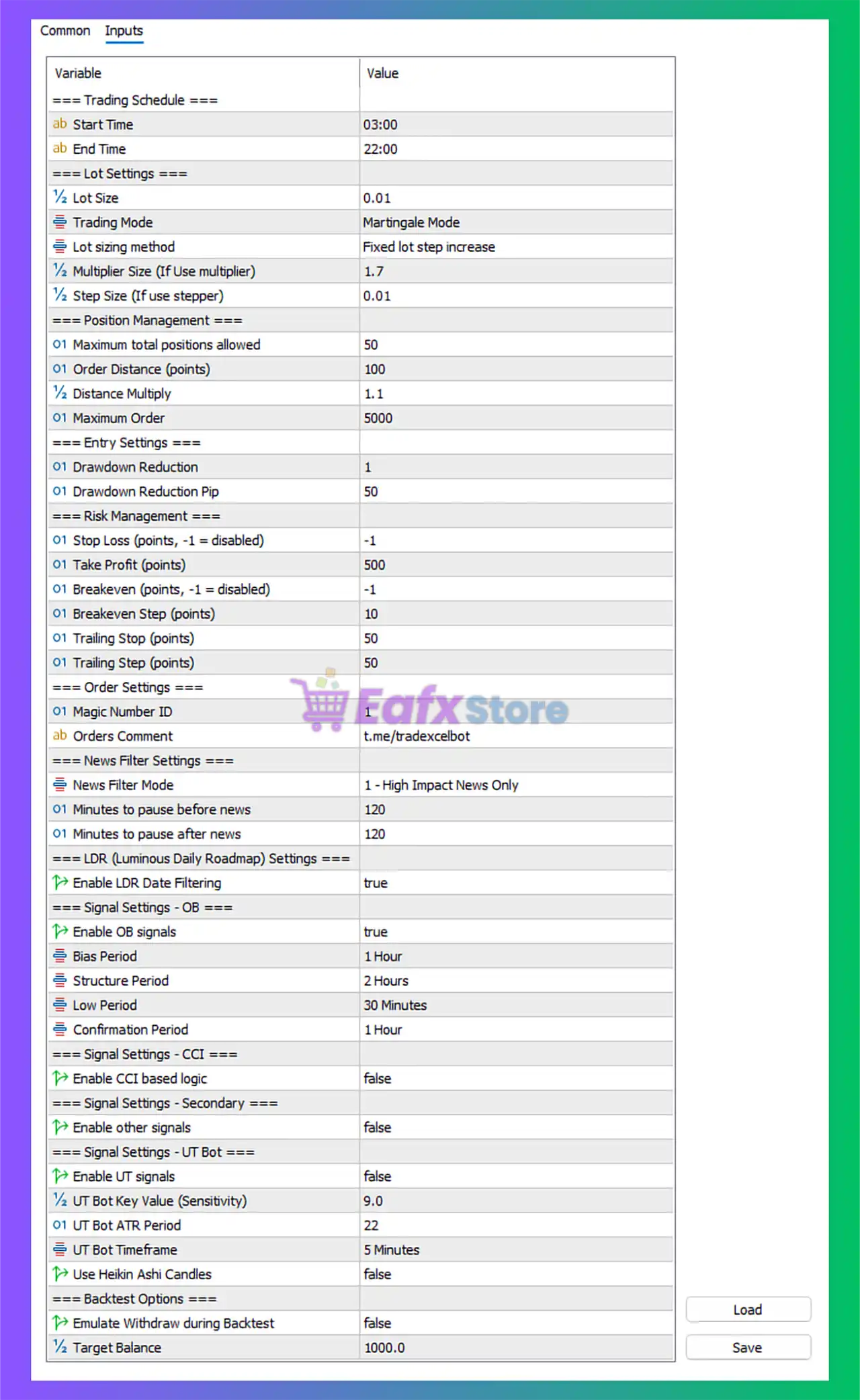
🕐 Trading Schedule Settings
| Parameter | Value |
|---|---|
| Start Time | 03:00 |
| End Time | 22:00 |
Interpretation:
The EA trades during Asian, European, and part of US sessions, avoiding late-night hours where spreads are wider and liquidity is lower. This is a good balance between opportunity and safety.
💰 Lot Settings
| Parameter | Value |
|---|---|
| Lot Size | 0.01 (micro lot) |
| Trading Mode | Martingale Mode |
| Lot Sizing Method | Fixed lot step increase |
| Multiplier Size | 1.7 |
| Step Size | 0.01 |
Interpretation:
- Uses martingale strategy, increasing lot size after losses.
- Multiplier of 1.7 is relatively conservative compared to typical 2x martingale systems.
- Step increase means lots grow incrementally, avoiding exponential risk.
📈 Position Management
| Parameter | Value |
|---|---|
| Max Positions | 50 |
| Order Distance | 100 points (10 pips) |
| Distance Multiply | 1.1 |
| Max Orders | 5000 |
Interpretation:
Allows up to 50 positions per grid with increasing distance between entries. This helps reduce the chance of overtrading in fast markets and better manages drawdown over long trends.
⚙️ Entry Settings
| Parameter | Value |
|---|---|
| Drawdown Reduction | Enabled |
| Drawdown Pip Threshold | 50 |
Interpretation:
Implements a recovery or capital protection mechanism after 50 pips drawdown—useful for limiting exposure in extreme volatility.
🛡️ Risk Management Settings
| Parameter | Value |
|---|---|
| Stop Loss | -1 (disabled) |
| Take Profit | 500 points (50 pips) |
| Breakeven | -1 (disabled) |
| Trailing Stop | 50 points (5 pips) |
| Trailing Step | 50 points |
Interpretation:
- No hard stop loss = ⚠️ Higher risk, especially in trending markets.
- 50 pips TP and trailing stop logic is used to lock in gains once positions go in profit.
🗒️ Order Settings
| Parameter | Value |
|---|---|
| Magic Number | 1 |
| Order Comment | t.me/tradexcelbot |
Interpretation:
Allows tracking EA trades separately in the platform.
📰 News Filter Settings
| Parameter | Value |
|---|---|
| Mode | High Impact Only |
| Pause Before News | 120 mins |
| Pause After News | 120 mins |
Interpretation:
Very safe news filter settings, avoiding trading 2 hours before and after high-impact events. Excellent for preserving capital during volatile periods (e.g. NFP, CPI, FOMC).
📅 LDR (Luminous Daily Roadmap) Settings
| Parameter | Value |
|---|---|
| LDR Filtering Enabled | true |
Interpretation:
LDR is likely a custom daily bias or sentiment filter. Activating this adds another layer of trade filtering, improving entry quality.
📊 OB (Order Block) Signal Settings
| Parameter | Value |
|---|---|
| Enable OB Signals | true |
| Bias Period | 1 Hour |
| Structure Period | 2 Hours |
| Low Period | 30 Minutes |
| Confirmation | 1 Hour |
Interpretation:
Uses multi-timeframe order block signals to confirm trade entries. This is a smart way to align with institutional levels and improve accuracy.
📉 CCI & Other Signal Settings
| CCI-Based Logic | false
| Other Signals Enabled | false
| UT Bot Signals | false
Interpretation:
Only OB-based signals are currently enabled, making the strategy more focused and streamlined.
📦 Backtest Settings
| Parameter | Value |
|---|---|
| Emulate Withdraw During Backtest | false |
| Target Balance | $1,000 |
Interpretation:
Backtests are clean and not distorted by virtual withdrawals. Useful for realistic performance modeling.
✅ Conclusion
🧠 TradeXcel EA is a Smart Grid-Martingale Hybrid with Order Block Filtering
With its news filters, drawdown protection, and OB signal integration, TradeXcel EA brings a balanced approach to grid-based trading. Despite using martingale logic, the lot sizing is conservative, and the trade filters (like time session, LDR, and OB signals) add safety and precision.
🟢 Pros:
- ✅ News protection (before & after high-impact news)
- ✅ Intelligent trade entries via order block signals
- ✅ Adjustable martingale multiplier (safe: 1.7x)
- ✅ Low lot size (0.01) ideal for small accounts
- ✅ Entry time filtering & max position limits
🔴 Cons:
- ❌ No fixed stop loss (SL disabled = risk of runaway drawdown)
- ❌ Martingale mode can still be risky in strong trends
- ❌ Only OB signals enabled – may limit entry opportunities
📌 Best For:
- Intermediate traders familiar with martingale/grid systems
- Traders who want semi-automated, smart filtered entries
- Users trading during calm market hours, avoiding news spikes