


🔢 TradeXcel EA MT5 Settings Explained – Complete Configuration Guide
TradeXcel EA MT5 is a powerful automated trading robot for MetaTrader 5 designed to combine martingale management, intelligent order block signals, news filtering and dynamic trade management into one advanced trading system.
The EA provides flexible position scaling, drawdown reduction tools, and multiple signal engines including OB logic, CCI filters and UT Bot confirmation.
With advanced risk controls and customizable trading schedules, TradeXcel EA MT5 is suitable for traders looking for automated multi-strategy execution in volatile Forex markets.

🔢 TradeXcel EA MT5 Full Settings Explanation
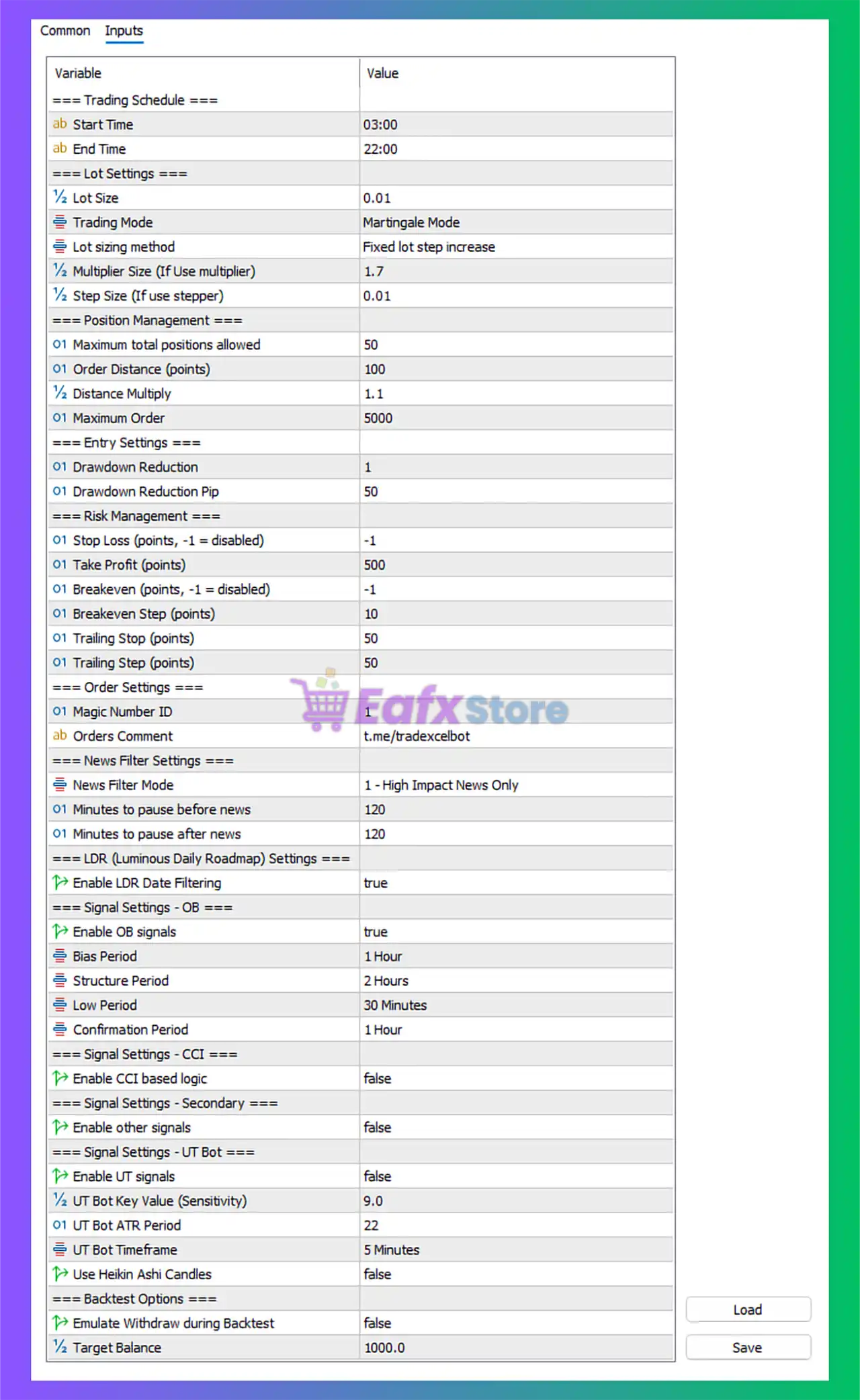
Below are the details of the parameters in the advisor’s trading system settings table:
🔶 Trading Schedule
🔹 Start Time = 03:00: Trading operations begin automatically at 03:00.
🔹 End Time = 22:00: Trading activities stop automatically at 22:00.
🔶 Lot Settings
🔹 Lot Size = 0.01: Initial fixed trading lot size is configured at 0.01.
🔹 Trading Mode = Martingale Mode: The EA uses a martingale-based trading system for position recovery and scaling.
🔹 Lot sizing method = Fixed lot step increase: Lot sizes increase using a fixed-step progression method.
🔹 Multiplier Size (If Use multiplier) = 1.7: Additional trade lot sizes are multiplied by 1.7.
🔹 Step Size (If use stepper) = 0.01: Lot size increment step is configured at 0.01.
🔶 Position Management
🔹 Maximum total positions allowed = 50: The EA can open a maximum of 50 simultaneous positions.
🔹 Order Distance (points) = 100: Minimum spacing between orders is set to 100 points.
🔹 Distance Multiply = 1.1: Distance between trades increases by a factor of 1.1.
🔹 Maximum Order = 5000: Maximum order limit for the strategy is configured at 5000.
🔶 Entry Settings
🔹 Drawdown Reduction = 1: Drawdown reduction mode level is set to 1.
🔹 Drawdown Reduction Pip = 50: Drawdown control activates after 50 pips movement.
🔶 Risk Management
🔹 Stop Loss (points, -1 = disabled) = -1: Stop Loss is disabled because the value is -1.
🔹 Take Profit (points) = 500: Take Profit target is configured at 500 points.
🔹 Breakeven (points, -1 = disabled) = -1: Breakeven functionality is disabled.
🔹 Breakeven Step (points) = 10: Breakeven movement step is configured at 10 points.
🔹 Trailing Stop (points) = 50: Trailing Stop distance is set to 50 points.
🔹 Trailing Step (points) = 50: Trailing Stop adjustment step is configured at 50 points.
🔶 Order Settings
🔹 Magic Number ID = 1: Unique Magic Number identifier for EA trade management is 1.
🔹 Orders Comment = t.me/tradexcelbot: Trade comment attached to opened positions is t.me/tradexcelbot.
🔶 News Filter Settings
🔹 News Filter Mode = 1 - High Impact News Only: The EA filters and pauses trading during high-impact economic news only.
🔹 Minutes to pause before news = 120: Trading pauses 120 minutes before high-impact news releases.
🔹 Minutes to pause after news = 120: Trading resumes 120 minutes after news events.
🔶 LDR (Luminous Daily Roadmap) Settings
🔹 Enable LDR Date Filtering = true: LDR date-based filtering system is enabled.
🔶 Signal Settings – OB
🔹 Enable OB signals = true: Order Block signal logic is enabled.
🔹 Bias Period = 1 Hour: Market directional bias timeframe is configured at 1 Hour.
🔹 Structure Period = 2 Hours: Market structure analysis timeframe is set to 2 Hours.
🔹 Low Period = 30 Minutes: Lower timeframe analysis period is 30 Minutes.
🔹 Confirmation Period = 1 Hour: Signal confirmation timeframe is configured at 1 Hour.
🔶 Signal Settings – CCI
🔹 Enable CCI based logic = false: Commodity Channel Index signal filtering is disabled.
🔶 Signal Settings – Secondary
🔹 Enable other signals = false: Additional secondary signal systems are disabled.
🔶 Signal Settings – UT Bot
🔹 Enable UT signals = false: UT Bot signal logic is disabled.
🔹 UT Bot Key Value (Sensitivity) = 9.0: UT Bot signal sensitivity is configured at 9.0.
🔹 UT Bot ATR Period = 22: ATR period used by UT Bot calculations is 22.
🔹 UT Bot Timeframe = 5 Minutes: UT Bot analysis timeframe is 5 Minutes.
🔹 Use Heikin Ashi Candles = false: Heikin Ashi candle confirmation is disabled.
🔶 Backtest Options
🔹 Emulate Withdraw during Backtest = false: Withdrawal simulation during backtesting is disabled.
🔹 Target Balance = 1000.0: Backtesting target account balance is configured at 1000.0.
🔢 Conclusion
TradeXcel EA MT5 is an advanced automated trading system that combines martingale management, order block analysis, news filtering, and multi-layered risk controls. The EA provides traders with highly customizable settings for position scaling, trailing stops, breakout confirmation and drawdown management.
With intelligent filtering systems and flexible signal engines, TradeXcel EA MT5 is designed for traders seeking a sophisticated and adaptive MetaTrader 5 trading solution.
🔢 FAQs
❓ What is TradeXcel EA MT5?
TradeXcel EA MT5 is an automated Forex Expert Advisor for MetaTrader 5 using martingale and smart signal-based trading strategies.
❓ Does TradeXcel EA MT5 support news filtering?
Yes, the EA includes a built-in high-impact news filter with customizable pause times.
❓ What trading mode does TradeXcel EA MT5 use?
The EA currently operates in Martingale Mode with scalable lot progression.
❓ Can I use Order Block signals in TradeXcel EA MT5?
Yes, Order Block (OB) signal logic is enabled by default in the provided settings.
❓ Does TradeXcel EA MT5 include trailing stop functionality?
Yes, the EA supports configurable trailing stop and trailing step management.



