





Adam FTMO MT5 (Latest version) - Unlimited

Subscriptions for Special Plan
- 30 EA package is more economical!
- Special package with 99%
- Download 1 EA/Day

Subscriptions for Premium Membership
- Download Unlimited in 1 Year
- Get 100% Discount
- Get free access to all

Subscriptions for Gold Membership
- 1 Year Membership
- Get 100% Discount
- Access EA+Indicator+Course
Frequently bought together 🎁
Add these products to enhance your purchase




Adam FTMO MT5: AI-Enhanced Trading for Prop Firm Success
The Adam FTMO MT5 is a specialized expert advisor designed specifically for traders aiming to conquer FTMO challenges. Leveraging cutting-edge AI technology, particularly from ChatGPT, combined with 17 years of global trading and algo development expertise, this EA focuses on robust risk management and strategic execution to help users pass prop firm evaluations.
 Vendor Website: Click here
About the Author
This product is compiled by Vyacheslav Izvarin. This author has more than +10 years of experience working on MQL5 with many famous products such as Adam FTMO MT5, ADAM for FTMO 40, ADAM for FTMO 5 and other advisors. Among them, Adam FTMO MT5 is his best performing products.
Delivery time 24h-48h after payment.
Refund if not delivered.
You will receive the current version without any limitations (ID+Time).
Adam FTMO MT5 Overview
Key Features of Adam FTMO MT5
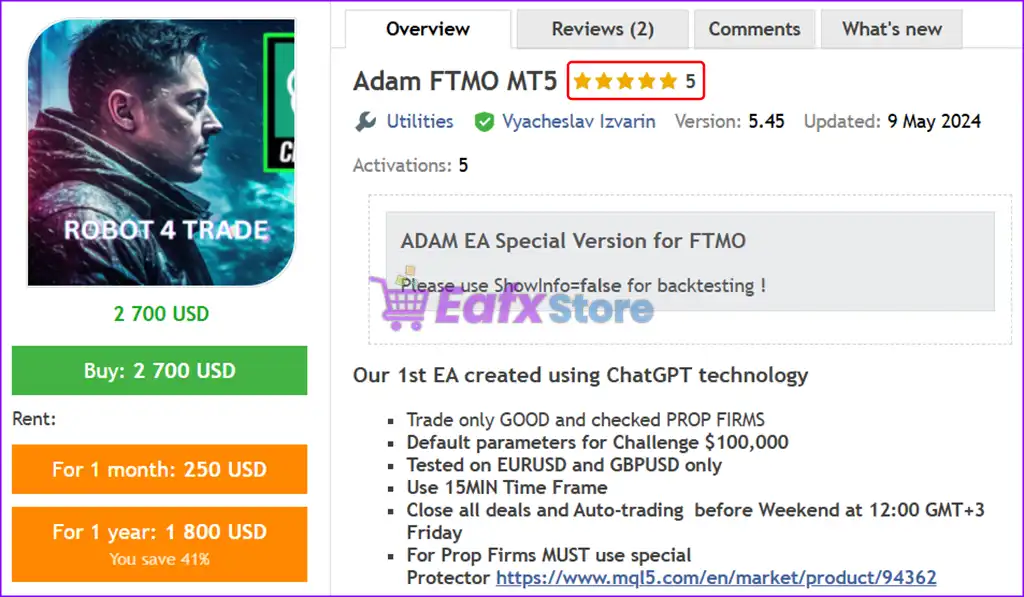
🔹 FTMO Challenge Optimized: A special version of the Adam EA specifically designed and tested to meet the stringent rules and requirements of FTMO challenges.
🔹 AI-Enhanced Strategy Development: Created using advanced ChatGPT technology for brainstorming ideas, indicator selection, and strategy formulation, resulting in highly efficient code.
🔹 Prop Firm Compatibility: Engineered to trade effectively only with good and verified prop firms, ensuring reliable performance within their specific guidelines.
🔹 Default Parameters for $100,000 Challenge: Comes with pre-configured default parameters optimized for the $100,000 FTMO challenge, simplifying setup.
🔹 Specific Trading Pairs & Timeframe: Tested and optimized for trading on EURUSD and GBPUSD pairs using the 15-minute (M15) timeframe.
🔹 Automated Weekend Management: Automatically closes all open deals and disables auto-trading before the weekend at 12:00 GMT+3 on Friday, mitigating weekend risk.
🔹 Integrated Risk Management: Incorporates professional risk management tools essential for navigating prop firm challenges, including precise control over trade sizing.
🔹 Adaptive Lot Sizing: Provides clear guidance for adjusting maximum lot sizes based on account balance, allowing users to scale risk appropriately.
Additional Features
🔹 Customizable EA Name & Magic Number: Allows users to change the EA-NAME and Magic Number, crucial for managing multiple EAs or challenges.
🔹 External Protector Integration: For prop firms, it MUST be used in conjunction with a special Protector tool (link provided), adding an extra layer of compliance and risk mitigation.
🔹 Focus on Quality Products: Developer’s commitment to creating high-quality products aimed at helping users pass prop trading challenges.
Adam FTMO MT5 Review
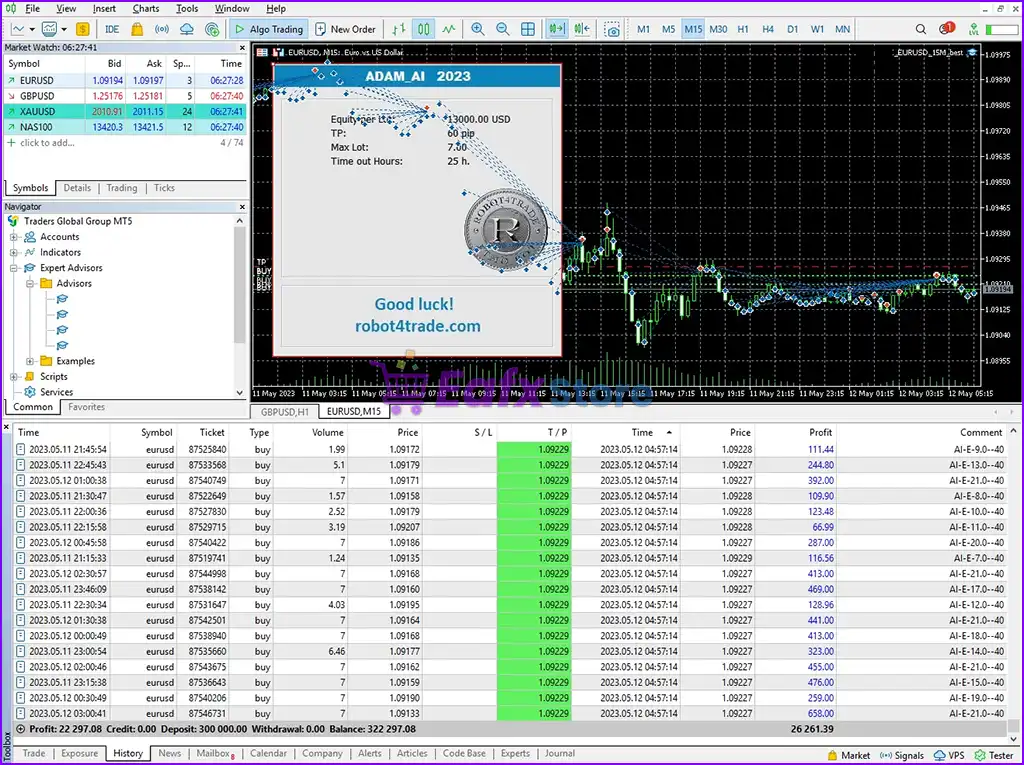
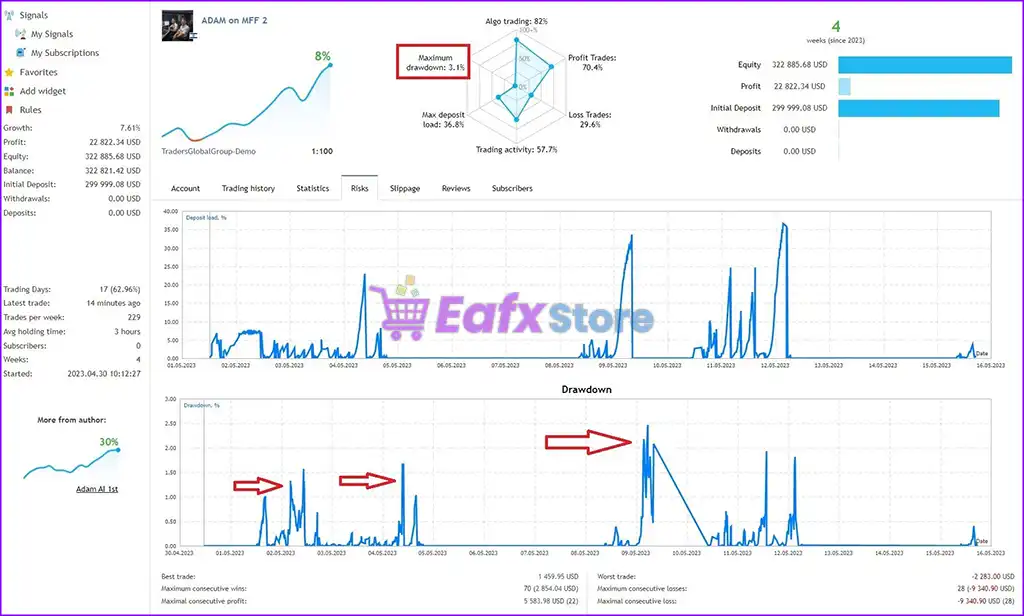
Adam FTMO MT5 Live Results
Adam FTMO MT5 is an advanced algorithmic trading system optimized for FTMO-style challenges and prop firm funding. Operating with strict risk control and high automation, this EA focuses on consistent returns while maintaining capital protection.
✅ Growth: +7.61%
✅ Profit: $22,822.34
✅ Equity: $322,885.68
✅ Initial Deposit: $299,999
✅ Maximum Drawdown: 3.1%
✅ Win Rate (Profit Trades): 70.4%
Adam FTMO MT5 Live Trading Results
Adam FTMO MT5 Review
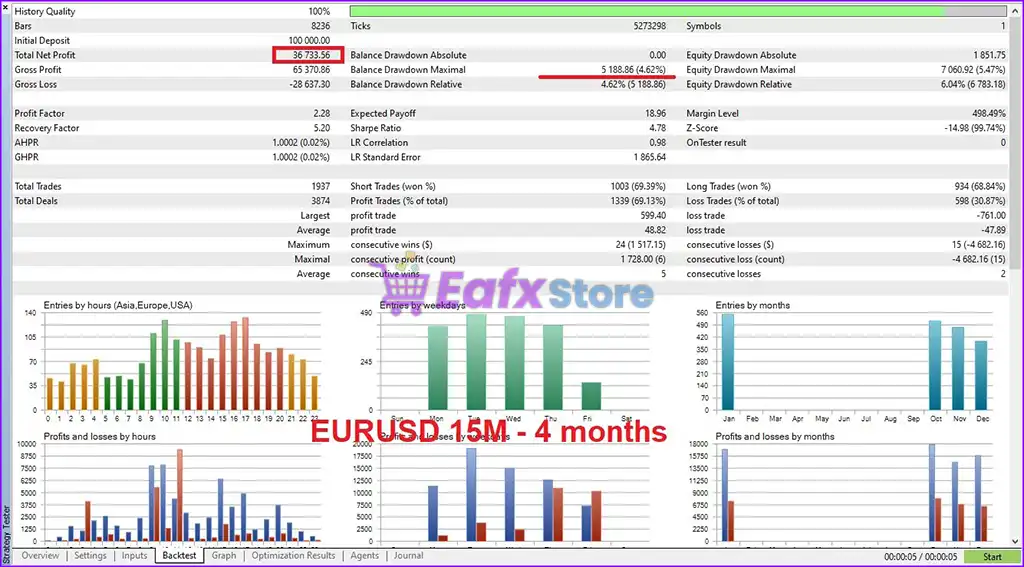
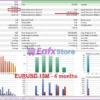
Adam FTMO MT5 Backtest Results
Adam FTMO MT5 is a professional-grade Expert Advisor (EA) designed to pass prop firm challenges like FTMO, MyForexFunds, and Traders Global. The following report showcases its strong risk-reward ratio, stable win rate, and low drawdown on a high-frequency EURUSD M15 setup over a 4-month period.
✅ Initial Deposit: $100,000
✅ Total Net Profit: $36,733.56
✅ Max Balance Drawdown: 4.62%
✅ Max Equity Drawdown: 6.04%
✅ Win Rate (Profit Trades): 69.13%
Adam FTMO MT5 Backtest Results
Why choose Adam FTMO MT5?
🔹 High-Tech Development: Benefits from the fusion of cutting-edge AI (ChatGPT) and extensive human experience, leading to a powerful and efficient trading system.
🔹 Tailored for FTMO: Specifically designed and thoroughly tested for the FTMO challenge, increasing the likelihood of success in evaluations.
🔹 Simplified Setup: Default parameters and clear guidance for lot sizing make it easy to set up for various challenge sizes.
🔹 Risk-Conscious Approach: Emphasizes professional risk management methods to protect capital and adhere to prop firm rules, which is critical for long-term success.
🔹 Proven Development Process: Undergoes a rigorous development cycle including brainstorming, coding, thorough testing, optimization, and refinement, ensuring a reliable trading bot.
🔹 Focus on Passing Challenges: The primary goal is to help users successfully pass prop trading challenges, not to guarantee unrealistic profits, promoting a realistic trading mindset.
User Reviews and Feedback
Adam FTMO MT5 delivers outstanding trading performance, particularly when optimized for the GBPUSD pair, showcasing its potential to generate consistent profits. Highly rated and trusted by the MQL5 community, this expert advisor combines advanced strategies with reliable results, making it a top choice for traders seeking efficiency and profitability in the forex market. Here are 5 star user reviews:
⭐⭐⭐⭐⭐ Lee79b (2024.06.19)
“Had some great results so far and have been using this EA for 2 months and its going well. The guys that developed Adam have been super helpful and the support has been fantastic.”
⭐⭐⭐⭐⭐ Azimum (2024.03.04)
“I have been using the bot for a week to test FTMO. The period is short, of course, but the results are already pleasing. Excellent risk management and transaction management. At the end of the test, I will update the review with the results.”
Recommended settings
Recommended settings and parameters to pay attention to from developers and experts:
| Features | Type |
|---|---|
| Trading platform | MetaTrader 5 (MT5) |
| Time frames | M15 (15 minute chart) |
| Currency pairs | EURUSD and GBPUSD |
| Minimum / Recommended deposit | $100,000 |
| Minimum / Recommended leverage | Any |
| Additional services | Unlock and Decompile |
| Recommended brokers | Exness Broker, Icmarkets Broker |
| Recommended VPS | MyfxVPS.com (Blue VPS, Golden VPS). Lowest Latency, 2 week Free Trial, 100% Free for 12-18 Months. |
Product Download Package?
The download package of the product suite includes:
✅ Experts: Adam FTMO MT5.ex5
➡️ Reviewed by David Easton
Conclusion
In short, Adam FTMO MT5 is a high-performance trading solution specifically engineered to help traders conquer FTMO and other prop firm challenges. Developed by Vyacheslav Izvarin, a seasoned MQL5 expert with over 7 years of experience, this Expert Advisor (EA) combines AI-enhanced strategy design with rigorous compliance to prop firm rules, making it an exceptional choice for traders seeking funding and consistency.
🔢 Adam FTMO MT5 Settings Guide
Adam FTMO MT5 is an automated Expert Advisor designed with a structured configuration for entry filtering, RSI-based market conditions, position sizing, adding trades, trailing management, equity protection, time-based exits, and FTMO-style risk control.
The supplied settings show a system using MagicNumber 7007, an Equity_per_lot of 10000, TakeProfit = 60.0, RSI boundaries of 30.0–70.0, and an adding system capable of up to 21 trades with a maximum lot size of 1.3. The EA also includes an equity-stop mechanism and a Friday closing schedule.
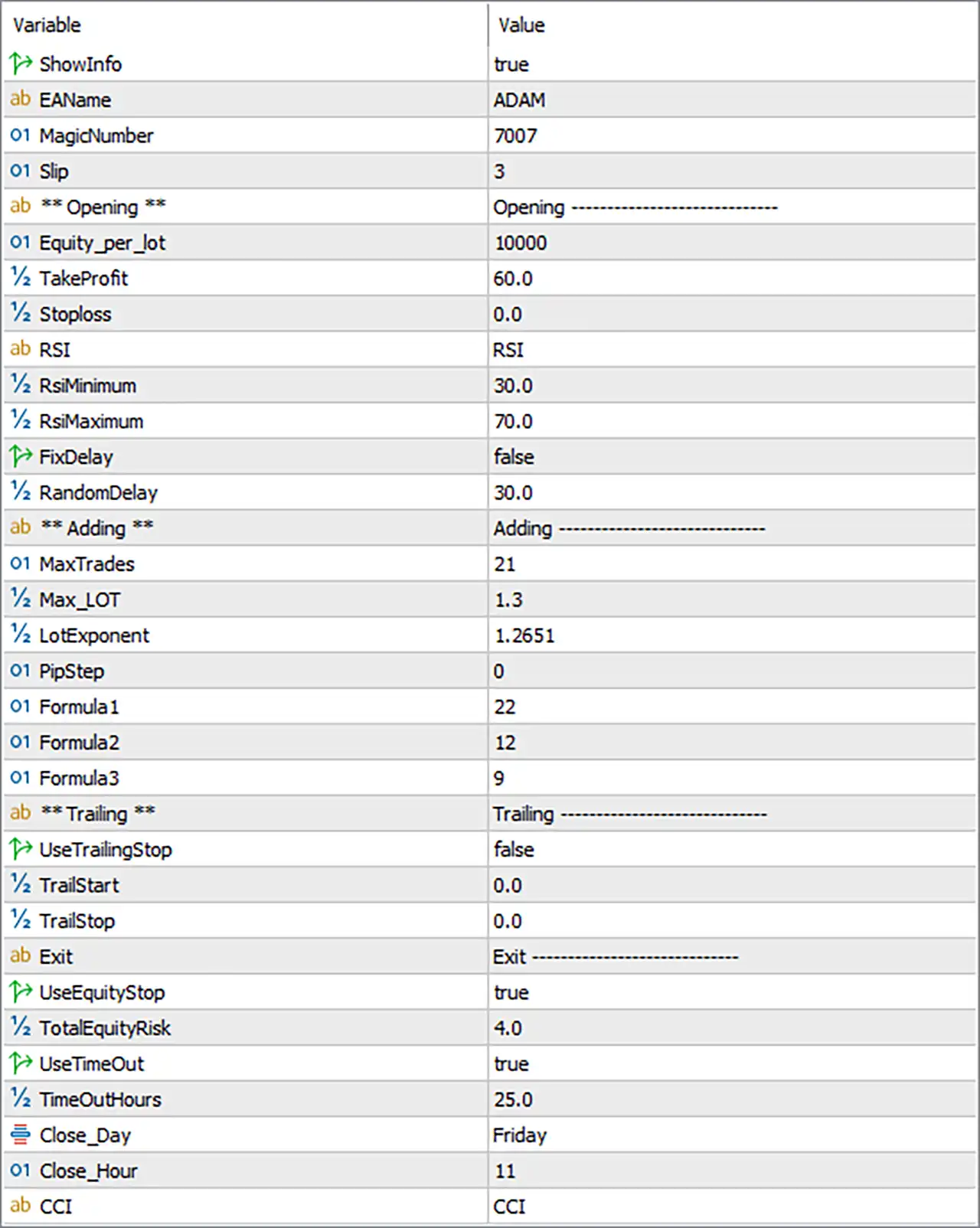
Adam FTMO MT5 Settings Panel
🔢 Adam FTMO MT5 Settings Explained
🔄 General Settings
🔹 ShowInfo: true — Enables the EA’s information display or on-chart information panel.
🔹 EAName: ADAM — Defines the EA name as ADAM.
🔹 MagicNumber: 7007 — Assigns 7007 as the EA’s unique Magic Number for identifying its trades.
🔹 Slp: 3 — Sets the Slp parameter to 3. This appears to be an execution-related setting, but its exact function cannot be determined from the screenshot alone.
🔄 Opening Settings
🔹 Opening: Opening —————————– — Identifies the Opening configuration section.
🔹 Equity_per_lot: 10000 — Sets the equity reference to 10000 per lot for the EA’s position-sizing calculation.
🔹 TakeProfit: 60.0 — Sets the Take Profit target to 60.0 according to the EA’s internal price-distance unit.
🔹 Stoploss: 0.0 — Sets Stop Loss to 0.0, which commonly indicates that the conventional fixed Stop Loss is disabled, subject to the EA’s internal logic.
🔹 Rsi: RSI — Specifies RSI as the indicator used for the displayed opening/filter configuration.
🔹 RsiMinimum: 30.0 — Sets the minimum RSI threshold to 30.0.
🔹 RsiMaximum: 70.0 — Sets the maximum RSI threshold to 70.0.
🔹 FixDelay: false — Disables the fixed-delay entry mechanism.
🔹 RandomDelay: 30.0 — Sets the random-delay parameter to 30.0 when the corresponding delay mechanism is used.
🔄 Adding Settings
🔹 Adding: Adding —————————– — Identifies the configuration section responsible for adding additional positions.
🔹 MaxTrades: 21 — Sets the maximum number of trades to 21.
🔹 Max_LOT: 1.3 — Sets the maximum permitted lot size to 1.3 lots.
🔹 LotExponent: 1.2651 — Sets the lot-sizing exponent/multiplier parameter to 1.2651 for the EA’s additional-position calculation.
🔹 PipStep: 0 — Sets the pip-step parameter to 0. This may indicate that no fixed pip spacing is configured, depending on the EA’s internal adding logic.
🔹 Formula1: 22 — Sets Formula1 to 22 for the EA’s internal adding/position-sizing calculation.
🔹 Formula2: 12 — Sets Formula2 to 12.
🔹 Formula3: 9 — Sets Formula3 to 9.
🔄 Trailing Settings
🔹 Trailing: Trailing —————————– — Identifies the trailing-management section.
🔹 UseTrailingStop: false — Disables the conventional trailing-stop function.
🔹 TrailStart: 0.0 — Sets the trailing activation threshold to 0.0. Because UseTrailingStop = false, this parameter is currently inactive.
🔹 TrailStop: 0.0 — Sets the trailing-stop distance to 0.0. The conventional trailing function is disabled in the supplied configuration.
🔄 Exit & Equity Protection Settings
🔹 Exit: Exit —————————– — Identifies the Exit management section.
🔹 UseEquityStop: true — Enables the EA’s equity-stop protection mechanism.
🔹 TotalEquityRisk: 4.0 — Sets the total equity-risk threshold to 4.0 according to the EA’s internal equity-protection calculation.
🔹 UseTimeOut: true — Enables the time-out mechanism for managing or closing trades after the configured time condition.
🔹 TimeOutHours: 25.0 — Sets the time-out period to 25.0 hours.
🔹 Close_Day: Friday — Specifies Friday as the configured day for scheduled closing.
🔹 Close_Hour: 11 — Sets the scheduled closing hour to 11.
🔄 Indicator Settings
🔹 Cci: CCI — Specifies CCI (Commodity Channel Index) as another indicator used by the EA’s trading logic.
🔄 Key Configuration Highlights
🔹 EA Name: ADAM.
🔹 Magic Number: 7007.
🔹 Equity Per Lot: 10000.
🔹 Take Profit: 60.0.
🔹 Fixed Stop Loss: 0.0.
🔹 RSI Range: 30.0–70.0.
🔹 Fixed Delay: Disabled with FixDelay = false.
🔹 Random Delay: 30.0.
🔹 Maximum Trades: 21.
🔹 Maximum Lot: 1.3.
🔹 Lot Exponent: 1.2651.
🔹 Pip Step: 0.
🔹 Formula Parameters: Formula1 = 22, Formula2 = 12, Formula3 = 9.
🔹 Trailing Stop: Disabled with UseTrailingStop = false.
🔹 Equity Stop: Enabled with UseEquityStop = true.
🔹 Total Equity Risk: 4.0.
🔹 Trade Time-Out: Enabled with TimeOutHours = 25.0.
🔹 Scheduled Closing: Friday at hour 11.
🔹 Indicators: RSI and CCI are specified in the configuration.
🔄 Risk Management Analysis
🔹 Equity-Based Position Sizing: Equity_per_lot = 10000 provides the account-equity reference used by the EA’s position-sizing methodology.
🔹 Maximum Exposure: With MaxTrades = 21 and Max_LOT = 1.3, the EA has a relatively broad maximum trade/exposure configuration. Actual exposure depends on its internal lot-sizing rules.
🔹 Lot Scaling: LotExponent = 1.2651 is particularly important because it controls the EA’s additional-position sizing behavior according to its internal formula.
🔹 Stop Loss Configuration: Stoploss = 0.0 means there is no conventional fixed Stop Loss value configured in the supplied settings. This makes the enabled equity protection and other exit mechanisms especially important.
🔹 Equity Protection: UseEquityStop = true enables an account-level equity protection mechanism with TotalEquityRisk = 4.0.
🔹 Time-Based Exit: UseTimeOut = true and TimeOutHours = 25.0 configure the EA to apply a time-based exit condition after 25.0 hours, subject to its internal rules.
🔹 Trailing Protection: Conventional trailing is disabled because UseTrailingStop = false, while both TrailStart = 0.0 and TrailStop = 0.0 remain at zero.
🔹 RSI Filter: The configured RSI boundaries of 30.0 and 70.0 establish the displayed lower and upper RSI thresholds.
🔢 Conclusion
Adam FTMO MT5 combines automated entry management with RSI filtering, CCI-based analysis, equity-based position sizing, multi-position adding, lot scaling, equity protection, time-out management, and scheduled Friday closing.
The supplied configuration uses MagicNumber = 7007, Equity_per_lot = 10000, and TakeProfit = 60.0, while the fixed Stoploss = 0.0 indicates that the conventional fixed Stop Loss is not configured. Instead, the EA relies on other protection and exit mechanisms, including UseEquityStop = true and TotalEquityRisk = 4.0.
The adding system is configured for up to 21 trades, with Max_LOT = 1.3 and LotExponent = 1.2651. The additional parameters Formula1 = 22, Formula2 = 12, Formula3 = 9, and PipStep = 0 determine important aspects of the EA’s internal position-management behavior.
The EA also uses an RSI range of 30.0–70.0, while trailing-stop management is disabled. A time-out of 25.0 hours is enabled, with scheduled closing configured for Friday at hour 11.
Overall, the configuration offers substantial flexibility, but the combination of 21 maximum trades, 1.3 maximum lot size, 1.2651 lot exponent, and Stoploss = 0.0 deserves careful testing, particularly when the EA is intended for an FTMO or other funded-account environment. Backtesting and forward testing should be performed to verify the actual drawdown and exposure behavior before live deployment.
🔢 FAQs
❓ What is the Magic Number of Adam FTMO MT5?
The Magic Number is 7007, which allows MT5 to identify trades generated by the EA.
❓ What are the Take Profit and Stop Loss settings?
The configured TakeProfit is 60.0, while Stoploss is 0.0. Therefore, no conventional fixed Stop Loss is configured in the supplied settings.
❓ How many trades can Adam FTMO MT5 open?
The MaxTrades parameter is set to 21, meaning the EA’s configured maximum is 21 trades, subject to its internal trading conditions.
❓ What are the lot-sizing settings?
The EA uses Equity_per_lot = 10000, Max_LOT = 1.3, and LotExponent = 1.2651. These parameters work together with the EA’s internal position-sizing logic.
❓ Does Adam FTMO MT5 have equity protection?
Yes. UseEquityStop = true enables equity protection, with TotalEquityRisk = 4.0. The EA also has a 25.0-hour time-out and scheduled closing on Friday at hour 11.
User Reviews
Only logged in customers who have purchased this product may leave a review.
What is Adam FTMO MT5 EA and what is it designed for?
Adam FTMO MT5 is a prop firm-optimized Expert Advisor for MetaTrader 5, specifically designed to help traders pass FTMO challenges and similar evaluations with strict risk control and smart automation.
Is Adam FTMO EA really effective for passing FTMO or prop firm challenges?
Yes, it’s built from the ground up for FTMO rule compliance — including daily/maximum drawdown limits, weekend risk handling, and adaptive lot sizing — all tested with real and backtest data.
What trading pairs and timeframes does Adam FTMO EA support?
Adam FTMO EA is optimized for EURUSD and GBPUSD on the M15 (15-minute) timeframe, offering high-frequency, low-risk trades ideal for challenge conditions.
Do I need to change any settings to start using it?
No major setup is required. It comes with pre-configured default settings optimized for a $100,000 FTMO challenge, and includes clear guidance on adjusting lot size and account protection.
Does Adam FTMO EA use Martingale, Grid, or Hedging?
No. Adam FTMO uses a risk-averse, rule-based strategy and avoids high-risk tactics like martingale, grid, or hedging, making it safe for prop firm evaluations.
Can I use this EA with other prop firms besides FTMO?
Absolutely. Adam FTMO MT5 is compatible with other major prop firms like MyForexFunds, Traders Global, and others that share similar risk requirements.
How does the EA manage weekend trading?
Adam FTMO EA automatically closes all trades before Friday 12:00 GMT+3 and disables trading to avoid holding positions over the weekend — a strict FTMO rule.
What is the Protector tool, and why is it needed?
To ensure 100% compliance with prop firm rules, the EA must be used with an external Protector tool (provided by the vendor) that monitors risk and prevents violations in real-time.
What’s the average win rate and drawdown?
Based on both live and backtest results, Adam FTMO EA achieves a win rate above 69–70%, with drawdown consistently under 6%, aligning well with FTMO risk limits.
Why should I choose Adam FTMO EA over other FTMO bots?
Unlike many overhyped EAs, Adam FTMO was built using ChatGPT AI-assisted logic and real-world trading experience, focused solely on prop firm success with transparent, verifiable results.
-
 Original price was: $500.00.$249.00Current price is: $249.00.
 -
 Original price was: $888.00.$249.00Current price is: $249.00.
 -
 Original price was: $439.00.$249.00Current price is: $249.00.
 -
 Original price was: $9,999.00.$249.00Current price is: $249.00.
-
 3Original price was: $199.00.$159.00Current price is: $159.00.
 -
 1Original price was: $1,299.00.$249.00Current price is: $249.00.
 -
 2Original price was: $990.00.$599.00Current price is: $599.00.
 -
 1Original price was: $1,000.00.$599.00Current price is: $599.00.
There are no reviews yet.