


Trend Alpha EA MT5 Settings Guide
Trend Alpha EA MT5 is a flexible automated trading Expert Advisor designed to support multiple major financial instruments, including XAUUSD, US30, US100, US500, DE40, and JP225. The EA provides automatic symbol detection, configurable risk management, equity and balance protection, trade randomization, trailing-stop controls, and tester-specific settings.
Its configuration allows traders to select the trading risk level, define maximum daily or total losses, establish profit targets, manage EA identification, and enable or disable advanced trade-management functions. The displayed setup is configured for Auto Symbol Selection, with all six supported instruments enabled.
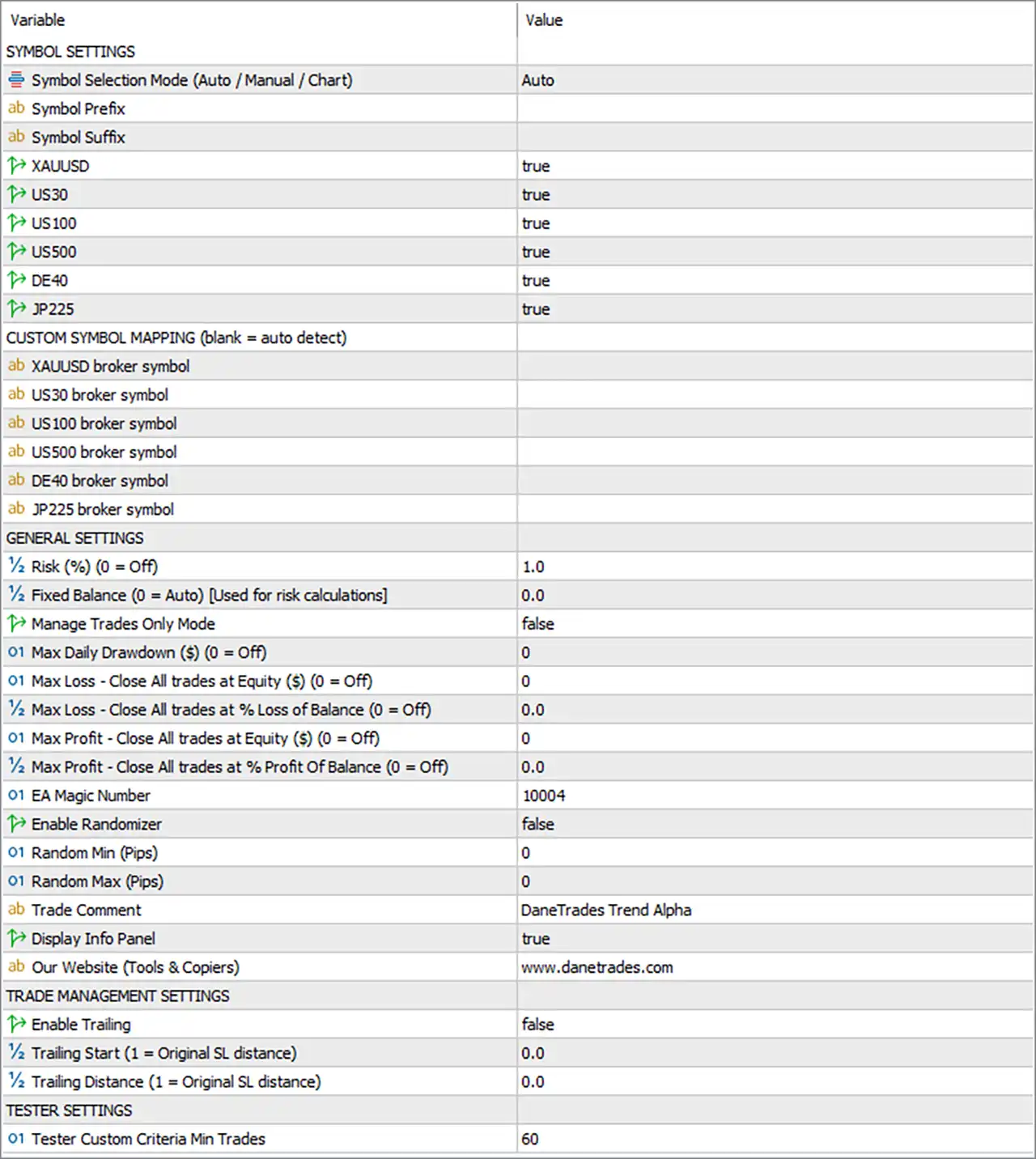
Symbol Settings
🔹 Symbol Selection Mode (Auto / Manual / Chart) = Auto — Automatically selects the appropriate trading symbol instead of requiring a manually specified instrument.
🔹 Symbol Prefix = blank — No symbol prefix is configured, allowing the EA to use the broker's standard symbol naming unless a prefix is required.
🔹 Symbol Suffix = blank — No symbol suffix is configured, allowing the EA to automatically detect symbols without an additional suffix.
🔹 XAUUSD = true — Enables XAUUSD as one of the instruments available for automatic symbol selection.
🔹 US30 = true — Enables US30 for trading under the automatic symbol-selection system.
🔹 US100 = true — Enables US100 as a supported trading instrument.
🔹 US500 = true — Enables US500 as a supported trading instrument.
🔹 DE40 = true — Enables DE40 as a supported trading instrument.
🔹 JP225 = true — Enables JP225 as a supported trading instrument.
Custom Symbol Mapping
🔹 CUSTOM SYMBOL MAPPING (blank = auto detect) — Indicates that the EA can automatically detect broker-specific symbol names when custom mappings are left blank.
🔹 XAUUSD broker symbol = blank — No custom broker symbol is specified for XAUUSD, so automatic detection is used.
🔹 US30 broker symbol = blank — No custom broker symbol is specified for US30, allowing automatic detection.
🔹 US100 broker symbol = blank — No custom broker symbol is specified for US100, allowing automatic detection.
🔹 US500 broker symbol = blank — No custom broker symbol is specified for US500, allowing automatic detection.
🔹 DE40 broker symbol = blank — No custom broker symbol is specified for DE40, allowing automatic detection.
🔹 JP225 broker symbol = blank — No custom broker symbol is specified for JP225, allowing automatic detection.
General Settings
🔹 Risk (%) (0 = Off) = 1.0 — Sets the risk-management parameter to 1.0%; a value of 0 would turn this risk setting off.
🔹 Fixed Balance (0 = Auto) [Used for risk calculations] = 0.0 — Sets the fixed balance reference to 0.0, meaning the EA uses the account's current balance automatically for risk calculations.
🔹 Manage Trades Only Mode = false — Disables Manage Trades Only Mode, allowing the EA to operate its normal trading functions.
🔹 Max Daily Drawdown ($) (0 = Off) = 0 — Sets the maximum daily drawdown limit to 0 USD, which means this protection is disabled.
🔹 Max Loss - Close All trades at Equity ($) (0 = Off) = 0 — Sets the equity-based maximum-loss threshold to 0 USD, disabling this protection.
🔹 Max Loss - Close All trades at % Loss of Balance (0 = Off) = 0.0 — Sets the balance-percentage loss threshold to 0.0%, disabling this protection.
🔹 Max Profit - Close All trades at Equity ($) (0 = Off) = 0 — Sets the equity-based profit target to 0 USD, meaning this automatic close-all profit condition is disabled.
🔹 Max Profit - Close All trades at % Profit Of Balance (0 = Off) = 0.0 — Sets the balance-percentage profit target to 0.0%, disabling this close-all profit condition.
🔹 EA Magic Number = 10004 — Assigns 10004 as the EA's unique Magic Number for identifying and managing its trades.
🔹 Enable Randomizer = false — Disables the EA's trade randomization function.
🔹 Random Min (Pips) = 0 — Sets the minimum randomization distance to 0 pips.
🔹 Random Max (Pips) = 0 — Sets the maximum randomization distance to 0 pips.
🔹 Trade Comment = DaneTrades Trend Alpha — Sets DaneTrades Trend Alpha as the comment attached to EA-generated trades.
🔹 Display Info Panel = true — Enables the EA's information panel on the trading chart.
🔹 Our Website (Tools & Copies) = www.danetrades.com — Displays the website associated with the EA and its tools/copies.
Trade Management Settings
🔹 Enable Trailing = false — Disables the EA's trailing-stop functionality.
🔹 Trailing Start (1 = Original SL distance) = 0.0 — Sets the trailing activation parameter to 0.0. Because trailing is disabled, this value is currently inactive.
🔹 Trailing Distance (1 = Original SL distance) = 0.0 — Sets the trailing distance parameter to 0.0. It is currently inactive because Enable Trailing = false.
Tester Settings
🔹 Tester Custom Criteria Min Trades = 60 — Sets the minimum number of trades required for the EA's custom Strategy Tester criteria to 60 trades.
Current Configuration Summary
🔹 Symbol Selection: The EA is configured for Auto symbol selection, allowing it to automatically identify supported broker symbols.
🔹 Supported Instruments: XAUUSD, US30, US100, US500, DE40, and JP225 are all enabled with true.
🔹 Custom Mapping: All broker-specific symbol mapping fields are blank, so the EA is configured to use automatic symbol detection.
🔹 Risk Setting: The configured risk value is 1.0%, with Fixed Balance = 0.0, meaning the account's current balance is used automatically.
🔹 Daily Drawdown Protection: Max Daily Drawdown = 0, so the daily dollar-based drawdown limit is disabled.
🔹 Loss Protection: All three displayed maximum-loss controls are disabled with values of 0, 0, and 0.0%.
🔹 Profit Protection: Both close-all profit targets are disabled with values of 0 USD and 0.0%.
🔹 Trade Identification: The EA uses Magic Number 10004 and the trade comment DaneTrades Trend Alpha.
🔹 Randomizer: The Randomizer is disabled, with both Random Min = 0 pips and Random Max = 0 pips.
🔹 Information Panel: The on-chart information panel is enabled.
🔹 Trailing Stop: Trailing is disabled, with both trailing parameters configured at 0.0.
🔹 Tester Requirement: The custom Strategy Tester criteria require a minimum of 60 trades.
Important Notes About the Settings
🔹 Risk Calculation: With Risk (%) = 1.0 and Fixed Balance = 0.0, the EA is configured to calculate risk using the account's automatically detected balance rather than a manually fixed balance.
🔹 Zero Protection Values: The settings explicitly state 0 = Off for several risk-management parameters. Therefore, the displayed 0, 0.0, and 0 USD values disable those specific protections rather than representing active zero-value thresholds.
🔹 Symbol Detection: Because all custom broker-symbol fields are blank, the EA relies on its Auto symbol-selection and automatic detection mechanism.
🔹 Multiple Markets: All six listed instruments are enabled: XAUUSD, US30, US100, US500, DE40, and JP225. Actual availability depends on the broker's symbol naming and market access.
🔹 Randomizer: The Randomizer is disabled, and both randomization boundaries are 0 pips, so no randomization range is configured.
🔹 Trailing Stop: Enable Trailing = false, meaning the Trailing Start = 0.0 and Trailing Distance = 0.0 settings are not currently active.
🔹 Tester Criteria: The 60-trade minimum applies to the EA's custom Strategy Tester criteria and should be considered when evaluating backtest results.
Conclusion
Trend Alpha EA MT5 provides a multi-market automated trading framework with automatic symbol detection, configurable percentage-based risk management, account protection controls, trade identification, randomization, trailing management, and Strategy Tester criteria.
The displayed configuration uses 1.0% Risk, Fixed Balance = 0.0, EA Magic Number = 10004, and supports XAUUSD, US30, US100, US500, DE40, and JP225. All custom broker symbol mappings are blank, allowing automatic detection. Daily drawdown, maximum-loss, maximum-profit, Randomizer, and Trailing functions are currently disabled, while the information panel is enabled.
For live deployment, traders should verify that their broker provides compatible symbols for all enabled instruments and confirm how the EA's 1.0% risk calculation translates into position size under their account and broker specifications. Backtesting should also meet the configured 60-trade minimum when evaluating the custom tester criteria.
FAQs
❓ What markets can Trend Alpha EA MT5 trade?
The displayed configuration enables XAUUSD, US30, US100, US500, DE40, and JP225.
❓ What is the current risk setting of Trend Alpha EA MT5?
The Risk (%) parameter is set to 1.0, while Fixed Balance = 0.0, meaning the EA uses the account balance automatically for its risk calculations.
❓ Does Trend Alpha EA MT5 use automatic symbol detection?
Yes. Symbol Selection Mode = Auto, and all custom broker-symbol fields are blank, allowing the EA to automatically detect compatible symbols.
❓ Is the Trailing Stop enabled?
No. Enable Trailing = false. The configured Trailing Start = 0.0 and Trailing Distance = 0.0 are therefore inactive.
❓ What is the Magic Number of Trend Alpha EA MT5?
The EA uses Magic Number 10004 to identify and manage its own trades separately from other trading strategies.


