


🔢 AR FOREX EA MT4 Settings: Complete Inputs Guide
AR FOREX EA MT4 is an automated Forex trading Expert Advisor designed for short-term trading and scalping on the MetaTrader 4 platform. Its input settings provide control over trade volume, stop-loss and take-profit levels, pip progression, and trade identification. Understanding these parameters helps traders configure the EA according to their trading objectives and risk tolerance.
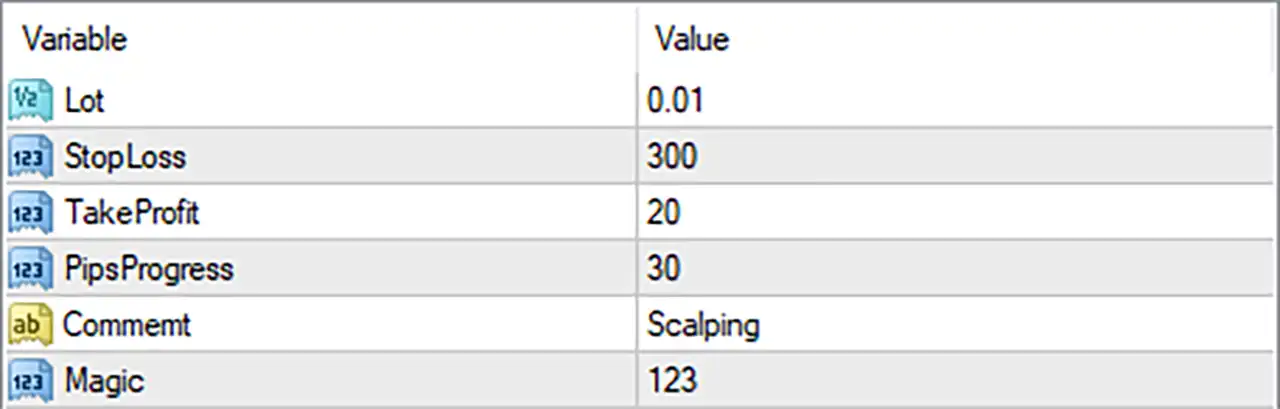
🔢 Input Parameters
🔹 Lot = 0.01: Sets the trading volume to 0.01 lots for each initial order, providing a small fixed position size under the configured lot-sizing method.
🔹 StopLoss = 300: Sets the Stop Loss distance to 300 points or the EA-defined units. This parameter is intended to limit losses when the market moves against an open position; the exact point-to-pip conversion depends on the broker's price digits and the EA's implementation.
🔹 TakeProfit = 20: Sets the Take Profit target to 20 points or the EA-defined units, allowing the EA to close a trade when its configured profit objective is reached.
🔹 PipsProgress = 30: Sets the pip progression parameter to 30. This is a distinctive AR FOREX EA setting associated with its trading progression logic; its precise effect on entry frequency or trade management depends on the EA's internal implementation.
🔹 Comment = Scalping: Assigns the comment "Scalping" to help identify the EA's trades in the MetaTrader 4 trade history and distinguish them from trades placed by other systems.
🔹 Magic = 123: Assigns the Magic Number 123 to identify trades managed by AR FOREX EA MT4. A unique Magic Number can help prevent trade-management conflicts when multiple Expert Advisors operate on the same account.
🔢 Conclusion
AR FOREX EA MT4 offers six straightforward input parameters covering position size, stop-loss protection, profit targets, pip progression, trade comments, and trade identification. The displayed configuration uses a 0.01-lot size, a 300-point Stop Loss, a 20-point Take Profit, and a PipsProgress value of 30.
Before live trading, the point-to-pip conversion and the specific behavior of PipsProgress should be verified for the installed EA version and broker. Backtesting and demo testing are also recommended to assess execution quality, drawdown, and the interaction between the Stop Loss and Take Profit settings.


