


ArtQuant Gold MT5 Settings Guide – Complete Parameter Explanation
ArtQuant Gold EA is a professional automated Gold trading Expert Advisor specifically designed for XAUUSD. It combines intelligent portfolio management, modular trading strategies, automatic position sizing, account protection, execution filters and market session controls.
With support for customizable Buy/Sell modules, portfolio presets, drawdown protection, and news filters, ArtQuant Gold MT5 provides traders with a flexible framework for disciplined automated Gold trading.
00. Product Information
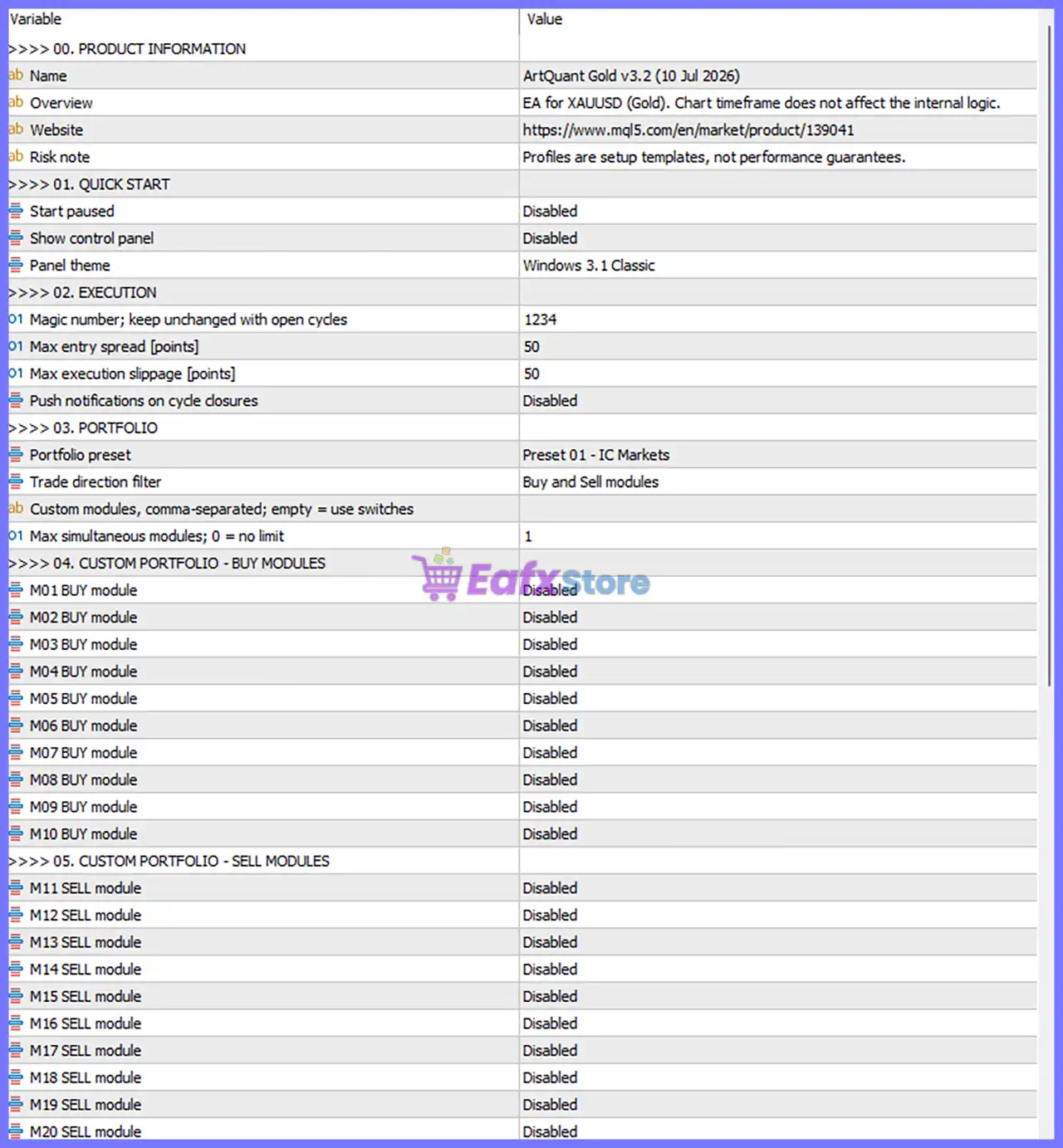
🔹 Overview = EA for XAUUSD (Gold). Chart timeframe does not affect the internal logic. – Indicates the EA is designed specifically for XAUUSD (Gold), and the chart timeframe does not influence its trading decisions.
🔹 Risk Note = Profiles are setup templates, not performance guarantees. – Explains that the provided presets are configuration templates and should not be interpreted as guaranteed trading performance.
01. Quick Start
🔹 Start Paused = Disabled – The EA starts trading immediately after being attached to the chart.
🔹 Show Control Panel = Disabled – Disables the on-chart control panel.
🔹 Panel Theme = Windows 3.1 Classic – Uses the Windows 3.1 Classic visual theme for the interface.
02. Execution
🔹 Magic Number; Keep Unchanged with Open Cycles = 1234 – Unique identifier assigned to all trades opened by the EA. It should not be changed while there are active trading cycles.
🔹 Max Entry Spread [Points] = 50 – Prevents opening new positions when the current spread exceeds 50 points.
🔹 Max Execution Slippage [Points] = 50 – Allows a maximum execution slippage of 50 points before rejecting an order.
🔹 Push Notifications on Cycle Closures = Disabled – Disables push notifications when a trading cycle is completed.
03. Portfolio
🔹 Portfolio Preset = Preset 01 - IC Markets – Uses the predefined portfolio optimized for IC Markets.
🔹 Trade Direction Filter = Buy and Sell Modules – Allows both Buy and Sell trading modules to operate.
🔹 Custom Modules (Comma-Separated; Empty = Use Switches) = (Empty) – No custom module list is specified; the EA uses the individual module switches.
🔹 Max Simultaneous Modules; 0 = No Limit = 1 – Limits execution to 1 active trading module at the same time.
04. Custom Portfolio – Buy Modules
🔹 M01 BUY Module = Disabled – Buy Module M01 is disabled.
🔹 M02 BUY Module = Disabled – Buy Module M02 is disabled.
🔹 M03 BUY Module = Disabled – Buy Module M03 is disabled.
🔹 M04 BUY Module = Disabled – Buy Module M04 is disabled.
🔹 M05 BUY Module = Disabled – Buy Module M05 is disabled.
🔹 M06 BUY Module = Disabled – Buy Module M06 is disabled.
🔹 M07 BUY Module = Disabled – Buy Module M07 is disabled.
🔹 M08 BUY Module = Disabled – Buy Module M08 is disabled.
🔹 M09 BUY Module = Disabled – Buy Module M09 is disabled.
🔹 M10 BUY Module = Disabled – Buy Module M10 is disabled.
05. Custom Portfolio – Sell Modules
🔹 M11 SELL Module = Disabled – Sell Module M11 is disabled.
🔹 M12 SELL Module = Disabled – Sell Module M12 is disabled.
🔹 M13 SELL Module = Disabled – Sell Module M13 is disabled.
🔹 M14 SELL Module = Disabled – Sell Module M14 is disabled.
🔹 M15 SELL Module = Disabled – Sell Module M15 is disabled.
🔹 M16 SELL Module = Disabled – Sell Module M16 is disabled.
🔹 M17 SELL Module = Disabled – Sell Module M17 is disabled.
🔹 M18 SELL Module = Disabled – Sell Module M18 is disabled.
🔹 M19 SELL Module = Disabled – Sell Module M19 is disabled.
🔹 M20 SELL Module = Disabled – Sell Module M20 is disabled.
06. Position Sizing
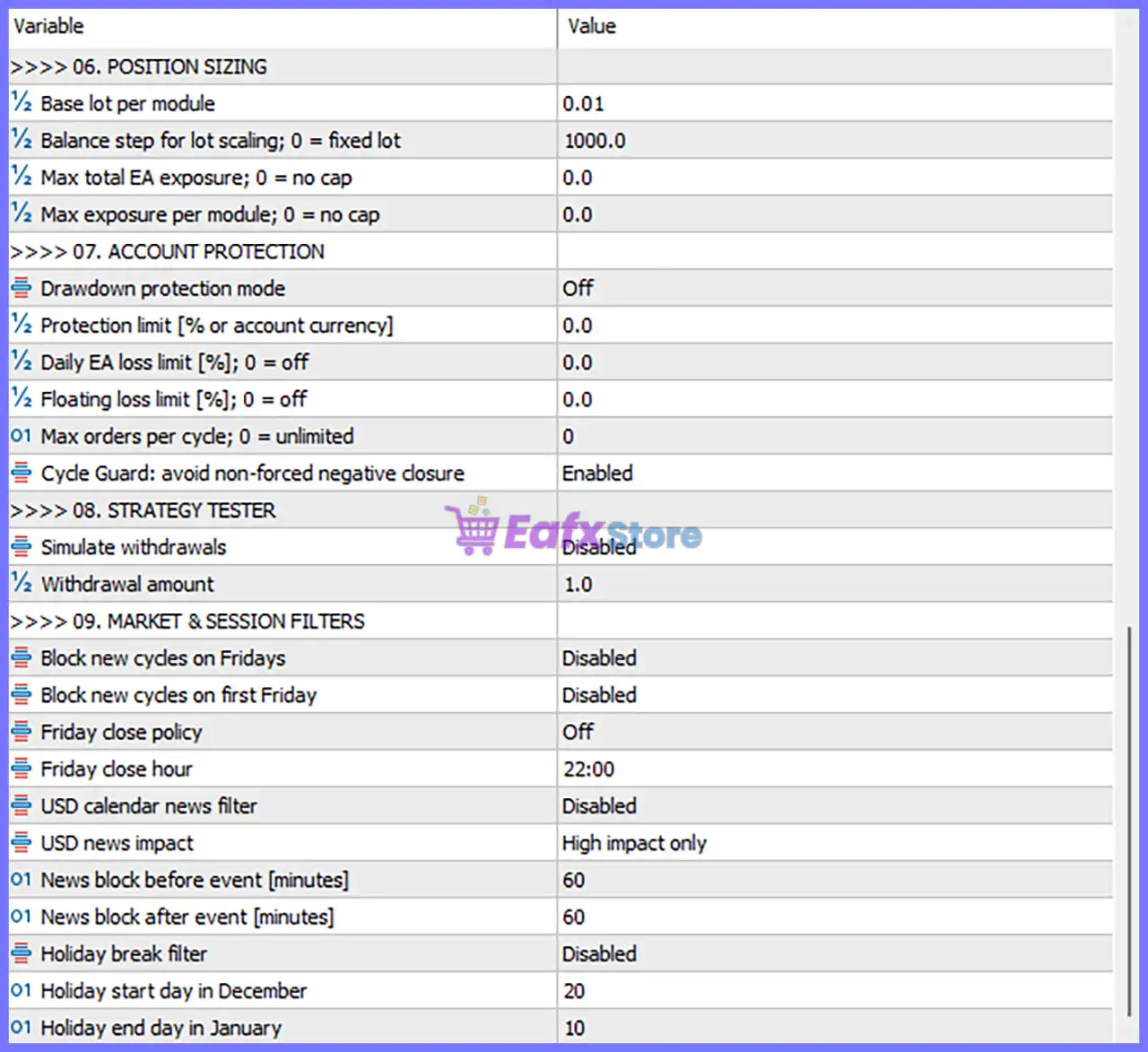
🔹 Base Lot per Module = 0.01 – Uses 0.01 lots as the default position size for each active trading module.
🔹 Balance Step for Lot Scaling; 0 = Fixed Lot = 1000.0 – Increases the lot size for every 1000.0 units of account balance.
🔹 Max Total EA Exposure; 0 = No Cap = 0.0 – No overall exposure limit is applied because the value is 0.0.
🔹 Max Exposure per Module; 0 = No Cap = 0.0 – No exposure limit is applied to individual modules.
07. Account Protection
🔹 Drawdown Protection Mode = Off – Disables automatic drawdown protection.
🔹 Protection Limit [% or Account Currency] = 0.0 – No protection threshold is configured.
🔹 Daily EA Loss Limit [%]; 0 = Off = 0.0 – Daily loss limitation is disabled.
🔹 Floating Loss Limit [%]; 0 = Off = 0.0 – Floating loss limitation is disabled.
🔹 Max Orders per Cycle; 0 = Unlimited = 0 – Unlimited orders are allowed within a trading cycle.
🔹 Cycle Guard: Avoid Non-Forced Negative Closure = Enabled – Prevents unnecessary negative trade closures unless required by the EA.
08. Strategy Tester
🔹 Simulate Withdrawals = Disabled – Account withdrawal simulation is disabled during backtesting.
🔹 Withdrawal Amount = 1.0 – Sets the simulated withdrawal amount to 1.0 when enabled.
09. Market & Session Filters
🔹 Block New Cycles on Fridays = Disabled – Allows the EA to open new trading cycles on Fridays.
🔹 Block New Cycles on First Friday = Disabled – Allows trading during the first Friday of each month.
🔹 Friday Close Policy = Off – No automatic Friday closing policy is applied.
🔹 Friday Close Hour = 22:00 – Defines 22:00 as the Friday closing time when the closing policy is enabled.
🔹 USD Calendar News Filter = Disabled – Disables the built-in USD economic news filter.
🔹 USD News Impact = High Impact Only – If enabled, only High-impact USD news is monitored.
🔹 News Block Before Event [Minutes] = 60 – Stops new trading 60 minutes before a monitored news event.
🔹 News Block After Event [Minutes] = 60 – Resumes trading 60 minutes after the event.
🔹 Holiday Break Filter = Disabled – Holiday trading filter is disabled.
🔹 Holiday Start Day in December = 20 – Defines December 20 as the holiday start date when the holiday filter is enabled.
🔹 Holiday End Day in January = 10 – Defines January 10 as the holiday end date when the holiday filter is enabled.
Conclusion
ArtQuant Gold MT5 is a highly modular Expert Advisor that combines portfolio-based strategy management, flexible position sizing, execution protection, and advanced market filters into a single automated trading system for XAUUSD.
Its support for multiple trading modules, broker-specific presets, configurable account protection, and session management enables traders to tailor the EA to different account sizes and market environments. Understanding each parameter ensures optimal setup, better risk management, and more consistent automated trading performance.
FAQs
❓ What market is ArtQuant Gold MT5 designed for?
ArtQuant Gold MT5 is specifically designed for XAUUSD (Gold), and its internal trading logic works independently of the chart timeframe.
❓ What is the purpose of the Portfolio Preset?
The Portfolio Preset = Preset 01 - IC Markets loads a predefined configuration optimized for IC Markets, simplifying the EA setup process.
❓ Why are all Buy and Sell Modules disabled?
The current configuration uses the selected Portfolio Preset, while all individual custom modules (M01–M20) remain disabled. Traders can enable specific modules when creating a custom portfolio.
❓ How does Position Sizing work in ArtQuant Gold MT5?
The EA starts with a Base Lot per Module = 0.01 and scales position sizes according to the Balance Step = 1000.0, unless fixed sizing is preferred.
❓ Can I enable news and holiday protection?
Yes. Although both the USD Calendar News Filter and Holiday Break Filter are currently Disabled, they can be enabled to automatically suspend trading around high-impact USD news events or predefined holiday periods.



