


Chiroptera EA MT5 Settings Guide – Complete Parameter Explanation
Chiroptera EA is an advanced multi-currency Expert Advisor that combines adaptive money management, machine learning, intelligent session filtering, and automated market analysis.
Designed to trade multiple Forex pairs from a single chart, the EA incorporates dynamic risk control, news filtering, spread protection, swap and commission validation, and mobile notifications, making it a comprehensive solution for automated portfolio trading on MetaTrader 5.
General Settings
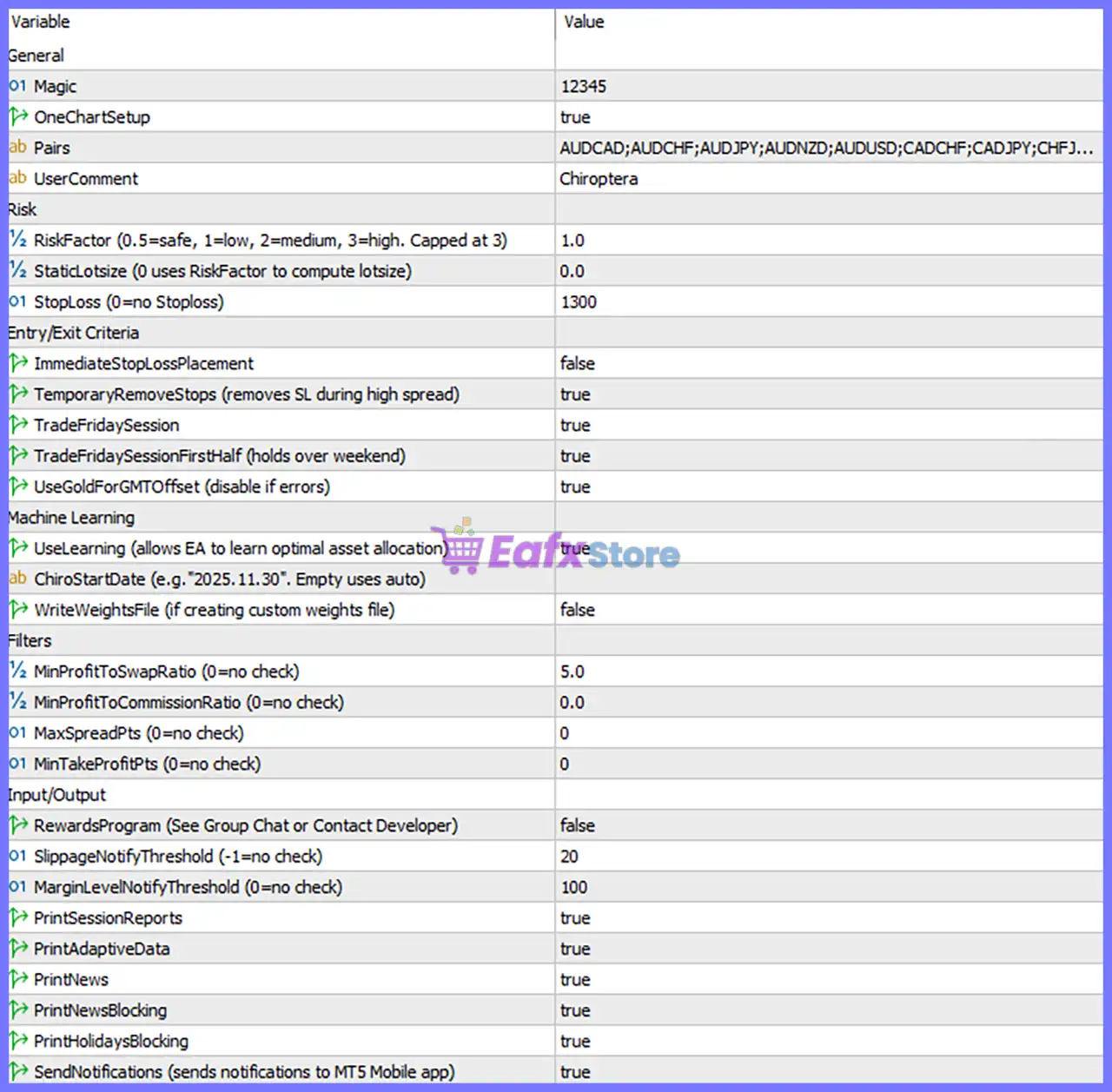
🔹 Magic = 12345 – Assigns the unique identifier 12345 to all trades opened by Chiroptera EA MT5, preventing conflicts with other Expert Advisors.
🔹 OneChartSetup = true – Enables the EA to manage all configured currency pairs from a single chart.
🔹 Pairs = AUDCAD; AUDCHF; AUDJPY; AUDNZD; AUDUSD; CADCHF; CADJPY; CHF... – Specifies the list of currency pairs monitored and traded by the EA.
🔹 UserComment = Chiroptera – Adds the custom trade comment "Chiroptera" to every position for easier identification.
Risk Management
🔹 RiskFactor (0.5 = Safe, 1 = Low, 2 = Medium, 3 = High, Capped at 3) = 1.0 – Uses the predefined Low Risk profile with a risk factor of 1.0.
🔹 StaticLotsize (0 Uses RiskFactor to Compute Lotsize) = 0.0 – Fixed lot sizing is disabled; the EA automatically calculates position size using the configured RiskFactor.
🔹 StopLoss (0 = No StopLoss) = 1300 – Sets the Stop Loss distance to 1300 points.
Entry & Exit Criteria
🔹 ImmediateStopLossPlacement = false – The Stop Loss is not placed immediately upon order execution.
🔹 TemporaryRemoveStops (Removes SL During High Spread) = true – Temporarily removes Stop Loss orders during periods of unusually high market spreads.
🔹 TradeFridaySession = true – Allows the EA to trade during Friday trading sessions.
🔹 TradeFridaySessionFirstHalf (Holds Over Weekend) = true – Permits trading during the first half of Friday and allows positions to remain open over the weekend if required.
🔹 UseGoldForGMTOffset (Disable if Errors) = true – Uses Gold market data to automatically determine the GMT offset. Disable this option if GMT synchronization issues occur.
Machine Learning
🔹 UseLearning (Allows EA to Learn Optimal Asset Allocation) = true – Enables the built-in machine learning engine to optimize portfolio allocation over time.
🔹 ChiroStartDate (e.g. "2025.11.30". Empty Uses Auto) = (Empty) – No manual learning start date is specified, so the EA automatically determines the optimal starting point.
🔹 WriteWeightsFile (If Creating Custom Weights File) = false – Disables exporting a custom machine learning weights file.
Filters
🔹 MinProfitToSwapRatio (0 = No Check) = 5.0 – Requires a minimum Profit-to-Swap Ratio of 5.0 before accepting a trade.
🔹 MinProfitToCommissionRatio (0 = No Check) = 0.0 – Commission ratio validation is disabled because the value is 0.0.
🔹 MaxSpreadPts (0 = No Check) = 0 – Spread filtering is disabled because the value is 0.
🔹 MinTakeProfitPts (0 = No Check) = 0 – Minimum Take Profit filtering is disabled.
Input / Output
🔹 RewardsProgram (See Group Chat or Contact Developer) = false – Participation in the developer's rewards program is disabled.
🔹 SlippageNotifyThreshold (-1 = No Check) = 20 – Sends a notification if execution slippage reaches or exceeds 20 points.
🔹 MarginLevelNotifyThreshold (0 = No Check) = 100 – Sends a notification when the account margin level falls to 100%.
🔹 PrintSessionReports = true – Enables detailed trading session reports in the Expert log.
🔹 PrintAdaptiveData = true – Logs adaptive calculation and optimization data.
🔹 PrintNews = true – Displays economic news information in the Expert log.
🔹 PrintNewsBlocking = true – Logs whenever trading is blocked because of scheduled news events.
🔹 PrintHolidaysBlocking = true – Logs trading restrictions caused by holidays.
🔹 SendNotifications (Sends Notifications to MT5 Mobile App) = true – Enables push notifications to the MetaTrader 5 mobile application.
Risk Level
🔹 Fix Lot – Uses a constant lot size for every trade regardless of account balance, making position sizing simple and predictable for traders who prefer manual risk control.
🔹 Safe – Applies conservative position sizing with lower market exposure to prioritize capital preservation during volatile market conditions.
🔹 Balanced – Uses a moderate level of risk that balances consistent growth with controlled drawdowns, making it suitable for most trading accounts.
🔹 Aggressive – Increases trading volume and overall exposure to maximize potential returns, while also significantly increasing trading risk and potential drawdown.
Conclusion
Chiroptera EA MT5 is a sophisticated multi-currency trading system that integrates adaptive money management, machine learning, intelligent session control, and comprehensive market filters into one Expert Advisor. Its ability to automatically calculate position sizes, optimize portfolio allocation, monitor trading conditions, and send mobile notifications makes it well suited for traders seeking a highly automated and intelligent Forex portfolio management solution. Correctly configuring each parameter helps maximize stability, improve execution quality, and maintain disciplined risk management.
FAQs
❓ What is the purpose of the OneChartSetup feature?
OneChartSetup = true allows Chiroptera EA MT5 to manage and trade all configured currency pairs from a single chart, simplifying portfolio management.
❓ How does the RiskFactor setting affect trading?
The current RiskFactor = 1.0 corresponds to a Low Risk profile. Higher values increase position size and exposure, while lower values reduce trading risk.
❓ What does the Machine Learning engine do?
With UseLearning = true, the EA continuously analyzes trading performance to optimize asset allocation and improve portfolio efficiency over time.
❓ Why is the MaxSpreadPts filter set to 0?
A value of 0 disables spread filtering, meaning the EA will not reject trades based on current market spread unless the setting is changed.
❓ Can Chiroptera EA MT5 send notifications to my phone?
Yes. With SendNotifications = true, the EA sends important trading and account notifications directly to the MetaTrader 5 mobile application, helping you monitor your account remotely.



