

BTC Vortex Nexus EA MT5 v1.1 with SetFiles (Unlimited)

Subscriptions for Special Plan
- 30 EA package is more economical!
- Special package with 99%
- Download 1 EA/Day

Subscriptions for Premium Membership
- Download Unlimited in 1 Year
- Get 100% Discount
- Get free access to all

Subscriptions for Gold Membership
- 1 Year Membership
- Get 100% Discount
- Access EA+Indicator+Course
Frequently bought together 🎁
Add these products to enhance your purchase



 Vendor Website:
  BTC Vortex Nexus EA MT5 v1.1.ex5
 Reviewed by
 🔢 BTC Vortex Nexus EA MT5 Settings Guide – Complete Parameter Explanation
BTC Vortex Nexus EA MT5 is a professional automated cryptocurrency trading Expert Advisor designed for MetaTrader 5. It combines breakout strategies, trend confirmation, volume validation, ATR-based trade management, dynamic trailing stops, automatic lot sizing, and intelligent risk management to provide a flexible and reliable Bitcoin trading solution.
With customizable filters and trading schedule controls, the EA allows traders to optimize performance under various market conditions.
BTC Vortex Nexus EA MT5 Settings
🔢 Installation Panel Parameters
Below are the details of the parameters in the advisor’s trading system settings table:
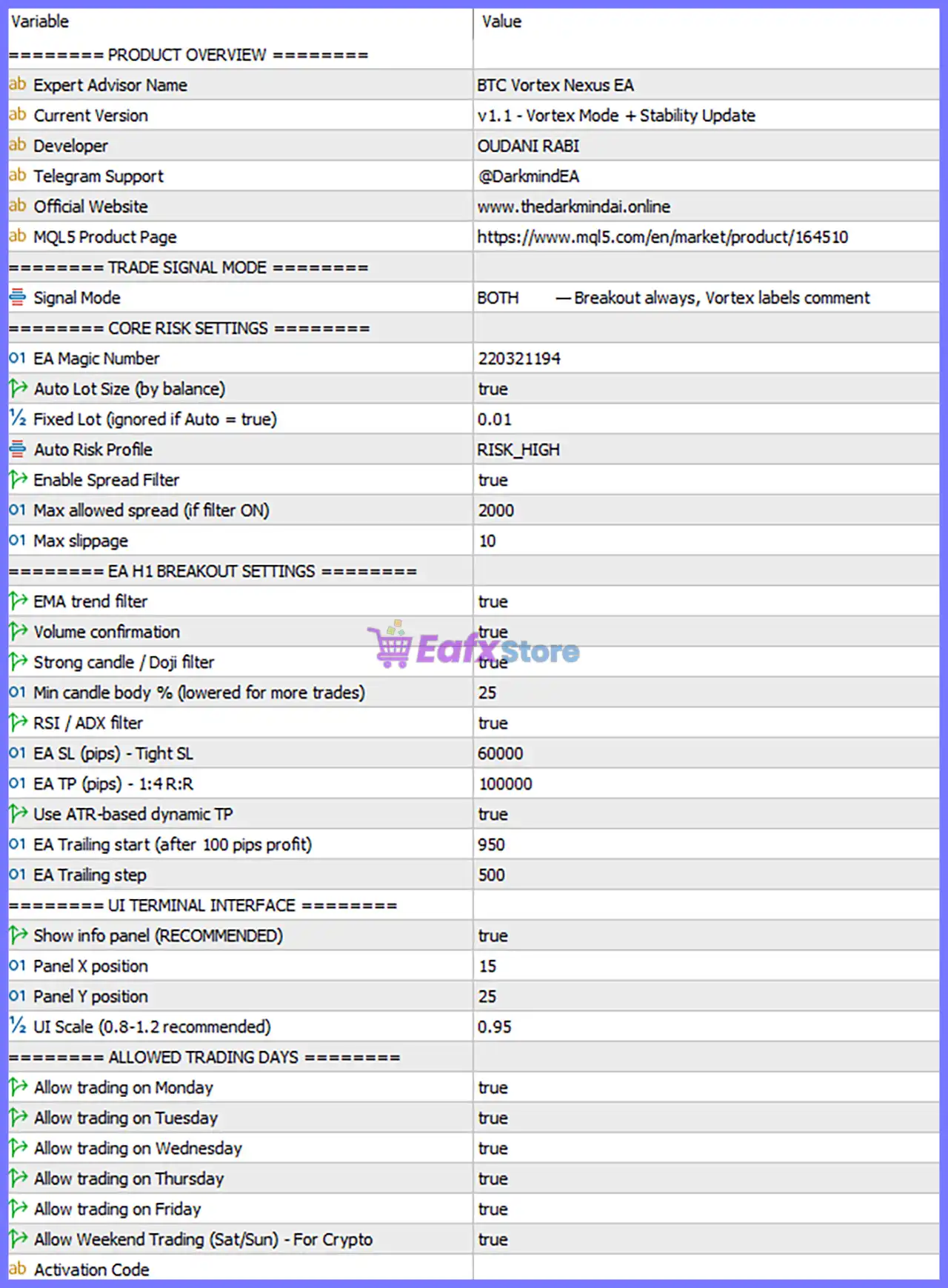
BTC Vortex Nexus EA MT5 Settings Panel
🔶 Product Overview
🔹 Expert Advisor Name = BTC Vortex Nexus EA – Displays the official name of the Expert Advisor.
🔹 Current Version = v1.1 – Vortex Mode + Stability Update – Indicates the installed software version v1.1 with the Vortex Mode + Stability Update.
🔹 Developer = OUDANI RABI – Shows the name of the EA developer.
🔶 Trade Signal Mode
🔹 Signal Mode = BOTH — Breakout always, Vortex labels comment – Enables both breakout trading and Vortex signal labeling simultaneously.
🔶 Core Risk Settings
🔹 EA Magic Number = 220321194 – Assigns the unique Magic Number 220321194 to all trades opened by the EA.
🔹 Auto Lot Size (by balance) = true – Automatically calculates trading volume based on the current account balance.
🔹 Fixed Lot (ignored if Auto = true) = 0.01 – Sets the fixed trading volume to 0.01 lots, but this value is ignored while Auto Lot Size is enabled.
🔹 Auto Risk Profile = RISK_HIGH – Uses the predefined High Risk money management profile.
🔹 Enable Spread Filter = true – Activates spread protection before opening new trades.
🔹 Max allowed spread (if filter ON) = 2000 – Trading is blocked whenever the market spread exceeds 2000 points.
🔹 Max slippage = 10 – Limits execution slippage to a maximum of 10 points.
🔶 EA H1 Breakout Settings
🔹 EMA trend filter = true – Confirms trades using the Exponential Moving Average trend direction.
🔹 Volume confirmation = true – Requires volume confirmation before executing trades.
🔹 Strong candle / Doji filter = true – Filters out weak candles and Doji formations to improve signal quality.
🔹 Min candle body % (lowered for more trades) = 25 – Requires the candle body to be at least 25% of the total candle size before entry.
🔹 RSI / ADX filter = true – Uses RSI and ADX indicators for additional market confirmation.
🔹 EA SL (pips) – Tight SL = 60000 – Sets the Stop Loss distance to 60000 pips using the Tight SL configuration.
🔹 EA TP (pips) – 1:4 R:R = 100000 – Sets the Take Profit distance to 100000 pips, targeting approximately a 1:4 Risk-to-Reward Ratio.
🔹 Use ATR-based dynamic TP = true – Dynamically adjusts the Take Profit using the Average True Range (ATR).
🔹 EA Trailing start (after 100 pips profit) = 950 – Activates the trailing stop after approximately 950 pips of profit.
🔹 EA Trailing step = 500 – Moves the trailing stop in increments of 500 pips.
🔶 UI Terminal Interface
🔹 Show info panel (RECOMMENDED) = true – Displays the information dashboard directly on the trading chart.
🔹 Panel X position = 15 – Sets the dashboard’s horizontal position to 15.
🔹 Panel Y position = 25 – Sets the dashboard’s vertical position to 25.
🔹 UI Scale (0.8-1.2 recommended) = 0.95 – Scales the interface to 0.95 for optimal visibility.
🔶 Allowed Trading Days
🔹 Allow trading on Monday = true – Enables trading on Monday.
🔹 Allow trading on Tuesday = true – Enables trading on Tuesday.
🔹 Allow trading on Wednesday = true – Enables trading on Wednesday.
🔹 Allow trading on Thursday = true – Enables trading on Thursday.
🔹 Allow trading on Friday = true – Enables trading on Friday.
🔹 Allow Weekend Trading (Sat/Sun) – For Crypto = true – Enables trading on Saturday and Sunday, making full use of the 24/7 cryptocurrency market.
🔹 Activation Code = (User-specific activation field) – Reserved field used for product activation or licensing.
🔶 Risk Level
🔹 Fix Lot – Uses a constant trading volume for every position regardless of account balance, providing predictable position sizing.
🔹 Safe – Uses conservative exposure with smaller position sizes to reduce drawdown and preserve account capital.
🔹 Balanced – Maintains a moderate balance between growth potential and risk, making it suitable for most traders.
🔹 Aggressive – Increases position sizing and market exposure to maximize profit potential while accepting significantly higher trading risk.
🔢 Conclusion
BTC Vortex Nexus EA MT5 is a feature-rich automated cryptocurrency trading system designed to combine breakout strategies with intelligent market confirmation and adaptive trade management. Its automatic lot sizing, ATR-based Take Profit, EMA trend filtering, RSI/ADX validation, spread protection, and weekend trading capabilities make it well suited for Bitcoin traders seeking a robust and flexible MetaTrader 5 Expert Advisor. Properly configuring each parameter can significantly improve execution quality, risk control, and long-term trading consistency.
🔢 FAQs
❓ What asset is BTC Vortex Nexus EA MT5 designed to trade?
BTC Vortex Nexus EA MT5 is primarily designed for Bitcoin and cryptocurrency markets, supporting continuous trading throughout the week.
❓ How does Auto Lot Size work?
When Auto Lot Size = true, the EA automatically calculates position sizes according to the account balance and the selected Auto Risk Profile.
❓ Why is the Weekend Trading option enabled?
Because cryptocurrency markets operate 24 hours a day, 7 days a week, enabling Weekend Trading = true allows the EA to capture trading opportunities on Saturdays and Sundays.
❓ What is the purpose of the EMA, RSI, and ADX filters?
These filters help validate market direction, trend strength, and momentum, reducing false breakout signals and improving trade quality.
❓ Can I switch from automatic lot sizing to fixed lots?
Yes. Simply disable Auto Lot Size and the EA will use the configured Fixed Lot = 0.01 for every new trade.
User Reviews
Only logged in customers who have purchased this product may leave a review.
❓ What market does BTC Vortex Nexus EA MT5 trade?
BTC Vortex Nexus EA MT5 is designed exclusively for BTCUSD on the H1 timeframe, using structural breakout analysis for disciplined automated trading.
❓ Does BTC Vortex Nexus EA MT5 use Martingale or Grid strategies?
No. BTC Vortex Nexus EA MT5 never uses Martingale, Grid, or trade stacking, relying instead on fixed-risk execution and strict money management.
❓ How does BTC Vortex Nexus EA MT5 decide when to enter trades?
BTC Vortex Nexus EA MT5 confirms every trade using breakout structure, Vortex momentum, trend alignment, and volatility filters before entering.
❓ How does BTC Vortex Nexus EA MT5 manage trading risk?
BTC Vortex Nexus EA MT5 applies automatic lot sizing, fixed Stop Loss, Take Profit, adaptive trailing, and spread protection on every position.
❓ How many positions can BTC Vortex Nexus EA MT5 open at once?
BTC Vortex Nexus EA MT5 allows only one active market position and up to two pending orders, preventing excessive exposure and overtrading.
❓ Which broker is recommended for BTC Vortex Nexus EA MT5?
BTC Vortex Nexus EA MT5 performs best with ECN or RAW crypto brokers offering stable execution, competitive BTCUSD spreads, and reliable order fills.
❓ Can I adjust the risk level in BTC Vortex Nexus EA MT5?
Yes. BTC Vortex Nexus EA MT5 supports flexible risk profiles with automatic lot sizing, allowing traders to match position sizes to account balance.
❓ Does BTC Vortex Nexus EA MT5 include a Trailing Stop?
Yes. BTC Vortex Nexus EA MT5 uses an intelligent Trailing Stop that activates only after confirmed trend strength while respecting broker limitations.
🔥 Get This EA for FREE with Our Membership! 🚀🚀
Unlock access to this EA, premium Indicators, and exclusive trading tools completely FREE with any of our Membership Plans! Thousands of traders already benefit from our VIP library—join them and level up your trading instantly. Choose Your Membership:
- SPECIAL – 1 Month Membership
- GOLD – 1 Year Membership
- PREMIUM – 1 Year Membership
-
 Original price was: $30,000.00.$599.00Current price is: $599.00.
 -
 Original price was: $3,750.00.$599.00Current price is: $599.00.
 -
 Original price was: $30,000.00.$599.00Current price is: $599.00.
 -
 Original price was: $999.00.$89.00Current price is: $89.00.
-
 3Original price was: $999.00.$69.00Current price is: $69.00.
 -
 3Original price was: $999.00.$69.00Current price is: $69.00.
 -
 3Original price was: $499.00.$59.00Current price is: $59.00.
 -
 0Original price was: $399.00.$59.00Current price is: $59.00.
There are no reviews yet.