
🔢 Babavenga EA – Complete Settings & Input Parameters Guide
Babavenga EA is an automated Forex trading robot designed for MetaTrader platforms, featuring flexible risk management, auto lot calculation, spread filtering, trailing stop functionality and customizable trading session controls.
The EA is optimized for traders who want controlled automated trading with configurable signal filters and day-by-day trading schedules.
🔢 Babavenga EA Settings Explained
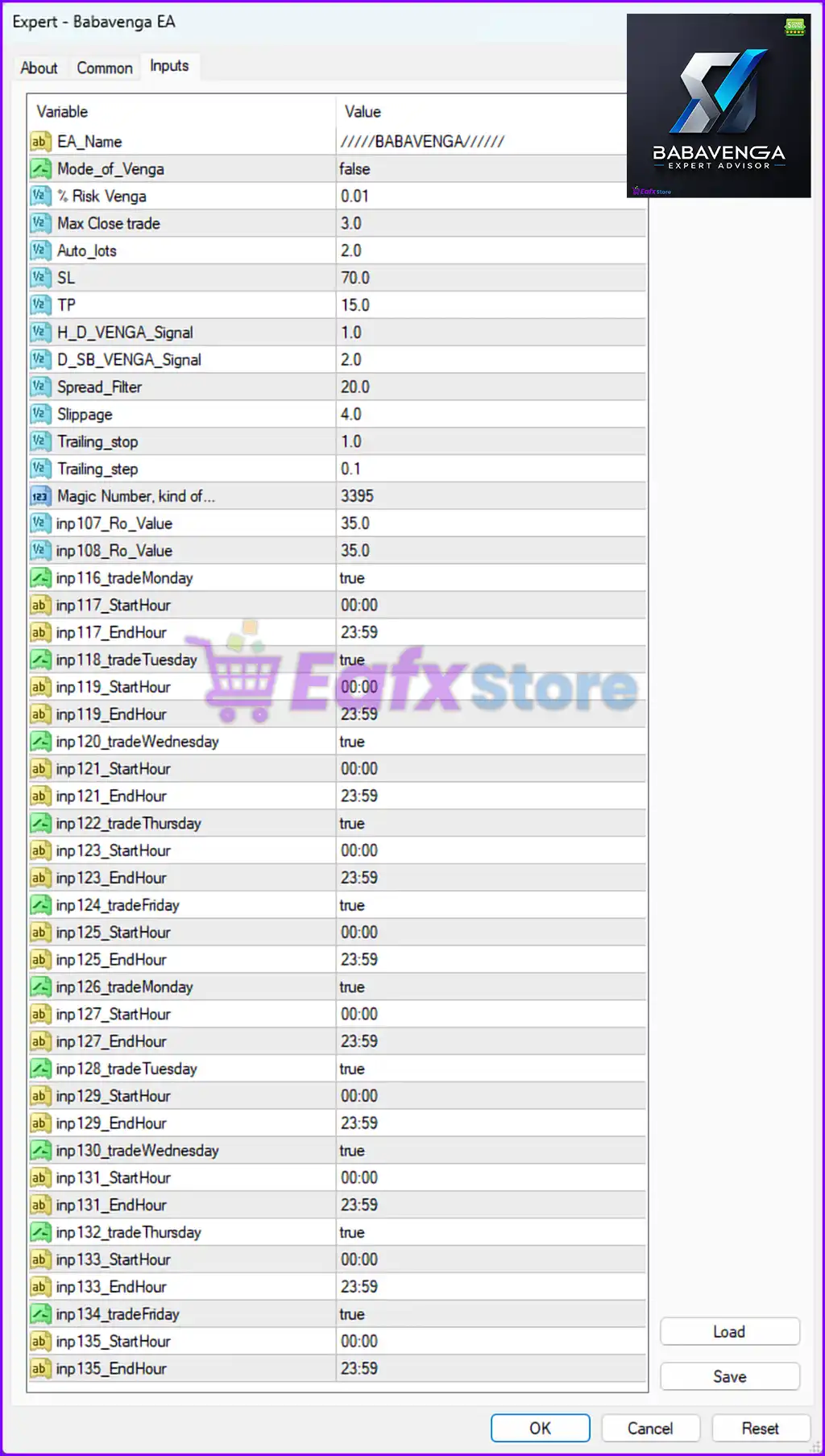
Below are the details of the parameters in the advisor’s trading system settings table:
🔶 General EA Settings
🔹 EA_Name = /////BABAVENGA/////: Displays the official name and identifier of the Babavenga EA.
🔹 Mode_of_Venga = false: Disables the special Venga trading mode when set to false.
🔹 % Risk Venga = 0.01: Sets the account risk percentage per trade to 0.01.
🔹 Max Close trade = 3.0: Limits the maximum number of simultaneously closed trades to 3.0.
🔹 Auto_lots = 2.0: Enables or configures automatic lot sizing with a multiplier value of 2.0.
🔶 Trade Protection Settings
🔹 SL = 70.0: Sets the Stop Loss value to 70.0 points/pips.
🔹 TP = 15.0: Sets the Take Profit target to 15.0 points/pips.
🔹 H_D_VENGA_Signal = 1.0: Configures the H_D VENGA signal sensitivity level to 1.0.
🔹 D_SB_VENGA_Signal = 2.0: Sets the D_SB VENGA signal parameter to 2.0.
🔶 Spread & Execution Settings
🔹 Spread_Filter = 20.0: Prevents trading when the market spread exceeds 20.0.
🔹 Slippage = 4.0: Sets maximum allowed slippage during order execution to 4.0.
🔶 Trailing Stop Settings
🔹 Trailing_stop = 1.0: Activates trailing stop management with a value of 1.0.
🔹 Trailing_step = 0.1: Sets trailing stop movement increments to 0.1.
🔶 Magic Number Settings
🔹 Magic Number, kind of... = 3395: Assigns magic number 3395 for identifying EA trades.
🔶 Signal & Indicator Parameters
🔹 inp107_Ro_Value = 35.0: Configures custom RO indicator/filter value to 35.0.
🔹 inp108_Ro_Value = 35.0: Sets the second RO filter parameter to 35.0.
🔶 Monday Trading Session Settings
🔹 inp116_tradeMonday = true: Enables trading on Monday.
🔹 inp117_StartHour = 00:00: Trading starts on Monday at 00:00.
🔹 inp117_EndHour = 23:59: Trading ends on Monday at 23:59.
🔶 Tuesday Trading Session Settings
🔹 inp118_tradeTuesday = true: Enables trading on Tuesday.
🔹 inp119_StartHour = 00:00: Trading starts on Tuesday at 00:00.
🔹 inp119_EndHour = 23:59: Trading ends on Tuesday at 23:59.
🔶 Wednesday Trading Session Settings
🔹 inp120_tradeWednesday = true: Enables trading on Wednesday.
🔹 inp121_StartHour = 00:00: Trading starts on Wednesday at 00:00.
🔹 inp121_EndHour = 23:59: Trading ends on Wednesday at 23:59.
🔶 Thursday Trading Session Settings
🔹 inp122_tradeThursday = true: Enables trading on Thursday.
🔹 inp123_StartHour = 00:00: Trading starts on Thursday at 00:00.
🔹 inp123_EndHour = 23:59: Trading ends on Thursday at 23:59.
🔶 Friday Trading Session Settings
🔹 inp124_tradeFriday = true: Enables trading on Friday.
🔹 inp125_StartHour = 00:00: Trading starts on Friday at 00:00.
🔹 inp125_EndHour = 23:59: Trading ends on Friday at 23:59.
🔶 Additional Weekly Trading Session Settings
🔹 inp126_tradeMonday = true: Secondary Monday trading session enabled.
🔹 inp127_StartHour = 00:00: Secondary Monday session starts at 00:00.
🔹 inp127_EndHour = 23:59: Secondary Monday session ends at 23:59.
🔹 inp128_tradeTuesday = true: Secondary Tuesday trading session enabled.
🔹 inp129_StartHour = 00:00: Secondary Tuesday session starts at 00:00.
🔹 inp129_EndHour = 23:59: Secondary Tuesday session ends at 23:59.
🔹 inp130_tradeWednesday = true: Secondary Wednesday trading session enabled.
🔹 inp131_StartHour = 00:00: Secondary Wednesday session starts at 00:00.
🔹 inp131_EndHour = 23:59: Secondary Wednesday session ends at 23:59.
🔹 inp132_tradeThursday = true: Secondary Thursday trading session enabled.
🔹 inp133_StartHour = 00:00: Secondary Thursday session starts at 00:00.
🔹 inp133_EndHour = 23:59: Secondary Thursday session ends at 23:59.
🔹 inp134_tradeFriday = true: Secondary Friday trading session enabled.
🔹 inp135_StartHour = 00:00: Secondary Friday session starts at 00:00.
🔹 inp135_EndHour = 23:59: Secondary Friday session ends at 23:59.
🔢 Conclusion
Babavenga EA is a highly configurable automated trading system designed for traders who want complete control over risk management, spread filtering, trailing stop behavior, and trading schedules. With customizable signal parameters, daily trading session filters, and flexible money management settings, Babavenga EA provides a solid framework for automated Forex trading on MetaTrader platforms.
🔢 FAQs
❓ What is Babavenga EA?
Babavenga EA is an automated Forex trading robot designed for MetaTrader platforms with advanced risk and session management features.
❓ Does Babavenga EA support automatic lot sizing?
Yes, the EA includes an Auto_lots parameter for dynamic lot management.
❓ Can I customize trading hours in Babavenga EA?
Yes, the EA allows individual start and end trading times for each weekday.
❓ Does Babavenga EA include spread protection?
Yes, the Spread_Filter setting prevents trades when spreads exceed the specified limit.
❓ Can Babavenga EA use trailing stop management?
Yes, the EA includes configurable Trailing_stop and Trailing_step settings for automated trade protection.