






PIP CLUB EA BOT Source Code MQ4 + SetFiles

Subscriptions for Special Plan
- 30 EA package is more economical!
- Special package with 99%
- Download 1 EA/Day

Subscriptions for Premium Membership
- Download Unlimited in 1 Year
- Get 100% Discount
- Get free access to all

Subscriptions for Gold Membership
- 1 Year Membership
- Get 100% Discount
- Access EA+Indicator+Course
Frequently bought together 🎁
Add these products to enhance your purchase



What is PIP CLUB EA BOT MQ4?
PIP CLUB EA BOT MQ4 is the source of an automated trading system that has proven profitable performance for many years. This source code allows the owner to actively customize and create many new systems as desired.
🔶 Vendor website: Click here
Outstanding Features
🔹 Professional capital management: Do not use potentially risky features such as Martingale or Price Averaging.
🔹 AI algorithm integration: Uses powerful statistical and machine learning models to analyze the market, determine optimal entry/exit points, and maximize profits.
🔹 Professional risk management: Automatic integration of Stop-Loss (SL), Take-Profit (TP) points ensures the safety of the trading system.
🔹 Setup and operation: Allows investors to adjust trading parameters according to risk appetite and market conditions, providing a maximum personalized experience.
Benefits of owning the Source Code
🔹 Proactive customization: Source code can be changed, adjusted and customized to precisely meet the investor’s specific needs and requirements.
🔹 Upgrades and Maintenance: No dependence on the original vendor for bug fixes, software updates or upgrades.
🔹 Vendor independence: No licensing fees or recurring maintenance fees to the software vendor.
🔹 System reuse and development: It is completely possible to reuse source code to create new products or applications suitable for the market.
PIP CLUB EA BOT Reviews
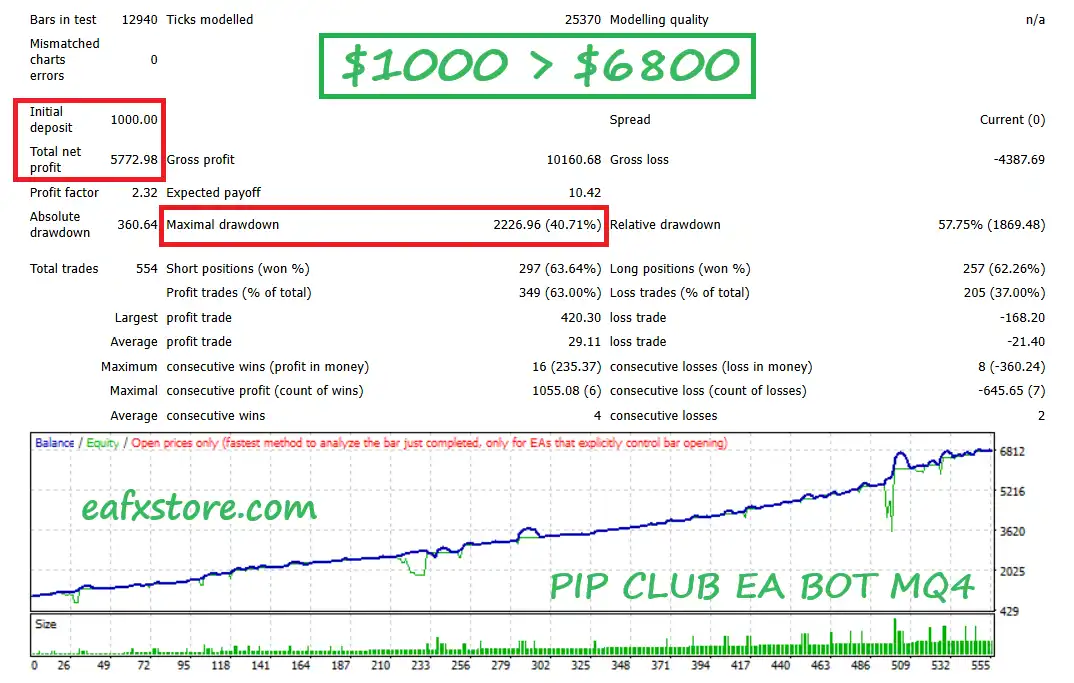
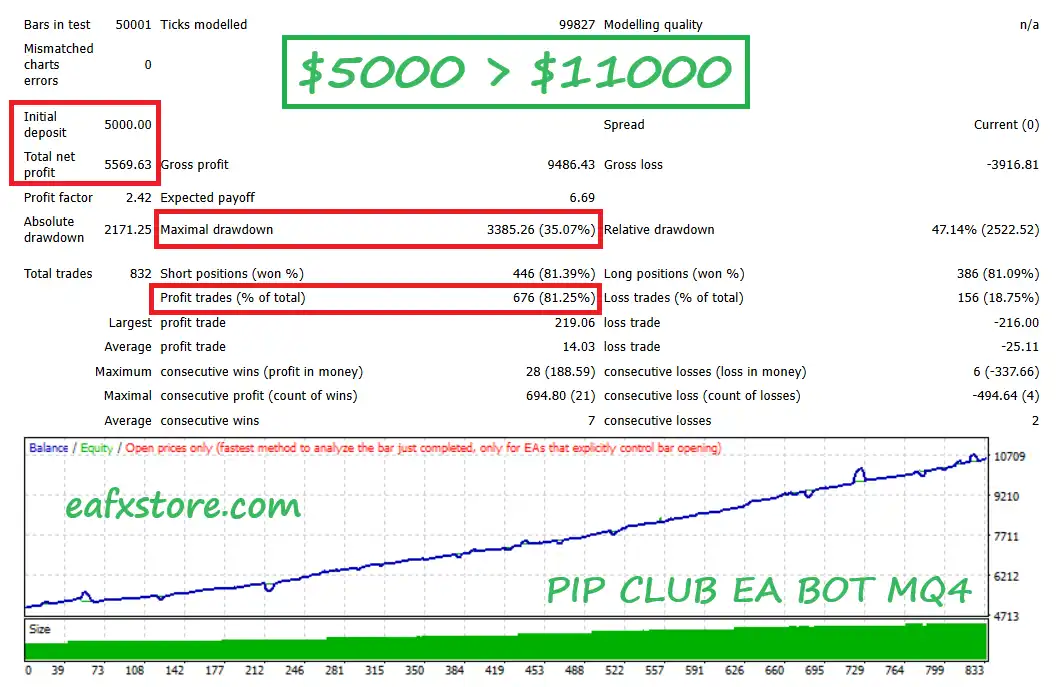
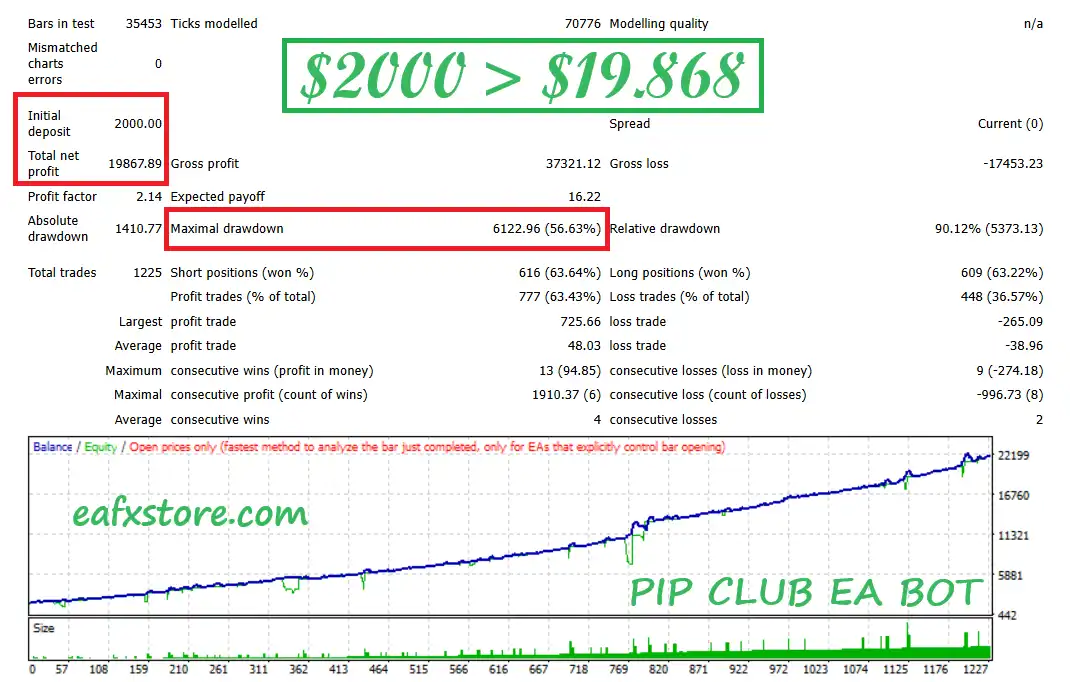
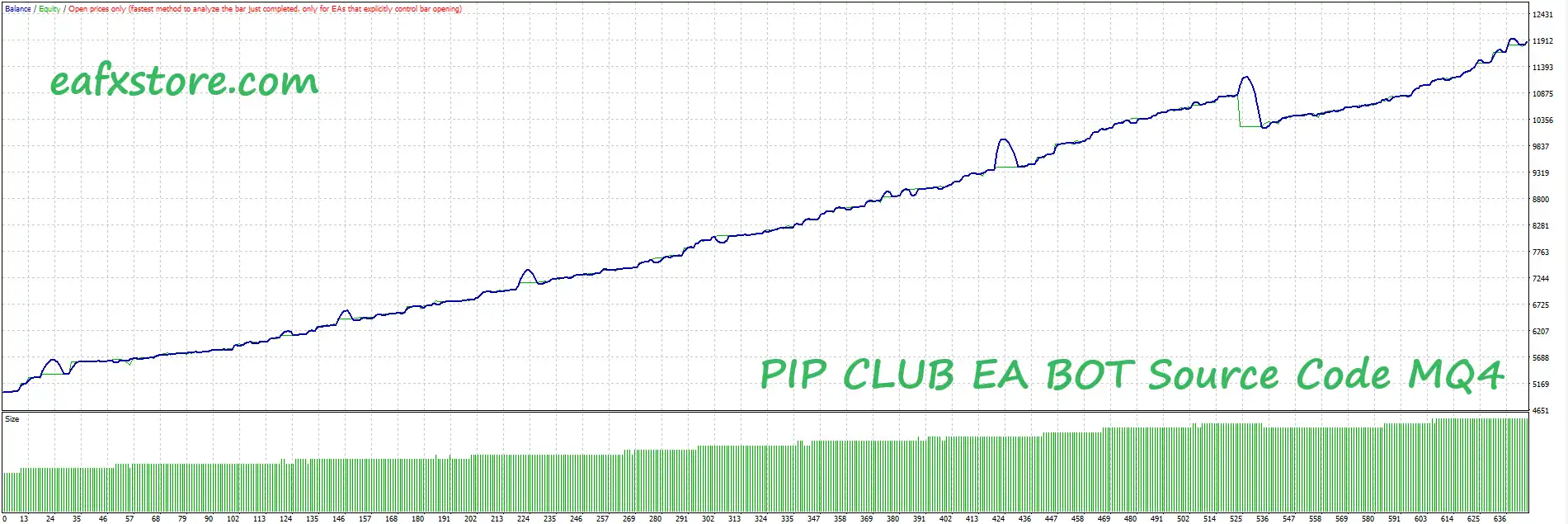
Passing rigorous and meticulous long-term tests shows stable profit potential.
PIP CLUB EA BOT Source Code Reviews
PIP CLUB EA BOT Source Code Reviews
PIP CLUB EA BOT Source Code Reviews
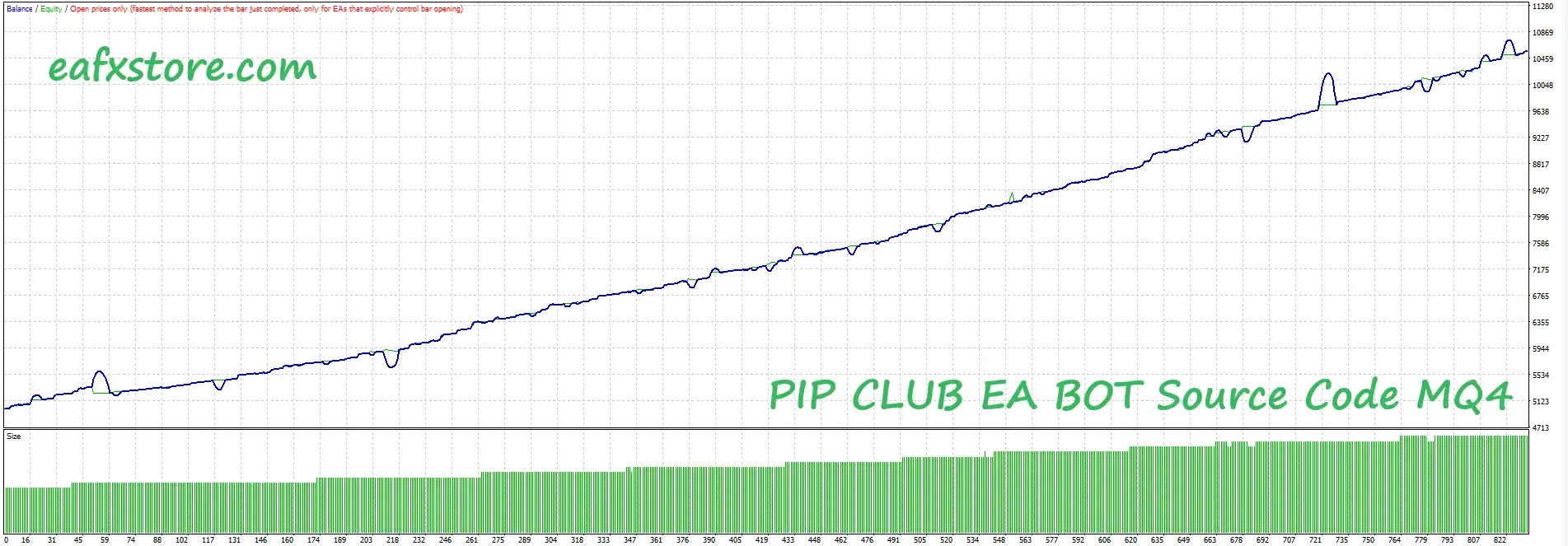
PIP CLUB EA BOT Source Code Reviews
Recommended settings
Recommended settings and parameters to pay attention to from developers and experts:
| Features | Type |
|---|---|
| Trading platform | MetaTrader 4 (MT4) |
| Account type | Any |
| Currency pairs | AUD, JPY, USD, GBP, XAU, US30, NAS100, SPX, EUR |
| Time frames | M5, M15 (Any times) |
| Minimum / Recommended deposit | $1,000 |
| Setup files | Available |
| Product type | Unlimited |
| Additional services | Unlock and Decompile |
| Recommended brokers | Exness Broker, Icmarkets Broker |
| Recommended VPS | MyfxVPS.com ( Blue VPS, Golden VPS). Lowest Latency, 2 week Free Trial, 100% Free for 12-18 Months. |
Product Download Package?
The download package of the product suite includes:
Experts
✅ PIP CLUB EA BOT Source Code.mq4
SetFiles
✅ EURUSD SET 1K M30.set
✅ EURUSD SET 2K M15.set
✅ EURUSD SET 5K M5_X2.set
➡️ Reviewed by David Easton
🔢 PIP CLUB EA BOT MT4 Settings Guide
PIP CLUB EA BOT is a highly configurable automated trading system designed with multiple trading engines, grid management, dynamic lot controls, profit protection, time filters, HILO signal filtering, trailing-stop management, equity protection and economic-news filtering.
The settings shown in the supplied screenshots reveal a comprehensive configuration framework that allows traders to control Buy/Sell engines, grid progression, lot sizing, trade frequency, profit protection, trading schedules, visual information panels, risk controls and high-impact news protection.
PIP CLUB EA BOT Settings
🔢 PIP CLUB EA BOT Settings
🔶 General & Display Settings
🔹 SerialKey: No value is specified in the supplied settings — this field is intended for the EA’s serial/license key.
🔹 Version_: No value is specified — this is a version/configuration reference field.
🔹 Version1_: PIP CLUB EA Auto Trader 2.0 — Displays the EA/version identification as PIP CLUB EA Auto Trader 2.0.
🔹 Version2_: No value is specified — an additional version information field.
🔹 Display Info: true — Enables the information display on the trading chart.
🔹 Display background color: true — Enables the background color for the information display.
🔹 background color: Black — Sets the information-panel background color to Black.
🔶 Max Trades & Hard Stop Loss
🔹 Max buy trades (0 disabled): 10 — Allows a maximum of 10 Buy trades; 0 would disable this limit.
🔹 Max sell trades (0 disabled): 10 — Allows a maximum of 10 Sell trades; 0 would disable this limit.
🔹 Hard SL (in points): 10000 — Sets the hard Stop Loss distance to 10000 points.
🔶 Switches & Order Controls
🔹 Start MANUAL Order Grid (Only if A / B Enable): false — Disables manually starting the grid when Engine A/B is enabled.
🔹 Open New Orders?: true — Allows the EA to open new orders.
🔹 Enable Grid?: true — Enables the EA’s grid trading functionality.
🔹 closes all orders now: false — The emergency function to immediately close all orders is currently disabled.
🔶 Magic Number Engine
🔹 Magic_: Magic Number Engine — Section controlling the unique identifiers used by the trading engines.
🔹 Enable Engine A [BUY]: true — Enables Engine A for Buy-side trading.
🔹 Magic Number A: 1111 — Assigns Magic Number 1111 to Engine A Buy trades.
🔹 Enable Engine B [SELL]: true — Enables Engine B for Sell-side trading.
🔹 Magic Number B: 2222 — Assigns Magic Number 2222 to Engine B Sell trades.
🔹 Engine fallback note: if all the engines are disabled runs a motor in buy and sell — The supplied panel indicates that if all engines are disabled, the EA can run a Buy-and-Sell motor.
🔶 Lot & Initial Trade Settings
🔹 Lot Mode: Percent Lot — Selects Percent Lot as the active lot-sizing mode.
🔹 Fixed Lot: 0.1 — Defines the fixed-lot parameter as 0.1 lots when fixed-lot calculation is used.
🔹 Percent Lot: 0.1 — Sets the percentage-based lot parameter to 0.1.
🔹 Take Profit in Pips: 6000 — Sets the Take Profit target to 6000 pips.
🔶 Grid Settings
🔹 Type Grid Lot: Martingale Lot 0.01 / 0.02 / 0.04 / 0.08 / 0.16 /........ — Selects the Martingale Lot progression, beginning with 0.01 / 0.02 / 0.04 / 0.08 / 0.16 / ….
🔹 Step Size in Pips: 3 — Sets the distance between grid levels to 3 pips.
🔹 Grid Increment Factor (If Martingale): 2.0 — Sets the Martingale grid lot multiplier to 2.0.
🔹 STEP LOT (If Step Lot): 4 — Sets the Step Lot parameter to 4 when Step Lot mode is used.
🔹 Max Lot: 99.0 — Limits the maximum lot size to 99.0 lots.
🔹 After Level Change Lot to A to B (Necessari all Engine Enable): 2 — Sets the level-change parameter to 2 for switching lot behavior between Engine A and Engine B when all engines are enabled.
🔹 Enable Grid Dual Side: false — Disables simultaneous dual-side grid operation.
🔶 One-Order-Per-Candle Filter
🔹 Open one order by candle: true — Restricts the EA to opening one order per candle according to the selected timeframe.
🔹 Timeframe OpenOneCandle: current — Uses the current chart timeframe for the one-order-per-candle filter.
🔶 Minimum Profit Close & Grid Protection
🔹 Enable Minimal Profit Close: true — Enables the minimum-profit closing mechanism.
🔹 Enable Protect Grid Last Save Firsts: true — Enables the grid protection mechanism designed to protect the last/save-first positions according to the EA’s internal logic.
🔹 Minimal Profit Close /Protect Grid: 10.0 — Sets the minimum profit/protection threshold to 10.0.
🔹 Qtd Trades to Minimal Profit Close / Protect Grid: 10 — Sets the number of trades involved in the minimum-profit/grid-protection condition to 10.
🔶 Additional Configuration
🔹 Hedge After Level: 0 — Sets the hedge activation level to 0.
🔹 Daily Target in Money: 50 — Sets the daily monetary target to 50.
🔶 Moving Average Settings
🔹 Moving Average TimeFrame: current — Uses the current chart timeframe for the Moving Average.
🔹 Moving Average Period: 34 — Sets the Moving Average period to 34.
🔹 Moving Average Method: Exponential — Uses an Exponential Moving Average (EMA) calculation.
🔹 Moving Average Price: Open price — Calculates the Moving Average using the Open price.
🔹 Moving Average Shift: 0 — Sets the Moving Average shift to 0.
🔶 Trading Time Filter
🔹 InpUtilizeTimeFilter: true — Enables the trading-time filter.
🔹 InpTrade_in_Monday: true — Allows trading on Monday.
🔹 InpTrade_in_Tuesday: true — Allows trading on Tuesday.
🔹 InpTrade_in_Wednesday: true — Allows trading on Wednesday.
🔹 InpTrade_in_Thursday: true — Allows trading on Thursday.
🔹 InpTrade_in_Friday: true — Allows trading on Friday.
🔹 InpStartHour: 00:00 — Sets the trading start time to 00:00.
🔹 InpEndHour: 23:59 — Sets the trading end time to 23:59.
🔶 Visual Information Panel — Visor 1
🔹 Visor1_Show_the_Time: true — Displays the current chart/trading time.
🔹 Visor1_Show_the_Price: true — Displays the current price information.
🔹 Visor1_Price_Up_Color: LawnGreen — Sets the upward-price display color to LawnGreen.
🔹 Visor1_Price_Down_Color: Tomato — Sets the downward-price display color to Tomato.
🔹 Visor1_Price_X_Position: 10 — Sets the X-axis price display position to 10.
🔹 Visor1_Price_Y_Position: 10 — Sets the Y-axis price display position to 10.
🔹 Visor1_Price_Size: 20 — Sets the displayed price size to 20.
🔹 Visor1_Percent_X_Position: 10 — Sets the percentage display X position to 10.
🔹 Visor1_Percent_Y_Position: 70 — Sets the percentage display Y position to 70.
🔹 Visor1_Percent_Size: 20 — Sets the percentage display size to 20.
🔹 Visor1_Symbol_X_Position: 10 — Sets the symbol display X position to 10.
🔹 Visor1_Symbol_Y_Position: 40 — Sets the symbol display Y position to 40.
🔹 Visor1_Symbol_Size: 20 — Sets the symbol display size to 20.
🔹 Visor1_Chart_Timezone: -5 — Configures the chart timezone offset as -5.
🔹 Visor1_Time_Color: Yellow — Sets the displayed time color to Yellow.
🔹 Visor1_Time_Size: 17 — Sets the time display font size to 17.
🔹 Visor1_Time_X_Position: 10 — Sets the time display X position to 10.
🔹 Visor1_Time_Y_Position: 10 — Sets the time display Y position to 10.
🔹 Visor1_Spread_Size: 10 — Sets the spread display size to 10.
🔹 Visor1_Spread_X_Position: 10 — Sets the spread display X position to 10.
🔹 Visor1_Spread_Y_Position: 100 — Sets the spread display Y position to 100.
🔶 HILO Signal Settings
🔹 Enable Signal HILO: true — Enables the HILO signal component.
🔹 If True Invert Filter: false — Keeps the HILO filter in its normal direction rather than inverting the signal.
🔹 HILO TimeFrame: current — Uses the current chart timeframe for HILO calculations.
🔹 HILO Period: 3 — Sets the HILO calculation period to 3.
🔹 HILO Method: Exponential — Uses the Exponential calculation method.
🔹 HILO Shift: 0 — Sets the HILO shift to 0.
🔶 Trailing Stop Settings
🔹 Use Trailing Stop?: true — Enables the trailing-stop mechanism.
🔹 TrailingStart: 20 — Activates trailing management after the configured 20 threshold.
🔹 Size Trailing stop: 20 — Sets the trailing-stop distance/size to 20.
🔶 Break-Even Settings
🔹 Use Break Even?: true — Enables break-even management.
🔹 Break Even Start: 15 — Starts break-even management at 15.
🔹 Break Even Step: 3 — Sets the break-even adjustment step to 3.
🔶 Take Equity Stop
🔹 Usar Take Equity Stop?: true — Enables the Take Equity Stop function.
🔹 Closes all orders once Float hits this $ amount: 50.0 — Closes all orders once floating P/L reaches the configured $50.0 amount.
🔶 Spread Filter
🔹 Max Spread in Pips: 24 — Sets the maximum allowed spread to 24 pips.
🔶 Equity Caution
🔹 EquityCaution?: true — Enables the equity-caution protection mechanism.
🔹 Total % Risk to EquityCaution: 20.0 — Sets the equity-caution risk threshold to 20.0%.
🔹 Timeframe as EquityCaution: 1 Day — Uses a 1 Day timeframe for the equity-caution calculation.
🔶 Daily Target Filter
🔹 Use_Daily_Target: true — Enables the daily profit-target mechanism.
🔹 Daily_Target: 50.0 — Sets the daily target to 50.0.
🔶 Equity Stop
🔹 Use Equity Stop?: true — Enables the equity-stop mechanism.
🔹 Total % Risk to EquityStop: 60.0 — Sets the total equity-stop risk threshold to 60.0%.
🔹 Send Alert to Celular: false — Disables mobile/cellular alerts.
🔹 Close all orders in TotalEquityRisk: false — Disables closing all orders when the total equity-risk threshold is reached.
🔹 Remove EA and close chart after Equity stop closes trades: true — Removes the EA and closes the chart after the equity stop has closed trades.
🔶 News Filter — Investing.com
🔹 Use news filter: true — Enables the economic-news filtering system.
🔹 Close trades during news period: false — Keeps existing trades open during the configured news period.
Low-Impact News
🔹 Scan for low impact news: false — Disables scanning for low-impact economic events.
🔹 Before low impact news: 5 — Sets a 5-minute pre-news period for low-impact events.
🔹 After low impact news: 5 — Sets a 5-minute post-news period for low-impact events.
Medium-Impact News
🔹 Scan for medium impact news: false — Disables scanning for medium-impact economic events.
🔹 Before medium impact news: 5 — Sets a 5-minute pre-news period for medium-impact events.
🔹 After medium impact news: 5 — Sets a 5-minute post-news period for medium-impact events.
High-Impact News
🔹 Scan for high impact news: true — Enables scanning for high-impact economic events.
🔹 Before high impact news: 5 — Stops/filters activity 5 minutes before high-impact news according to the EA’s news logic.
🔹 After high impact news: 5 — Maintains the configured news protection for 5 minutes after high-impact news.
NFP News
🔹 Scan for NFP news: true — Enables scanning for Non-Farm Payroll (NFP) events.
🔹 Before NFP news: 5 — Sets a 5-minute pre-NFP protection period.
🔹 After NFP news: 5 — Sets a 5-minute post-NFP protection period.
🔶 News Chart Visualization
🔹 DrawNewsLines: true — Displays news-related lines on the trading chart.
🔹 Line colour – low impact news: Green — Uses Green for low-impact news lines.
🔹 Line colour – medium impact news: Blue — Uses Blue for medium-impact news lines.
🔹 Line colour – high impact news: Red — Uses Red for high-impact news lines.
🔹 Line width: 1 — Sets the news-line width to 1.
🔹 Line Style: Dot — Uses a Dot line style for news markers.
🔢 Key PIP CLUB EA BOT Configuration Summary
🔹 Version: PIP CLUB EA Auto Trader 2.0
🔹 Buy Engine: true — Engine A is enabled with Magic Number 1111.
🔹 Sell Engine: true — Engine B is enabled with Magic Number 2222.
🔹 Grid: true — Grid trading is enabled.
🔹 Grid Type: Martingale Lot 0.01 / 0.02 / 0.04 / 0.08 / 0.16 /........
🔹 Grid Step: 3 pips.
🔹 Grid Increment Factor: 2.0.
🔹 Maximum Lot: 99.0.
🔹 Maximum Buy Trades: 10.
🔹 Maximum Sell Trades: 10.
🔹 Take Profit: 6000 pips.
🔹 Minimum Profit Protection: true, with 10.0 minimum profit and 10 trades.
🔹 Daily Target: 50.
🔹 Moving Average: 34-period Exponential MA using Open price, with Shift 0.
🔹 HILO: Enabled with Period 3, Exponential method, current timeframe, and Shift 0.
🔹 Trailing Stop: Enabled with TrailingStart 20 and Size Trailing stop 20.
🔹 Break Even: Enabled with Start 15 and Step 3.
🔹 Take Equity Stop: Enabled at $50.0 floating P/L.
🔹 Equity Caution: Enabled at 20.0% over 1 Day.
🔹 Equity Stop: Enabled at 60.0%.
🔹 News Filter: Enabled, with high-impact news and NFP news scanning active.
🔹 High-Impact News Window: 5 minutes before and 5 minutes after.
🔹 NFP News Window: 5 minutes before and 5 minutes after.
🔹 Maximum Spread: 24 pips.
🔹 Trading Schedule: Monday through Friday enabled from 00:00 to 23:59.
🔢 Conclusion
PIP CLUB EA BOT offers a broad and highly configurable trading framework combining dual Buy/Sell engines, grid trading, Martingale lot progression, Moving Average filtering, HILO signals, trailing stops, break-even management, daily targets, equity protection, and economic-news filtering.
The supplied configuration enables both Engine A [BUY] = true and Engine B [SELL] = true, with Magic Numbers 1111 and 2222. Grid trading is enabled with a 3-pip step, 2.0 Martingale increment factor, and 99.0 maximum lot, while the EA permits up to 10 Buy and 10 Sell trades.
Risk-control features are also active, including Take Equity Stop at 50.0, Equity Caution at 20.0%, Equity Stop at 60.0%, trailing stop, and break-even management. The news filter focuses particularly on high-impact and NFP events, with 5-minute protection windows before and after each event.
Because the configuration includes a Martingale grid system, a very high Max Lot of 99.0, and up to 10 Buy + 10 Sell trades, users should carefully evaluate exposure, margin requirements, and maximum drawdown through extensive backtesting and forward testing before live deployment.
User Reviews
Only logged in customers who have purchased this product may leave a review.
🔥 Get This EA for FREE with Our Membership! 🚀🚀
Unlock access to this EA, premium Indicators, and exclusive trading tools completely FREE with any of our Membership Plans! Thousands of traders already benefit from our VIP library—join them and level up your trading instantly. Choose Your Membership:
- SPECIAL – 1 Month Membership
- GOLD – 1 Year Membership
- PREMIUM – 1 Year Membership
-
 Price range: $60.00 through $599.00
 -
 Original price was: $329.00.$89.00Current price is: $89.00.
 -
 Original price was: $899.00.$89.00Current price is: $89.00.
 -
 Price range: $89.00 through $599.00
-
 0Original price was: $1,999.00.$249.00Current price is: $249.00.
 -
 0Original price was: $890.00.$149.00Current price is: $149.00.
 -
 0Original price was: $900.00.$199.00Current price is: $199.00.
 -
 2Original price was: $3,999.00.$199.00Current price is: $199.00.
There are no reviews yet.