


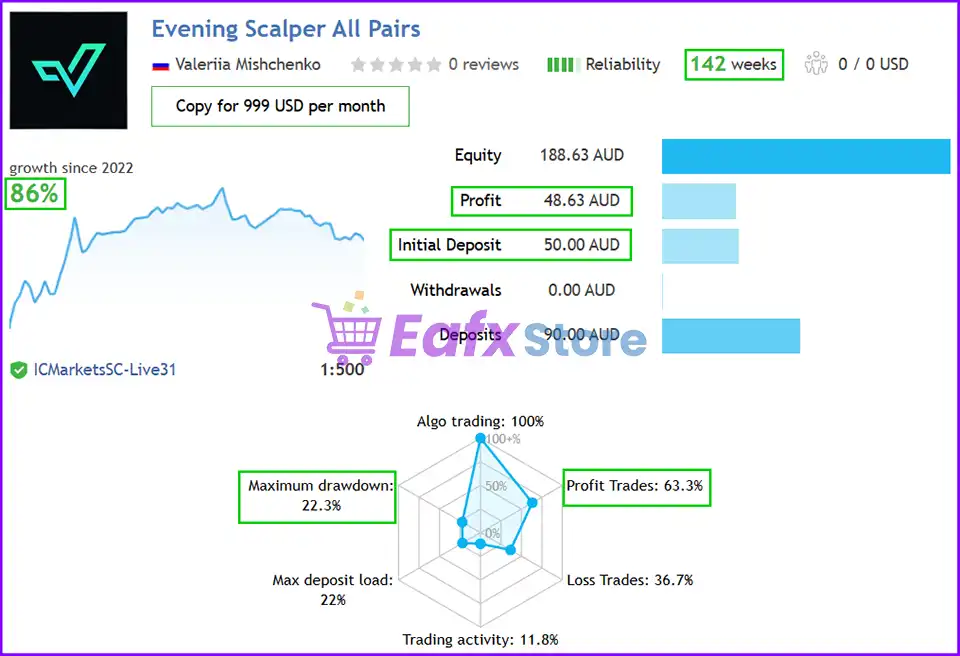
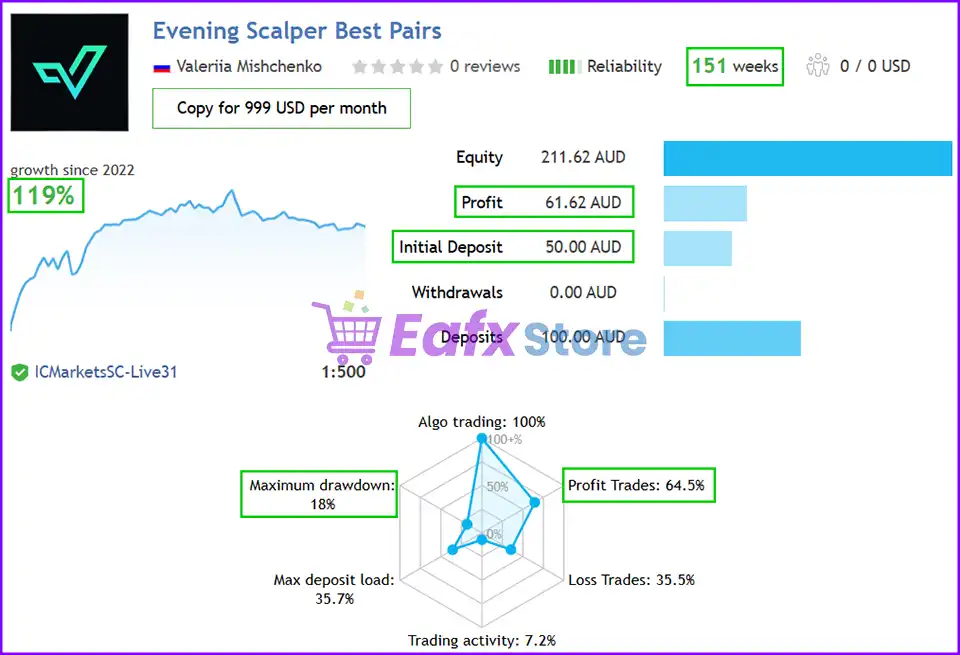
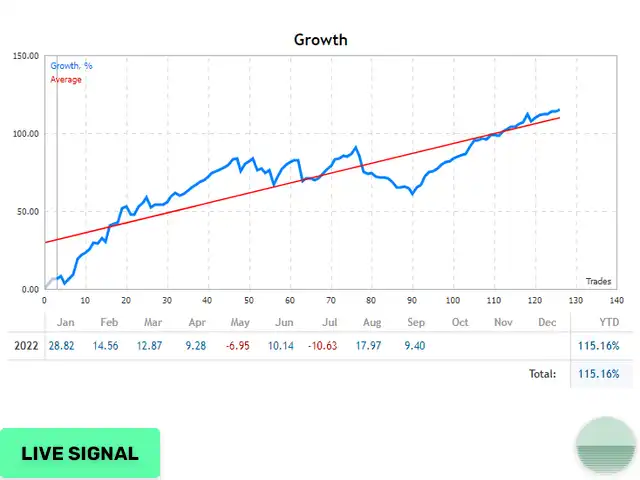
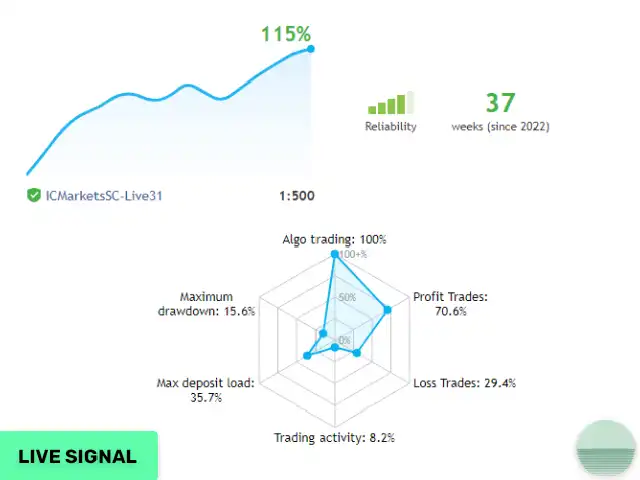


Evening Scalper Pro EA MQ4 v2.39 + SetFiles (Source Code)

Subscriptions for Special Plan
- 30 EA package is more economical!
- Special package with 99%
- Download 1 EA/Day

Subscriptions for Premium Membership
- Download Unlimited in 1 Year
- Get 100% Discount
- Get free access to all

Subscriptions for Gold Membership
- 1 Year Membership
- Get 100% Discount
- Access EA+Indicator+Course
Frequently bought together 🎁
Add these products to enhance your purchase

🔢 Evening Scalper Pro EA Settings Guide
Evening Scalper Pro EA is a configurable automated trading system designed for controlled short-session trading, with extensive parameters for money management, drawdown protection, trading schedules, spread and slippage control, currency exposure, volatility filtering, news protection, rollover management and backtesting.
The supplied configuration is particularly focused on an evening trading window from 19:00 to 23:59, while providing additional safeguards for market conditions and major economic events.
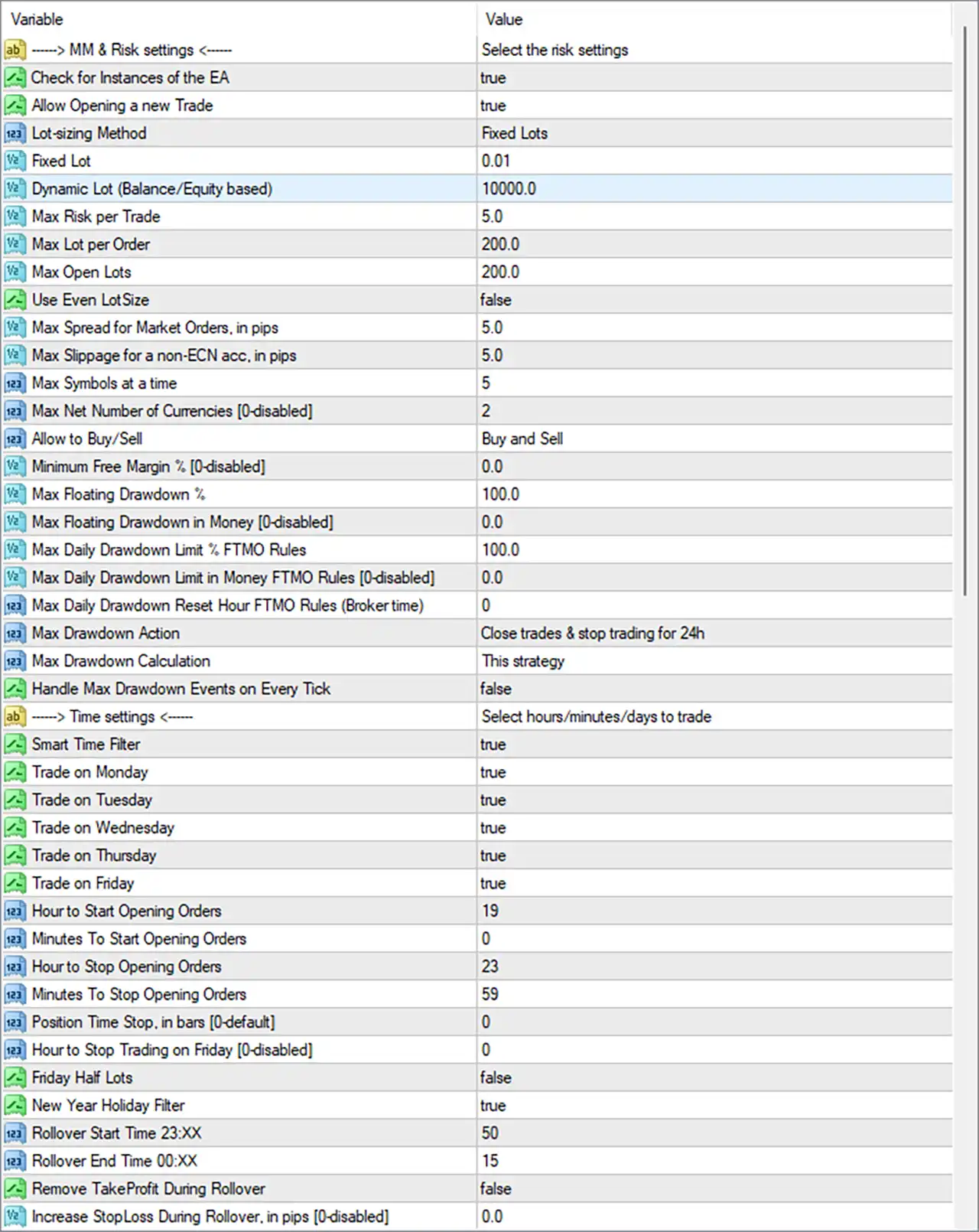
Evening Scalper Pro MT4 Settings Panel
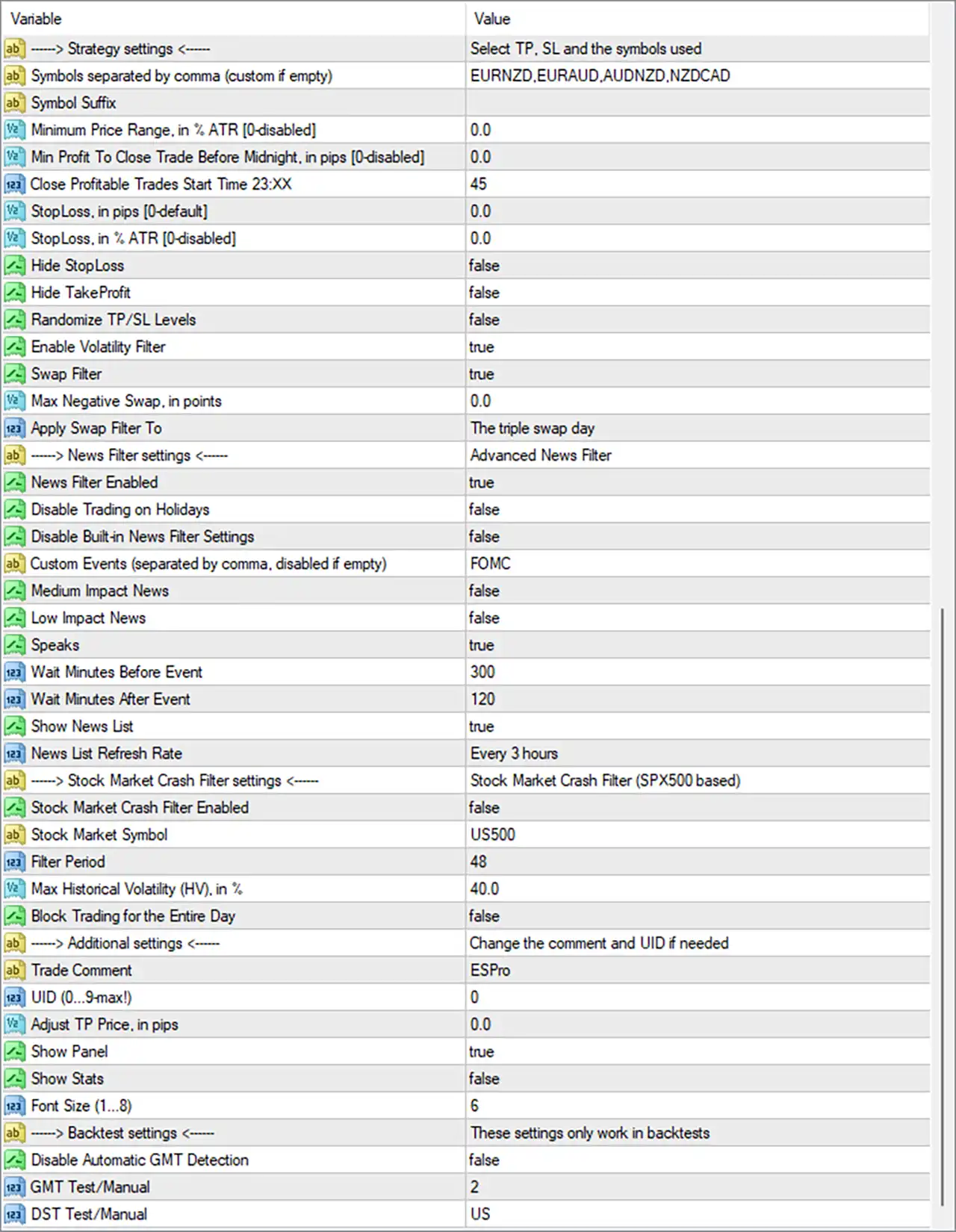
Evening Scalper Pro EA Settings Panel
🔢 Evening Scalper Pro EA Settings Explained
🔄 Money Management & Risk Settings
🔹 Check for Instances of the EA: true — Enables checking for other instances of the EA, helping control duplicate EA instances.
🔹 Allow Opening a new Trade: true — Allows the EA to open new trades when its trading conditions are satisfied.
🔹 Lot-sizing Method: Fixed Lots — Selects fixed-lot sizing as the active position-sizing method.
🔹 Fixed Lot: 0.01 — Sets the fixed trading volume to 0.01 lots.
🔹 Dynamic Lot (Balance/Equity based): 10000.0 — Defines the configured balance/equity reference value for dynamic lot calculations.
🔹 Max Risk per Trade: 5.0 — Sets the maximum configured risk per trade to 5.0.
🔹 Max Lot per Order: 200.0 — Limits the maximum lot volume allowed for an individual order to 200.0 lots.
🔹 Max Open Lots: 200.0 — Sets the maximum combined open lot exposure to 200.0 lots.
🔹 Use Even LotSize: false — Disables even lot-size adjustment.
🔹 Max Spread for Market Orders, in pips: 5.0 — Prevents market-order execution when the spread exceeds the configured 5.0 pips threshold.
🔹 Max Slippage for a non-ECN acc, in pips: 5.0 — Sets the maximum allowed slippage for non-ECN accounts to 5.0 pips.
🔹 Max Symbols at a time: 5 — Limits simultaneous symbol exposure to a maximum of 5 symbols.
🔹 Max Net Number of Currencies [0-disabled]: 2 — Limits the maximum configured net number of currencies to 2; 0 would disable this restriction.
🔹 Allow to Buy/Sell: Buy and Sell — Allows the EA to trade in both Buy and Sell directions.
🔹 Minimum Free Margin % [0-disabled]: 0.0 — Sets the minimum free-margin requirement to 0.0%, effectively disabling this specific threshold.
🔹 Max Floating Drawdown %: 100.0 — Sets the maximum floating drawdown threshold to 100.0%.
🔹 Max Floating Drawdown in Money [0-disabled]: 0.0 — Sets the money-based floating drawdown limit to 0.0, which disables this limit according to the parameter description.
🔹 Max Daily Drawdown Limit % FTMO Rules: 100.0 — Sets the daily drawdown percentage limit to 100.0% under the configured FTMO Rules setting.
🔹 Max Daily Drawdown Limit in Money FTMO Rules [0-disabled]: 0.0 — Sets the money-based daily drawdown limit to 0.0, disabling this particular monetary threshold.
🔹 Max Daily Drawdown Reset Hour FTMO Rules (Broker time): 0 — Sets the daily drawdown reset hour to 0:00 broker time.
🔹 Max Drawdown Action: Close trades & stop trading for 24h — Instructs the EA to close trades and stop opening new trades for 24 hours when the configured drawdown condition is triggered.
🔹 Max Drawdown Calculation: This strategy — Calculates the configured maximum drawdown according to the current strategy.
🔹 Handle Max Drawdown Events on Every Tick: false — Disables processing maximum-drawdown events on every incoming tick.
🔄 Time Settings
🔹 Smart Time Filter: true — Enables the smart time filter for controlling when the EA can trade.
🔹 Trade on Monday: true — Allows trading on Monday.
🔹 Trade on Tuesday: true — Allows trading on Tuesday.
🔹 Trade on Wednesday: true — Allows trading on Wednesday.
🔹 Trade on Thursday: true — Allows trading on Thursday.
🔹 Trade on Friday: true — Allows trading on Friday.
🔹 Hour to Start Opening Orders: 19 — Sets the order-opening start hour to 19:00.
🔹 Minutes To Start Opening Orders: 0 — Sets the order-opening start minute to 00, resulting in a start time of 19:00.
🔹 Hour to Stop Opening Orders: 23 — Sets the order-opening stop hour to 23.
🔹 Minutes To Stop Opening Orders: 59 — Sets the order-opening stop minute to 59, resulting in a stop time of 23:59.
🔹 Position Time Stop, in bars [0-default]: 0 — Sets the position time-stop parameter to 0, leaving this time-based position exit at its default/disabled state.
🔹 Hour to Stop Trading on Friday [0-disabled]: 0 — Sets the Friday-specific stop-trading hour to 0; the parameter is disabled according to its [0-disabled] description.
🔹 Friday Half Lots: false — Disables the Friday half-lot feature.
🔄 Holiday & Rollover Settings
🔹 New Year Holiday Filter: true — Enables the New Year holiday filter to help restrict trading around the configured holiday period.
🔹 Rollover Start Time 23:XX: 50 — Sets rollover protection to begin at 23:50.
🔹 Rollover End Time 00:XX: 15 — Sets the rollover protection period to end at 00:15.
🔹 Remove TakeProfit During Rollover: false — Keeps Take Profit levels active during the rollover period.
🔹 Increase StopLoss During Rollover, in pips [0-disabled]: 0.0 — Sets additional Stop Loss distance during rollover to 0.0 pips, leaving this adjustment disabled.
🔄 Strategy Settings
🔹 Symbols separated by comma (custom if empty): EURNZD,EURAUD,AUDNZD,NZDCAD — Defines the configured trading symbols as EURNZD, EURAUD, AUDNZD, and NZDCAD.
🔹 Symbol Suffix: blank — No additional broker-specific symbol suffix is configured.
🔹 Minimum Price Range, in % ATR [0-disabled]: 0.0 — Sets the minimum price-range requirement to 0.0% ATR, disabling this threshold.
🔹 Min Profit To Close Trade Before Midnight, in pips [0-disabled]: 0.0 — Sets the minimum profit required for the pre-midnight closing rule to 0.0 pips, leaving the threshold disabled.
🔹 Close Profitable Trades Start Time 23:XX: 45 — Sets the start time for closing profitable trades at 23:45.
🔹 StopLoss, in pips [0-default]: 0.0 — Sets the explicit pip-based Stop Loss to 0.0, leaving it at the default/disabled state.
🔹 StopLoss, in % ATR [0-disabled]: 0.0 — Sets the ATR-based Stop Loss percentage to 0.0, disabling this setting.
🔹 Hide StopLoss: false — Keeps Stop Loss levels visible rather than hiding them.
🔹 Hide TakeProfit: false — Keeps Take Profit levels visible rather than hiding them.
🔹 Randomize TP/SL Levels: false — Disables randomization of Take Profit and Stop Loss levels.
🔹 Enable Volatility Filter: true — Enables the volatility filter to evaluate market volatility before trading.
🔹 Swap Filter: true — Enables the swap filter for evaluating overnight/swap-related trading conditions.
🔹 Max Negative Swap, in points: 0.0 — Sets the maximum negative swap threshold to 0.0 points.
🔹 Apply Swap Filter To: The triple swap day — Applies the swap filter specifically to the triple swap day.
🔄 News Filter Settings
🔹 News Filter Enabled: true — Enables the EA’s economic-news filtering system.
🔹 Disable Trading on Holidays: false — Keeps holiday-based trading enabled rather than disabling trading through this setting.
🔹 Disable Built-in News Filter Settings: false — Keeps the built-in news-filter settings active.
🔹 Custom Events (separated by comma, disabled if empty): FOMC — Adds FOMC as a custom economic event to be considered by the news filter.
🔹 Medium Impact News: false — Disables filtering specifically for medium-impact news.
🔹 Low Impact News: false — Disables filtering specifically for low-impact news.
🔹 Speaks: true — Enables the configured Speaks news/event category.
🔹 Wait Minutes Before Event: 300 — Prevents or restricts trading for 300 minutes before a qualifying event.
🔹 Wait Minutes After Event: 120 — Prevents or restricts trading for 120 minutes after a qualifying event.
🔹 Show News List: true — Displays the relevant news list.
🔹 News List Refresh Rate: Every 3 hours — Refreshes the news list every 3 hours.
🔄 Stock Market Crash Filter
🔹 Stock Market Crash Filter Enabled: false — Disables the stock-market crash filter.
🔹 Stock Market Symbol: US500 — Specifies US500 as the stock-market symbol used by the crash-filter configuration.
🔹 Filter Period: 48 — Sets the stock-market crash filter analysis period to 48.
🔹 Max Historical Volatility (HV), in %: 40.0 — Sets maximum historical volatility to 40.0% for the crash-filter configuration.
🔹 Block Trading for the Entire Day: false — Does not block trading for the entire day when the stock-market crash filter condition is considered.
🔄 Additional Settings
🔹 Trade Comment: ESPro — Sets ESPro as the comment associated with EA trades.
🔹 UID (0…9max!): 0 — Sets the user/account identification value to 0, within the displayed 0...9 range.
🔹 Adjust TP Price, in pips: 0.0 — Applies no additional Take Profit price adjustment, with the value set to 0.0 pips.
🔹 Show Panel: true — Displays the EA information/control panel on the chart.
🔹 Show Stats: false — Disables the statistics display.
🔹 Font Size (1…8): 6 — Sets the panel font size to 6 within the displayed 1–8 range.
🔄 Backtest Settings
🔹 Disable Automatic GMT Detection: false — Keeps automatic GMT detection enabled.
🔹 GMT Test/Manual: 2 — Sets the manual/test GMT value to 2.
🔹 DST Test/Manual: US — Sets the Daylight Saving Time test/manual region to US.
🔢 Complete Evening Scalper Pro EA Configuration
🔄 Money Management & Risk
🔹 Check for Instances of the EA: true
🔹 Allow Opening a new Trade: true
🔹 Lot-sizing Method: Fixed Lots
🔹 Fixed Lot: 0.01
🔹 Dynamic Lot (Balance/Equity based): 10000.0
🔹 Max Risk per Trade: 5.0
🔹 Max Lot per Order: 200.0
🔹 Max Open Lots: 200.0
🔹 Use Even LotSize: false
🔹 Max Spread for Market Orders, in pips: 5.0
🔹 Max Slippage for a non-ECN acc, in pips: 5.0
🔹 Max Symbols at a time: 5
🔹 Max Net Number of Currencies [0-disabled]: 2
🔹 Allow to Buy/Sell: Buy and Sell
🔹 Minimum Free Margin % [0-disabled]: 0.0
🔹 Max Floating Drawdown %: 100.0
🔹 Max Floating Drawdown in Money [0-disabled]: 0.0
🔹 Max Daily Drawdown Limit % FTMO Rules: 100.0
🔹 Max Daily Drawdown Limit in Money FTMO Rules [0-disabled]: 0.0
🔹 Max Daily Drawdown Reset Hour FTMO Rules (Broker time): 0
🔹 Max Drawdown Action: Close trades & stop trading for 24h
🔹 Max Drawdown Calculation: This strategy
🔹 Handle Max Drawdown Events on Every Tick: false
🔄 Time & Rollover
🔹 Smart Time Filter: true
🔹 Trade on Monday: true
🔹 Trade on Tuesday: true
🔹 Trade on Wednesday: true
🔹 Trade on Thursday: true
🔹 Trade on Friday: true
🔹 Hour to Start Opening Orders: 19
🔹 Minutes To Start Opening Orders: 0
🔹 Hour to Stop Opening Orders: 23
🔹 Minutes To Stop Opening Orders: 59
🔹 Position Time Stop, in bars [0-default]: 0
🔹 Hour to Stop Trading on Friday [0-disabled]: 0
🔹 Friday Half Lots: false
🔹 New Year Holiday Filter: true
🔹 Rollover Start Time 23:XX: 50
🔹 Rollover End Time 00:XX: 15
🔹 Remove TakeProfit During Rollover: false
🔹 Increase StopLoss During Rollover, in pips [0-disabled]: 0.0
🔄 Strategy
🔹 Symbols: EURNZD,EURAUD,AUDNZD,NZDCAD
🔹 Symbol Suffix: blank
🔹 Minimum Price Range, in % ATR [0-disabled]: 0.0
🔹 Min Profit To Close Trade Before Midnight, in pips [0-disabled]: 0.0
🔹 Close Profitable Trades Start Time 23:XX: 45
🔹 StopLoss, in pips [0-default]: 0.0
🔹 StopLoss, in % ATR [0-disabled]: 0.0
🔹 Hide StopLoss: false
🔹 Hide TakeProfit: false
🔹 Randomize TP/SL Levels: false
🔹 Enable Volatility Filter: true
🔹 Swap Filter: true
🔹 Max Negative Swap, in points: 0.0
🔹 Apply Swap Filter To: The triple swap day
🔄 News & Market Protection
🔹 News Filter Enabled: true
🔹 Disable Trading on Holidays: false
🔹 Disable Built-in News Filter Settings: false
🔹 Custom Events: FOMC
🔹 Medium Impact News: false
🔹 Low Impact News: false
🔹 Speaks: true
🔹 Wait Minutes Before Event: 300
🔹 Wait Minutes After Event: 120
🔹 Show News List: true
🔹 News List Refresh Rate: Every 3 hours
🔹 Stock Market Crash Filter Enabled: false
🔹 Stock Market Symbol: US500
🔹 Filter Period: 48
🔹 Max Historical Volatility (HV), in %: 40.0
🔹 Block Trading for the Entire Day: false
🔄 Additional & Backtest
🔹 Trade Comment: ESPro
🔹 UID: 0
🔹 Adjust TP Price, in pips: 0.0
🔹 Show Panel: true
🔹 Show Stats: false
🔹 Font Size: 6
🔹 Disable Automatic GMT Detection: false
🔹 GMT Test/Manual: 2
🔹 DST Test/Manual: US
🔢 Key Configuration Highlights
🔹 Evening Trading Window: The EA is configured to open trades from 19:00 to 23:59, matching its evening-scalping orientation.
🔹 Fixed Position Size: The active lot-sizing method is Fixed Lots, with Fixed Lot = 0.01.
🔹 Multi-Symbol Trading: The supplied symbol list contains EURNZD, EURAUD, AUDNZD, and NZDCAD.
🔹 Currency Exposure Control: The EA allows a maximum net number of currencies of 2 and up to 5 symbols at a time.
🔹 Spread Protection: Market orders are restricted at spreads above 5.0 pips.
🔹 Slippage Control: Non-ECN execution slippage is limited to 5.0 pips.
🔹 Volatility Filtering: Enable Volatility Filter = true, adding a market-volatility condition to the trading process.
🔹 News Protection: The news filter is enabled, with FOMC configured as a custom event and 300 minutes before / 120 minutes after event protection.
🔹 Rollover Protection: The rollover window runs from 23:50 to 00:15, while the EA is configured not to remove Take Profit or increase Stop Loss during rollover.
🔹 Midnight Profit Management: Profitable-trade closing begins at 23:45, providing a specific end-of-session management rule.
🔹 Stock Crash Filter: The stock market crash filter is currently disabled, despite having US500, 48 filter period, and 40.0% maximum historical volatility parameters configured.
🔹 Dashboard: Show Panel = true, while Show Stats = false, with the panel font configured to 6.
🔹 GMT Configuration: Automatic GMT detection remains enabled because Disable Automatic GMT Detection = false, with GMT Test/Manual = 2 and DST Test/Manual = US.
🔢 Conclusion
Evening Scalper Pro EA is configured as a highly parameterized automated trading system with a clear emphasis on evening-session trading, controlled currency exposure, volatility filtering, news protection, rollover management, and risk monitoring.
The supplied configuration uses Fixed Lots with a 0.01-lot position size and permits both Buy and Sell trades. The EA can monitor up to 5 symbols simultaneously, with the configured currency limit set to 2. Its primary trading window runs from 19:00 to 23:59, while profitable positions can begin being closed from 23:45.
Market protection includes a 5.0-pip maximum spread, 5.0-pip maximum slippage, an enabled Volatility Filter, and an enabled Swap Filter. The news system is also active, with FOMC specified as a custom event and a substantial 300-minute pre-event and 120-minute post-event waiting period.
The configuration also includes a rollover window from 23:50 to 00:15, a New Year holiday filter, drawdown controls, and a configurable 24-hour trading suspension following a qualifying maximum-drawdown event.
It is important to note that several thresholds are set to values such as 0.0, where the parameter description explicitly states that 0 disables the corresponding feature. Traders should therefore distinguish between configured numerical values and actively enforced protection mechanisms before using the EA on a live account.
Overall, the supplied settings provide a structured framework for evening Forex trading with fixed position sizing, session control, market-condition filtering, economic-news protection, and automated risk-management rules. Thorough backtesting and forward testing are recommended before deployment, particularly when changing the risk, spread, drawdown, and news-filter parameters.
🔢 FAQs
❓ What trading hours are configured for Evening Scalper Pro EA?
The EA is configured to start opening orders at 19:00 and stop opening new orders at 23:59.
❓ Which currency pairs are included in the supplied configuration?
The configured symbols are EURNZD, EURAUD, AUDNZD and NZDCAD.
❓ What is the configured lot size?
The active Lot-sizing Method is Fixed Lots, with Fixed Lot = 0.01.
❓ Does Evening Scalper Pro EA use a news filter?
Yes. News Filter Enabled = true, with FOMC configured as a custom event, 300 minutes before and 120 minutes after event protection.
❓ Does the EA have rollover protection?
Yes. The configured rollover period is 23:50–00:15. However, Remove TakeProfit During Rollover = false and Increase StopLoss During Rollover = 0.0, so neither of those additional rollover adjustments is active in the supplied configuration.
User Reviews
Only logged in customers who have purchased this product may leave a review.
1. What is the core strategy of Evening Scalper Pro?
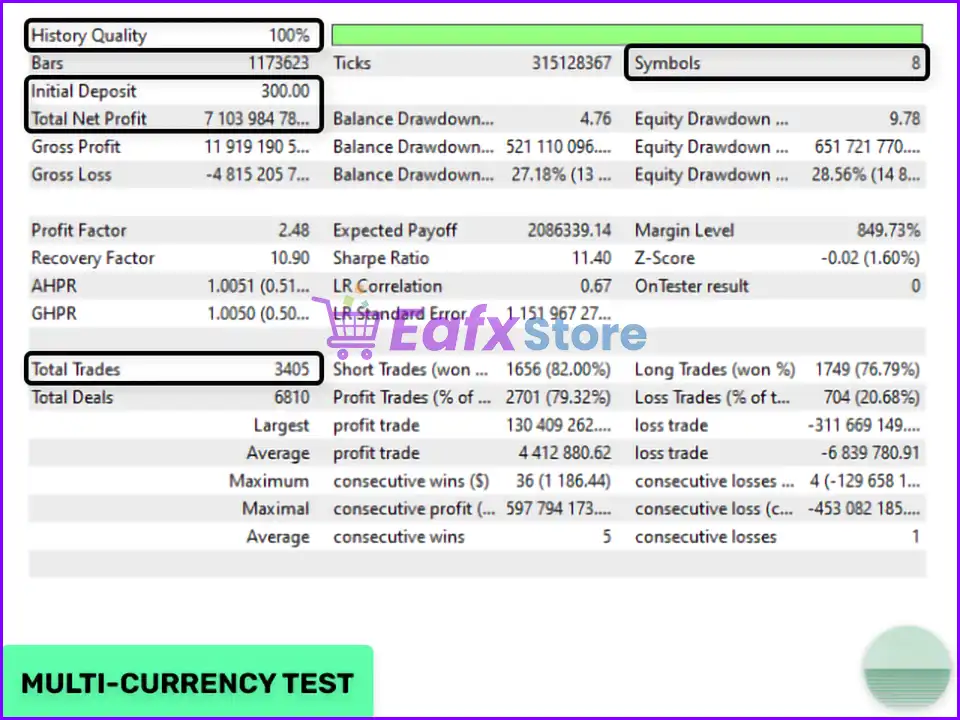
Evening Scalper Pro is a mean-reversion scalping system that capitalizes on short-term price fluctuations during the American trading session. It identifies and trades cross-pairs with strong mean-reverting tendencies.
2. Which currency pairs does the EA support?
The EA supports the following currency pairs: EURNZD, EURAUD, AUDNZD, NZDCAD, AUDCAD, EURGBP, GBPAUD, and GBPCAD.
3. What is the recommended timeframe for trading with the EA?
The recommended timeframe for using the EA is the 5-minute (M5) timeframe.
4. How does the EA handle risk management?
The EA offers various lot-sizing methods, including fixed lot size, dynamic lot size, and maximum risk per trade. Additionally, it has a maximum drawdown percentage setting to limit potential losses.
5. Does the EA have any built-in filters to protect against adverse market conditions?
Yes, the EA incorporates several filters, such as a news filter, stock market crash filter, and negative swap filter to mitigate risks during volatile market periods.
6. What are the hardware and software requirements for running the EA?
The EA requires a VPS (Virtual Private Server) for continuous operation. It can be run on a PC, but it's recommended to use a VPS to ensure uninterrupted trading.
7. What kind of broker account is recommended for using the EA?
A good ECN broker with low spreads and slippage, especially during rollover periods, is recommended for optimal performance.
🔥 Get This EA for FREE with Our Membership! 🚀🚀
Unlock access to this EA, premium Indicators, and exclusive trading tools completely FREE with any of our Membership Plans! Thousands of traders already benefit from our VIP library—join them and level up your trading instantly. Choose Your Membership:
- SPECIAL – 1 Month Membership
- GOLD – 1 Year Membership
- PREMIUM – 1 Year Membership
-
 Price range: $89.00 through $599.00
 -
 Price range: $89.00 through $599.00
 -
 Price range: $89.00 through $599.00
 -
 Price range: $70.00 through $599.00
-
 0Original price was: $1,999.00.$249.00Current price is: $249.00.
 -
 0Original price was: $5,500.00.$199.00Current price is: $199.00.
 -
 2Original price was: $4,997.00.$199.00Current price is: $199.00.
 -
 2Original price was: $3,999.00.$199.00Current price is: $199.00.
There are no reviews yet.