




Atherion Zenith AI EA MQ5 v1.4 (Source Code)

Subscriptions for Special Plan
- 30 EA package is more economical!
- Special package with 99%
- Download 1 EA/Day

Subscriptions for Premium Membership
- Download Unlimited in 1 Year
- Get 100% Discount
- Get free access to all

Subscriptions for Gold Membership
- 1 Year Membership
- Get 100% Discount
- Access EA+Indicator+Course
Frequently bought together 🎁
Add these products to enhance your purchase


Quick Overview
Aetherion Zenith AI EA is a fully automated robot developed for XAUUSD on the H1 chart. It evaluates market structure, volatility and momentum before allowing a trade, and it waits for its internal conditions to align. It offers automated risk management, trailing stop logic and a dashboard, and it is described as selective rather than frequent.
Best For:
✅ Gold traders who prefer the H1 chart.
✅ Users who want selective trade filtering.
✅ Traders who want automated risk controls.
✅ Users who like a trailing stop.
✅ Traders who want a chart dashboard.
What is Aetherion Zenith AI EA MT5?
Aetherion Zenith AI EA is an Expert Advisor (EA) developed specifically for XAUUSD on the H1 timeframe in MetaTrader 5.
It is described as the next generation of the Aetherion concept, with stronger filtering, refined risk behavior and an AI oriented logic layer.
 Vendor Website: View here
How Does Aetherion Zenith AI EA MT5 Work?
Market Evaluation
The EA looks at market structure, volatility, momentum and session activity before it allows a trade.
Selective Entries
Weak setups are filtered out, and positions open only when its internal requirements are aligned.
Risk and Exits
Volume follows the chosen risk level, with a stop loss, a take profit and trailing stop logic.
Dashboard
A panel on the chart shows account status, trading state, risk configuration and position management.
Aetherion Zenith AI EA MT5 Trading Strategy
Study the Market First
The EA evaluates market structure, volatility, momentum and session activity before it allows any trade on gold.
Filter Weak Setups
Internal confirmation layers remove low quality situations, so the robot waits until its own requirements are aligned.
Trade Selectively on H1
The hourly chart gives a broader view of structure and avoids much of the noise seen on lower timeframes.
Set Protective Orders
Each position is opened with a stop loss and a take profit, and the volume is calculated from the chosen risk level.
Manage Exits with Trailing
Trailing stop logic protects profitable positions while still allowing a trade to run when conditions stay favorable.
Verified Live Signal Performance
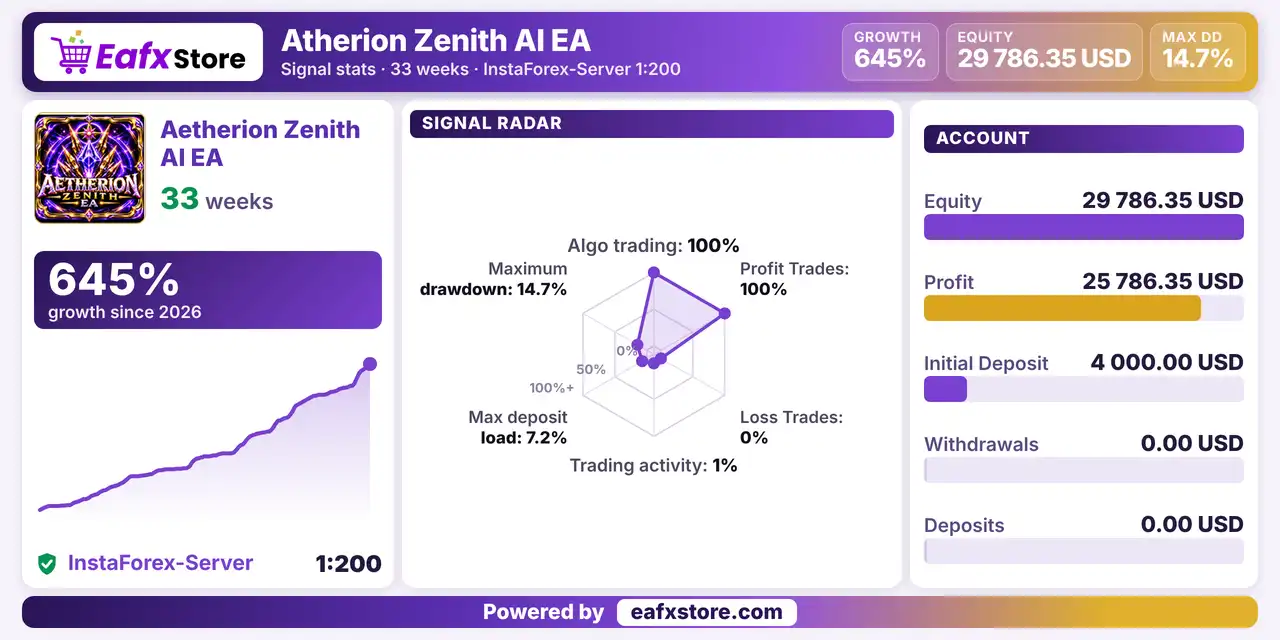
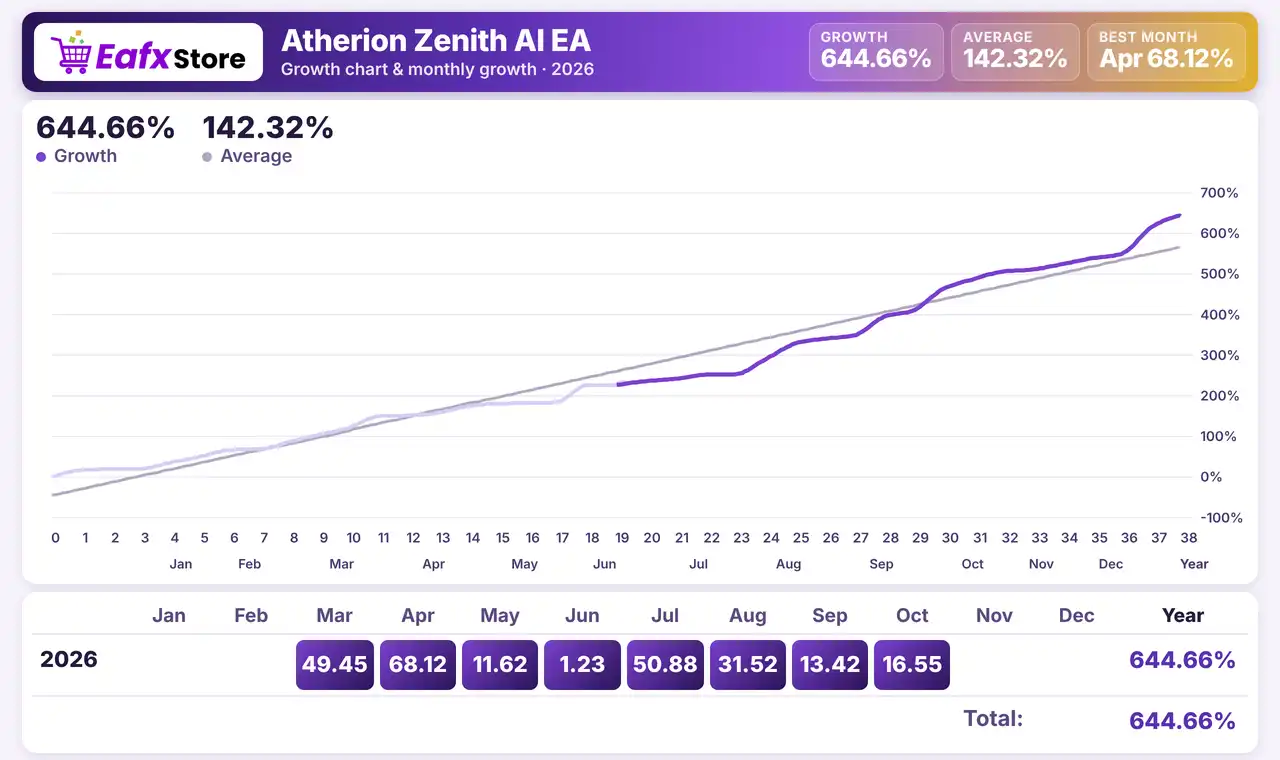
Atherion Zenith AI EA has been tracked live for 33 weeks. The account shows a profit of $25,786.35 from an initial deposit of $4,000, with reported growth of 645%.
Atherion Zenith AI EA Live Signal
| Parameter | Results |
|---|---|
| Initial Deposit | $4,000 |
| Current Equity | $29,786.35 |
| Total Profit | $25,786.35 |
| Growth Since 2026 | 645% |
| Tracking Period | 33 weeks |
| Algorithmic Trading | 100% |
| Maximum Drawdown | 14.7% |
Historical Trading Results Performance
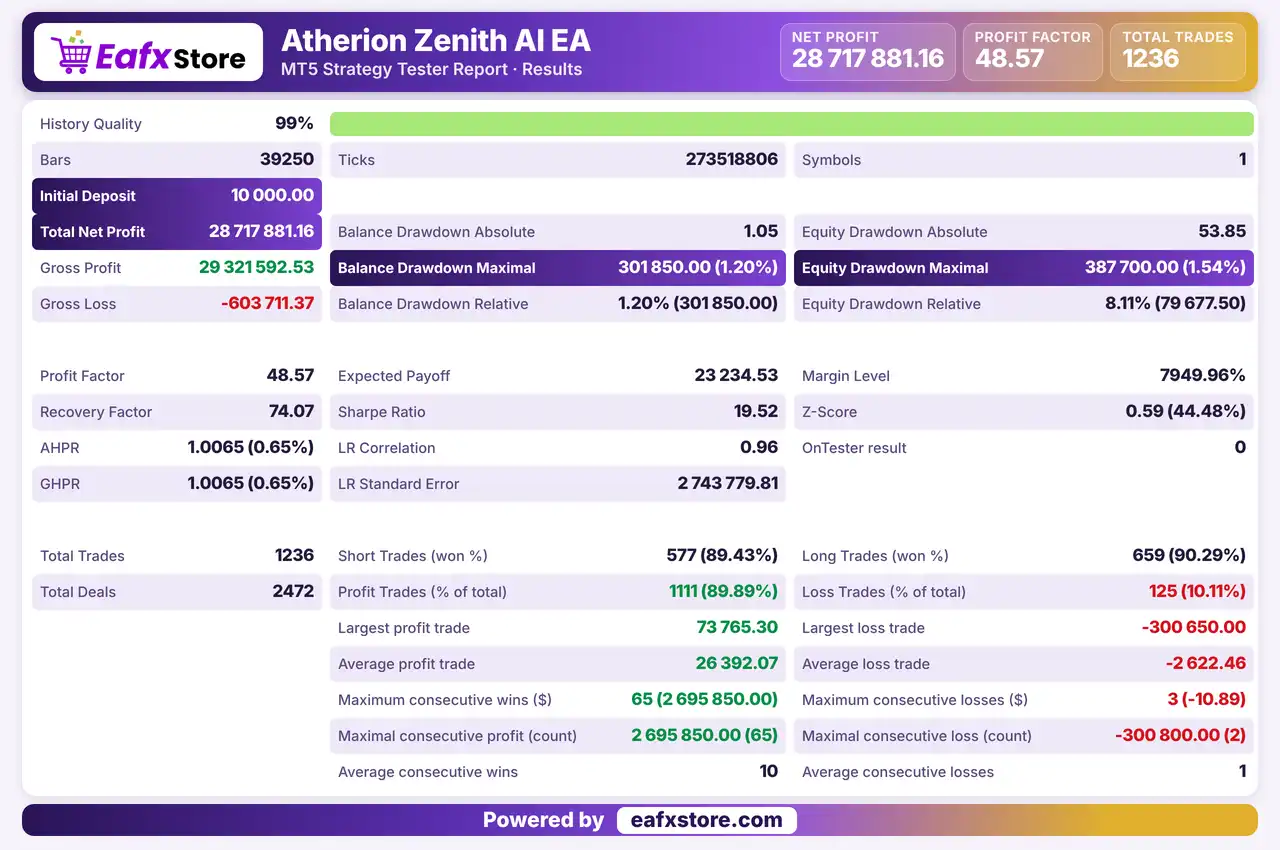
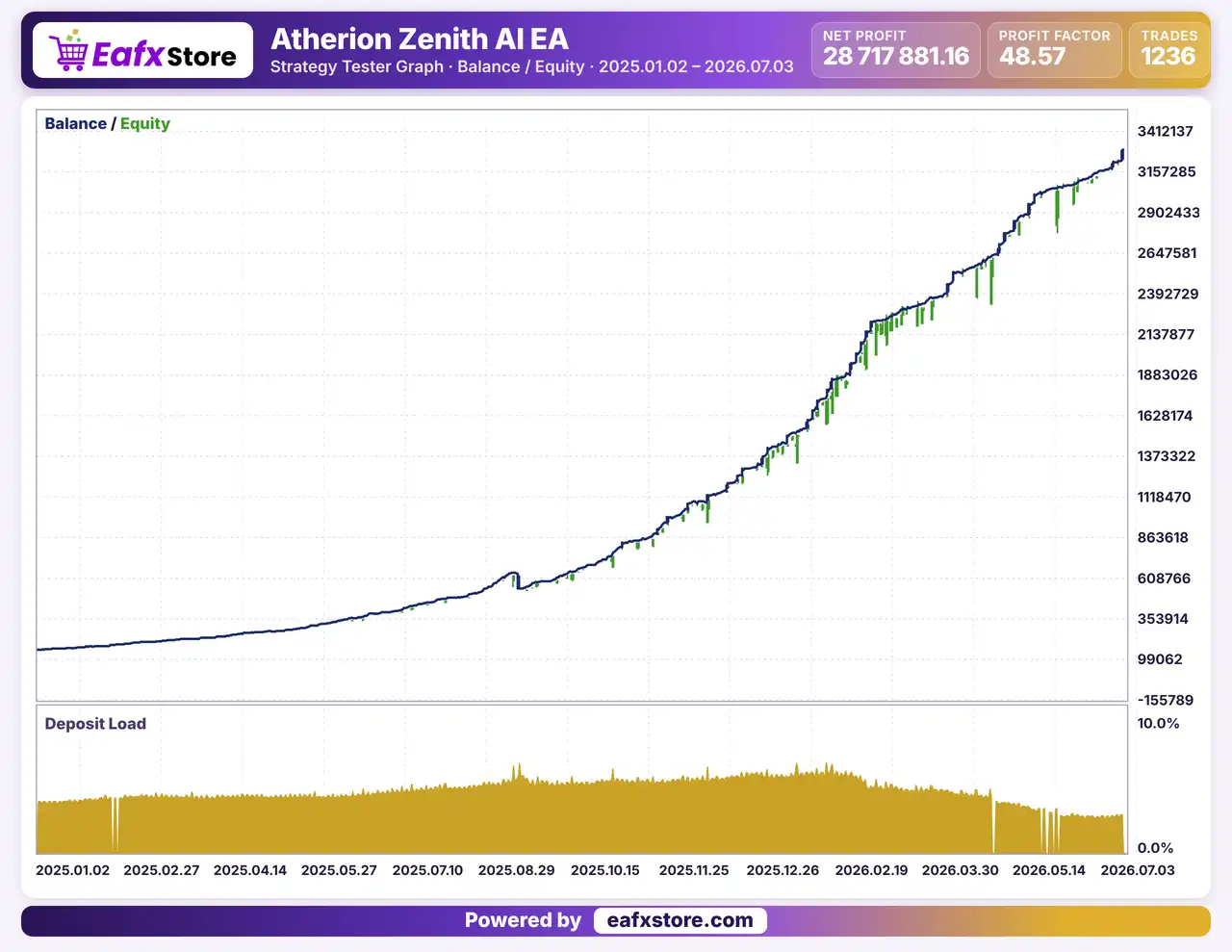
Atherion Zenith AI EA achieved a total net profit of $28,717,881.16 in a backtest covering 39,250 bars.
Atherion Zenith AI EA MT5 Backtest Results
| Parameter | Results |
|---|---|
| Initial Deposit | $10,000 |
| Total Net Profit | $28,717,881.16 |
| Profit Factor | 48.57 |
| Total Trades | 1,236 |
| Winning Trades | 89.89% |
| Maximum Balance Drawdown | 1.20% |
| Maximum Equity Drawdown | 1.54% |
Key Features of Aetherion Zenith AI EA MT5
AI Oriented Analytical Logic
An internal decision framework looks at the market from several angles before a trade, which aims to raise the quality of entries.
Built Only for XAUUSD
The system is developed around the behavior of gold, with sharp impulses, deep pullbacks and sudden volatility, not as a generic robot.
H1 Timeframe Operation
The EA works on the hourly chart, which helps it read broader structure and manage positions with a calm and steady approach.
Automated Risk Management
A risk system links the account balance, the chosen risk level, volatility and exposure, so position size follows the settings.
Smart Trailing Management
The trailing logic protects open profit and can let a trade continue, instead of relying only on one fixed exit level.
Real Time Chart Dashboard
A panel on the chart shows account status, trading state, risk configuration, market mode and position management information.
Is Atherion Zenith AI EA safe?
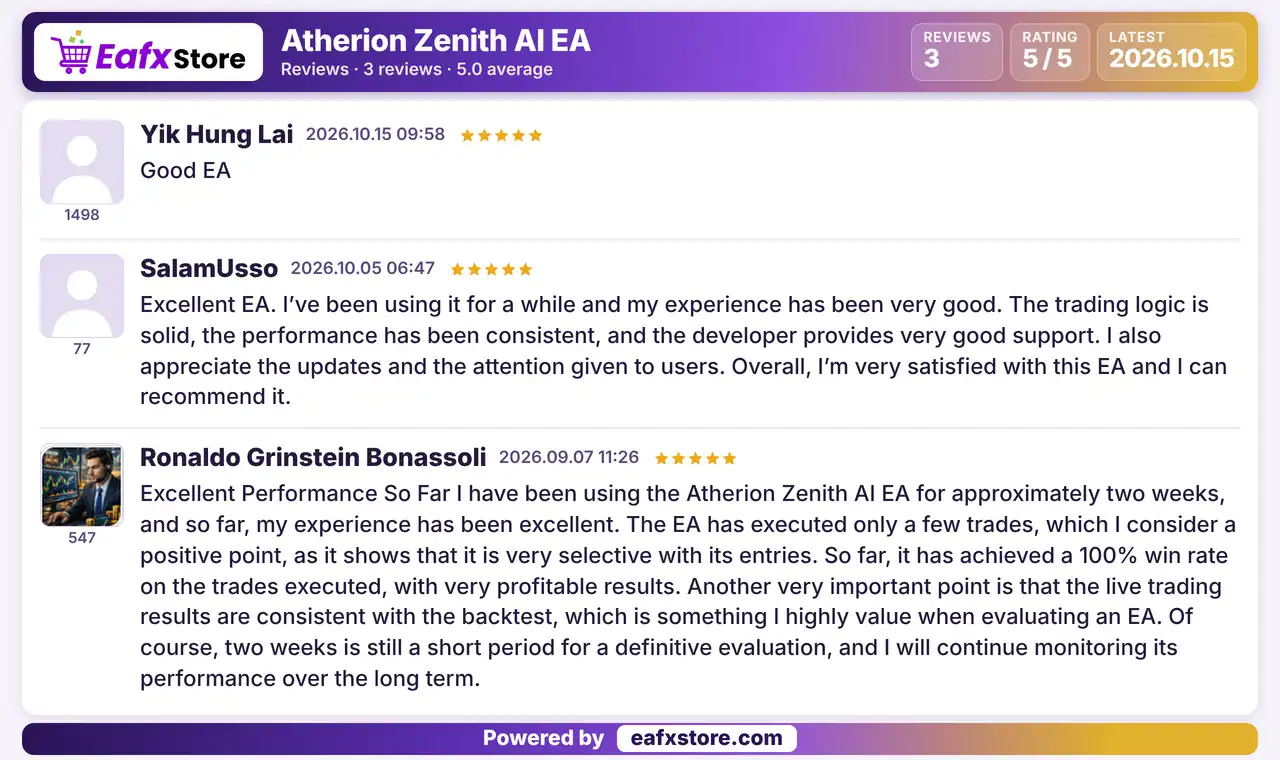
Atherion Zenith AI EA demonstrates significant potential for generating stable and reliable profits, establishing itself as a reputable tool in the Forex markets.
This EA has earned a 5-star rating from the community and successfully won the trust of users.
User reviews of Atherion Zenith AI EA
Risk Management
Gold Is Volatile
Sudden news, spread widening and fast moves can hurt even selective entries, so every trade needs a sensible size.
A Stop Loss Can Still Slip
Gaps and fast moves can pass the stop-loss level, so the real loss can be larger than planned.
Trailing Can Cut a Trade Short
A trailing stop may close a position before it reaches its take-profit, which gives up part of a possible gain.
A Higher Risk Level Raises Losses
A larger risk setting grows the position size, so a short losing run can reduce the balance quickly.
What Sets It Apart
Gold Only Design
A single symbol focus lets all logic follow the rhythm of XAUUSD instead of a general multi symbol approach.
Quality Over Frequency
The product stresses selective execution, which means fewer trades and long periods without any position.
Layered Evaluation
Several market factors and confirmation layers are checked before a trade, instead of a single signal.
Fast Start
A default configuration and a short installation process let traders begin testing without building every setting.
Who Should Use Aetherion Zenith AI EA MT5?
Gold Traders Who Like Patience
People who accept long gaps between trades and prefer a selective robot on the hourly chart.
Hands Off Users
Traders who want the full trading cycle handled by the EA without watching the chart all day long.
Careful Starters
Users who will keep the default settings, choose a modest risk level and test on a demo account first.
Not for Traders Who
Want frequent trading, other symbols, a fully explained strategy or any guaranteed profit from a robot.
Recommended Trading Conditions
For optimal performance, the developer recommends:
| Features | Type |
|---|---|
| Trading platform | MetaTrader 5 (MT5) |
| Time frames | H1 (60 minute chart) |
| Currency pairs | XAUUSD (Gold) |
| Minimum / Recommended deposit | $100+ |
| Minimum / Recommended leverage | Any |
| Account type | Any |
| Additional services | Unlock and Decompile |
| Recommended brokers | Exness Broker, Icmarkets Broker |
| Recommended VPS | MyfxVPS.com (Blue VPS, Golden VPS). Lowest Latency, 2 week Free Trial, 100% Free for 12-18 Months. |
Product Download Package?
The download package of the product suite includes:
 Experts: Atherion_Zenith_AI.ex5
MQ5 (Source Code): Atherion_Zenith_AI.mq5
 Reviewed by David Easton
Final Verdict
Aetherion Zenith AI EA MT5 is a selective gold robot for the H1 chart that checks market structure, volatility and momentum before a trade, then uses automated risk control, trailing stop logic and a chart dashboard. It suits patient traders who accept long gaps between trades. The entry and exit rules are not explained, results depend on the broker and no performance figures are published here, so a demo test with the default settings and a modest risk level should come before any live trading.
🔢 Atherion Zenith AI EA MT5 Settings Guide: Complete Inputs Explanation
Atherion Zenith AI EA MT5 is an automated trading Expert Advisor designed to manage trade execution, position sizing, stop-loss and take-profit levels, trailing stops, account risk limits, and trading identification on MetaTrader 5. Its configurable inputs allow traders to adjust risk exposure, manage trade exits, control execution conditions, and customize the EA’s information panel.
This guide explains every parameter shown in the Atherion Zenith AI EA MT5 settings panel, preserving the original parameter names and exact values to help traders understand how each setting may affect their trading configuration.
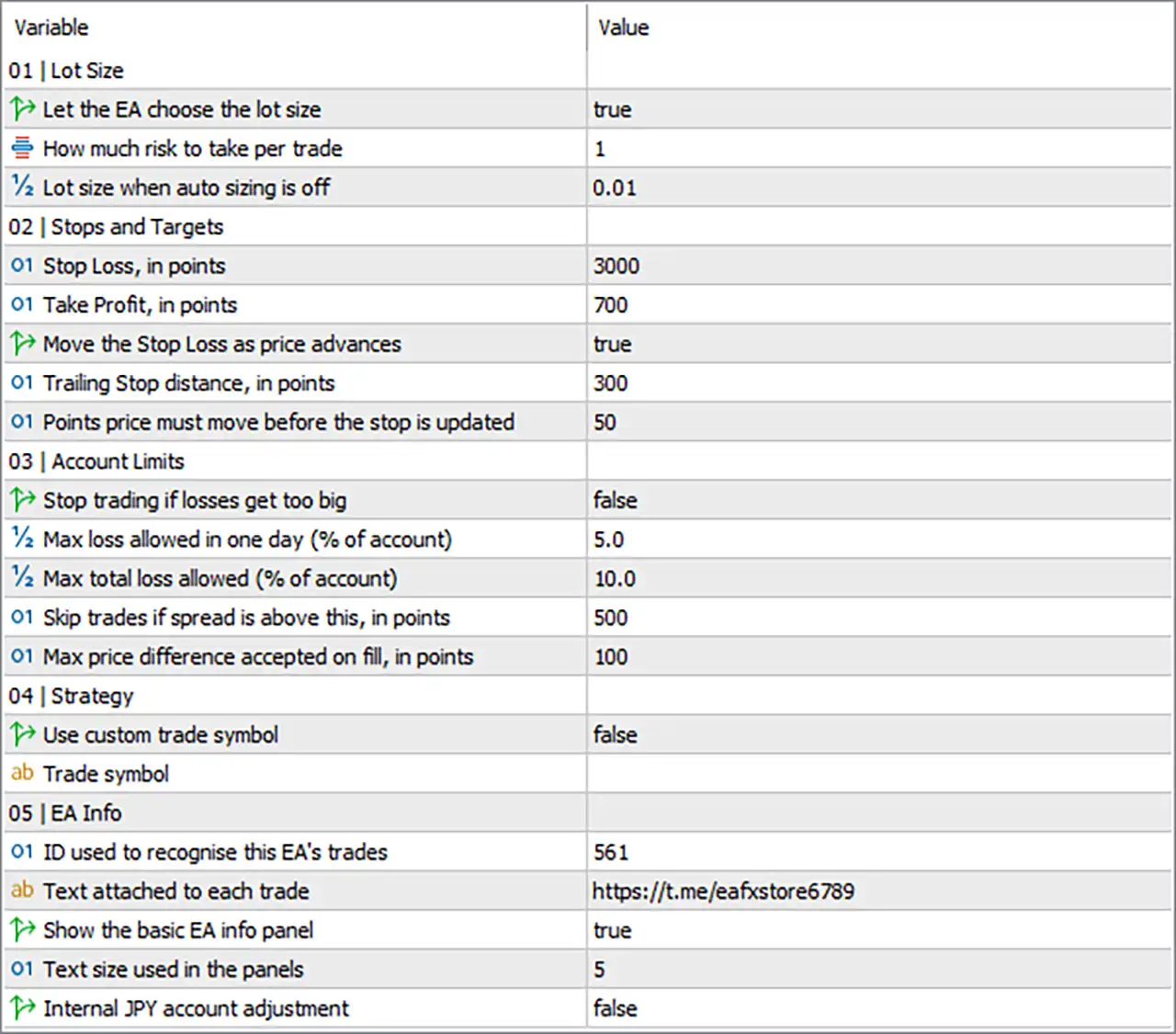
Atherion Zenith AI EA Settings Panel
⚙️ Lot Size Settings
🔹 How much risk to take per trade — 1: Sets the risk input used by the EA when determining the position size. The exact percentage or calculation method depends on the EA’s internal implementation, so the value 1 should not automatically be interpreted as a guaranteed 1% account risk.
🔹 Lot size when auto sizing is off — 0.01: Sets the fixed lot size used when automatic position sizing is disabled. The configured value is 0.01 lots, which is commonly used as a small starting volume, subject to the broker’s contract specifications.
⚙️ Stops and Targets Settings
3000 points. The corresponding price distance depends on the instrument’s tick size, number of digits, and the broker’s symbol specifications.🔹 Take Profit, in points — 700: Sets the take-profit distance to 700 points from the relevant trade entry price, according to the EA’s order-placement logic and the instrument’s pricing specifications.
🔹 Move the Stop Loss as price advances — true: Enables the EA to move the stop-loss as the market price advances favorably, helping protect open-trade profits while retaining the configured exit-management logic.
🔹 Trailing Stop distance, in points — 300: Sets the trailing-stop distance to 300 points. When trailing is active, the stop-loss is generally maintained at this distance from the relevant market price, subject to the EA’s implementation and broker restrictions.
🔹 Points price must move before the stop is updated — 50: Sets the minimum favorable price movement of 50 points required before the EA updates the trailing stop. This can help reduce excessive stop modifications during small price fluctuations.
⚙️ Account Limits and Execution Protection
🔹 Max loss allowed in one day (% of account) — 5.0: Specifies a daily loss threshold of 5.0% of the account under the EA’s applicable loss-calculation method. Because the main stop-trading switch is false, do not assume this threshold automatically disables trading without verifying the EA’s implementation.
🔹 Max total loss allowed (% of account) — 10.0: Specifies a maximum total-loss threshold of 10.0% of the account. Whether this limit actively blocks further trading depends on how the EA implements its account-protection controls and whether the relevant protection is enabled.
🔹 Skip trades if spread is above this, in points — 500: Instructs the EA to skip new trades when the spread exceeds 500 points, assuming the EA applies this filter as described. The practical spread threshold varies with the broker’s pricing precision and the instrument being traded.
🔹 Max price difference accepted on fill, in points — 100: Sets the maximum permitted price difference of 100 points for trade execution, commonly associated with slippage or deviation control. Actual behavior depends on the EA’s order-submission method and the broker’s execution rules.
⚙️ Strategy Settings
🔹 Trade symbol — [blank]: No custom trading symbol is entered. Since Use custom trade symbol is set to false, this blank field is not expected to override the chart symbol under the intended configuration.
⚙️ EA Information and Identification Settings
561, commonly used as a magic number to distinguish its orders from trades placed by other Expert Advisors or manual trading activity.🔹 Text attached to each trade — https://t.me/eafxstore6789: Specifies the text associated with each trade. The configured text is https://t.me/eafxstore6789, which may be used as an order comment or trade-identification label depending on the EA’s implementation.
🔹 Show the basic EA info panel — true: Enables the basic EA information panel on the MetaTrader 5 chart, allowing the trader to view the information provided by the EA while it is running.
🔹 Text size used in the panels — 5: Sets the panel text-size parameter to 5. The actual font size and visual appearance depend on the EA’s panel design and implementation.
🔹 Internal JPY account adjustment — false: Disables the EA’s internal JPY account adjustment option. This setting may affect currency-specific calculations in certain account configurations; its exact purpose should be confirmed from the developer’s documentation before using the EA on a JPY-denominated account.
🔢 Conclusion
The Atherion Zenith AI EA MT5 settings provide controls for position sizing, stop-loss and take-profit placement, trailing-stop management, execution filters, trade identification, and chart-panel customization.
The current configuration uses automatic lot sizing (true), a risk input of 1, a stop loss of 3000 points, a take profit of 700 points, and a trailing-stop distance of 300 points with a 50-point update threshold. It also specifies daily and total loss thresholds of 5.0% and 10.0%, respectively, while Stop trading if losses get too big remains false.
Before running the EA on a live account, verify how its risk input is calculated, whether the loss thresholds are enforced when the protection switch is disabled, and how point distances translate to actual price movements for your broker’s symbol. Backtesting and forward testing on a demo account are recommended before live deployment.
User Reviews
Only logged in customers who have purchased this product may leave a review.
❓ What is Aetherion Zenith AI EA MT5?
A fully automated Expert Advisor for MetaTrader 5, developed for XAUUSD on the H1 timeframe, with selective trade filtering and risk management.
❓ Which symbol does Aetherion Zenith AI EA MT5 trade?
Only XAUUSD, Gold.
❓ Which timeframe does Aetherion Zenith AI EA MT5 use?
H1, the hourly chart.
❓ What does the AI in Aetherion Zenith AI EA MT5 mean?
The product describes an AI oriented analytical logic that checks several market factors before a trade. The exact method is not detailed.
❓ Does Aetherion Zenith AI EA MT5 use a stop loss?
Yes. It places a stop loss and a take profit and applies trailing stop logic to profitable positions.
❓ How does risk management work in Aetherion Zenith AI EA MT5?
A risk level can be chosen, and position size follows the account balance, the risk level and the market conditions.
❓ Does Aetherion Zenith AI EA MT5 have a dashboard?
Yes. A panel on the chart shows account status, trading state, risk configuration and position management details.
❓ Should the default settings of Aetherion Zenith AI EA MT5 be used?
Yes. The product advises starting with the default configuration before any change.
❓ Is Aetherion Zenith AI EA MT5 a grid or martingale EA?
The product information describes no grid or martingale logic. A demo test helps confirm this before real money is used.
❓ Does Aetherion Zenith AI EA MT5 need continuous operation?
Yes. It is meant for round the clock operation during the trading week, so the terminal must stay running.
🔥 Get This EA for FREE with Our Membership! 🚀🚀
Unlock access to this EA, premium Indicators, and exclusive trading tools completely FREE with any of our Membership Plans! Thousands of traders already benefit from our VIP library—join them and level up your trading instantly. Choose Your Membership:
- SPECIAL – 1 Month Membership
- GOLD – 1 Year Membership
- PREMIUM – 1 Year Membership
-
 Original price was: $4,999.00.$249.00Current price is: $249.00.
 -
 Original price was: $4,500.00.$249.00Current price is: $249.00.
 -
 Original price was: $4,999.00.$249.00Current price is: $249.00.
 -
 Original price was: $28,000.00.$249.00Current price is: $249.00.
-
 1Original price was: $2,500.00.$299.00Current price is: $299.00.
 -
 0Original price was: $5,500.00.$199.00Current price is: $199.00.
 -
 0Original price was: $900.00.$199.00Current price is: $199.00.
 -
 1Original price was: $2,500.00.$199.00Current price is: $199.00.
There are no reviews yet.