



AGI FX EA MQ4 v3.1 with SetFiles (Source Code)

Subscriptions for Special Plan
- 30 EA package is more economical!
- Special package with 99%
- Download 1 EA/Day

Subscriptions for Premium Membership
- Download Unlimited in 1 Year
- Get 100% Discount
- Get free access to all

Subscriptions for Gold Membership
- 1 Year Membership
- Get 100% Discount
- Access EA+Indicator+Course
Frequently bought together 🎁
Add these products to enhance your purchase




Quick Verdict
The Agi FX Robot is a configurable MT5 Expert Advisor (EA) focused on automated trading, averaging, dynamic lot sizing and controlled profit targets. Its live signals show strong historical growth, while the aggressive averaging configuration requires disciplined risk management and suitable account capital.
Best For
✅ Forex traders seeking automated trading solutions.
✅ Traders looking for a flexible forex EA.
✅ Experienced users of averaging strategies.
✅ Traders seeking dynamic lot management.
✅ Users interested in EA compounding features.
✅ Traders wanting configurable risk controls.
Overall Rating
⭐⭐⭐⭐⭐ 9.5/10
What is Agi FX Robot?
Agi FX Robot is an automated Expert Advisor (EA) designed to manage forex trading positions based on customizable trading rules and parameters. Instead of requiring traders to manually open, manage, and close each position, this EA automates key stages of the trading process.
A particularly important aspect of Agi FX is its averaging mechanism. The relationship between initial trade volume, the averaging mechanism, and the maximum number of orders is a critical factor that anyone intending to run this EA on a live account must carefully consider.
⭐ Vendor Website: View here
How Does Agi FX Robot Work?
Automated Trading
Agi FX Robot automatically manages trades based on its programmed strategy, reducing the need for continuous manual intervention.
Controlled Trading Schedule
The EA operates within the configured trading window, allowing traders to define when the strategy is permitted to open and manage positions.
Dynamic Position Management
The robot starts with the configured base lot and can adjust position sizes according to its money-management and compounding settings.
Averaging Strategy
When averaging is enabled, the EA can add positions according to its internal rules.
The selected lot-sizing mode and exponent determine how additional positions are calculated.
Profit & Exposure Control
Take Profit and maximum-trade settings help define the strategy’s exit objective and limit the number of positions that can be managed within an applicable trading sequence.
Key Features of Agi FX Robot
Custom Risk Profile
The EA supports a custom risk setup, giving traders greater flexibility to adjust the strategy according to their account and trading preferences.
Flexible Trading Hours
Configurable operating hours allow the EA to trade during a selected market period instead of remaining active throughout the entire day.
Smart Lot Management
The base lot setting provides a clear starting position size, while the money-management system can adjust exposure as the strategy develops.
Automated Averaging Engine
The averaging function can be enabled or disabled, allowing traders to decide whether the EA should add positions when market conditions move against an existing trade.
Dynamic Lot Sizing
The configurable lot exponent allows Averaging positions to increase according to the selected money-management calculation.
Lot Compounding
The compounding feature can gradually increase position sizing as the account progresses, creating a growth-oriented approach to automated trading.
Trade & Execution Controls
Take Profit, maximum trades and slippage settings give traders additional control over profit targets, position exposure and order execution.
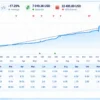
Verified Live Signal Performance
The Agi FX achieved impressive profit performance when trading with EURUSD.
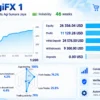
AgiFX 1 Live Signal
The first signal is shown with 46 weeks of reliability history and 51% growth since 2025.
AGI FX EA Live Signal Results
| Metric | AgiFX 1 |
|---|---|
| Growth Since | 2025 |
| Growth | 51% |
| Reliability | 46 weeks |
| Equity | 26,356.04 USD |
| Profit | 11,129.28 USD |
| Initial Deposit | 24,576.50 USD |
| Maximum Drawdown | 4.2% |
The first signal demonstrates an interesting balance between growth and drawdown.
Performance data shows 51% growth alongside a maximum drawdown of 4.2%, with the signal maintaining a stable track record over a 46-week period.
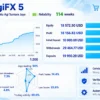
AgiFX 5 Live Signal
The second signal provides a longer historical period, with 114 weeks of reliability and reported growth of 245% since 2024.
AGI FX EA Live Results
| Metric | AgiFX 5 |
|---|---|
| Growth Since | 2024 |
| Growth | 245% |
| Reliability | 114 weeks |
| Equity | 18,572.50 USD |
| Profit | 18,156.83 USD |
| Initial Deposit | 10,000.00 USD |
| Maximum Drawdown | 7.3% |
AgiFX 5 demonstrates significantly higher historical growth and a longer track record of live trading signals compared to AgiFX 1.
Performance data shows 245% growth sustained over 114 weeks, with a maximum account drawdown of 7.3%.
Why Agi FX Robot Stands Out
Flexible EA Configuration
Agi FX Robot gives traders extensive control over trading hours, lot sizing, averaging, compounding, Take Profit, maximum trades and execution settings.
Automated Trade Management
The EA can handle position sizing, averaging and trade management automatically, reducing the need for constant manual intervention.
Strong Live Signal History
The supplied live signals demonstrate attractive historical growth with established reliability periods, providing useful evidence of the strategy’s real-market operation.
Growth-Focused Money Management
The combination of configurable lot compounding and dynamic averaging allows traders to fine-tune the EA’s exposure and growth approach according to their trading objectives and risk tolerance.
Risk Management Features
Custom Risk Profile
The EA uses a custom risk configuration, allowing traders to adjust key parameters according to their preferred trading style and account conditions.
Controlled Position Size
The base lot setting provides a defined starting position size, helping traders establish an initial level of market exposure.
Averaging Control
The averaging engine can be enabled or disabled, giving traders greater control over whether additional positions are opened during adverse price movements.
Lot Exponent Management
The configurable lot exponent determines how position sizes can increase during averaging, allowing traders to adjust the aggressiveness of the money-management system.
Maximum Trade Limit
A maximum trade setting helps prevent the averaging sequence from expanding without a defined limit, providing an additional layer of exposure control.
Compounding & Execution Control
The EA includes configurable lot compounding and slippage parameters, allowing traders to balance growth potential with execution conditions and overall account risk.
Recommended Trading Conditions
According to the supplied product description, AGI FX is designed for:
| Features | Type |
|---|---|
| Trading platform | MetaTrader 4 (MT4) |
| Time frames | M30 (30 minute chart) |
| Currency pairs | EURUSD |
| Minimum / Recommended deposit | $100+ |
| Minimum / Recommended leverage | Any |
| Account types | Any |
| Product type | Unlimited (NoDLL) |
| Additional services | Unlock and Decompile |
| Recommended brokers | Exness Broker, Icmarkets Broker |
| Recommended VPS | MyfxVPS.com (Blue VPS, Golden VPS). Lowest Latency, 2 week Free Trial, 100% Free for 12-18 Months. |
Product Download Package?
The download package of the product suite includes:
Source Code (MQ4)
✅ AGI_FX.mq4
Experts
✅ AGI_FX.ex4
SetFiles
✅ EURUSD_AGGRESSIVE.set
✅ EURUSD_BALANCED.set
✅ EURUSD_CONSERVATIVE.set
➡️ Reviewed by David Easton
Weaknesses and Risk Warnings
Averaging Can Increase Exposure
The averaging engine may add new positions when the market moves against the strategy, potentially increasing total exposure.
Lot Growth Requires Caution
The configured exponential lot-sizing approach can make later positions considerably larger than the initial trade.
Historical Results Are Not Guaranteed
Previous live-signal performance can provide useful evidence, but it cannot guarantee future profitability under different market conditions.
Drawdown Can Increase
Even when historical drawdown appears controlled, unusual volatility, prolonged trends or unfavorable market conditions may produce larger drawdowns.
Broker Conditions Matter
Spreads, execution speed, slippage, leverage and server stability can affect the EA’s real-world performance.
Proper Testing Is Essential
Traders should test the EA with their intended settings on a demo account and carefully evaluate total exposure before moving to live capital.
Who Should Use Agi FX Robot?
Experienced Automated-Trading Users
Agi FX Robot is particularly suitable for traders who understand automated trading and can evaluate position-sizing systems rather than focusing only on headline returns.
Traders Seeking Configurability
The EA may appeal to traders who want control over:
🔹 Base lots
🔹 Compounding
🔹 Averaging
🔹 Lot exponent
🔹 Trading hours
🔹 Maximum trades
🔹 Take Profit
🔹 Slippage
🔹 Magic Number
Traders Comfortable With Averaging Strategies
Because averaging is an important part of the supplied configuration, users should understand the consequences of adding positions during adverse price movements.
Final Verdict
Agi FX Robot is a powerful automated trading solution for traders seeking flexible control over entries, averaging, lot management, compounding and trade execution. Its live signal history demonstrates attractive growth potential, while the configurable risk parameters provide room for strategy optimization.
However, the averaging system requires careful capital and exposure management. Overall, it is best suited to experienced traders who understand automated trading risks and prioritize disciplined testing before live deployment.
🔢 AGI FX EA Settings & Inputs Guide — Complete Parameter Explanation
AGI FX EA is a configurable Expert Advisor designed to give traders precise control over trading behavior, position sizing, averaging logic, profit targets, execution conditions, and trade identification. Its Inputs panel combines risk management, lot compounding, averaging, trading-time control, execution settings, and visual display options, allowing users to adapt the EA to different account sizes and trading strategies.
Below is a complete explanation of every actual setting visible in the supplied AGI FX EA Inputs panel, with all original numerical values preserved.
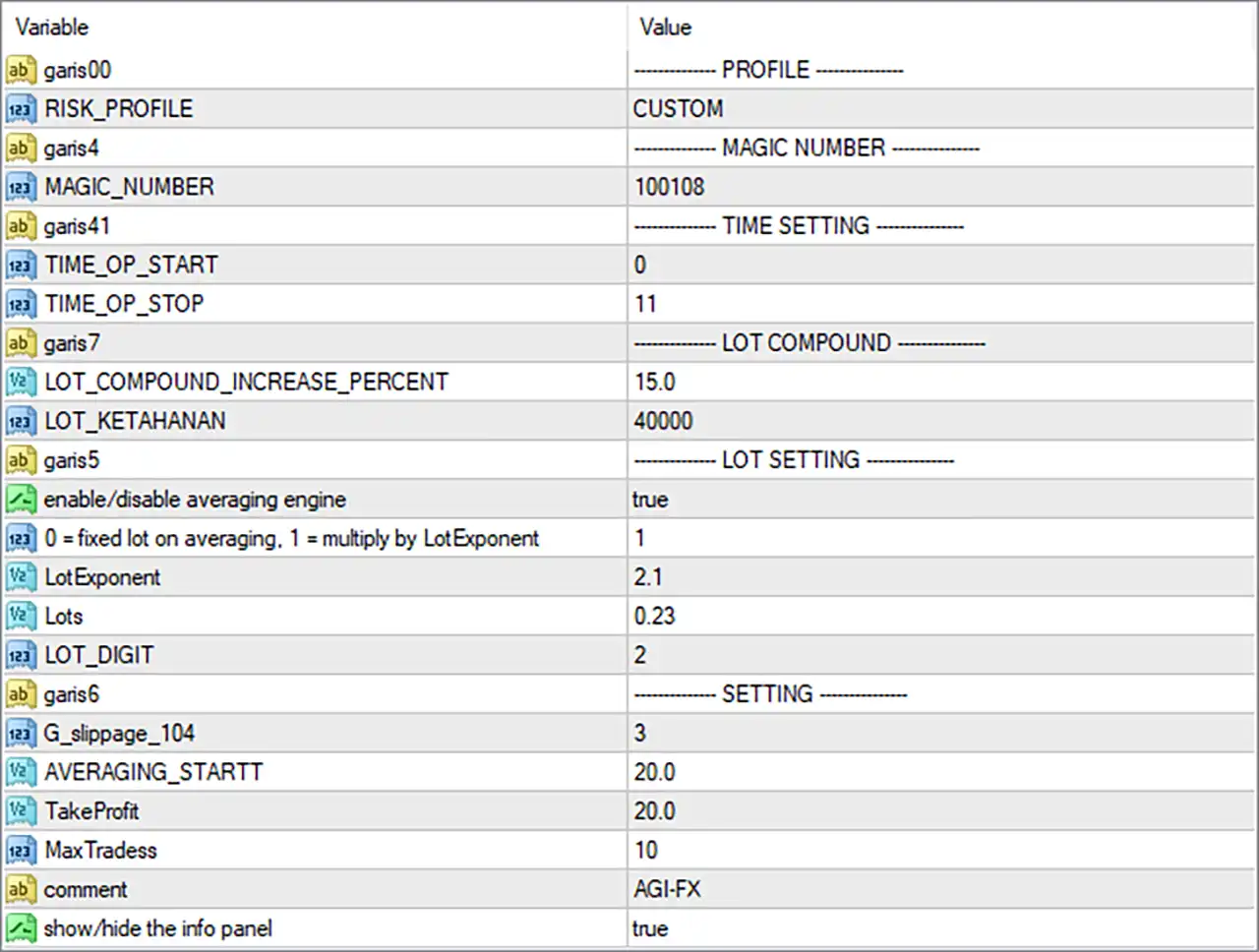
AGI FX EA Settings Panel
🔢 AGI FX EA Settings & Parameters
🔹 RISK_PROFILE = CUSTOM — Selects the EA’s risk profile; CUSTOM indicates that the trading configuration is controlled by the manually specified parameters rather than a predefined risk preset.
🔹 MAGIC_NUMBER = 100108 — The unique Magic Number used by the EA to identify and distinguish its own trades from positions opened by other EAs or manual trading.
🔹 TIME_OP_START = 0 — Defines the starting hour of the EA’s operating/trading window; 0 represents the beginning of the configured daily time range.
🔹 TIME_OP_STOP = 11 — Defines the ending hour of the EA’s operating/trading window; the displayed value is 11, so the configured operating period ends at hour 11 according to the EA/broker time reference.
🔹 LOT_COMPOUND_INCREASE_PERCENT = 15.0 — Sets the lot-compounding increase percentage to 15.0%, controlling how the lot size can increase as the account or strategy progresses when compounding is enabled.
🔹 LOT_KETAHANAN = 40000 — Sets the displayed LOT_KETAHANAN parameter to 40000; this is an EA-specific lot-management parameter, and its exact internal calculation depends on how the EA source code uses this variable.
🔹 enable/disable averaging engine = true — Enables the EA’s averaging engine, with true meaning averaging is currently active.
🔹 0 = fixed lot on averaging. 1 = multiply by LotExponent = 1 — Selects the averaging lot-sizing method; 1 means the EA multiplies the averaging position size using the configured LotExponent, rather than keeping a fixed lot size.
🔹 LotExponent = 2.1 — Sets the averaging lot multiplier/exponent to 2.1, meaning subsequent averaging positions can increase according to the EA’s exponential lot-sizing calculation.
🔹 Lots = 0.23 — Sets the base trading lot size to 0.23 lots, which serves as the starting position size for the EA’s lot-management system.
🔹 LOT_DIGIT = 2 — Sets the lot-size precision to 2 decimal places, allowing lot values such as 0.23 to be represented with two digits after the decimal point.
🔹 G_slippage_104 = 3 — Sets the permitted/configured slippage value to 3, controlling the EA’s tolerance for execution-price deviation during order processing.
🔹 AVERAGING_STARTT = 20.0 — Sets the averaging-start parameter to 20.0, defining the configured threshold at which the EA’s averaging mechanism can begin according to its internal strategy logic.
🔹 TakeProfit = 20.0 — Sets the Take Profit parameter to 20.0, defining the EA’s configured profit-target value according to the unit and calculation method implemented by the EA.
🔹 Max Trades = 10 — Limits the EA to a maximum of 10 trades/positions within the strategy’s applicable trade-management logic, helping restrict the maximum number of positions in an averaging sequence.
🔹 comment = AGI-FX — Sets the trade/order comment to AGI-FX, allowing positions generated by the EA to be more easily recognized in the trading platform.
🔹 show/hide the info panel = true — Enables the on-chart information panel; true means the EA’s information panel is currently displayed.
🔢 Key AGI FX EA Configuration Highlights
🔹 Trading Window: 0–11, providing a defined operating period rather than unrestricted 24-hour operation.
🔹 Base Lot: 0.23 lots, establishing the starting position size.
🔹 Averaging: Enabled (true), with the averaging system actively configured.
🔹 Averaging Lot Mode: 1, meaning the EA uses LotExponent rather than a fixed averaging lot.
🔹 Lot Exponent: 2.1, representing an aggressive position-sizing multiplier that should be evaluated carefully against account size and drawdown tolerance.
🔹 Compounding Increase: 15.0%, allowing the lot-compounding mechanism to increase position sizing according to its internal calculation.
🔹 Averaging Start: 20.0, defining the configured averaging threshold.
🔹 Take Profit: 20.0, defining the configured profit-target parameter.
🔹 Maximum Trades: 10, placing a clear upper limit on the number of positions managed within the relevant strategy sequence.
🔹 Slippage: 3, providing the configured execution-deviation tolerance.
🔹 Magic Number: 100108, uniquely identifying AGI FX EA trades.
🔢 Risk Management Considerations
🔹 The combination of Lots = 0.23, LotExponent = 2.1, Averaging = true, and Max Trades = 10 is particularly important, because position exposure can increase substantially when multiple averaging trades are opened.
🔹 The 15.0% compounding setting can increase future position sizes, so account growth and exposure should be evaluated together rather than looking only at the initial 0.23-lot setting.
🔹 Max Trades = 10 does not by itself indicate low risk, because the total exposure depends on the lot progression generated by the 2.1 LotExponent and the EA’s internal averaging calculations.
🔹 AVERAGING_STARTT = 20.0 and TakeProfit = 20.0 should be interpreted according to the EA’s internal unit definitions, because the screenshot alone does not establish whether these values represent points, pips, price distance, or another calculation.
🔹 LOT_KETAHANAN = 40000 should not be assigned a specific financial meaning without the EA’s source code or official documentation, because the variable name is EA-specific and its exact calculation is not revealed by the Inputs panel.
🔢 Conclusion
AGI FX EA provides a highly configurable trading framework with particular emphasis on averaging, dynamic lot sizing, compounding, and controlled trade execution. The current configuration uses 0.23 lots, an averaging engine enabled, LotExponent 2.1, 15.0% lot-compounding increase, 20.0 averaging start, 20.0 Take Profit, and 10 maximum trades.
The most important settings to evaluate together are Lots + LotExponent + Averaging + Max Trades, because these parameters collectively determine how position exposure can develop during a sequence of trades. Traders should therefore test the configuration carefully in backtests and demo environments before applying it to live capital.
User Reviews
Only logged in customers who have purchased this product may leave a review.
❓ What is the default lot size of AGIFX EA, and how does it affect trading risk?
The configured base lot size of AGIFX EA is 0.23 lots. This is the starting position size used by the EA's lot-management system. However, the actual exposure can become significantly larger when averaging and the LotExponent of 2.1 are enabled.
❓ How does the averaging system work in AGIFX EA?
The averaging engine in AGIFX EA is currently enabled (true). When the internal averaging conditions are met, the EA can open additional positions according to its configured averaging logic. The averaging process is limited by Max Trades = 10.
❓ What does LotExponent 2.1 mean in AGIFX EA?
LotExponent = 2.1 determines how the lot size can increase when AGIFX EA opens averaging positions. Because 2.1 represents an aggressive multiplier, position exposure can grow rapidly across multiple averaging trades. Traders should carefully evaluate this setting against account size and drawdown tolerance.
❓ How many positions can AGIFX EA open at maximum?
The current configuration sets Max Trades = 10. This means AGIFX EA can manage up to 10 trades or positions within the applicable strategy sequence. The maximum number of trades does not necessarily represent the maximum financial risk, because lot sizes may increase through the averaging system.
❓ What is the trading time window configured for AGIFX EA?
The configured operating period for AGIFX EA is from 0 to 11 according to the EA/broker time reference. This means the EA is configured to operate during a defined daily trading window rather than continuously for 24 hours.
❓ What is the Take Profit setting of AGIFX EA?
The configured TakeProfit value is 20.0. This represents the EA's profit-target parameter. However, the exact meaning of 20.0—such as points, pips, price distance, or another unit—depends on the internal calculation used by AGIFX EA.
❓ Is AGIFX EA suitable for accounts with small capital?
The suitability of AGIFX EA depends on the account size, broker conditions, leverage, and acceptable drawdown. The combination of 0.23 lots, averaging enabled, LotExponent 2.1, and Max Trades 10 can create substantial exposure, so users should evaluate the configuration carefully before trading with live capital.
❓ What does the 15% lot compounding setting do in AGIFX EA?
LOT_COMPOUND_INCREASE_PERCENT = 15.0 allows the lot-compounding mechanism of AGIFX EA to increase position sizing by 15.0% according to its internal calculation. This means future exposure can increase as the account or strategy progresses when compounding is active.
❓ Which AGIFX EA settings are most important for managing trading risk?
The most important settings to evaluate together are Lots = 0.23, LotExponent = 2.1, Averaging = true, and Max Trades = 10. These parameters collectively determine how position exposure can develop during an averaging sequence. The 15.0% compounding setting is also important because it can increase future position sizes.
🔥 Get This EA for FREE with Our Membership! 🚀🚀
Unlock access to this EA, premium Indicators, and exclusive trading tools completely FREE with any of our Membership Plans! Thousands of traders already benefit from our VIP library—join them and level up your trading instantly. Choose Your Membership:
- SPECIAL – 1 Month Membership
- GOLD – 1 Year Membership
- PREMIUM – 1 Year Membership
-
 Original price was: $4,999.00.$249.00Current price is: $249.00.
 -
 Original price was: $4,500.00.$249.00Current price is: $249.00.
 -
 Original price was: $4,999.00.$249.00Current price is: $249.00.
 -
 Original price was: $28,000.00.$249.00Current price is: $249.00.
-
 0Original price was: $5,500.00.$199.00Current price is: $199.00.
 -
 1Original price was: $2,500.00.$299.00Current price is: $299.00.
 -
 0Original price was: $279.00.$79.00Current price is: $79.00.
 -
 1Original price was: $3,599.00.$199.00Current price is: $199.00.
There are no reviews yet.