






Fundamental Trader MT4 + Sets (Latest version) - Unlimited

Subscriptions for Special Plan
- 30 EA package is more economical!
- Special package with 99%
- Download 1 EA/Day

Subscriptions for Premium Membership
- Download Unlimited in 1 Year
- Get 100% Discount
- Get free access to all

Subscriptions for Gold Membership
- 1 Year Membership
- Get 100% Discount
- Access EA+Indicator+Course
Frequently bought together 🎁
Add these products to enhance your purchase




What is Fundamental Trader MT4?
Fundamental Trader EA is an advanced Expert Advisor (EA) designed for automated trading and professional market analysis using real-time fundamental, technical and sentiment indicators. Combining AI-driven data streams, smart risk management, and adaptive execution logic, the EA delivers stability, flexibility, and improved decision-making across Forex market conditions.
 Vendor Website: View here
About the Author
This product is compiled by Sara Sabaghi. This author has more than +5 years of experience working on MQL5 with many famous products such as Fundamental Trader MT4, Fundamental Hunter EA, Gold Extractor EA, Trend Scalp Pro MT4, Fundamental Trader MT5 and other advisors. Among them, Fundamental Trader EA is his best performing products.
Key Features of Fundamental Trader EA for MT4
🔹 AI-Powered Market Analysis System: Combines sentiment, macroeconomic and technical indicators together.
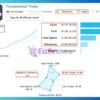
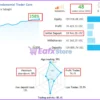
🔹 Integrated Fundamental Trading Panel: Displays COT data, bond yields, forecasts and retail sentiment.
🔹 Advanced Automated Risk Controls: Includes news filters, trailing stop, break-even and lot management.
🔹 Multi-Source Real-Time Data Streams: Uses live economic and institutional trading information sources.
🔹 Flexible Manual And Auto Trading: Supports both discretionary trading assistance and automated execution.
What is the Fundamental Trader EA Trading Strategy?
🔹 Fundamental Bias Trend Trading: Trades based on economic strength and central bank market direction.
🔹 Sentiment And COT Confirmation Logic: Uses institutional positioning and trader sentiment for validation.
🔹 Technical Scalping Entry System: Combines moving averages, stochastic and flow trend confirmations.
🔹 Risk Sentiment Market Analysis: Detects risk-on and risk-off conditions for adaptive trade execution.
🔹 News And Volatility Filtering: Avoids high-impact events through integrated economic news protection.
Fundamental Trader MT4 Review
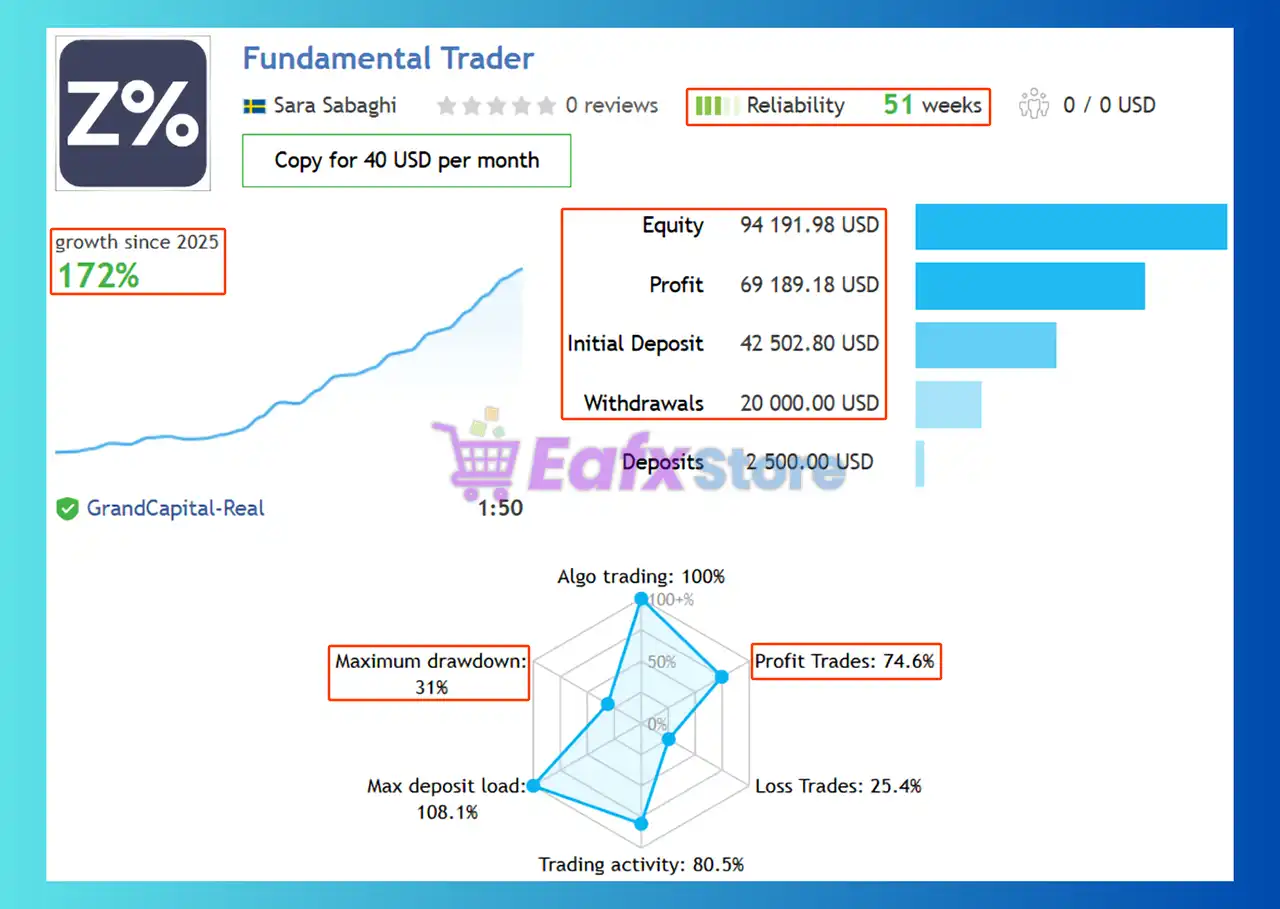
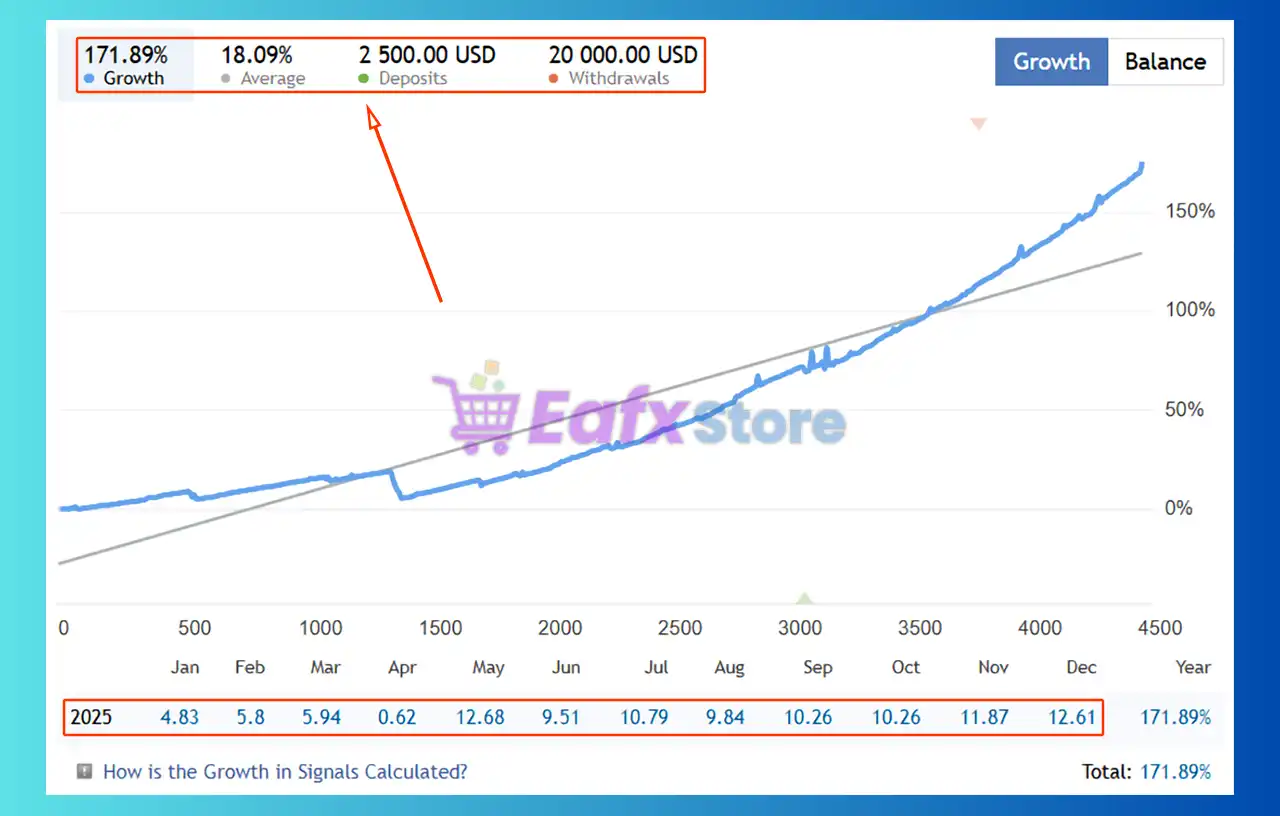
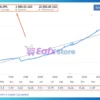
The Fundamental Trader EA achieved impressive profit performance when trading with FX pairs. Trading results on real account for 51 consecutive weeks of trading:
✅ Initial Deposit: $42,500
✅ Growth Rate: +172%
✅ Win Rate (% of total): 74.6%
✅ Maximum Drawdown: 31%
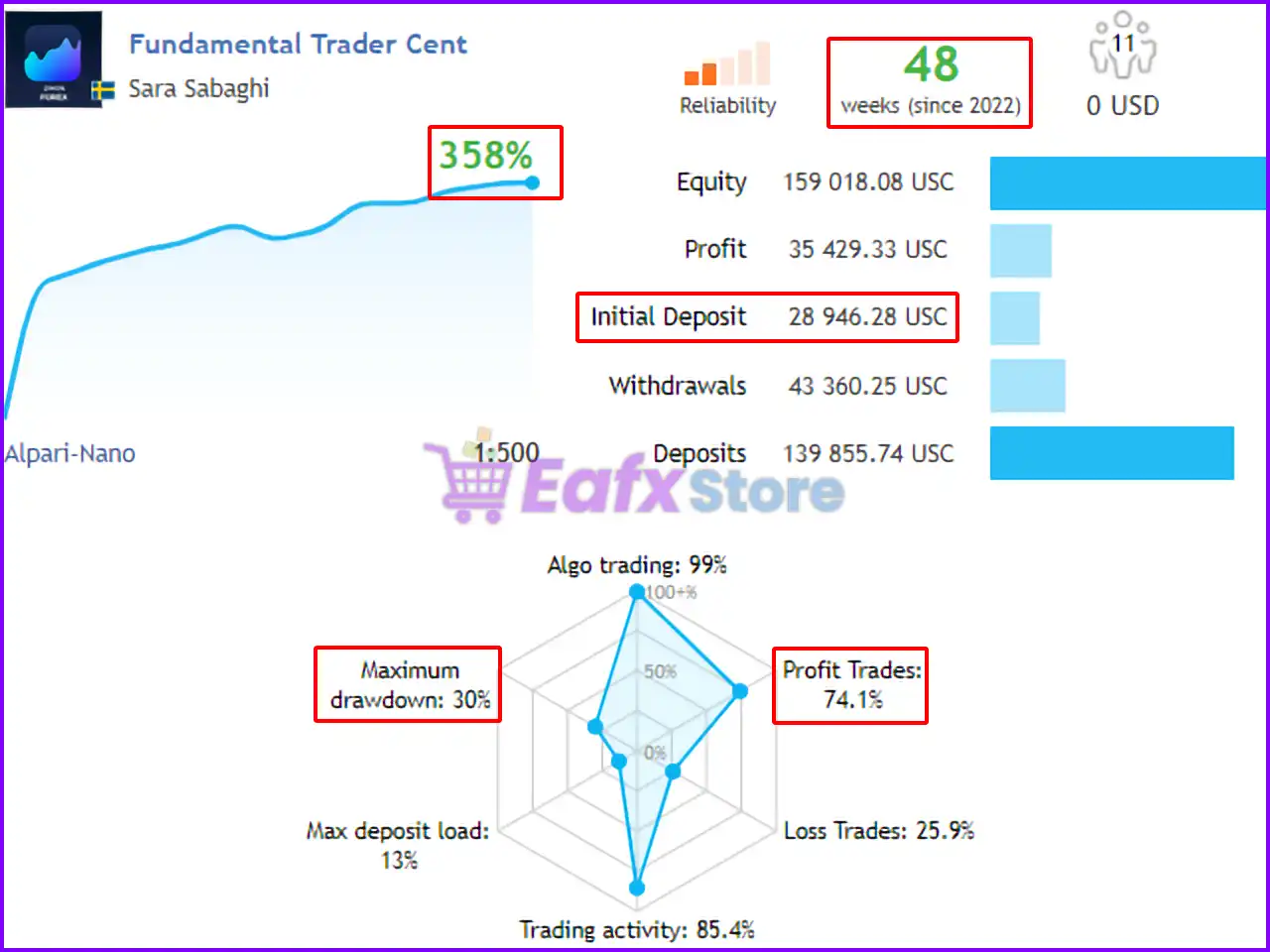
Fundamental Trader EA Signal Results
Fundamental Trader MT4 Signal Results
Why Choose & Use Fundamental Trader MT4?
🔹 Built For Intelligent Market Decisions: Integrates multiple trading data sources into one trading system.
🔹 Advanced Risk Management Framework: Protects trading accounts through adaptive money management tools.
🔹 Professional Institutional Trading Support: Aligns trading direction with smart money market behavior.
🔹 Flexible Across Multiple Forex Pairs: Designed for scalable trading across diverse market conditions.
🔹 Ideal For Marketplace And Prop Traders: Suitable for traders seeking stable and data-driven automation.
Is the Fundamental Trader EA safe?
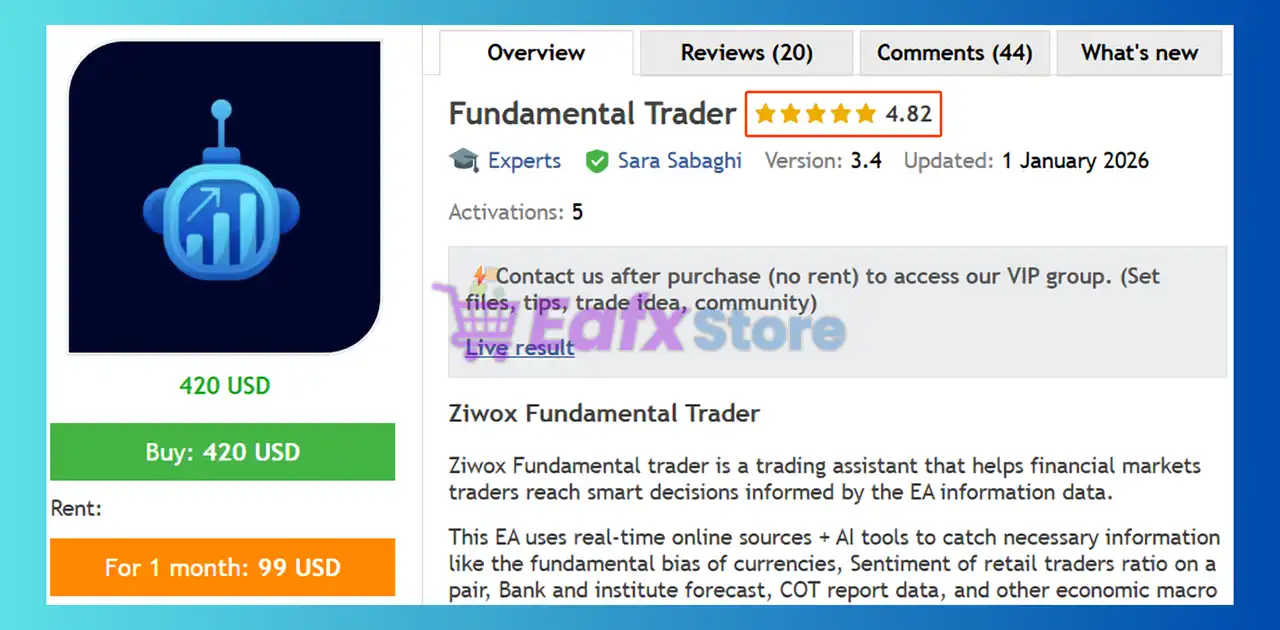
Fundamental Trader EA shows significant potential in providing stable and reliable profits, making it a reliable tool in the forex market. The advisor is highly appreciated by the MQL5 community in many aspects and has won the trust of users.
➡️ Forexmania (2024.06.27): “This great EA combines fundamental- with technical trading and produces stable profit with low DD.”
➡️ Alex Adjei (2023.11.25): “It is awesome. I like the ideas and insights it communicates. Ali, keep up the excellent work. Kudos. Above all, they have a very reliable support base.”
➡️ Akondo Ayewa (2025.07.22): “Je me permets de mettre 5 étoiles. il suffit de regarder l’évolution du signal de l’auteur sur les 6 mois pour se rendre compte que ce robot est un must have. si l’on fait vraiment de bonnes analyses pour choisir les meilleurs paires à trader je crois que l’on peut s’en sortir très bien avec ce robot et ceci sur du long termes. on peut viser entre 5 et 10% par mois sans un grand DD.”
Recommended settings
Recommended settings and parameters to pay attention to from developers and experts:
| Features | Type |
|---|---|
| Trading platform | MetaTrader 4 (MT4) |
| Time frames | H1 (60 minute chart) |
| Currency pairs | All Major and Minor pairs |
| Minimum / Recommended deposit | $500 |
| Minimum / Recommended leverage | 1:500 |
| Account types | Any |
| Product type | NoDLL / Unlimited / Unlocked |
| Additional services | Unlock and Decompile |
| Recommended brokers | Exness Broker, Icmarkets Broker |
| Recommended VPS | MyfxVPS.com (Blue VPS, Golden VPS). Lowest Latency, 2 week Free Trial, 100% Free for 12-18 Months. |
Reviewed by David Easton
Product Download Package?
The download package of the product suite includes:
1. Experts:
 Setting (If Any).docx
Installation Guide.docx
2. SetFiles:
Normal_gOldi_Strategy.set
Fund_5_Trend_Scalp_v1.3.set
V2.1_Multipairs.set
V2.1_Bolinger.set
V_2.2_Bolionger_Band_Safe_Strategy.set
V_2.2_MultiPair_Safe_Strategy.set
V_2.2_Gold_Safe_strategy.set
V_2.2_Bolionger_Band_Strategy.set
Conclusion
In short, Fundamental Trader for MT4 is the ultimate tool for traders who want to combine the power of macroeconomics with technical precision. By integrating market sentiment and COT data, it filters out the noise that causes most technical bots to fail. If you are looking for an EA that trades with a “reason” rather than just a pattern, this is your solution for 2026.
Fundamental Trader EA MT4 Settings Explained
Fundamental Trader EA is a professional multi-strategy Expert Advisor (EA) designed for MetaTrader 4 traders who combine technical analysis, macroeconomic fundamentals, market sentiment and news-based trading.
The EA includes advanced money management, Martingale systems, ATR-based trailing stops, market watch scanners, economic news filters, sentiment panels and multi-currency trading capabilities.
With intelligent trade management and customizable market analysis tools, Fundamental Trader EA is ideal for traders seeking a fully automated trading environment with both technical and fundamental market logic.
Fundamental Trader EA MT4 Settings
Fundamental Trader EA MT4 Full Settings Explanation
Below are the details of the parameters in the advisor’s trading system settings table:
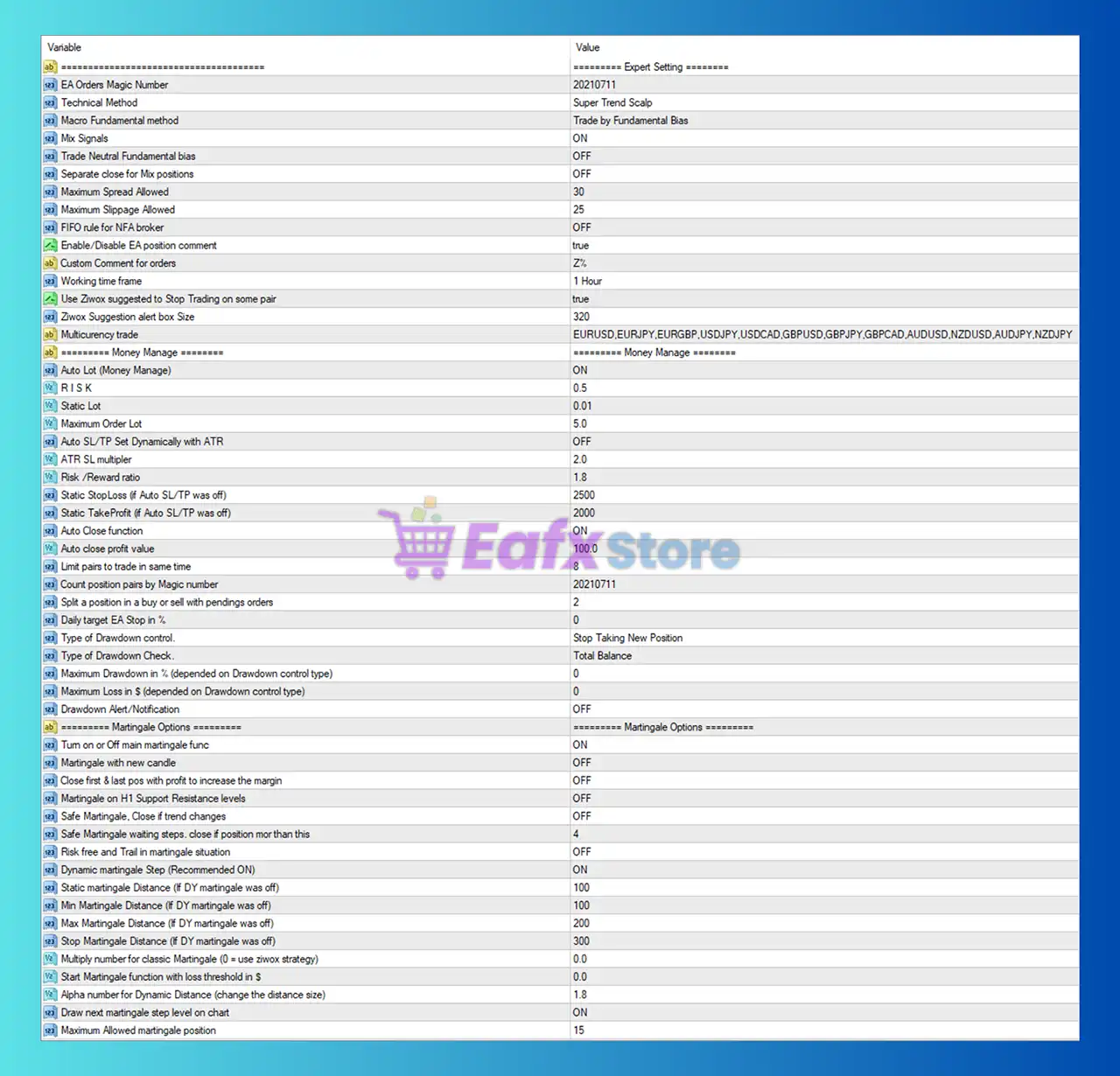
Fundamental Trader EA MT4 Settings Panel
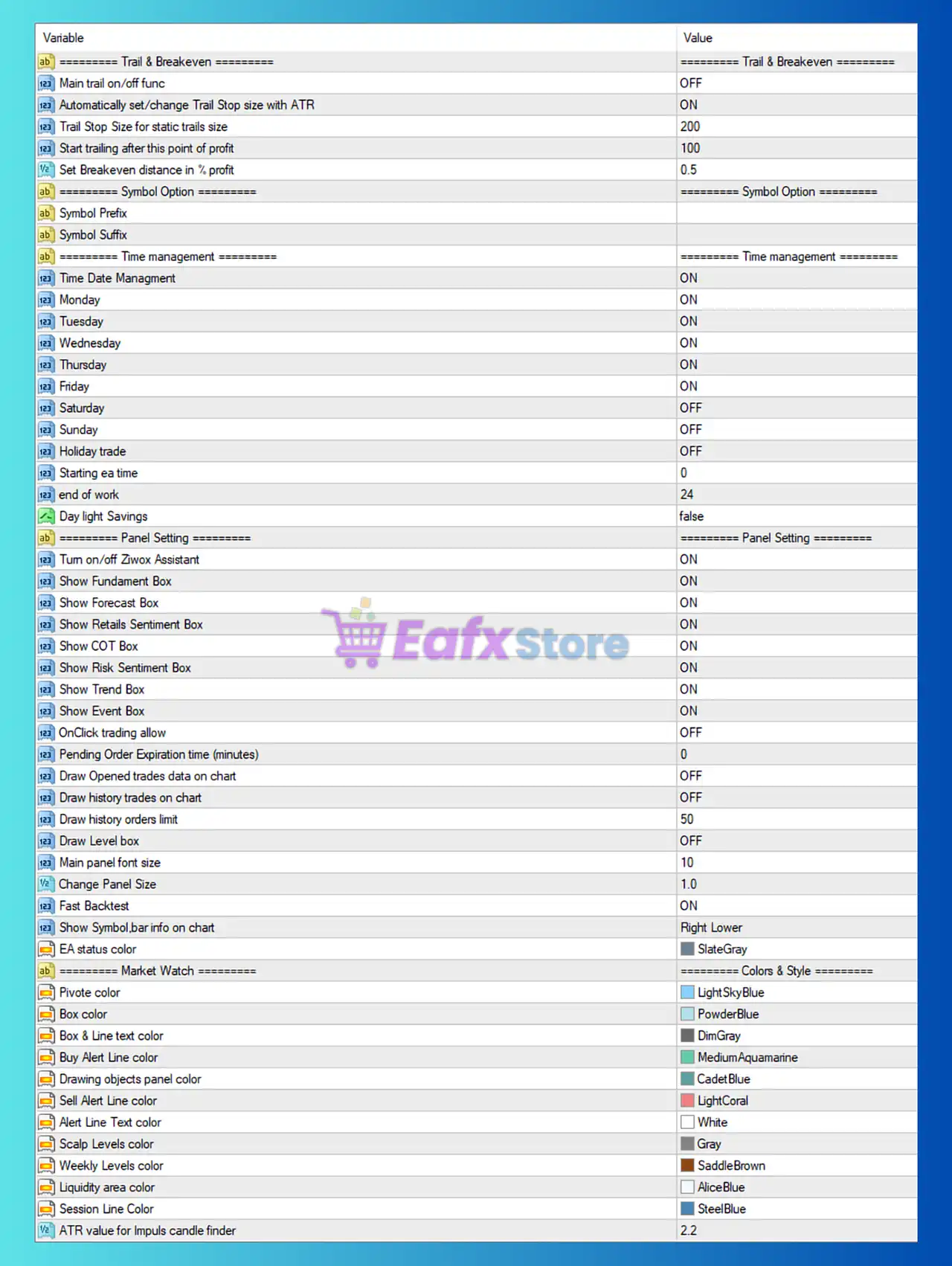
Fundamental Trader EA Settings Panel
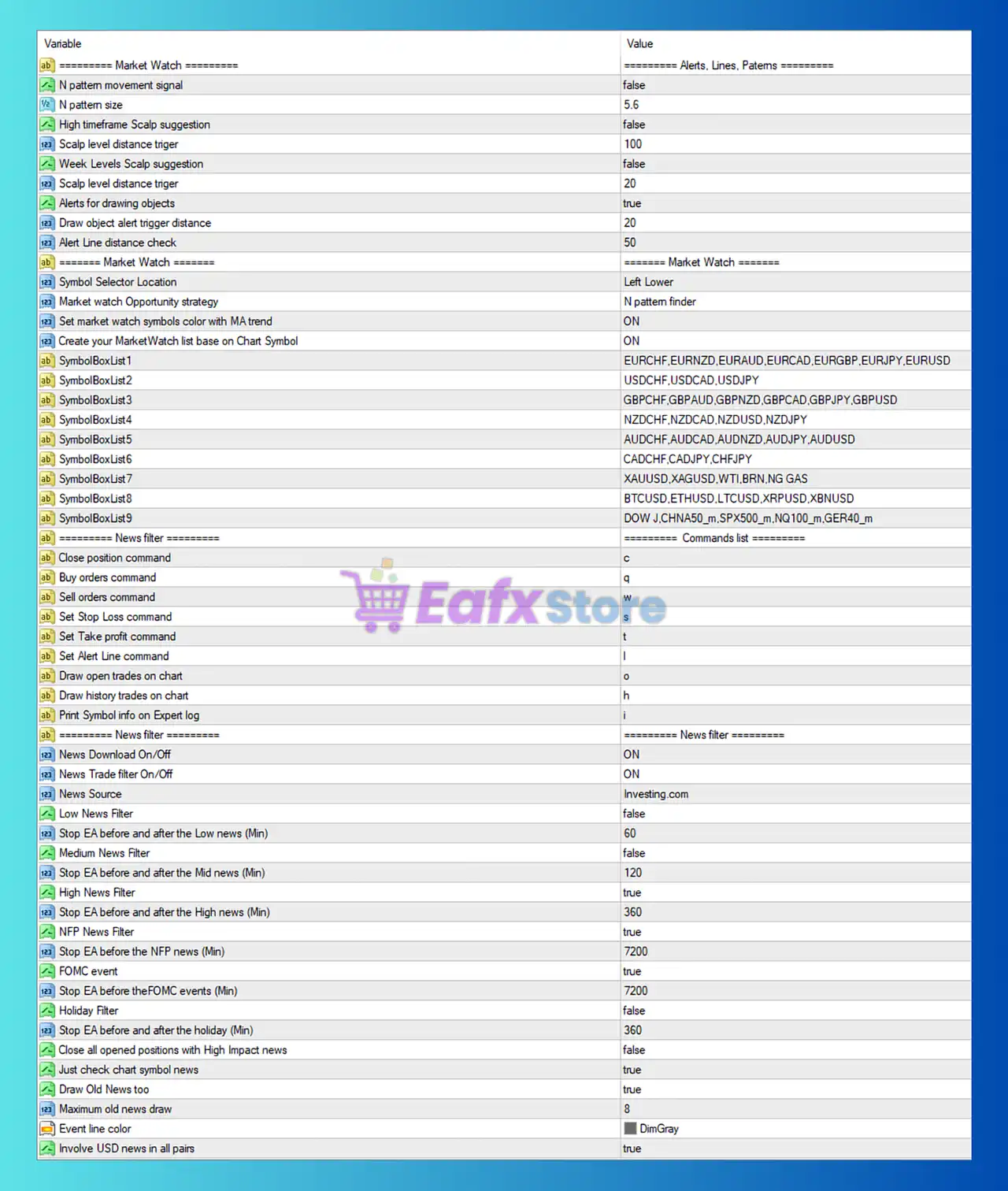
Fundamental Trader MT4 Settings Panel
Market Watch & Pattern Settings
🔹 N pattern movement signal = false: Disables N-pattern movement signal alerts.
🔹 N pattern size = 5.6: Defines the size sensitivity for N-pattern recognition.
🔹 High timeframe Scalp suggestion = false: Disables higher timeframe scalp suggestions.
🔹 Scalp level distance trigger = 100: Trigger distance for scalp levels is 100.
🔹 Week Levels Scalp suggestion = false: Weekly scalp level suggestions are disabled.
🔹 Scalp level distance trigger = 20: Secondary scalp trigger distance is 20.
🔹 Alerts for drawing objects = true: Enables alerts for chart drawing objects.
🔹 Draw object alert trigger distance = 20: Alert distance for drawn objects is 20.
🔹 Alert Line distance check = 50: Distance validation for alert lines is 50.
Market Watch Settings
🔹 Symbol Selector Location = Left Lower: Places the symbol selector at the lower-left chart corner.
🔹 Market watch Opportunity strategy = N pattern finder: Uses N-pattern finder for market opportunities.
🔹 Set market watch symbols color with MA trend = ON: Symbol colors follow Moving Average trend direction.
🔹 Create your MarketWatch list base on Chart Symbol = ON: Automatically builds watchlist based on chart symbols.
🔹 SymbolBoxList1 = EURCHF, EURNZD, EURAUD, EURCAD, EURGBP, EURJPY, EURUSD: First custom market watch symbol group.
🔹 SymbolBoxList2 = USDCHF, USDCAD, USDJPY: Second symbol group.
🔹 SymbolBoxList3 = GBPCHF, GBPAUD, GBPNZD, GBPCAD, GBPJPY, GBPUSD: Third symbol group.
🔹 SymbolBoxList4 = NZDCHF, NZDCAD, NZDUSD, NZDJPY: Fourth symbol group.
🔹 SymbolBoxList5 = AUDCHF, AUDCAD, AUDNZD, AUDJPY, AUDUSD: Fifth symbol group.
🔹 SymbolBoxList6 = CADCHF, CADJPY, CHFJPY: Sixth symbol group.
🔹 SymbolBoxList7 = XAUUSD, XAGUSD, WTI, BRN, NG GAS: Commodity symbol group.
🔹 SymbolBoxList8 = BTCUSD, ETHUSD, LTCUSD, XRPUSD, XBNUSD: Cryptocurrency symbol group.
🔹 SymbolBoxList9 = DOW J, CHNA50_m, SPX500_m, NQ100_m, GER40_m: Indices symbol group.
Commands List Settings
🔹 Close position command = c: Keyboard shortcut c closes positions.
🔹 Buy orders command = q: Shortcut q opens buy orders.
🔹 Sell orders command = w: Shortcut w opens sell orders.
🔹 Set Stop Loss command = s: Shortcut s sets Stop Loss.
🔹 Set Take profit command = t: Shortcut t sets Take Profit.
🔹 Set Alert Line command = l: Shortcut l creates alert lines.
🔹 Draw open trades on chart = o: Shortcut o displays open trades.
🔹 Draw history trades on chart = h: Shortcut h displays trade history.
🔹 Print Symbol info on Expert log = i: Shortcut i prints symbol information to logs.
News Filter Settings
🔹 News Download On/Off = ON: Enables economic news downloading.
🔹 News Trade filter On/Off = ON: Enables news-based trading filters.
🔹 News Source = Investing.com: Uses Investing.com as the news source.
🔹 Low News Filter = false: Low-impact news filtering disabled.
🔹 Stop EA before and after the Low news (Min) = 60: Stops EA 60 minutes around low news.
🔹 Medium News Filter = false: Medium-impact news filtering disabled.
🔹 Stop EA before and after the Mid news (Min) = 120: Stops EA 120 minutes around medium news.
🔹 High News Filter = true: High-impact news filtering enabled.
🔹 Stop EA before and after the High news (Min) = 360: Stops EA 360 minutes around high-impact news.
🔹 NFP News Filter = true: Enables Non-Farm Payroll filtering.
🔹 Stop EA before the NFP news (Min) = 7200: Stops EA 7200 minutes before NFP.
🔹 FOMC event = true: Enables FOMC event filtering.
🔹 Stop EA before the FOMC events (Min) = 7200: Stops EA 7200 minutes before FOMC.
🔹 Holiday Filter = false: Holiday trading filter disabled.
🔹 Stop EA before and after the holiday (Min) = 360: Holiday pause duration set to 360 minutes.
🔹 Close all opened positions with High Impact news = false: Open positions remain during high-impact news.
🔹 Just check chart symbol news = true: Checks news only for the active chart symbol.
🔹 Draw Old News too = true: Displays previous news events on chart.
🔹 Maximum old news draw = 8: Maximum old news events displayed is 8.
🔹 Event line color = DimGray: News event line color set to DimGray.
🔹 Involve USD news in all pairs = true: USD news affects all trading pairs.
Expert Settings
🔹 EA Orders Magic Number = 20210711: Unique Magic Number for EA trades.
🔹 Technical Method = Super Trend Scalp: Uses Super Trend Scalping strategy.
🔹 Macro Fundamental method = Trade by Fundamental Bias: Trading decisions based on macro fundamentals.
🔹 Mix Signals = ON: Combines technical and fundamental signals.
🔹 Trade Neutral Fundamental bias = OFF: Neutral fundamental trades disabled.
🔹 Separate close for Mix positions = OFF: Mixed positions close together.
🔹 Maximum Spread Allowed = 30: Maximum allowed spread is 30.
🔹 Maximum Slippage Allowed = 25: Maximum allowed slippage is 25.
🔹 FIFO rule for NFA broker = OFF: FIFO compliance disabled.
🔹 Enable/Disable EA position comment = true: Enables trade comments.
🔹 Custom Comment for orders = Zfx: Custom order comment is Zfx.
🔹 Working time frame = 1 Hour: Main working timeframe is H1.
🔹 Use Ziwox suggested to Stop Trading on some pair = true: Uses Ziwox stop-trading suggestions.
🔹 Ziwox Suggestion alert box Size = 320: Suggestion alert box size is 320.
🔹 Multicurrency trade = EURUSD,EURJPY,EURGBP,USDJPY,USDCAD,GBPUSD,GBPJPY,GBPCAD,AUDUSD,NZDUSD,AUDJPY,NZDJPY: Active multi-currency trading pairs.
Money Management Settings
🔹 Auto Lot (Money Manage) = ON: Automatic lot sizing enabled.
🔹 RISK = 0.5: Risk level set to 0.5.
🔹 Static Lot = 0.01: Fixed lot size is 0.01.
🔹 Maximum Order Lot = 5.0: Maximum trade lot allowed is 5.0.
🔹 Auto SL/TP Set Dynamically with ATR = OFF: ATR-based SL/TP disabled.
🔹 ATR SL multiplier = 2.0: ATR Stop Loss multiplier value.
🔹 Risk /Reward ratio = 1.8: Risk-to-reward ratio set to 1.8.
🔹 Static StopLoss = 2500: Fixed Stop Loss value is 2500.
🔹 Static TakeProfit = 2000: Fixed Take Profit value is 2000.
🔹 Auto Close function = ON: Automatic close feature enabled.
🔹 Auto close profit value = 100.0: Auto-close activates at $100.0 profit.
🔹 Limit pairs to trade in same time = 8: Maximum simultaneous pairs is 8.
🔹 Count position pairs by Magic number = 20210711: Uses Magic Number tracking.
🔹 Split a position in a buy or sell with pending orders = 2: Splits positions into 2 pending orders.
🔹 Daily target EA Stop in % = 0: Daily target stop disabled.
🔹 Type of Drawdown control = Stop Taking New Position: Stops opening new positions during drawdown.
🔹 Type of Drawdown Check = Total Balance: Uses total account balance for drawdown checks.
🔹 Maximum Drawdown in % = 0: Percentage drawdown limit disabled.
🔹 Maximum Loss in $ = 0: Dollar loss limit disabled.
🔹 Drawdown Alert/Notification = OFF: Drawdown alerts disabled.
Martingale Settings
🔹 Turn on or Off main martingale func = ON: Enables martingale system.
🔹 Martingale with new candle = OFF: Martingale not triggered by new candles.
🔹 Close first & last pos with profit to increase the margin = OFF: Profit-based margin optimization disabled.
🔹 Martingale on H1 Support Resistance levels = OFF: H1 support/resistance martingale disabled.
🔹 Safe Martingale, Close if trend changes = OFF: Trend-reversal martingale safety disabled.
🔹 Safe Martingale waiting steps = 4: Waits 4 steps before safety close.
🔹 Risk free and Trail in martingale situation = OFF: Risk-free martingale trailing disabled.
🔹 Dynamic martingale Step = ON: Dynamic martingale distance enabled.
🔹 Static martingale Distance = 100: Static martingale spacing is 100.
🔹 Min Martingale Distance = 100: Minimum martingale gap is 100.
🔹 Max Martingale Distance = 200: Maximum martingale gap is 200.
🔹 Stop Martingale Distance = 300: Martingale stops at 300 distance.
🔹 Multiply number for classic Martingale = 0.0: Multiplier disabled.
🔹 Start Martingale function with loss threshold in $ = 0.0: Martingale loss trigger disabled.
🔹 Alpha number for Dynamic Distance = 1.8: Dynamic distance factor is 1.8.
🔹 Draw next martingale step level on chart = ON: Displays next martingale level visually.
🔹 Maximum Allowed martingale position = 15: Maximum martingale positions is 15.
Trail & Breakeven Settings
🔹 Main trail on/off func = OFF: Main trailing feature disabled.
🔹 Automatically set/change Trail Stop size with ATR = ON: ATR adjusts trailing stop automatically.
🔹 Trail Stop Size for static trails size = 200: Static trailing stop size is 200.
🔹 Start trailing after this point of profit = 100: Trailing activates after 100 profit points.
🔹 Set Breakeven distance in % profit = 0.5: Breakeven activates at 0.5% profit.
Time Management Settings
🔹 Time Date Management = ON: Enables trading time management.
🔹 Monday = ON: Trading allowed Monday.
🔹 Tuesday = ON: Trading allowed Tuesday.
🔹 Wednesday = ON: Trading allowed Wednesday.
🔹 Thursday = ON: Trading allowed Thursday.
🔹 Friday = ON: Trading allowed Friday.
🔹 Saturday = OFF: Trading disabled Saturday.
🔹 Sunday = OFF: Trading disabled Sunday.
🔹 Holiday trade = OFF: Holiday trading disabled.
🔹 Starting ea time = 0: EA starts trading at hour 0.
🔹 end of work = 24: EA stops trading at hour 24.
🔹 Day light Savings = false: DST adjustments disabled.
Panel Settings
🔹 Turn on/off Ziwox Assistant = ON: Enables Ziwox assistant panel.
🔹 Show Fundament Box = ON: Displays fundamental analysis box.
🔹 Show Forecast Box = ON: Displays market forecast box.
🔹 Show Retails Sentiment Box = ON: Shows retail sentiment data.
🔹 Show COT Box = ON: Displays Commitment of Traders data.
🔹 Show Risk Sentiment Box = ON: Shows risk sentiment analysis.
🔹 Show Trend Box = ON: Displays trend analysis panel.
🔹 Show Event Box = ON: Shows economic event box.
🔹 OnClick trading allow = OFF: One-click trading disabled.
🔹 Pending Order Expiration time = 0: Pending orders do not expire.
🔹 Draw Opened trades data on chart = OFF: Open trade visualization disabled.
🔹 Draw history trades on chart = OFF: Historical trades not displayed.
🔹 Draw history orders limit = 50: Maximum history orders shown is 50.
🔹 Draw Level box = OFF: Level boxes disabled.
🔹 Main panel font size = 10: Panel font size set to 10.
🔹 Change Panel Size = 1.0: Panel scaling factor is 1.0.
🔹 Fast Backtest = ON: Enables faster backtesting mode.
🔹 Show Symbol,bar info on chart = Right Lower: Symbol and bar info shown at lower-right.
🔹 EA status color = SlateGray: EA status display color.
Colors & Style Settings
🔹 Pivot color = LightSkyBlue: Pivot line color.
🔹 Box color = PowderBlue: Box background color.
🔹 Box & Line text color = DimGray: Text color for boxes and lines.
🔹 Buy Alert Line color = MediumAquamarine: Buy alert line color.
🔹 Drawing objects panel color = CadetBlue: Drawing object panel color.
🔹 Sell Alert Line color = LightCoral: Sell alert line color.
🔹 Alert Line Text color = White: Alert text color.
🔹 Scalp Levels color = Gray: Scalping levels color.
🔹 Weekly Levels color = SaddleBrown: Weekly level color.
🔹 Liquidity area color = AliceBlue: Liquidity area display color.
🔹 Session Line Color = SteelBlue: Session line display color.
🔹 ATR value for Impuls candle finder = 2.2: ATR sensitivity value for impulse candle detection.
Conclusion
Fundamental Trader EA MT4 is a powerful multi-functional Expert Advisor combining technical scalping, macroeconomic analysis, sentiment trading, martingale systems, and advanced risk management into a single automated trading solution. With comprehensive news filters, market watch scanners, multi-currency trading support, ATR-based protection systems, and customizable trading panels, the EA provides traders with a highly flexible environment suitable for both technical and fundamental trading strategies.
FAQs
❓ What is Fundamental Trader EA MT4?
Fundamental Trader EA MT4 is an automated MetaTrader 4 Expert Advisor that combines technical and fundamental trading strategies.
❓ Does Fundamental Trader EA MT4 support multi-currency trading?
Yes, the EA supports simultaneous trading across multiple forex pairs, commodities, and cryptocurrencies.
❓ Can the EA filter economic news events?
Yes, it includes advanced news filtering for High, Medium, NFP, and FOMC events.
❓ Does Fundamental Trader EA MT4 use martingale strategies?
Yes, the EA includes both static and dynamic martingale management systems.
❓ Is Fundamental Trader EA MT4 suitable for scalping?
Yes, the EA includes Super Trend Scalping strategies and scalp-level market analysis tools.
User Reviews
Only logged in customers who have purchased this product may leave a review.
❓ What is a Forex Expert Advisor (EA) and how does it work?
A Forex Expert Advisor (EA) is an automated trading software designed for the MetaTrader 4 (MT4) or MetaTrader 5 (MT5) platforms. It uses pre-programmed algorithms to monitor market movements, analyze price action, and execute trades automatically 24/5. By removing human emotion and fatigue, an EA ensures disciplined execution of a specific trading strategy.
❓ Is this EA compatible with Prop Firms like FTMO and FundedNext?
Yes, our trading robots are Prop Firm compatible. They are built with advanced risk management features, including hard stop-losses and daily loss limits. These settings ensure that the EA stays within the strict drawdown requirements (typically 5% daily and 10% total) of firms like FTMO, FundedNext, and E8 Funding.
❓ Does the EA use high-risk strategies like Martingale or Grid?
Unlike many high-risk bots on the market, our flagship EAs prioritize capital preservation. While some systems offer optional recovery modes, our primary logic focuses on trend-following and scalping with fixed risk per trade. We strictly avoid uncontrolled Martingale or Grid averaging to protect your account from "black swan" events.
❓ What is the recommended minimum deposit for a Gold EA?
For a Gold EA (XAUUSD), we recommend a minimum deposit of $100 on a Cent account or $1,000 on a Standard ECN account. This provides sufficient margin to handle the natural volatility of Gold while allowing the EA to trade with the smallest possible lot size (0.01) for maximum safety.
❓ Why is a VPS (Virtual Private Server) necessary for automated trading?
A Forex VPS is essential because it provides a dedicated, 24/7 stable internet connection for your EA. It ensures ultra-low latency execution and prevents missed trades due to local power outages, computer crashes, or internet disconnects, which is vital for high-speed scalping and precision exit strategies.
❓ Can I trade Gold and Forex pairs at the same time?
Yes. Our advanced EAs are multi-asset systems capable of trading XAUUSD (Gold), EURUSD, GBPUSD, and other pairs simultaneously. Trading multiple non-correlated assets helps diversify your risk and can lead to a much smoother equity growth curve compared to trading a single pair.
❓ How does the EA handle high-impact news like NFP or CPI?
Our EAs come equipped with an Integrated News Filter. This feature automatically pulls data from economic calendars and can be set to pause trading 30 to 60 minutes before and after high-impact events. This prevents the bot from getting caught in unpredictable price gaps or extreme slippage during major news releases.
❓ What timeframe is best for maximizing EA performance?
The optimal timeframe depends on the EA's specific logic. Generally, our scalping EAs perform best on the M5 or M15 charts, while our trend-following systems are optimized for the H1 or H4 timeframes to filter out market noise and capture significant price movements.
❓ What is "Drawdown" and how is it controlled in your systems?
Drawdown measures the peak-to-trough decline in your account equity. Our systems control drawdown through Adaptive Risk Scaling and Global Equity Protection. If the total account drawdown reaches a user-defined limit, the EA will automatically close all open positions and stop trading to prevent further losses.
-
 Original price was: $30,000.00.$599.00Current price is: $599.00.
 -
 Original price was: $3,750.00.$599.00Current price is: $599.00.
 -
 Original price was: $30,000.00.$599.00Current price is: $599.00.
 -
 Original price was: $999.00.$89.00Current price is: $89.00.
-
 0Original price was: $2,288.00.$249.00Current price is: $249.00.
 -
 0Original price was: $290.00.$179.00Current price is: $179.00.
 -
 1Original price was: $500.00.$249.00Current price is: $249.00.
 -
 3Original price was: $199.00.$159.00Current price is: $159.00.
There are no reviews yet.