





G101 EA Scalper MT5 v2.19.1 with SetFiles (Unlimited)

Subscriptions for Special Plan
- 30 EA package is more economical!
- Special package with 99%
- Download 1 EA/Day

Subscriptions for Premium Membership
- Download Unlimited in 1 Year
- Get 100% Discount
- Get free access to all

Subscriptions for Gold Membership
- 1 Year Membership
- Get 100% Discount
- Access EA+Indicator+Course
Frequently bought together 🎁
Add these products to enhance your purchase




Quick Verdict
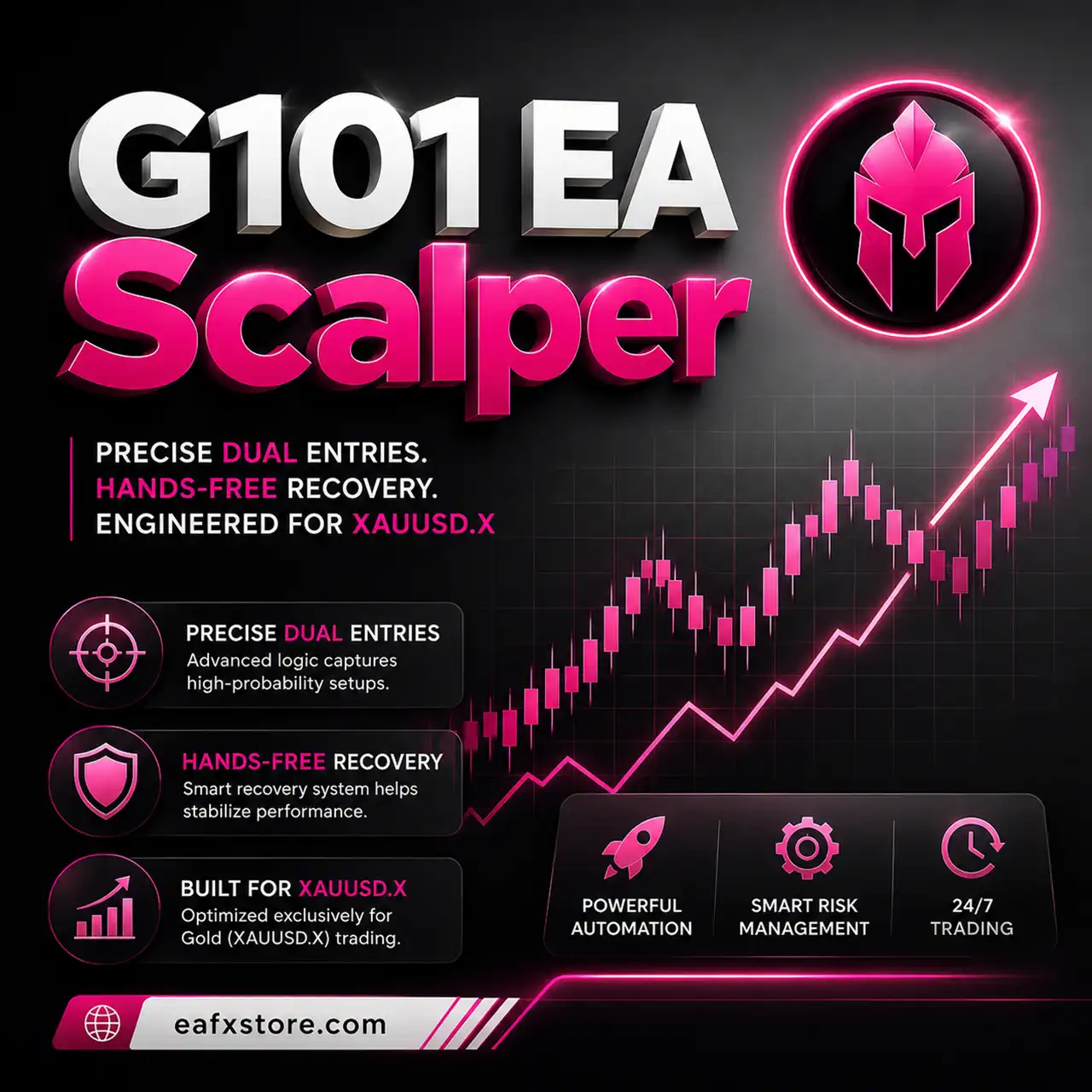
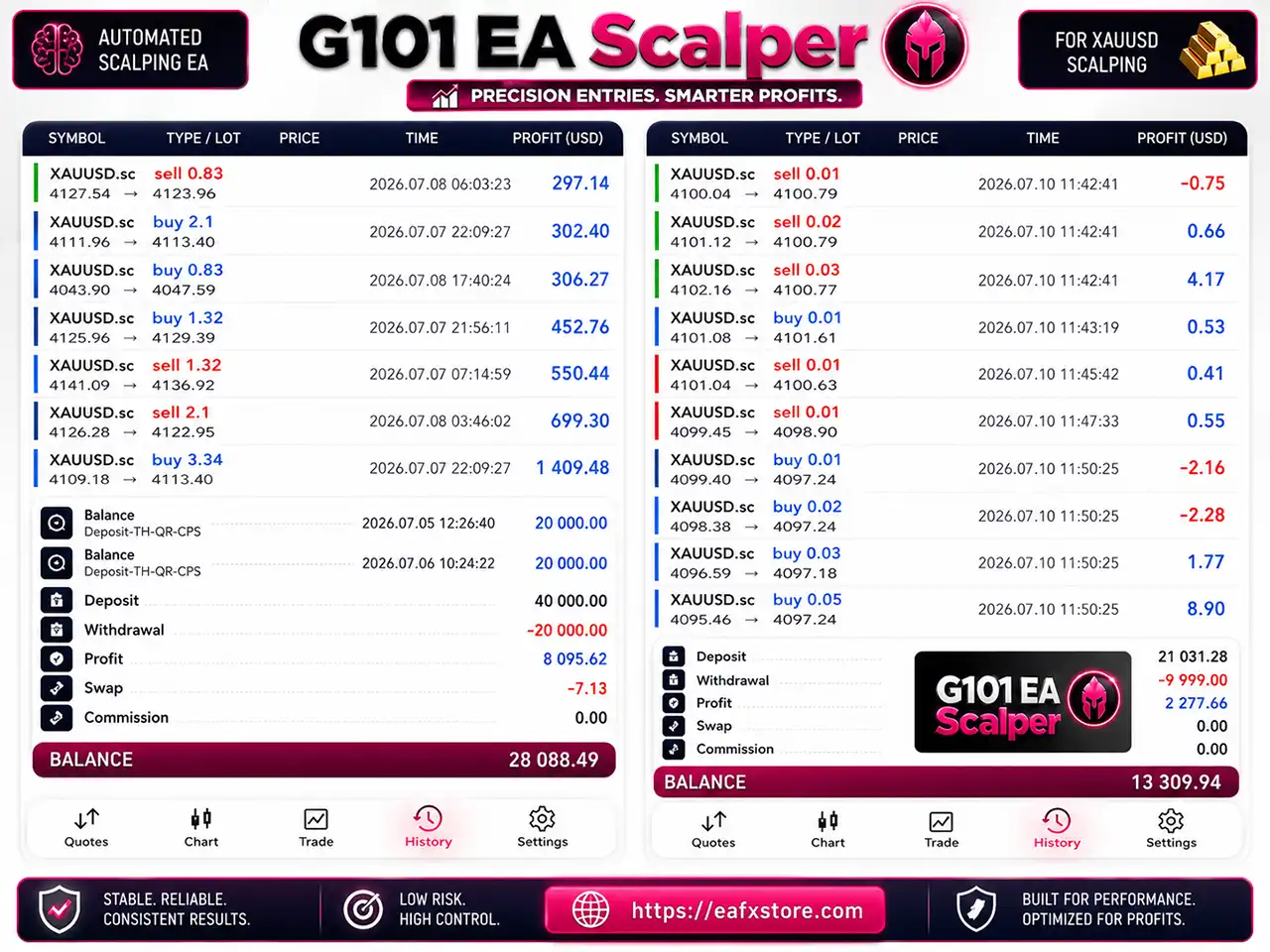
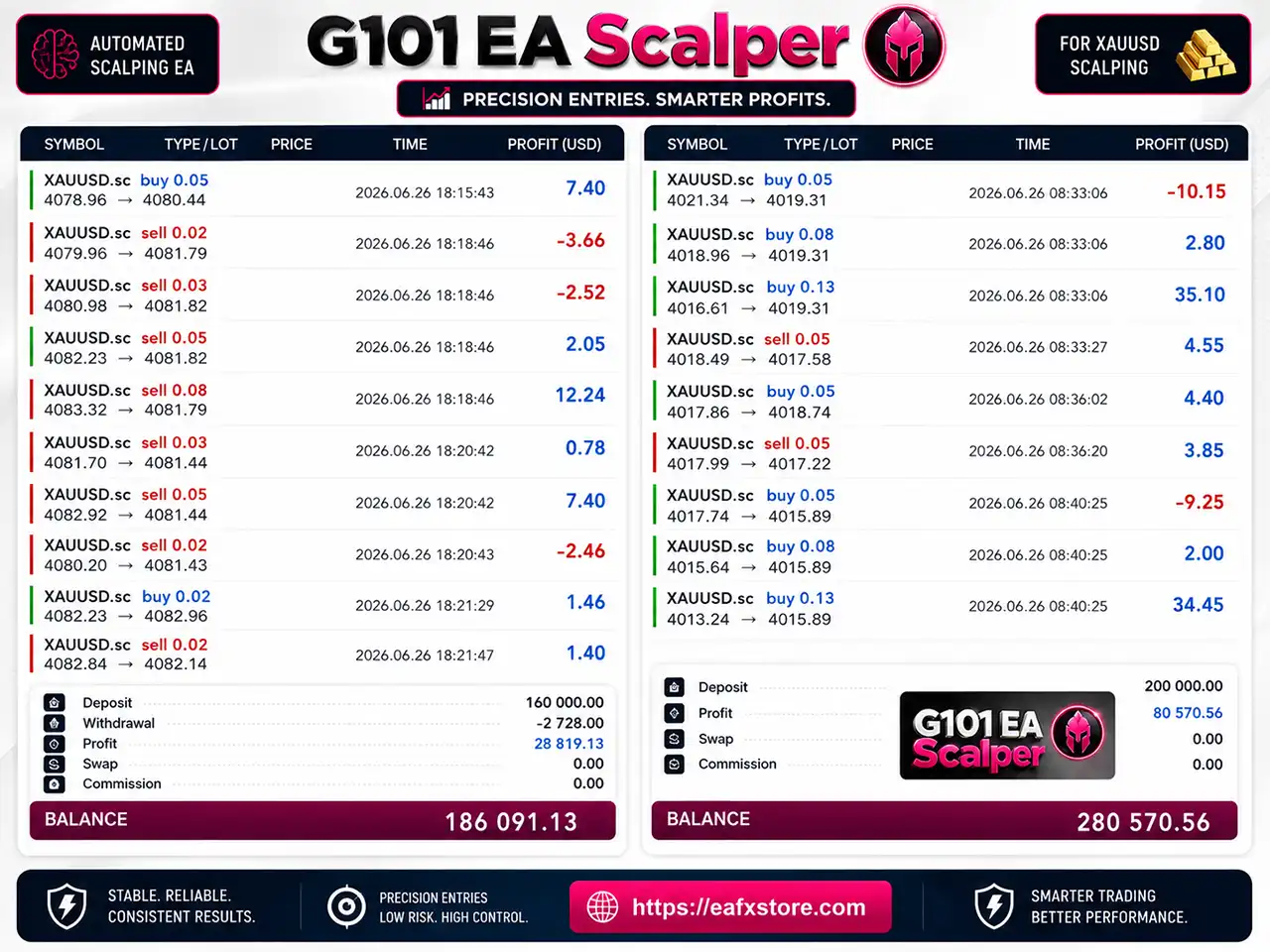
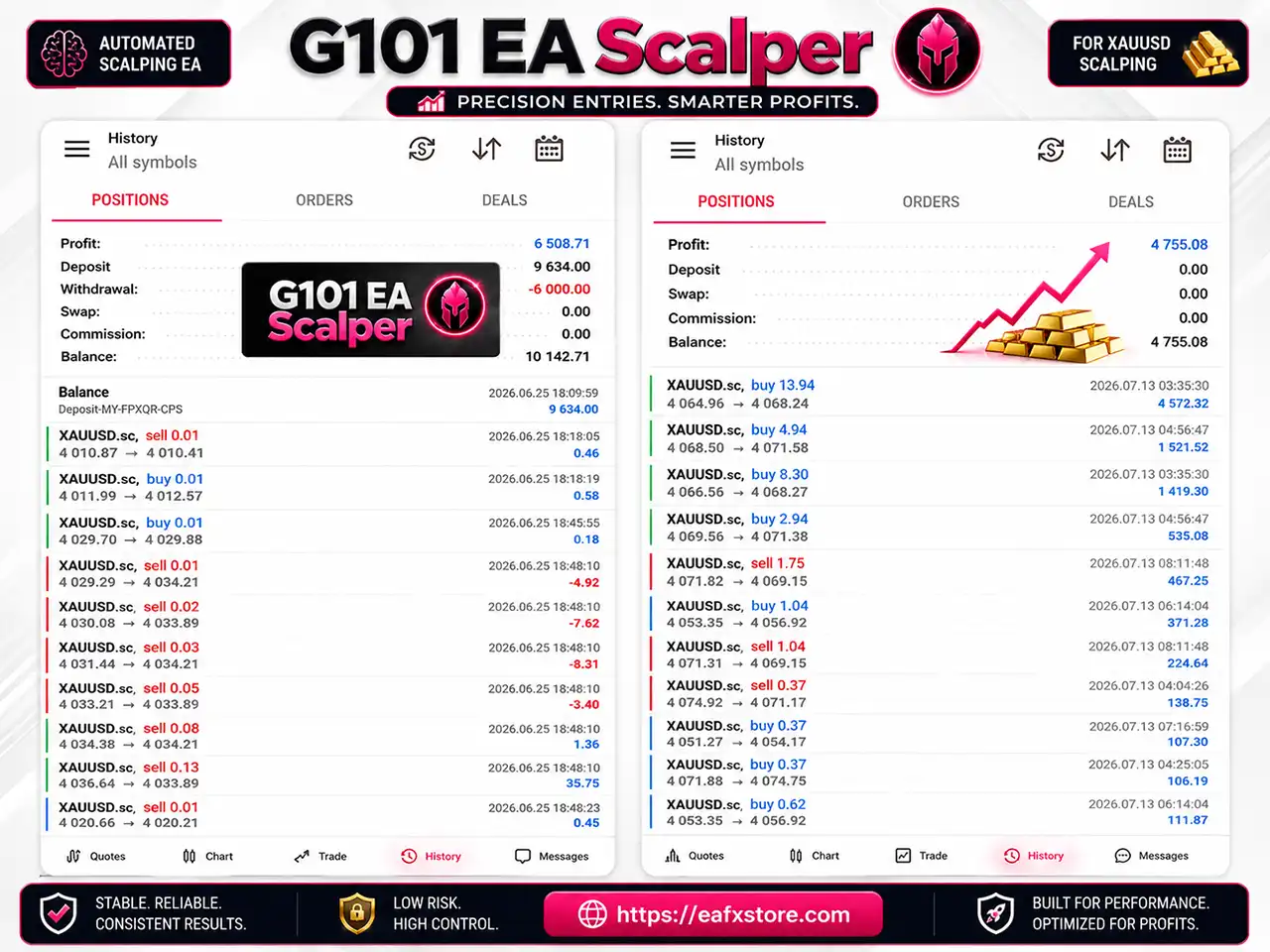
G101 EA Scalper offers a highly configurable scalping framework with dual pending orders, progressive lot sizing, multi-level execution and news protection. Its trading records and Strategy Tester results are promising, although no verified Live Signal or Myfxbook track record is provided.
Best For
✅ Gold Scalpers: Suitable for traders focusing on XAUUSD price movements.
✅ Automated Trading Users: Designed for hands-free MetaTrader 5 execution.
✅ Level-Based Traders: Suitable for users who prefer structured multi-level entries.
✅ News-Aware Traders: Includes protection around high-impact USD news.
✅ Experienced EA Users: Better suited to traders familiar with progressive lot sizing.
Overall Rating
⭐⭐⭐⭐⭐ 8.8/10
| Evaluation Category | Rating |
|---|---|
| Trading Strategy | 8.7/10 |
| Configuration Flexibility | 9.1/10 |
| Risk & News Controls | 8.8/10 |
| Trading Performance Evidence | 8.6/10 |
| Automation & Execution | 8.9/10 |
| Overall Rating | 8.8/10 |
What is G101 EA Scalper MT5?
G101 EA Scalper MT5 is an automated Expert Advisor (EA) designed for structured scalping using Buy Stop and Sell Stop pending orders.
Instead of relying on a single market entry, the EA can prepare pending orders around predefined price areas and progress through multiple trading levels as market conditions develop.
G101 EA Scalper also provides individual distance and DP parameters for different trading levels, allowing the strategy to adapt its positioning as price movement expands.
 Vendor Website: View here
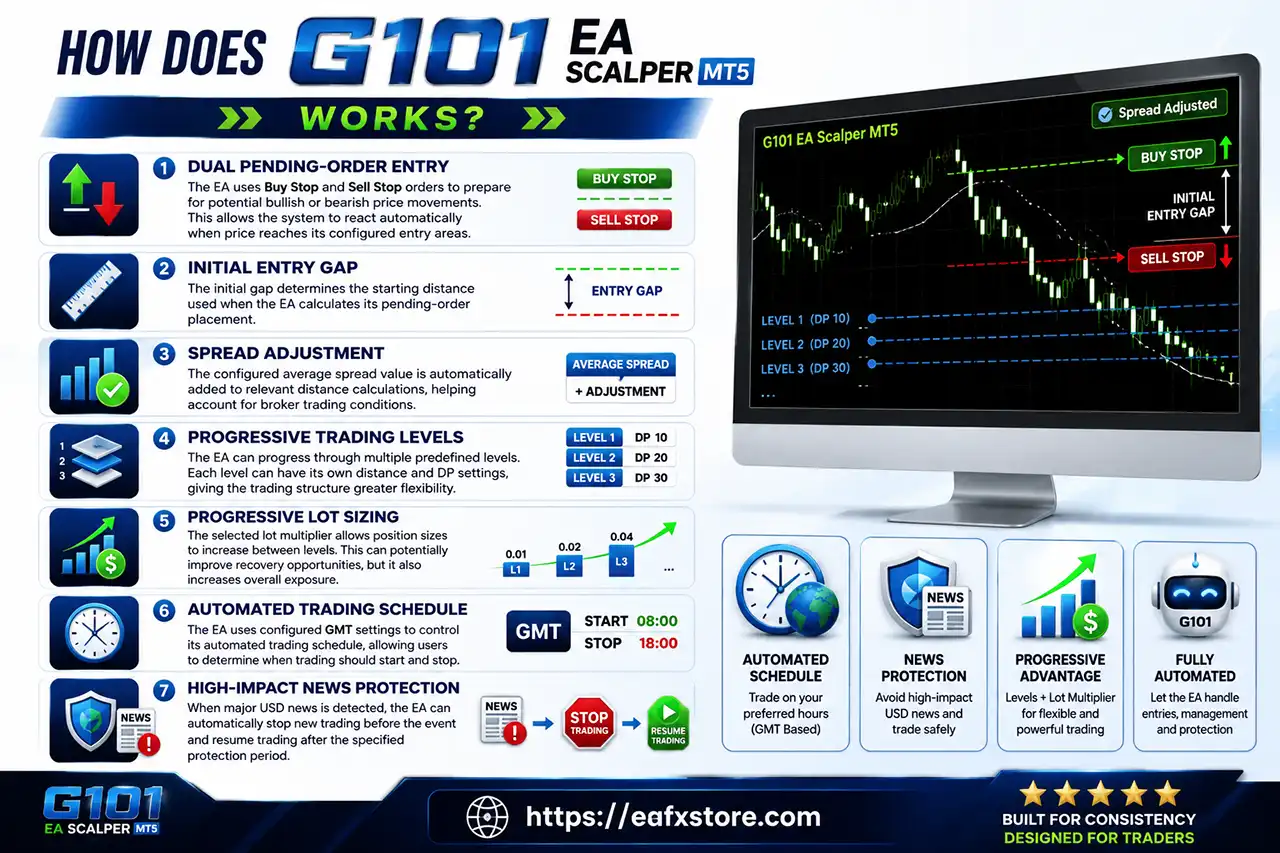
How Does G101 EA Scalper MT5 Work?
Dual Pending-Order Entry
The EA uses Buy Stop and Sell Stop orders to prepare for potential bullish or bearish price movements.
This allows the system to react automatically when price reaches its configured entry areas.
Initial Entry Gap
The initial gap determines the starting distance used when the EA calculates its pending-order placement.
Spread Adjustment
The configured average spread value is automatically added to relevant distance calculations, helping account for broker trading conditions.
Progressive Trading Levels
The EA can progress through multiple predefined levels. Each level can have its own distance and DP settings, giving the trading structure greater flexibility.
Progressive Lot Sizing
The selected lot multiplier allows position sizes to increase between levels.
This can potentially improve recovery opportunities, but it also increases overall exposure.
Automated Trading Schedule
The EA uses configured GMT settings to control its automated trading schedule, allowing users to determine when trading should start and stop.
High-Impact News Protection
When major USD news is detected, the EA can automatically stop new trading before the event and resume trading after the specified protection period.
How Does G101 EA Scalper MT5 Work
Key Features of G101 EA Scalper MT5
Dual Pending-Order System
Uses Buy Stop and Sell Stop orders to prepare for potential directional Gold movements.
Progressive Lot Management
Supports configurable lot multiplication between trading levels for adaptive position sizing.
Multi-Level Trading Structure
Provides up to 30 individual trading levels with configurable distance and DP parameters.
Spread-Aware Distance Calculation
Incorporates the configured average spread into relevant trading-distance calculations.
Flexible Entry Gap
Allows traders to control the initial distance used for pending-order placement.
Automated Trading Schedule
Provides configurable start and stop times based on GMT settings.
High-Impact USD News Filter
Can automatically suspend new trading around important USD economic events.
Detailed Level Parameters
Individual level settings provide additional control over how the EA progresses through the trading structure.
Broker GMT Adjustment
Supports broker server-time conversion for more accurate trading schedules.
Fully Automated MT5 Trading
Handles pending orders and trading execution automatically without requiring constant manual intervention.
Verified Live Signal Performance
Historical account data and reports from the MetaTrader 5 Strategy Tester provide useful evidence regarding performance on live accounts.
G101 EA Scalper Trading Results
G101 EA Scalper MT5 Trading Results
Historical Trading Results Performance
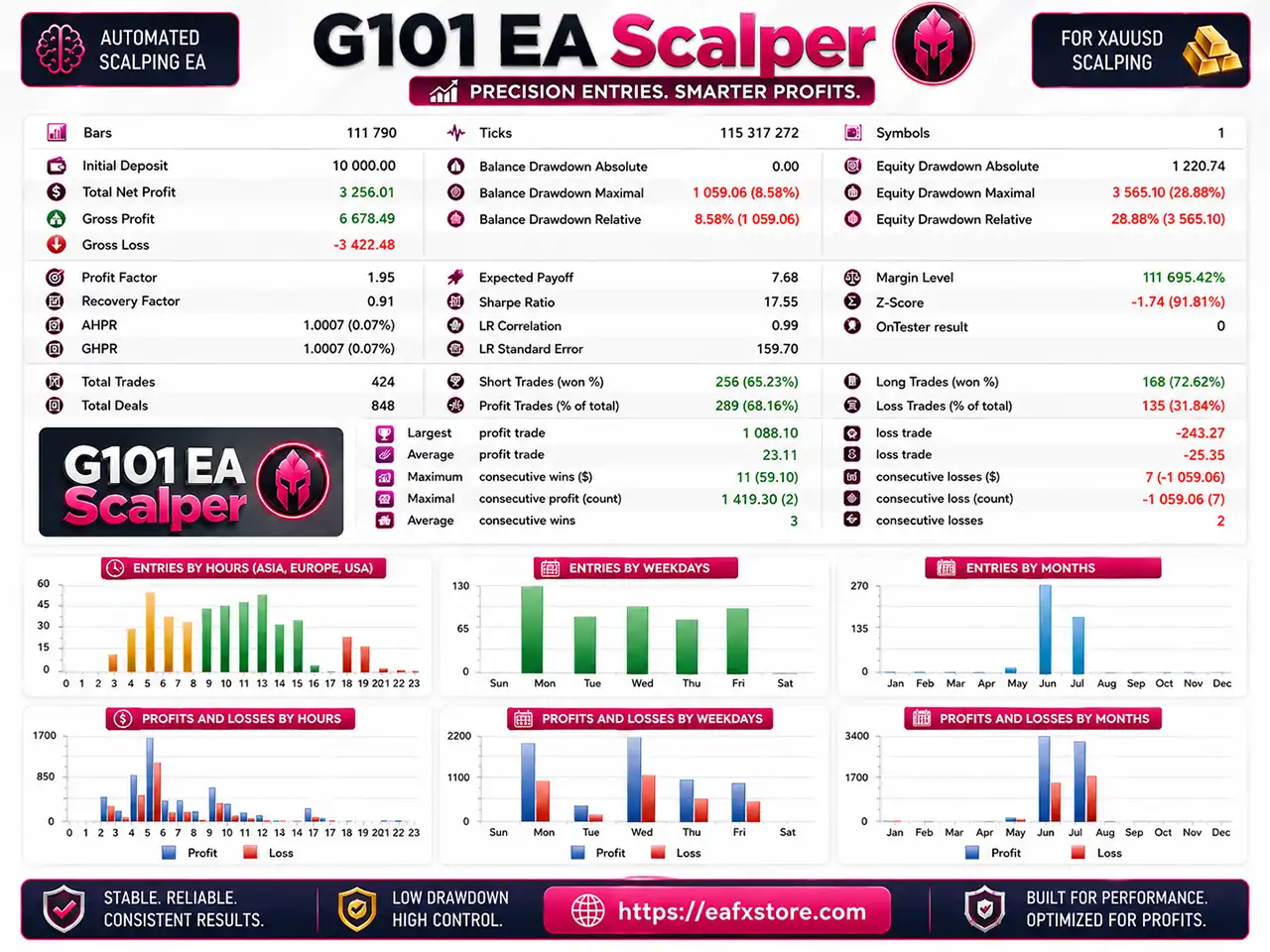
The supplied MetaTrader 5 Strategy Tester report provides a separate historical performance overview.
G101 EA Scalper MT5 Backtest Results
| Metric | Reported Result |
|---|---|
| Initial Deposit | 10,000.00 |
| Total Net Profit | 3,256.01 |
| Gross Profit | 6,678.49 |
| Gross Loss | -3,422.48 |
| Profit Factor | 1.95 |
| Recovery Factor | 0.91 |
| Total Trades | 424 |
| Profit Trades | 289 (68.16%) |
| Loss Trades | 135 (31.84%) |
| Equity Drawdown Relative | 28.88% |
The Strategy Tester reports 3,256.01 in total net profit from an initial deposit of 10,000.00.
The 1.95 Profit Factor indicates that gross profit was substantially higher than gross loss during the tested period.
The reported winning-trade percentage was 68.16%, while relative equity drawdown reached 28.88%.
The drawdown figure is particularly important. Although the test generated positive net profit, nearly 29% relative equity drawdown indicates that the system can experience significant equity fluctuations.
Why G101 EA Scalper MT5 Stands Out
Extensive Level Configuration
G101 EA Scalper MT5 provides detailed control across its trading levels.
Traders can configure individual distance and DP parameters rather than relying on a single static entry structure.
Dual-Direction Preparation
The Buy Stop and Sell Stop framework allows the EA to prepare for both bullish and bearish market movements.
Built-In News Protection
The high-impact USD news filter is valuable for Gold trading because XAUUSD can experience significant volatility during major US economic announcements.
Flexible Time Management
Automatic start and stop controls allow users to define when the EA should be active.
Spread-Aware Trading
The ability to incorporate average spread into distance calculations gives the EA additional awareness of broker trading conditions.
Risk Management Features
Initial Lot Control
The EA starts from a configurable 0.01-lot position size, providing a defined base exposure.
Lot Multiplier Management
The selected minimum multiplier of 1.50 will govern how the position size changes across trading levels.
News Protection
High-impact USD news protection can temporarily suspend new trading around major events.
Trading Schedule Control
Automatic start and stop times help restrict market exposure to selected periods.
Spread Adjustment
The configured spread value is incorporated into distance calculations to account for trading costs.
Level-Based Exposure Control
Individual level distances provide additional control over how trading positions can develop.
Recommended Trading Conditions
For the best performance, the following setup is recommended:
| Features | Type |
|---|---|
| Trading platform | MetaTrader 5 (MT5) |
| Time frames | M5 (5 minute chart) |
| Currency pairs | XAUUSD (Gold) |
| Minimum / Recommended deposit | $1,000+ |
| Minimum / Recommended leverage | 1:50+ |
| Account type | Any |
| Product type | NoDLL |
| Additional services | Unlock and Decompile |
| Recommended brokers | Exness Broker, Icmarkets Broker |
| Recommended VPS | MyfxVPS.com (Blue VPS, Golden VPS). Lowest Latency, 2 week Free Trial, 100% Free for 12-18 Months. |
Product Download Package?
The download package of the product suite includes:
Experts
 G101 EA Scalper v2.19.1.ex5
SetFiles
XAUUSD_Multi_1.50.set
XAUUSD_Multi_1.59.set
XAUUSD_Multi_1.68.set
 Reviewed by David Easton
Weaknesses and Risk Warnings
Progressive Lot Exposure
The selected lot multiplier can increase position size as additional trading levels become active.
Multiple Trading Levels
A large number of levels can create significant cumulative exposure during extended market movements.
Drawdown Can Be Significant
The supplied Strategy Tester reports 28.88% relative equity drawdown, which should be carefully considered.
No Verified Live Signal
The supplied materials do not establish a verified Live Signal or Myfxbook track record.
News Volatility Risk
Although the news filter is enabled, Gold can still experience rapid price movements around major economic events.
Who Should Use G101 EA Scalper MT5?
Gold-Focused Traders
G101 EA Scalper MT5 is particularly relevant for traders who actively trade XAUUSD and understand Gold’s volatility.
Experienced Automated-Trading Users
The multi-level structure and progressive lot management make the EA more suitable for users who understand automated position sizing and exposure.
Traders Seeking Detailed Control
Users who prefer adjusting entry gaps, level distances, trading schedules and news protection can benefit from the extensive configuration options.
Traders With Adequate Capital
Because progressive levels can increase total exposure, the EA should be used with sufficient capital and appropriate margin management.
Traders Willing to Forward Test
Since there is no independently verified Live Signal or Myfxbook track record, personal demo and forward testing are especially important before committing significant capital.
Final Verdict
G101 EA Scalper MT5 is a highly configurable automated scalping Expert Advisor built around dual pending orders, progressive lot sizing, multi-level execution, spread adjustment, scheduled trading and high-impact USD news protection.
However, the reported drawdown and progressive lot structure demonstrate that this is not a low-risk trading system. The lack of an independently verified Live Signal or Myfxbook track record is also an important consideration when evaluating the EA.
For traders looking for a configurable MT5 scalper with multi-level execution, dual pending orders, progressive lot management and automated news protection, G101 EA Scalper presents an interesting option.
🔢 G101 EA Scalper MT5 Settings Guide
G101 EA Scalper MT5 is an automated scalping Expert Advisor designed around dual-entry Buy Stop and Sell Stop orders, configurable entry gaps, progressive trading levels, and detailed level-by-level distance and DP parameters.
The supplied configuration provides extensive control over initial lot sizing, broker spread adjustments, trading hours, high-impact news protection and up to 30 trading levels.
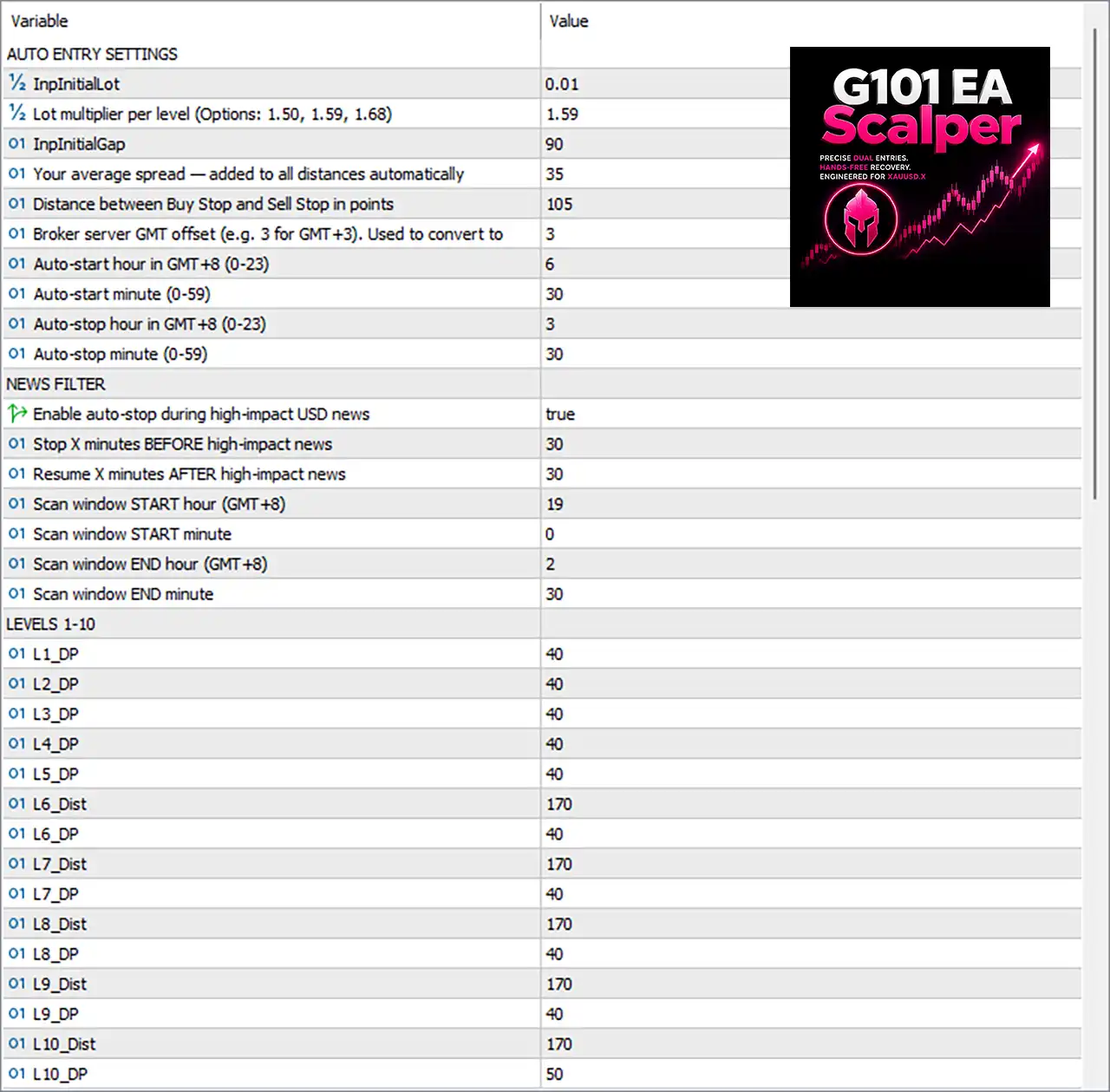
G101 EA Scalper MT5 Settings Panel
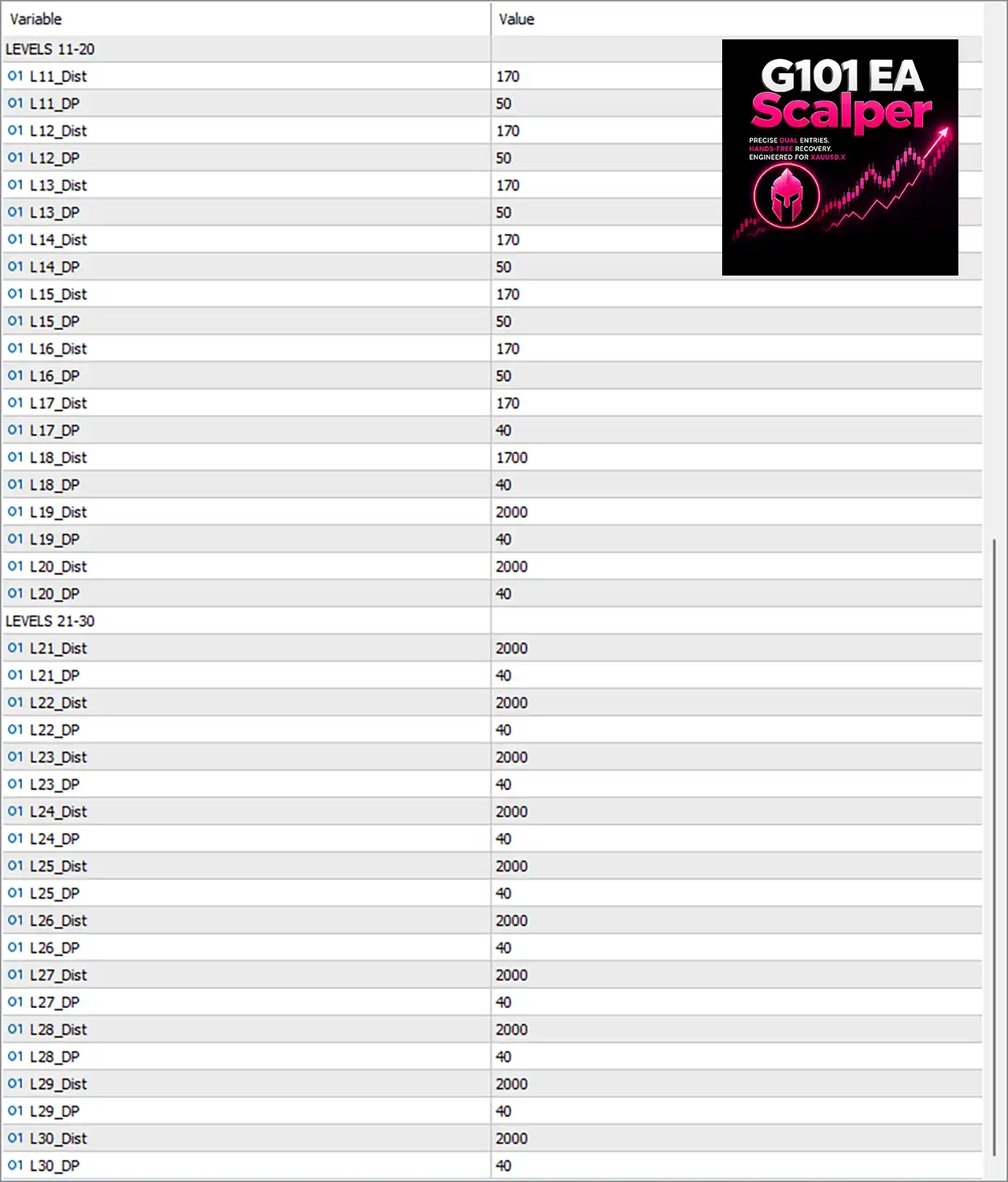
G101 EA Scalper Settings Panel
🔶 Auto Entry Settings
🔹 InpInitialLot: 0.01 — Sets the initial trading lot size at 0.01 for the first entry level.
🔹 Lot multiplier per level (Options: 1.50, 1.59, 1.68): 1.59 — Determines how the lot size progresses between levels; the selected multiplier is 1.59.
🔹 InpInitialGap: 90 — Sets the initial gap used by the EA when calculating the first pending-order entry distance.
🔹 Your average spread — added to all distances automatically: 35 — Adds the broker’s average spread adjustment of 35 to the configured trading distances.
🔹 Distance between Buy Stop and Sell Stop in points: 105 — Sets the separation between the Buy Stop and Sell Stop orders to 105 points.
🔹 Broker server GMT offset (e.g. 3 for GMT+3): 3 — Defines the broker server’s GMT offset as 3, which is used for time conversion.
🔹 Auto-start hour in GMT+8 (0-23): 6 — Sets the automatic trading start hour to 06:00 in GMT+8.
🔹 Auto-start minute (0-59): 30 — Sets the automatic trading start minute to 30, giving a start time of 06:30 GMT+8.
🔹 Auto-stop hour in GMT+8 (0-23): 3 — Sets the automatic trading stop hour to 03:00 GMT+8.
🔹 Auto-stop minute (0-59): 30 — Sets the automatic trading stop minute to 30, giving a stop time of 03:30 GMT+8.
🔶 News Filter Settings
🔹 Enable auto-stop during high-impact USD news: true — Enables automatic trading suspension around high-impact USD news events.
🔹 Stop X minutes BEFORE high-impact news: 30 — Stops new trading 30 minutes before a high-impact news event.
🔹 Resume X minutes AFTER high-impact news: 30 — Allows trading to resume 30 minutes after the high-impact news event.
🔹 Scan window START hour (GMT+8): 19 — Sets the news-calendar scanning window start to 19:00 GMT+8.
🔹 Scan window START minute: 0 — Sets the news scanning start minute to 00, creating a start time of 19:00 GMT+8.
🔹 Scan window END hour (GMT+8): 2 — Sets the news scanning window end hour to 02:00 GMT+8.
🔹 Scan window END minute: 30 — Sets the news scanning end minute to 30, creating an end time of 02:30 GMT+8.
🔶 Levels 1–10
The EA provides individual parameters for each trading level. The Dist values represent the configured distance for the corresponding level, while DP is the level-specific parameter used by the EA’s internal trading logic.
🔹 L1_DP: 40 — Sets the DP parameter for Level 1 to 40.
🔹 L2_DP: 40 — Sets the DP parameter for Level 2 to 40.
🔹 L3_DP: 40 — Sets the DP parameter for Level 3 to 40.
🔹 L4_DP: 40 — Sets the DP parameter for Level 4 to 40.
🔹 L5_DP: 40 — Sets the DP parameter for Level 5 to 40.
🔹 L6_Dist: 170 — Sets the distance for Level 6 to 170.
🔹 L6_DP: 40 — Sets the DP parameter for Level 6 to 40.
🔹 L7_Dist: 170 — Sets the distance for Level 7 to 170.
🔹 L7_DP: 40 — Sets the DP parameter for Level 7 to 40.
🔹 L8_Dist: 170 — Sets the distance for Level 8 to 170.
🔹 L8_DP: 40 — Sets the DP parameter for Level 8 to 40.
🔹 L9_Dist: 170 — Sets the distance for Level 9 to 170.
🔹 L9_DP: 40 — Sets the DP parameter for Level 9 to 40.
🔹 L10_Dist: 170 — Sets the distance for Level 10 to 170.
🔹 L10_DP: 50 — Sets the DP parameter for Level 10 to 50.
🔶 Levels 11–20
🔹 L11_Dist: 170 — Sets the distance for Level 11 to 170.
🔹 L11_DP: 50 — Sets the DP parameter for Level 11 to 50.
🔹 L12_Dist: 170 — Sets the distance for Level 12 to 170.
🔹 L12_DP: 50 — Sets the DP parameter for Level 12 to 50.
🔹 L13_Dist: 170 — Sets the distance for Level 13 to 170.
🔹 L13_DP: 50 — Sets the DP parameter for Level 13 to 50.
🔹 L14_Dist: 170 — Sets the distance for Level 14 to 170.
🔹 L14_DP: 50 — Sets the DP parameter for Level 14 to 50.
🔹 L15_Dist: 170 — Sets the distance for Level 15 to 170.
🔹 L15_DP: 50 — Sets the DP parameter for Level 15 to 50.
🔹 L16_Dist: 170 — Sets the distance for Level 16 to 170.
🔹 L16_DP: 50 — Sets the DP parameter for Level 16 to 50.
🔹 L17_Dist: 170 — Sets the distance for Level 17 to 170.
🔹 L17_DP: 40 — Sets the DP parameter for Level 17 to 40.
🔹 L18_Dist: 1700 — Sets the distance for Level 18 to 1700, substantially wider than the preceding levels.
🔹 L18_DP: 40 — Sets the DP parameter for Level 18 to 40.
🔹 L19_Dist: 2000 — Sets the distance for Level 19 to 2000.
🔹 L19_DP: 40 — Sets the DP parameter for Level 19 to 40.
🔹 L20_Dist: 2000 — Sets the distance for Level 20 to 2000.
🔹 L20_DP: 40 — Sets the DP parameter for Level 20 to 40.
🔶 Levels 21–30
🔹 L21_Dist: 2000 — Sets the distance for Level 21 to 2000.
🔹 L21_DP: 40 — Sets the DP parameter for Level 21 to 40.
🔹 L22_Dist: 2000 — Sets the distance for Level 22 to 2000.
🔹 L22_DP: 40 — Sets the DP parameter for Level 22 to 40.
🔹 L23_Dist: 2000 — Sets the distance for Level 23 to 2000.
🔹 L23_DP: 40 — Sets the DP parameter for Level 23 to 40.
🔹 L24_Dist: 2000 — Sets the distance for Level 24 to 2000.
🔹 L24_DP: 40 — Sets the DP parameter for Level 24 to 40.
🔹 L25_Dist: 2000 — Sets the distance for Level 25 to 2000.
🔹 L25_DP: 40 — Sets the DP parameter for Level 25 to 40.
🔹 L26_Dist: 2000 — Sets the distance for Level 26 to 2000.
🔹 L26_DP: 40 — Sets the DP parameter for Level 26 to 40.
🔹 L27_Dist: 2000 — Sets the distance for Level 27 to 2000.
🔹 L27_DP: 40 — Sets the DP parameter for Level 27 to 40.
🔹 L28_Dist: 2000 — Sets the distance for Level 28 to 2000.
🔹 L28_DP: 40 — Sets the DP parameter for Level 28 to 40.
🔹 L29_Dist: 2000 — Sets the distance for Level 29 to 2000.
🔹 L29_DP: 40 — Sets the DP parameter for Level 29 to 40.
🔹 L30_Dist: 2000 — Sets the distance for Level 30 to 2000.
🔹 L30_DP: 40 — Sets the DP parameter for Level 30 to 40.
🔢 G101 EA Scalper MT5 Settings Overview
🔹 Initial Lot: 0.01
🔹 Lot Multiplier: 1.59
🔹 Initial Gap: 90
🔹 Average Spread Adjustment: 35
🔹 Buy Stop/Sell Stop Distance: 105 points
🔹 Broker GMT Offset: 3
🔹 Auto-Start: 06:30 GMT+8
🔹 Auto-Stop: 03:30 GMT+8
🔹 High-Impact USD News Protection: true
🔹 News Pause Before: 30 minutes
🔹 News Pause After: 30 minutes
🔹 News Scan Window: 19:00–02:30 GMT+8
🔹 Trading Levels: 1–30
🔹 Level 6–17 Distance: 170
🔹 Level 18 Distance: 1700
🔹 Level 19–30 Distance: 2000
🔢 How the G101 EA Scalper MT5 Configuration Works
The configuration starts automated entries with an initial lot of 0.01 and a 1.59 lot multiplier per level. The EA uses an initial gap of 90, while an average spread adjustment of 35 is automatically added to distance calculations.
The Buy Stop and Sell Stop orders are separated by 105 points, creating the foundation for the EA’s dual-entry approach. The configuration also includes a broker GMT offset of 3 and a dedicated GMT+8 automatic trading schedule.
The EA’s level system extends from Level 1 through Level 30. Levels 6–17 use a distance of 170, Level 18 expands to 1700, and Levels 19–30 use 2000. This creates a progressively wider distance structure at the higher levels.
The news protection system is enabled for high-impact USD news, with trading automatically stopped 30 minutes before and resumed 30 minutes after the event. The configured news scan window runs from 19:00 to 02:30 GMT+8.
🔢 Risk Considerations
🔹 Lot Multiplier: The selected 1.59 multiplier can increase exposure as additional levels are activated.
🔹 30 Trading Levels: The configuration provides up to 30 levels, so traders should evaluate potential cumulative exposure before live deployment.
🔹 Wide Level Distances: The jump from 170 to 1700 at Level 18 and then 2000 from Level 19 onward creates a substantially wider spacing structure.
🔹 Dual Pending Orders: The 105-point separation between Buy Stop and Sell Stop orders can expose the account to different directional scenarios depending on market movement.
🔹 News Protection: High-impact USD news protection is enabled with a 30-minute buffer on both sides of the event.
🔢 Conclusion
G101 EA Scalper MT5 offers a highly configurable automated scalping framework with dual pending entries, progressive lot sizing, broker-time conversion, scheduled trading, high-impact USD news protection, and 30 individual trading levels.
The supplied configuration uses 0.01 as the initial lot, a 1.59 multiplier, an initial gap of 90, and 105 points between Buy Stop and Sell Stop orders. Its level structure becomes increasingly wide, moving from 170 at Levels 6–17 to 1700 at Level 18 and 2000 across Levels 19–30.
Because the strategy can operate across many levels while using a lot multiplier, proper backtesting, forward testing, margin analysis, and drawdown evaluation are important before applying these settings to a live account.
🔢 FAQs
❓ What is the initial lot size of G101 EA Scalper MT5?
The InpInitialLot is set to 0.01.
❓ What lot multiplier is currently selected?
The selected Lot multiplier per level is 1.59, with the available options shown as 1.50, 1.59, and 1.68.
❓ How far apart are the Buy Stop and Sell Stop orders?
The configured Distance between Buy Stop and Sell Stop is 105 points.
❓ Does G101 EA Scalper MT5 have high-impact news protection?
Yes. Enable auto-stop during high-impact USD news = true, with trading stopped 30 minutes before and resumed 30 minutes after high-impact news.
❓ How many trading levels are configured?
The settings include 30 levels, from L1 through L30, with individual distance and DP parameters where shown.
User Reviews
Only logged in customers who have purchased this product may leave a review.
❓ What is the initial lot size of G101 EA Scalper MT5?
G101 EA Scalper MT5 uses an initial lot size of 0.01, which defines the trading volume for the first entry level before progressive sizing is applied.
❓ What lot multiplier does G101 EA Scalper MT5 use?
G101 EA Scalper MT5 uses a 1.59 lot multiplier per level, with 1.50, 1.59, and 1.68 available as selectable options.
❓ How far apart are the Buy Stop and Sell Stop orders?
G101 EA Scalper MT5 sets the Buy Stop and Sell Stop separation to 105 points, forming the foundation of its dual-pending-order entry structure.
❓ Does G101 EA Scalper MT5 protect trading during high-impact news?
Yes. G101 EA Scalper MT5 stops new trades 30 minutes before high-impact USD news and resumes 30 minutes after the event.
❓ How many trading levels does G101 EA Scalper MT5 support?
G101 EA Scalper MT5 provides up to 30 trading levels, with individual distance and DP parameters controlling the configuration of each level.
❓ What is the initial entry gap in G101 EA Scalper MT5?
The InpInitialGap is set to 90, defining the initial gap used when G101 EA Scalper MT5 calculates its first pending-order entry distance.
❓ How does the spread adjustment work in G101 EA Scalper MT5?
G101 EA Scalper MT5 uses an average spread adjustment of 35, which is automatically added to configured trading distances according to the supplied settings.
❓ What are the trading hours configured for G101 EA Scalper MT5?
G101 EA Scalper MT5 is configured to auto-start at 06:30 GMT+8 and auto-stop at 03:30 GMT+8, using the specified broker time conversion.
❓ How are the higher trading levels configured?
G101 EA Scalper MT5 uses 170 distance for Levels 6–17, expands to 1700 at Level 18, and uses 2000 for Levels 19–30.
❓ What should traders consider before using G101 EA Scalper MT5 live?
G101 EA Scalper MT5 can increase exposure through its 1.59 multiplier and multiple levels, so backtesting, margin analysis, and drawdown evaluation are recommended.
🔥 Get This EA for FREE with Our Membership! 🚀🚀
Unlock access to this EA, premium Indicators, and exclusive trading tools completely FREE with any of our Membership Plans! Thousands of traders already benefit from our VIP library—join them and level up your trading instantly. Choose Your Membership:
- SPECIAL – 1 Month Membership
- GOLD – 1 Year Membership
- PREMIUM – 1 Year Membership
-
 Original price was: $4,998.00.$89.00Current price is: $89.00.
 -
 Original price was: $999.00.$89.00Current price is: $89.00.
 -
 Original price was: $249.00.$89.00Current price is: $89.00.
 -
 Price range: $65.00 through $599.00
-
 10Original price was: $499.00.$69.00Current price is: $69.00.
 -
 1Original price was: $599.00.$59.00Current price is: $59.00.
 -
 1Original price was: $11,000.00.$89.00Current price is: $89.00.
 -
 0Original price was: $500.00.$69.00Current price is: $69.00.
There are no reviews yet.