


🔢 Gold Liquidity V2 MT5 Settings Guide
Gold Liquidity V2 MT5 is an automated trading Expert Advisor designed for Gold (XAUUSD) trading with configurable position sizing, dynamic profit management, trend filtering, recovery controls, trading-hour management, and broker GMT detection. The supplied settings show a relatively flexible configuration, allowing traders to control daily profit/loss limits, recovery behavior, trading sessions, and chart-panel appearance.
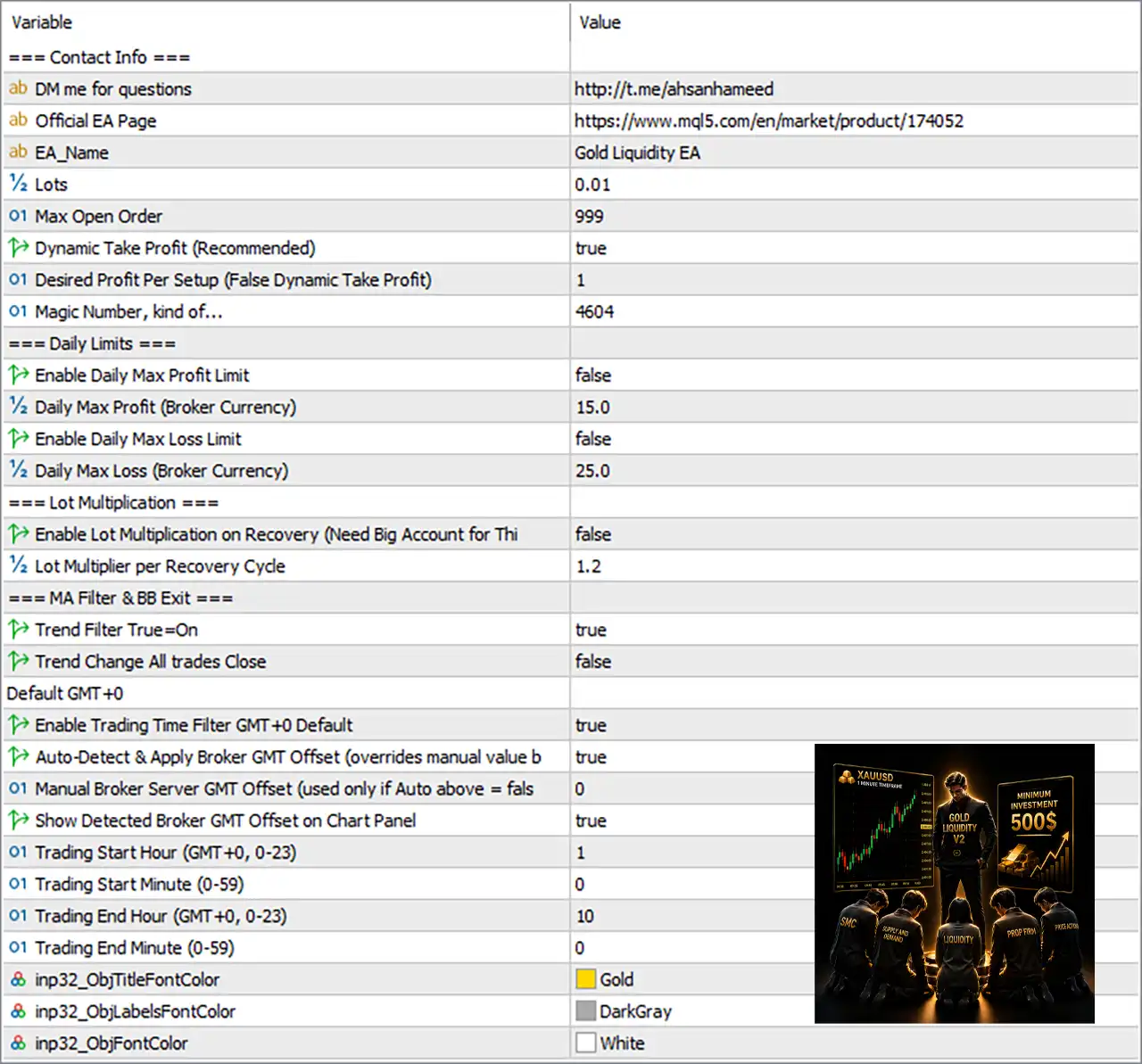
🔶 Lot & Order Settings
🔹 Lots: 0.01 — Sets the default trading volume to 0.01 lots, providing a small starting position size.
🔹 Max Open Order: 999 — Allows up to 999 open orders according to the EA's internal order limit.
🔹 Dynamic Take Profit (Recommended): true — Enables the recommended dynamic Take Profit functionality, allowing the EA to adjust profit targets according to its trading logic.
🔹 Desired Profit Per Setup (False Dynamic Take Profit): 1 — Sets the desired profit per setup to 1 when Dynamic Take Profit is disabled.
🔹 Magic Number, kind of...: 4604 — Uses 4604 as the EA's unique Magic Number for identifying its trades.
🔶 Daily Limits
🔹 Enable Daily Max Profit Limit: false — Disables the daily maximum-profit stopping mechanism.
🔹 Daily Max Profit (Broker Currency): 15.0 — Sets the daily maximum profit threshold to 15.0 in the broker account currency if the corresponding limit is enabled.
🔹 Enable Daily Max Loss Limit: false — Disables the daily maximum-loss protection mechanism.
🔹 Daily Max Loss (Broker Currency): 25.0 — Sets the maximum daily loss threshold to 25.0 in the broker account currency if the loss limit is enabled.
🔶 Lot Multiplication
🔹 Enable Lot Multiplication on Recovery (Need Big Account for This): false — Disables lot multiplication during recovery trades; enabling this feature may require a larger account because position sizes can increase.
🔹 Lot Multiplier per Recovery Cycle: 1.2 — Sets the recovery lot multiplier to 1.2, meaning each applicable recovery cycle can increase the lot size according to a 1.2× multiplier.
🔶 MA Filter & BB Exit
🔹 Trend Filter True = On: true — Enables the EA's trend filter.
🔹 Trend Change All trades Close: false — Prevents the EA from automatically closing all existing trades when a detected trend change occurs.
🔶 Default GMT+0 / Trading Time Filter
🔹 Enable Trading Time Filter GMT+0 Default: true — Enables the trading-time filter using the EA's GMT+0-based time configuration.
🔹 Auto-Detect & Apply Broker GMT Offset (overrides manual value b...): true — Automatically detects and applies the broker's GMT offset, overriding the manual GMT value when applicable.
🔹 Manual Broker Server GMT Offset (used only if Auto above = false): 0 — Sets the manual broker GMT offset to 0; this value is only used when automatic GMT detection is disabled.
🔹 Show Detected Broker GMT Offset on Chart Panel: true — Displays the detected broker GMT offset on the EA's chart panel.
🔶 Trading Schedule
🔹 Trading Start Hour (GMT+0, 0-23): 1 — Sets the trading start hour to 01:00 GMT+0.
🔹 Trading Start Minute (0-59): 0 — Sets the trading start minute to 00, resulting in a trading start time of 01:00 GMT+0.
🔹 Trading End Hour (GMT+0, 0-23): 10 — Sets the trading end hour to 10:00 GMT+0.
🔹 Trading End Minute (0-59): 0 — Sets the trading end minute to 00, resulting in a trading end time of 10:00 GMT+0.
🔶 Chart Panel Colors
🔹 inp32_ObjTitleFontColor: Gold — Sets the title font color of the EA's chart objects/panel to Gold.
🔹 inp32_ObjLabelsFontColor: DarkGray — Sets the label font color to DarkGray.
🔹 inp32_ObjFontColor: White — Sets the general object text/font color to White.
🔢 How the Current Configuration Works
The supplied configuration is set to trade with a 0.01-lot base position size and allows as many as 999 open orders according to the EA's internal order limit. This is an important setting to monitor because a very high maximum order allowance can potentially increase overall exposure if the strategy generates multiple positions.
The EA has Dynamic Take Profit enabled, which means the normal operating mode relies on dynamic profit management rather than the static Desired Profit Per Setup = 1 parameter. The static value of 1 becomes relevant when Dynamic Take Profit is disabled.
The trend filter is enabled, helping the EA align its trading decisions with the detected market trend. However, Trend Change All trades Close = false, so a change in trend does not automatically force all existing positions to close.
The recovery multiplier is configured at 1.2, but Enable Lot Multiplication on Recovery = false. Therefore, the 1.2 multiplier is not currently active for increasing recovery lot sizes.
The trading schedule is restricted to 01:00–10:00 GMT+0. Since automatic broker GMT detection is enabled, the EA will attempt to determine the broker's GMT offset and apply it automatically.
🔢 Risk Management Considerations
🔹 Small Initial Lot: The 0.01 lot setting can provide a relatively small starting position, but actual risk also depends on Gold's contract specifications and the EA's position-management logic.
🔹 High Order Limit: 999 maximum open orders is a very large ceiling. Traders should carefully evaluate potential exposure before using the EA on a live account.
🔹 Daily Profit Limit Disabled: Because Enable Daily Max Profit Limit = false, the 15.0 threshold does not currently stop trading.
🔹 Daily Loss Limit Disabled: Because Enable Daily Max Loss Limit = false, the 25.0 loss threshold is also not currently active.
🔹 Recovery Multiplication Disabled: The recovery multiplier of 1.2 is configured but is not currently used because the recovery lot multiplication switch is false.
🔹 Trend Filter Enabled: The trend filter can help restrict trading to the EA's preferred market direction, although its effectiveness depends on the underlying strategy.
🔹 Limited Trading Window: Trading is configured for only 01:00–10:00 GMT+0, which significantly restricts the time during which new trading activity can occur.
🔢 Conclusion
Gold Liquidity V2 MT5 provides a broad set of configurable controls for automated Gold trading, covering lot sizing, dynamic Take Profit, trend filtering, recovery management, daily limits, broker GMT detection, trading hours, and chart visualization.
The current configuration uses 0.01 lots, Magic Number 4604, Dynamic Take Profit enabled, and a 1.2 recovery multiplier with recovery lot multiplication disabled. The trend filter is enabled, while automatic closing of all positions after a trend change is disabled.
For time management, the EA uses automatic broker GMT detection and is configured to trade from 01:00 to 10:00 GMT+0. Daily profit and loss limits are currently disabled, despite their thresholds being set to 15.0 and 25.0 respectively.
Before deploying Gold Liquidity V2 MT5 on a live XAUUSD account, traders should pay particular attention to the 999 maximum open-order setting, recovery configuration, trading window, and actual exposure generated by multiple positions. Backtesting and forward testing under the intended broker's Gold contract specifications are recommended before using real capital.
🔢 FAQs
❓ What is the default lot size of Gold Liquidity V2 MT5?
The configured Lots value is 0.01, which is the default position size shown in the settings.
❓ Does Gold Liquidity V2 MT5 use Dynamic Take Profit?
Yes. Dynamic Take Profit is enabled (true) in the supplied configuration. The Desired Profit Per Setup is set to 1 for the alternative static-profit configuration.
❓ Is the trend filter enabled?
Yes. Trend Filter True = On is set to true, while Trend Change All trades Close remains false.
❓ What are the current Gold Liquidity V2 MT5 trading hours?
The EA is configured to trade from 01:00 to 10:00 GMT+0, with the trading-time filter enabled.
❓ Are the daily profit and loss limits active?
No. Both controls are disabled. Enable Daily Max Profit Limit = false and Enable Daily Max Loss Limit = false. Their configured thresholds are 15.0 and 25.0 in broker currency, respectively.



