







Get Funded FX EA MT4 + SetFiles (Platform build 1476+)

Subscriptions for Special Plan
- 30 EA package is more economical!
- Special package with 99%
- Download 1 EA/Day

Subscriptions for Premium Membership
- Download Unlimited in 1 Year
- Get 100% Discount
- Get free access to all

Subscriptions for Gold Membership
- 1 Year Membership
- Get 100% Discount
- Access EA+Indicator+Course
Frequently bought together 🎁
Add these products to enhance your purchase




What is Get Funded FX EA?
The Get Funded System EA is likely a trading bot that automates trading strategies for the forex market. Its primary goal is to meet the criteria set by proprietary trading firms or funding programs, which assess traders based on their ability to generate profits while managing risks effectively.
➡️ Vendor Website: View here
Why should you use Get Funded System EA?
🔹 Risk management: Tailored to meet funding programs’ strict risk management criteria, ensuring traders adhere to loss limits and drawdown rules.
🔹 Strategy optimization: Optimized for consistency and profitability, key factors that funding programs evaluate.
Key Features of Get Funded FX for MT4
🔹 Compatibility: Works with popular trading platforms like Metatrader 4.
🔹 Customization: Allows users to adjust parameters to fit their trading style and risk tolerance.
🔹 Backtesting capability: Enables traders to test the EA on historical data to evaluate performance.
🔹 Drawdown control: Features mechanisms to minimize losses and protect capital.
Get Funded System EA Review
When looking for reviews, consider the following:
🔹 User testimonials: Look for feedback from users who have successfully used the EA to get funded.
🔹 Independent reviews: Seek out reviews on independent trading forums and websites for unbiased opinions.
🔹 Performance metrics: Analyze verified trading results, if available, to assess the EA’s effectiveness.
Get Funded FX EA Results
Get Funded FX EA MT4 Review
Recommended settings
Recommended settings and parameters to pay attention to from developers and experts:
| Features | Type |
|---|---|
| Trading platform | MetaTrader 4 (MT4) |
| Minimum / Recommended deposit | $500+ |
| Minimum / Recommended leverage | 1:50+ |
| Time frames | Any times |
| Currency pairs | 28 currency pairs |
| Setup files | Available |
| Product type | NoDLL / Fix |
| Additional services | Unlock and Decompile |
| Recommended brokers | Exness Broker, Icmarkets Broker |
| Recommended VPS | MyfxVPS.com ( Blue VPS, Golden VPS). Lowest Latency, 2 week Free Trial, 100% Free for 12-18 Months. |
Product Download Package?
The download package of the product suite includes:
Experts
✅ Get Funded System EA_fix.ex4
Indicators
✅ SupplyDemand.ex4
SetFiles
✅ USDCHF_1H_GetFunded.set
✅ GBPUSD_1H_GetFunded.set
✅ XAUUSD_M15_GetFunded.set
✅ US30_M15_GetFunded.set
➡️ Reviewed by David Easton
Conclusion
In short, Get Funded FX stands out as a comprehensive tool for traders aspiring to secure funding in the forex market. With its strategic framework, risk management integration, and customizable features, this system provides a pathway for traders to access funding opportunities and enhance their trading careers. Whether you are a newcomer or an experienced trader seeking funding, the Get Funded offers a valuable resource to navigate the funding landscape successfully.
🔢 Get Funded System EA MT4 Settings Guide
Get Funded System EA is a professional automated trading Expert Advisor designed for prop firm challenges and disciplined risk management. The EA combines flexible money management, martingale recovery options, correlation filtering, trading session controls, news protection, and multiple technical filters such as Price Action and EMA Cross. Its extensive configuration allows traders to optimize performance while maintaining strict drawdown control and adapting to different market conditions.
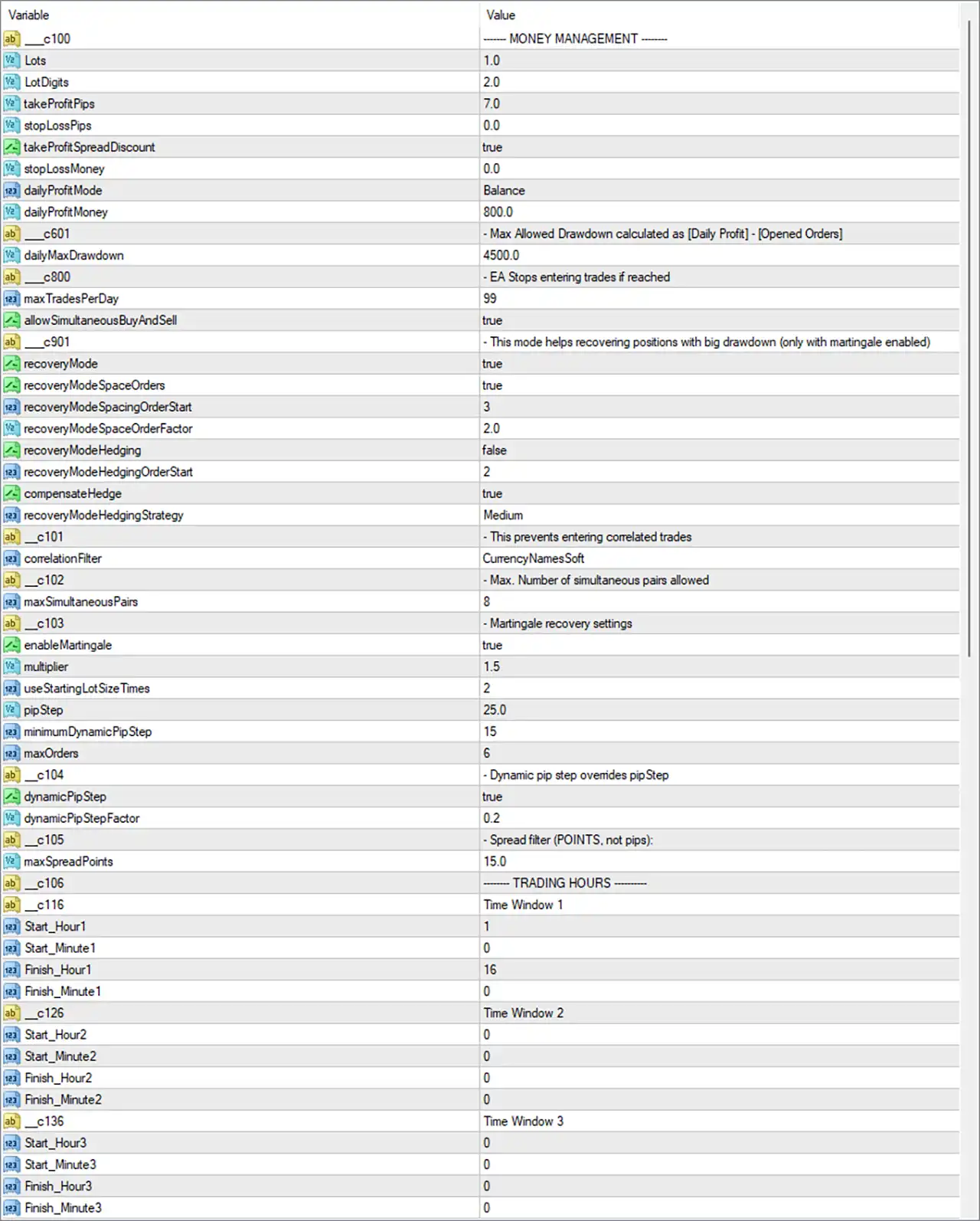
Get Funded System EA MT4 Settings Panel
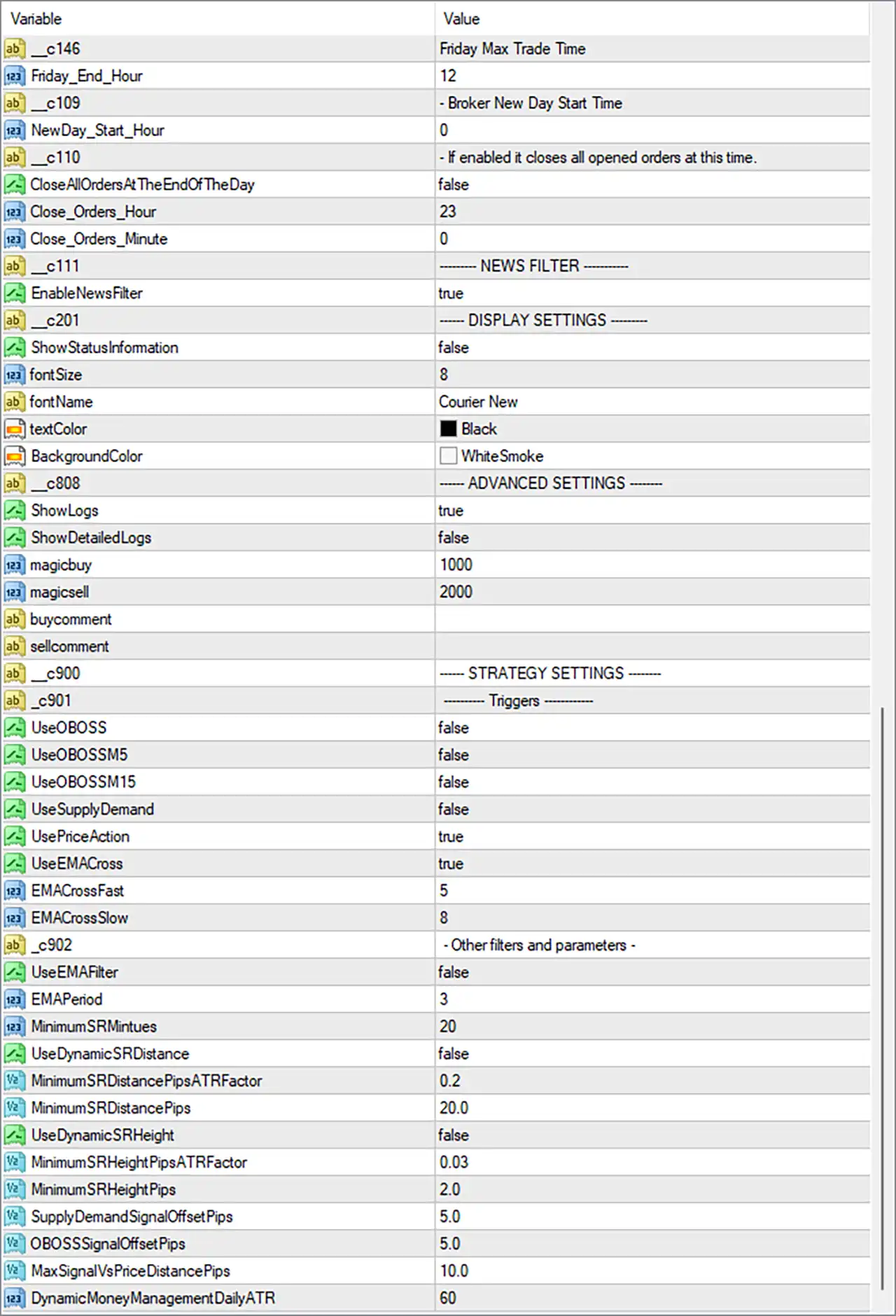
Get Funded System MT4 Settings Panel
🔢 Get Funded System EA MT4 Settings Explained
🔶 Money Management
🔹 Lots = 1.0 – Sets the initial trading lot size to 1.0 lots.
🔹 LotDigits = 2.0 – Defines lot precision with 2 decimal places.
🔹 takeProfitPips = 7.0 – Sets the Take Profit target to 7.0 pips.
🔹 stopLossPips = 0.0 – Sets Stop Loss to 0.0 pips, meaning no fixed Stop Loss is applied.
🔹 takeProfitSpreadDiscount = true – Adjusts the Take Profit target by considering the current spread.
🔹 stopLossMoney = 0.0 – Disables money-based Stop Loss protection.
🔹 dailyProfitMode = Balance – Calculates daily profit based on the account balance.
🔹 dailyProfitMoney = 800.0 – Sets the daily profit target to 800.0 account currency units.
🔶 Drawdown Protection
🔹 dailyMaxDrawdown = 4500.0 – Stops opening new trades when the daily drawdown reaches 4500.0.
🔶 Trading Limits
🔹 maxTradesPerDay = 99 – Allows up to 99 trades per day.
🔹 allowSimultaneousBuyAndSell = true – Permits Buy and Sell positions simultaneously.
🔶 Recovery Mode
🔹 recoveryMode = true – Enables the recovery system for positions experiencing significant drawdown.
🔹 recoveryModeSpaceOrders = true – Activates spacing between recovery orders.
🔹 recoveryModeSpacingOrderStart = 3 – Starts spacing logic from the 3rd recovery order.
🔹 recoveryModeSpaceOrderFactor = 2.0 – Multiplies spacing distance by 2.0 for successive recovery trades.
🔹 recoveryModeHedging = false – Disables hedging within recovery mode.
🔹 recoveryModeHedgingOrderStart = 2 – Hedging would begin from order 2 if enabled.
🔹 compensateHedge = true – Enables hedge compensation calculations.
🔹 recoveryModeHedgingStrategy = Medium – Uses the Medium hedging recovery profile.
🔶 Correlation Filter
🔹 correlationFilter = CurrencyNamesSoft – Prevents trades on highly correlated currency pairs using the CurrencyNamesSoft filter.
🔹 maxSimultaneousPairs = 8 – Allows a maximum of 8 simultaneous trading pairs.
🔶 Martingale Recovery
🔹 enableMartingale = true – Enables the Martingale recovery algorithm.
🔹 multiplier = 1.5 – Multiplies lot size by 1.5 after qualifying losing trades.
🔹 useStartingLotSizeTimes = 2 – Uses 2× the starting lot size for Martingale calculations.
🔹 pipStep = 25.0 – Places additional Martingale trades every 25.0 pips.
🔹 minimumDynamicPipStep = 15 – Sets the minimum adaptive pip step to 15.
🔹 maxOrders = 6 – Limits the Martingale basket to 6 maximum orders.
🔶 Dynamic Pip Step
🔹 dynamicPipStep = true – Enables adaptive pip spacing.
🔹 dynamicPipStepFactor = 0.2 – Uses a scaling factor of 0.2 for dynamic pip calculations.
🔶 Spread Filter
🔹 maxSpreadPoints = 15.0 – Blocks new trades when spread exceeds 15.0 points.
🔶 Trading Hours
Time Window 1
🔹 Start_Hour1 = 1 – Trading begins at 01:00.
🔹 Start_Minute1 = 0 – Trading starts at minute 00.
🔹 Finish_Hour1 = 16 – Trading ends at 16:00.
🔹 Finish_Minute1 = 0 – Trading ends at minute 00.
Time Window 2
🔹 Start_Hour2 = 0 – Second session starts at 00:00.
🔹 Start_Minute2 = 0 – Second session starts at minute 00.
🔹 Finish_Hour2 = 0 – Second session ends at 00:00.
🔹 Finish_Minute2 = 0 – Second session ends at minute 00.
Time Window 3
🔹 Start_Hour3 = 0 – Third session starts at 00:00.
🔹 Start_Minute3 = 0 – Third session starts at minute 00.
🔹 Finish_Hour3 = 0 – Third session ends at 00:00.
🔹 Finish_Minute3 = 0 – Third session ends at minute 00.
🔶 Friday & Daily Controls
🔹 Friday_End_Hour = 12 – Stops Friday trading after 12:00.
🔹 NewDay_Start_Hour = 0 – Defines the broker’s trading day reset at 00:00.
🔹 CloseAllOrdersAtTheEndOfTheDay = false – Keeps trades open at the end of the day.
🔹 Close_Orders_Hour = 23 – Scheduled close hour is 23:00 when enabled.
🔹 Close_Orders_Minute = 0 – Scheduled close minute is 00.
🔶 News Filter
🔹 EnableNewsFilter = true – Activates the built-in economic news filter.
🔶 Display Settings
🔹 ShowStatusInformation = false – Disables the on-chart status panel.
🔹 fontSize = 8 – Sets the display font size to 8.
🔹 fontName = Courier New – Uses Courier New as the display font.
🔹 textColor = Black – Displays text in Black.
🔹 BackgroundColor = WhiteSmoke – Uses WhiteSmoke as the panel background.
🔶 Advanced Settings
🔹 ShowLogs = true – Enables EA activity logging.
🔹 ShowDetailedLogs = false – Disables detailed diagnostic logging.
🔹 magicbuy = 1000 – Assigns Magic Number 1000 for Buy trades.
🔹 magicsell = 2000 – Assigns Magic Number 2000 for Sell trades.
🔹 buycomment – Custom Buy order comment field.
🔹 sellcomment – Custom Sell order comment field.
🔶 Strategy Settings
Trigger Modules
🔹 UseOBOSS = false – Disables the Overbought/Oversold trigger.
🔹 UseOBOSSM5 = false – Disables OB/OS detection on M5.
🔹 UseOBOSSM15 = false – Disables OB/OS detection on M15.
🔹 UseSupplyDemand = false – Disables Supply & Demand zone filtering.
🔹 UsePriceAction = true – Enables Price Action confirmation.
🔹 UseEMACross = true – Enables EMA crossover signals.
🔹 EMACrossFast = 5 – Sets the fast EMA period to 5.
🔹 EMACrossSlow = 8 – Sets the slow EMA period to 8.
Additional Filters
🔹 UseEMAFilter = false – Disables the trend EMA filter.
🔹 EMAPeriod = 3 – Sets EMA filter period to 3.
🔹 MinimumSRMinutes = 20 – Requires Support/Resistance zones to exist for at least 20 minutes.
🔹 UseDynamicSRDistance = false – Disables ATR-based Support/Resistance distance.
🔹 MinimumSRDistancePipsATRFactor = 0.2 – Uses 0.2 ATR as the minimum SR distance factor.
🔹 MinimumSRDistancePips = 20.0 – Requires at least 20.0 pips between SR zones.
🔹 UseDynamicSRHeight = false – Disables adaptive SR height calculations.
🔹 MinimumSRHeightPipsATRFactor = 0.03 – Sets the minimum SR height to 0.03 ATR.
🔹 MinimumSRHeightPips = 2.0 – Requires a minimum SR height of 2.0 pips.
🔹 SupplyDemandSignalOffsetPips = 5.0 – Offsets Supply & Demand entries by 5.0 pips.
🔹 OBOSSSignalOffsetPips = 5.0 – Offsets OB/OS signals by 5.0 pips.
🔹 MaxSignalVsPriceDistancePips = 10.0 – Limits the maximum distance between signal and market price to 10.0 pips.
🔹 DynamicMoneyManagementDailyATR = 60 – Uses a 60-period Daily ATR for adaptive money management calculations.
🔢 Conclusion
Get Funded System EA MT4 is a comprehensive Expert Advisor built with prop firm compliance and advanced risk control in mind. Its combination of dynamic money management, Martingale recovery, correlation protection, news filtering, trading session management, and Price Action with EMA Cross confirmation offers traders a highly configurable automated trading solution. Whether used for challenge accounts or live trading, the extensive parameter set allows precise optimization while maintaining strict control over drawdown and execution quality.
🔢 FAQs
❓ Does Get Funded System EA MT4 include a built-in news filter?
Yes. The EA includes an integrated news filter that can pause trading during important economic events.
❓ Can I disable the Martingale system?
Yes. Simply set enableMartingale = false to trade without Martingale recovery.
❓ Does the EA allow Buy and Sell positions at the same time?
Yes. With allowSimultaneousBuyAndSell = true, both trade directions can remain open simultaneously.
❓ How does the recovery mode work?
Recovery Mode opens additional recovery trades using configurable spacing, optional hedging parameters, and adaptive position management to help reduce drawdown.
❓ Can I customize the trading strategy filters?
Yes. You can independently enable or disable Price Action, EMA Cross, Supply & Demand, Overbought/Oversold filters, Support & Resistance filters, and several adaptive execution parameters to match your preferred trading style.
User Reviews
Only logged in customers who have purchased this product may leave a review.
🔴 What is Get Funded System EA and what is its main purpose?
Get Funded System EA is an automated trading bot for MetaTrader 4 (MT4) designed to help traders pass prop firm challenges and manage funded accounts. It focuses on achieving consistent profitability while keeping drawdown and risk within strict funding program limits.
🔴 How does Get Funded System EA help traders meet prop firm rules?
The EA includes built-in risk and drawdown control, ensuring traders stay below maximum daily and overall loss thresholds. It also promotes steady performance, aligning with funding firm requirements such as profit targets and trade consistency.
🔴 Is Get Funded System EA suitable for beginners?
Yes. It’s beginner-friendly, offering ready-to-use SetFiles and optimized presets for pairs like XAUUSD, GBPUSD, USDCHF, and US30. Users can easily load the provided files and start trading without advanced setup knowledge.
🔴 What trading platforms and brokers are supported?
Get Funded System EA operates on MetaTrader 4 (MT4) and works with most ECN brokers. Recommended brokers include Exness and ICMarkets, known for low spreads, fast order execution, and prop-firm-friendly conditions.
🔴 What account types and leverage are recommended?
The EA performs best with a minimum deposit of $500 and 1:50 leverage or higher. It supports both standard and cent accounts, and for optimal results, using a low-latency VPS (e.g., MyfxVPS Blue or Golden) is highly recommended.
🔴 Does Get Funded System EA support all currency pairs?
Yes. It can trade up to 28 forex pairs, along with Gold (XAUUSD) and indices like US30, depending on the preset used. Each preset is optimized for specific instruments and timeframes, offering strong flexibility.
🔴 Does the EA use risky methods like Martingale or Grid trading?
No. The EA avoids Martingale, Grid, or averaging techniques. Instead, it uses controlled position sizing, smart entry logic, and strict stop-loss mechanisms to ensure safe and sustainable trading performance.
🔴 Can I backtest the EA before using it on a live or funded account?
Yes. The EA is fully compatible with MT4 backtesting, allowing users to verify profitability, drawdown levels, and trade accuracy before going live or taking a funding challenge.
🔥 Get This EA for FREE with Our Membership! 🚀🚀
Unlock access to this EA, premium Indicators, and exclusive trading tools completely FREE with any of our Membership Plans! Thousands of traders already benefit from our VIP library—join them and level up your trading instantly. Choose Your Membership:
- SPECIAL – 1 Month Membership
- GOLD – 1 Year Membership
- PREMIUM – 1 Year Membership
-
 Original price was: $1,200.00.$249.00Current price is: $249.00.
 -
 Original price was: $1,000.00.$249.00Current price is: $249.00.
 -
 Original price was: $1,999.00.$249.00Current price is: $249.00.
 -
 Original price was: $999.00.$249.00Current price is: $249.00.
-
 3Original price was: $999.00.$69.00Current price is: $69.00.
 -
 2Original price was: $3,500.00.$59.00Current price is: $59.00.
 -
 0Original price was: $399.00.$59.00Current price is: $59.00.
 -
 1Original price was: $399.00.$69.00Current price is: $69.00.
There are no reviews yet.