



GOLD Edge PRO MT5 with SetFiles (Latest version) - Unlimited

Subscriptions for Special Plan
- 30 EA package is more economical!
- Special package with 99%
- Download 1 EA/Day

Subscriptions for Premium Membership
- Download Unlimited in 1 Year
- Get 100% Discount
- Get free access to all

Subscriptions for Gold Membership
- 1 Year Membership
- Get 100% Discount
- Access EA+Indicator+Course
Frequently bought together 🎁
Add these products to enhance your purchase



What is GOLD Edge PRO MT5?
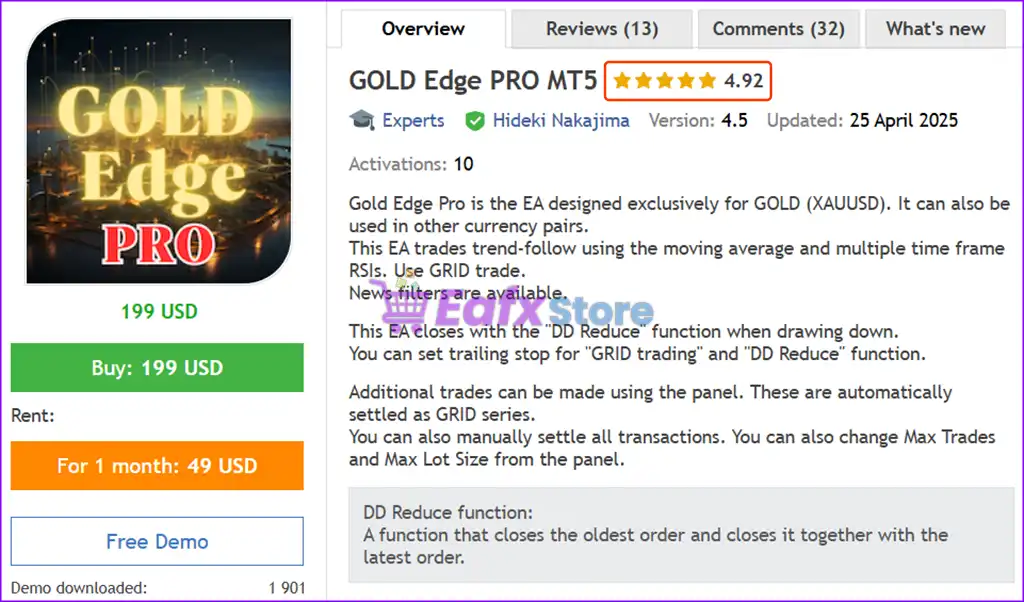
GOLD Edge PRO MT5 is a next-generation Expert Advisor (EA) designed specifically for trading XAUUSD (Gold), with powerful features that also support other currency pairs such as EURUSD, GBPUSD and AUDUSD. This intelligent, fully automated trading system combines trend-following strategies with multi-timeframe RSI filters, moving average confirmations, and a smart grid engine to maximize profitability while minimizing risk.
 Vendor Website: Click here
About the Author
This product is compiled by Hideki Nakajima. This author has more than +5 years of experience working on MQL5 with many famous products such as GOLD Edge PRO MT5, GOLD Edge PRO MT4, Genius Edge MT5, Genius Edge MT4 and other advisors. Among them, GOLD Edge PRO MT5 is his best performing products.
Delivery time 24h-48h after payment.
Refund if not delivered.
You will receive the current version without any limitations (ID+Time).
Key Features of Gold Edge Pro MT5
🔹 Trend-Based Grid System: Combines trend indicators with grid execution for adaptive trade management.
🔹 DD Reduce Protection: Smart drawdown control closes positions to minimize risk exposure.
🔹 Advanced News Filter: Avoids trading during high-impact events to enhance stability.
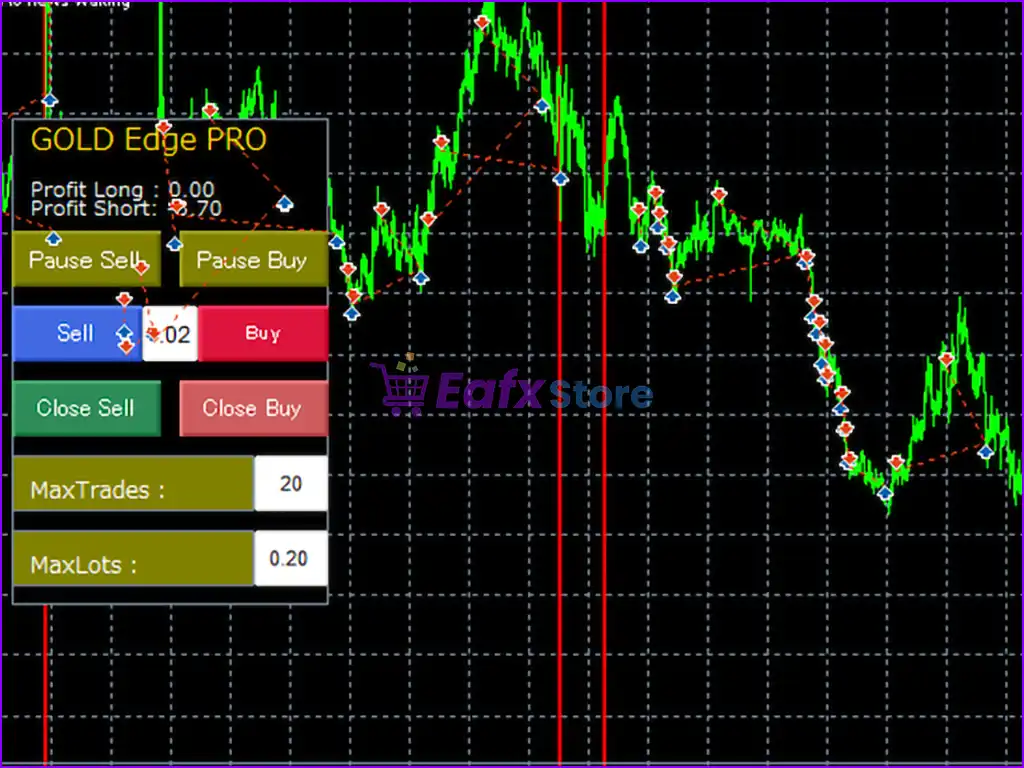
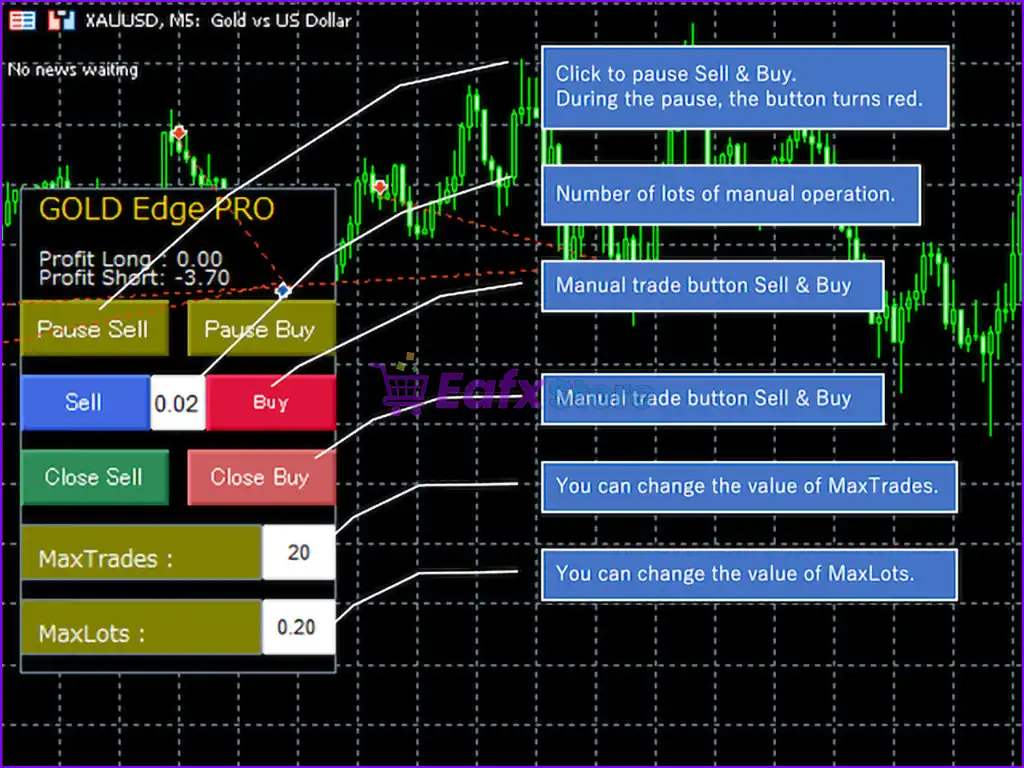
🔹 Custom Trading Panel: Allows manual control, trade adjustments and flexible parameter settings.
🔹 Spread & Time Filters: Prevents trading under unfavorable conditions like high spreads or off-hours.
What is the GOLD Edge PRO MT5 Trading Strategy?
🔹 Moving Average Trend Logic: Identifies market direction using trend-following indicators.
🔹 Multi-Timeframe RSI Analysis: Confirms entries using RSI signals across multiple timeframes.
🔹 Grid-Based Positioning: Opens trades at calculated intervals to manage price fluctuations.
🔹 Adaptive Trade Distance: Automatically adjusts grid spacing based on market conditions.
🔹 Drawdown Reduction System: Closes combined positions strategically to control floating losses.
Gold Edge Pro MT5 Review
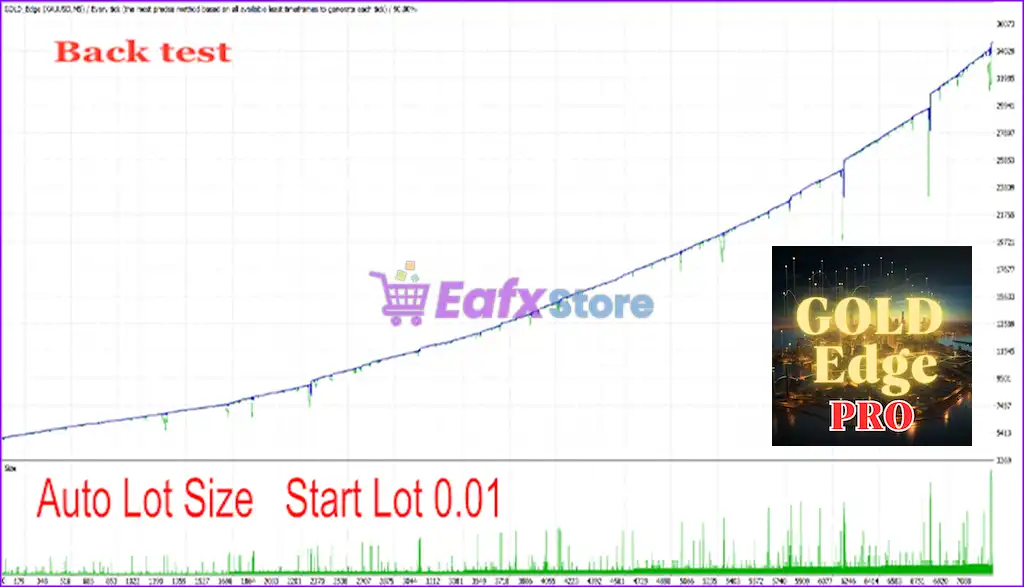
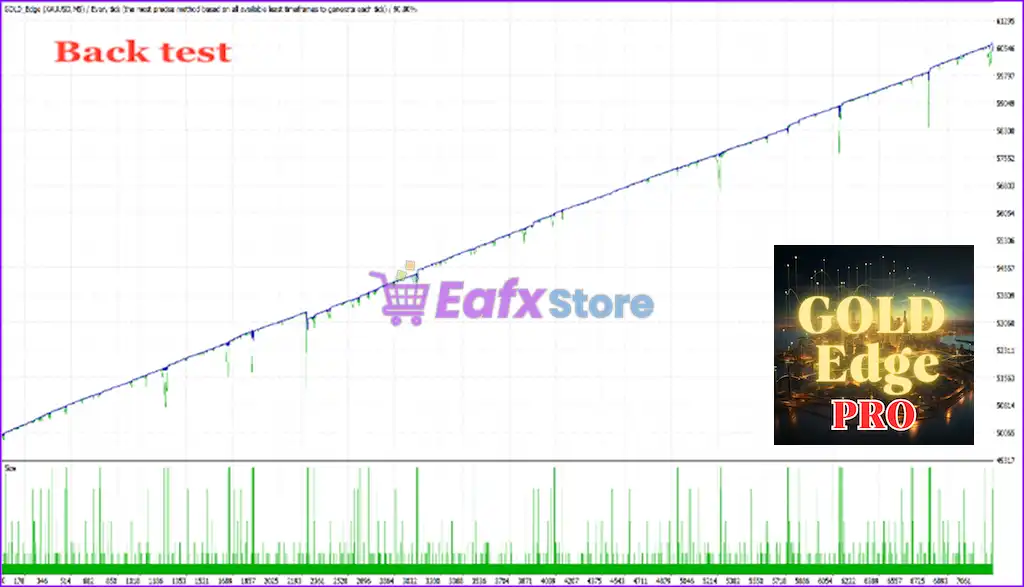
Gold Edge Pro achieves impressive profit performance in backtested trades. Long-term profit potential, safe and able to optimize according to the user’s strategy.
GOLD Edge PRO MT5 Backtest Trading Results
GOLD Edge PRO MT5 Backtest Results
GOLD Edge PRO MT5 Reviews
Why choose & use GOLD Edge PRO MT5?
🔹 Optimized for Gold Trading: Designed specifically for XAUUSD volatility and behavior.
🔹 Flexible Risk Control: Multiple safety layers help maintain long-term account stability.
🔹 Customizable Trading Logic: Offers control over trading days, hours and execution rules.
🔹 Balanced Performance Focus: Combines profit potential with strong drawdown management.
🔹 User-Friendly Interface: Easy setup with panel control for both beginners and advanced users.
Is GOLD Edge PRO MT5 safe?
GOLD Edge PRO MT5 shows significant potential in providing stable and reliable profits, making it a reliable tool in the forex market. The advisor is highly appreciated by the MQL5 community in many aspects and has won the trust of users.
⭐⭐⭐⭐⭐ Elias.dlamini Dlamini (2024.12.29): “Excellent bot. made stable profit. thanks a lot.”
⭐⭐⭐⭐⭐ Parviz Pirooz Nasab (2024.02.22): “I’m grateful to you for this EA and I wanted to advise friends who haven’t discovered this expert yet not to miss out on it.”
⭐⭐⭐⭐⭐ Virajmokadam (2023.09.28): “Using this EA for a month now. Very good approach for heading and SL. Profits are small but consistent. Today I will buy this and use it ahead.”
⭐⭐⭐⭐⭐ Kevan Bruno Max Jacquet (2023.09.27): “This bot is absolutely amazing! After spending around 40 hours on it I arrived at a setting ranging from 20 to 50% monthly profitability.”
Recommended settings
Recommended settings and parameters to pay attention to from developers and experts:
| Features | Type |
|---|---|
| Trading platform | MetaTrader 5 (MT5) |
| Time frames | M5 (5 minute chart) |
| Currency pairs | GOLD (XAUUSD), AUDUSD, EURUSD, GBPUSD (Any) |
| Minimum / Recommended deposit | $1,500 |
| Minimum / Recommended leverage | Any |
| Product type | Original version |
| Additional services | Unlock and Decompile |
| Recommended brokers | Exness Broker, Icmarkets Broker |
| Recommended VPS | MyfxVPS.com (Blue VPS, Golden VPS). Lowest Latency, 2 week Free Trial, 100% Free for 12-18 Months. |
Product Download Package?
The download package of the product suite includes:
Experts
✅ GOLD Edge PRO MT5.ex5
SetFiles
✅ GOLD_Edge_PRO_M5_Video.set
✅ GOLD_Edge_PRO_lowrisk_MT5_M5_202404.set
✅ GOLD_Edge_PRO_MT5_M5_nomal_auto.set
✅ GOLD_Edge_PRO_MT5_M5_nomal_300.set
✅ GOLD_Edge_PRO_Currency_MT5_M5.set
✅ GOLD_Edge_PRO_lowrisk_MT5_M5__1.set
➡️ Reviewed by David Easton
Conclusion
In short, GOLD Edge PRO MT5 stands out as a top-tier, fully automated expert advisor tailored for gold (XAUUSD) trading and adaptable to major forex pairs like EURUSD, GBPUSD, and AUDUSD. Powered by a robust combination of multi-timeframe RSI filters, moving average confirmations, and a smart grid engine, this EA delivers exceptional precision, drawdown control, and profitability across various market conditions.
GOLD Edge PRO MT5 Settings Guide
GOLD Edge PRO MT5 is an automated trading Expert Advisor designed with comprehensive trade management, Grid functionality, dynamic lot controls, trailing-stop protection, drawdown reduction, news filtering, trend-reversal analysis, and multi-timeframe confirmation. The displayed configuration supports both Long and Short trading and includes flexible controls for position sizing, Take Profit, Slippage, Spread, Grid distance, ATR-based spacing, news protection, RSI filters, Moving Average filters, candle confirmation, trading schedules, and risk management.
With its combination of technical filters and automated position-management tools, GOLD Edge PRO MT5 provides traders with extensive options for customizing automated Gold trading according to their preferred strategy and risk parameters.
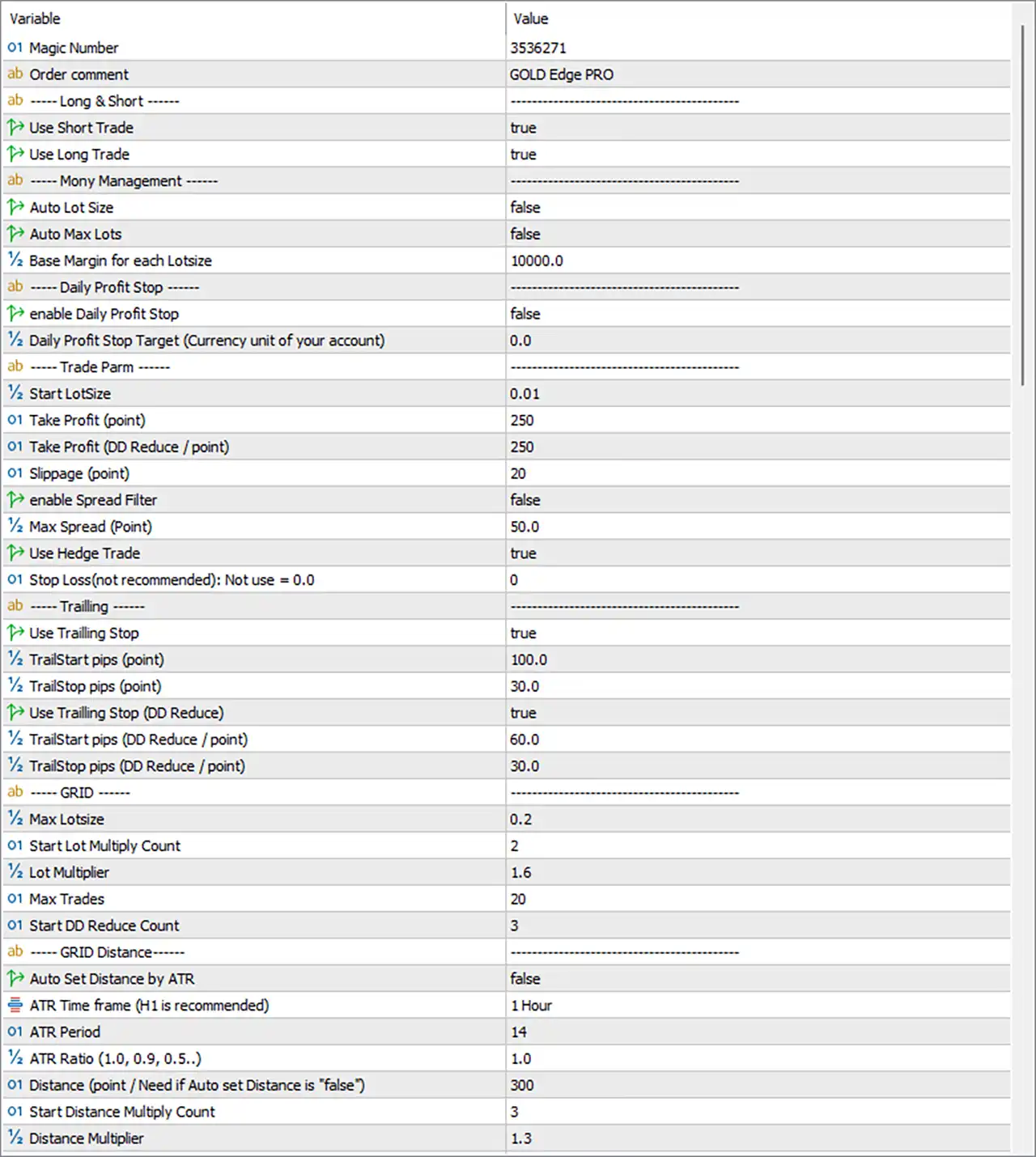
GOLD Edge PRO MT5 Settings Panel
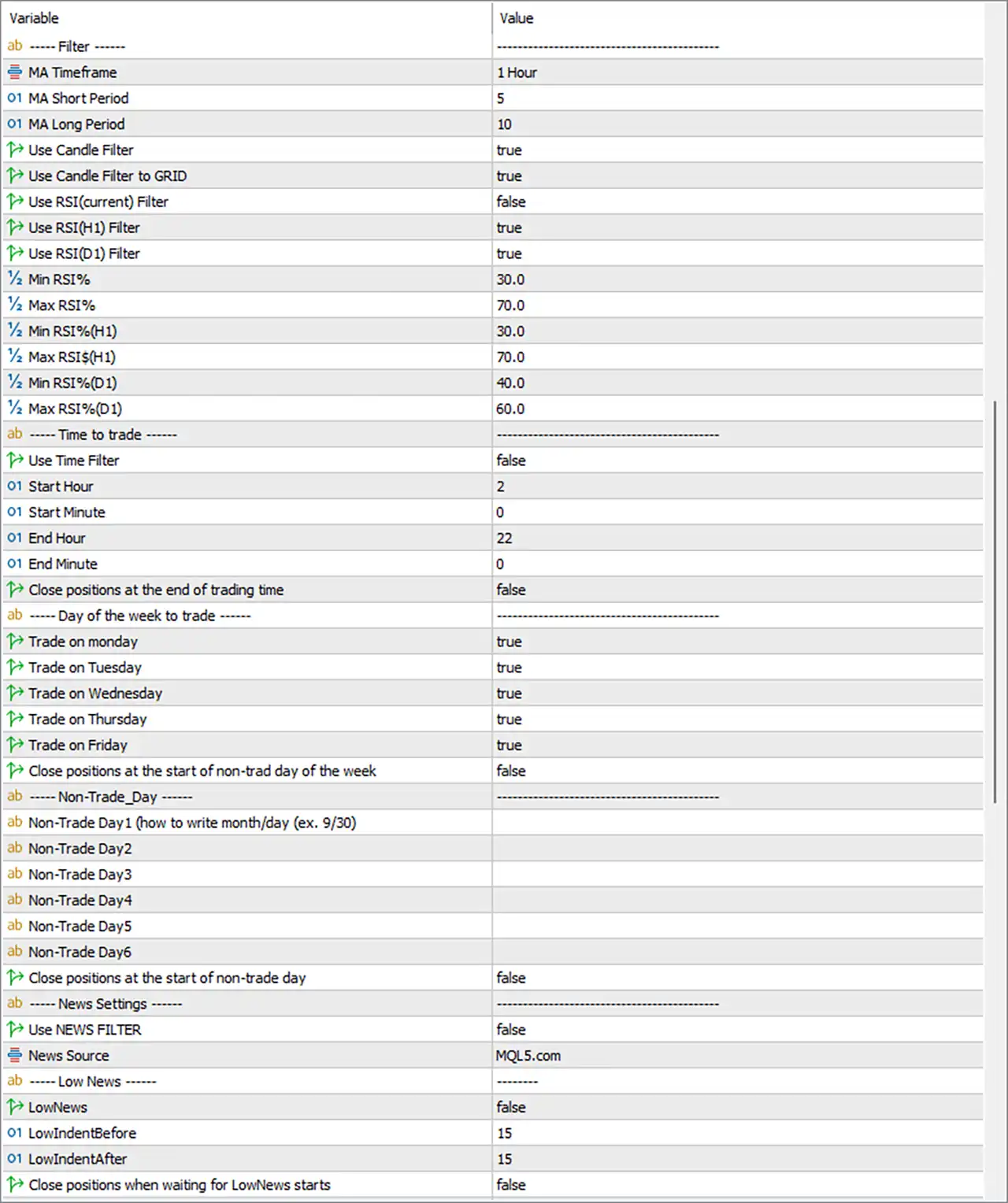
GOLD Edge PRO MT5 EA Settings Panel
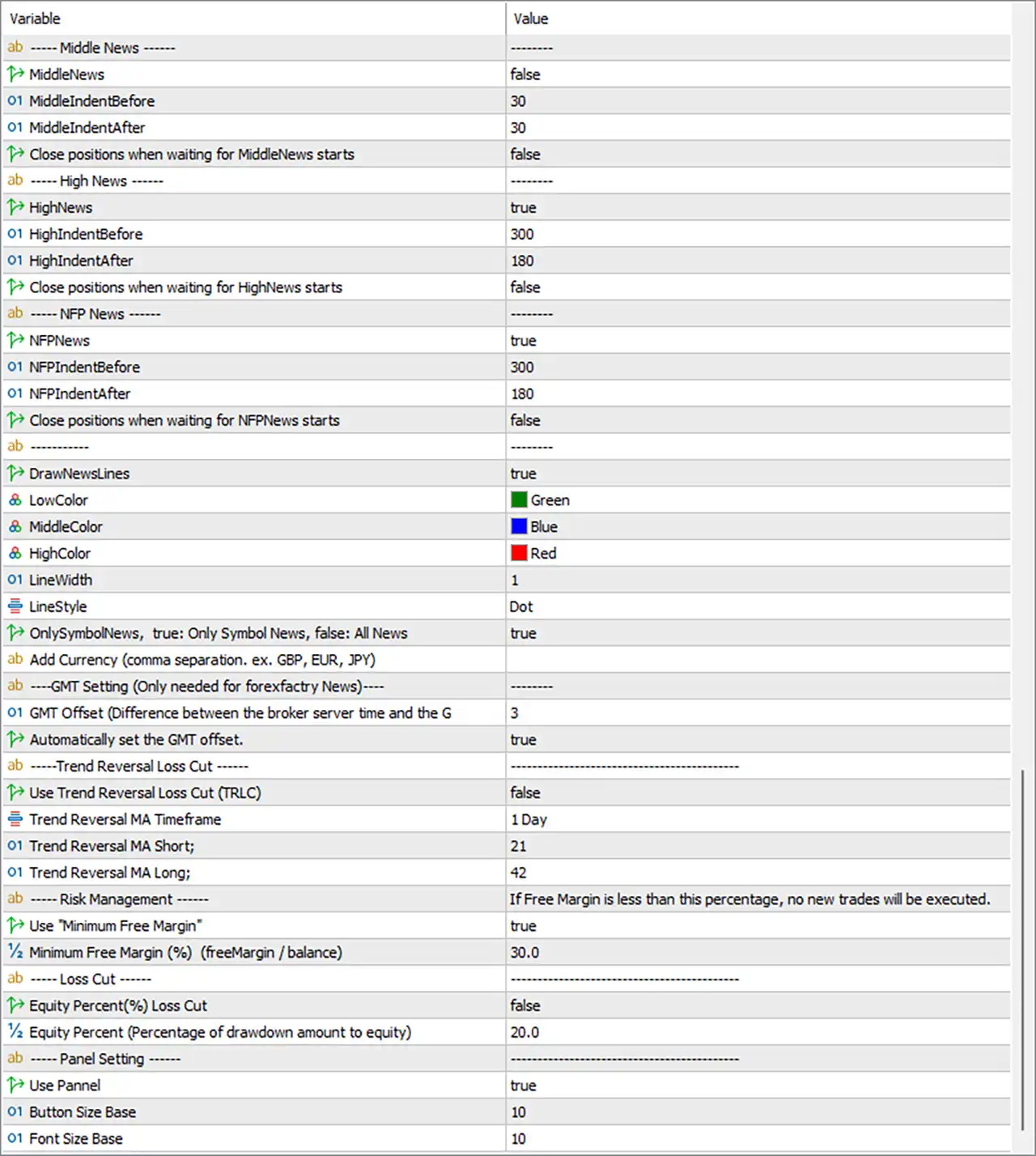
GOLD Edge PRO MT5 Setting Panel
General Trading Settings
🔹 Magic Number = 3536271 — Sets the unique Magic Number to 3536271, allowing the EA to identify and manage its own trades.
🔹 Order comment = GOLD Edge PRO — Sets GOLD Edge PRO as the comment attached to EA-generated orders.
Long & Short Settings
🔹 Use Short Trade = true — Enables Short/Sell trading.
🔹 Use Long Trade = true — Enables Long/Buy trading.
Money Management
🔹 Auto Lot Size = false — Disables automatic lot-size calculation.
🔹 Auto Max Lots = false — Disables the automatic maximum-lot calculation.
🔹 Base Margin for each Lotsize = 10000.0 — Sets the base margin reference to 10000.0 for lot-size calculations when the relevant automatic money-management functions are used.
Daily Profit Stop
🔹 enable Daily Profit Stop = false — Disables the Daily Profit Stop function.
🔹 Daily Profit Stop Target (Currency unit of your account) = 0.0 — Sets the Daily Profit Stop target to 0.0 account-currency units.
Trade Parameters
🔹 Start LotSize = 0.01 — Sets the starting lot size to 0.01 lots.
🔹 Take Profit (point) = 250 — Sets the Take Profit distance to 250 points.
🔹 Take Profit (DD Reduce /point) = 250 — Sets the Take Profit value used for the DrawDown Reduction mechanism to 250 points.
🔹 Slippage (point) = 20 — Sets the permitted slippage parameter to 20 points.
🔹 enable Spread Filter = false — Disables the Spread Filter.
🔹 Max Spread (Point) = 50.0 — Sets the maximum spread threshold to 50.0 points when the Spread Filter is enabled.
🔹 Use Hedge Trade = true — Enables the EA’s Hedge Trade function.
🔹 Stop Loss(not recommended): Not use = 0 — Sets the Stop Loss to 0, meaning the dedicated Stop Loss function is not being used in the displayed configuration.
Trailing Settings
🔹 Use Trailing Stop = true — Enables the standard Trailing Stop function.
🔹 TrailStart pips (point) = 100.0 — Activates the standard trailing mechanism after 100.0 points of favorable movement.
🔹 TrailStop pips (point) = 30.0 — Sets the standard trailing distance to 30.0 points.
🔹 Use Trailing Stop (DD Reduce) = true — Enables a separate Trailing Stop mechanism for DrawDown Reduction.
🔹 TrailStart pips (DD Reduce / point) = 60.0 — Activates the DD Reduction trailing mechanism at 60.0 points.
🔹 TrailStop pips (DD Reduce / point) = 30.0 — Sets the DD Reduction trailing distance to 30.0 points.
Grid Settings
🔹 Max Lotsize = 0.2 — Sets the maximum lot-size value to 0.2 lots.
🔹 Start Lot Multiply Count = 2 — Starts the lot-multiplication mechanism from 2 orders/trades.
🔹 Lot Multiplier = 1.6 — Sets the lot multiplier to 1.6.
🔹 Max Trades = 20 — Limits the Grid sequence to a maximum of 20 trades.
🔹 Start DD Reduce Count = 3 — Starts the DrawDown Reduction mechanism from 3 trades.
Grid Distance Settings
🔹 Auto Set Distance by ATR = false — Disables automatic Grid-distance calculation using ATR.
🔹 ATR Time frame (H1 is recommended) = 1 Hour — Sets the ATR calculation timeframe to 1 Hour.
🔹 ATR Period = 14 — Sets the ATR calculation period to 14.
🔹 ATR Ratio (1.0, 0.9, 0.5…) = 1.0 — Sets the ATR distance multiplier/ratio to 1.0 when ATR-based distance calculation is enabled.
🔹 Distance (point / Need if Auto set Distance is “false”) = 300 — Sets the fixed Grid distance to 300 points because automatic ATR distance is disabled.
🔹 Start Distance Multiply Count = 3 — Starts the Grid-distance multiplication mechanism from 3 trades/orders.
🔹 Distance Multiplier = 1.3 — Sets the Grid-distance multiplier to 1.3.
Middle News Settings
🔹 MiddleNews = false — Disables the Middle-Impact News filter.
🔹 MiddleIndentBefore = 30 — Sets the Middle News protection period before an event to 30 minutes when enabled.
🔹 MiddleIndentAfter = 30 — Sets the Middle News protection period after an event to 30 minutes when enabled.
🔹 Close positions when waiting for MiddleNews starts = false — Prevents automatic closing of existing positions when the Middle News waiting period begins.
High News Settings
🔹 HighNews = true — Enables the High-Impact News filter.
🔹 HighIndentBefore = 300 — Sets the High News protection period before an event to 300 minutes.
🔹 HighIndentAfter = 180 — Sets the High News protection period after an event to 180 minutes.
🔹 Close positions when waiting for HighNews starts = false — Keeps existing positions open when the High News waiting period begins.
NFP News Settings
🔹 NFPNews = true — Enables the NFP News filter.
🔹 NFPIndentBefore = 300 — Sets the NFP protection period before the event to 300 minutes.
🔹 NFPIndentAfter = 180 — Sets the NFP protection period after the event to 180 minutes.
🔹 Close positions when waiting for NFPNews starts = false — Prevents automatic closing of existing positions when the NFP waiting period begins.
News Display Settings
🔹 DrawNewsLines = true — Enables drawing news-event lines directly on the chart.
🔹 LowColor = Green — Sets the chart-line color for Low-impact news to Green.
🔹 MiddleColor = Blue — Sets the chart-line color for Middle-impact news to Blue.
🔹 HighColor = Red — Sets the chart-line color for High-impact news to Red.
🔹 LineWidth = 1 — Sets the news-line width to 1.
🔹 LineStyle = Dot — Uses a Dot line style for the displayed news markers.
🔹 OnlySymbolNews, true: Only Symbol News, false: All News = true — Restricts the news display/filtering to news associated with the current trading symbol.
🔹 Add Currency (comma separation. ex. GBP, EUR, JPY) = blank — No additional currencies are manually specified.
GMT Settings
🔹 GMT Offset (Difference between the broker server time and the GMT) = 3 — Sets the broker-to-GMT offset parameter to 3 hours.
🔹 Automatically set the GMT offset. = true — Enables automatic GMT-offset detection.
Trend Reversal Loss Cut
🔹 Use Trend Reversal Loss Cut (TRLC) = false — Disables the Trend Reversal Loss Cut function.
🔹 Trend Reversal MA Timeframe = 1 Day — Sets the Trend Reversal Moving Average timeframe to 1 Day.
🔹 Trend Reversal MA Short = 21 — Sets the short Trend Reversal Moving Average period to 21.
🔹 Trend Reversal MA Long = 42 — Sets the long Trend Reversal Moving Average period to 42.
Risk Management
🔹 Use “Minimum Free Margin” = true — Enables the Minimum Free Margin protection.
🔹 Minimum Free Margin (%) (freeMargin / balance) = 30.0 — Requires the account to maintain at least 30.0% free margin relative to balance before new trades are allowed under this protection.
Loss Cut Settings
🔹 Equity Percent(%) Loss Cut = false — Disables the Equity Percentage Loss Cut function.
🔹 Equity Percent (Percentage of drawdown amount to equity) = 20.0 — Sets the equity drawdown threshold to 20.0% when the Loss Cut function is enabled.
Panel Settings
🔹 Use Panel = true — Enables the EA’s on-chart control/information panel.
🔹 Button Size Base = 10 — Sets the base button size to 10.
🔹 Font Size Base = 10 — Sets the base panel font size to 10.
Filter Settings
🔹 MA Timeframe = 1 Hour — Sets the Moving Average filter timeframe to 1 Hour.
🔹 MA Short Period = 5 — Sets the short Moving Average period to 5.
🔹 MA Long Period = 10 — Sets the long Moving Average period to 10.
🔹 Use Candle Filter = true — Enables the Candle Filter.
🔹 Use Candle Filter to GRID = true — Applies the Candle Filter to Grid entries as well.
RSI Filter Settings
🔹 Use RSI(Current) Filter = false — Disables the RSI filter based on the current timeframe.
🔹 Use RSI(H1) Filter = true — Enables the RSI filter based on the H1 timeframe.
🔹 Use RSI(D1) Filter = true — Enables the RSI filter based on the D1 timeframe.
🔹 Min RSI% = 30.0 — Sets the minimum current-timeframe RSI threshold to 30.0.
🔹 Max RSI% = 70.0 — Sets the maximum current-timeframe RSI threshold to 70.0.
🔹 Min RSI%(H1) = 30.0 — Sets the minimum H1 RSI threshold to 30.0.
🔹 Max RSI%(H1) = 70.0 — Sets the maximum H1 RSI threshold to 70.0.
🔹 Min RSI%(D1) = 40.0 — Sets the minimum D1 RSI threshold to 40.0.
🔹 Max RSI%(D1) = 60.0 — Sets the maximum D1 RSI threshold to 60.0.
Time-to-Trade Settings
🔹 Use Time Filter = false — Disables the dedicated trading-time filter.
🔹 Start Hour = 2 — Sets the configured trading start hour to 02:00 if the Time Filter is enabled.
🔹 Start Minute = 0 — Sets the trading start minute to 00.
🔹 End Hour = 22 — Sets the configured trading end hour to 22:00.
🔹 End Minute = 0 — Sets the trading end minute to 00.
🔹 Close positions at the end of trading time = false — Prevents automatic closing of open positions when the configured trading period ends.
Day-of-the-Week Trading Settings
🔹 Trade on Monday = true — Allows trading on Monday.
🔹 Trade on Tuesday = true — Allows trading on Tuesday.
🔹 Trade on Wednesday = true — Allows trading on Wednesday.
🔹 Trade on Thursday = true — Allows trading on Thursday.
🔹 Trade on Friday = true — Allows trading on Friday.
🔹 Close positions at the start of non-trad day of the week = false — Disables automatic closing of positions at the beginning of a non-trading day.
Non-Trade Day Settings
🔹 Non-Trade Day1 (how to write month/day (ex. 9/30) = blank — No first custom non-trading date is specified.
🔹 Non-Trade Day2 = blank — No second custom non-trading date is specified.
🔹 Non-Trade Day3 = blank — No third custom non-trading date is specified.
🔹 Non-Trade Day4 = blank — No fourth custom non-trading date is specified.
🔹 Non-Trade Day5 = blank — No fifth custom non-trading date is specified.
🔹 Non-Trade Day6 = blank — No sixth custom non-trading date is specified.
🔹 Close positions at the start of non-trade day = false — Disables automatic position closing at the start of a configured non-trading day.
News Settings
🔹 Use NEWS FILTER = false — Disables the overall News Filter.
🔹 News Source = MQL5.com — Selects MQL5.com as the news data source.
Low News Settings
🔹 LowNews = false — Disables the Low-Impact News filter.
🔹 LowIndentBefore = 15 — Sets the Low News protection period before an event to 15 minutes.
🔹 LowIndentAfter = 15 — Sets the Low News protection period after an event to 15 minutes.
🔹 Close positions when waiting for LowNews starts = false — Prevents automatic closing of positions when the Low News waiting period begins.
Current Configuration Summary
🔹 Trading Direction: Both Use Short Trade = true and Use Long Trade = true, so both BUY and SELL trading are enabled.
🔹 Starting Lot: The displayed starting lot size is 0.01 lots.
🔹 Lot Multiplication: Lot multiplication starts at 2 trades, with a 1.6 multiplier and 0.2 maximum lot size.
🔹 Grid Exposure: The EA permits up to 20 trades, with DrawDown Reduction starting from 3 trades.
🔹 Grid Distance: Fixed Grid distance is 300 points, with distance multiplication beginning at 3 trades and using a 1.3 multiplier.
🔹 ATR Distance: Automatic ATR-based Grid distance is disabled, while the ATR configuration remains 1 Hour / 14 / 1.0.
🔹 Trailing Stop: Standard trailing is enabled at 100.0 points, with a 30.0-point trailing distance.
🔹 DD Reduction Trailing: DD Reduction trailing is also enabled, starting at 60.0 points with a 30.0-point distance.
🔹 Hedging: Use Hedge Trade = true, allowing the EA’s hedge functionality to operate.
🔹 News Protection: High News and NFP News are enabled, while Middle News and Low News are disabled.
🔹 High News Protection: The configuration uses 300 minutes before and 180 minutes after High News events.
🔹 NFP Protection: The configuration uses 300 minutes before and 180 minutes after NFP events.
🔹 Trend Reversal Loss Cut: TRLC is disabled, although its MA configuration is D1 / 21 / 42.
🔹 Free Margin Protection: Minimum Free Margin protection is enabled at 30.0%.
🔹 RSI Confirmation: H1 and D1 RSI filters are enabled, using 30.0–70.0 on H1 and 40.0–60.0 on D1.
🔹 Candle Confirmation: The Candle Filter is enabled and also applies to Grid entries.
🔹 Trading Days: Monday through Friday are all enabled for trading.
🔹 Time Filter: The dedicated Time Filter is disabled, so the configured 02:00–22:00 schedule is not currently restricting entries through that function.
Important Notes About the Settings
🔹 Grid and Lot Multiplication: The combination of Max Trades = 20, Start Lot Multiply Count = 2, Lot Multiplier = 1.6, and Max Lotsize = 0.2 can materially affect total position exposure.
🔹 Grid Distance: Because Auto Set Distance by ATR = false, the active Grid distance is the manually configured 300 points rather than an automatically calculated ATR distance.
🔹 ATR Settings: The 1 Hour / 14 / 1.0 ATR parameters remain available if automatic ATR distance is activated.
🔹 Trailing Protection: Both standard and DD Reduction trailing mechanisms are enabled, with different activation levels of 100.0 and 60.0 points.
🔹 Stop Loss: Stop Loss = 0 means the dedicated fixed Stop Loss function is not being used in the displayed configuration.
🔹 Spread Filter: The maximum spread is configured at 50.0 points, but enable Spread Filter = false, so this restriction is currently inactive.
🔹 Daily Profit Stop: The Daily Profit Stop is disabled, and its target is 0.0.
🔹 News Filter: The overall Use NEWS FILTER = false setting means the general news filter is disabled, even though individual High News and NFP News modules are set to true.
🔹 High and NFP News: High News and NFP News have substantial protection windows of 300 minutes before and 180 minutes after the relevant events.
🔹 Minimum Free Margin: The 30.0% Minimum Free Margin protection is enabled and can restrict new trades when available free margin falls below the configured threshold.
🔹 RSI Filters: The current-timeframe RSI filter is disabled, but H1 and D1 RSI filters remain active with their respective ranges.
🔹 Trading Time: The 02:00–22:00 schedule is configured, but Use Time Filter = false, so this schedule is not currently enforced by the dedicated time filter.
Conclusion
GOLD Edge PRO MT5 offers a comprehensive automated trading framework combining Long and Short trading, Grid management, lot multiplication, ATR-based distance options, trailing stops, DrawDown Reduction, hedging, news protection, trend-reversal controls, Moving Average filters, Candle filters, RSI confirmation, and account-level margin protection.
The displayed configuration starts with 0.01 lots, allows up to 20 trades, uses a 1.6 lot multiplier, and limits the maximum lot size to 0.2. The Grid distance is manually set to 300 points, while the standard trailing mechanism starts at 100.0 points with a 30.0-point trailing distance. The DD Reduction trailing system starts at 60.0 points with a 30.0-point distance.
The configuration also enables H1 and D1 RSI filters, Candle filtering, Long and Short trading, Hedging, and a 30.0% Minimum Free Margin protection. High News and NFP News settings are enabled with 300-minute pre-event and 180-minute post-event protection windows, although the overall News Filter is currently set to false.
Because this setup includes Grid trading, lot multiplication, and hedging, traders should carefully test the combined exposure and risk behavior under their broker’s Gold trading specifications before using it on a live account.
User Reviews
Only logged in customers who have purchased this product may leave a review.
1. What is GOLD Edge PRO MT5 and which symbols can it trade?
GOLD Edge PRO MT5 is a fully automated trading robot designed for XAUUSD (Gold), but it also supports EURUSD, GBPUSD, and AUDUSD. It uses advanced filtering, trend logic, and grid trading to maximize profits with reduced risk.
2. What timeframe and trading platform should I use?
✅ Platform: MetaTrader 5 (MT5)
✅ Timeframe: M5 (5-minute chart)
3. Is this EA beginner-friendly?
Yes. GOLD Edge PRO MT5 is built with both beginners and advanced users in mind. It features visual panels, preset filters, and default settings that work right out of the box, while still offering deep customization.
4. How does the built-in grid system work?
The EA uses a smart grid strategy that automatically opens trades based on price movements. It adapts spacing with the Auto Set Distance feature and manages risk using drawdown control mechanisms like DD Reduce.
5. How does GOLD Edge PRO MT5 protect my capital?
It includes multiple protection features:
✅ DD Reduce Function for limiting equity drawdown.
✅ Daily Profit Stop to lock in daily profits.
✅ Spread & News Filters to avoid poor trading conditions and high volatility.
6. What is the minimum deposit and leverage required?
✅ Recommended Minimum Deposit: $1,500.
✅ Leverage: Any leverage is supported, but 1:100 or higher is preferred for better efficiency.
7. Can I use this EA on any broker?
Yes. GOLD Edge PRO MT5 is compatible with any MT5 broker, though it's advisable to use brokers with low spreads and fast execution for optimal performance.
8. Does it trade during news events?
No. The EA has a built-in news filter that blocks trading during high-impact news events, reducing the risk of sudden market spikes.
9. Can I trade manually while the EA is running?
Yes. The EA features a manual trade panel allowing you to place or close trades, adjust max trades, or modify lot sizes — giving you full flexibility and control.
-
 Original price was: $4,999.00.$249.00Current price is: $249.00.
 -
 Original price was: $4,500.00.$249.00Current price is: $249.00.
 -
 Original price was: $4,999.00.$249.00Current price is: $249.00.
 -
 Original price was: $28,000.00.$249.00Current price is: $249.00.
-
 0Original price was: $2,288.00.$249.00Current price is: $249.00.
 -
 0Original price was: $290.00.$179.00Current price is: $179.00.
 -
 1Original price was: $500.00.$249.00Current price is: $249.00.
 -
 0Original price was: $778.00.$249.00Current price is: $249.00.
There are no reviews yet.