


AI Neuro Dynamics MT5 Settings Guide
AI Neuro Dynamics MT5 is an automated trading Expert Advisor that combines AI-assisted market analysis, dynamic money management, news filtering, volatility controls, trading restrictions, and optional Prop Firm protection. The displayed configuration includes DeepSeek AI integration, automatic lot sizing, configurable risk levels, trailing-stop management, news-event protection, volatility filtering, spread and slippage controls, and customizable chart visualization.
The EA also provides flexible settings for Friday trading, restricted trading hours, Magic Number identification, trade comments, and graphical display. These options allow traders to customize the EA according to their preferred risk profile, market conditions, and trading environment.
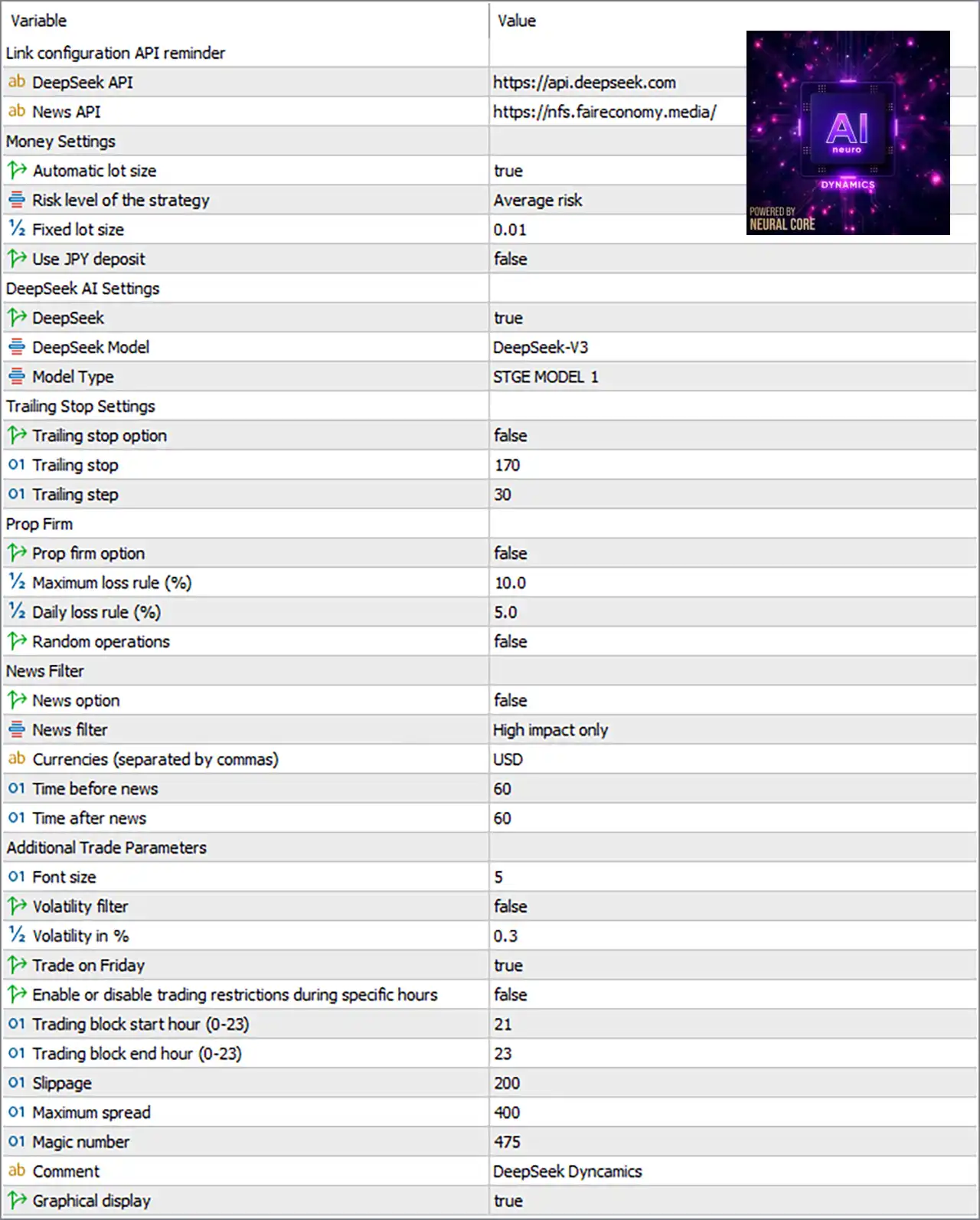
API Configuration
🔹 Link configuration API reminder — Displays a configuration reminder section for the external API settings used by the EA.
🔹 DeepSeek API = https://api.deepseek.com — Specifies the DeepSeek API endpoint used for the EA's AI-related functionality.
🔹 News API = https://nfs.faireconomy.media/ — Specifies the external News API endpoint used for economic-news data.
Money Settings
🔹 Automatic lot size = true — Enables automatic calculation of the trading lot size.
🔹 Risk level of the strategy = Average risk — Selects Average risk as the EA's active strategy risk profile.
🔹 Fixed lot size = 0.01 — Sets the fixed lot-size reference to 0.01 lots when fixed-lot sizing is applicable.
🔹 Use JPY deposit = false — Disables special JPY-deposit handling for the money-management calculation.
DeepSeek AI Settings
🔹 DeepSeek = true — Enables the DeepSeek AI functionality within the EA.
🔹 DeepSeek Model = DeepSeek-V3 — Selects DeepSeek-V3 as the configured AI model.
🔹 Model Type = STGE MODEL 1 — Selects STGE MODEL 1 as the active model type.
Trailing Stop Settings
🔹 Trailing stop option = false — Disables the Trailing Stop function in the current configuration.
🔹 Trailing stop = 170 — Sets the trailing-stop distance/value to 170 when the trailing option is enabled.
🔹 Trailing step = 30 — Sets the trailing-stop step to 30.
Prop Firm Settings
🔹 Prop firm option = false — Disables the dedicated Prop Firm protection mode.
🔹 Maximum loss rule (%) = 10.0 — Sets the maximum loss threshold to 10.0% when Prop Firm protection is enabled.
🔹 Daily loss rule (%) = 5.0 — Sets the daily loss threshold to 5.0% when Prop Firm protection is enabled.
🔹 Random operations = false — Disables randomization of trading operations.
News Filter Settings
🔹 News option = false — Disables the overall News Filter functionality.
🔹 News filter = High impact only — Selects High impact only as the news-impact category to be considered when the News Option is enabled.
🔹 Currencies (separated by commas) = USD — Sets USD as the currency used for news filtering.
🔹 Time before news = 60 — Sets the news protection period before an event to 60 minutes.
🔹 Time after news = 60 — Sets the news protection period after an event to 60 minutes.
Additional Trade Parameters
🔹 Font size = 5 — Sets the graphical interface font size to 5.
🔹 Volatility filter = false — Disables the volatility filter.
🔹 Volatility in % = 0.3 — Sets the volatility threshold/reference value to 0.3% when the volatility filter is enabled.
🔹 Trade on Friday = true — Allows the EA to trade on Friday.
🔹 Enable or disable trading restrictions during specific hours = false — Disables the specific-hour trading restriction.
🔹 Trading block start hour (0-23) = 21 — Sets the trading restriction start hour to 21:00 when the specific-hour restriction is enabled.
🔹 Trading block end hour (0-23) = 23 — Sets the trading restriction end hour to 23:00 when the specific-hour restriction is enabled.
🔹 Slippage = 200 — Sets the maximum/configured slippage value to 200.
🔹 Maximum spread = 400 — Sets the maximum spread threshold to 400.
🔹 Magic number = 475 — Sets the EA's unique Magic Number to 475, allowing its trades to be identified and managed separately.
🔹 Comment = DeepSeek Dynamics — Sets DeepSeek Dynamics as the trade comment attached to EA-generated positions.
🔹 Graphical display = true — Enables the EA's graphical display/interface on the trading chart.
Current Configuration Summary
🔹 AI Integration: DeepSeek AI is enabled with DeepSeek = true, using DeepSeek-V3 and STGE MODEL 1.
🔹 Money Management: Automatic lot sizing is enabled with Automatic lot size = true, while the strategy risk profile is Average risk.
🔹 Fixed Lot Reference: The fixed lot-size value is 0.01, providing the configured fixed-volume reference.
🔹 JPY Handling: Use JPY deposit = false, so the special JPY deposit calculation is disabled.
🔹 Trailing Stop: The Trailing Stop is currently disabled, although Trailing stop = 170 and Trailing step = 30 are configured.
🔹 Prop Firm Protection: Prop Firm mode is disabled, with Maximum loss = 10.0% and Daily loss = 5.0% configured for potential use.
🔹 Random Trading: Random operations are disabled.
🔹 News Protection: The overall News Option is disabled, although the selected news category is High impact only, with USD as the filtered currency.
🔹 News Protection Window: The configured protection periods are 60 minutes before and 60 minutes after news events.
🔹 Volatility Filter: The Volatility Filter is disabled, with a configured threshold of 0.3%.
🔹 Friday Trading: Friday trading is enabled.
🔹 Trading Restrictions: Specific-hour restrictions are disabled, although the configured block is 21:00–23:00.
🔹 Execution Protection: Slippage is configured at 200, while the maximum spread is 400.
🔹 Trade Identification: The EA uses Magic Number 475 and the comment DeepSeek Dynamics.
🔹 Chart Interface: Graphical display is enabled.
Important Notes About the Settings
🔹 Automatic Lot Sizing: Because Automatic lot size = true, the EA's automatic money-management system is active. The exact lot calculation should be verified through the EA's documentation or testing because the screenshot does not show a numerical risk percentage.
🔹 Fixed Lot Size: The Fixed lot size = 0.01 value remains configured, but automatic lot sizing is currently enabled.
🔹 DeepSeek AI: DeepSeek = true indicates that the AI module is enabled. API access and external connectivity may be required for the AI functionality to operate as intended.
🔹 Trailing Stop: The values 170 and 30 are configured, but Trailing stop option = false, so the trailing mechanism is currently inactive.
🔹 Prop Firm Rules: The 10.0% maximum loss and 5.0% daily loss parameters are configured but are not active because Prop firm option = false.
🔹 News Filter: Although News filter = High impact only, the overall News option = false means news protection is currently disabled.
🔹 Trading Hours: The 21–23 trading block is configured, but the specific-hour restriction is disabled.
🔹 Volatility: The 0.3% volatility value is configured, but the Volatility Filter is disabled.
🔹 Spread and Slippage: Maximum spread = 400 and Slippage = 200 are configured execution parameters. Their practical effect depends on the broker's symbol specifications and the EA's internal unit calculation.
Conclusion
AI Neuro Dynamics MT5 provides a combination of AI-assisted analysis, automatic money management, news filtering, execution controls, volatility analysis, and optional Prop Firm protection. The displayed setup enables DeepSeek-V3, uses STGE MODEL 1, and operates with Automatic lot size = true and an Average risk profile.
The current configuration keeps several protective modules disabled, including the Trailing Stop, Prop Firm protection, News Filter, Volatility Filter, and specific-hour trading restriction. Nevertheless, their parameters remain configured, including 170 trailing stop, 30 trailing step, 10.0% maximum loss, 5.0% daily loss, 60-minute news windows, and 0.3% volatility.
For live deployment, traders should verify the AI API connection, automatic lot-sizing behavior, broker-specific spread/slippage units, and the interaction between news protection and automated trading. Thorough demo and Strategy Tester testing is recommended before using the EA with real funds.
FAQs
❓ What AI model does AI Neuro Dynamics MT5 use?
The displayed configuration uses DeepSeek-V3, with DeepSeek = true and Model Type = STGE MODEL 1.
❓ Does AI Neuro Dynamics MT5 use automatic lot sizing?
Yes. Automatic lot size = true, and the strategy risk profile is set to Average risk. The configured fixed lot reference is 0.01.
❓ Is the Trailing Stop enabled?
No. Trailing stop option = false. However, the configured trailing parameters are 170 for the trailing stop and 30 for the trailing step.
❓ Does the EA have Prop Firm protection?
The Prop Firm option is currently disabled. If enabled, the configured limits are 10.0% maximum loss and 5.0% daily loss.
❓ Is the News Filter active in the current configuration?
No. News option = false. The selected category is High impact only, with USD as the currency and 60 minutes configured both before and after news events.


