
GoldenHour EA MT5
GoldenHour MT5GoldenHour EA Live Signal MyfxbookGoldenHour EA MT5 Backtest Trading ResultsGoldenHour EA Backtest Trading ResultsGoldenHour EA MT5 Overview
MT5XAUUSD (Gold) · M15, M30, H1Updated 20 Sept 2026

GoldenHour EA MT5 with SetFiles (Latest version) - Unlimited

GoldenHour EA is an automated and optimized robot for trading GOLD (XAUUSD). Performance has been thoroughly verified by MyFxBook.

Buy now — $599Add to cart
Download link right after paymentUnlimited accounts, no licence lockSet files includedFree updates to new versions
Pay with Visa · MastercardUSDT · BTC · ETHBinance Pay
Not sure it fits your broker or account?Ask a question
Check before you buy

Will it work for me?

Trading platform
Time frames
M15, M30, H1
Currency pairs
XAUUSD (Gold)
Minimum / Recommended deposit
$20
Minimum / Recommended leverage
1:50 or higher
Product type
Original version
Additional services
Recommended brokers
What you get

In the download

FILEGoldenHour EA MT5
Optimize Settings

Recommended settings for GoldenHour EA MT5

GoldenHour EA MT5 Settings Guide

GoldenHour EA MT5 is an automated trading Expert Advisor designed around a Multi-Session Trading Strategy, combining configurable entry offsets, risk management, trailing-stop controls, position sizing, market-condition filters, liquidity analysis, and time synchronization. The EA provides separate controls for long and short entry placement, initial Stop Loss and Profit Target, dynamic position sizing, account risk, spread and slippage protection, and minimum tick-volume requirements.

The displayed configuration also includes session-specific Magic Numbers, an EA identifier label, broker-time adjustment, and an on-chart information panel. These settings allow traders to customize the EA's execution behavior, position risk, and market-entry conditions.
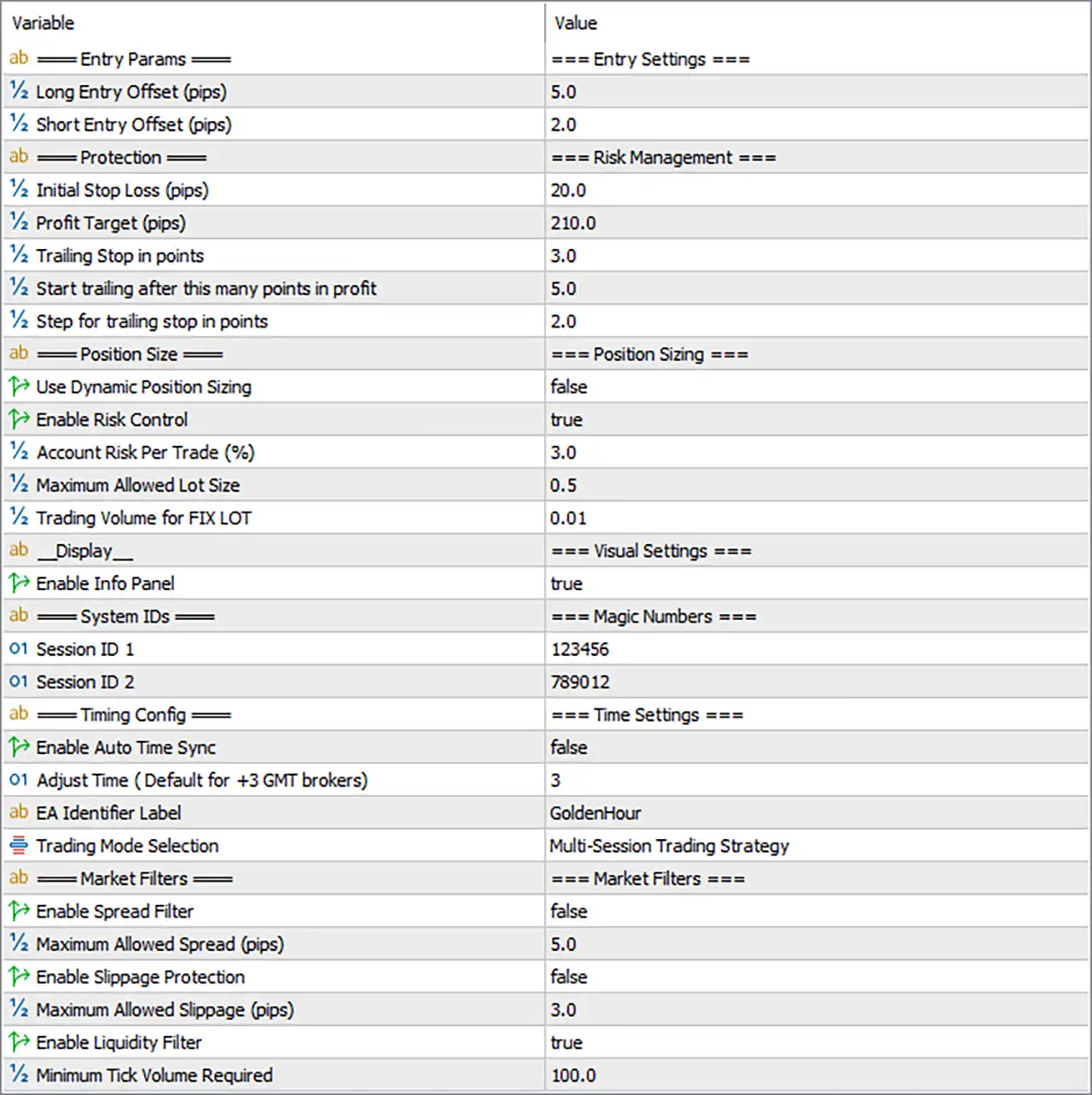
GoldenHour EA MT5 Settings Panel

Entry Settings

🔹 Long Entry Offset (pips) = 5.0 — Sets the entry offset for Long trades to 5.0 pips from the EA's calculated entry level.

🔹 Short Entry Offset (pips) = 2.0 — Sets the entry offset for Short trades to 2.0 pips from the EA's calculated entry level.

Risk Management Settings

🔹 Initial Stop Loss (pips) = 20.0 — Sets the initial protective Stop Loss distance to 20.0 pips.

🔹 Profit Target (pips) = 210.0 — Sets the main Profit Target to 210.0 pips.

🔹 Trailing Stop in points = 3.0 — Sets the trailing-stop distance to 3.0 points.

🔹 Start trailing after this many points in profit = 5.0 — Activates trailing management after the position reaches 5.0 points of profit.

🔹 Step for trailing stop in points = 2.0 — Sets the trailing-stop adjustment step to 2.0 points.

Position Sizing Settings

🔹 Use Dynamic Position Sizing = false — Disables dynamic position sizing in the current configuration.

🔹 Enable Risk Control = true — Enables the EA's account-risk control mechanism.

🔹 Account Risk Per Trade (%) = 3.0 — Sets the configured account risk per trade to 3.0%.

🔹 Maximum Allowed Lot Size = 0.5 — Limits the maximum permitted position size to 0.5 lots.

🔹 Trading Volume for FIX LOT = 0.01 — Sets the fixed trading volume to 0.01 lots when fixed-lot sizing is used.

Visual Settings

🔹 Enable Info Panel = true — Enables the EA's information panel on the trading chart.

Magic Number Settings

🔹 Session ID 1 = 123456 — Assigns 123456 as the Magic Number/session identifier for the first trading session.

🔹 Session ID 2 = 789012 — Assigns 789012 as the Magic Number/session identifier for the second trading session.

Time Settings

🔹 Enable Auto Time Sync = false — Disables automatic synchronization of the EA's trading time with the broker/server time.

🔹 Adjust Time (Default for +3 GMT brokers) = 3 — Sets the manual time adjustment to 3, corresponding to the default setting for +3 GMT brokers.

🔹 EA Identifier Label = GoldenHour — Sets GoldenHour as the EA identifier label.

🔹 Trading Mode Selection = Multi-Session Trading Strategy — Selects the Multi-Session Trading Strategy as the EA's trading mode.

Market Filter Settings

🔹 Enable Spread Filter = false — Disables the spread filter in the current configuration.

🔹 Maximum Allowed Spread (pips) = 5.0 — Sets the maximum allowed spread to 5.0 pips when the Spread Filter is enabled.

🔹 Enable Slippage Protection = false — Disables slippage protection.

🔹 Maximum Allowed Slippage (pips) = 3.0 — Sets the maximum allowed slippage to 3.0 pips when Slippage Protection is enabled.

🔹 Enable Liquidity Filter = true — Enables the liquidity filter for trade-entry conditions.

🔹 Minimum Tick Volume Required = 100.0 — Requires a minimum tick volume of 100.0 for the liquidity filter to accept trading conditions.

Current Configuration Summary

🔹 Trading Mode: The EA is configured for the Multi-Session Trading Strategy.

🔹 Long Entry: The Long Entry Offset is set to 5.0 pips.

🔹 Short Entry: The Short Entry Offset is set to 2.0 pips.

🔹 Initial Protection: The Initial Stop Loss is configured at 20.0 pips.

🔹 Profit Target: The Profit Target is configured at 210.0 pips.

🔹 Trailing Management: Trailing begins after 5.0 points of profit, with a 3.0-point trailing distance and a 2.0-point trailing step.

🔹 Risk Control: Risk Control is enabled with 3.0% account risk per trade.

🔹 Position Limit: The maximum allowed lot size is 0.5 lots.

🔹 Fixed Volume: The fixed-lot trading volume is 0.01 lots.

🔹 Dynamic Position Sizing: Dynamic Position Sizing is disabled.

🔹 Spread Protection: The Spread Filter is disabled, although the configured maximum spread is 5.0 pips.

🔹 Slippage Protection: Slippage Protection is disabled, with 3.0 pips configured as the maximum allowed slippage.

🔹 Liquidity Protection: The Liquidity Filter is enabled and requires 100.0 minimum tick volume.

🔹 Session Identification: The EA uses Session ID 123456 and Session ID 789012.

🔹 Time Synchronization: Automatic Time Sync is disabled, with a manual time adjustment of 3.

🔹 Chart Display: The Info Panel is enabled.

Important Notes About the Settings

🔹 Risk Control vs Dynamic Position Sizing: Risk Control is enabled at 3.0%, while Dynamic Position Sizing is disabled. The exact lot calculation should therefore be interpreted according to the EA's internal position-sizing logic.

🔹 Fixed Lot Configuration: The EA has Trading Volume for FIX LOT = 0.01, which provides the fixed-volume setting when fixed-lot operation is applicable.

🔹 Maximum Lot Protection: Regardless of the position-sizing method, the displayed Maximum Allowed Lot Size = 0.5 provides a configured upper lot-size limit.

🔹 Spread Filter: Although Maximum Allowed Spread = 5.0 pips is configured, Enable Spread Filter = false, so this spread threshold is not currently active as a filter.

🔹 Slippage Protection: Maximum Allowed Slippage = 3.0 pips is configured, but Enable Slippage Protection = false, so the dedicated slippage protection is currently disabled.

🔹 Liquidity Filter: The Liquidity Filter is active with Minimum Tick Volume Required = 100.0, meaning market liquidity conditions are part of the displayed trade-entry configuration.

🔹 Trailing Stop: The trailing system is configured to begin after 5.0 points of profit, use a 3.0-point trailing distance, and adjust in 2.0-point steps.

🔹 Time Adjustment: Automatic synchronization is disabled, so the configured manual adjustment of 3 should be checked against the broker's server time.

🔹 Session IDs: The values 123456 and 789012 allow the EA to distinguish trades associated with its two configured sessions.

Conclusion

GoldenHour EA MT5 provides a structured Multi-Session Trading Strategy with detailed controls for entry placement, risk management, position sizing, trailing stops, liquidity conditions, execution filters, and time synchronization.

The displayed setup uses 5.0 pips for the Long Entry Offset, 2.0 pips for the Short Entry Offset, a 20.0-pip Initial Stop Loss, and a 210.0-pip Profit Target. Risk Control is enabled with 3.0% account risk per trade, while the maximum allowed lot size is limited to 0.5 lots.

For trade management, the trailing system starts after 5.0 points of profit, uses a 3.0-point trailing distance, and applies a 2.0-point step. The Liquidity Filter is enabled with a minimum tick volume requirement of 100.0.

The Spread and Slippage filters are currently disabled, despite having configured thresholds of 5.0 pips and 3.0 pips respectively. Traders should therefore distinguish between configured values and currently active protection modules when evaluating this setup.

FAQs

❓ What trading strategy does GoldenHour EA MT5 use?
The displayed configuration uses the Multi-Session Trading Strategy, with separate session identifiers 123456 and 789012.

❓ What is the Stop Loss and Profit Target?
The Initial Stop Loss is 20.0 pips, while the Profit Target is 210.0 pips.

❓ What is the risk per trade?
Enable Risk Control = true, with Account Risk Per Trade = 3.0%. The maximum allowed lot size is 0.5 lots.

❓ Does GoldenHour EA MT5 use a Liquidity Filter?
Yes. Enable Liquidity Filter = true, with Minimum Tick Volume Required = 100.0.

❓ Are Spread and Slippage Protection enabled?
No. Both are currently disabled. The configured maximum spread is 5.0 pips, and the maximum slippage is 3.0 pips, but their respective protection switches are set to false.

Full review

GoldenHour EA MT5: Precision Scalping for XAUUSD (Gold)

GoldenHour EA is a precision Expert Advisor (EA) designed for automated gold trading using a disciplined scalping approach. Built for XAUUSD, it focuses on high-probability single-position trades with strict risk management. By combining advanced Indicators, multi-timeframe analysis, and controlled trade execution, the system delivers stability, adaptability, and consistent automated performance.

⭐ Vendor website: View here

About the Author

This product is compiled by Zaha Feiz. This author has more than +4 years of experience working on MQL5 with many famous products such as GoldenHour EA MT5, Autorithm AI MT5, Atbot EA, AT Ai Bot MT5 and other advisors. Among them, GoldenHour EA is his best performing products.

⭐ Join Our Channel Telegram

⭐ Delivery time 24h-48h after payment.

⭐ Refund if not delivered.

⭐ You will receive the current version without any limitations (ID+Time).

Key Features of GoldenHour EA for MT5

🔹 Single-Position Precision Scalping: Executes carefully filtered trades while avoiding risky multi-position exposure.
🔹 Session-Optimized Trading Modes: Supports Asia breakout, London reversal and combined multi-session strategies.
🔹 Advanced Indicator Confirmation System: Uses RSI divergence, momentum indicators, and price action validation.
🔹 Built-In Capital Protection Framework: Includes Stop Loss (SL), Take Profit (TP), trailing stop and dynamic position sizing.
🔹 Execution Safety and Spread Control: Integrated spread monitoring and slippage protection enhance trade stability.

What is the GoldenHour EA Trading Strategy?

🔹 High-Probability Gold Scalping Model: Targets short-term opportunities with average trades lasting 15–45 minutes.
🔹 Multi-Timeframe Market Analysis Logic: Combines higher timeframe context with fast execution signals.
🔹 Momentum and Divergence Detection: Confirms entries using RSI divergence and momentum strength filters.
🔹 Session-Based Market Behavior Analysis: Identifies liquidity patterns during Asian and London sessions.
🔹 Quick Exit Risk Control System: Trailing stop and reversal detection secure profits and reduce exposure.

GoldenHour EA MT5 Review

GoldenHour EA Myfxbook Results

Golden Hour EA has shown outstanding performance and is verified by MyFxBook. The EA achieved +91.08% growth in a short period while maintaining a 0.00% drawdown - a rare combination in algorithmic trading.

✅ Initial Deposit: $500
✅ Gain: +91.08%
✅ Daily Return: 3.13%
✅ Monthly Return: 91.08%

GoldenHour EA Live Signal Myfxbook

GoldenHour EA Backtest Results

🔶 GoldenHour has demonstrated outstanding performance during backtesting, generating over $25 million in profits from just a $500 deposit—while still keeping drawdowns under control.

✅ Initial Deposit: $500
✅ Total Net Profit: $25.97 million
✅ Win Rate: 92.56%
✅ Balance Drawdown Maximal: 2.48%
✅ Equity Drawdown Maximal: 2.79%

GoldenHour EA Backtest Trading Results

GoldenHour EA Backtest Trading Results

🔶 This backtest shows how the EA turned an initial deposit of $20 into over $22.9 million in net profits, with exceptional accuracy and low drawdown.

✅ Initial Deposit: $20
✅ Total Net Profit: $22.92 million
✅ Win Rate: 92.56%
✅ Balance Drawdown Maximal: 1.13%
✅ Equity Drawdown Maximal: 3.52%

GoldenHour EA MT5 Backtest Trading Results

GoldenHour EA MT5 Backtest Trading Results

Why choose and use GoldenHour EA?

🔹 Stable Gold Trading Automation: Focuses on quality setups rather than frequent or aggressive trading.
🔹 Low-Risk Structure Without Dangerous Methods: Avoids martingale, grid or hedging strategies entirely.
🔹 Efficient Market Exposure Management: Short holding times reduce risk during volatile conditions.
🔹 Adaptive Strategy for Different Sessions: Multiple trading modes respond to changing liquidity cycles.
🔹 Professional Marketplace-Ready EA: Designed for traders seeking disciplined automated gold trading.

Is GoldenHour EA Safe?

GoldenHour EA demonstrates remarkable potential in delivering stable and reliable profits, making it a reliable tool in the forex market. GoldenHour EA is highly regarded by the MQL5 community in many aspects and has gained the trust of its users.

⭐⭐⭐⭐⭐ David_Ng (2025.05.16): "Just new set up for golden hour, so far running 3days and profit almost 300%..strongly recommended..."
⭐⭐⭐⭐⭐ Sumair_Es (2025.03.22): "Been using it for last 3-4 days, till now it is working more than my expectations! keep up the good work."

Product Download Package?

The download package of the product suite includes:

Experts

✅ GoldenHour EA.ex5

SetFiles

✅ GoldenHour +3 GMT setfiles (1).set
✅ GoldenHour +3 GMT setfiles (2).set
✅ GoldenHour +3 GMT setfiles (3).set
✅ GoldenHour +3 GMT setfiles (4).set
✅ GoldenHour +3 GMT setfiles (5).set

➡️ Reviewed by David Easton

Conclusion: Why GoldenHour EA Stands Out as a Top Choice for Gold Scalping

In short, GoldenHour EA is a top-tier scalping Expert Advisor tailored specifically for trading XAUUSD (Gold) with precision, reliability, and discipline. Its focus on high-probability single trades, combined with a low-risk, no-martingale approach, makes it the perfect solution for traders seeking stable and consistent returns. By avoiding risky strategies like grid and hedging, and instead relying on strict entry criteria and intelligent session-based logic, GoldenHour EA ensures disciplined execution aligned with market momentum.

Questions about GoldenHour EA MT5

1. What is GoldenHour EA and what makes it different from other EAs?

GoldenHour EA is a precision scalping Expert Advisor built specifically for XAUUSD (Gold) on MetaTrader 5. It avoids high-risk strategies like Martingale, Grid, or Hedging, focusing instead on disciplined, single-entry scalping with low drawdowns and session-based trade logic.

2. Which currency pair and timeframes does the EA support?

GoldenHour EA is designed exclusively for XAUUSD (Gold) and works best on M15, M30, and H1 timeframes.

3. What trading strategy does GoldenHour EA use?

It uses session-based scalping logic, targeting high-probability moves during the Asian breakout and London reversal sessions, with short holding times (15–45 minutes) and only 2–3 trades per day.

4. Does the EA use Martingale, Grid, or Hedging?

No, GoldenHour EA strictly avoids risky compounding methods. It opens only one trade at a time, with fixed stop-loss and take-profit levels, ensuring better control over risk.

5. Is this EA beginner-friendly and fully automated?

Yes. GoldenHour EA is a set-and-forget system that runs fully automated on MT5. It includes auto GMT detection, session timing features, and easy setup—making it suitable for both beginners and advanced traders.

6. What are the minimum deposit and leverage requirements?

✅ Minimum Deposit: $20 ✅ Recommended Deposit: $500 ✅ Minimum Leverage: 1:50 or higher

7. How has GoldenHour EA performed in live trading?

On a verified Myfxbook signal, it achieved: ✅ +91.08% gain ✅ 0.00% drawdown ✅ $500 initial deposit ✅ 3.13% daily return

8. What do backtest results show about GoldenHour EA’s potential?

GoldenHour EA turned: ✅ $500 into $25.9 million with a 92.56% win rate ✅ $20 into $22.9 million with max drawdown under 3.52% These results show exceptional profit potential and risk control.

9. Is GoldenHour EA suitable for prop firm trading?

Yes. It is prop firm friendly, thanks to its low drawdown, fixed SL/TP, and rule-based execution, which helps meet the requirements of funded account evaluations.

Other products traders compare

$599
Instant download
Buy now