


🔢 GoldPulse AI MT5 Settings Explained – Complete Parameter Guide
GoldPulse AI MT5 is an advanced AI-powered Expert Advisor for MetaTrader 5, designed to trade multiple Gold symbols with intelligent day and night trading profiles, automatic money management, volatility filtering, and broker time synchronization.
Its flexible configuration allows traders to optimize trading across different Gold instruments while maintaining disciplined risk management and multi-symbol control.

🔢 GoldPulse AI MT5 Parameters Explained
Below are the details of the parameters in the advisor’s trading system settings table:
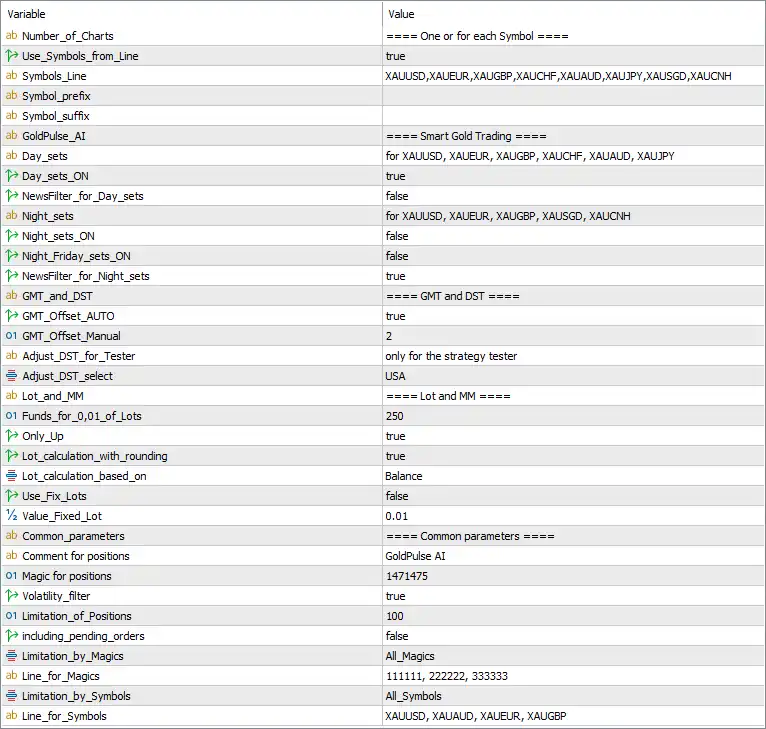
🔶 Chart & Symbol Settings
🔹 Number_of_Charts = One or for each Symbol – Determines whether the EA operates on a single chart or opens one chart for every configured trading symbol.
🔹 Use_Symbols_from_Line = true – Enables the EA to use the manually defined symbol list instead of only the current chart symbol.
🔹 Symbols_Line = XAUUSD, XAUEUR, XAUGBP, XAUCHF, XAUAUD, XAUJPY, XAUSGD, XAUCNH – Specifies the complete list of Gold symbols available for automated trading.
🔹 Symbol_prefix = (blank) – Allows traders to define a broker-specific symbol prefix if required.
🔹 Symbol_suffix = (blank) – Allows traders to define a broker-specific symbol suffix for broker compatibility.
🔶 Smart Gold Trading Configuration
🔹 GoldPulse_AI – Main configuration section for the AI-powered Gold trading strategy.
🔹 Day_sets = for XAUUSD, XAUEUR, XAUGBP, XAUCHF, XAUAUD, XAUJPY – Defines the optimized daytime trading profile for these Gold symbols.
🔹 Day_sets_ON = true – Enables the daytime AI trading configuration.
🔹 NewsFilter_for_Day_sets = false – Disables the news filter while using the daytime trading profile.
🔹 Night_sets = for XAUUSD, XAUEUR, XAUGBP, XAUSGD, XAUCNH – Defines the optimized nighttime trading profile.
🔹 Night_sets_ON = false – Disables the nighttime AI trading profile.
🔹 Night_Friday_sets_ON = false – Disables the special Friday night trading configuration.
🔹 NewsFilter_for_Night_sets = true – Enables economic news filtering for the nighttime profile.
🔶 GMT and DST Settings
🔹 GMT_Offset_AUTO = true – Automatically detects the broker's GMT offset.
🔹 GMT_Offset_Manual = 2 – Uses a manual GMT offset of 2 when automatic detection is disabled.
🔹 Adjust_DST_for_Tester = only for the strategy tester – Applies Daylight Saving Time adjustment only during MT5 Strategy Tester backtesting.
🔹 Adjust_DST_select = USA – Uses the USA Daylight Saving Time rules when DST adjustment is required.
🔶 Lot Size & Money Management
🔹 Funds_for_0,01_of_Lots = 250 – Requires approximately 250 account currency units for every 0.01 lot traded.
🔹 Only_UP = true – Allows automatic lot sizing to increase only according to the money management algorithm.
🔹 Lot_calculation_with_rounding = true – Rounds calculated lot sizes to broker-supported trading increments.
🔹 Lot_calculation_based_on = Balance – Calculates trading volume using the account Balance.
🔹 Use_Fix_Lots = false – Disables fixed lot sizing and enables automatic money management.
🔹 Value_Fixed_Lot = 0.01 – Sets the fixed lot size to 0.01 lots when fixed lot mode is enabled.
🔶 Common Trading Parameters
🔹 Comment for positions = GoldPulse AI – Adds "GoldPulse AI" as the trade comment for all EA positions.
🔹 Magic for positions = 1471475 – Assigns Magic Number 1471475 to uniquely identify all trades opened by the EA.
🔹 Volatility_filter = true – Enables the volatility filter to avoid opening trades during unsuitable market conditions.
🔹 Limitation_of_Positions = 100 – Limits the total number of simultaneously managed positions to 100.
🔹 including_pending_orders = false – Excludes pending orders from the position limit calculation.
🔶 Magic Number Management
🔹 Limitation_by_Magics = All_Magics – Applies management rules across all Magic Numbers.
🔹 Line_for_Magics = 111111, 222222, 333333 – Lists the Magic Numbers available for custom filtering when required.
🔶 Symbol Management
🔹 Limitation_by_Symbols = All_Symbols – Applies trading limitations across all configured trading symbols.
🔹 Line_for_Symbols = XAUUSD, XAUAUD, XAUEUR, XAUGBP – Specifies the symbols used when custom symbol filtering is enabled.
🔢 Conclusion
GoldPulse AI MT5 is a sophisticated AI-based Gold trading Expert Advisor that combines intelligent day/night trading profiles, automatic money management, broker time synchronization, volatility protection, and multi-symbol trading support. With flexible configuration options for multiple Gold instruments and advanced risk management, it provides traders with a powerful solution for automated Gold trading on MetaTrader 5.
🔢 FAQs
❓ What symbols can GoldPulse AI MT5 trade by default?
GoldPulse AI MT5 supports multiple Gold instruments, including XAUUSD, XAUEUR, XAUGBP, XAUCHF, XAUAUD, XAUJPY, XAUSGD, and XAUCNH.
❓ Does GoldPulse AI MT5 support automatic lot sizing?
Yes. By default, Use_Fix_Lots = false, allowing the EA to calculate position sizes automatically based on the account Balance.
❓ Can GoldPulse AI MT5 automatically detect broker time?
Yes. With GMT_Offset_AUTO = true, the EA automatically detects the broker's GMT offset while also supporting manual configuration.
❓ Does GoldPulse AI MT5 include a volatility filter?
Yes. The Volatility_filter = true setting helps the EA avoid trading during unstable or highly volatile market conditions.
❓ What is the default Magic Number in GoldPulse AI MT5?
The default Magic Number is 1471475, allowing GoldPulse AI MT5 to uniquely identify and manage its own trades independently from other Expert Advisors.



