



🔢 Scalper Deriv EA MT5 Settings Explained – Complete Parameter Guide
Scalper Deriv EA is an automated MetaTrader 5 Expert Advisor designed for scalping strategies on Deriv synthetic indices and traditional Forex/Metals markets.
The EA combines flexible risk management, fractal-based market analysis, trading session controls, news filtering, and customizable display options to help traders automate entries while maintaining disciplined money management. Below is a complete explanation of every available input parameter from the settings panel.
🔢 Scalper Deriv EA MT5 Parameters Explained
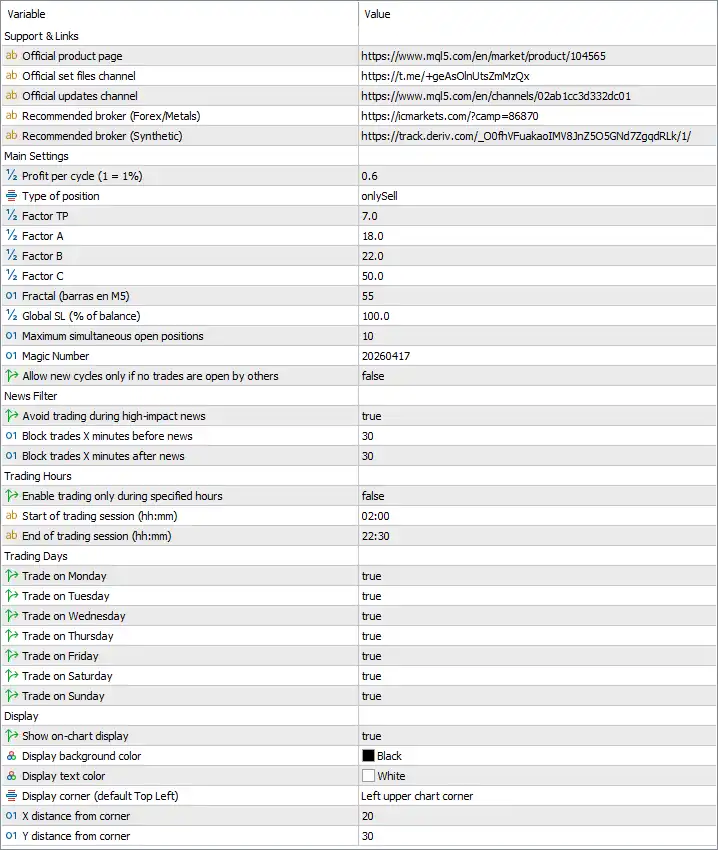
🔶 Main Settings
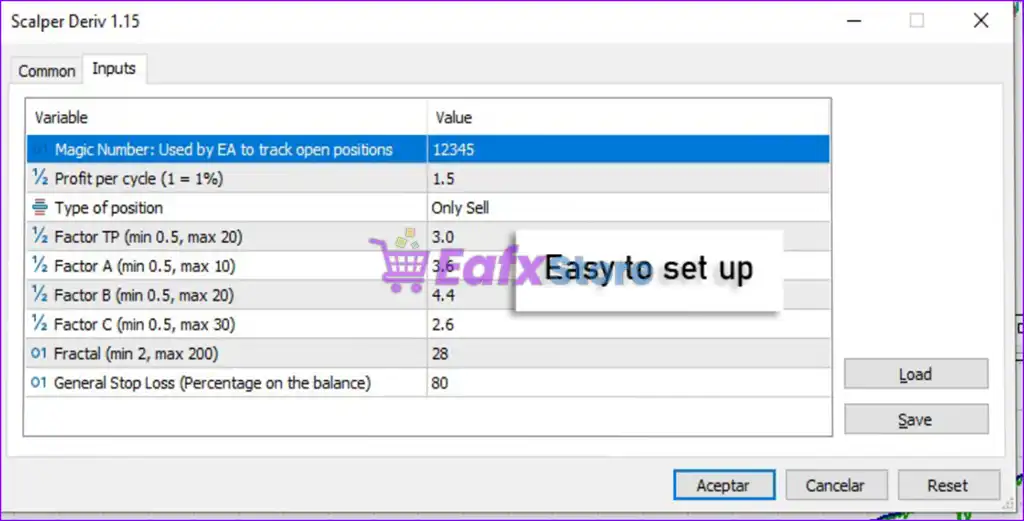
🔹 Profit per cycle (1 = 1%) = 0.6 – Sets the target profit for each trading cycle to 0.6% of the account.
🔹 Type of position = onlySell – Restricts the EA to opening Sell positions only.
🔹 Factor TP = 7.0 – Multiplier used by the Take Profit calculation algorithm.
🔹 Factor A = 18.0 – Internal strategy coefficient used for trade signal calculations.
🔹 Factor B = 22.0 – Secondary algorithm coefficient that influences entry logic.
🔹 Factor C = 50.0 – Additional strategy parameter used by the EA's trading model.
🔹 Fractal (barras en M5) = 55 – Uses 55 M5 bars for fractal-based market analysis.
🔹 Global SL (% of balance) = 100.0 – Sets the global Stop Loss at 100.0% of the account balance.
🔹 Maximum simultaneous open positions = 10 – Allows a maximum of 10 open trades at the same time.
🔹 Magic Number = 20260417 – Unique identifier assigned to all positions opened by this EA.
🔹 Allow new cycles only if no trades are open by others = false – Allows the EA to begin new trading cycles even if other manual or EA trades are currently open.
🔶 News Filter
🔹 Avoid trading during high-impact news = true – Prevents new trades during major economic news events.
🔹 Block trades X minutes before news = 30 – Stops opening new trades 30 minutes before high-impact news.
🔹 Block trades X minutes after news = 30 – Resumes trading 30 minutes after high-impact news.
🔶 Trading Hours
🔹 Enable trading only during specified hours = false – Disables session restrictions and allows trading throughout the day.
🔹 Start of trading session (hh:mm) = 02:00 – Defines the session start time if trading-hour filtering is enabled.
🔹 End of trading session (hh:mm) = 22:30 – Defines the session end time if trading-hour filtering is enabled.
🔶 Trading Days
🔹 Trade on Monday = true – Enables trading on Monday.
🔹 Trade on Tuesday = true – Enables trading on Tuesday.
🔹 Trade on Wednesday = true – Enables trading on Wednesday.
🔹 Trade on Thursday = true – Enables trading on Thursday.
🔹 Trade on Friday = true – Enables trading on Friday.
🔹 Trade on Saturday = true – Enables trading on Saturday.
🔹 Trade on Sunday = true – Enables trading on Sunday.
🔶 Display Settings
🔹 Show on-chart display = true – Displays the EA information panel directly on the trading chart.
🔹 Display background color = Black – Sets the dashboard background color to Black.
🔹 Display text color = White – Displays dashboard text in White.
🔹 Display corner (default Top Left) = Left upper chart corner – Positions the information panel in the upper-left corner of the chart.
🔹 X distance from corner = 20 – Sets the horizontal dashboard offset to 20 pixels.
🔹 Y distance from corner = 30 – Sets the vertical dashboard offset to 30 pixels.
🔢 Conclusion
Scalper Deriv EA MT5 provides a streamlined yet highly configurable trading environment for automated scalping. Its combination of cycle-based profit management, fractal analysis, configurable trading sessions, built-in news protection, and customizable chart display makes it suitable for traders seeking controlled automation on both Deriv synthetic markets and traditional Forex instruments. Proper optimization of these parameters can significantly improve the EA's performance under different market conditions.
🔢 FAQs
❓ What does "Profit per cycle (1 = 1%)" mean in Scalper Deriv EA MT5?
It specifies the percentage profit target for each trading cycle. A value of 0.6 means the EA aims for approximately 0.6% profit before completing the cycle.
❓ Can Scalper Deriv EA MT5 trade both Buy and Sell positions?
Yes, depending on the selected Type of position. In this configuration, it is set to onlySell, so only Sell trades are allowed.
❓ Does the EA include a built-in news filter?
Yes. It can automatically avoid trading around high-impact economic news by pausing entries 30 minutes before and 30 minutes after scheduled events.
❓ Can I restrict the EA to trade only during certain hours?
Yes. You can enable trading-hour filtering and define custom session start and end times such as 02:00–22:30.
❓ Why is the Magic Number important?
The Magic Number (20260417) uniquely identifies all trades opened by Scalper Deriv EA MT5, allowing the EA to manage only its own positions without interfering with other Expert Advisors or manual trades.



