


🔢 Vineski HFT Gold Scalper MT5 Settings Explained – Complete Parameter Guide
Vineski HFT Gold Scalper EA is a high-frequency trading (HFT) Expert Advisor developed for MetaTrader 5, specifically optimized for Gold trading. The EA combines precise execution, configurable trading sessions, trailing stop management, grid functionality, and advanced order controls to help traders capture short-term market opportunities.

🔢 Vineski HFT Gold Scalper MT5 Settings
Below are the details of the parameters in the advisor’s trading system settings table:
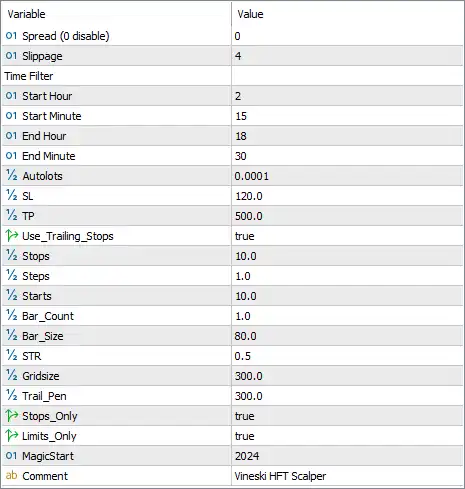
🔹 Spread (0 disable) = 0 – Sets the maximum allowed spread for opening trades; 0 disables the spread filter.
🔹 Slippage = 4 – Defines the maximum acceptable execution slippage as 4 points before an order is rejected.
🔶 Time Filter
🔹 Start Hour = 2 – Trading begins at 02:00 server time.
🔹 Start Minute = 15 – Trading starts at 15 minutes past the start hour (02:15).
🔹 End Hour = 18 – Trading stops initiating new positions at 18:00 server time.
🔹 End Minute = 30 – Trading ends at 18:30 server time.
🔶 Money Management
🔹 Autolots = 0.0001 – Enables automatic lot calculation using a sizing coefficient of 0.0001.
🔶 Stop Loss & Take Profit
🔹 SL = 120.0 – Sets the Stop Loss distance to 120.0 points for each trade.
🔹 TP = 500.0 – Sets the Take Profit distance to 500.0 points.
🔶 Trailing Stop Settings
🔹 Use_Trailing_Stops = true – Enables the built-in trailing stop system.
🔹 Stops = 10.0 – Defines the trailing stop distance as 10.0 points.
🔹 Steps = 1.0 – Moves the trailing stop in increments of 1.0 point.
🔹 Starts = 10.0 – Activates trailing once the position reaches 10.0 points of profit.
🔶 Bar & Strategy Parameters
🔹 Bar_Count = 1.0 – Uses 1 completed bar for the EA's trading logic and signal evaluation.
🔹 Bar_Size = 80.0 – Sets the required minimum bar size to 80.0 points before trade conditions are met.
🔹 STR = 0.5 – Configures the strategy strength/filter coefficient to 0.5.
🔶 Grid & Trade Management
🔹 Gridsize = 300.0 – Defines the spacing between grid orders as 300.0 points.
🔹 Trail_Pen = 300.0 – Sets the trailing penetration or trailing activation parameter to 300.0 points.
🔹 Stops_Only = true – Restricts the EA to manage Stop orders only.
🔹 Limits_Only = true – Restricts the EA to manage Limit orders only.
🔶 Identification
🔹 MagicStart = 2024 – Uses 2024 as the base Magic Number to uniquely identify trades opened by the EA.
🔹 Comment = Vineski HFT Scalper – Adds the trade comment "Vineski HFT Scalper" to every position for easier identification in the trading terminal.
🔢 Conclusion
Vineski HFT Gold Scalper MT5 provides a compact yet highly configurable set of parameters for traders seeking automated Gold scalping. With adjustable trading hours, automatic lot sizing, customizable Stop Loss and Take Profit, advanced trailing stop controls, grid management, and order filtering options, the EA allows users to fine-tune performance according to their broker conditions and individual risk tolerance. Proper optimization and testing are recommended before deploying the EA on a live trading account.
🔢 FAQs
❓ What market is Vineski HFT Gold Scalper MT5 designed for?
The EA is primarily designed for Gold (XAUUSD) high-frequency scalping on MetaTrader 5.
❓ Can I change the trading session?
Yes. You can modify the Start Hour, Start Minute, End Hour, and End Minute to match your preferred trading session or broker server time.
❓ Does the EA support automatic lot sizing?
Yes. The Autolots parameter is set to 0.0001, allowing the EA to calculate position sizes automatically.
❓ How does the trailing stop work?
When Use_Trailing_Stops = true, the EA starts trailing after 10.0 points of profit, using a 10.0-point trailing distance with 1.0-point adjustment steps.
❓ What is the purpose of the MagicStart parameter?
MagicStart = 2024 assigns a unique identifier to all trades opened by the EA, ensuring they can be managed independently from manual trades or other Expert Advisors.



