

QuantFiTech Gold EA MT5 Settings Explained – Complete Parameter Guide
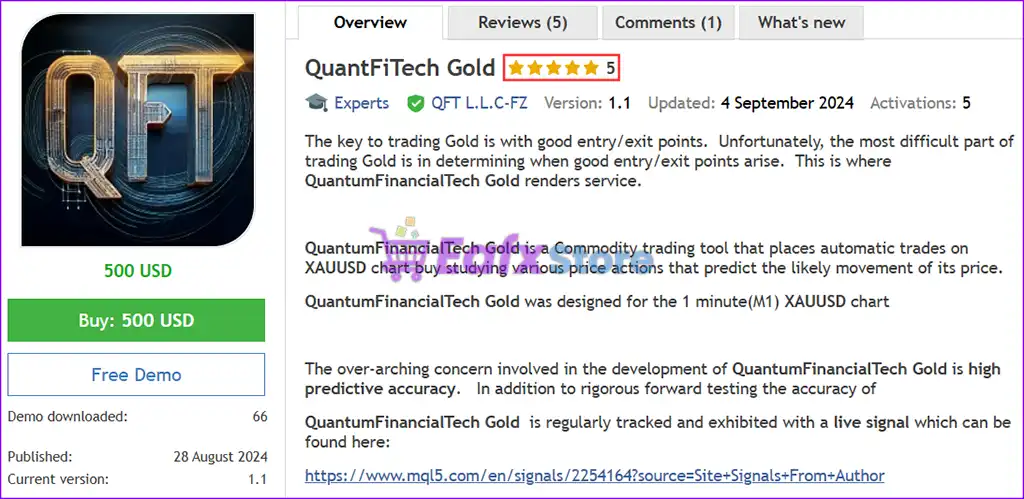
QuantFiTech Gold EA is an automated MetaTrader 5 Expert Advisor developed for Gold (XAUUSD) trading. It combines configurable money management, trailing stop functionality, risk profiles, equity-based lot sizing options, and recovery controls to help traders automate their strategies while maintaining flexible risk management.

QuantFiTech Gold EA MT5 Settings
Below are the details of the parameters in the advisor’s trading system settings table:
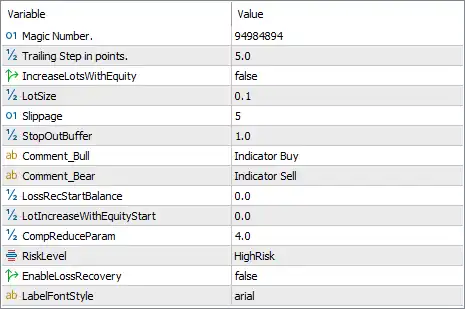
🔹 Magic Number = 94984894 – Assigns the unique Magic Number 94984894 so the EA can identify and manage only its own trades.
🔹 Trailing Step in points = 5.0 – Moves the trailing stop by 5.0 points whenever the market advances in the trade's favor.
🔹 IncreaseLotsWithEquity = false – Disables automatic lot size increases based on account equity growth.
🔹 LotSize = 0.1 – Sets the default trading volume to 0.1 lots for every new position.
🔹 Slippage = 5 – Allows a maximum execution slippage of 5 points before an order is rejected or requoted.
🔹 StopOutBuffer = 1.0 – Applies a 1.0 safety buffer to help reduce the risk of reaching the broker's Stop Out level.
🔹 Comment_Bul = Indicator Buy – Adds the trade comment "Indicator Buy" to buy positions for easier identification.
🔹 Comment_Bear = Indicator Sell – Adds the trade comment "Indicator Sell" to sell positions for easier identification.
🔹 LossRecStartBalance = 0.0 – Sets the starting account balance for the loss recovery feature to 0.0, effectively using the default reference.
🔹 LotIncreaseWithEquityStart = 0.0 – Specifies the starting equity level for automatic lot size scaling as 0.0, meaning the feature remains inactive while equity scaling is disabled.
🔹 CompReduceParam = 4.0 – Sets the compensation reduction parameter to 4.0, controlling how aggressively the EA adjusts recovery or compensation calculations.
🔹 RiskLevel = HighRisk – Selects the HighRisk trading profile, allowing more aggressive position management and risk exposure.
🔹 EnableLossRecovery = false – Disables the built-in loss recovery mechanism, preventing recovery-based trade sequences.
🔹 LabelFontStyle = arial – Uses the Arial font for all labels and information displayed on the chart.
Conclusion
QuantFiTech Gold EA MT5 provides a straightforward yet flexible configuration focused on Gold trading automation. Its settings allow traders to control position sizing, trailing stop behavior, execution quality, risk profiles, and trade identification while keeping recovery features optional. Whether you prefer fixed lot trading or plan to optimize the EA for your own strategy, these parameters offer a solid foundation for balancing performance and risk.
FAQs
❓ What market is QuantFiTech Gold EA MT5 designed for?
It is designed primarily for automated Gold (XAUUSD) trading on the MetaTrader 5 platform.
❓ Does QuantFiTech Gold EA MT5 use automatic lot scaling?
The EA supports equity-based lot scaling, but IncreaseLotsWithEquity = false disables this feature in the current configuration.
❓ What risk profile is selected by default?
The current configuration uses RiskLevel = HighRisk, providing a more aggressive trading approach.
❓ Is the loss recovery system enabled?
No. EnableLossRecovery = false, meaning the EA does not use recovery trades after losses.
❓ Why is the Magic Number important?
The Magic Number (94984894) uniquely identifies trades opened by QuantFiTech Gold EA MT5, allowing it to manage its own positions without interfering with manual trades or other Expert Advisors.



