


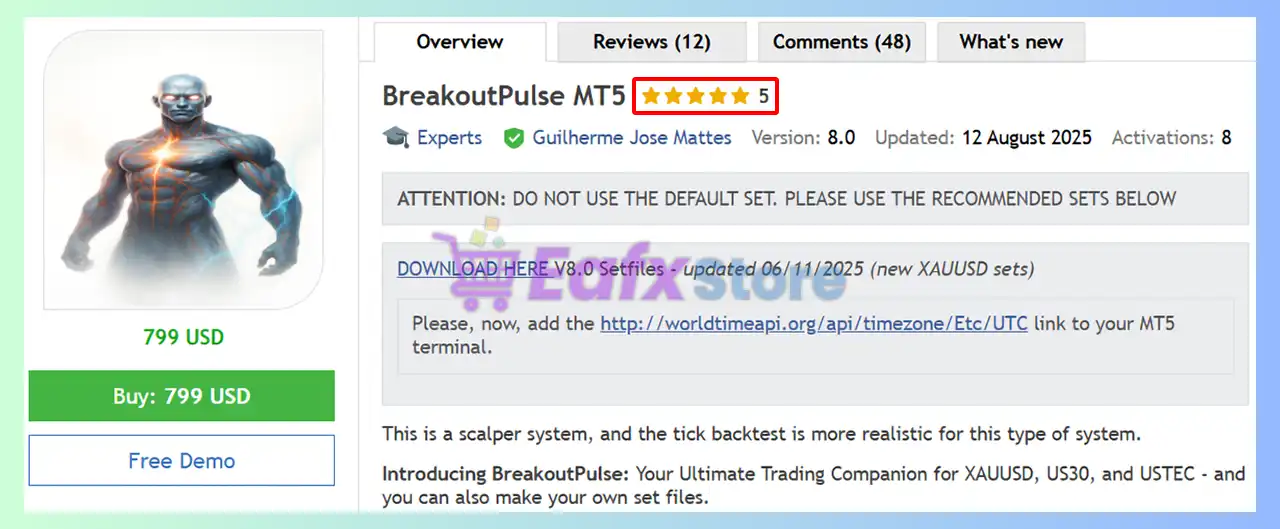
🔢 BreakoutPulse MT5 Settings Explained – Complete Parameter Guide
BreakoutPulse MT5 is an advanced breakout trading Expert Advisor for MetaTrader 5 that combines adaptive market regime detection, Bollinger Band and Keltner Channel squeeze analysis, ATR-based risk management, trend confirmation, momentum filtering, and intelligent breakout execution. Its comprehensive settings allow traders to optimize breakout performance while maintaining strict risk control across various market conditions.

🔢 Installation Panel Parameters
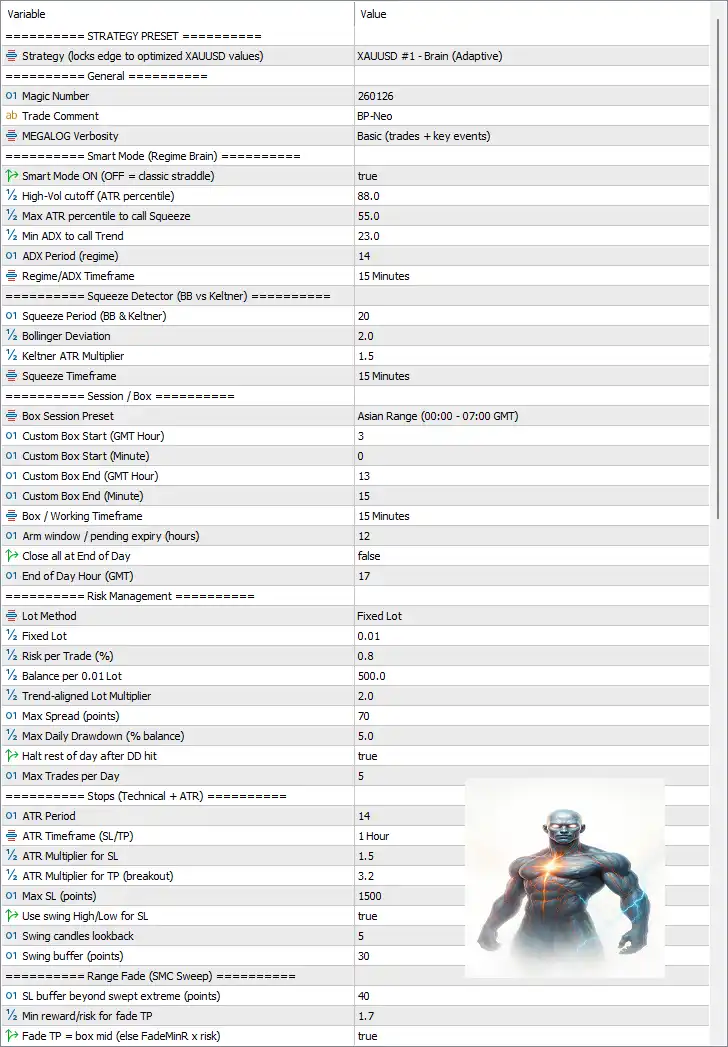
Below are the details of the parameters in the advisor’s trading system settings table:
🔶 Strategy Preset
🔹 Strategy (locks edge to optimized XAUUSD values) = XAUUSD #1 - Brain (Adaptive) – Loads the optimized adaptive trading preset specifically designed for XAUUSD breakout trading.
🔶 General Settings
🔹 Magic Number = 260126 – Assigns the unique Magic Number 260126 to identify trades opened by BreakoutPulse MT5.
🔹 Trade Comment = BP-Neo – Adds the trade comment "BP-Neo" to every order for easier identification.
🔹 MEGALOG Verbosity = Basic (trades + key events) – Controls log detail, displaying trade activity and important EA events.
🔶 Smart Market Regime Settings
🔹 Smart Mode ON (OFF = classic straddle) = true – Enables adaptive market regime detection instead of the traditional breakout straddle mode.
🔹 High-Vol cutoff (ATR percentile) = 88.0 – Defines 88.0 as the ATR percentile threshold for identifying high-volatility conditions.
🔹 Max ATR percentile to call Squeeze = 55.0 – Uses an ATR percentile below 55.0 to classify the market as being in a squeeze.
🔹 Min ADX to call Trend = 23.0 – Requires an ADX value of at least 23.0 before recognizing a trending market.
🔹 ADX Period (regime) = 14 – Uses an ADX calculation period of 14.
🔹 Regime/ADX Timeframe = 15 Minutes – Calculates market regime using the 15 Minutes timeframe.
🔶 Squeeze Detector (BB vs Keltner)
🔹 Squeeze Period (BB & Keltner) = 20 – Uses a 20-period Bollinger Band and Keltner Channel calculation.
🔹 Bollinger Deviation = 2.0 – Sets the Bollinger Bands deviation to 2.0.
🔹 Keltner ATR Multiplier = 1.5 – Uses an ATR multiplier of 1.5 for the Keltner Channel.
🔹 Squeeze Timeframe = 15 Minutes – Detects squeeze conditions on the 15 Minutes chart.
🔶 Session / Box Settings
🔹 Box Session Preset = Asian Range (00:00 - 07:00 GMT) – Uses the Asian trading session as the breakout range.
🔹 Custom Box Start (GMT Hour) = 3 – Sets the custom session start hour to 03 GMT.
🔹 Custom Box Start (Minute) = 0 – Starts at 00 minutes.
🔹 Custom Box End (GMT Hour) = 13 – Ends the session at 13 GMT.
🔹 Custom Box End (Minute) = 15 – Ends at 15 minutes.
🔹 Box / Working Timeframe = 15 Minutes – Builds the breakout box on the M15 chart.
🔹 Arm window / pending expiry (hours) = 12 – Pending breakout orders expire after 12 hours.
🔹 Close all at End of Day = false – Does not automatically close all positions at the end of the trading day.
🔹 End of Day Hour (GMT) = 17 – End-of-day reference is 17 GMT.
🔶 Risk Management
🔹 Lot Method = Fixed Lot – Uses a fixed lot sizing model.
🔹 Fixed Lot = 0.01 – Opens trades with 0.01 lots.
🔹 Risk per Trade (%) = 0.8 – Risks 0.8% of account equity per trade when percentage risk is enabled.
🔹 Balance per 0.01 Lot = 500.0 – Allocates 0.01 lot for every 500.0 balance units.
🔹 Trend-aligned Lot Multiplier = 2.0 – Doubles position size when trading in the direction of the detected trend.
🔹 Max Spread (points) = 70 – Blocks new trades if spread exceeds 70 points.
🔹 Max Daily Drawdown (% balance) = 5.0 – Stops trading after a 5.0% daily drawdown.
🔹 Halt rest of day after DD hit = true – Stops trading for the remainder of the day after reaching the daily drawdown limit.
🔹 Max Trades per Day = 5 – Limits trading to 5 trades per day.
🔶 Stop Loss & Take Profit (Technical + ATR)
🔹 ATR Period = 14 – Uses a 14-period ATR calculation.
🔹 ATR Timeframe (SL/TP) = 1 Hour – Calculates ATR using the H1 timeframe.
🔹 ATR Multiplier for SL = 1.5 – Stop Loss equals 1.5 × ATR.
🔹 ATR Multiplier for TP (breakout) = 3.2 – Take Profit equals 3.2 × ATR.
🔹 Max SL (points) = 1500 – Maximum Stop Loss distance is 1500 points.
🔹 Use swing High/Low for SL = true – Places Stop Loss using recent swing highs or lows.
🔹 Swing candles lookback = 5 – Evaluates the last 5 candles for swing detection.
🔹 Swing buffer (points) = 30 – Adds a 30-point safety buffer beyond swing levels.
🔶 Range Fade (SMC Sweep)
🔹 SL buffer beyond swept extreme (points) = 40 – Places Stop Loss 40 points beyond the swept liquidity level.
🔹 Min reward/risk for fade TP = 1.7 – Requires a minimum Risk-to-Reward ratio of 1.7.
🔹 Fade TP = box mid (else FadeMinR x risk) = true – Uses the box midpoint as the preferred Take Profit for fade setups.
🔶 Trailing Stop (Multi-Tier)
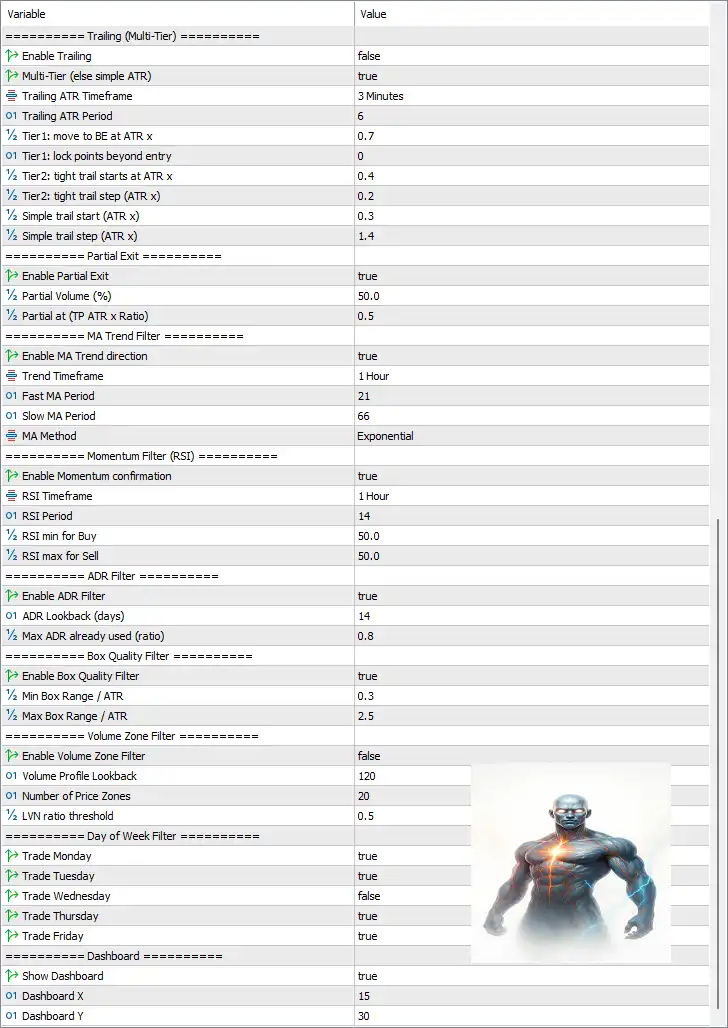
🔹 Enable Trailing = false – Standard trailing stop is disabled.
🔹 Multi-Tier (else simple ATR) = true – Enables advanced multi-stage trailing management.
🔹 Trailing ATR Timeframe = 3 Minutes – Uses the M3 timeframe for trailing calculations.
🔹 Trailing ATR Period = 6 – Uses an ATR period of 6.
🔹 Tier1: move to BE at ATR x = 0.7 – Moves Stop Loss to Break-even after 0.7 × ATR.
🔹 Tier1: lock points beyond entry = 0 – Locks 0 points beyond entry.
🔹 Tier2: tight trail starts at ATR x = 0.4 – Begins aggressive trailing after 0.4 × ATR.
🔹 Tier2: tight trail step (ATR x) = 0.2 – Uses 0.2 × ATR as the trailing increment.
🔹 Simple trail start (ATR x) = 0.3 – Starts simple trailing after 0.3 × ATR.
🔹 Simple trail step (ATR x) = 1.4 – Adjusts the simple trailing stop every 1.4 × ATR.
🔶 Partial Exit
🔹 Enable Partial Exit = true – Enables partial profit-taking.
🔹 Partial Volume (%) = 50.0 – Closes 50.0% of the position.
🔹 Partial at (TP ATR x Ratio) = 0.5 – Executes the partial exit at 50% of the ATR-based Take Profit target.
🔶 MA Trend Filter
🔹 Enable MA Trend direction = true – Uses Moving Average trend confirmation.
🔹 Trend Timeframe = 1 Hour – Trend filter operates on the H1 chart.
🔹 Fast MA Period = 21 – Fast Moving Average period is 21.
🔹 Slow MA Period = 66 – Slow Moving Average period is 66.
🔹 MA Method = Exponential – Uses an Exponential Moving Average (EMA).
🔶 Momentum Filter (RSI)
🔹 Enable Momentum confirmation = true – Enables RSI confirmation.
🔹 RSI Timeframe = 1 Hour – RSI uses the H1 timeframe.
🔹 RSI Period = 14 – RSI calculation period is 14.
🔹 RSI min for Buy = 50.0 – Buy trades require RSI above 50.0.
🔹 RSI max for Sell = 50.0 – Sell trades require RSI below 50.0.
🔶 ADR Filter
🔹 Enable ADR Filter = true – Enables Average Daily Range filtering.
🔹 ADR Lookback (days) = 14 – Calculates ADR over 14 days.
🔹 Max ADR already used (ratio) = 0.8 – Prevents entries after 80% of the ADR has already been consumed.
🔶 Box Quality Filter
🔹 Enable Box Quality Filter = true – Filters breakout boxes based on quality.
🔹 Min Box Range / ATR = 0.3 – Minimum box size is 0.3 × ATR.
🔹 Max Box Range / ATR = 2.5 – Maximum box size is 2.5 × ATR.
🔶 Volume Zone Filter
🔹 Enable Volume Zone Filter = false – Volume profile filtering is disabled.
🔹 Volume Profile Lookback = 120 – Uses 120 candles for volume calculations.
🔹 Number of Price Zones = 20 – Divides the profile into 20 price zones.
🔹 LVN ratio threshold = 0.5 – Uses 0.5 as the Low Volume Node threshold.
🔶 Day of Week Filter
🔹 Trade Monday = true – Trading is allowed on Monday.
🔹 Trade Tuesday = true – Trading is allowed on Tuesday.
🔹 Trade Wednesday = false – Trading is disabled on Wednesday.
🔹 Trade Thursday = true – Trading is allowed on Thursday.
🔹 Trade Friday = true – Trading is allowed on Friday.
🔶 Dashboard
🔹 Show Dashboard = true – Displays the on-chart trading dashboard.
🔹 Dashboard X = 15 – Sets the dashboard horizontal position to 15.
🔹 Dashboard Y = 30 – Sets the dashboard vertical position to 30.
🔢 Conclusion
BreakoutPulse MT5 is a sophisticated breakout Expert Advisor that integrates adaptive market regime analysis, ATR-based volatility measurements, trend and momentum confirmation, intelligent breakout boxes, multi-tier trailing stops and advanced risk management.
With its extensive filtering system and configurable trade management tools, the EA provides traders with a highly flexible framework for trading XAUUSD and other breakout markets while maintaining disciplined risk control.
🔢 FAQs
❓ What strategy does BreakoutPulse MT5 use?
BreakoutPulse MT5 combines breakout trading with adaptive market regime detection, Bollinger Band and Keltner squeeze analysis, ATR volatility measurements, and trend confirmation.
❓ Can I use percentage-based risk instead of fixed lots?
Yes. The EA supports both Fixed Lot trading and Risk per Trade (%) money management.
❓ Does BreakoutPulse MT5 support partial profit taking?
Yes. Partial Exit is enabled by default, closing 50% of the position at 50% of the ATR-based Take Profit target.
❓ Which indicators are used by BreakoutPulse MT5?
The EA utilizes ATR, ADX, Bollinger Bands, Keltner Channels, EMA, RSI, ADR, and swing high/low analysis to filter and manage trades.
❓ Does BreakoutPulse MT5 include daily risk protection?
Yes. It includes Max Daily Drawdown (5.0%), daily trade limits, spread filtering, and automatic trading suspension after the daily drawdown threshold is reached.



