






PROPFIRM AI EA MT4 Unlimited

Subscriptions for Special Plan
- 30 EA package is more economical!
- Special package with 99%
- Download 1 EA/Day

Subscriptions for Premium Membership
- Download Unlimited in 1 Year
- Get 100% Discount
- Get free access to all

Subscriptions for Gold Membership
- 1 Year Membership
- Get 100% Discount
- Access EA+Indicator+Course
Frequently bought together 🎁
Add these products to enhance your purchase




PROPFIRM AI EA MT4: Prop Firm Optimized Multi-Pair Grid
PROPFIRM AI EA is a robust trading system meticulously engineered for MetaTrader 4 (MT4) and optimized for prop-firm trading challenges. It combines grid trading logic with wide diversification across 31 active currency pairs, emphasizing consistency and systematic execution on the H1 timeframe.
🔶 Vendor Website: View here
About the Author
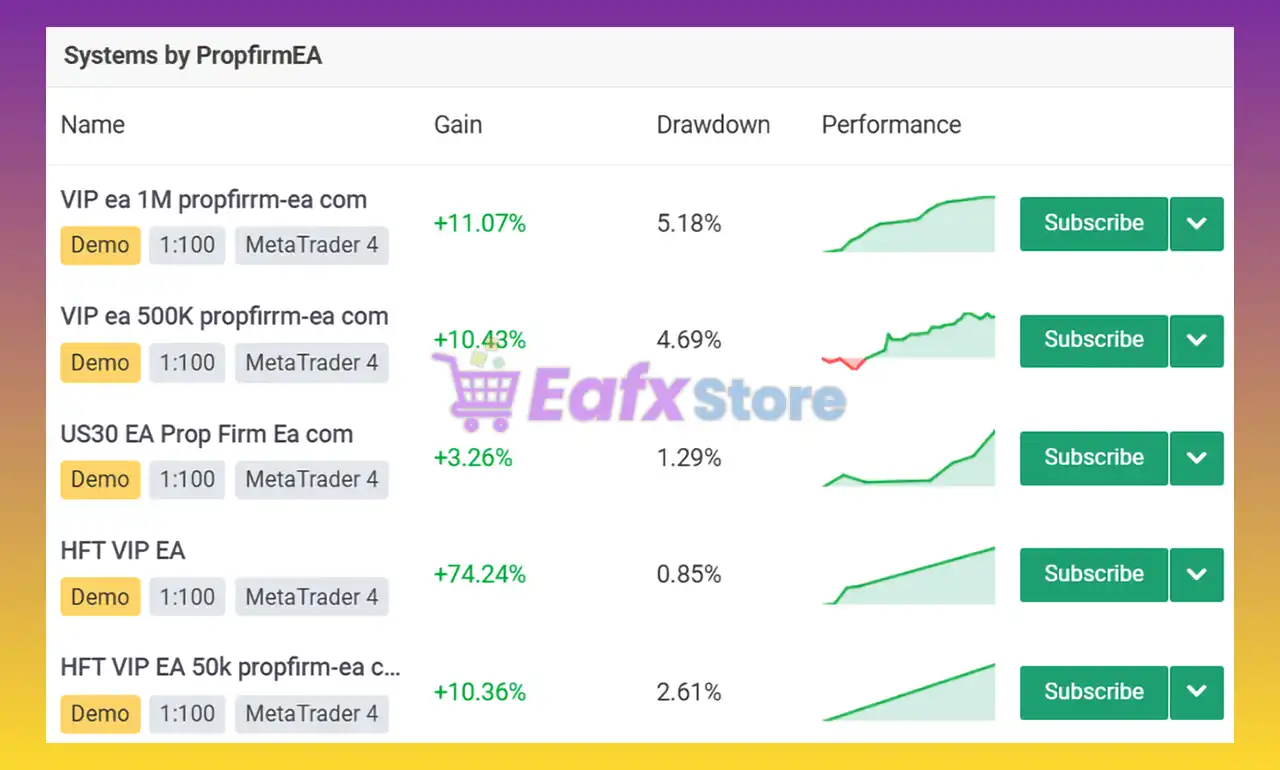
This product is compiled by PropfirmEA. This author has more than +10 years of experience working on MyFxBook with many famous products such as PROPFIRM AI EA MT4, HFT VIP EA, Dark Knight EA, PROPFIRM AI EA MT5 and other advisors. Among them, PROPFIRM AI EA is his best performing products.
PROPFIRM AI EA Review
Key Features of PROPFIRM AI EA for MT4
🔹 Multi-Currency Trading Engine: Supports diversified automated trading across major forex pairs.
🔹 AI-Based Trade Management: Uses adaptive indicators and structured execution for market stability.
🔹 Flexible Risk Control System: Includes customizable lot sizing and portfolio exposure management.
🔹 Advanced Trading Schedule Filters: Controls trading sessions for optimized market participation.
🔹 Prop Firm Ready Architecture: Designed for disciplined execution and controlled drawdown handling.
What is the PROPFIRM AI EA trading strategy?
🔹 Portfolio Diversification Logic: Trades multiple Forex pairs to distribute market exposure efficiently.
🔹 Grid Distance Optimization System: Uses structured order spacing for adaptive trade management.
🔹 AI-Driven Market Analysis: Combines trend indicators with automated execution logic for precision.
🔹 Timeframe-Based Signal Filtering: Uses H1 market structure analysis for stable trading decisions.
🔹 Controlled Trading Session Logic: Executes trades within predefined market activity periods only.
PROPFIRM AI EA MT4 Review
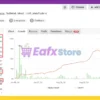
The PROPFIRM AI has been verified profitable by MyFxBook in the long term and has achieved impressive returns. Advisor shows potential for effective trading and high profit rates.
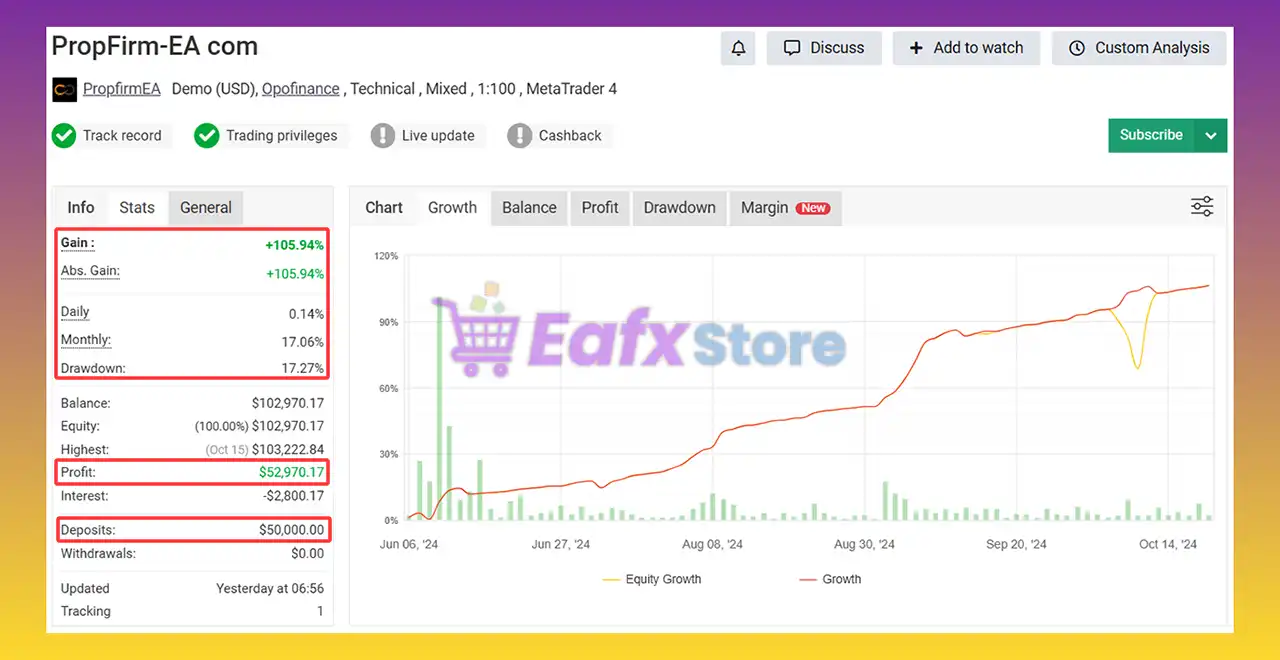
🔶 Trading with an initial deposit of $50,000 for 5 months shows stability and safety.
✅ Total Gain: +105.94%
✅ Average Monthly Profit: 17.06%
✅ Maximum Drawdown: 17.27%
PROPFIRM AI EA Myfxbook
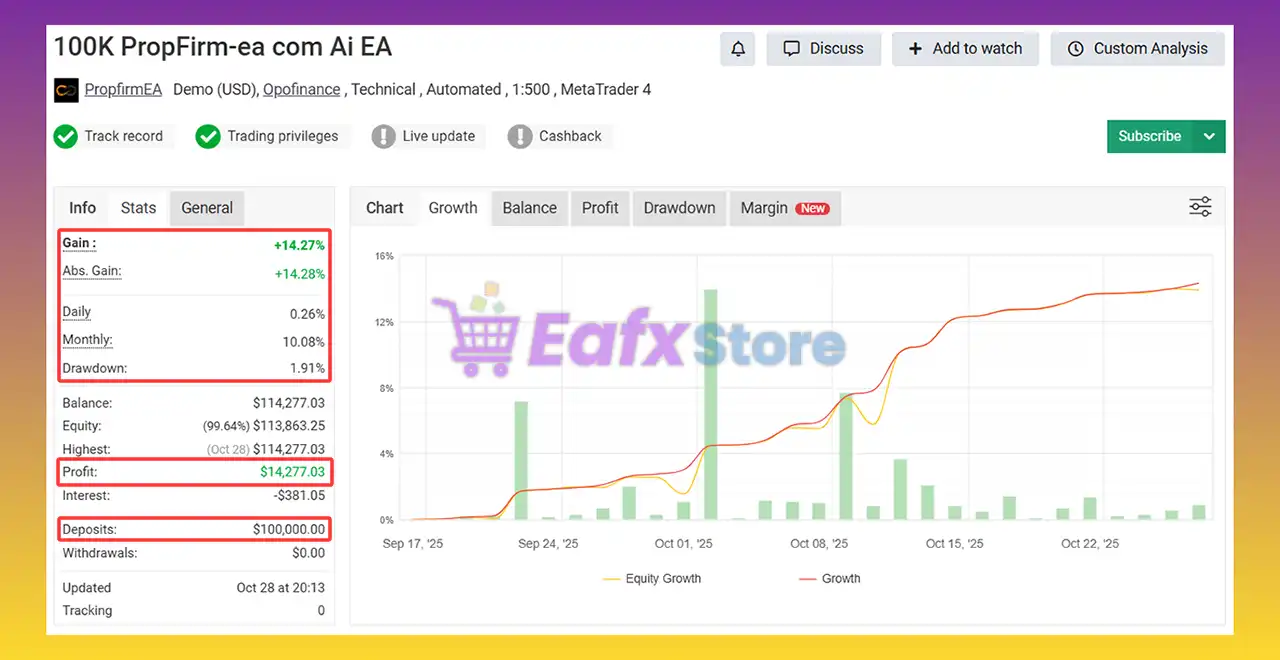
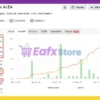
🔶 Trading with an initial deposit of $100,000 for 2 months shows stability and safety on 31 forex pairs.
✅ Total Gain: +14.27%
✅ Average Monthly Profit: 10.08%
✅ Maximum Drawdown: 1.91%
PROPFIRM AI EA MT4 Myfxbook
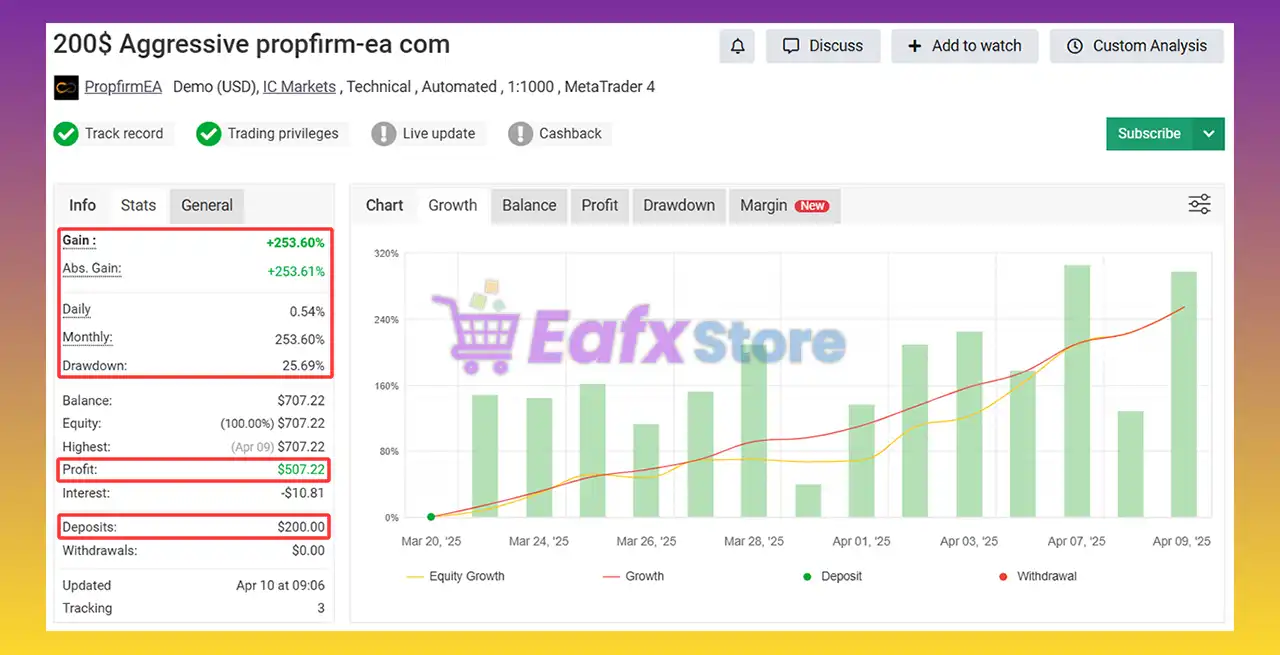
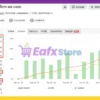
🔶 Trading with an initial deposit of $200 for 2 months shows stability and safety on Gold (XAUUSD) and 4 forex pairs.
✅ Total Gain: +253.60%
✅ Average Monthly Profit: 253.60%
✅ Maximum Drawdown: 25.69%
PROPFIRM EA Myfxbook
Why choose and use PROPFIRM AI EA?
🔹 Built For Long-Term Stability: Focuses on disciplined automation and balanced portfolio control.
🔹 Highly Adaptable Trading Framework: Adjusts efficiently to changing Forex market conditions.
🔹 Structured Risk Management Tools: Helps traders maintain controlled exposure and recovery logic.
🔹 Optimized For Prop Firm Rules: Supports scalable trading with flexible configuration settings.
🔹 Professional Marketplace Trading Solution: Suitable for automated forex portfolio management.
Recommended settings
Recommended settings and parameters to pay attention to from developers and experts:
| Features | Type |
|---|---|
| Trading platform | MetaTrader 4 (MT4) |
| Time frames | H1 (60 minute chart) |
| Currency pairs | 31 Currency pairs |
| Minimum / Recommended deposit | $200 |
| Minimum / Recommended leverage | 1:30 |
| Product type | NoDLL / Unlimited / Fix |
| Additional services | Unlock and Decompile |
| Recommended brokers | Exness Broker, Icmarkets Broker |
| Recommended VPS | MyfxVPS.com ( Blue VPS, Golden VPS). Lowest Latency, 2 week Free Trial, 100% Free for 12-18 Months. |
➡️ Reviewed by David Easton
Product Download Package?
The download package of the product suite includes:
✅ Experts: PROPFIRM AI EA.ex4
Conclusion
In short, PROPFIRM AI EA for MT4 is a highly diversified, grid-based trading system built for prop firm success. Operating on the H1 timeframe with 31 active pairs, it delivers consistent returns through controlled grid accumulation and strict adherence to prop firm rules. With proven Myfxbook results, PROPFIRM AI EA stands as a stable, scalable, and professional-grade solution for long-term trading growth.
PROPFIRM AI EA MT4 Settings Explained – Complete Configuration Guide
PROPFIRM AI EA is a multi-currency automated trading Expert Advisor (EA) developed for MetaTrader 4 traders, especially those trading under prop firm conditions.
The EA supports multiple forex pairs, AI-based trading management, grid configuration, risk control, trading schedules and pair-specific customization.
With advanced configuration flexibility, PROPFIRM AI EA MT4 is designed to help traders diversify trades while maintaining structured risk management.
PROPFIRM AI EA Settings
PROPFIRM AI EA MT4 Full Settings Explanation
Below are the details of the parameters in the advisor’s trading system settings table:
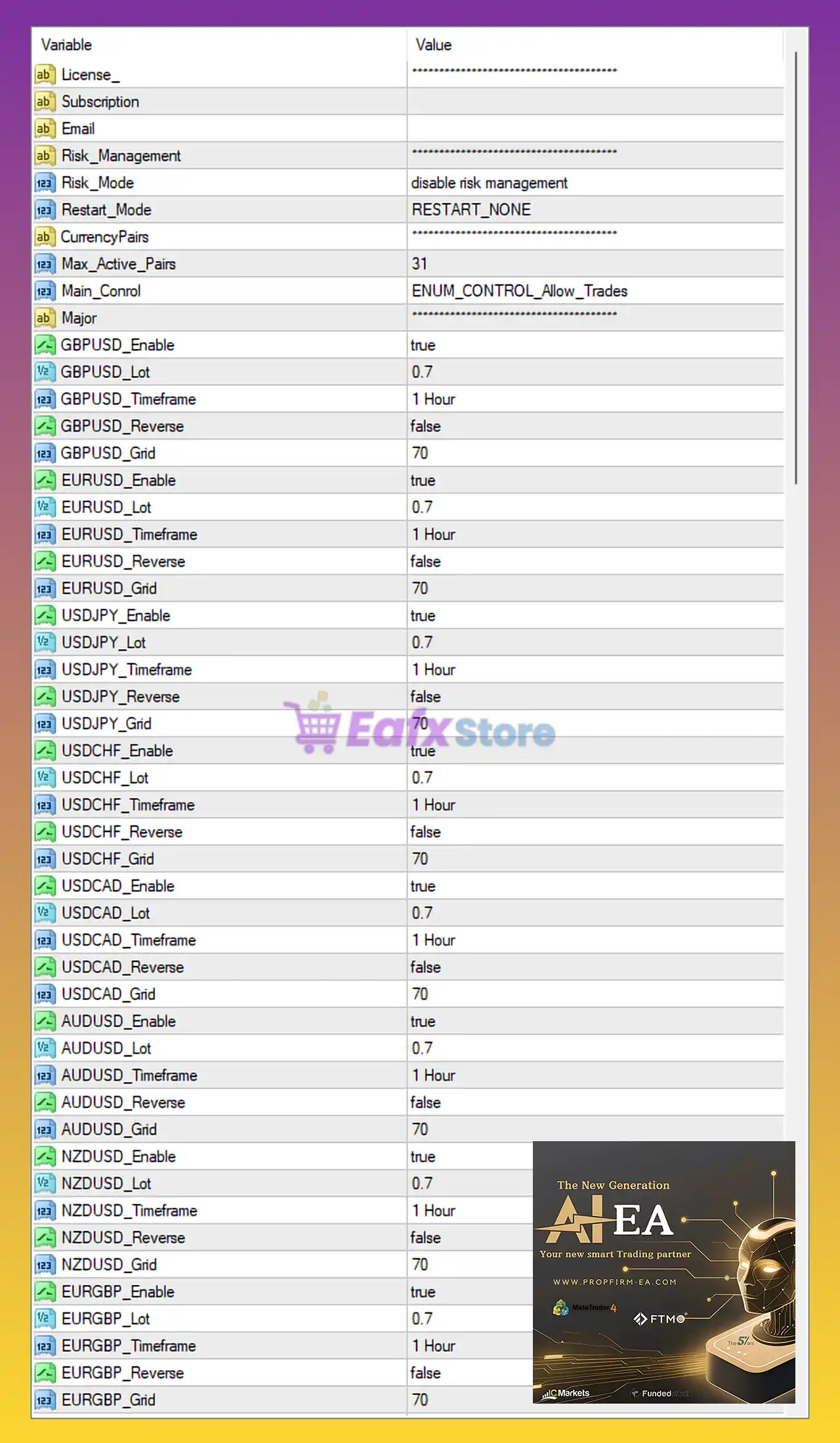
PROPFIRM AI EA Settings Panel
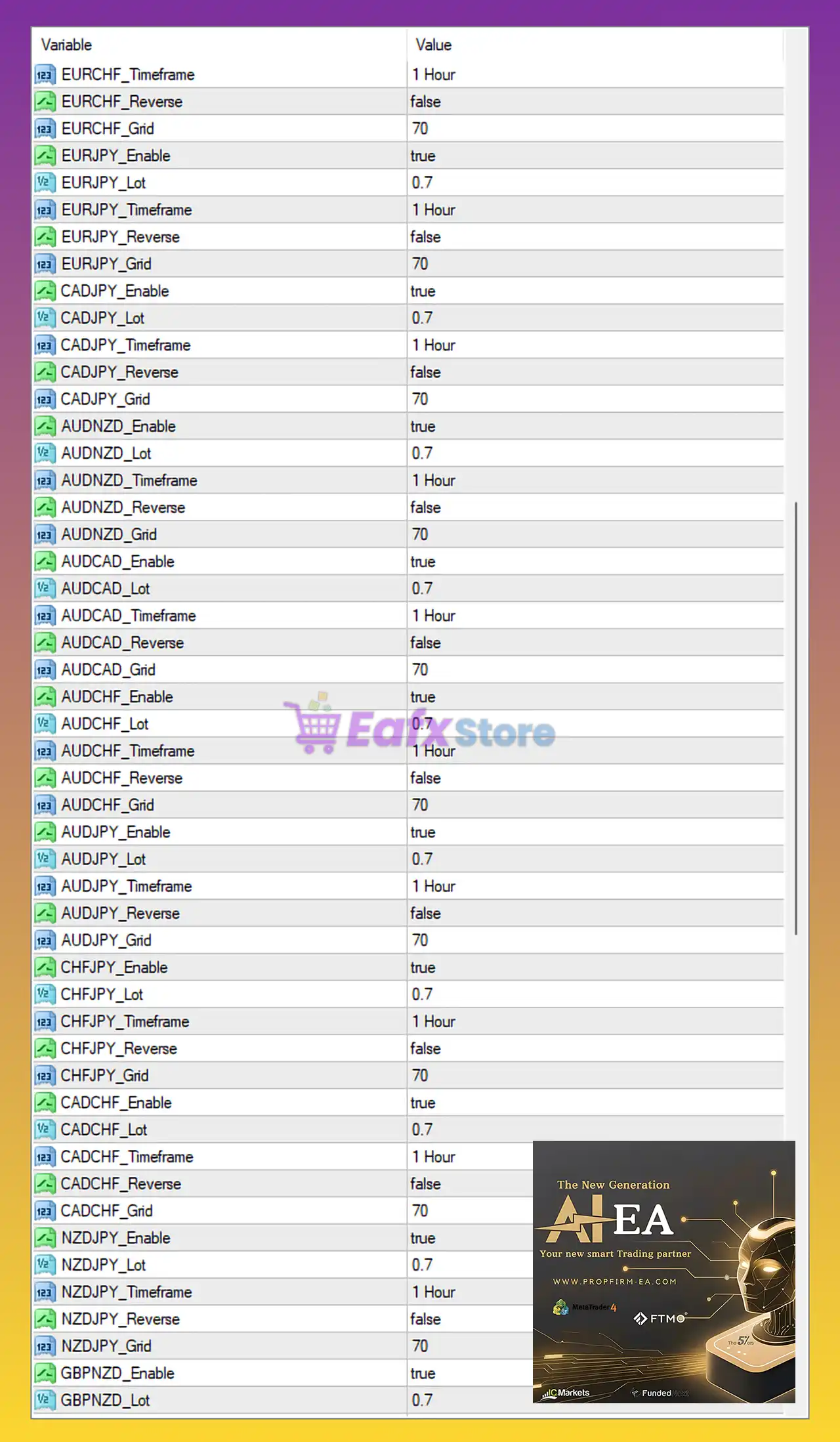
PROPFIRM AI EA MT4 Settings Panel
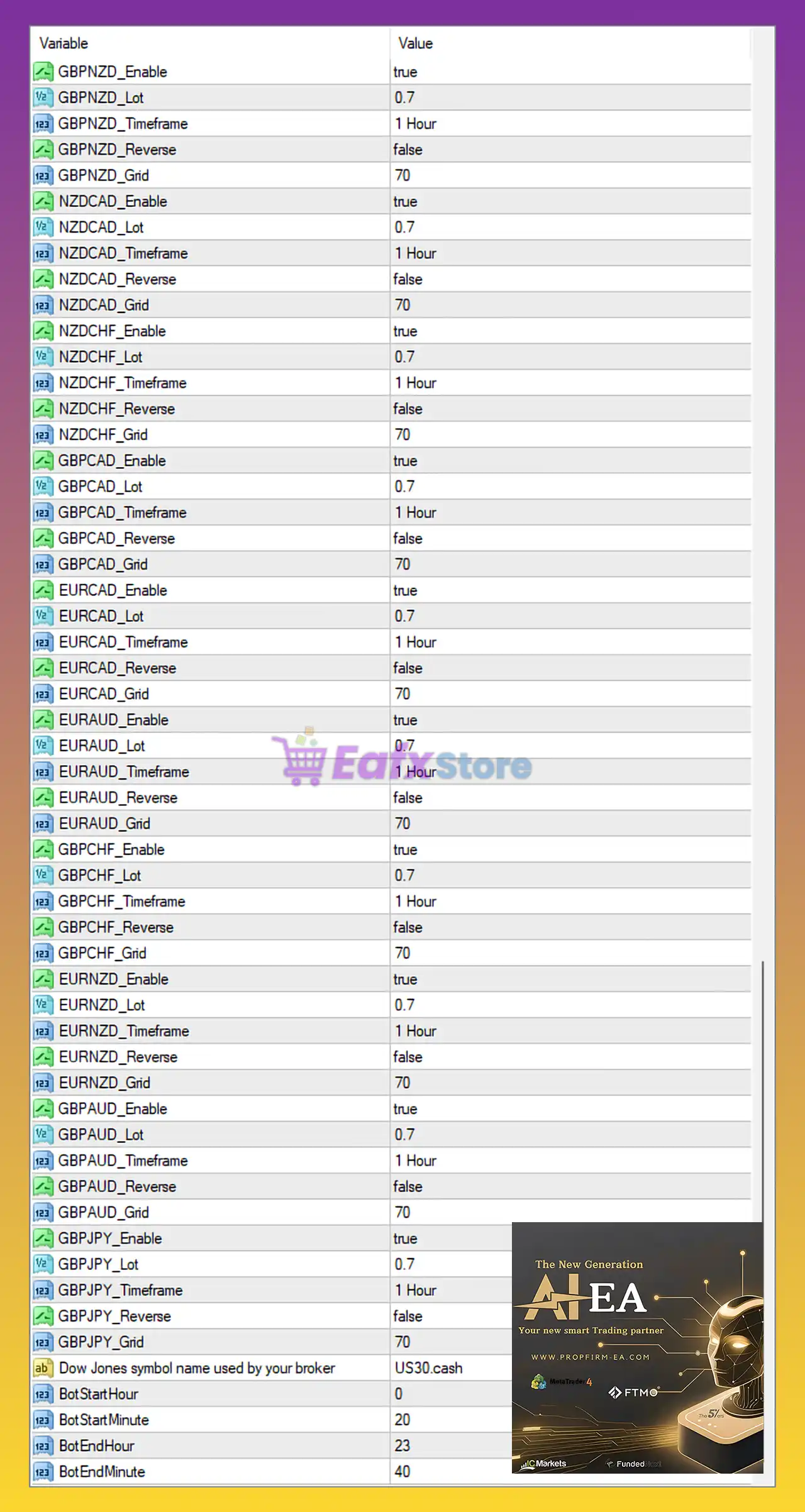
PROPFIRM AI MT4 Settings Panel
Risk Management Settings
🔹 Risk_Management: Main section for configuring account risk controls.
🔹 Risk_Mode = disable risk management: Disables automatic risk management protection features.
🔹 Restart_Mode = RESTART_NONE: Prevents the EA from automatically restarting trading cycles after interruptions.
Currency Pair Management
🔹 CurrencyPairs: Main section for enabling and configuring tradable forex pairs.
🔹 Max_Active_Pairs = 31: Allows a maximum of 31 active currency pairs simultaneously.
🔹 Main_Conrol = ENUM_CONTROL_Allow_Trades: Enables the EA trading execution system.
Major Currency Pair Settings
GBPUSD Settings
🔹 GBPUSD_Enable = true: Enables trading for the GBPUSD currency pair.
🔹 GBPUSD_Lot = 0.7: Sets the lot size for GBPUSD trades to 0.7.
🔹 GBPUSD_Timeframe = 1 Hour: Uses the H1 timeframe for GBPUSD trading signals.
🔹 GBPUSD_Reverse = false: Disables reverse trading mode for GBPUSD.
🔹 GBPUSD_Grid = 70: Sets the GBPUSD grid distance to 70.
EURUSD Settings
🔹 EURUSD_Enable = true: Enables trading for the EURUSD pair.
🔹 EURUSD_Lot = 0.7: Sets EURUSD lot size to 0.7.
🔹 EURUSD_Timeframe = 1 Hour: Uses the 1 Hour timeframe for EURUSD.
🔹 EURUSD_Reverse = false: Keeps EURUSD trading direction normal.
🔹 EURUSD_Grid = 70: Defines the EURUSD grid distance at 70.
USDJPY Settings
🔹 USDJPY_Enable = true: Activates trading for USDJPY.
🔹 USDJPY_Lot = 0.7: Sets the USDJPY lot size to 0.7.
🔹 USDJPY_Timeframe = 1 Hour: Uses the H1 timeframe for USDJPY.
🔹 USDJPY_Reverse = false: Reverse mode disabled for USDJPY.
🔹 USDJPY_Grid = 70: Sets the grid spacing to 70.
USDCHF Settings
🔹 USDCHF_Enable = true: Enables USDCHF trading.
🔹 USDCHF_Lot = 0.7: Sets the lot size to 0.7.
🔹 USDCHF_Timeframe = 1 Hour: Uses the H1 timeframe.
🔹 USDCHF_Reverse = false: Disables reverse strategy mode.
🔹 USDCHF_Grid = 70: Defines the grid step at 70.
USDCAD Settings
🔹 USDCAD_Enable = true: Enables USDCAD trading.
🔹 USDCAD_Lot = 0.7: Configures lot size at 0.7.
🔹 USDCAD_Timeframe = 1 Hour: Uses the H1 chart timeframe.
🔹 USDCAD_Reverse = false: Keeps normal trading direction.
🔹 USDCAD_Grid = 70: Grid distance configured at 70.
AUDUSD Settings
🔹 AUDUSD_Enable = true: Enables AUDUSD trading.
🔹 AUDUSD_Lot = 0.7: Sets the trading volume to 0.7.
🔹 AUDUSD_Timeframe = 1 Hour: Uses H1 timeframe.
🔹 AUDUSD_Reverse = false: Reverse mode disabled.
🔹 AUDUSD_Grid = 70: Grid value configured to 70.
NZDUSD Settings
🔹 NZDUSD_Enable = true: Enables NZDUSD trading.
🔹 NZDUSD_Lot = 0.7: Uses lot size 0.7.
🔹 NZDUSD_Timeframe = 1 Hour: Trades based on H1 signals.
🔹 NZDUSD_Reverse = false: Normal trade direction enabled.
🔹 NZDUSD_Grid = 70: Grid spacing set to 70.
EURGBP Settings
🔹 EURGBP_Enable = true: Activates EURGBP trading.
🔹 EURGBP_Lot = 0.7: Sets lot size at 0.7.
🔹 EURGBP_Timeframe = 1 Hour: Uses the 1-hour timeframe.
🔹 EURGBP_Reverse = false: Disables reverse trades.
🔹 EURGBP_Grid = 70: Uses grid spacing of 70.
Additional Pair Settings
🔹 EURCHF_Enable = true: Enables EURCHF trading.
🔹 EURCHF_Timeframe = 1 Hour: Uses H1 timeframe.
🔹 EURCHF_Reverse = false: Reverse trading disabled.
🔹 EURCHF_Grid = 70: Sets EURCHF grid value to 70.
🔹 EURJPY_Enable = true: Enables EURJPY trading.
🔹 EURJPY_Lot = 0.7: EURJPY lot size is 0.7.
🔹 EURJPY_Timeframe = 1 Hour: Uses H1 timeframe.
🔹 EURJPY_Reverse = false: Reverse trading disabled.
🔹 EURJPY_Grid = 70: Grid spacing set at 70.
🔹 CADJPY_Enable = true: Enables CADJPY trading.
🔹 CADJPY_Lot = 0.7: Uses lot size 0.7.
🔹 CADJPY_Timeframe = 1 Hour: Uses H1 timeframe.
🔹 CADJPY_Reverse = false: Keeps normal trade direction.
🔹 CADJPY_Grid = 70: Grid value set to 70.
🔹 AUDNZD_Enable = true: Enables AUDNZD trading.
🔹 AUDNZD_Lot = 0.7: Lot size configured at 0.7.
🔹 AUDNZD_Timeframe = 1 Hour: Uses H1 chart.
🔹 AUDNZD_Reverse = false: Reverse mode disabled.
🔹 AUDNZD_Grid = 70: Grid step value 70.
🔹 AUDCAD_Enable = true: Enables AUDCAD trading.
🔹 AUDCAD_Lot = 0.7: Sets lot size to 0.7.
🔹 AUDCAD_Timeframe = 1 Hour: Uses H1 timeframe.
🔹 AUDCAD_Reverse = false: Reverse trading disabled.
🔹 AUDCAD_Grid = 70: Grid spacing at 70.
🔹 AUDCHF_Enable = true: Enables AUDCHF trading.
🔹 AUDCHF_Lot = 0.7: Uses 0.7 lots.
🔹 AUDCHF_Timeframe = 1 Hour: Uses H1 timeframe.
🔹 AUDCHF_Reverse = false: Reverse mode off.
🔹 AUDCHF_Grid = 70: Grid value configured at 70.
🔹 AUDJPY_Enable = true: Enables AUDJPY trading.
🔹 AUDJPY_Lot = 0.7: Trading volume set to 0.7.
🔹 AUDJPY_Timeframe = 1 Hour: Uses H1 timeframe.
🔹 AUDJPY_Reverse = false: Reverse mode disabled.
🔹 AUDJPY_Grid = 70: Grid distance 70.
🔹 CHFJPY_Enable = true: Enables CHFJPY trading.
🔹 CHFJPY_Lot = 0.7: Uses lot size 0.7.
🔹 CHFJPY_Timeframe = 1 Hour: H1 timeframe enabled.
🔹 CHFJPY_Reverse = false: Reverse trading disabled.
🔹 CHFJPY_Grid = 70: Grid setting at 70.
🔹 CADCHF_Enable = true: Enables CADCHF trading.
🔹 CADCHF_Lot = 0.7: Uses lot size 0.7.
🔹 CADCHF_Timeframe = 1 Hour: Uses H1 timeframe.
🔹 CADCHF_Reverse = false: Reverse trading disabled.
🔹 CADCHF_Grid = 70: Grid spacing value 70.
🔹 NZDJPY_Enable = true: Enables NZDJPY trading.
🔹 NZDJPY_Lot = 0.7: Trading lot size is 0.7.
🔹 NZDJPY_Timeframe = 1 Hour: Uses the H1 timeframe.
🔹 NZDJPY_Reverse = false: Keeps normal trade logic.
🔹 NZDJPY_Grid = 70: Grid step configured to 70.
🔹 GBPNZD_Enable = true: Enables GBPNZD trading.
🔹 GBPNZD_Lot = 0.7: Uses lot size 0.7.
🔹 GBPNZD_Timeframe = 1 Hour: Uses H1 timeframe.
🔹 GBPNZD_Reverse = false: Reverse trading disabled.
🔹 GBPNZD_Grid = 70: Grid distance set to 70.
🔹 NZDCAD_Enable = true: Enables NZDCAD trading.
🔹 NZDCAD_Lot = 0.7: Sets lot size to 0.7.
🔹 NZDCAD_Timeframe = 1 Hour: Uses H1 timeframe.
🔹 NZDCAD_Reverse = false: Keeps standard trade direction.
🔹 NZDCAD_Grid = 70: Grid value configured at 70.
🔹 NZDCHF_Enable = true: Enables NZDCHF trading.
🔹 NZDCHF_Lot = 0.7: Uses 0.7 lots.
🔹 NZDCHF_Timeframe = 1 Hour: Uses H1 chart.
🔹 NZDCHF_Reverse = false: Reverse mode disabled.
🔹 NZDCHF_Grid = 70: Grid spacing at 70.
🔹 GBPCAD_Enable = true: Enables GBPCAD trading.
🔹 GBPCAD_Lot = 0.7: Uses lot size 0.7.
🔹 GBPCAD_Timeframe = 1 Hour: Uses H1 timeframe.
🔹 GBPCAD_Reverse = false: Reverse trading disabled.
🔹 GBPCAD_Grid = 70: Grid step configured to 70.
🔹 EURCAD_Enable = true: Enables EURCAD trading.
🔹 EURCAD_Lot = 0.7: Sets lot size at 0.7.
🔹 EURCAD_Timeframe = 1 Hour: Uses H1 timeframe.
🔹 EURCAD_Reverse = false: Keeps normal trade logic.
🔹 EURCAD_Grid = 70: Grid value configured at 70.
🔹 EURAUD_Enable = true: Enables EURAUD trading.
🔹 EURAUD_Lot = 0.7: Uses lot size 0.7.
🔹 EURAUD_Timeframe = 1 Hour: Uses H1 chart.
🔹 EURAUD_Reverse = false: Reverse mode disabled.
🔹 EURAUD_Grid = 70: Grid spacing set at 70.
🔹 GBPCHF_Enable = true: Enables GBPCHF trading.
🔹 GBPCHF_Lot = 0.7: Uses 0.7 lots.
🔹 GBPCHF_Timeframe = 1 Hour: Uses H1 timeframe.
🔹 GBPCHF_Reverse = false: Keeps standard trading direction.
🔹 GBPCHF_Grid = 70: Grid value configured at 70.
Trading Session Settings
🔹 Dow Jones symbol name used by your broker = US30.cash: Defines the broker symbol name for the Dow Jones index.
🔹 BotStartHour = 0: Sets the EA trading start hour to 00.
🔹 BotStartMinute = 20: Starts trading at minute 20.
🔹 BotEndHour = 23: Stops trading at hour 23.
🔹 BotEndMinute = 40: Stops trading at minute 40.
Conclusion
PROPFIRM AI EA MT4 is a highly configurable multi-currency Expert Advisor designed for traders seeking diversified forex automation and prop firm compatibility.
With support for dozens of currency pairs, customizable grid settings, timeframe controls, and trading session management, the EA provides traders with flexible portfolio-level automation. Proper risk control and optimized broker conditions are essential when using multi-pair grid-based systems.
FAQs
❓ What is PROPFIRM AI EA MT4?
PROPFIRM AI EA MT4 is a multi-currency automated forex trading robot designed for MetaTrader 4 platforms and prop firm trading environments.
❓ How many currency pairs can PROPFIRM AI EA MT4 trade?
The EA supports up to 31 active currency pairs simultaneously.
❓ What timeframe does PROPFIRM AI EA MT4 use?
Most trading pairs in the EA are configured to use the 1 Hour (H1) timeframe.
❓ What does the Grid setting do in PROPFIRM AI EA MT4?
The Grid parameter controls the spacing distance between grid trades, commonly set to 70.
❓ Can I disable individual currency pairs in PROPFIRM AI EA MT4?
Yes, each currency pair includes an Enable parameter that allows traders to activate or deactivate specific pairs individually.
User Reviews
Only logged in customers who have purchased this product may leave a review.
🔴 What is PROPFIRM AI EA and how does it work?
PROPFIRM AI EA is a professional-grade automated trading system for MetaTrader 4 (MT4), specifically optimized for prop firm challenges. It combines grid trading logic with diversification across 31 currency pairs on the H1 timeframe to achieve stable, low-risk profit accumulation over time.
🔴 How is PROPFIRM AI EA different from regular forex EAs?
Unlike standard EAs that rely on single-pair or short-term setups, PROPFIRM AI EA is engineered for funded accounts. It applies a unified grid strategy across 31 pairs, ensuring consistent growth while staying within the drawdown and risk limits required by prop firms.
🔴 Which trading platforms and accounts are supported by PROPFIRM AI EA?
This EA is designed for MetaTrader 4 (MT4) and works seamlessly with all major brokers that allow automated trading. It performs exceptionally well on prop firm accounts such as FTMO, MyForexFunds, and The Funded Trader, as well as standard ECN or professional accounts.
🔴 What trading strategy does PROPFIRM AI EA use?
It uses a grid-based accumulation strategy with a 70-pip grid step, targeting medium-term price oscillations. The EA systematically opens and manages trades in line with the main trend, without relying on risky martingale or hedging methods.
🔴 Why does PROPFIRM AI EA trade 31 currency pairs simultaneously?
The wide diversification across 31 pairs reduces exposure to volatility from any single market. This portfolio approach balances performance, smooths equity growth, and enhances long-term stability — ideal for meeting prop firm’s consistency requirements.
🔴 Does PROPFIRM AI EA include built-in risk management?
The EA’s internal risk control is intentionally minimal (“External Risk Reliance”) to allow external or preset grid control systems. However, its grid spacing, conservative lot sizing, and diversified portfolio inherently limit drawdowns and ensure account safety.
🔴 What are the verified performance results of PROPFIRM AI EA?
According to MyFxBook-verified accounts, PROPFIRM AI EA achieved:
✅ +105.94% total gain on $50,000 in 5 months (17.27% max drawdown)
✅ +14.27% total gain on $100,000 in 2 months (1.91% drawdown)
✅ +253.60% gain on $200 small account in 2 months (25.69% drawdown)
🔴 Is PROPFIRM AI EA beginner-friendly or only for professionals?
Both beginners and professionals can use it. The EA comes pre-configured with all parameters optimized. Users only need to attach it to their MT4 platform and select their desired pairs. It’s designed for hands-free, 24/7 operation.
🔴 What is the minimum recommended deposit and leverage?
The EA requires a minimum deposit of $200 and operates effectively with a leverage of 1:30 or higher. For prop firm accounts, the system scales proportionally with account size, from $10K challenges to $100K+ evaluations.
🔴 How does PROPFIRM AI EA ensure continuous and stable operation?
It’s equipped with restart protection and continuous operation logic, meaning it automatically resumes trading after terminal restarts. Its unified strategy across all pairs keeps performance stable and ensures uninterrupted participation in global markets.
🔥 Get This EA for FREE with Our Membership! 🚀🚀
Unlock access to this EA, premium Indicators, and exclusive trading tools completely FREE with any of our Membership Plans! Thousands of traders already benefit from our VIP library—join them and level up your trading instantly. Choose Your Membership:
- SPECIAL – 1 Month Membership
- GOLD – 1 Year Membership
- PREMIUM – 1 Year Membership
-
 Price range: $89.00 through $599.00
 -
 Price range: $89.00 through $599.00
 -
 Price range: $89.00 through $599.00
 -
 Price range: $70.00 through $599.00
-
 1Original price was: $1,599.00.$59.00Current price is: $59.00.
 -
 1Original price was: $11,000.00.$89.00Current price is: $89.00.
 -
 0Original price was: $500.00.$69.00Current price is: $69.00.
 -
 1Original price was: $950.00.$59.00Current price is: $59.00.
There are no reviews yet.