




Quantum Athena MT5 – Complete Settings Guide & Explanation
Quantum Athena MT5 is an advanced automated trading Expert Advisor (EA) developed for the MetaTrader 5 platform, specially optimized for Gold trading (XAUUSD).
The EA combines intelligent lot calculation, drawdown management, spread protection, visual trading panels, and risk-based automation to help traders achieve stable and efficient trading performance.
With customizable risk settings and internal timeframe management, Quantum Athena MT5 is designed for both beginner and professional Forex traders.
Installation Panel Parameters
Below are the details of the parameters in the advisor’s trading system settings table:
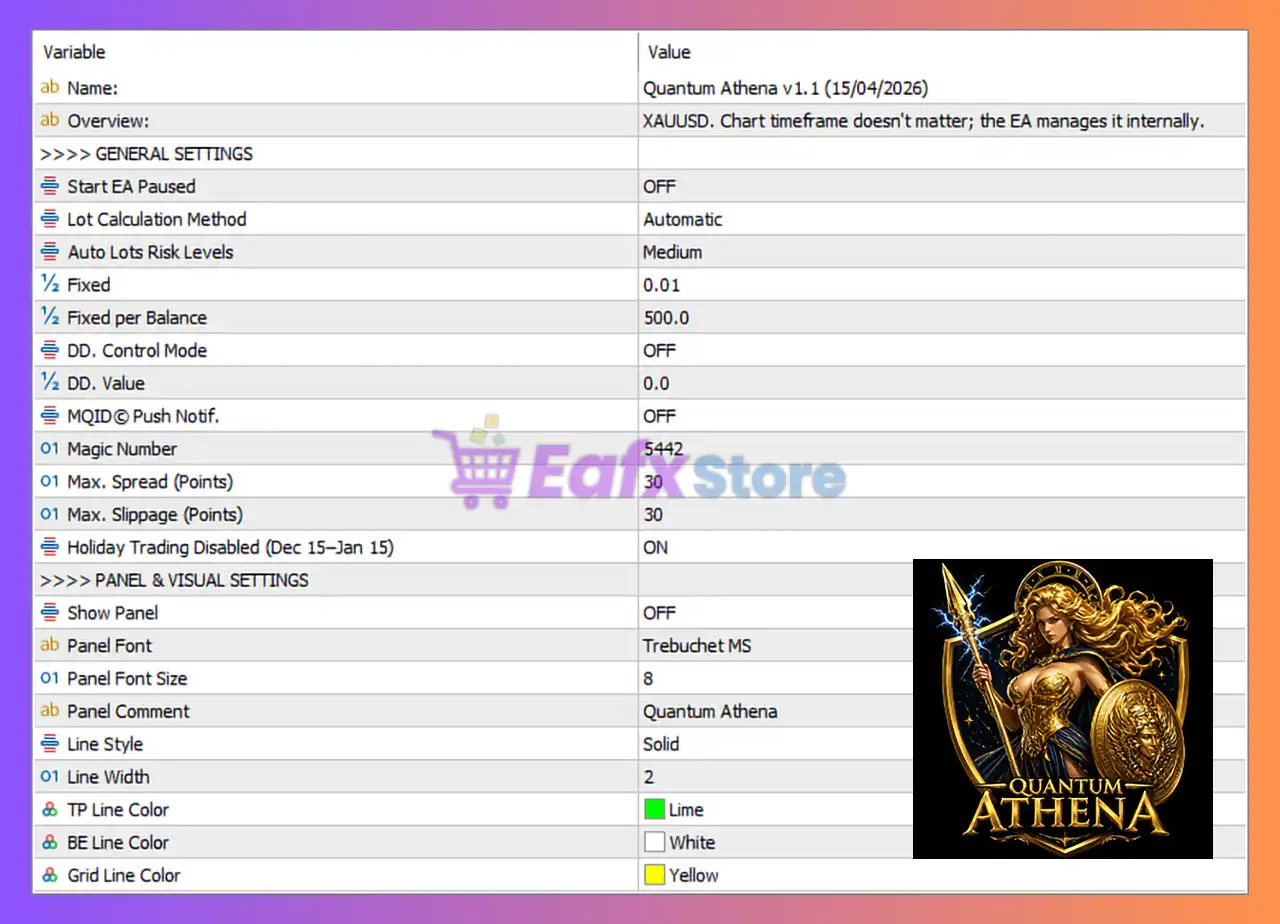
General Settings
🔹 Name = Quantum Athena v.1.1 (15/04/2026) — Displays the EA version and release date information.
🔹 Overview = XAUUSD. Chart timeframe doesn't matter; the EA manages it internally. — Explains that the EA is optimized for XAUUSD trading and automatically manages timeframe logic internally.
🔹 >>>> GENERAL SETTINGS — Main section header for the core EA configuration settings.
🔹 Start EA Paused = OFF — Starts the Expert Advisor immediately after activation without pause mode.
🔹 Lot Calculation Method = Automatic — Uses automatic lot size calculation based on account conditions and risk settings.
🔹 Auto Lots Risk Levels = Medium — Sets the automatic risk level to Medium for balanced trading exposure.
🔹 Fixed = 0.01 — Uses a fixed lot size value of 0.01 when fixed lot mode is selected.
🔹 Fixed per Balance = 500.0 — Calculates lot sizing based on every 500.0 balance units.
🔹 DD. Control Mode = OFF — Disables drawdown control and equity protection mode.
🔹 DD. Value = 0.0 — Drawdown limit value is set to 0.0, meaning no drawdown restriction is active.
🔹 MQID© Push Notif. = OFF — Disables push notification alerts to mobile devices.
🔹 Magic Number = 5442 — Unique trade identification number used by the EA to manage positions.
🔹 Max. Spread (Points) = 30 — Maximum allowed market spread before opening new trades.
🔹 Max. Slippage (Points) = 30 — Maximum slippage tolerance allowed during trade execution.
🔹 Holiday Trading Disabled (Dec 15–Jan 15) = ON — Disables trading activity between December 15 and January 15 to avoid holiday market volatility.
Panel & Visual Settings
🔹 >>>> PANEL & VISUAL SETTINGS — Main section header for chart display and visual customization settings.
🔹 Show Panel = OFF — Disables the on-chart information and management panel.
🔹 Panel Font = Trebuchet MS — Uses the “Trebuchet MS” font for panel text display.
🔹 Panel Font Size = 8 — Sets the panel text font size to 8.
🔹 Panel Comment = Quantum Athena — Displays “Quantum Athena” as the panel title or chart comment.
🔹 Line Style = Solid — Uses solid style lines for chart visualization.
🔹 Line Width = 2 — Sets the width of chart lines to 2.
🔹 TP Line Color = Lime — Uses Lime color for Take Profit lines on the chart.
🔹 BE Line Color = White — Uses White color for Break Even lines on the chart.
🔹 Grid Line Color = Yellow — Uses Yellow color for grid lines and visual order levels.
Conclusion
Quantum Athena EA is a professional Gold trading Expert Advisor that combines automatic lot sizing, spread protection, drawdown management and advanced visual customization into a powerful MT5 trading solution.
With optimized XAUUSD trading logic and internal timeframe management, the EA is suitable for traders seeking automation, risk control and stable trading performance in volatile Gold markets.
FAQs
❓ What is Quantum Athena MT5?
Quantum Athena MT5 is an automated MetaTrader 5 Expert Advisor designed mainly for trading Gold (XAUUSD) with advanced risk and money management features.
❓ Does Quantum Athena MT5 automatically calculate lot sizes?
Yes, the EA supports automatic lot calculation using predefined risk levels such as Medium risk mode.
❓ What is the purpose of the Magic Number in Quantum Athena MT5?
The Magic Number uniquely identifies trades opened by the EA, helping it manage positions independently from other EAs or manual trades.
❓ Why is holiday trading disabled in Quantum Athena MT5?
The EA disables trading from Dec 15 to Jan 15 to avoid low liquidity and unpredictable volatility during holiday market conditions.
❓ Can I customize the visual appearance of Quantum Athena MT5?
Yes, the EA allows customization of panel fonts, line styles, line colors and other chart visualization settings.





