






Wall Street Robot MT5 (Latest version) – GroupBuy
Select a variant to see availability.
Quick Verdict
Wall Street Robot MT5 is a premium Expert Advisor (EA) built exclusively for trading the S&P500 and Dow Jones on MetaTrader 5. With trend-following logic, ATR-based trade management, single-position execution, and zero Grid or Martingale, it offers disciplined, low-risk automation ideal for traders seeking stable long-term performance.
Best For
✅ US Indices traders.
✅ Prop Firm traders.
✅ Conservative investors.
✅ Beginners seeking simple setup.
✅ Professional algorithmic traders.
✅ Traders preferring disciplined risk management.
Overall Rating
9.8/10 ⭐⭐⭐⭐⭐
What is Wall Street Robot MT5?
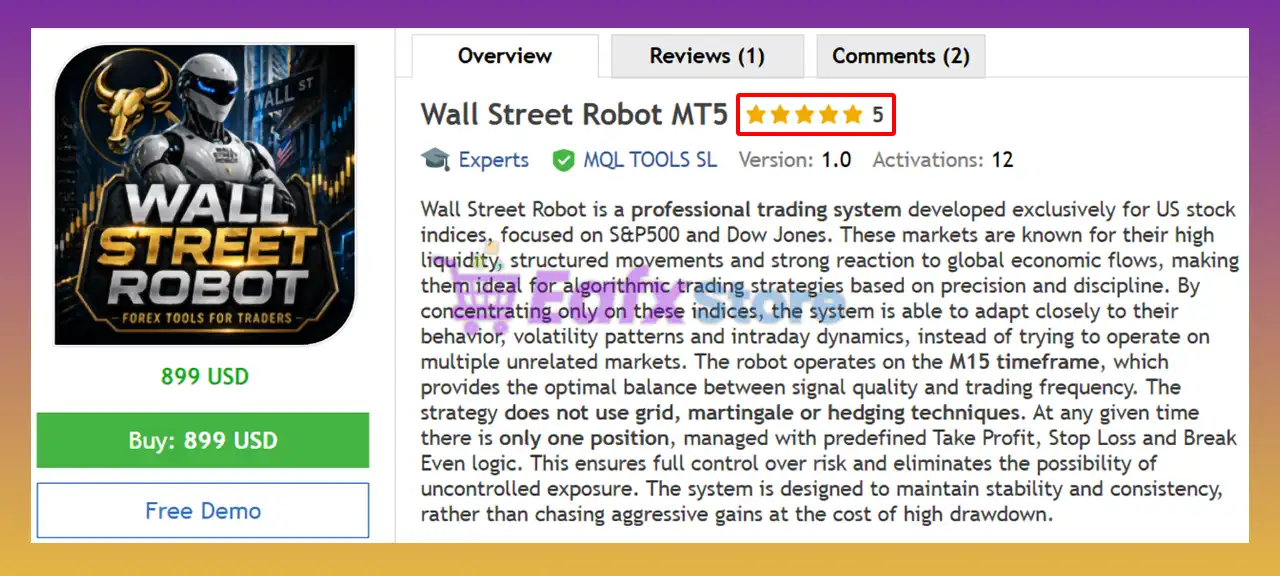
Wall Street Robot MT5 is a fully automated Expert Advisor specifically engineered for US stock indices, focusing exclusively on the S&P500 (US500) and Dow Jones (US30). Rather than attempting to trade multiple unrelated markets, the robot specializes in instruments known for their deep liquidity, structured price action and strong institutional participation.
Operating on the M15 timeframe, Wall Street Robot balances trading frequency with signal quality. It follows a disciplined trend-based methodology supported by volatility filters and professional trade management. The EA avoids risky Grid, Martingale, and Hedging strategies, maintaining only one active position at any time to minimize exposure and improve capital preservation.
 Vendor Website: View here
This is GroupBuy ==> How to Join
Key Features of Wall Street Robot MT5
Exclusive US Indices Strategy
Designed exclusively for:
🔹 S&P500
🔹 Dow Jones
with logic optimized for their specific market behavior.
M15 Optimized Trading
Uses the M15 timeframe to provide an ideal balance between opportunity frequency and signal quality.
Trend-Based Execution
Trades only in the direction of the prevailing market trend.
Dynamic ATR Management
Automatically adapts Stop Loss (SL), Take Profit (TP), Break Even and Trailing Stop according to volatility.
No Grid, No Martingale, No Hedging
Maintains disciplined risk control without dangerous recovery strategies.
One Position at a Time
Simplifies portfolio exposure and improves overall account stability.
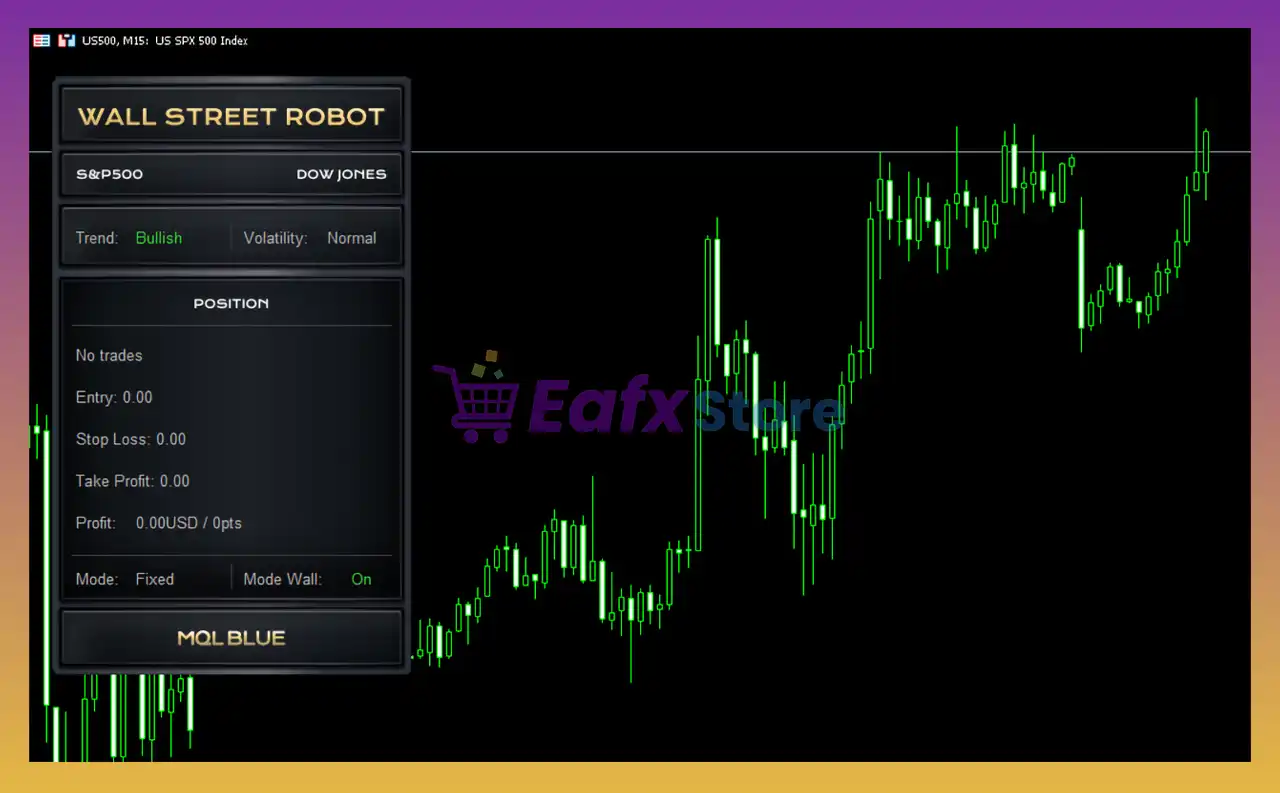
Professional Trading Panel
Displays:
🔹 Trend direction
🔹 Market volatility
🔹 Active trades
🔹 Current operating mode
Prop Firm Compatible
Designed to meet the strict risk management requirements of major proprietary trading firms.
Beginner-Friendly Setup
Only the lot size typically needs adjustment, while all other parameters are pre-optimized.
How Does Wall Street Robot MT5 Work?
Trend-Following Strategy
The EA analyzes market direction using moving averages and executes trades only when the prevailing trend is confirmed.
Volatility-Based Market Filter
A built-in volatility filter prevents trading during quiet or unstable market conditions, ensuring entries occur only when sufficient price movement is available.
Single Position Logic
Only one position can remain active at any given time, helping traders avoid excessive exposure and overlapping risk.
Two Trade Management Modes
Fixed Mode
Allows users to manually configure:
🔹 Stop Loss
🔹 Take Profit
🔹 Break Even
Dynamic Mode
Automatically adjusts:
🔹 Stop Loss
🔹 Take Profit
🔹 Break Even
🔹 ATR-based Trailing Stop
based on current market volatility.
Fully Automated Execution
Once installed, the EA continuously scans market conditions and executes trades without manual intervention.
Backtest Performance Analysis
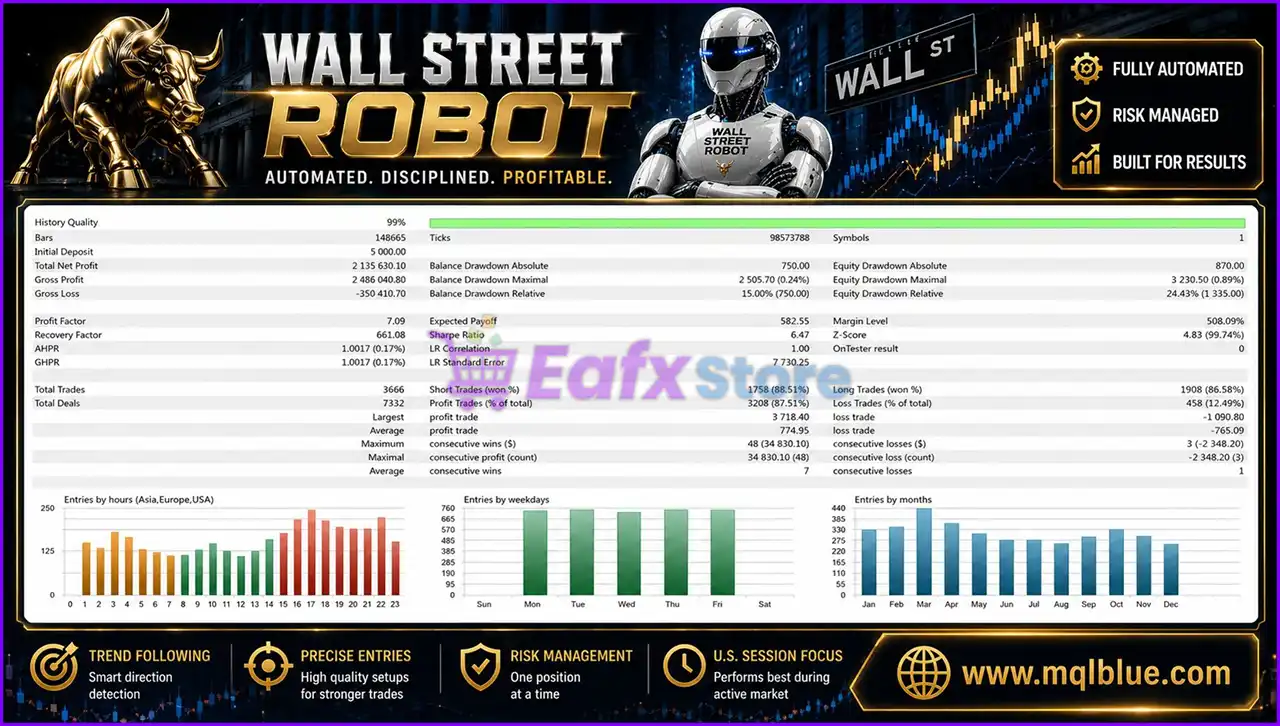
Wall Street Robot MT5 Backtest
One of the strongest aspects of Wall Street Robot is the quality of its performance metrics.
The provided backtest was performed using 99% modeling quality data and generated more than 3,600 trades across multiple years of market conditions.
Key statistics include:
| Metric | Result |
|---|---|
| Profit Factor | 7.09 |
| Win Rate | 87.51% |
| Recovery Factor | 661.08 |
| Relative Equity Drawdown | 0.24% |
| Total Net Profit | $2.13 million |
| Total Trades | 3,666 |
These numbers suggest a trading system with a strong statistical edge and robust risk management.
While no backtest guarantees future performance, the data provides useful insight into how the strategy behaved across different market environments.
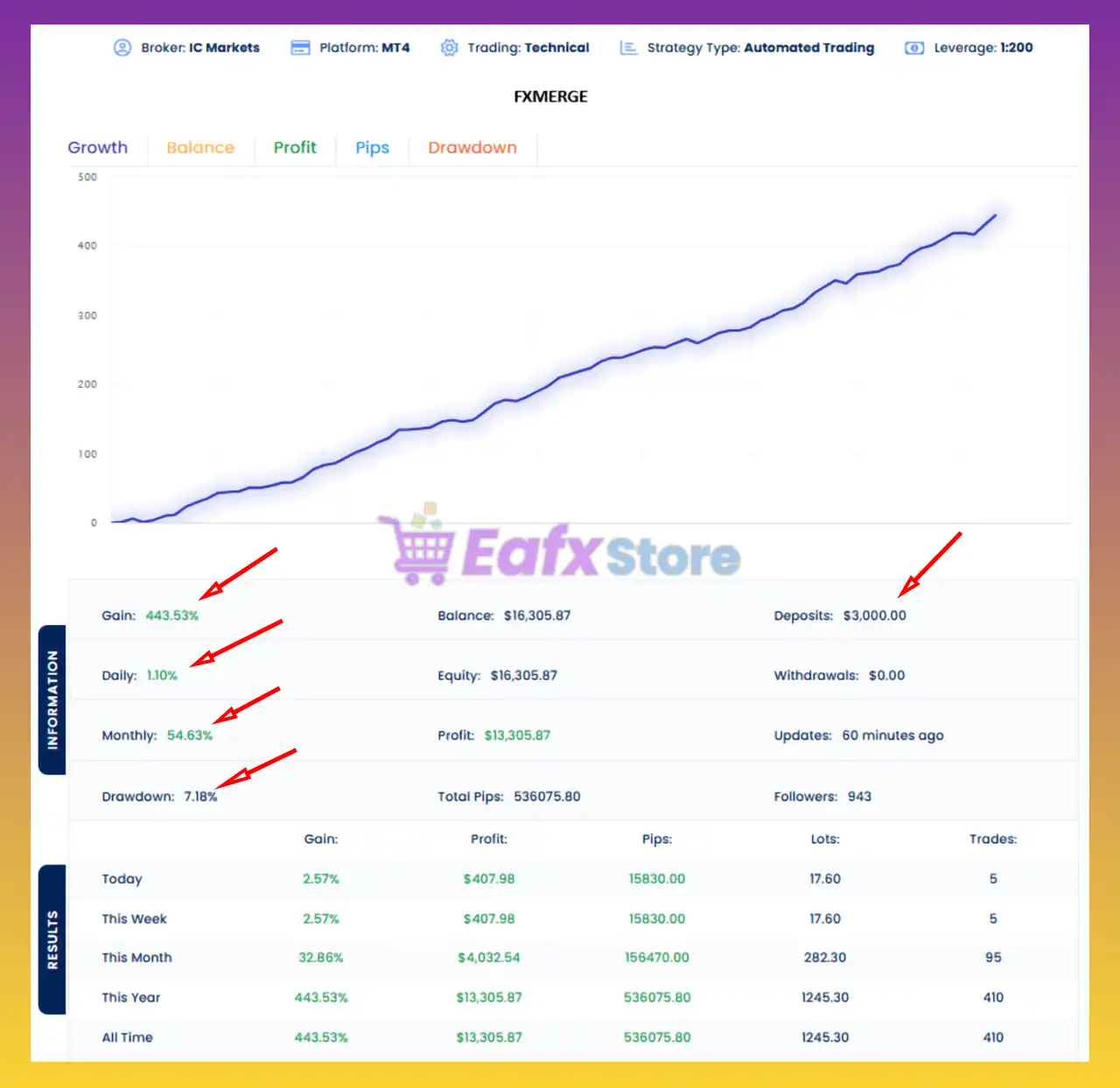
Equity Curve Analysis
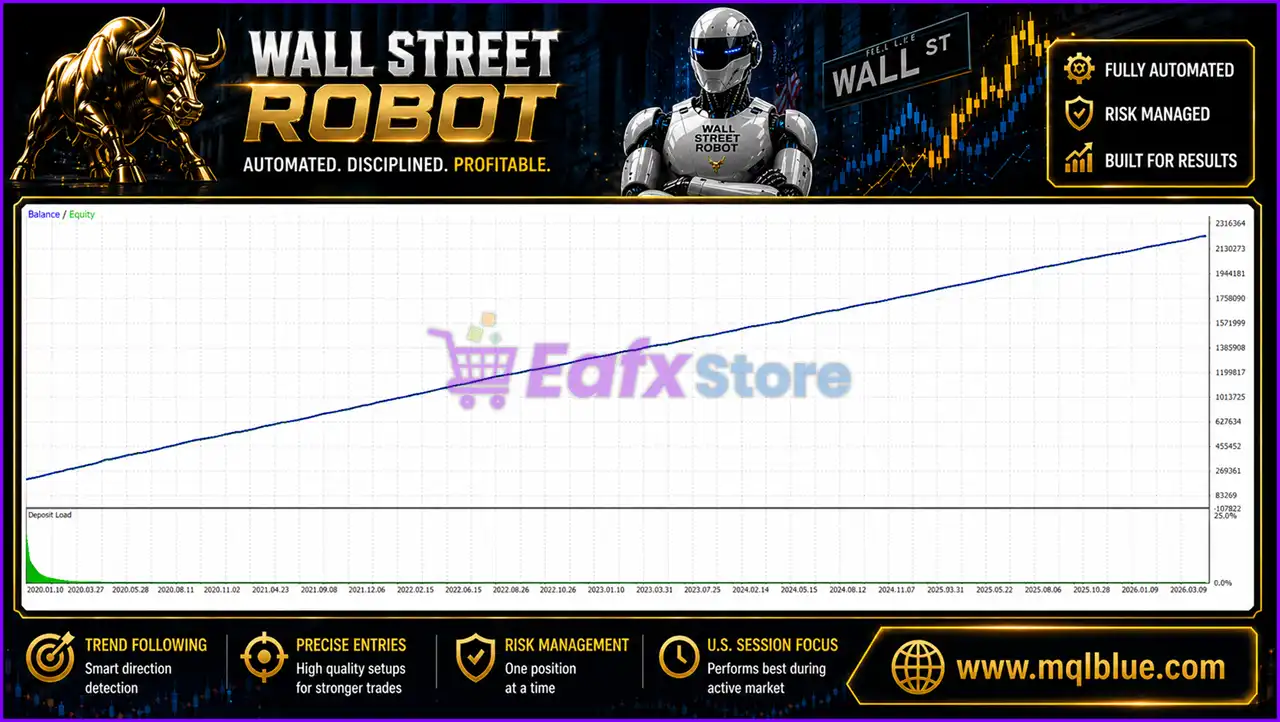
Wall Street Robot MT5 Backtest Results
For experienced traders, the shape of the equity curve is often more important than the final profit number.
The equity graph displayed by Wall Street Robot is remarkably smooth.
There are no sharp vertical jumps typically associated with Martingale systems.
There are no major recovery cycles that would suggest aggressive position scaling.
Instead, the growth trajectory appears gradual, stable, and consistent.
This is exactly what many professional traders look for when evaluating an automated strategy.
The equity curve supports the developer’s claim that Wall Street Robot prioritizes stability over aggressive risk-taking.
What Real Users Are Saying
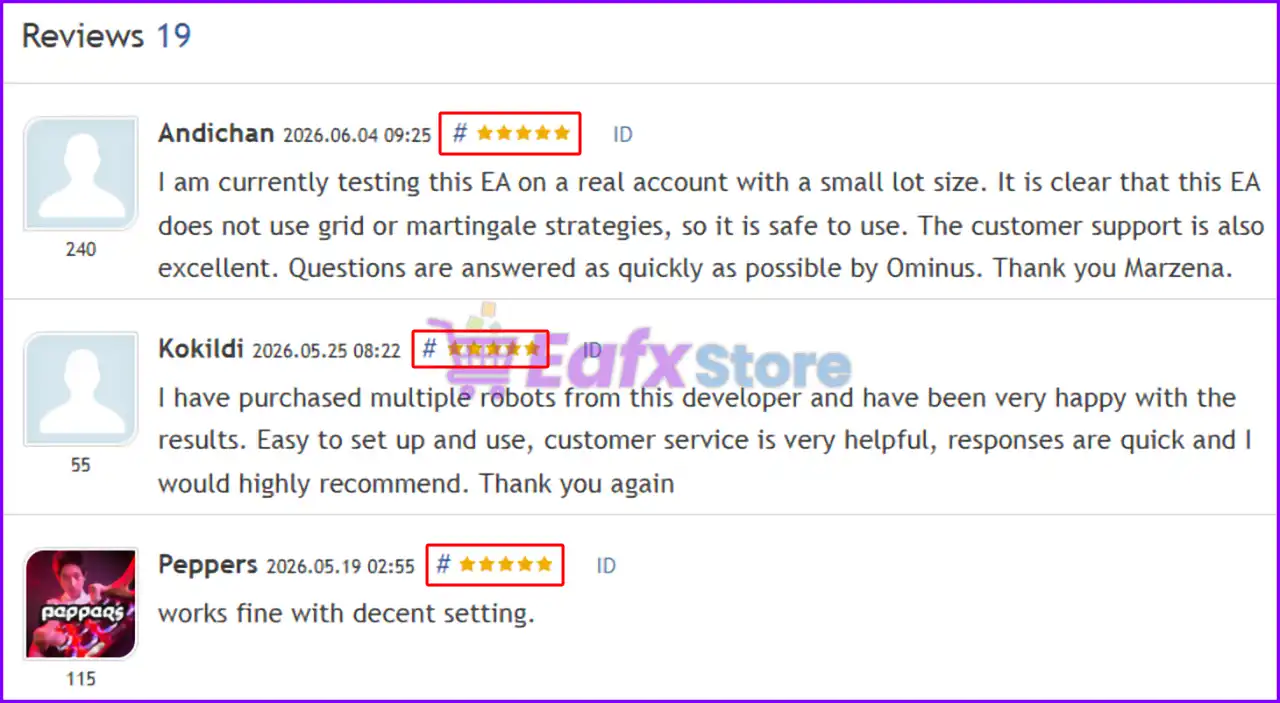
Wall Street Robot MT5 user reviews and customer feedback
Backtests show how a strategy performed historically.
User reviews show how traders experience the product in real-world conditions.
Several themes appear repeatedly throughout customer feedback.
Easy To Set Up
Many traders mention that the installation process is straightforward.
Most users only need to configure lot size and select their preferred operating mode.
Helpful Customer Support
Support quality is one of the most frequently praised aspects of the product.
Users regularly mention fast responses and useful guidance.
No Grid or Martingale
Several reviews specifically highlight the fact that Wall Street Robot avoids high-risk recovery techniques.
This is an important consideration for traders seeking a more conservative approach.
Balanced Perspective
Not every review is positive.
One user reported losses during testing and expressed disappointment with performance.
This serves as an important reminder that no trading robot can produce profits under every market condition.
Wall Street Robot should be viewed as a long-term systematic trading solution rather than a short-term profit generator.
Is Wall Street Robot MT5 Suitable For Prop Firms?
Yes.
The robot is fully compatible with Prop Firm environments because it follows principles that funded account programs typically prefer:
 One trade at a time
Defined Stop Loss
No Martingale
No Grid
No Hedging
Controlled risk exposure
For traders preparing for evaluation challenges, these characteristics can be particularly attractive.
Recommended settings
Recommended settings and parameters to pay attention to from developers and experts:
| Features | Type |
|---|---|
| Trading platform | MetaTrader 5 (MT5) |
| Time frames | M15 (15 minute chart) |
| Currency pairs | SP500 & US30 |
| Minimum / Recommended deposit | $1,000 |
| Minimum / Recommended leverage | 1:20 up to 1:1000 |
| Account type | Hedging, Netting, Zero, Cent, Micro, Standard, Premium or ECN |
| Product type | Original version |
| Additional services | Unlock and Decompile |
| Recommended brokers | Exness Broker, Icmarkets Broker |
| Recommended VPS | MyfxVPS.com (Blue VPS, Golden VPS). Lowest Latency, 2 week Free Trial, 100% Free for 12-18 Months. |
Product Download Package?
The download package of the product suite includes:
 Setting (If Any).docx
Installation Guide.docx
 Reviewed by David Easton
Final Verdict
Wall Street Robot MT5 is a highly specialized Expert Advisor built exclusively for the structured behavior of the S&P500 and Dow Jones. By combining trend-following logic, volatility-based trade management, and strict one-position execution, it delivers a disciplined approach designed for long-term consistency rather than aggressive speculation.
Its dual management modes, Prop Firm compatibility, professional trading panel, and comprehensive risk controls make it suitable for both new and experienced traders. Backed by strong historical testing, positive user feedback, free lifetime updates, and dedicated support, Wall Street Robot MT5 is an excellent choice for traders seeking a professional, fully automated US indices trading solution with a strong emphasis on stability and capital protection.
🔢 Wall Street Robot MT5 – Complete Settings Guide for Professional Forex Trading
Wall Street Robot MT5 is an advanced automated Forex trading Expert Advisor (EA) designed for MetaTrader 5. The EA includes powerful session filters, fixed and dynamic trading modes, breakeven protection, prop firm risk controls and advanced drawdown management.
With flexible trade parameters and automated protection systems, Wall Street Robot MT5 is suitable for traders looking for disciplined and systematic trading automation.
Wall Street Robot MT5 Settings
🔢 Wall Street Robot MT5 Settings Explained
Below are the details of the parameters in the advisor’s trading system settings table:
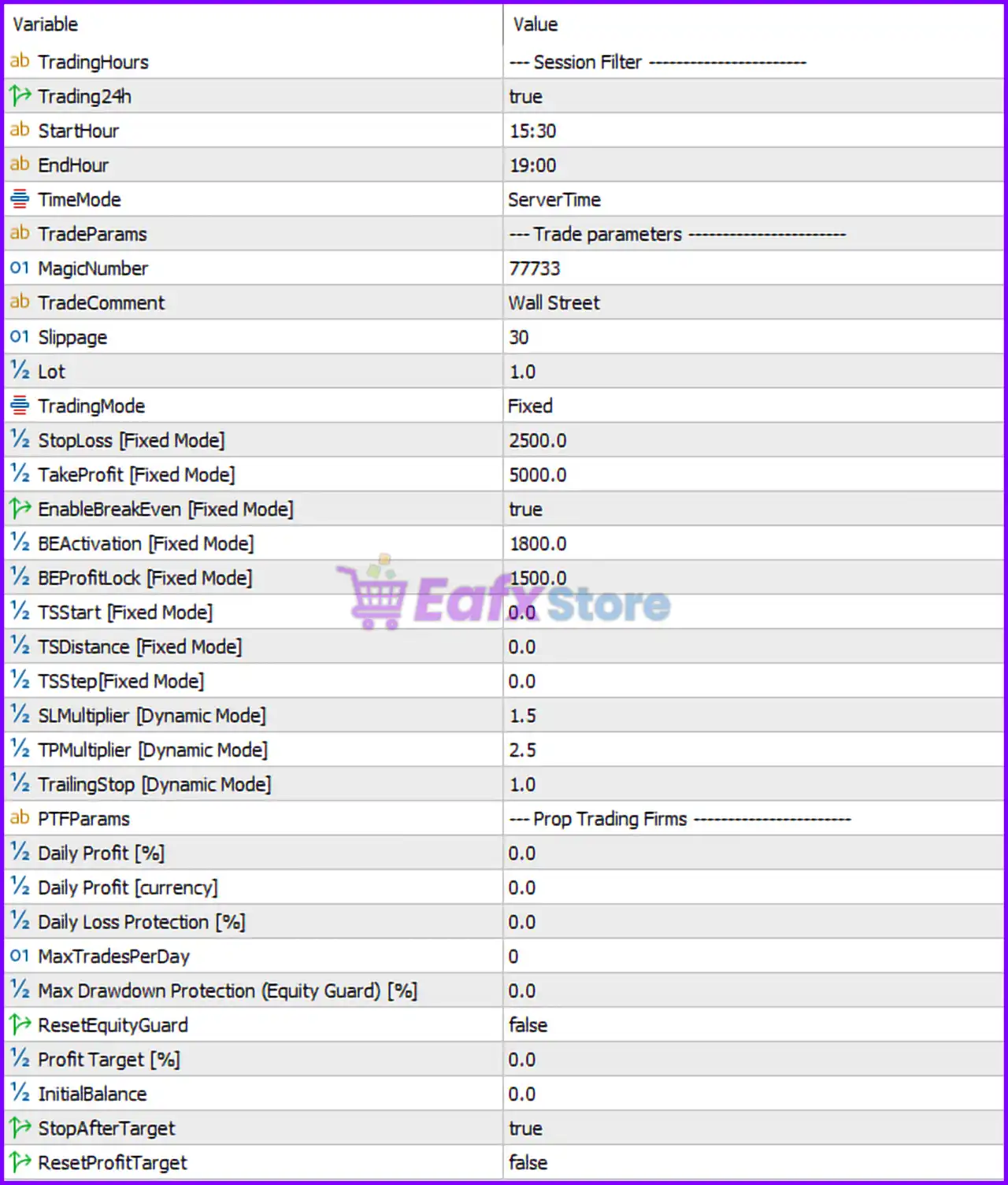
Wall Street Robot MT5 Setting Panel
🔹 TradingHours = — Session Filter ——————– — Section header for configuring trading session and working hours.
🔹 Trading24h = true — Enables 24-hour trading functionality.
🔹 StartHour = 15:30 — Defines the trading session start time at 15:30.
🔹 EndHour = 19:00 — Defines the trading session end time at 19:00.
🔹 TimeMode = ServerTime — Uses broker server time for all trading session calculations.
🔹 TradeParams = — Trade parameters ——————– — Section header for trade execution settings.
🔹 MagicNumber = 77733 — Assigns the unique Magic Number 77733 to identify EA trades.
🔹 TradeComment = Wall Street — Adds the comment “Wall Street” to all orders opened by the EA.
🔹 Slippage = 30 — Sets the maximum allowed slippage to 30 points during order execution.
🔹 Lot = 1.0 — Defines the trading lot size as 1.0 lots.
🔹 TradingMode = Fixed — Uses Fixed trading mode instead of dynamic calculation mode.
🔹 StopLoss [Fixed Mode] = 2500.0 — Sets the Stop Loss distance to 2500.0 points in Fixed Mode.
🔹 TakeProfit [Fixed Mode] = 5000.0 — Sets the Take Profit target to 5000.0 points in Fixed Mode.
🔹 EnableBreakEven [Fixed Mode] = true — Activates the breakeven protection system in Fixed Mode.
🔹 BEActivation [Fixed Mode] = 1800.0 — Starts breakeven activation after 1800.0 points of profit.
🔹 BEProfitLock [Fixed Mode] = 1500.0 — Locks in 1500.0 points of secured profit when breakeven activates.
🔹 TSStart [Fixed Mode] = 0.0 — Defines the trailing stop activation level at 0.0 points in Fixed Mode.
🔹 TSDistance [Fixed Mode] = 0.0 — Sets the trailing stop distance to 0.0 points in Fixed Mode.
🔹 TSStep [Fixed Mode] = 0.0 — Defines the trailing stop movement step as 0.0 points.
🔹 SLMultiplier [Dynamic Mode] = 1.5 — Uses a Stop Loss multiplier of 1.5 in Dynamic Mode calculations.
🔹 TPMultiplier [Dynamic Mode] = 2.5 — Uses a Take Profit multiplier of 2.5 in Dynamic Mode calculations.
🔹 TrailingStop [Dynamic Mode] = 1.0 — Enables dynamic trailing stop management with a value of 1.0.
🔹 PTFParams = — Prop Trading Firms ——————– — Section header for prop firm protection settings.
🔹 Daily Profit [%] = 0.0 — Sets the daily profit percentage target to 0.0%.
🔹 Daily Profit [currency] = 0.0 — Sets the daily profit target in account currency to 0.0.
🔹 Daily Loss Protection [%] = 0.0 — Sets daily loss protection to 0.0%.
🔹 MaxTradesPerDay = 0 — Allows unlimited trades per day when set to 0.
🔹 Max Drawdown Protection (Equity Guard) [%] = 0.0 — Sets maximum drawdown protection to 0.0%.
🔹 ResetEquityGuard = false — Disables automatic reset of the equity guard protection system.
🔹 Profit Target [%] = 0.0 — Sets the account profit target percentage to 0.0%.
🔹 InitialBalance = 0.0 — Defines the initial balance reference value as 0.0.
🔹 StopAfterTarget = true — Stops trading automatically after reaching the profit target.
🔹 ResetProfitTarget = false — Disables automatic reset of the profit target after completion.
🔢 Conclusion
Wall Street Robot MT5 is a feature-rich automated trading EA that combines advanced session filtering, fixed and dynamic trade management, breakeven protection and prop firm risk controls.
With customizable Stop Loss, Take Profit, trailing stop systems, and equity protection tools, the EA offers traders a highly structured and disciplined approach to automated Forex trading on MetaTrader 5.
🔢 FAQs
❓ What is Wall Street Robot MT5?
Wall Street Robot MT5 is an automated Forex trading Expert Advisor designed for MetaTrader 5 with advanced risk and trade management systems.
❓ Does Wall Street Robot MT5 support breakeven protection?
Yes, the EA includes a configurable breakeven system with activation and profit lock parameters.
❓ Can Wall Street Robot MT5 be used for prop firm trading?
Yes, the EA includes prop firm protection settings such as daily loss limits and equity guard controls.
❓ What is the difference between Fixed and Dynamic trading modes?
Fixed Mode uses manually defined Stop Loss and Take Profit values, while Dynamic Mode calculates them using multipliers.
❓ Does Wall Street Robot MT5 allow session-based trading?
Yes, traders can define custom trading hours using StartHour, EndHour, and ServerTime settings.
User Reviews
Only logged in customers who have purchased this product may leave a review.
❓ What is Wall Street Robot MT5 and how does it work?
Wall Street Robot MT5 is an automated trading system focused on US indices, using trend and volatility filters to execute precise trades with controlled risk and consistency.
❓ Is Wall Street Robot MT5 suitable for beginners?
Yes, Wall Street Robot MT5 is beginner-friendly with default optimized settings, requiring only basic adjustments like lot size and mode selection.
❓ What markets does Wall Street Robot MT5 trade?
Wall Street Robot MT5 is specifically designed for S&P500 and Dow Jones, focusing on structured and liquid index markets.
❓ What trading strategy does Wall Street Robot MT5 use?
Wall Street Robot MT5 uses trend-following logic with volatility filters and breakout confirmation to identify high-quality trading opportunities.
❓ Does Wall Street Robot MT5 use martingale or grid strategies?
No, Wall Street Robot MT5 avoids martingale, grid, and hedging methods, ensuring controlled and disciplined risk management.
❓ How does Wall Street Robot MT5 manage risk?
Wall Street Robot MT5 uses predefined stop loss, take profit, break even, and trailing stop mechanisms to maintain stable and controlled trading performance.
❓ Can Wall Street Robot MT5 run fully automatically?
Yes, Wall Street Robot MT5 is fully automated and executes trades independently once installed and configured properly.
❓ What timeframe is recommended for Wall Street Robot MT5?
Wall Street Robot MT5 is optimized for the M15 timeframe, providing a balance between trading frequency and signal quality.
❓ What is the difference between Fixed and Dynamic mode in Wall Street Robot MT5?
Wall Street Robot MT5 offers Fixed mode for manual control and Dynamic mode for automatic volatility-based trade management.
❓ Is Wall Street Robot MT5 suitable for long-term trading?
Yes, Wall Street Robot MT5 is designed for stability and consistency, making it suitable for long-term automated trading strategies.
-
 Original price was: $499.00.$249.00Current price is: $249.00.
 -
 Original price was: $30,000.00.$249.00Current price is: $249.00.
 -
 Original price was: $30,000.00.$249.00Current price is: $249.00.
 -
 Original price was: $30,000.00.$249.00Current price is: $249.00.
-
 2
2 -
 1Price range: $89.00 through $599.00
 -
 0Price range: $89.00 through $599.00
 -
 1
1
There are no reviews yet.