





SentinelAI EA MT4 v1.17 with SetFiles (Platform build 1475+)

Subscriptions for Special Plan
- 30 EA package is more economical!
- Special package with 99%
- Download 1 EA/Day

Subscriptions for Premium Membership
- Download Unlimited in 1 Year
- Get 100% Discount
- Get free access to all

Subscriptions for Gold Membership
- 1 Year Membership
- Get 100% Discount
- Access EA+Indicator+Course
Frequently bought together 🎁
Add these products to enhance your purchase



What is SentinelAI MT4?
SentinelAI MT4 is an intelligent Expert Advisor (EA) for automated Forex trading, designed for EURUSD and GBPUSD with adaptive AI-driven analytics. Combining price action, mean reversion logic, and advanced indicators, it delivers stable execution, smart risk management and resilient trading performance across changing market conditions.
🔶 Vendor Website: View here
About the Author
This product is compiled by Valeriia Mishchenko. This author has more than +6 years of experience working on MQL5 with many famous products such as SentinelAI EA MT4, SentinelAI MT5, Waka Waka EA MT5, Perceptrader AI MT5, Golden Pickaxe MT5 and others. Among them, SentinelAI MT4 is his best performing products.
Key Features of SentinelAI MT4
🔹 AI-Powered Market Filtering System: Uses deep learning analytics to detect stronger trading conditions.
🔹 Advanced News Protection Filters: Blocks risky trades during major news and volatile market events.
🔹 Multi-Pair Automated Trading Setup: Supports EURUSD and GBPUSD from a single trading chart.
🔹 Dynamic Risk Management Controls: Includes drawdown protection and adaptive lot-sizing options.
🔹 Smart Neural Network Forecast Engine: Enhances trade precision using predictive market indicators.
Why Choose & Use SentinelAI MT4?
🔹 Stable Automated Forex Trading Solution: Designed for long-term adaptability and trading consistency.
🔹 Professional Risk Control Features: Includes FTMO-style drawdown management and margin protection.
🔹 Flexible Customization for Traders: Offers adjustable filters, lot sizing and portfolio settings.
🔹 Efficient VPS and ECN Compatibility: Optimized for stable execution with low-spread environments.
🔹 Marketplace-Ready Expert Advisor System: Suitable for traders seeking disciplined AI-driven automation.
SentinelAI EA MT4 Review
SentinelAI EA MT4 Signal Results
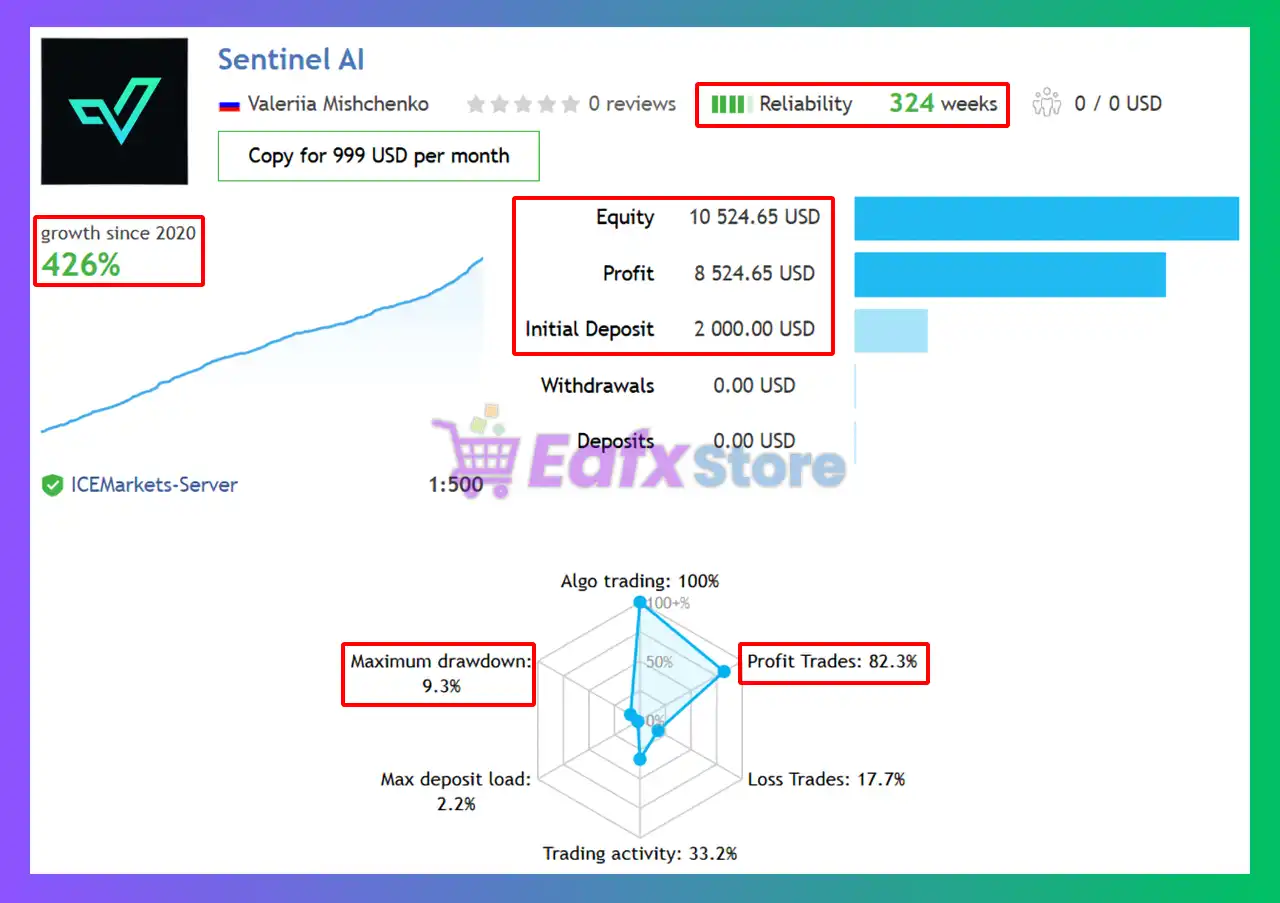
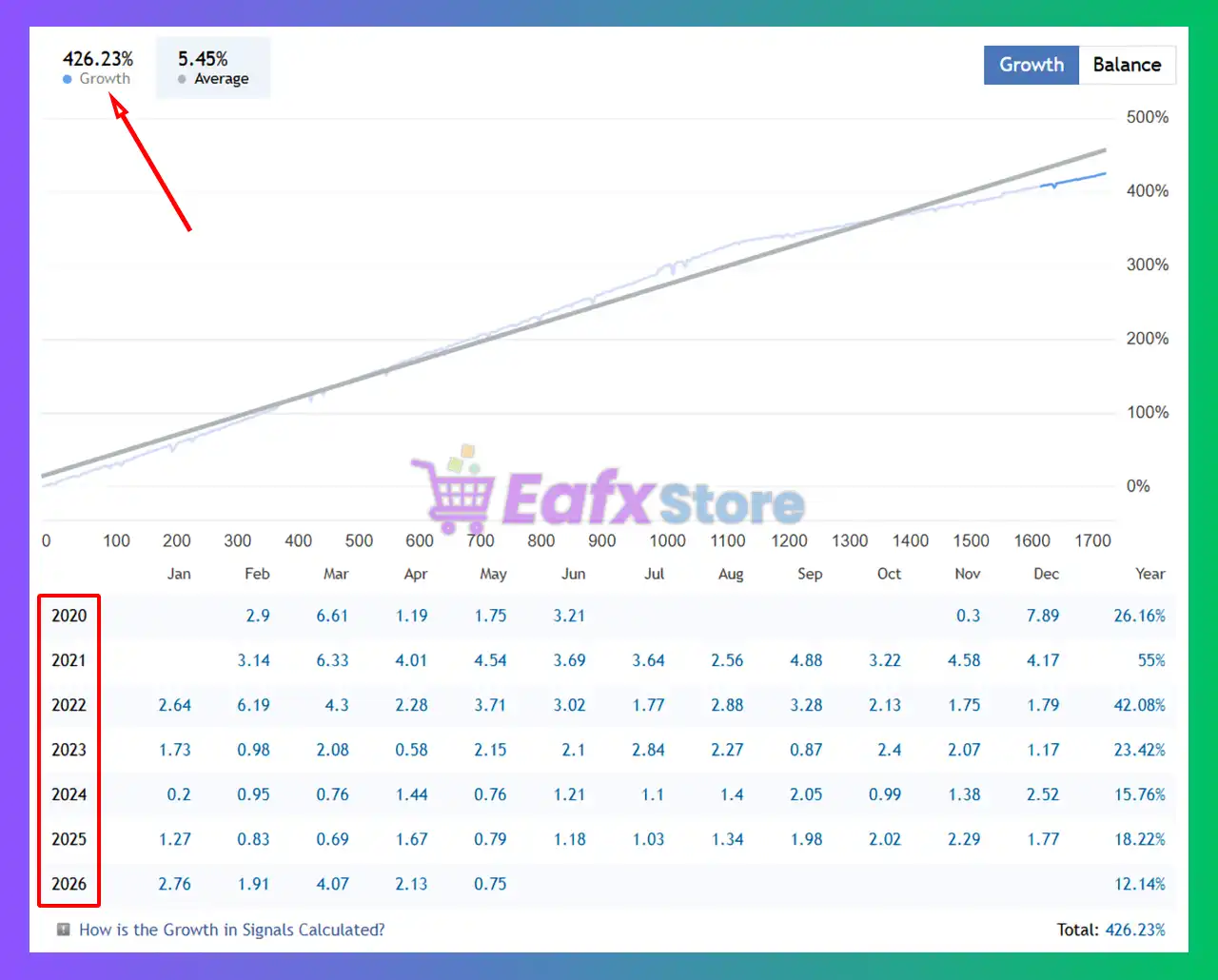
The Sentinel AI MT4 achieved impressive profit performance when trading with GBPUSD & EURUSD pairs. Trading results on real account for 324 weeks of trading.
 Initial Deposit: $2,000
Growth Rate: +426%
Win Rate (% of total): 82.3%
Maximum Drawdown: 9.3%
SentinelAI EA Signal
SentinelAI MT4 Signal Results
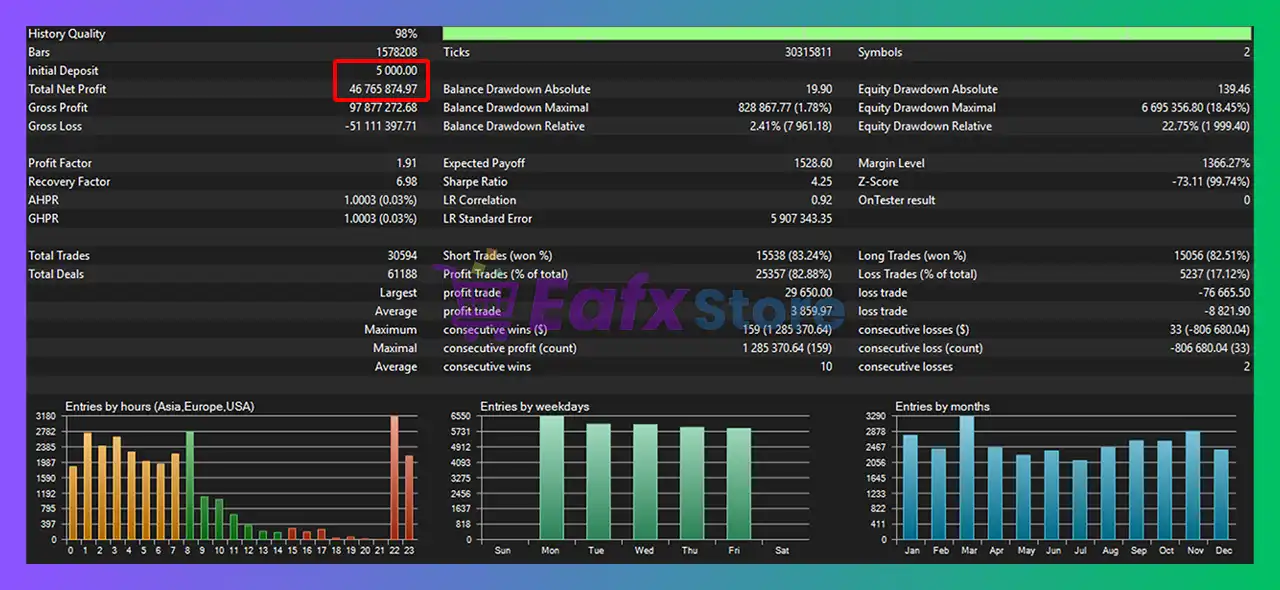
SentinelAI MT4 Backtest Results
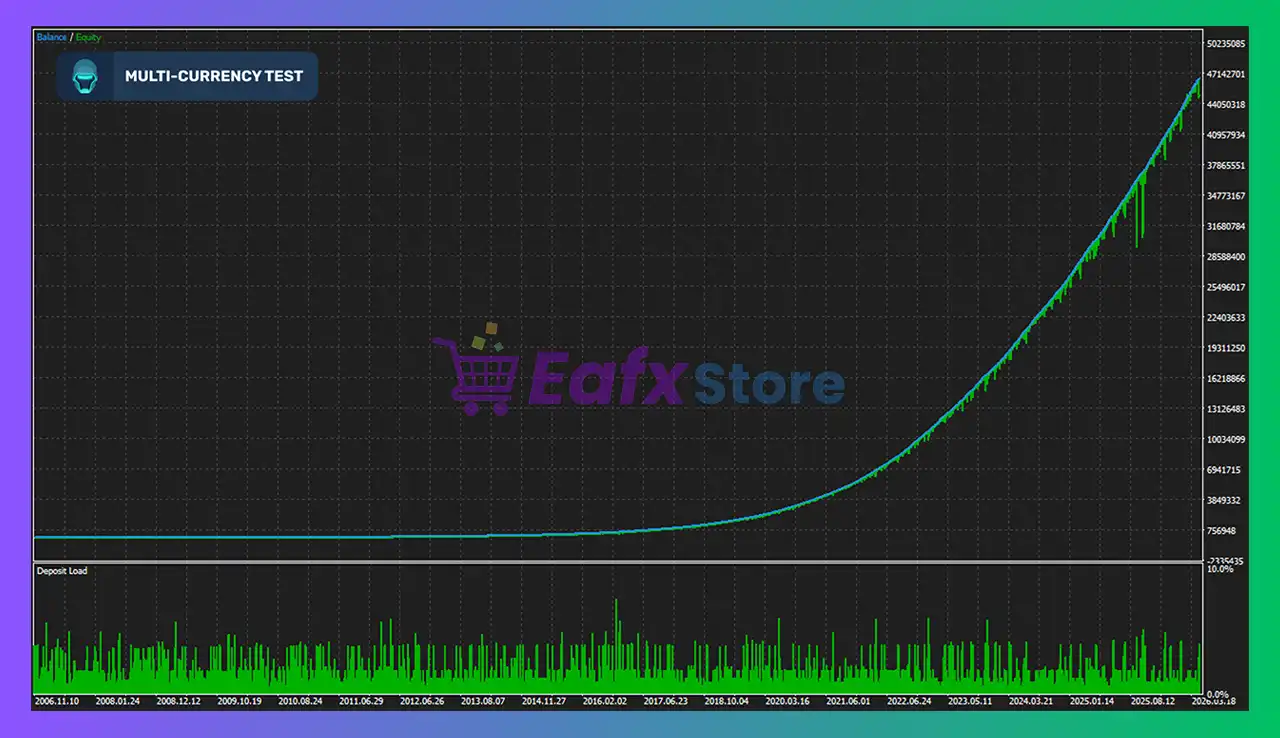
SentinelAI MT4 has achieved impressive profit performance when trading the EURUSD pair. This EA has demonstrated exceptional ability in capturing market trends and increasing profits over 19 years of trading.
Initial Deposit: $5,000
Total Net Profit: $46.76 million
Win Rate (% of total): 82.88%
Maximum Drawdown: 18.45%
SentinelAI MT4 Backtest
SentinelAI EA MT4 Backtest
What is the SentinelAI MT4 Trading Strategy?
🔹 Price Action and Mean Reversion Logic: Targets market inefficiencies and potential trend reversals.
🔹 AI-Based Trend and Volatility Filters: Reduces weak entries during unstable trading conditions.
🔹 Adaptive Grid Trade Management System: Uses structured Averaging with controlled exposure logic.
🔹 Deep Learning Momentum Confirmation: Confirms entries through advanced predictive analysis tools.
🔹 Integrated Drawdown Protection Framework: Helps preserve capital during adverse market movements.
Recommended settings
Recommended settings and parameters to pay attention to from developers and experts:
| Features | Type |
|---|---|
| Trading platform | MetaTrader 4 (MT4) |
| Time frames | M5 (5 minute chart) |
| Currency pairs | EURUSD, GBPUSD |
| Minimum / Recommended deposit | $1,000 |
| Minimum / Recommended leverage | 1:30+ |
| Account types | ECN broker |
| Product type | NoDLL / Unlimited / Unlocked |
| Additional services | Unlock and Decompile |
| Recommended brokers | Exness Broker, Icmarkets Broker |
| Recommended VPS | MyfxVPS.com (Blue VPS, Golden VPS). Lowest Latency, 2 week Free Trial, 100% Free for 12-18 Months. |
 Reviewed by David Easton
Product Download Package?
The download package of the product suite includes:
Experts
SentinelAI_1.17_fix.ex4
SetFiles
Sentinel_Low Risk.set
Sentinel_Mid Risk.set
Sentinel_Significant Risk.set
Sentinel_ High Risk.set
Conclusion
In short, SentinelAI MT4 is an advanced AI-powered Forex trading robot designed for EURUSD and GBPUSD traders seeking intelligent automation and structured risk management. By combining deep learning analytics, neural network filters, price action logic, and advanced news protection, the EA delivers a modern approach to automated trading. SentinelAI is ideal for traders looking for flexible, multi-pair trading with strong portfolio and drawdown controls.
SentinelAI EA MT4 Settings Explained (Full Parameters)
Introduction to SentinelAI EA MT4
SentinelAI EA is an advanced AI-enhanced grid trading Expert Advisor (EA) developed for the MetaTrader 4 platform. The EA combines neural network filtering, market forecast integration, adaptive grid logic, advanced news filtering, and strict drawdown management to create a highly automated trading environment.
With support for portfolio trading, FTMO-style protection rules, and machine-learning-assisted filtering, SentinelAI EA is designed for traders seeking professional-grade automation and risk control.
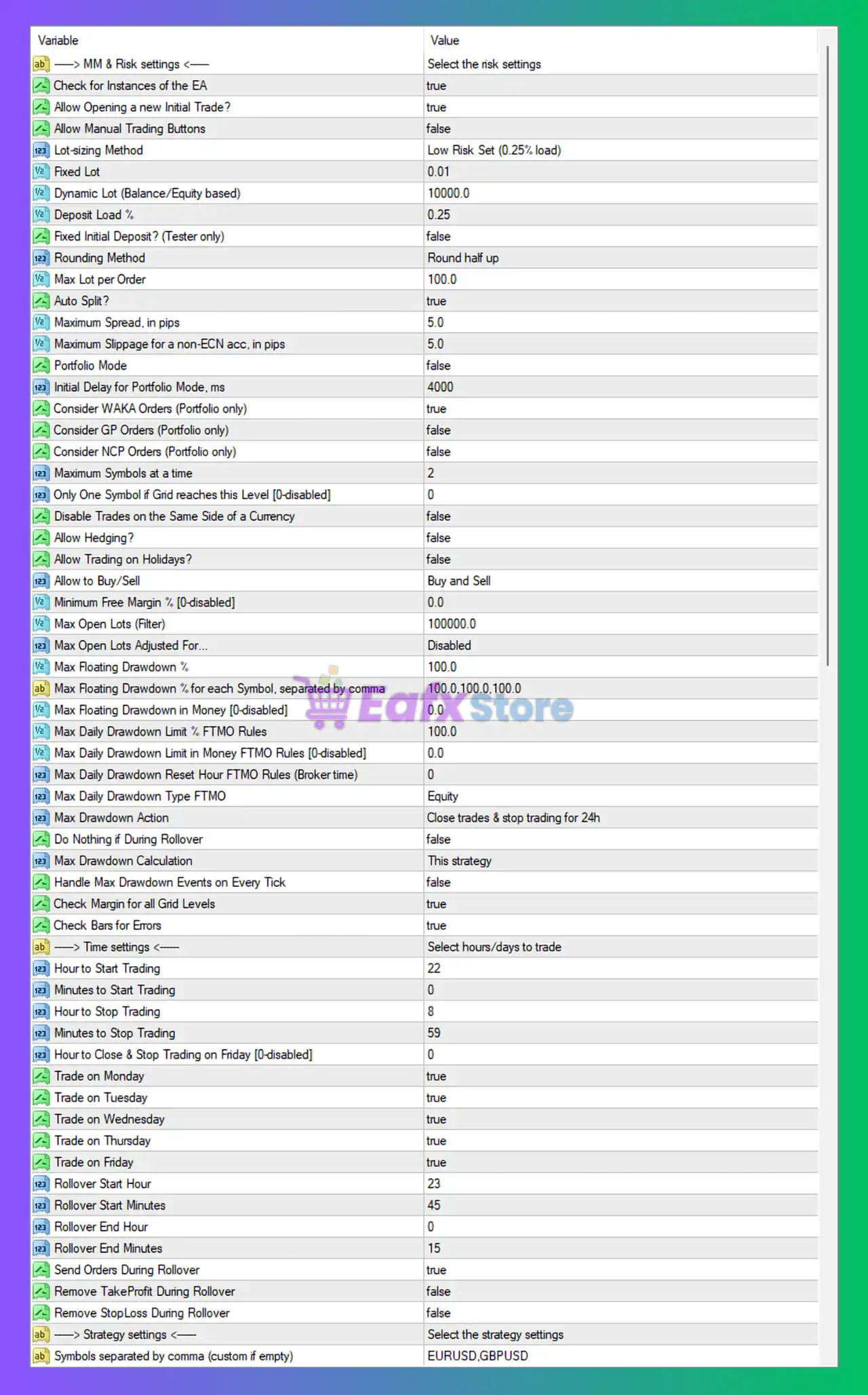
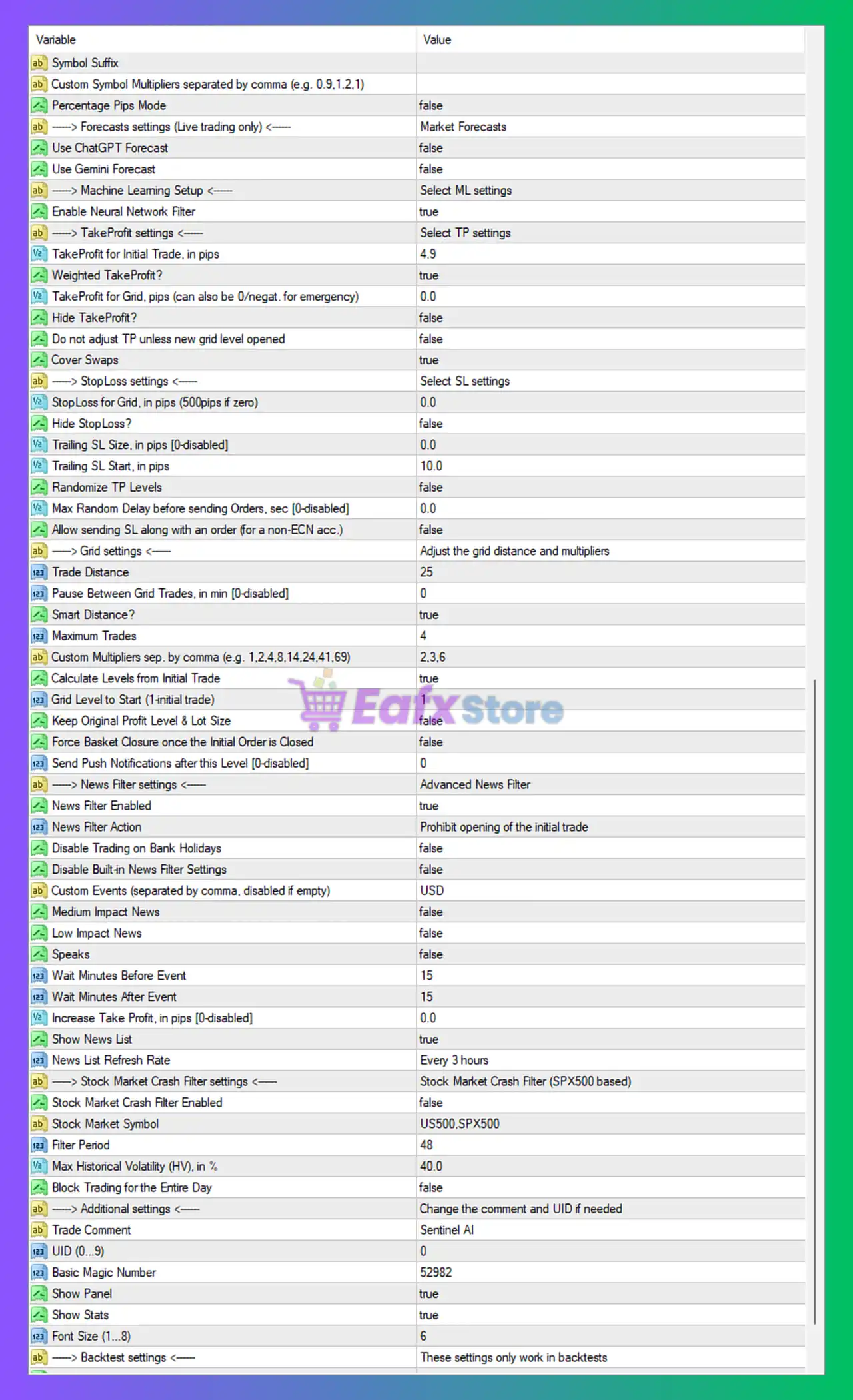
General Symbol Settings
- Symbol Suffix =: Custom broker symbol suffix field left empty.
- Custom Symbol Multipliers separated by comma (e.g. 0.9,1.2,1) =: Allows custom multipliers for each symbol; currently empty.
- Percentage Pips Mode = false: Disables percentage-based pip calculations.
Forecasts settings (Live trading only)
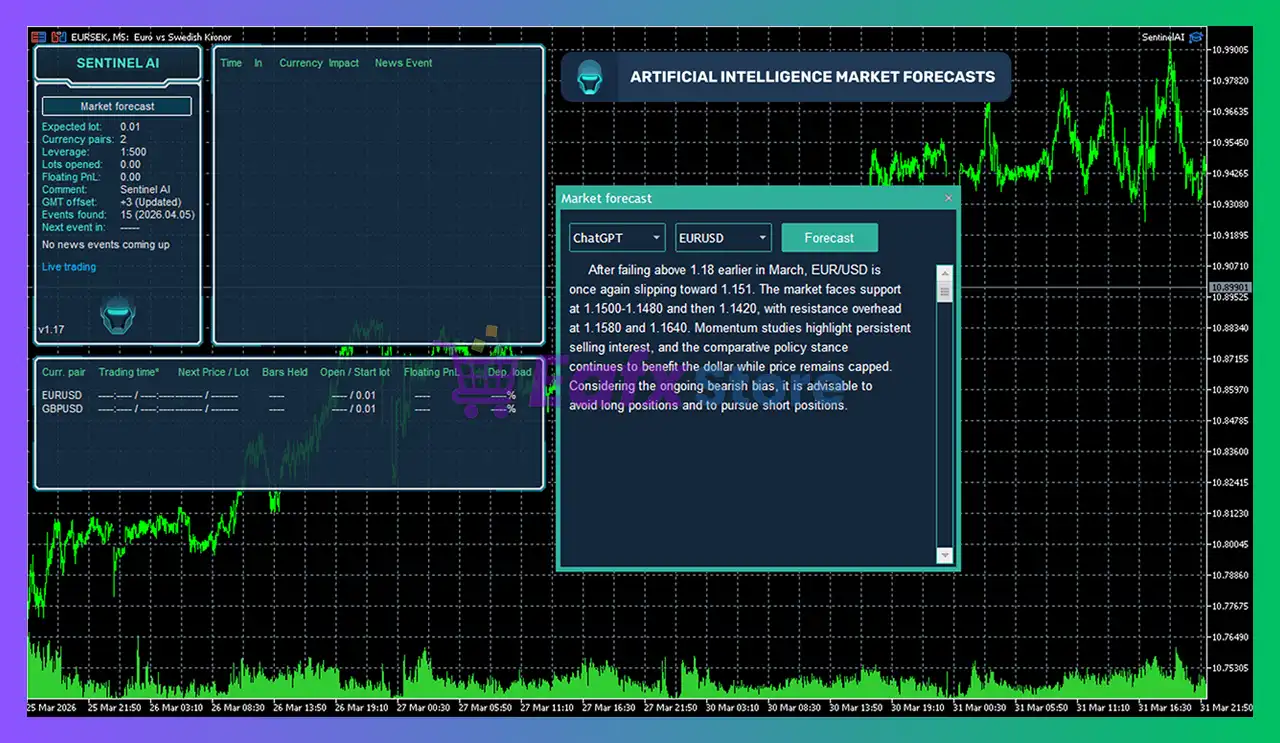
- Use ChatGPT Forecast = false: Disables ChatGPT-based market forecast integration.
- Use Gemini Forecast = false: Disables Gemini AI market forecasting integration.
Machine Learning Setup
- Enable Neural Network Filter = true: Activates neural network filtering for trade validation.
TakeProfit settings
- TakeProfit for Initial Trade, in pips = 4.9: Sets Take Profit target for the initial trade to 4.9 pips.
- Weighted TakeProfit? = true: Enables weighted Take Profit calculations across grid positions.
- TakeProfit for Grid, pips (can also be 0/negat. for emergency) = 0.0: Grid Take Profit disabled with value 0.0.
- Hide TakeProfit? = false: Displays Take Profit levels on the chart and broker server.
- Do not adjust TP unless new grid level opened = false: Allows dynamic TP adjustments without requiring new grid levels.
- Cover Swaps = true: Includes swap costs in Take Profit calculations.
StopLoss settings
- StopLoss for Grid, in pips (500pips if zero) = 0.0: Stop Loss defaults to 500 pips because value is 0.0.
- Hide StopLoss? = false: Displays Stop Loss levels normally.
- Trailing SL Size, in pips [0-disabled] = 0.0: Trailing Stop Loss disabled.
- Trailing SL Start, in pips = 10.0: Trailing Stop would activate after 10.0 pips if enabled.
- Randomize TP Levels = false: Disables randomization of Take Profit targets.
- Max Random Delay before sending Orders, sec [0-disabled] = 0.0: No execution delay randomization applied.
- Allow sending SL along with an order (for a non-ECN acc.) = false: Prevents SL from being sent immediately with orders on non-ECN accounts.
Grid settings
- Trade Distance = 25: Distance between grid trades set to 25 pips.
- Pause Between Grid Trades, in min [0-disabled] = 0: No pause between grid trades.
- Smart Distance? = true: Enables adaptive grid spacing logic.
- Maximum Trades = 4: Limits total grid trades to 4 positions.
- Custom Multipliers sep. by comma (e.g. 1,2,4,8,14,24,41,69) = 2,3,6: Uses custom lot multipliers of 2, 3, and 6.
- Calculate Levels from Initial Trade = true: Grid levels are calculated relative to the initial trade.
- Grid Level to Start (1-initial trade) = 1: Grid begins from level 1.
- Keep Original Profit Level & Lot Size = false: Allows TP and lot size adjustments dynamically.
- Force Basket Closure once the Initial Order is Closed = false: Basket remains active even after initial order closure.
- Send Push Notifications after this Level [0-disabled] = 0: Push notifications disabled.
News Filter settings
- News Filter Enabled = true: Activates advanced economic news filtering.
- News Filter Action = Prohibit opening of the initial trade: Prevents new initial trades during news events.
- Disable Trading on Bank Holidays = false: Trading remains active during bank holidays.
- Disable Built-in News Filter Settings = false: Built-in news filter remains enabled.
- Custom Events (separated by comma, disabled if empty) = USD: Applies custom filtering to USD-related news events.
- Medium Impact News = false: Medium-impact news events ignored.
- Low Impact News = false: Low-impact news events ignored.
- Speaks = false: Speech-based events are ignored.
- Wait Minutes Before Event = 15: Stops opening trades 15 minutes before news releases.
- Wait Minutes After Event = 15: Resumes trading 15 minutes after events.
- Increase Take Profit, in pips [0-disabled] = 0.0: No TP increase during news conditions.
- Show News List = true: Displays economic news list on chart.
- News List Refresh Rate = Every 3 hours: Refreshes news data every 3 hours.
Stock Market Crash Filter settings
- Stock Market Crash Filter Enabled = false: Disables stock market crash protection filter.
- Stock Market Symbol = US500,SPX500: Uses US500 and SPX500 indices for crash monitoring.
- Filter Period = 48: Volatility filter period set to 48.
- Max Historical Volatility (HV), in % = 40.0: Maximum allowed volatility threshold is 40.0%.
- Block Trading for the Entire Day = false: Trading is not blocked for the entire day during crash conditions.
Additional settings
- Trade Comment = Sentinel AI: Adds “Sentinel AI” as trade comment.
- UID (0…9) = 0: Unique EA instance identifier set to 0.
- Basic Magic Number = 52982: Main Magic Number used for trade management.
- Show Panel = true: Enables information panel display.
- Show Stats = true: Displays trading statistics panel.
- Font Size (1…8) = 6: Sets panel font size to 6.
MM & Risk settings
- Check for Instances of the EA = true: Prevents conflicts between multiple EA instances.
- Allow Opening a new Initial Trade? = true: Allows opening new initial positions.
- Allow Manual Trading Buttons = false: Manual trading buttons disabled.
- Lot-sizing Method = Low Risk Set (0.25% load): Uses low-risk lot sizing profile.
- Fixed Lot = 0.01: Fixed lot size set to 0.01.
- Dynamic Lot (Balance/Equity based) = 10000.0: Dynamic lot sizing based on 10000.0 balance/equity.
- Deposit Load % = 0.25: Uses 0.25% deposit load for risk calculations.
- Fixed Initial Deposit? (Tester only) = false: No fixed deposit simulation used in tester.
- Rounding Method = Round half up: Uses round-half-up lot rounding.
- Max Lot per Order = 100.0: Caps each order at 100.0 lots.
- Auto Split? = true: Automatically splits large orders.
- Maximum Spread, in pips = 5.0: Maximum allowed spread set to 5.0 pips.
- Maximum Slippage for a non-ECN acc. in pips = 5.0: Slippage limit set to 5.0 pips.
- Portfolio Mode = false: Portfolio trading mode disabled.
- Initial Delay for Portfolio Mode, ms = 4000: Portfolio delay set to 4000 ms.
- Consider WAKA Orders (Portfolio only) = true: Includes WAKA orders in portfolio mode.
- Consider GP Orders (Portfolio only) = false: GP orders ignored.
- Consider NCP Orders (Portfolio only) = false: NCP orders ignored.
- Maximum Symbols at a time = 2: Allows trading on maximum 2 symbols simultaneously.
- Only One Symbol if Grid reaches this Level [0-disabled] = 0: Feature disabled.
- Disable Trades on the Same Side of a Currency = false: Allows same-direction trades on related currencies.
- Allow Hedging? = false: Hedging disabled.
- Allow Trading on Holidays? = false: Trading on holidays disabled.
- Allow to Buy/Sell = Buy and Sell: Allows both buy and sell trades.
- Minimum Free Margin % [0-disabled] = 0.0: Minimum free margin filter disabled.
- Max Open Lots (Filter) = 100000.0: Maximum total open lots filter set to 100000.0.
- Max Open Lots Adjusted For… = Disabled: Dynamic adjustment disabled.
- Max Floating Drawdown % = 100.0: Maximum floating drawdown allowed is 100.0%.
- Max Floating Drawdown % for each Symbol, separated by comma = 100.0,100.0,100.0: Per-symbol floating drawdown limits set to 100.0%.
- Max Floating Drawdown in Money [0-disabled] = 0.0: Money-based floating DD disabled.
- Max Daily Drawdown Limit % FTMO Rules = 100.0: FTMO-style daily drawdown limit set to 100.0%.
- Max Daily Drawdown Limit in Money FTMO Rules [0-disabled] = 0.0: Money-based FTMO DD limit disabled.
- Max Daily Drawdown Reset Hour FTMO Rules (Broker time) = 0: Daily DD reset hour set to 0.
- Max Daily Drawdown Type FTMO = Equity: Uses equity-based FTMO DD calculations.
- Max Drawdown Action = Close trades & stop trading for 24h: Closes trades and pauses trading for 24 hours after DD limit hit.
- Do Nothing if During Rollover = false: EA remains active during rollover.
- Max Drawdown Calculation = This strategy: Drawdown calculated only for this EA strategy.
- Handle Max Drawdown Events on Every Tick = false: DD checks not processed every tick.
- Check Margin for all Grid Levels = true: Validates margin requirements for all grid positions.
- Check Bars for Errors = true: Enables candle/bar validation checks.
Time settings
- Hour to Start Trading = 22: Trading starts at 22:00 broker time.
- Minutes to Start Trading = 0: Trading starts at minute 0.
- Hour to Stop Trading = 8: Trading stops at 08:00 broker time.
- Minutes to Stop Trading = 59: Trading stops at minute 59.
- Hour to Close & Stop Trading on Friday [0-disabled] = 0: Friday stop feature disabled.
- Trade on Monday = true: Trading enabled on Monday.
- Trade on Tuesday = true: Trading enabled on Tuesday.
- Trade on Wednesday = true: Trading enabled on Wednesday.
- Trade on Thursday = true: Trading enabled on Thursday.
- Trade on Friday = true: Trading enabled on Friday.
- Rollover Start Hour = 23: Rollover period starts at 23:00.
- Rollover Start Minutes = 45: Rollover starts at minute 45.
- Rollover End Hour = 0: Rollover ends at 00:00.
- Rollover End Minutes = 15: Rollover ends at minute 15.
- Send Orders During Rollover = true: EA allowed to send orders during rollover.
- Remove TakeProfit During Rollover = false: TP remains active during rollover.
- Remove StopLoss During Rollover = false: SL remains active during rollover.
Strategy settings
- Symbols separated by comma (custom if empty) = EURUSD,GBPUSD: EA configured to trade EURUSD and GBPUSD pairs.
Conclusion
The SentinelAI EA MT4 settings provide an exceptionally advanced trading environment with AI-assisted filtering, adaptive grid logic, portfolio controls, advanced news filtering, and institutional-style drawdown protection.
The combination of neural network validation, FTMO risk management rules, and flexible symbol handling makes this EA suitable for professional traders seeking sophisticated automation with strong risk controls. Understanding and optimizing these settings can significantly improve trading consistency and long-term account stability.
FAQs
 What does Enable Neural Network Filter = true do?
It activates AI-based filtering to improve trade quality and signal validation.
Why is News Filter Enabled = true important?
It prevents opening trades during high-impact economic news events.
What is the purpose of Smart Distance = true?
It enables adaptive spacing between grid trades based on market conditions.
Why is Max Drawdown Action = Close trades & stop trading for 24h useful?
It protects the account by halting trading after excessive drawdown.
What does Symbols separated by comma = EURUSD,GBPUSD mean?
It configures the EA to trade both EURUSD and GBPUSD currency pairs.
User Reviews
Only logged in customers who have purchased this product may leave a review.
❓ What is SentinelAI MT4 and how does it trade Forex markets?
SentinelAI MT4 is an AI-powered automated trading system that combines price action, mean reversion, and deep learning filters on Forex pairs.
❓ Which currency pairs are supported by SentinelAI MT4?
SentinelAI MT4 is optimized for EURUSD and GBPUSD on the M5 timeframe, offering structured multi-pair automated trading.
❓ Does SentinelAI MT4 use artificial intelligence for trade filtering?
Yes, SentinelAI MT4 uses AI forecasts, neural network filters, and deep learning analytics to reduce weak trading signals.
❓ Can SentinelAI MT4 trade multiple symbols from one chart?
SentinelAI MT4 supports One Chart Setup, allowing traders to manage and trade several supported pairs from a single chart.
❓ Is SentinelAI MT4 suitable for prop firm trading?
Yes, SentinelAI MT4 includes FTMO-style daily drawdown protection and advanced risk controls for prop firm environments.
❓ Does SentinelAI MT4 include a news filter system?
SentinelAI MT4 features an advanced news filter that blocks trading during major economic events and market instability.
❓ How does SentinelAI MT4 manage trading risk automatically?
SentinelAI MT4 offers dynamic lot sizing, floating drawdown limits, margin protection, and configurable risk-based settings.
❓ Can SentinelAI MT4 work with VPS hosting?
Yes, SentinelAI MT4 is designed for continuous VPS operation to ensure stable execution and uninterrupted automated trading.
❓ Does SentinelAI MT4 support hedging and grid trading?
SentinelAI MT4 allows hedging and intelligent grid management while using AI-driven filters to control market exposure.
❓ Why is SentinelAI MT4 considered an advanced Forex EA?
SentinelAI MT4 combines AI forecasts, neural network analysis, news protection, and portfolio management into one system.
🔥 Get This EA for FREE with Our Membership! 🚀🚀
Unlock access to this EA, premium Indicators, and exclusive trading tools completely FREE with any of our Membership Plans! Thousands of traders already benefit from our VIP library—join them and level up your trading instantly. Choose Your Membership:
- SPECIAL – 1 Month Membership
- GOLD – 1 Year Membership
- PREMIUM – 1 Year Membership
-
 Price range: $70.00 through $599.00
 -
 Price range: $65.00 through $599.00
 -
 Price range: $70.00 through $599.00
 -
 Price range: $80.00 through $599.00
-
 1Original price was: $599.00.$59.00Current price is: $59.00.
 -
 1Original price was: $11,000.00.$89.00Current price is: $89.00.
 -
 1Original price was: $599.00.$59.00Current price is: $59.00.
 -
 0Original price was: $500.00.$69.00Current price is: $69.00.
There are no reviews yet.