




Golden Pickaxe MT5 with SetFiles (Latest version) – GroupBuy
Select a variant to see availability.
What is Golden Pickaxe MT5?
Golden Pickaxe MT5 is an advanced Expert Advisor (EA) designed for automated trading on gold using mean-reversion logic and machine learning indicators. It emphasizes stability, adaptability, and strong risk management by exploiting real market inefficiencies, filtering trades intelligently and dynamically adjusting execution based on volatility and predictive analytics.
🔶 Vendor Website: Click here
🔶 This is GroupBuy ==> How to Join
About the Author
This product is compiled by Valeriia Mishchenko. This author has more than +6 years of experience working on MQL5 with many famous products such as Golden Pickaxe MT5, Perceptrader AI MT5, News Catcher Pro MT5, Night Hunter Pro MT5, Evening Scalper Pro MT5 and others. Among them, Golden Pickaxe MT5 is his best performing products.
Key Features of Golden Pickaxe MT5
🔹 Machine Learning Integration: Uses neural network filtering to improve trade accuracy and decision quality.
🔹 Advanced Grid Framework: Structured Grid system designed to capture mean-reversion opportunities on gold.
🔹 Smart Risk Management: Includes volatility filters, drawdown control and flexible lot sizing options.
🔹 Multi-Strategy Setup: Offers multiple preset configurations for different trading styles and risk levels.
🔹 News & Crash Protection: Filters trades during high-impact events and extreme market conditions.
What is the Golden Pickaxe MT5 Trading Strategy?
🔹 Mean-Reversion Trading Logic: Targets price corrections after temporary deviations in gold market trends.
🔹 Machine Learning Confirmation: Uses neural networks to filter low-probability trades effectively.
🔹 Grid-Based Positioning: Opens additional trades with structured spacing to optimize entry levels.
🔹 Trend & Volatility Filters: Combines EMA and channel indicators to align trades with market context.
🔹 Adaptive Execution System: Adjusts trade logic dynamically based on volatility and probability metrics.
Golden Pickaxe MT5 Review
Golden Pickaxe MT5 MyFxBook Results
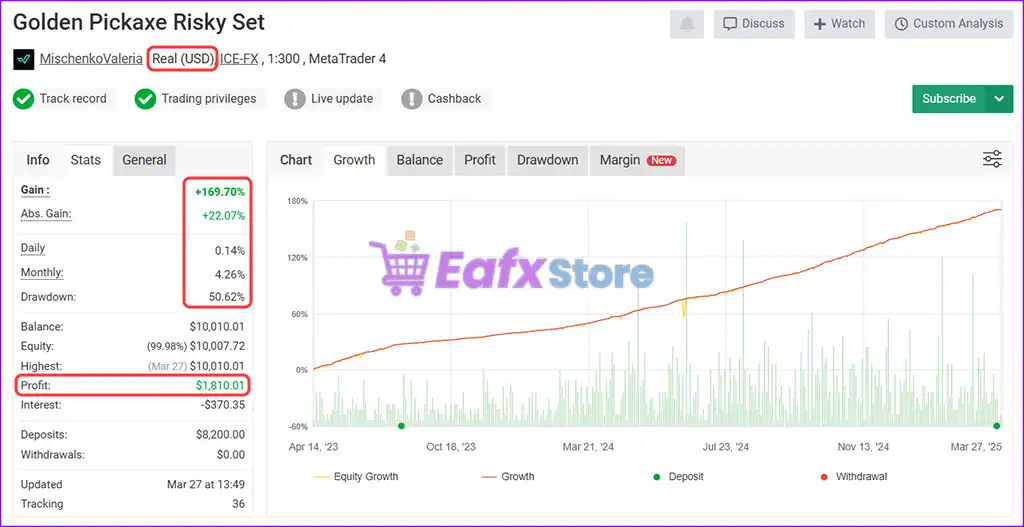
The Golden Pickaxe MT5 has been verified by MyFxBook in the long term and has achieved impressive returns. The advisor shows good XAUUSD (Gold) trading potential and high profit rate.
✅ Initial Deposit: $8,200
✅ Total Gain: +169.70%
✅ Monthly Return: 4.26%
✅ Maximum Drawdown: 50.62%
✅ Live Signal MyFxBook: View here
Golden Pickaxe MT5 Verified by MyFxBook
Golden Pickaxe MT5 Signal Results
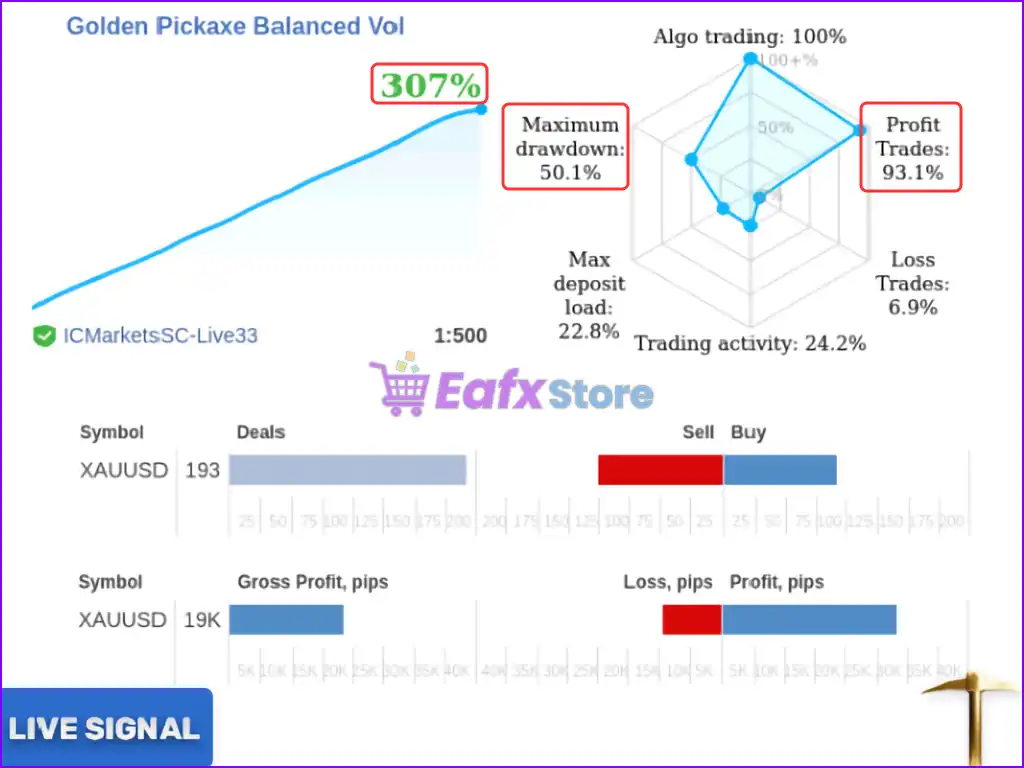
Golden Pickaxe is a precision-tuned algorithm designed to trade XAUUSD (Gold) with high-frequency, high-accuracy entries. Real account trading results are verified and show strong profitability and smart volatility balancing.
✅ Total Gain: +307%
✅ Win Rate: 93.1%
✅ Maximum Drawdown: 50.1%
Golden Pickaxe MT5 Live Results
Golden Pickaxe MT5 Backtest Results
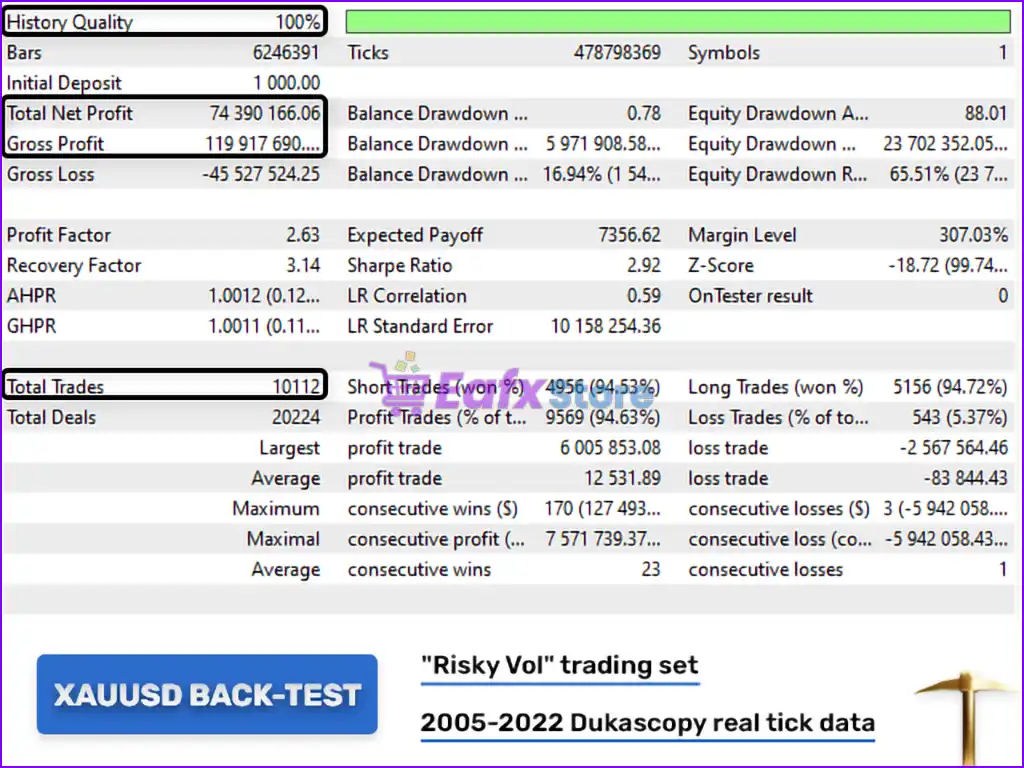
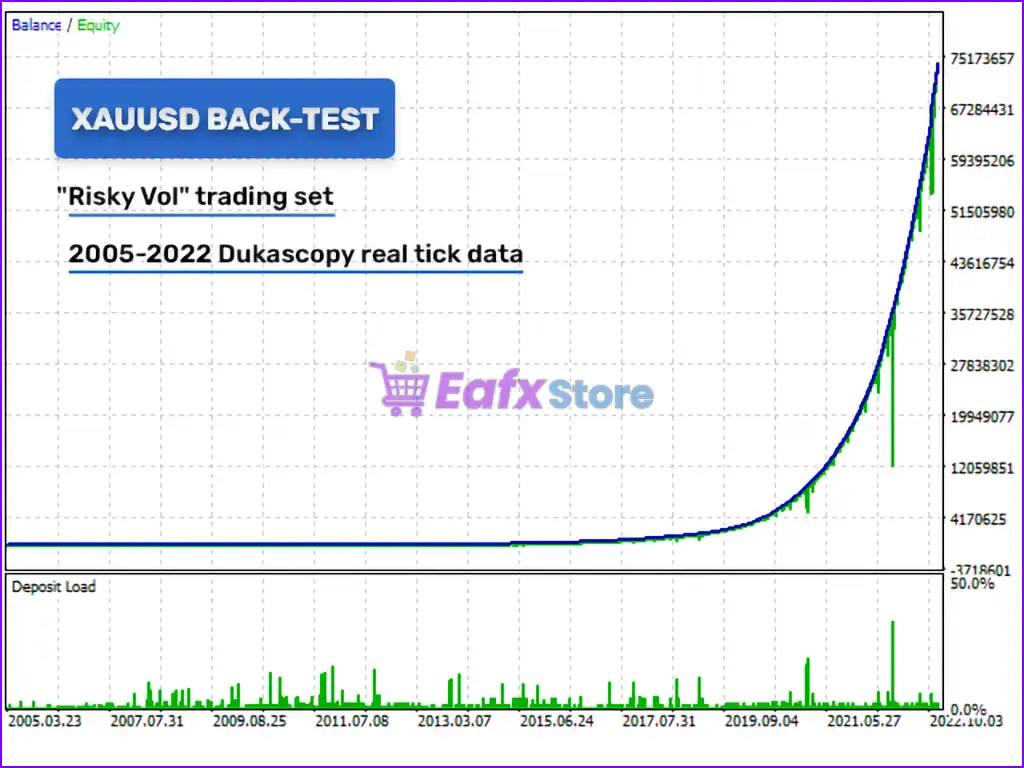
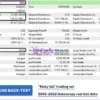
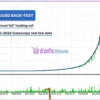
🔶 This 17-year (2005 – 2022) Backtest trade of Golden Pickaxe MT5 has an impressive performance using RISKY VOL settings. Key performance metrics:
✅ Initial Deposit: $1,000
✅ Total Net Profit: $74.39 million
✅ Win Rate: 94.63%
✅ Maximum Drawdown: 16.94%
Golden Pickaxe MT5 Backtest Trading Results
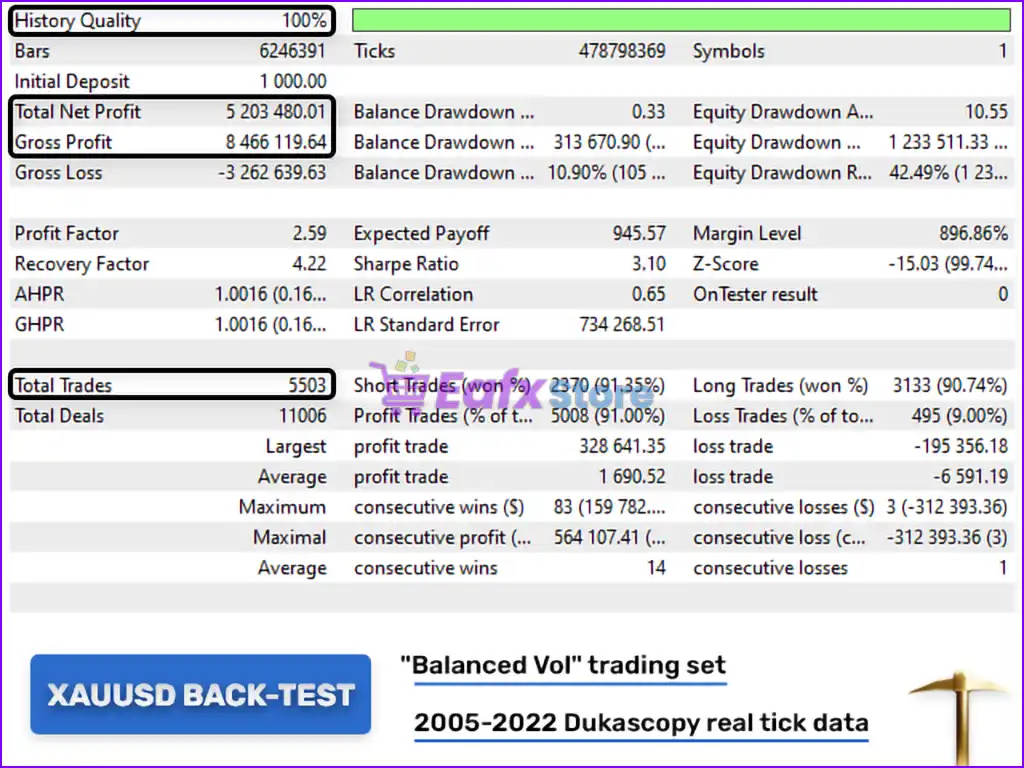
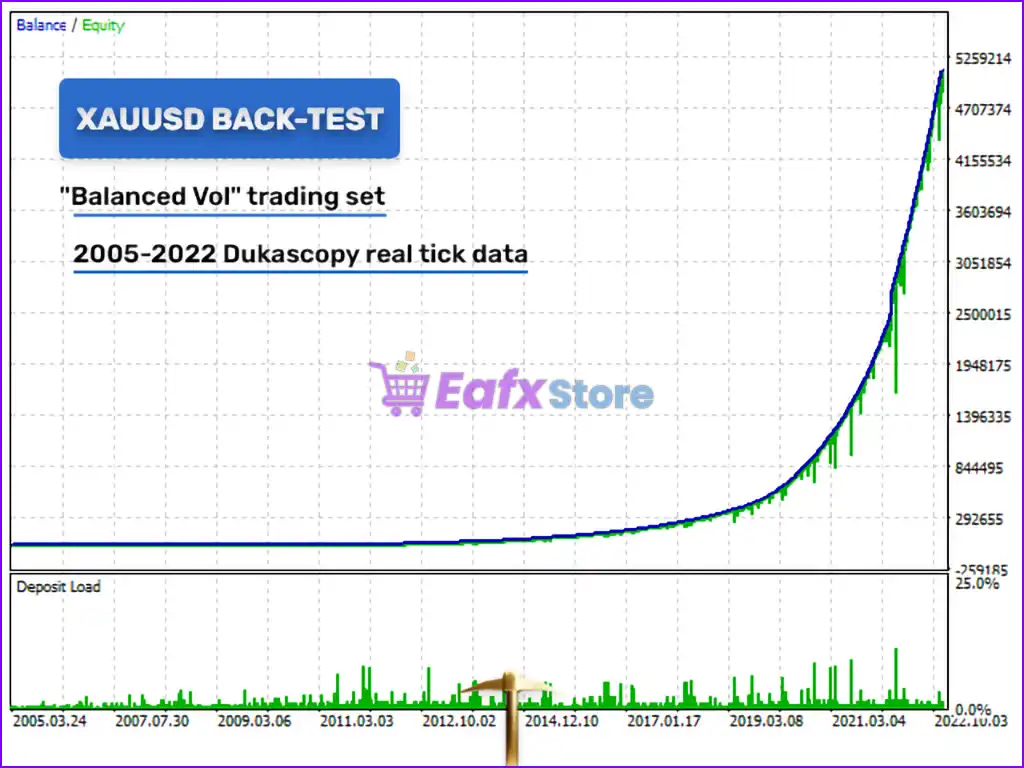
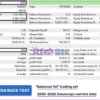
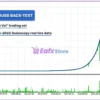
🔶 This 17-year (2005 – 2022) Backtest trade of Golden Pickaxe MT5 has an impressive performance using the BANLANCED VOL setting. Key performance metrics:
✅ Initial Deposit: $1,000
✅ Total Net Profit: $5.2 million
✅ Win Rate: 91.00%
✅ Maximum Drawdown: 10.90%
Golden Pickaxe MT5 Backtest Results
Why choose Golden Pickaxe MT5?
🔹 AI-Enhanced Precision: Machine learning improves trade selection and reduces unnecessary exposure.
🔹 Stable Long-Term Design: Built to exploit real inefficiencies rather than relying on curve-fitted models.
🔹 Flexible Risk Control: Customizable settings allow traders to match their risk tolerance effectively.
🔹 Optimized for Gold Trading: Specifically designed for XAUUSD with high-frequency precision logic.
🔹 User-Friendly Automation: Preconfigured system with optional customization for advanced users.
Is Golden Pickaxe MT5 safe?
Golden Pickaxe MT5 shows significant potential in providing stable and reliable profits, making it a reliable tool in the forex market. The advisor is highly appreciated by the MQL5 community in many aspects and has won the trust of users.
➡️ Ken (2023.06.05): “Great gold EA. With the Balanced Vol setting, the drawdown is low.”
➡️ Divonney (2022.12.13): “Valeriia (the one and only) whats i name her she is the most trusted brain to build EAs and there is nothing to hide check her account at myfxbook.”
➡️ Robert Gregory Tiddy (2022.11.29): “Amazing product! Been trading for years and using EAs, have been working with gold for sometime now and finally a grid based system that can tame the beast of gold. Amazing work and love the design, keep it up. Been waiting a long time for this one.”
Recommended settings
Recommended settings and parameters to pay attention to from developers and experts:
| Features | Type |
|---|---|
| Trading platform | MetaTrader 5 (MT5) |
| Time frames | M1 (1 minute chart) |
| Currency pairs | XAUUSD (Gold) |
| Minimum / Recommended deposit | $1,000 |
| Minimum / Recommended leverage | 1:100 |
| Product type | Original version |
| Additional services | Unlock and Decompile |
| Recommended brokers | Exness Broker, Icmarkets Broker |
| Recommended VPS | MyfxVPS.com ( Blue VPS, Golden VPS). Lowest Latency, 2 week Free Trial, 100% Free for 12-18 Months. |
Product Download Package?
The download package of the product suite includes:
Experts
✅ Installation Guide.docx
✅ Setting (If Any).docx
SetFiles
✅ XAU Classic.set
✅ XAU Balanced.set
✅ XAU Risky.set
✅ XAU Balanced Vol.set
✅ XAU Risky Vol.set
Conclusion
In short, Golden Pickaxe MT5 is a top-tier AI-powered trading robot for XAUUSD (Gold), engineered with cutting-edge machine learning, neural networks and a robust mean-reversion grid strategy. Tailored specifically for MetaTrader 5 (MT5), this EA stands out for its ability to adapt to real market inefficiencies, delivering high-frequency, high-accuracy trades with exceptional consistency.
🔢 Golden Pickaxe MT5 Settings Explained – Complete Parameter Guide
Golden Pickaxe MT5 is an advanced MetaTrader 5 Expert Advisor designed for intelligent grid trading with machine learning support, neural network filtering, adaptive money management, advanced news protection, rollover control, stock market crash detection and comprehensive risk management.
The EA provides extensive customization for professional traders seeking automated portfolio management with multiple layers of protection.

Golden Pickaxe MT5 Settings
🔢 Installation Panel Parameters
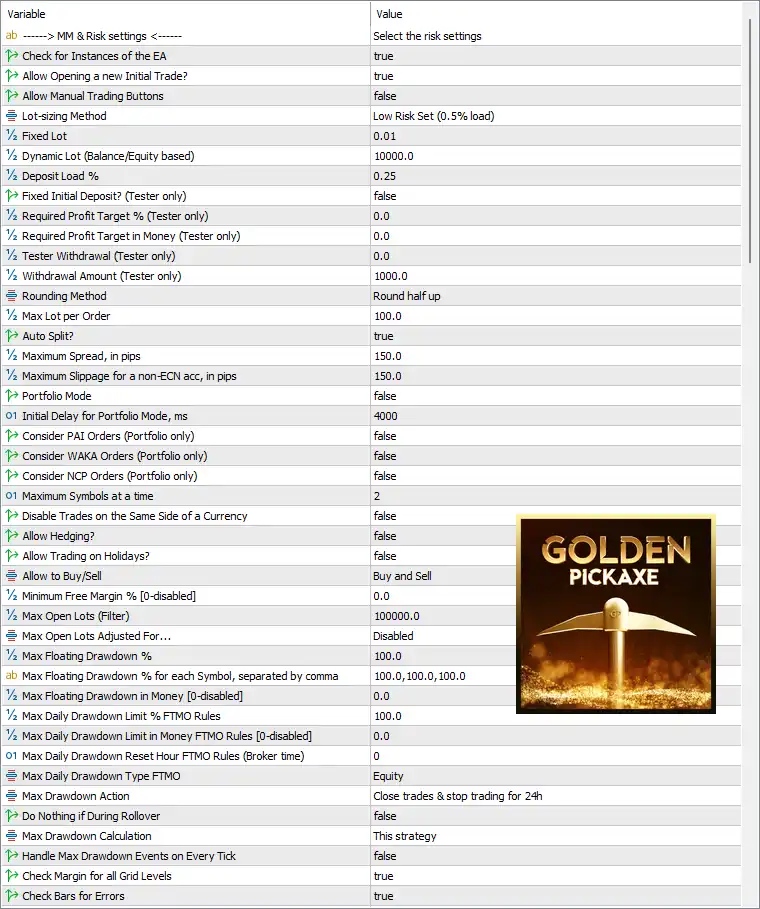
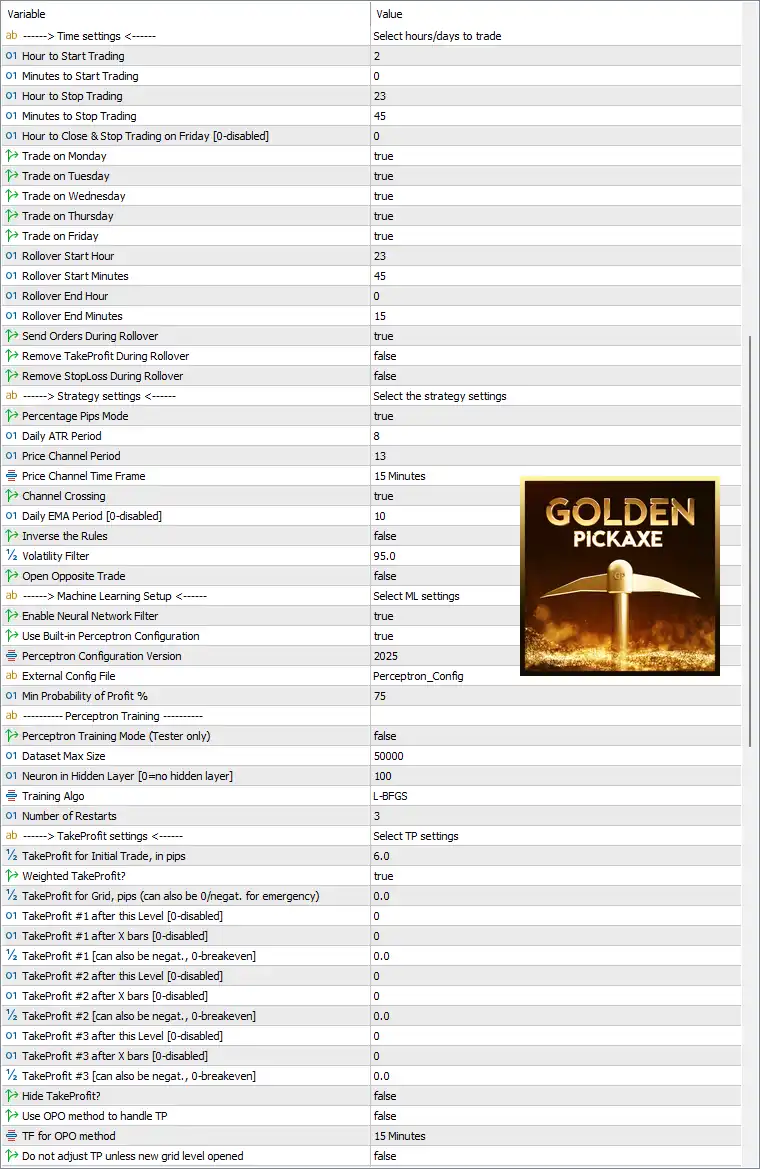
Below are the details of the parameters in the advisor’s trading system settings table:
Golden Pickaxe MT5 Settings Panel
Golden Pickaxe MT5 Setting Panel
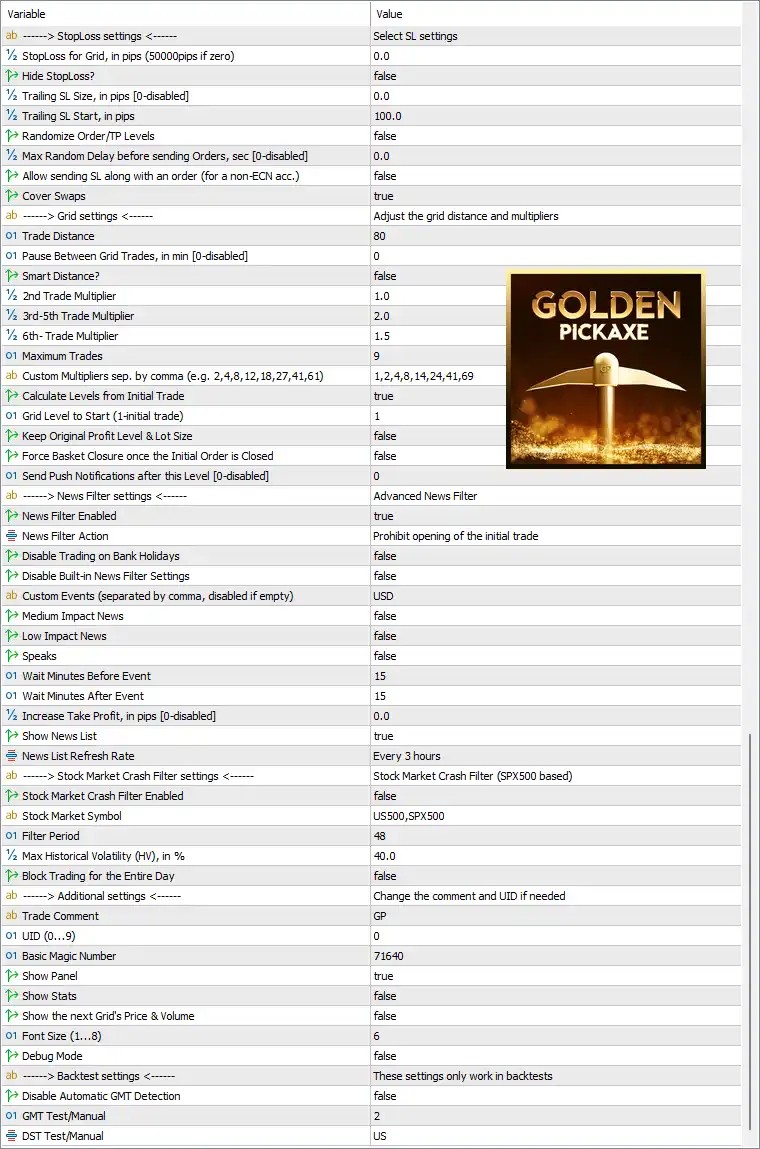
Golden Pickaxe MT5 EA Settings Panel
🔶 MM & Risk Settings
🔹 Check for Instances of the EA = true – Prevents multiple instances of the EA from running simultaneously on the same account.
🔹 Allow Opening a new Initial Trade? = true – Allows the EA to initiate new trading cycles.
🔹 Allow Manual Trading Buttons = false – Disables manual trading buttons on the chart.
🔹 Lot-sizing Method = Low Risk Set (0.5% load) – Uses the predefined low-risk money management model.
🔹 Fixed Lot = 0.01 – Opens trades with a fixed volume of 0.01 lots when fixed lot sizing is used.
🔹 Dynamic Lot (Balance/Equity based) = 10000.0 – Uses 10000.0 as the balance/equity reference for dynamic lot calculations.
🔹 Deposit Load % = 0.25 – Uses 0.25% deposit load for position sizing.
🔹 Fixed Initial Deposit? (Tester only) = false – Uses the actual tester balance instead of a fixed deposit.
🔹 Required Profit Target % (Tester only) = 0.0 – No percentage profit target is applied during testing.
🔹 Required Profit Target in Money (Tester only) = 0.0 – No monetary profit target is required during testing.
🔹 Tester Withdrawal (Tester only) = 0.0 – Automatic withdrawals are disabled during backtesting.
🔹 Withdrawal Amount (Tester only) = 1000.0 – Defines a withdrawal amount of 1000.0 if tester withdrawals are enabled.
🔹 Rounding Method = Round half up – Uses the “Round half up” method for lot calculations.
🔹 Max Lot per Order = 100.0 – Limits every order to a maximum size of 100.0 lots.
🔹 Auto Split? = true – Automatically splits oversized positions into multiple orders.
🔹 Maximum Spread, in pips = 150.0 – Allows trading only when the spread is below 150.0 pips.
🔹 Maximum Slippage for a non-ECN acc, in pips = 150.0 – Accepts up to 150.0 pips slippage on non-ECN accounts.
🔹 Portfolio Mode = false – Disables portfolio trading mode.
🔹 Initial Delay for Portfolio Mode, ms = 4000 – Uses 4000 milliseconds delay if Portfolio Mode is enabled.
🔹 Consider PAI Orders (Portfolio only) = false – Ignores PAI orders.
🔹 Consider WAKA Orders (Portfolio only) = false – Ignores WAKA orders.
🔹 Consider NCP Orders (Portfolio only) = false – Ignores NCP orders.
🔹 Maximum Symbols at a time = 2 – Trades a maximum of 2 symbols simultaneously.
🔹 Disable Trades on the Same Side of a Currency = false – Allows positions in the same currency direction.
🔹 Allow Hedging? = false – Prevents simultaneous opposite positions.
🔹 Allow Trading on Holidays? = false – Disables trading during holidays.
🔹 Allow to Buy/Sell = Buy and Sell – Enables both Buy and Sell trading.
🔹 Minimum Free Margin % [0=disabled] = 0.0 – Free margin protection is disabled.
🔹 Max Open Lots (Filter) = 100000.0 – Allows up to 100000.0 lots across all open trades.
🔹 Max Open Lots Adjusted For = Disabled – Automatic lot adjustment is disabled.
🔹 Max Floating Drawdown % = 100.0 – Sets the floating drawdown limit to 100.0%.
🔹 Max Floating Drawdown % for each Symbol = 100.0,100.0,100.0,100.0 – Applies 100.0% floating drawdown to each configured symbol.
🔹 Max Floating Drawdown in Money [0=disabled] = 0.0 – Money-based drawdown protection is disabled.
🔹 Max Daily Drawdown Limit % FTMO Rules = 100.0 – Daily drawdown limit is 100.0%.
🔹 Max Daily Drawdown Limit in Money FTMO Rules [0=disabled] = 0.0 – Money-based FTMO limit is disabled.
🔹 Max Daily Drawdown Reset Hour FTMO Rules (Broker time) = 0 – Resets at broker hour 00:00.
🔹 Max Daily Drawdown Type FTMO = Equity – Calculates FTMO drawdown using Equity.
🔹 Max Drawdown Action = Close trades & stop trading for 24h – Closes all positions and pauses trading for 24 hours after reaching the drawdown limit.
🔹 Do Nothing if During Rollover = false – Trading logic remains active during rollover management.
🔹 Max Drawdown Calculation = This strategy – Calculates drawdown using only this EA.
🔹 Handle Max Drawdown Events on Every Tick = false – Does not evaluate drawdown on every tick.
🔹 Check Margin for all Grid Levels = true – Verifies margin requirements before opening new grid trades.
🔹 Check Bars for Errors = true – Performs additional chart validation before trading.
🔶 Time Settings
🔹 Hour to Start Trading = 2 – Trading begins at 02:00.
🔹 Minutes to Start Trading = 0 – Starts exactly at 00 minutes.
🔹 Hour to Stop Trading = 23 – Stops trading at 23:00.
🔹 Minutes to Stop Trading = 45 – Trading ends at 23:45.
🔹 Hour to Close & Stop Trading on Friday [0=disabled] = 0 – Friday close filter is disabled.
🔹 Trade on Monday = true – Enables Monday trading.
🔹 Trade on Tuesday = true – Enables Tuesday trading.
🔹 Trade on Wednesday = true – Enables Wednesday trading.
🔹 Trade on Thursday = true – Enables Thursday trading.
🔹 Trade on Friday = true – Enables Friday trading.
🔹 Rollover Start Hour = 23 – Rollover protection starts at 23:00.
🔹 Rollover Start Minutes = 45 – Begins rollover handling at 23:45.
🔹 Rollover End Hour = 0 – Ends rollover at 00:00.
🔹 Rollover End Minutes = 15 – Completes rollover protection at 00:15.
🔹 Send Orders During Rollover = true – Allows order placement during rollover.
🔹 Remove TakeProfit During Rollover = false – Keeps Take Profit active during rollover.
🔹 Remove StopLoss During Rollover = false – Keeps Stop Loss active during rollover.
🔶 Strategy Settings
🔹 Percentage Pips Mode = true – Uses percentage-based pip calculations.
🔹 Daily ATR Period = 8 – Uses an 8-period ATR for volatility calculations.
🔹 Price Channel Period = 13 – Uses a 13-period price channel.
🔹 Price Channel Time Frame = 15 Minutes – Calculates channels on the M15 timeframe.
🔹 Channel Crossing = true – Uses channel crossing as an entry condition.
🔹 Daily EMA Period [0=disabled] = 10 – Uses a 10-period EMA daily filter.
🔹 Inverse the Rules = false – Uses the standard strategy logic.
🔹 Volatility Filter = 95.0 – Requires volatility above 95.0.
🔹 Open Opposite Trade = false – Does not hedge with opposite positions.
🔶 Machine Learning Settings
🔹 Enable Neural Network Filter = true – Activates the built-in neural network filter.
🔹 Use Built-in Perceptron Configuration = true – Uses the default AI model configuration.
🔹 Perceptron Configuration Version = 2025 – Loads configuration version 2025.
🔹 External Config File = Perceptron_Config – Loads AI settings from Perceptron_Config.
🔹 Min Probability of Profit % = 75 – Requires at least 75% predicted probability before entering trades.
Perceptron Training
🔹 Perceptron Training Mode (Tester only) = false – AI training is disabled during normal operation.
🔹 Dataset Max Size = 50000 – Uses a maximum dataset size of 50,000 samples.
🔹 Neuron in Hidden Layer [0=no hidden layer] = 100 – Configures 100 hidden neurons.
🔹 Training Algo = L-BFGS – Uses the L-BFGS optimization algorithm.
🔹 Number of Restarts = 3 – Performs 3 optimization restarts during training.
🔶 Take Profit Settings
🔹 TakeProfit for Initial Trade, in pips = 6.0 – Initial trades target 6.0 pips.
🔹 Weighted TakeProfit? = true – Calculates basket TP using weighted positions.
🔹 TakeProfit for Grid, pips = 0.0 – Uses automatic grid TP calculation.
🔹 TakeProfit #1 after this Level [0-disabled] = 0 – TP Level 1 is disabled.
🔹 TakeProfit #1 after X bars [0-disabled] = 0 – Bar-based TP Level 1 is disabled.
🔹 TakeProfit #1 can also be negative, [0=breakeven] = 0.0 – Uses breakeven only.
🔹 TakeProfit #2 after this Level [0-disabled] = 0 – TP Level 2 is disabled.
🔹 TakeProfit #2 after X bars [0-disabled] = 0 – Time-based TP Level 2 is disabled.
🔹 TakeProfit #2 can also be negative, [0=breakeven] = 0.0 – Uses breakeven.
🔹 TakeProfit #3 after this Level [0-disabled] = 0 – TP Level 3 is disabled.
🔹 TakeProfit #3 after X bars [0-disabled] = 0 – Time-based TP Level 3 is disabled.
🔹 TakeProfit #3 can also be negative, [0=breakeven] = 0.0 – Uses breakeven.
🔹 Hide TakeProfit? = false – Displays Take Profit orders.
🔹 Use OPO method to handle TP = false – OPO TP management is disabled.
🔹 TF for OPO method = 15 Minutes – Uses M15 if OPO is enabled.
🔹 Do not adjust TP unless new grid level opened = false – TP may update whenever needed.
🔶 Stop Loss Settings
🔹 StopLoss for Grid, in pips (5000pips if zero) = 0.0 – Uses the default emergency Stop Loss.
🔹 Hide StopLoss? = false – Stop Loss remains visible.
🔹 Trailing SL Size, in pips [0-disabled] = 0.0 – Trailing Stop distance is disabled.
🔹 Trailing SL Start, in pips = 100.0 – Starts trailing after 100.0 pips.
🔹 Randomize Order/TP Levels = false – Does not randomize execution prices.
🔹 Max Random Delay before sending Orders, sec [0-disabled] = 0.0 – No random execution delay.
🔹 Allow sending SL along with an order (for a non-ECN acc.) = false – Sends SL separately.
🔹 Cover Swaps = true – Adjusts strategy to compensate for swap costs.
🔶 Grid Settings
🔹 Trade Distance = 80 – Grid spacing is 80 pips.
🔹 Pause Between Grid Trades, in min [0-disabled] = 0 – No waiting period between grid entries.
🔹 Smart Distance? = false – Uses fixed grid spacing.
🔹 2nd Trade Multiplier = 1.0 – Second position keeps the same lot size.
🔹 3rd–5th Trade Multiplier = 2.0 – Third to fifth trades double the lot size.
🔹 6th+ Trade Multiplier = 1.5 – Sixth and later trades use 1.5× multiplier.
🔹 Maximum Trades = 9 – Limits the basket to 9 trades.
🔹 Custom Multipliers sep. by comma = 1,2,4,8,14,24,41,69 – Uses custom progression for grid levels.
🔹 Calculate Levels from Initial Trade = true – Grid distances reference the first trade.
🔹 Grid Level to Start (1 initial trade) = 1 – Grid starts from level 1.
🔹 Keep Original Profit Level & Lot Size = false – Allows dynamic TP and lot recalculation.
🔹 Force Basket Closure once the Initial Order is Closed = false – Remaining trades continue after the first closes.
🔹 Send Push Notification after this Level [0-disabled] = 0 – Push notifications are disabled.
🔶 News Filter Settings
🔹 News Filter Enabled = true – Enables advanced news protection.
🔹 News Filter Action = Prohibit opening of the initial trade – Blocks new initial entries during news events.
🔹 Disable Trading on Bank Holidays = false – Trading continues on bank holidays.
🔹 Disable Built-in News Filter Settings = false – Uses built-in news settings.
🔹 Custom Events = USD – Monitors USD-related events.
🔹 Medium Impact News = false – Ignores medium-impact events.
🔹 Low Impact News = false – Ignores low-impact events.
🔹 Speaks = false – Speech notifications are disabled.
🔹 Wait Minutes Before Event = 15 – Stops opening new trades 15 minutes before news.
🔹 Wait Minutes After Event = 15 – Resumes trading 15 minutes after news.
🔹 Increase Take Profit, in pips [0-disabled] = 0.0 – TP adjustment around news is disabled.
🔹 Show News List = true – Displays the economic calendar.
🔹 News List Refresh Rate = Every 3 hours – Refreshes news every 3 hours.
🔶 Stock Market Crash Filter
🔹 Stock Market Crash Filter Enabled = false – Crash protection is disabled.
🔹 Stock Market Symbol = US500, SPX500 – Uses US500/SPX500 as the volatility benchmark.
🔹 Filter Period = 48 – Uses a 48-period historical window.
🔹 Max Historical Volatility (HV), in % = 40.0 – Uses 40.0% as the HV threshold.
🔹 Block Trading for the Entire Day = false – Trading continues after volatility spikes.
🔶 Additional Settings
🔹 Trade Comment = GP – Adds GP as the order comment.
🔹 UID (0…9) = 0 – Uses unique identifier 0.
🔹 Basic Magic Number = 71640 – Assigns Magic Number 71640 to all EA trades.
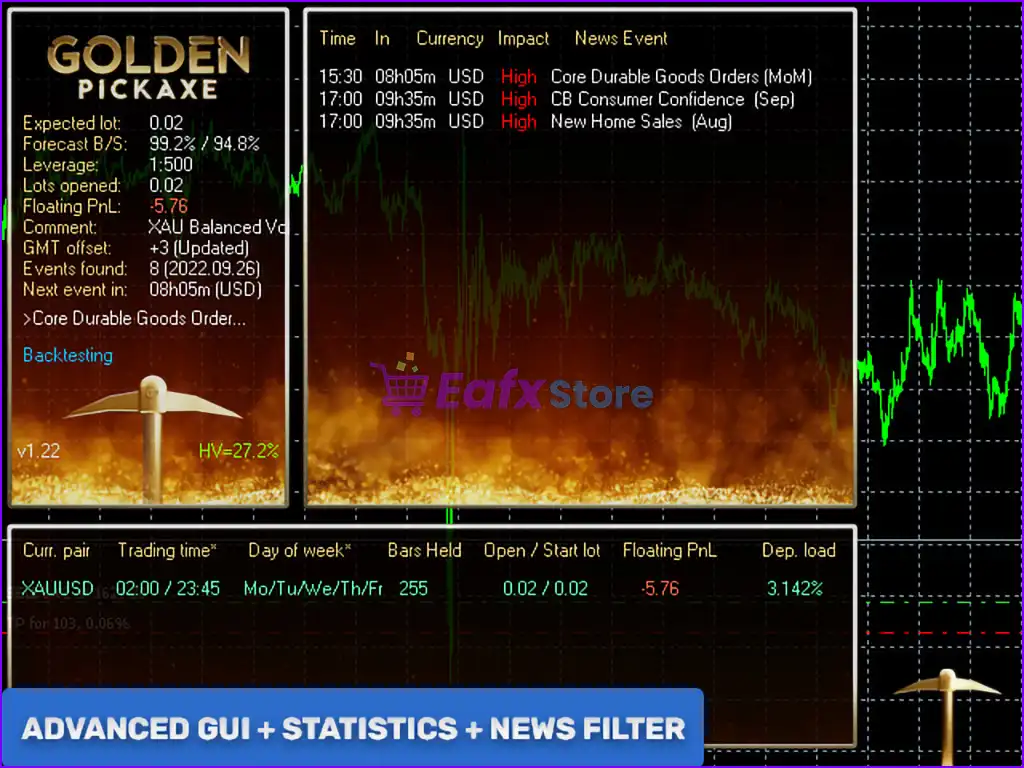
🔹 Show Panel = true – Displays the EA dashboard.
🔹 Show Stats = false – Hides statistical information.
🔹 Show the next Grid’s Price & Volume = false – Does not display upcoming grid details.
🔹 Font Size (1…8) = 6 – Uses font size 6.
🔹 Debug Mode = false – Debug logging is disabled.
🔶 Backtest Settings
🔹 Disable Automatic GMT Detection = false – Automatically detects GMT during live trading.
🔹 GMT Test/Manual = 2 – Uses GMT offset 2 for testing.
🔹 DST Test/Manual = US – Applies US Daylight Saving Time rules.
🔢 Conclusion
Golden Pickaxe MT5 is a feature-rich AI-powered grid trading Expert Advisor that combines machine learning, neural network filtering, adaptive money management, ATR-based market analysis, advanced news protection, rollover management, stock market crash filtering and extensive drawdown controls.
With highly configurable trading parameters and robust portfolio protection tools, it provides experienced MetaTrader 5 traders with a flexible framework for optimizing automated trading while maintaining disciplined risk management.
🔢 FAQs
❓ What is the main trading strategy of Golden Pickaxe MT5?
Golden Pickaxe MT5 uses an adaptive grid trading strategy enhanced with neural network filtering and machine learning probability analysis.
❓ Does Golden Pickaxe MT5 include AI features?
Yes. The EA includes a built-in neural network, Perceptron configuration, configurable AI training parameters, and probability-based trade filtering.
❓ Can Golden Pickaxe MT5 trade both Buy and Sell positions?
Yes. The default configuration allows both Buy and Sell trading directions.
❓ Does the EA include an economic news filter?
Yes. It features an advanced news filter that blocks new initial trades before major economic events and resumes trading after the configured waiting period.
❓ Is Golden Pickaxe MT5 suitable for professional risk management?
Yes. The EA provides advanced drawdown protection, FTMO-style limits, adaptive lot sizing, rollover management, stock market crash filtering, neural network validation, and comprehensive grid management for professional automated trading.
User Reviews
Only logged in customers who have purchased this product may leave a review.
1. What trading strategy does Golden Pickaxe MT5 use?
Golden Pickaxe MT5 uses a mean-reversion grid trading strategy, specifically optimized for XAUUSD (Gold). It identifies market inefficiencies to open trades during price reversals, aiming for high-probability entries.
2. Is this EA only for trading gold (XAUUSD)?
Yes, Golden Pickaxe MT5 is exclusively designed for trading gold (XAUUSD) and is not intended for other currency pairs or instruments.
3. How does the AI and machine learning improve trading?
The EA integrates custom neural networks and Perceptron models that analyze historical and real-time data to filter out low-quality trades, enhancing trade precision and decision-making.
4. What is the minimum deposit required to run the EA?
The recommended minimum deposit is $1,000. Smaller deposits may reduce performance or increase risk exposure due to limited grid flexibility.
5. How many strategies or presets does the EA include?
Golden Pickaxe MT5 includes 5 preset strategies, each with a different risk level. These include conservative, balanced, and aggressive profiles like the popular “XAU Risky” setup.
6. Is it safe to use this EA considering gold's volatility?
Yes, the EA includes advanced risk management tools, news filters, and market crash protection to reduce exposure during highly volatile or unpredictable conditions.
7. What kind of live performance can I expect?
Verified accounts show gains of over +300% with 93%+ win rate, though this depends on your settings and risk appetite. Historical drawdowns range from 10% to 50% depending on the configuration used.
8. Does the EA support automatic updates or retraining?
Yes. Golden Pickaxe MT5 can retrain its AI model using broker-specific data, improving its adaptability and accuracy across different trading environments.
9. What timeframe and leverage does the EA use?
The EA runs on the M1 timeframe and is optimized for accounts with at least 1:100 leverage, although higher leverage may improve flexibility in grid trading.
10. Is the EA suitable for beginners or only professionals?
Golden Pickaxe MT5 is beginner-friendly with detailed instructions and presets, but also offers advanced customization for experienced traders seeking full control over grid, risk, and AI behavior.
-
 Price range: $65.00 through $599.00
 -
 Price range: $89.00 through $599.00
 -
 Price range: $89.00 through $599.00
 -
 Price range: $60.00 through $599.00
-
 3
3 -
 3Price range: $89.00 through $599.00
 -
 1
1 -
 0Price range: $89.00 through $599.00
There are no reviews yet.