


🔢 Prop Guardian Pro EA MT4 – Complete Settings Guide and Parameter Explanation
Prop Guardian Pro EA is an advanced automated trading Expert Advisor designed for MetaTrader 4 traders seeking disciplined risk management, trend confirmation and prop firm-friendly trading execution.
The EA combines multiple technical indicators including RSI, MACD, Moving Averages, Stochastic, CCI, Bollinger Bands, Momentum, Williams %R, and Parabolic SAR to identify high-probability trading opportunities while maintaining strict control over drawdown and trade execution.

🔢 Installation Panel Parameters
Below are the details of the parameters in the advisor’s trading system settings table:
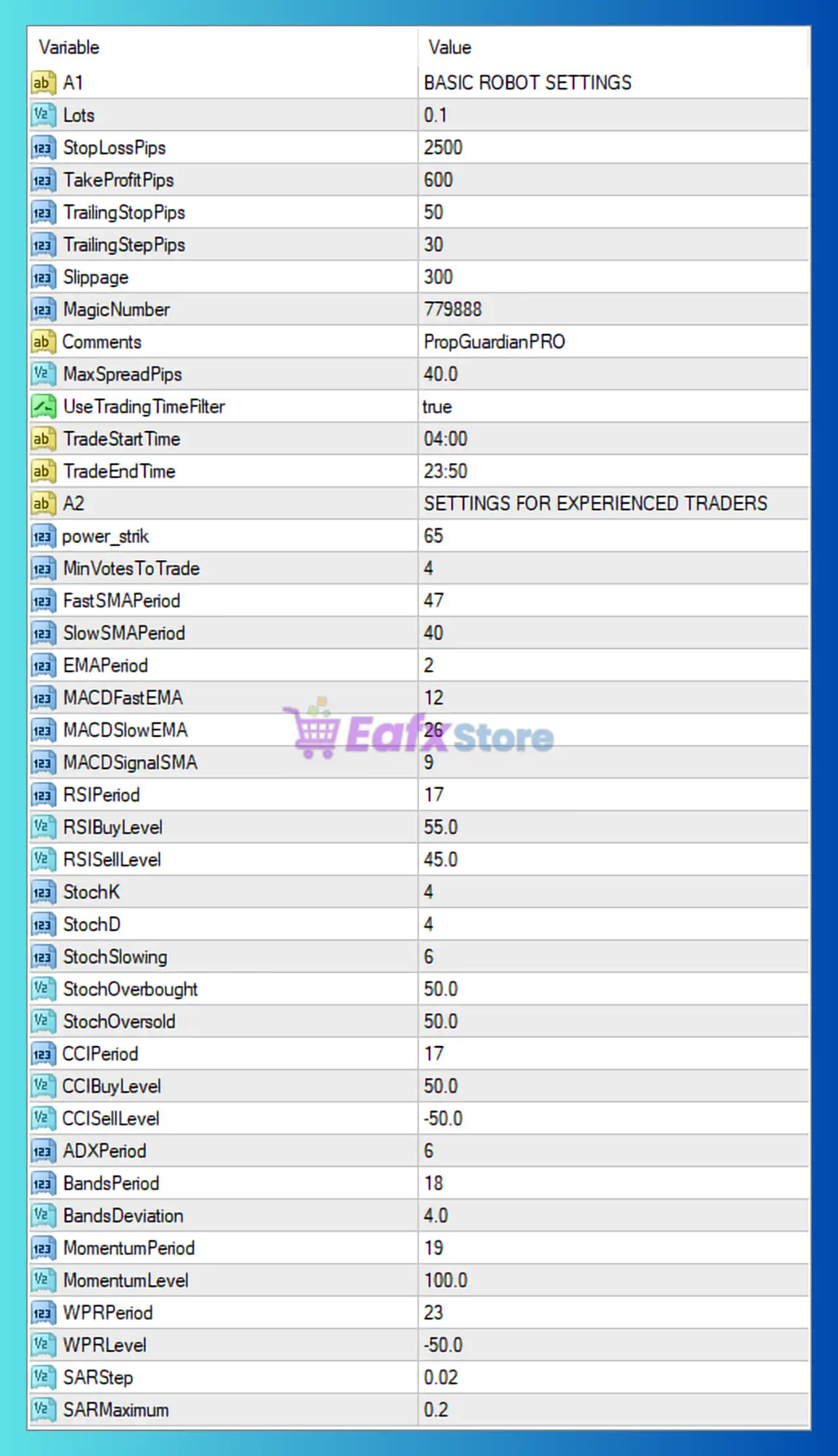
Basic Robot Settings
🔹 A1: Section header labeled "BASIC ROBOT SETTINGS", grouping the core trading parameters.
🔹 Lots: Set to 0.1 lots, defining the default trade volume used by the EA.
🔹 StopLossPips: Configured at 2500 pips, defining the maximum loss allowed per trade.
🔹 TakeProfitPips: Set to 600 pips, defining the profit target for each position.
🔹 TrailingStopPips: Configured at 50 pips, determining when the trailing stop mechanism becomes active.
🔹 TrailingStepPips: Set to 30 pips, defining the incremental movement of the trailing stop.
🔹 Slippage: Configured at 300, specifying the maximum acceptable execution slippage.
🔹 MagicNumber: Set to 779888, serving as the unique identifier for all trades managed by the EA.
🔹 Comments: Configured as PropGuardianPRO, adding this comment to all EA-generated orders.
🔹 MaxSpreadPips: Set to 40.0 pips, defining the maximum spread allowed before opening new trades.
🔹 UseTradingTimeFilter: Set to true, enabling trading session restrictions.
🔹 TradeStartTime: Configured at 04:00, allowing the EA to begin opening trades at 4:00 AM.
🔹 TradeEndTime: Configured at 23:50, stopping new trade entries at 11:50 PM.
Advanced Settings for Experienced Traders
🔹 A2: Section header labeled "SETTINGS FOR EXPERIENCED TRADERS", containing advanced indicator configurations.
🔹 power_strik: Set to 65, defining the overall signal strength threshold required for trade execution.
🔹 MinVotesToTrade: Configured at 4, requiring at least four indicator confirmations before entering a trade.
Moving Average Settings
🔹 FastSMAPeriod: Set to 47, defining the period used for the Fast Simple Moving Average.
🔹 SlowSMAPeriod: Configured at 40, defining the period used for the Slow Simple Moving Average.
🔹 EMAPeriod: Set to 2, specifying the Exponential Moving Average calculation period.
MACD Settings
🔹 MACDFastEMA: Configured at 12, defining the fast EMA period used in MACD calculations.
🔹 MACDSlowEMA: Set to 26, defining the slow EMA period used in MACD calculations.
🔹 MACDSignalSMA: Configured at 9, specifying the MACD signal line smoothing period.
RSI Settings
🔹 RSIPeriod: Set to 17, defining the Relative Strength Index calculation period.
🔹 RSIBuyLevel: Configured at 55.0, defining the RSI level required for BUY signal confirmation.
🔹 RSISellLevel: Set to 45.0, defining the RSI level required for SELL signal confirmation.
Stochastic Oscillator Settings
🔹 StochK: Configured at 4, defining the %K period of the Stochastic Oscillator.
🔹 StochD: Set to 4, defining the %D smoothing period.
🔹 StochSlowing: Configured at 6, controlling the slowing factor of the Stochastic calculation.
🔹 StochOverbought: Set to 50.0, defining the overbought threshold level.
🔹 StochOversold: Configured at 50.0, defining the oversold threshold level.
Commodity Channel Index (CCI) Settings
🔹 CCIPeriod: Set to 17, defining the calculation period for the Commodity Channel Index.
🔹 CCIBuyLevel: Configured at 50.0, defining the BUY confirmation level for CCI.
🔹 CCISellLevel: Set to -50.0, defining the SELL confirmation level for CCI.
Average Directional Index (ADX) Settings
🔹 ADXPeriod: Configured at 6, defining the period used to measure trend strength.
Bollinger Bands Settings
🔹 BandsPeriod: Set to 18, defining the Bollinger Bands calculation period.
🔹 BandsDeviation: Configured at 4.0, specifying the standard deviation multiplier used by the Bollinger Bands.
Momentum Indicator Settings
🔹 MomentumPeriod: Set to 19, defining the Momentum indicator calculation period.
🔹 MomentumLevel: Configured at 100.0, defining the Momentum threshold used for signal generation.
Williams Percent Range (WPR) Settings
🔹 WPRPeriod: Set to 23, defining the Williams %R calculation period.
🔹 WPRLevel: Configured at -50.0, defining the Williams %R signal threshold.
Parabolic SAR Settings
🔹 SARStep: Set to 0.02, defining the acceleration step used by the Parabolic SAR indicator.
🔹 SARMaximum: Configured at 0.2, specifying the maximum acceleration factor of the Parabolic SAR.
🔢 Conclusion
Prop Guardian Pro EA is a comprehensive multi-indicator trading system that combines trend analysis, momentum detection, volatility measurements, and advanced trade filtering into a single automated solution.
With risk management features such as StopLossPips 2500, TakeProfitPips 600, MaxSpreadPips 40.0, and MinVotesToTrade 4, the EA is designed to provide disciplined execution while reducing unnecessary market exposure. Proper optimization of these settings can help traders adapt the EA to various market conditions and prop firm trading requirements.
🔢 FAQs
❓ What is Prop Guardian Pro EA MT4?
Prop Guardian Pro EA MT4 is an automated Forex trading robot that uses multiple technical indicators and advanced filtering systems to identify high-probability trading opportunities.
❓ What is the purpose of the MagicNumber 779888?
The MagicNumber 779888 uniquely identifies all trades opened by the EA, allowing it to manage positions independently from other EAs or manual trades.
❓ How does MinVotesToTrade work?
The MinVotesToTrade = 4 parameter requires at least four indicator confirmations before a trade can be executed, helping reduce false signals.
❓ Why does the EA use multiple indicators?
The EA combines RSI, MACD, Moving Averages, Stochastic, CCI, ADX, Bollinger Bands, Momentum, Williams %R, and Parabolic SAR to improve signal accuracy and market confirmation.
❓ Can I customize the trading session hours?
Yes, with UseTradingTimeFilter = true, traders can modify TradeStartTime 04:00 and TradeEndTime 23:50 to match their preferred trading sessions and broker time zone.



