



SharpShooter EA MT4 v3.0 + SetFiles (Platform build 1476+)

Subscriptions for Special Plan
- 30 EA package is more economical!
- Special package with 99%
- Download 1 EA/Day

Subscriptions for Premium Membership
- Download Unlimited in 1 Year
- Get 100% Discount
- Get free access to all

Subscriptions for Gold Membership
- 1 Year Membership
- Get 100% Discount
- Access EA+Indicator+Course
Frequently bought together 🎁
Add these products to enhance your purchase




🔢 SharpShooter EA MT4 Settings Guide
SharpShooter EA is an automated news trading Expert Advisor specifically designed to capitalize on high-impact economic events using pending order strategies. The EA provides comprehensive controls for pending orders, news filtering, currency selection, alerts, automatic economic calendar downloads, and dynamic symbol switching, making it an excellent solution for traders who focus on volatility generated by major financial news releases.
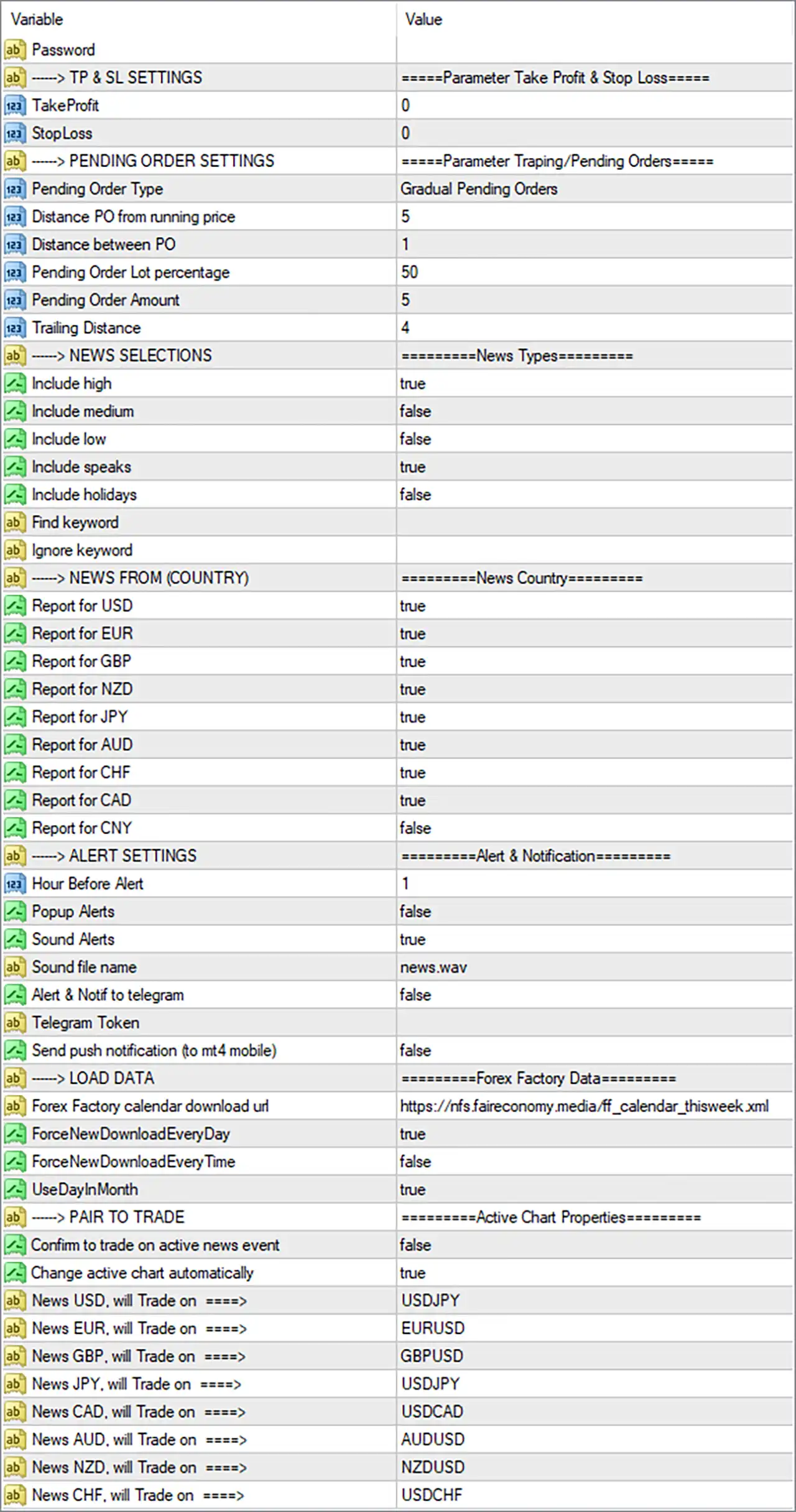
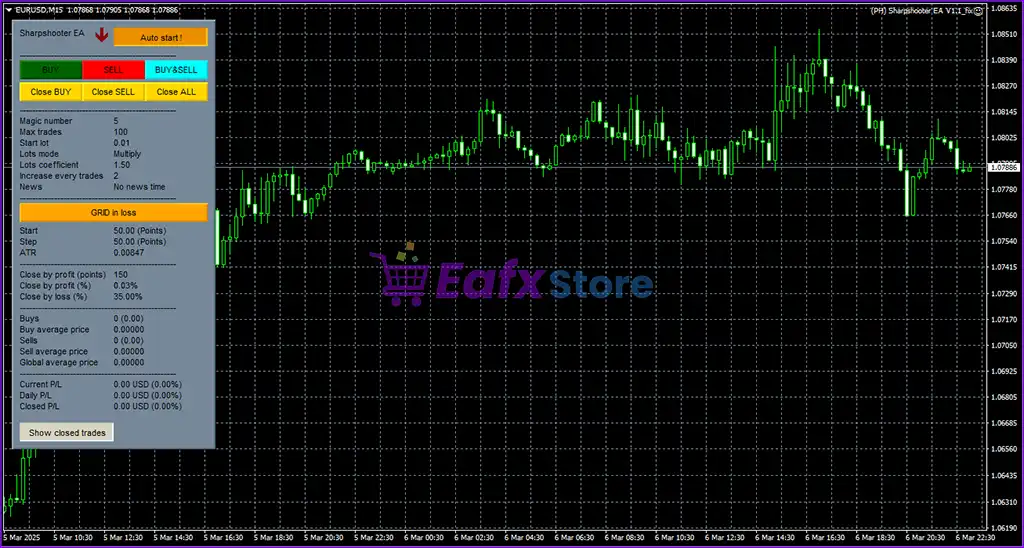
SharpShooter EA MT4 Settings Panel
🔢 SharpShooter EA MT4 Settings Explained
🔶 Take Profit & Stop Loss Settings
🔹 TakeProfit = 0 – Sets the Take Profit level to 0, meaning no fixed Take Profit is applied by default.
🔹 StopLoss = 0 – Sets the Stop Loss level to 0, meaning no fixed Stop Loss is used unless managed internally by the EA.
🔶 Pending Order Settings
🔹 Pending Order Type = Gradual Pending Orders – Uses the Gradual Pending Orders execution method for placing pending orders around news events.
🔹 Distance PO from running price = 5 – Places pending orders 5 points/pips away from the current market price.
🔹 Distance between PO = 1 – Maintains 1 point/pip spacing between multiple pending orders.
🔹 Pending Order Lot percentage = 50 – Allocates 50% of the configured lot size for pending order placement.
🔹 Pending Order Amount = 5 – Allows up to 5 pending orders to be placed.
🔹 Trailing Distance = 4 – Uses a trailing distance of 4 points/pips for managing pending orders or open positions.
🔶 News Selection Settings
🔹 Include high = true – Includes high-impact economic news for trading.
🔹 Include medium = false – Excludes medium-impact news events.
🔹 Include low = false – Excludes low-impact news events.
🔹 Include speaks = true – Includes speeches from central bank officials and policymakers.
🔹 Include holidays = false – Ignores public holidays in the news filter.
🔹 Find keyword – Allows filtering news by specific keywords.
🔹 Ignore keyword – Allows excluding specific keywords from news processing.
🔶 News Country Settings
🔹 Report for USD = true – Monitors and trades USD-related economic news.
🔹 Report for EUR = true – Monitors and trades EUR-related economic news.
🔹 Report for GBP = true – Monitors and trades GBP-related economic news.
🔹 Report for NZD = true – Monitors and trades NZD-related economic news.
🔹 Report for JPY = true – Monitors and trades JPY-related economic news.
🔹 Report for AUD = true – Monitors and trades AUD-related economic news.
🔹 Report for CHF = true – Monitors and trades CHF-related economic news.
🔹 Report for CAD = true – Monitors and trades CAD-related economic news.
🔹 Report for CNY = false – Disables monitoring of Chinese Yuan (CNY) news events.
🔶 Alert Settings
🔹 Hour Before Alert = 1 – Generates an alert 1 hour before a scheduled economic event.
🔹 Popup Alerts = false – Disables MetaTrader popup notifications.
🔹 Sound Alerts = true – Enables audible alerts for upcoming news events.
🔹 Sound file name = news.wav – Uses news.wav as the notification sound.
🔹 Alert & Notify to telegram = false – Disables Telegram notifications.
🔹 Telegram Token – Field used to enter the Telegram Bot API token if Telegram alerts are enabled.
🔹 Send push notification (to mt4 mobile) = false – Disables push notifications to the MetaTrader 4 mobile application.
🔶 Forex Factory Data Settings
🔹 Forex Factory calendar download url = https://nfs.faireconomy.media/ff_calendar_thisweek.xml – Downloads the weekly economic calendar from the configured XML source.
🔹 ForceNewDownloadEveryDay = true – Forces the EA to download a fresh calendar every day.
🔹 ForceNewDownloadEveryTime = false – Prevents downloading the calendar every time the EA starts.
🔹 UseDayMonth = true – Displays or processes dates using the Day/Month format.
🔶 Pair to Trade Settings
🔹 Confirm to trade on active news event = false – Executes trades automatically without requesting manual confirmation.
🔹 Change active chart automatically = true – Automatically switches the active chart to the appropriate trading symbol for the detected news event.
🔹 News USD, will Trade on = USDJPY – Trades USDJPY for USD news releases.
🔹 News EUR, will Trade on = EURUSD – Trades EURUSD for EUR news releases.
🔹 News GBP, will Trade on = GBPUSD – Trades GBPUSD for GBP news releases.
🔹 News JPY, will Trade on = USDJPY – Trades USDJPY for JPY news releases.
🔹 News CAD, will Trade on = USDCAD – Trades USDCAD for CAD news releases.
🔹 News AUD, will Trade on = AUDUSD – Trades AUDUSD for AUD news releases.
🔹 News NZD, will Trade on = NZDUSD – Trades NZDUSD for NZD news releases.
🔹 News CHF, will Trade on = USDCHF – Trades USDCHF for CHF news releases.
🔢 Conclusion
SharpShooter EA MT4 is a specialized news trading Expert Advisor built for traders who want to automate trading around major economic announcements. Its configurable pending order system, flexible news filters, automatic Forex Factory calendar integration, customizable alerts, and currency-specific trading assignments provide a powerful framework for capturing volatility during high-impact news events. With extensive customization options, the EA can be adapted to a wide range of news trading strategies while maintaining disciplined execution.
🔢 FAQs
❓ What trading strategy does SharpShooter EA MT4 use?
SharpShooter EA MT4 primarily uses a Gradual Pending Orders strategy to capture price movements during important economic news releases.
❓ Can I trade only high-impact news?
Yes. The current settings enable high-impact news only, while medium and low-impact events are disabled.
❓ Does the EA automatically download the economic calendar?
Yes. It downloads the weekly economic calendar automatically from the configured Forex Factory XML source and refreshes it daily.
❓ Can I assign different currency pairs for different news events?
Yes. Each currency (USD, EUR, GBP, JPY, AUD, NZD, CAD, CHF) can be assigned its own trading pair.
❓ Does SharpShooter EA MT4 support mobile or Telegram notifications?
Yes. The EA supports both Telegram and MetaTrader mobile push notifications, although both are disabled in the current configuration.
User Reviews
Only logged in customers who have purchased this product may leave a review.
1. What is Sharpshooter EA?
Sharpshooter EA is an advanced forex scalping Expert Advisor (EA) for MetaTrader 4 (MT4) that focuses on executing short-term trades on the EUR/USD and GBP/USD currency pairs. It uses a trend-following strategy to capture small but consistent profits.
2. How does Sharpshooter EA work?
The EA identifies high-probability trade opportunities by aligning short-term scalping trades with larger market trends. It uses an adaptive flex-grid money management system to adjust position sizing based on market volatility for optimal risk management.
3. What currency pairs does Sharpshooter EA trade?
It is optimized for EUR/USD and GBP/USD, as these pairs have high liquidity and low spreads, making them ideal for scalping strategies.
4. What is the minimum deposit required to use Sharpshooter EA?
The recommended minimum deposit is $1,000, though traders may adjust based on their risk tolerance.
5. What is the typical trade duration for Sharpshooter EA?
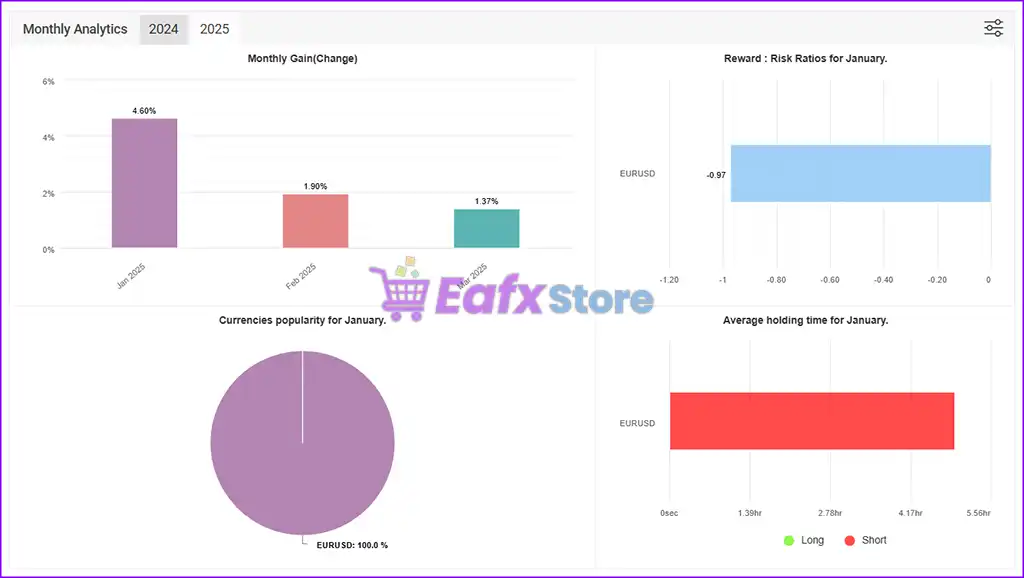
The average trade duration is 1.5 hours, minimizing exposure to overnight risks and sudden market gaps.
6. What kind of profitability can I expect from Sharpshooter EA?
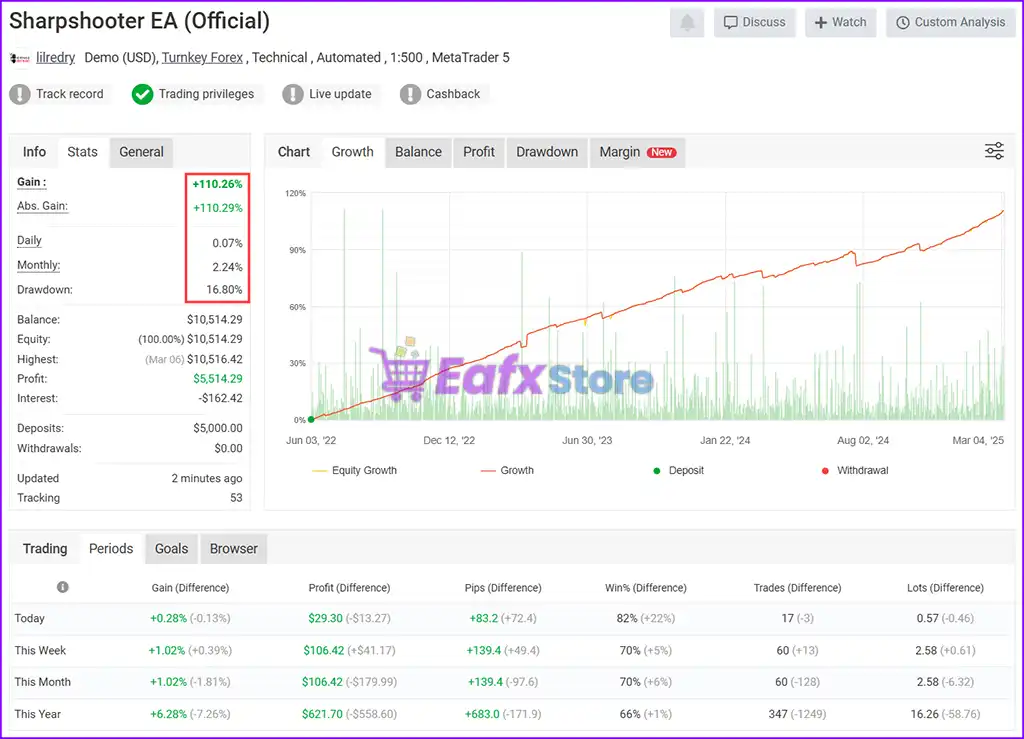
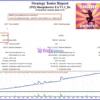
Live performance metrics show:
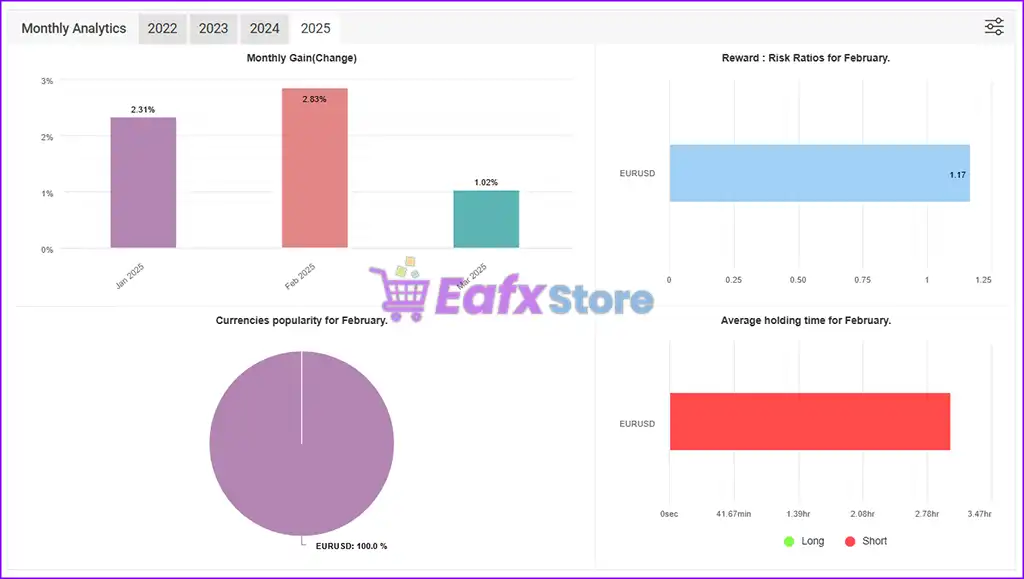
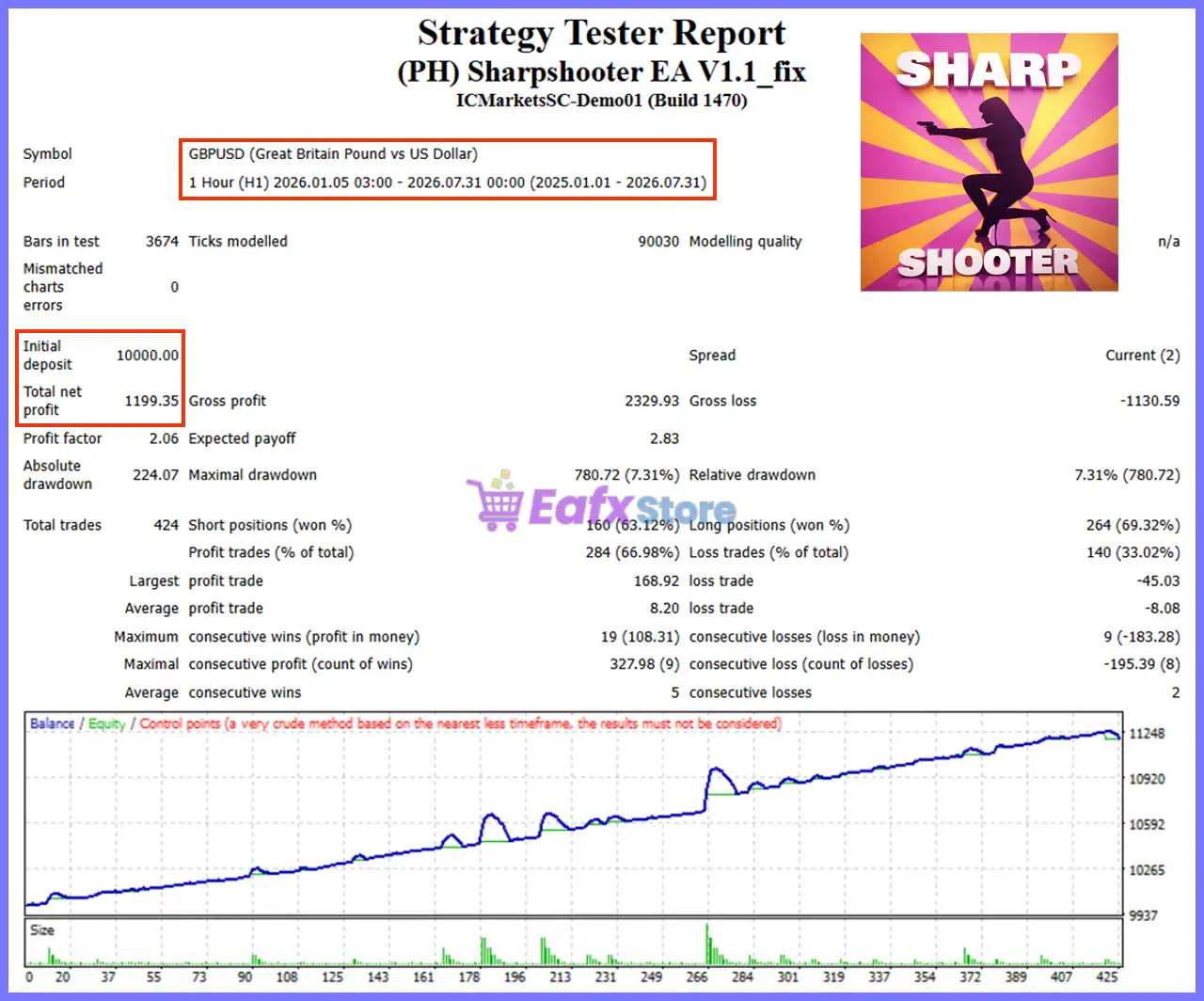
✔ Total Gain: +110.26%
✔ Monthly Growth: 2.24%
✔ Drawdown: 16.80%
✔ Live Signal: Verified on MyFxBook
7. Does Sharpshooter EA use dangerous trading strategies like Martingale or Grid?
No, Sharpshooter EA does not use high-risk Martingale strategies. Instead, it employs an adaptive flex-grid system that dynamically adjusts trade sizes to manage risk effectively.
8. Is Sharpshooter EA fully automated?
Yes, Sharpshooter EA is 100% automated and does not require any manual intervention, making it ideal for both beginners and experienced traders.
🔥 Get This EA for FREE with Our Membership! 🚀🚀
Unlock access to this EA, premium Indicators, and exclusive trading tools completely FREE with any of our Membership Plans! Thousands of traders already benefit from our VIP library—join them and level up your trading instantly. Choose Your Membership:
- SPECIAL – 1 Month Membership
- GOLD – 1 Year Membership
- PREMIUM – 1 Year Membership
-
 Price range: $70.00 through $599.00
 -
 Price range: $80.00 through $599.00
 -
 Original price was: $299.00.$89.00Current price is: $89.00.
 -
 Price range: $60.00 through $599.00
-
 1Original price was: $1,599.00.$59.00Current price is: $59.00.
 -
 1Original price was: $950.00.$59.00Current price is: $59.00.
 -
 3Original price was: $999.00.$69.00Current price is: $69.00.
 -
 10Original price was: $2,100.00.$69.00Current price is: $69.00.
There are no reviews yet.