


Thunderbolt EA MT5 v3.5 with SetFiles (Unlimited)

Subscriptions for Special Plan
- 30 EA package is more economical!
- Special package with 99%
- Download 1 EA/Day

Subscriptions for Premium Membership
- Download Unlimited in 1 Year
- Get 100% Discount
- Get free access to all

Subscriptions for Gold Membership
- 1 Year Membership
- Get 100% Discount
- Access EA+Indicator+Course
Frequently bought together 🎁
Add these products to enhance your purchase


What is Thunderbolt EA?
Thunderbolt EA is an Expert Advisor (EA) specializing in trading forex pairs, Gold and is designed to be compatible with the MetaTrader 5 (MT5) platform. Thunderbolt EA’s excellent performance has been verified with impressive 2 years of trading results.
Key Features of Thunderbolt EA for MT5
✅ Fully automated trading: The robot will automatically execute all transactions in your account, from opening to fixing and closing orders. (No manual operation required)
✅ Huge profits:
🔹Expected daily growth: 50% – 290%, even up to 1000%.
🔹Win rate up to 90%.
🔹The robot has been profitable for more than 2 years.
✅ Risk management: The robot will minimize drawdown based on volume and market trends.
✅ Safety:
🔹The publisher is committed to keeping your capital secure to generate continuous profits.
🔹No profit sharing required (Zero profit share).
✅ Easy to use: Just install on MetaTrader 5 (MT5) software in 10 minutes.
✅ Differentiation:
🔹Using advanced algorithms.
🔹Compatible with all brokers.
🔹Combining multiple trading methods (Mixed Approach).
Thunderbolt EA MT5 Review
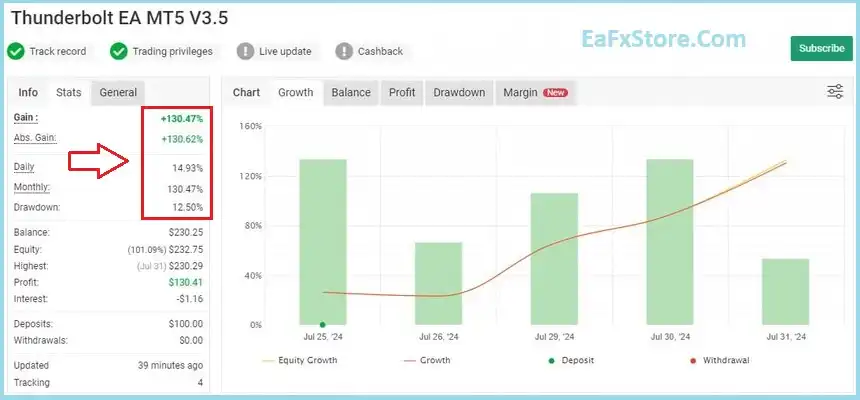
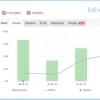
Thunderbolt EA has proven profitable performance for 2 years of continuous trading and performance verified by Myfxbook, the results show great profit potential.
thunderbolt EA Myfxbook
Thunderbolt EA MT5 Reviews
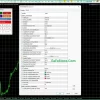
Recommended settings
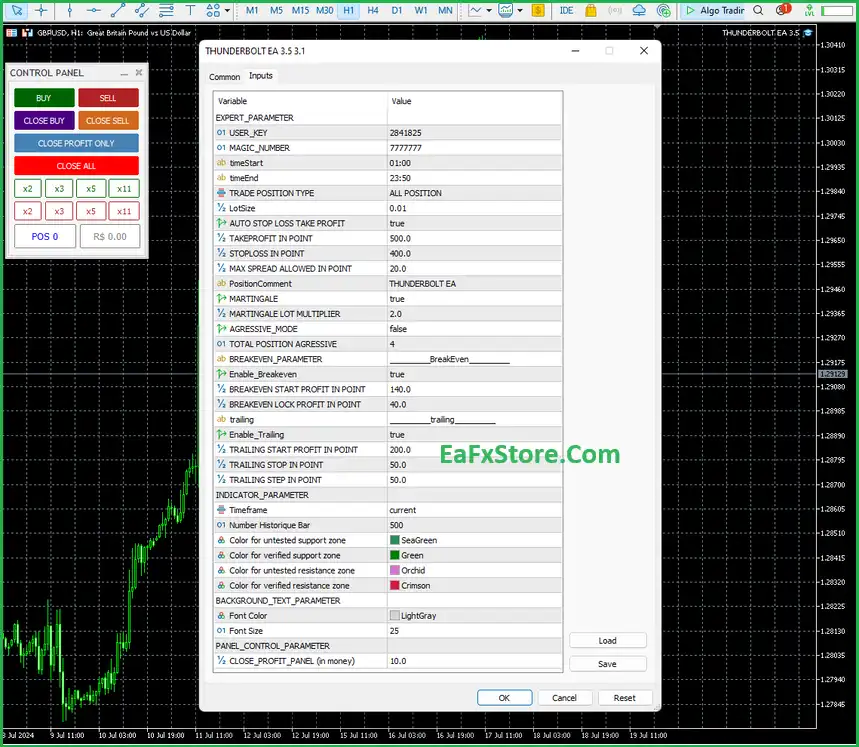
Recommended settings and parameters to pay attention to from developers and experts:
| Features | Type |
|---|---|
| Trading platform | MetaTrader 5 (MT5) |
| Time frames | H1 (60 minute chart) |
| Minimum / Recommended deposit | $20 |
| Currency pairs | EURUSD, GBPUSD, AUDUSD, EURJPY, EURGBP, USDCAD, XAUUSD, BTCUSD. |
| Setup files | Available |
| Product type | NoDLL / Fix |
| Additional services | Unlock and Decompile |
| Recommended brokers | Exness Broker, Icmarkets Broker |
| Recommended VPS | MyfxVPS.com ( Blue VPS, Golden VPS). Lowest Latency, 2 week Free Trial, 100% Free for 12-18 Months. |
➡️ Reviewed by David Easton
Product Download Package?
The download package of the product suite includes:
1. Experts:
✅ THUNDERBOLT EA 3.5.ex5
✅ THUNDERBOLT EA v3.1.ex5
2. SetFiles:
2.1. NORMAL MODE PRESETS:
✅ 1- gbpusd normal.set
✅ 2- eurusd normal.set
✅ 3- audusd normal.set
✅ 4- usdchf normal.set
✅ 5- usdjpy normal.set
✅ 6- usdcad normal.set
✅ 7- chfjpy normal.set
✅ 8- eurgbp normal.set
✅ 9- gbpjpy normal.set
✅ 10- xauusd normal.set
✅ 11- xauusd normal for exness.set
✅ 12- btcusd normal.set
2.2. AGGRESSIVE MODE PRESETS:
✅ 1- gbpusd aggressive.set
✅ 2- eurusd aggressive.set
✅ 3- audusd aggressive.set
✅ 4- usdchf aggressive.set
✅ 5- usdjpy aggressive.set
✅ 6- usdcad aggressive.set
✅ 7- chfjpy aggressive.set
✅ 8- eurgbp aggressive.set
✅ 9- gbpjpy aggressive.set
✅ 10- xauusd aggressive.set
✅ 11- btcusd aggressive.set
✅ 12- xauusd aggressive for exness.set
Conclusion: Accelerate Your Capital with the Thunderbolt EA MT5
In short, Thunderbolt EA is a high-octane automated system for those seeking explosive growth in the Gold and Forex markets. By utilizing advanced algorithms and a 90% theoretical win rate, it targets short-term impulses that traditional bots miss. If you have a high-risk appetite and want to leverage the volatility of XAUUSD for maximum returns in 2026, this is your primary tool.
User Reviews
Only logged in customers who have purchased this product may leave a review.
❓ What is the Thunderbolt EA for MetaTrader 5?
Thunderbolt EA is a multi-asset automated trading system developed for the MT5 platform. It specializes in trading major Forex pairs (EURUSD, GBPUSD), Gold (XAUUSD), and Bitcoin (BTCUSD). It is designed to handle high-frequency market movements using a "Mixed Approach" of trend-following and momentum scalping.
❓ Does Thunderbolt EA use high-risk strategies like Martingale?
Yes, in its aggressive settings, Thunderbolt EA utilizes a limited Martingale recovery system. This means it may increase position sizes during market pullbacks to exit trades in profit faster. While this generates high returns, it is recommended to use the "Safe" or "Standard" presets to manage account drawdown effectively.
❓ What is the minimum deposit for Thunderbolt EA MT5?
One of the key advantages of Thunderbolt EA is its accessibility. You can start with as little as $20 on a Cent Account. For Standard ECN accounts, a minimum deposit of $100 to $200 is recommended to allow the robot's recovery logic enough margin to operate during volatile market phases.
❓ Can I use Thunderbolt EA for Prop Firm challenges?
While Thunderbolt EA is highly profitable, its default aggressive mode may exceed the strict drawdown limits (usually 5% daily) of firms like FTMO. To use it for Prop Firm challenges, you must select the "Prop Firm" or "Conservative" preset and strictly monitor the daily loss limits.
❓ Is the Thunderbolt EA performance verified?
Yes. Thunderbolt EA has a verified track record spanning over 2 years on Myfxbook. While marketing claims suggest daily growth up to 1000%, realistic long-term performance for stable trading usually ranges between 10% and 30% per month, depending on the risk settings applied.
❓ Which timeframe should I use for Thunderbolt EA?
The developer strictly recommends the H1 (1-hour) timeframe. Trading on the H1 chart allows the EA's advanced algorithms to filter out intraday "noise" and focus on more reliable structural trends, which results in a reported win rate of up to 90%.
❓ Does the EA trade during high-impact news?
Thunderbolt EA includes an Integrated News Filter. This feature allows the robot to automatically pause trading before and after major economic releases (like NFP or CPI), protecting the account from unpredictable price gaps and slippage.
❓ Can I trade Cryptocurrencies like Bitcoin with this EA?
Here is a professionally crafted set of 10 SEO-optimized Frequently Asked Questions (FAQs) for Thunderbolt EA MT5. These are designed to capture high-intent search traffic by addressing technical queries and risk-related concerns.
Thunderbolt EA MT5: 10 Frequently Asked Questions (FAQs)
❓ What is the Thunderbolt EA for MetaTrader 5?
Thunderbolt EA is a multi-asset automated trading system developed for the MT5 platform. It specializes in trading major Forex pairs (EURUSD, GBPUSD), Gold (XAUUSD), and Bitcoin (BTCUSD). It is designed to handle high-frequency market movements using a "Mixed Approach" of trend-following and momentum scalping.
❓ Does Thunderbolt EA use high-risk strategies like Martingale?
Yes, in its aggressive settings, Thunderbolt EA utilizes a limited Martingale recovery system. This means it may increase position sizes during market pullbacks to exit trades in profit faster. While this generates high returns, it is recommended to use the "Safe" or "Standard" presets to manage account drawdown effectively.
❓ What is the minimum deposit for Thunderbolt EA MT5?
One of the key advantages of Thunderbolt EA is its accessibility. You can start with as little as $20 on a Cent Account. For Standard ECN accounts, a minimum deposit of $100 to $200 is recommended to allow the robot's recovery logic enough margin to operate during volatile market phases.
❓ Can I use Thunderbolt EA for Prop Firm challenges?
While Thunderbolt EA is highly profitable, its default aggressive mode may exceed the strict drawdown limits (usually 5% daily) of firms like FTMO. To use it for Prop Firm challenges, you must select the "Prop Firm" or "Conservative" preset and strictly monitor the daily loss limits.
❓ Is the Thunderbolt EA performance verified?
Yes. Thunderbolt EA has a verified track record spanning over 2 years on Myfxbook. While marketing claims suggest daily growth up to 1000%, realistic long-term performance for stable trading usually ranges between 10% and 30% per month, depending on the risk settings applied.
❓ Which timeframe should I use for Thunderbolt EA?
The developer strictly recommends the H1 (1-hour) timeframe. Trading on the H1 chart allows the EA's advanced algorithms to filter out intraday "noise" and focus on more reliable structural trends, which results in a reported win rate of up to 90%.
❓ Does Thunderbolt EA require a VPS?
Yes. Because Thunderbolt EA manages a "basket" of trades and uses real-time recovery logic, it requires a 24/5 stable connection. A low-latency Forex VPS ensures the bot can close orders instantly and prevents errors caused by local internet outages or power failures.
❓ How do I install Thunderbolt EA on my MT5 terminal?
Installation is a simple 3-step process:
Copy the .ex5 file into your MQL5 > Experts folder.
Restart MT5 and drag the EA from the Navigator onto an H1 chart of your chosen pair.
Ensure "Algo Trading" is enabled (the icon should be green) and your risk parameters are set in the Inputs tab.
❓ Does the EA trade during high-impact news?
Thunderbolt EA includes an Integrated News Filter. This feature allows the robot to automatically pause trading before and after major economic releases (like NFP or CPI), protecting the account from unpredictable price gaps and slippage.
❓ Can I trade Cryptocurrencies like Bitcoin with this EA?
Yes. Thunderbolt EA is one of the few MT5 robots optimized for BTCUSD. It applies the same neural-filtered trend logic to the crypto market, allowing traders to profit from Bitcoin's high volatility even on weekends.
🔥 Get This EA for FREE with Our Membership! 🚀🚀
Unlock access to this EA, premium Indicators, and exclusive trading tools completely FREE with any of our Membership Plans! Thousands of traders already benefit from our VIP library—join them and level up your trading instantly. Choose Your Membership:
- SPECIAL – 1 Month Membership
- GOLD – 1 Year Membership
- PREMIUM – 1 Year Membership
-
 Original price was: $899.00.$89.00Current price is: $89.00.
 -
 Price range: $89.00 through $599.00
 -
 Original price was: $1,999.00.$89.00Current price is: $89.00.
 -
 Original price was: $700.00.$89.00Current price is: $89.00.
-
 10Original price was: $499.00.$69.00Current price is: $69.00.
 -
 1Original price was: $599.00.$59.00Current price is: $59.00.
 -
 3Original price was: $999.00.$69.00Current price is: $69.00.
 -
 3Original price was: $999.00.$69.00Current price is: $69.00.
There are no reviews yet.