


🔢 Bitcoin Robot MT5 Settings Guide – Complete Parameter Explanation
Bitcoin Robot MT5 is a professional automated trading system for MetaTrader 5 designed to trade Forex and cryptocurrency markets using intelligent lot scaling, news filtering, spread protection, trailing stop systems and advanced multi-position management.
The EA includes flexible risk settings, trading session filters, and dynamic trade recovery logic, making it suitable for both conservative and aggressive traders.

🔢 Installation Panel Parameters
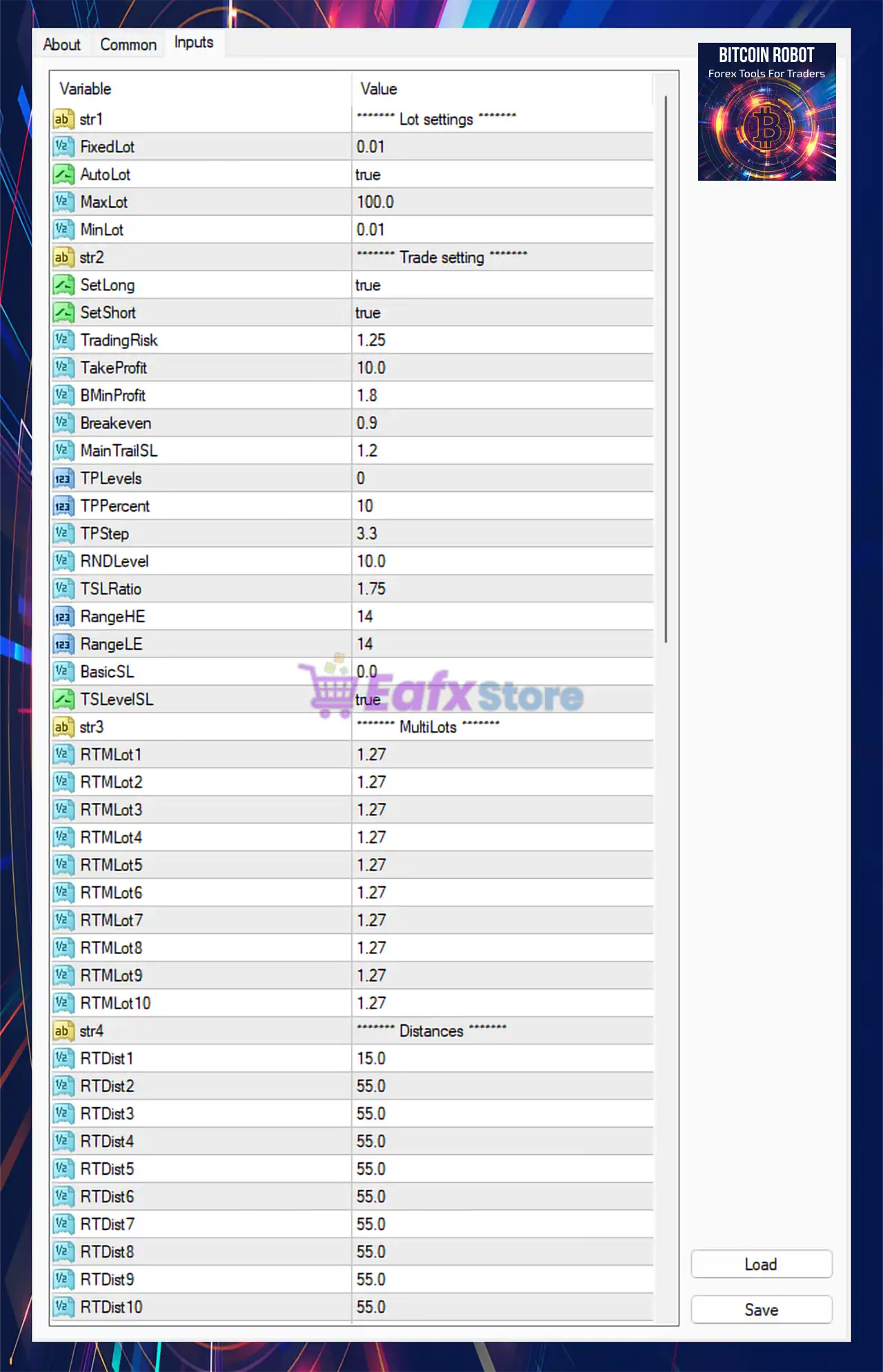
Below are the details of the parameters in the advisor’s trading system settings table:
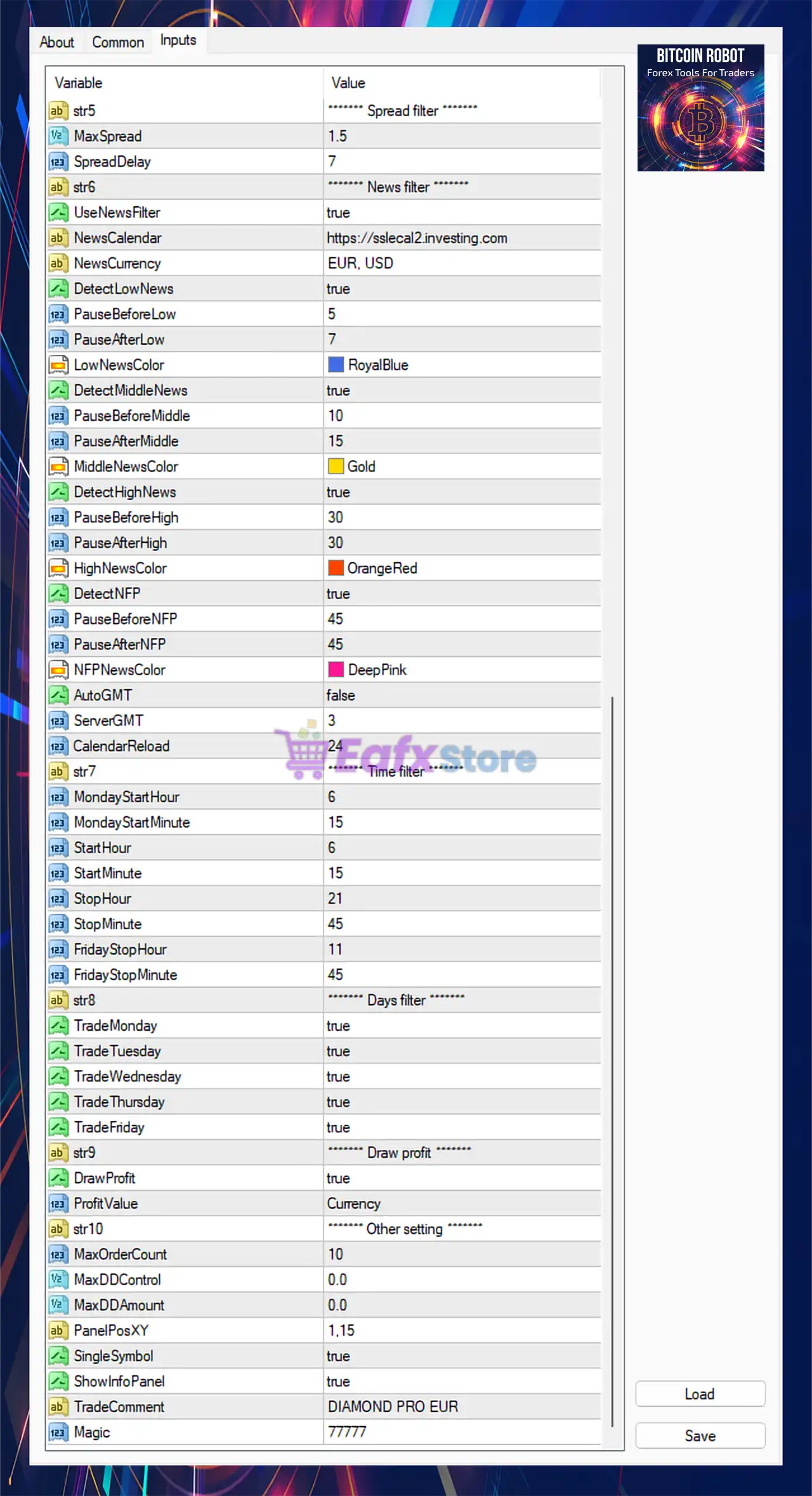
🔶 Lot Settings
🔹 FixedLot = 0.01: Default fixed trading lot size is set to 0.01.
🔹 AutoLot = true: Automatic lot sizing based on account conditions is enabled.
🔹 MaxLot = 100.0: Maximum allowed lot size is limited to 100.0.
🔹 MinLot = 0.01: Minimum trading lot size is configured at 0.01.
🔶 Trade Settings
🔹 SetLong = true: Buy (long) trading positions are enabled.
🔹 SetShort = true: Sell (short) trading positions are enabled.
🔹 TradingRisk = 1.25: Trading risk multiplier is configured at 1.25.
🔹 TakeProfit = 10.0: Default take-profit target is 10.0.
🔹 BMinProfit = 1.8: Minimum profit before breakeven activation is 1.8.
🔹 Breakeven = 0.9: Breakeven protection level is set to 0.9.
🔹 MainTrailSL = 1.2: Main trailing stop-loss value is 1.2.
🔹 TPLevels = 0: Number of take-profit levels is currently 0.
🔹 TPPercent = 10: Percentage target for take-profit scaling is 10.
🔹 TPStep = 3.3: Increment step for take-profit adjustment is 3.3.
🔹 RNDLevel = 10.0: Rounded number trading level parameter is 10.0.
🔹 TSLRatio = 1.75: Trailing stop-loss ratio is configured at 1.75.
🔹 RangeHE = 14: Higher entry range value is 14.
🔹 RangeLE = 14: Lower entry range value is 14.
🔹 BasicSL = 0.0: Basic stop-loss value is disabled with 0.0.
🔹 TSLevelSL = true: Trailing stop-loss based on levels is enabled.
🔶 MultiLots Settings
🔹 RTMLot1 = 1.27: Recovery/multi-lot level 1 multiplier is 1.27.
🔹 RTMLot2 = 1.27: Recovery/multi-lot level 2 multiplier is 1.27.
🔹 RTMLot3 = 1.27: Recovery/multi-lot level 3 multiplier is 1.27.
🔹 RTMLot4 = 1.27: Recovery/multi-lot level 4 multiplier is 1.27.
🔹 RTMLot5 = 1.27: Recovery/multi-lot level 5 multiplier is 1.27.
🔹 RTMLot6 = 1.27: Recovery/multi-lot level 6 multiplier is 1.27.
🔹 RTMLot7 = 1.27: Recovery/multi-lot level 7 multiplier is 1.27.
🔹 RTMLot8 = 1.27: Recovery/multi-lot level 8 multiplier is 1.27.
🔹 RTMLot9 = 1.27: Recovery/multi-lot level 9 multiplier is 1.27.
🔹 RTMLot10 = 1.27: Recovery/multi-lot level 10 multiplier is 1.27.
🔶 Distance Settings
🔹 RTDist1 = 15.0: Distance for recovery/grid order 1 is 15.0.
🔹 RTDist2 = 55.0: Distance for recovery/grid order 2 is 55.0.
🔹 RTDist3 = 55.0: Distance for recovery/grid order 3 is 55.0.
🔹 RTDist4 = 55.0: Distance for recovery/grid order 4 is 55.0.
🔹 RTDist5 = 55.0: Distance for recovery/grid order 5 is 55.0.
🔹 RTDist6 = 55.0: Distance for recovery/grid order 6 is 55.0.
🔹 RTDist7 = 55.0: Distance for recovery/grid order 7 is 55.0.
🔹 RTDist8 = 55.0: Distance for recovery/grid order 8 is 55.0.
🔹 RTDist9 = 55.0: Distance for recovery/grid order 9 is 55.0.
🔹 RTDist10 = 55.0: Distance for recovery/grid order 10 is 55.0.
🔶 Spread Filter Settings
🔹 MaxSpread = 1.5: Maximum spread allowed for trading is 1.5.
🔹 SpreadDelay = 7: Delay before trading under spread conditions is 7.
🔶 News Filter Settings
🔹 UseNewsFilter = true: News filter system is enabled.
🔹 NewsCalendar = https://sslecal2.investing.com: Economic calendar source URL is configured.
🔹 NewsCurrency = EUR, USD: News filter monitors EUR and USD currencies.
🔹 DetectLowNews = true: Low-impact news events are detected.
🔹 PauseBeforeLow = 5: Trading pauses 5 minutes before low-impact news.
🔹 PauseAfterLow = 7: Trading resumes 7 minutes after low-impact news.
🔹 LowNewsColor = RoyalBlue: Low-impact news color indicator is RoyalBlue.
🔹 DetectMiddleNews = true: Medium-impact news detection is enabled.
🔹 PauseBeforeMiddle = 10: Trading pauses 10 minutes before medium news.
🔹 PauseAfterMiddle = 15: Trading resumes 15 minutes after medium news.
🔹 MiddleNewsColor = Gold: Medium-impact news display color is Gold.
🔹 DetectHighNews = true: High-impact news filtering is enabled.
🔹 PauseBeforeHigh = 30: Trading pauses 30 minutes before high-impact news.
🔹 PauseAfterHigh = 30: Trading resumes 30 minutes after high-impact news.
🔹 HighNewsColor = OrangeRed: High-impact news display color is OrangeRed.
🔹 DetectNFP = true: Non-Farm Payroll (NFP) news detection is enabled.
🔹 PauseBeforeNFP = 45: Trading pauses 45 minutes before NFP news.
🔹 PauseAfterNFP = 45: Trading resumes 45 minutes after NFP news.
🔹 NFPNewsColor = DeepPink: NFP news display color is DeepPink.
🔹 AutoGMT = false: Automatic GMT detection is disabled.
🔹 ServerGMT = 3: Broker server GMT offset is configured at 3.
🔹 CalendarReload = 24: Economic calendar refresh interval is 24.
🔶 Time Filter Settings
🔹 MondayStartHour = 6: Monday trading starts at hour 6.
🔹 MondayStartMinute = 15: Monday trading starts at minute 15.
🔹 StartHour = 6: Standard daily trading start hour is 6.
🔹 StartMinute = 15: Standard daily trading start minute is 15.
🔹 StopHour = 21: Trading stops at hour 21.
🔹 StopMinute = 45: Trading stops at minute 45.
🔹 FridayStopHour = 11: Friday trading stops at hour 11.
🔹 FridayStopMinute = 45: Friday trading stops at minute 45.
🔶 Days Filter Settings
🔹 TradeMonday = true: Trading on Monday is enabled.
🔹 TradeTuesday = true: Trading on Tuesday is enabled.
🔹 TradeWednesday = true: Trading on Wednesday is enabled.
🔹 TradeThursday = true: Trading on Thursday is enabled.
🔹 TradeFriday = true: Trading on Friday is enabled.
🔶 Draw Profit Settings
🔹 DrawProfit = true: Profit visualization on the chart is enabled.
🔹 ProfitValue = Currency: Profit values are displayed in account currency format.
🔶 Other Settings
🔹 MaxOrderCount = 10: Maximum number of simultaneous orders is 10.
🔹 MaxDDControl = 0.0: Maximum drawdown control is disabled with 0.0.
🔹 MaxDDAmount = 0.0: Maximum drawdown amount protection is disabled.
🔹 PanelPosXY = 1,15: Information panel position coordinates are 1,15.
🔹 SingleSymbol = true: EA trades only one symbol at a time.
🔹 ShowInfoPanel = true: Trading information panel is enabled.
🔹 TradeComment = DIAMOND PRO EUR: Trade comment label is DIAMOND PRO EUR.
🔹 Magic = 77777: Unique magic number assigned to trades is 77777.
🔢 Conclusion
Bitcoin Robot MT5 provides traders with a powerful automated trading environment featuring intelligent risk control, advanced trailing systems, economic news filtering, multi-lot recovery logic, and detailed session management. With flexible customization options and robust trade protection tools, the EA is designed to support both Forex and crypto trading strategies on MetaTrader 5.
🔢 FAQs
❓ What is Bitcoin Robot MT5?
Bitcoin Robot MT5 is an automated Expert Advisor for MetaTrader 5 designed for Forex and cryptocurrency trading.
❓ Does Bitcoin Robot MT5 include a news filter?
Yes, the EA includes advanced economic news filtering with low, medium, high, and NFP news controls.
❓ Can Bitcoin Robot MT5 trade both buy and sell positions?
Yes, both long and short trading positions are enabled.
❓ Does Bitcoin Robot MT5 support automatic lot sizing?
Yes, AutoLot is enabled by default.
❓ What is the default magic number in Bitcoin Robot MT5?
The default magic number configured in the EA is 77777.



