

🔢 TopBottomEA MT4 Settings Guide
TopBottomEA is a configurable automated trading system designed to provide traders with direct control over lot sizing, risk parameters, volatility sensitivity, Stop Loss, profit targets, point-difference limits, parameter switching, trade identification and chart display settings.
The supplied configuration is relatively compact, making it easy to understand and adjust the EA's core trading behavior while maintaining precise numerical control.
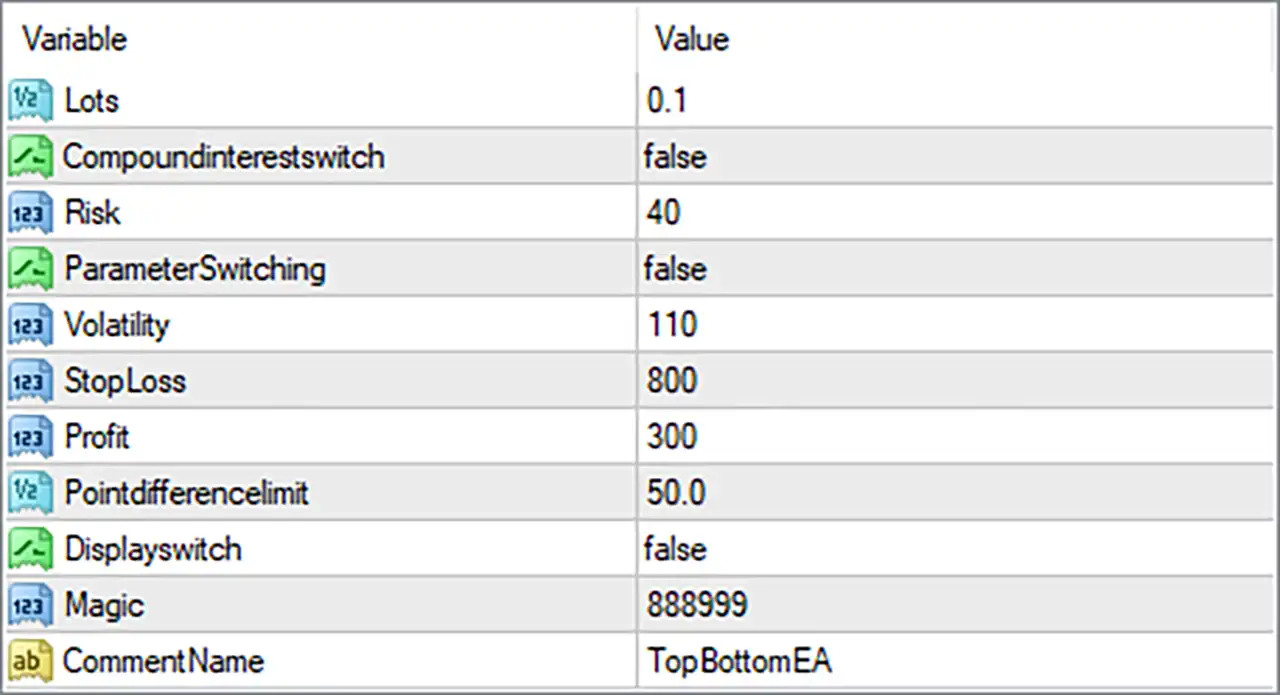
🔢 TopBottomEA MT4 Settings Explained
🔄 Money Management & Risk Settings
🔹 Lots: 0.1 — Sets the fixed trading lot size to 0.1 lots for positions opened by the EA.
🔹 Compoundinterestswitch: false — Disables the compound-interest or balance-based position-sizing function, so the EA does not use this feature.
🔹 Risk: 40 — Sets the EA's configured risk parameter to 40; the exact risk calculation depends on how the EA internally applies this value.
🔹 ParameterSwitching: false — Disables automatic parameter switching, meaning the EA keeps the selected configuration rather than dynamically changing parameters.
🔄 Market & Volatility Settings
🔹 Volatility: 110 — Sets the volatility parameter to 110, controlling the EA's configured sensitivity to market volatility.
🔹 Pointdifferencelimit: 50.0 — Sets the point-difference limit to 50.0, defining the configured maximum or minimum price-point difference used by the EA's trading logic.
🔄 Trade Protection & Profit Settings
🔹 StopLoss: 800 — Sets the Stop Loss parameter to 800 points, providing the configured distance for limiting an adverse market movement.
🔹 Profit: 300 — Sets the profit target parameter to 300, which is used by the EA's internal profit-taking logic.
🔄 Display & Trade Identification
🔹 Displayswitch: false — Disables the EA's configurable display function on the chart.
🔹 Magic: 888999 — Sets the EA Magic Number to 888999, allowing MT4 to identify and manage trades belonging specifically to TopBottomEA.
🔹 CommentName: TopBottomEA — Sets the trade/comment identification name to TopBottomEA, which can appear in the order or trade information associated with the EA.
🔢 Complete TopBottomEA MT4 Configuration
🔹 Lots: 0.1
🔹 Compoundinterestswitch: false
🔹 Risk: 40
🔹 ParameterSwitching: false
🔹 Volatility: 110
🔹 StopLoss: 800
🔹 Profit: 300
🔹 Pointdifferencelimit: 50.0
🔹 Displayswitch: false
🔹 Magic: 888999
🔹 CommentName: TopBottomEA
🔢 Key Trading Configuration Highlights
🔹 Fixed Lot Size: 0.1 — The current configuration uses a fixed 0.1-lot setting rather than enabling compound-interest sizing.
🔹 Risk Parameter: 40 — The EA's risk-related parameter is configured at 40.
🔹 Volatility Setting: 110 — The volatility parameter is set to 110, providing a defined market-sensitivity value.
🔹 Stop Loss: 800 — The configured Stop Loss value is 800 points.
🔹 Profit Target: 300 — The configured profit parameter is 300.
🔹 Point Difference Limit: 50.0 — The point-difference control is set to 50.0.
🔹 Parameter Switching: false — Automatic parameter switching is currently disabled.
🔹 Display Switch: false — The optional display function is currently disabled.
🔹 Magic Number: 888999 — Provides unique trade identification for the EA.
🔹 Order Comment: TopBottomEA — Provides a recognizable comment label for EA-generated trades.
🔢 Conclusion
TopBottomEA MT4 provides a straightforward but configurable framework for automated trading, with the supplied setup focusing on fixed lot execution, volatility control, risk configuration, predefined Stop Loss and profit parameters, and unique trade identification.
The current configuration uses 0.1 lots, while Compoundinterestswitch = false means the compound-interest feature is disabled. The EA's risk parameter is set to 40, with Volatility = 110, allowing traders to work with a clearly defined volatility setting.
For trade protection, the configuration specifies StopLoss = 800 and Profit = 300. The Pointdifferencelimit = 50.0 provides another numerical constraint within the EA's trading logic. Meanwhile, ParameterSwitching = false keeps automatic parameter switching disabled.
For trade management and identification, the EA uses Magic = 888999 and CommentName = TopBottomEA, helping distinguish its positions from trades generated by other Expert Advisors or manual trading activity.
Overall, these settings provide a relatively simple starting configuration while still offering important controls over position size, risk, volatility, trade exits, execution logic, and order identification. Traders should carefully test the numerical parameters on a demo account and through appropriate historical testing before applying them to live trading, particularly because the exact meaning of parameters such as Risk 40, Volatility 110, and Profit 300 depends on the EA's internal programming.
🔢 FAQs
❓ What is TopBottomEA MT4?
TopBottomEA MT4 is an automated trading Expert Advisor with configurable settings for lot size, risk, volatility, Stop Loss, profit targets, and trade management.
❓ What lot size is configured for TopBottomEA MT4?
The current Lots setting is 0.1, meaning the supplied configuration uses a fixed lot size of 0.1.
❓ What is the Stop Loss setting?
The StopLoss parameter is set to 800 points in the supplied configuration.
❓ What is the Magic Number of TopBottomEA MT4?
The Magic Number is 888999, which is used to identify the EA's trades in the MT4 terminal.
❓ Is compound-interest position sizing enabled?
No. Compoundinterestswitch = false, so the compound-interest feature is disabled in the supplied configuration.