







Trident Society Secured EA MT4 v2.0 + SetFiles (Unlimited)

Subscriptions for Special Plan
- 30 EA package is more economical!
- Special package with 99%
- Download 1 EA/Day

Subscriptions for Premium Membership
- Download Unlimited in 1 Year
- Get 100% Discount
- Get free access to all

Subscriptions for Gold Membership
- 1 Year Membership
- Get 100% Discount
- Access EA+Indicator+Course
Frequently bought together 🎁
Add these products to enhance your purchase




What is Trident Society Secured EA?
The Trident Society Secured EA for Metatrader 4 (MT4) is a type of automated trading software designed to operate within the MT4 platform. Expert advisors (EA) like Trident Society Secured EA, are developed to execute trades based on predefined criteria and algorithms without the need for manual intervention, making them popular among forex traders who prefer automated trading solutions.
Why Should You Use Trident Society Secured EA?
🔹 Automation: Automates trading processes, allowing for 24/7 operation without requiring constant monitoring by the trader.
🔹 Strategy implementation: Precisely executes trading strategies, ensuring consistency and removing emotional decision-making from trading.
🔹 Backtesting capability: Enables users to backtest their trading strategies against historical data before applying them to live markets, helping to refine strategies and increase confidence in their effectiveness.
🔹 Risk management: Often includes features that help manage and mitigate risks, such as Stop-loss (SL) orders, Take-profit (TP) levels, and customizable risk parameters.
Key features
🔹 Compatibility: Designed specifically for the MT4 platform, ensuring seamless integration and functionality.
🔹 Security: Implements advanced security measures to protect trading operations and sensitive information.
🔹 Customization: Offers a range of customizable settings, allowing traders to tailor the EA to their specific trading strategies and risk tolerance.
🔹 Algorithmic excellence: Built on sophisticated algorithms that can analyze market conditions in real-time and execute trades based on predefined criteria.
Trident Society Secured EA Reviews
The Trident Society Secured EA backtest trading results achieved impressive profit performance for 3 months on the AUDCAD pair. The advisor showed the ability to maintain safe stars on the 5-minute chart.
✅ Initial Deposit: $1,000
✅ Total Net Profit: $2,085.41
✅ Win Rate (% of total): 78.29%
✅ Maximum Drawdown: 30.03%
Trident Society Secured EA MT4 Backtest
Trident Society Secured EA Backtest
Recommended settings
Recommended settings and parameters to pay attention to from developers and experts:
| Features | Type |
|---|---|
| Trading platform | MetaTrader 4 (MT4) |
| Minimum / Recommended deposit | $1,000 |
| Time frames | H1 (60 minute chart) |
| Currency pairs | AUDCAD, EURUSD, XAUUSD, US30 (Any Pairs) |
| Setup files | Available |
| Product type | NoDLL / Fix |
| Additional services | Unlock and Decompile |
| Recommended brokers | Exness Broker, Icmarkets Broker |
| Recommended VPS | MyfxVPS.com ( Blue VPS, Golden VPS). Lowest Latency, 2 week Free Trial, 100% Free for 12-18 Months. |
Product download package includes
The download package of the product suite includes:
Experts
✅ Trident Society Secured EA.ex4
SetFiles
✅ XAUSDKiller.set
✅ US30KILLER100K.set
✅ AUDCAD_1000$_VIP.set
✅ 100K20-20LowRisk24-7.set
✅ 100K20-25LowRisk24-7.set
➡️ Reviewed by David Easton
Conclusion
In short, Trident Society Secured EA stands out as a comprehensive solution that merges security with high-performance automation in the forex market. With its focus on robust security protocols, advanced trading algorithms, and consistent profitability, this EA provides traders with a reliable tool for navigating the intricacies of forex trading. Whether you are a seasoned trader or just starting, the Trident Society Secured offers a secure and effective automated trading experience.
🔢 Trident Society Secured EA MT4 Settings Guide
Trident Society Secured EA MT4 is a configurable automated trading system built around dual trading engines, grid and martingale controls, equity protection, trading schedules, news filtering, Moving Average and HILO filters, trailing-stop management, and break-even functionality.
The settings shown in the supplied panels provide extensive control over position sizing, trade frequency, market conditions, risk protection, and trading-session behavior.
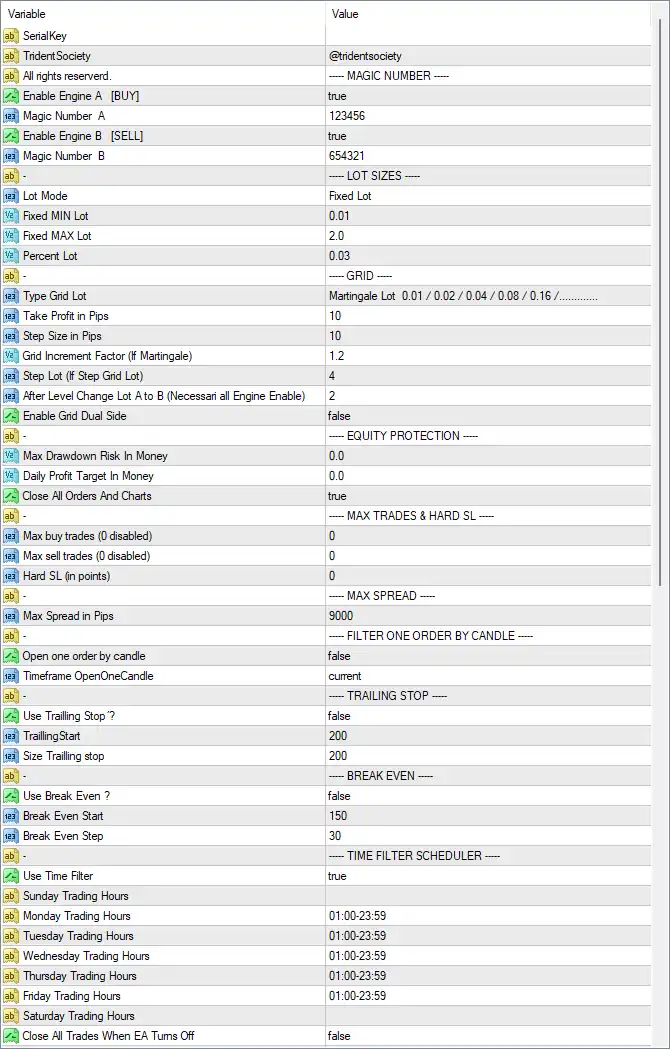
Trident Society Secured EA MT4 Settings Panel
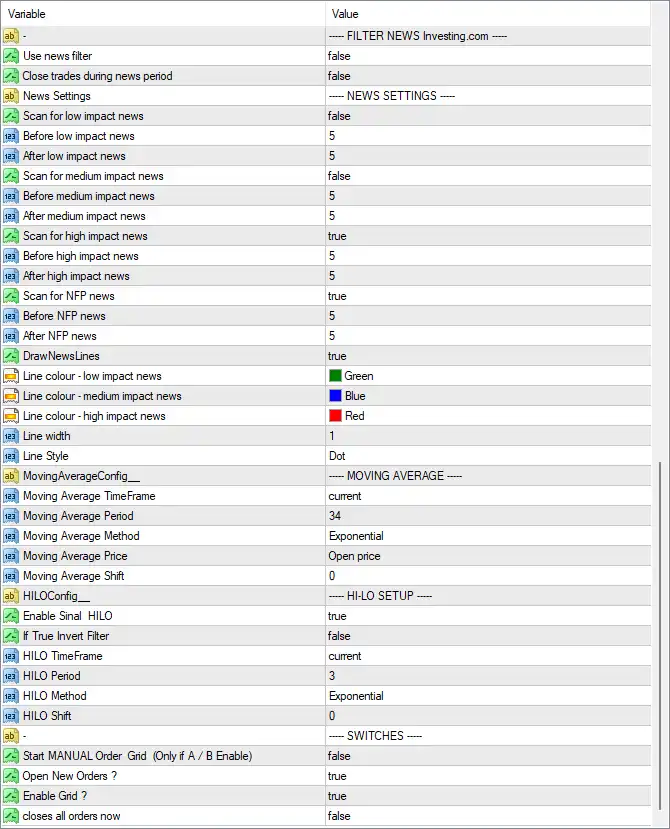
Trident Society Secured EA Settings Panel
🔶 General & Trading Engine Settings
🔹 Enable Engine A [BUY]: true — Enables Engine A for Buy-side trading.
🔹 Magic Number A: 123456 — Unique identifier used to distinguish Engine A’s trades from other orders.
🔹 Enable Engine B [SELL]: true — Enables Engine B for Sell-side trading.
🔹 Magic Number B: 654321 — Unique identifier assigned to Engine B’s Sell trades.
🔶 Lot Size Settings
🔹 Lot Mode: Fixed Lot — Selects fixed-lot sizing as the primary position-sizing method.
🔹 Fixed MIN Lot: 0.01 — Sets the minimum fixed lot size to 0.01.
🔹 Fixed MAX Lot: 2.0 — Sets the maximum fixed lot size to 2.0.
🔹 Percent Lot: 0.03 — Defines the percentage-based lot parameter at 0.03; its effect depends on the selected lot mode.
🔶 Grid Settings
🔹 Type Grid Lot: Martingale Lot 0.01 / 0.02 / 0.04 / 0.08 / 0.16 / ........ — Selects a Martingale-style grid progression in which lot sizes increase sequentially.
🔹 Take Profit in Pips: 10 — Sets the grid take-profit target to 10 pips.
🔹 Step Size in Pips: 10 — Sets the standard distance between grid levels to 10 pips.
🔹 Grid Increment Factor (If Martingale): 1.2 — Sets the multiplication factor used when increasing grid lot sizes under the Martingale configuration.
🔹 Step Lot (If Step Grid Lot): 4 — Sets the lot-step parameter to 4 when the Step Grid Lot method is used.
🔹 After Level Change Lot A to B (Necessari all Engine Enable): 2 — Sets the lot-change parameter after a grid level transition when both engines are enabled.
🔹 Enable Grid Dual Side: false — Disables simultaneous dual-side grid operation.
🔶 Equity Protection
🔹 Max Drawdown Risk In Money: 0.0 — Sets the maximum monetary drawdown protection to 0.0, which indicates no monetary drawdown limit is configured through this parameter.
🔹 Daily Profit Target In Money: 0.0 — Sets the daily monetary profit target to 0.0, meaning no specific daily monetary target is configured.
🔹 Close All Orders And Charts: true — Enables the function that closes all relevant orders and chart-related EA activity when its protection/action condition is triggered.
🔶 Maximum Trades & Hard Stop Loss
🔹 Max buy trades (0 disabled): 0 — Sets the maximum Buy-trade limit to 0, which disables this particular maximum-trade restriction.
🔹 Max sell trades (0 disabled): 0 — Sets the maximum Sell-trade limit to 0, which disables this particular maximum-trade restriction.
🔹 Hard SL (in points): 0 — Sets the hard Stop Loss to 0 points, indicating that no hard SL is configured through this parameter.
🔶 Maximum Spread
🔹 Max Spread in Pips: 9000 — Sets the maximum permitted spread threshold to 9000 pips according to the EA’s internal spread calculation.
🔶 Filter One Order by Candle
🔹 Open one order by candle: false — Disables the restriction that would limit the EA to opening only one order per candle.
🔹 Timeframe OpenOneCandle: current — Uses the current chart timeframe for the one-order-per-candle filter when that feature is enabled.
🔶 Trailing Stop
🔹 Use Trailing Stop?: false — Disables the trailing-stop system.
🔹 TrailingStart: 200 — Defines 200 as the profit/distance threshold at which trailing would start if enabled.
🔹 Size Trailing stop: 200 — Sets the trailing-stop distance/size to 200.
🔶 Break-Even Settings
🔹 Use Break Even?: false — Disables the break-even function.
🔹 Break Even Start: 150 — Sets the break-even activation level to 150.
🔹 Break Even Step: 30 — Sets the break-even adjustment step to 30.
🔶 Time Filter Scheduler
🔹 Use Time Filter: true — Enables the EA’s trading-time scheduler.
🔹 Sunday Trading Hours: No value is shown — No specific Sunday trading-hours range is configured in the supplied panel.
🔹 Monday Trading Hours: 01:00-23:59 — Allows scheduled trading from 01:00 to 23:59 on Monday.
🔹 Tuesday Trading Hours: 01:00-23:59 — Allows scheduled trading from 01:00 to 23:59 on Tuesday.
🔹 Wednesday Trading Hours: 01:00-23:59 — Allows scheduled trading from 01:00 to 23:59 on Wednesday.
🔹 Thursday Trading Hours: 01:00-23:59 — Allows scheduled trading from 01:00 to 23:59 on Thursday.
🔹 Friday Trading Hours: 01:00-23:59 — Allows scheduled trading from 01:00 to 23:59 on Friday.
🔹 Saturday Trading Hours: No value is shown — No specific Saturday trading-hours range is configured in the supplied panel.
🔹 Close All Trades When EA Turns Off: false — Prevents the EA from automatically closing all trades simply because the EA is turned off.
🔶 News Filter Settings
🔹 Use news filter: false — Disables the Investing.com-based news filter.
🔹 Close trades during news period: false — Prevents the EA from automatically closing existing trades during a configured news period.
🔹 News Settings: NEWS SETTINGS — Section label for the economic-news configuration.
Low-Impact News
🔹 Scan for low impact news: false — Disables scanning for low-impact economic events.
🔹 Before low impact news: 5 — Sets the pre-news protection period to 5 when low-impact news scanning is enabled.
🔹 After low impact news: 5 — Sets the post-news protection period to 5 when low-impact news scanning is enabled.
Medium-Impact News
🔹 Scan for medium impact news: false — Disables scanning for medium-impact economic events.
🔹 Before medium impact news: 5 — Sets the pre-news period to 5 when medium-impact news scanning is enabled.
🔹 After medium impact news: 5 — Sets the post-news period to 5 when medium-impact news scanning is enabled.
High-Impact News
🔹 Scan for high impact news: true — Enables scanning for high-impact economic events.
🔹 Before high impact news: 5 — Sets the high-impact news protection period before an event to 5.
🔹 After high impact news: 5 — Sets the high-impact news protection period after an event to 5.
NFP News
🔹 Scan for NFP news: true — Enables dedicated scanning for Non-Farm Payroll (NFP) events.
🔹 Before NFP news: 5 — Sets the NFP pre-news protection period to 5.
🔹 After NFP news: 5 — Sets the NFP post-news protection period to 5.
🔶 News Chart Display
🔹 Draw NewsLines: true — Displays economic-news markers/lines on the chart.
🔹 Line colour – low impact news: Green — Uses Green for low-impact news lines.
🔹 Line colour – medium impact news: Blue — Uses Blue for medium-impact news lines.
🔹 Line colour – high impact news: Red — Uses Red for high-impact news lines.
🔹 Line width: 1 — Sets the news-line width to 1.
🔹 Line Style: Dot — Uses a dotted line style for the displayed news markers.
🔶 Moving Average Settings
🔹 MovingAverageConfig: MOVING AVERAGE — Section identifying the Moving Average configuration.
🔹 Moving Average TimeFrame: current — Uses the current chart timeframe for the Moving Average.
🔹 Moving Average Period: 34 — Sets the Moving Average period to 34.
🔹 Moving Average Method: Exponential — Uses an Exponential Moving Average (EMA) calculation.
🔹 Moving Average Price: Open price — Calculates the Moving Average using the candle’s Open price.
🔹 Moving Average Shift: 0 — Applies a Moving Average shift of 0, meaning no forward/backward shift is applied.
🔶 HILO Setup
🔹 HILOConfig: HI-LO SETUP — Section identifying the HILO indicator configuration.
🔹 Enable Sinal HILO: true — Enables the HILO signal component.
🔹 If True Invert Filter: false — Keeps the HILO filter in its normal direction instead of inverting its signal.
🔹 HILO TimeFrame: current — Uses the current chart timeframe for HILO calculations.
🔹 HILO Period: 3 — Sets the HILO calculation period to 3.
🔹 HILO Method: Exponential — Uses an Exponential calculation method for HILO.
🔹 HILO Shift: 0 — Sets the HILO shift to 0.
🔶 Switches
🔹 Start MANUAL Order Grid (Only if A / B Enable): false — Disables manually starting the Order Grid under the A/B engine configuration.
🔹 Open New Orders?: true — Allows the EA to open new orders.
🔹 Enable Grid?: true — Enables the grid-trading functionality.
🔹 closes all orders now: false — Does not activate the immediate close-all-orders command.
🔢 Key Configuration Summary
🔹 Engine A [BUY]: true — Buy engine enabled.
🔹 Engine B [SELL]: true — Sell engine enabled.
🔹 Lot Mode: Fixed Lot — Fixed-lot mode selected.
🔹 Fixed MIN Lot: 0.01 — Minimum lot 0.01.
🔹 Fixed MAX Lot: 2.0 — Maximum lot 2.0.
🔹 Grid Take Profit: 10 pips — Grid profit target.
🔹 Grid Step: 10 pips — Grid spacing.
🔹 Grid Increment Factor: 1.2 — Martingale/grid multiplication factor.
🔹 Dual-Side Grid: false — Dual-side grid disabled.
🔹 Max Buy Trades: 0 — Disabled limit.
🔹 Max Sell Trades: 0 — Disabled limit.
🔹 Hard SL: 0 points — No hard SL configured.
🔹 Trailing Stop: false — Disabled.
🔹 Break Even: false — Disabled.
🔹 Time Filter: true — Enabled.
🔹 News Filter: false — Main news filter disabled, although high-impact and NFP scanning parameters are individually set to true.
🔹 High-Impact News Scan: true — High-impact events are configured for scanning.
🔹 NFP News Scan: true — NFP events are configured for scanning.
🔹 Moving Average: 34-period Exponential — Uses the current timeframe and Open price.
🔹 HILO: 3-period Exponential — HILO signal enabled.
🔹 Open New Orders: true — New order placement enabled.
🔹 Grid: true — Grid trading enabled.
🔢 Conclusion
Trident Society Secured EA MT4 provides a broad set of controls for automated trading, combining Buy and Sell engines, fixed lot sizing, grid/Martingale functionality, time scheduling, news-event analysis, Moving Average filtering, HILO signals, trailing-stop controls, and break-even management.
The supplied configuration has both trading engines enabled with Magic Numbers 123456 and 654321, while the selected lot mode is Fixed Lot, with a minimum of 0.01 and maximum of 2.0. Grid trading is enabled with 10 pips Take Profit, 10 pips Step Size, and a 1.2 Grid Increment Factor.
Risk controls such as Trailing Stop, Break Even, and monetary drawdown protection are currently disabled or set to zero. Meanwhile, the time filter is enabled, and the configuration gives particular attention to high-impact news and NFP events.
The EA also uses a 34-period Exponential Moving Average and a 3-period Exponential HILO configuration. Because grid and Martingale-style parameters can increase exposure as additional positions are opened, these settings should be thoroughly tested in the MT4 Strategy Tester and on a demo account before being considered for live trading.
User Reviews
Only logged in customers who have purchased this product may leave a review.
🔴 What trading platform is Trident Society Secured EA designed for?
Trident Society Secured EA is specifically designed for the MetaTrader 4 (MT4) platform, ensuring seamless functionality, full compatibility, and ease of use for both beginner and experienced traders.
🔴 What trading strategy does Trident Society Secured EA use?
It uses predefined algorithms to analyze real-time market conditions and execute trades automatically based on preset criteria, helping traders maintain consistency and eliminate emotional decision-making.
🔴 Which currency pairs are supported by Trident Society Secured EA?
It supports multiple instruments including AUDCAD, EURUSD, XAUUSD (Gold), and US30. The EA is flexible and can be used with any MT4-compatible currency or asset.
🔴 What are the minimum requirements to run Trident Society Secured EA?
✔ Platform: MT4
✔ Minimum Deposit: $1,000
✔ Timeframe: H1 (60-minute chart)
✔ Recommended Brokers: Exness, ICMarkets
✔ VPS: MyfxVPS (Low latency, Free trial options)
🔴 Does Trident Society Secured EA include risk management features?
Yes. It offers built-in Stop-Loss (SL), Take-Profit (TP), and customizable risk parameters to protect your capital and manage risk effectively.
🔴 Can I backtest Trident Society Secured EA?
Absolutely. The EA allows full backtesting on historical data to help you validate strategies, optimize settings, and build confidence before going live.
🔴 How profitable is Trident Society Secured EA based on reviews?
📊 Backtest Results (3 months on AUDCAD):
✔ Initial Deposit: $1,000
✔ Total Net Profit: $2,085.41
✔ Win Rate: 78.29%
✔ Maximum Drawdown: 30.03%
🔴 Does this EA come with preset files for easy setup?
Yes. The download package includes multiple ready-to-use preset files such as XAUSDKiller.set, US30KILLER100K.set, and low-risk settings for different account sizes.
🔴 Is the EA beginner-friendly?
Yes. With automated trading, preset strategies, no manual intervention, and easy MT4 integration, it's designed for both beginners and professionals.
🔥 Get This EA for FREE with Our Membership! 🚀🚀
Unlock access to this EA, premium Indicators, and exclusive trading tools completely FREE with any of our Membership Plans! Thousands of traders already benefit from our VIP library—join them and level up your trading instantly. Choose Your Membership:
- SPECIAL – 1 Month Membership
- GOLD – 1 Year Membership
- PREMIUM – 1 Year Membership
-
 Original price was: $500.00.$249.00Current price is: $249.00.
-
 Original price was: $888.00.$249.00Current price is: $249.00.
-
 Original price was: $439.00.$249.00Current price is: $249.00.
-
 Original price was: $9,999.00.$249.00Current price is: $249.00.
-
 3Original price was: $999.00.$69.00Current price is: $69.00.
-
 1Original price was: $950.00.$59.00Current price is: $59.00.
-
 10Original price was: $2,100.00.$69.00Current price is: $69.00.
-
 3Original price was: $499.00.$59.00Current price is: $59.00.
There are no reviews yet.