
Trirex Wave EA MT4 Settings Explained
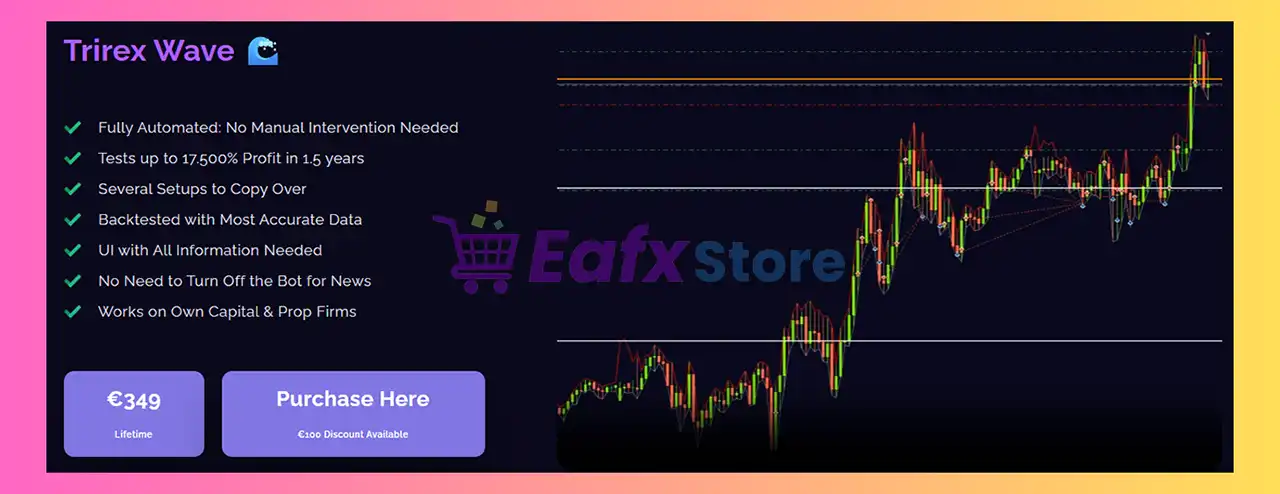
Trirex Wave EA MT4 is an automated Forex trading robot for MetaTrader 4 that combines wave-based entries, lot multiplication, breakeven management, trailing systems and advanced news filtering.
The EA is designed to help traders automate trade execution while maintaining flexible risk control, compounding options and multi-pair management features.
With support for custom indicators like PriceBorder and Heiken Ashi, Trirex Wave EA MT4 provides a structured trading environment suitable for both conservative and aggressive Forex traders.
Trirex Wave EA MT4 Full Settings Explanation
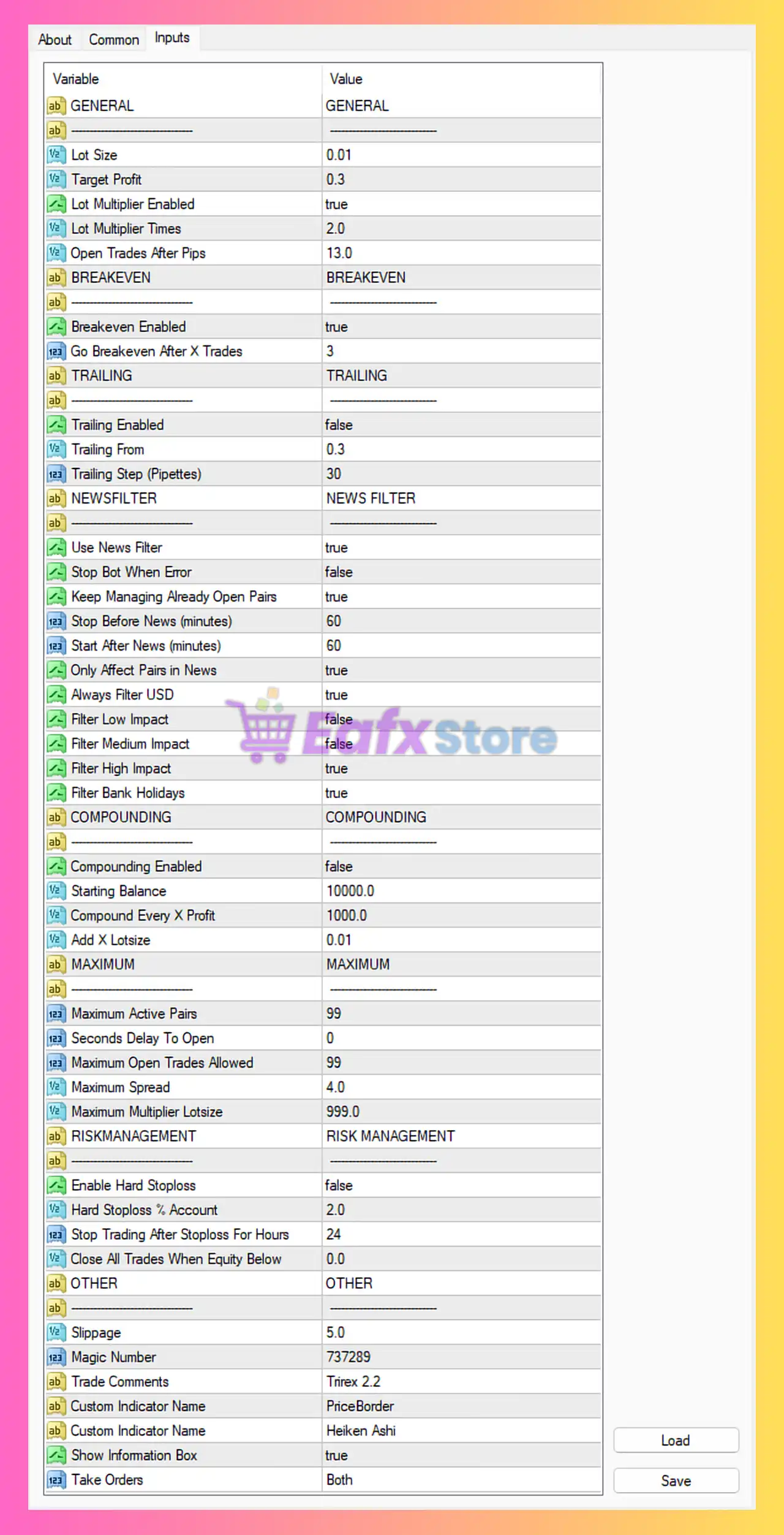
Below are the details of the parameters in the advisor’s trading system settings table:
General Settings
🔹 Lot Size = 0.01: Sets the default starting trade volume to 0.01 lots.
🔹 Target Profit = 0.3: Defines the target profit level at 0.3.
🔹 Lot Multiplier Enabled = true: Activates the lot multiplication feature for scaling positions.
🔹 Lot Multiplier Times = 2.0: Multiplies the lot size by 2.0 after specified conditions are met.
🔹 Open Trades After Pips = 13.0: Opens additional trades when price moves 13.0 pips.
Breakeven Settings
🔹 Breakeven Enabled = true: Enables automatic breakeven protection for open trades.
🔹 Go Breakeven After X Trades = 3: Activates breakeven mode after 3 trades are opened.
Trailing Settings
🔹 Trailing Enabled = false: Disables the trailing stop feature.
🔹 Trailing From = 0.3: Sets the profit level at 0.3 before trailing begins.
🔹 Trailing Step (Pipettes) = 30: Adjusts the trailing stop every 30 pipettes.
News Filter Settings
🔹 Use News Filter = true: Enables economic news filtering to avoid volatile events.
🔹 Stop Bot When Error = false: Keeps the EA running even if an error occurs.
🔹 Keep Managing Already Open Pairs = true: Continues managing existing trades during news events.
🔹 Stop Before News (minutes) = 60: Stops opening new trades 60 minutes before news releases.
🔹 Start After News (minutes) = 60: Resumes trading 60 minutes after news events.
🔹 Only Affect Pairs in News = true: Applies news filtering only to affected currency pairs.
🔹 Always Filter USD = true: Always applies filtering for USD-related news.
🔹 Filter Low Impact = false: Ignores low-impact economic news.
🔹 Filter Medium Impact = false: Ignores medium-impact economic news.
🔹 Filter High Impact = true: Filters trading during high-impact news events.
🔹 Filter Bank Holidays = true: Avoids trading during bank holidays.
Compounding Settings
🔹 Compounding Enabled = false: Disables automatic compounding of lot sizes.
🔹 Starting Balance = 10000.0: Uses 10000.0 as the reference account balance for compounding.
🔹 Compound Every X Profit = 1000.0: Increases lot sizing after every 1000.0 profit.
🔹 Add X Lotsize = 0.01: Adds 0.01 lots during compounding increments.
Maximum Settings
🔹 Maximum Active Pairs = 99: Allows trading on up to 99 currency pairs simultaneously.
🔹 Seconds Delay To Open = 0: Opens trades instantly with 0 seconds delay.
🔹 Maximum Open Trades Allowed = 99: Limits the maximum number of active trades to 99.
🔹 Maximum Spread = 4.0: Prevents trading when spread exceeds 4.0.
🔹 Maximum Multiplier Lotsize = 999.0: Caps multiplied lot sizes at 999.0.
Risk Management Settings
🔹 Enable Hard Stoploss = false: Disables fixed hard stop-loss protection.
🔹 Hard Stoploss % Account = 2.0: Defines hard stop-loss at 2.0% of account balance if enabled.
🔹 Stop Trading After Stoploss For Hours = 24: Pauses trading for 24 hours after stop-loss activation.
🔹 Close All Trades When Equity Below = 0.0: Disables equity-based emergency closure because value is 0.0.
Other Settings
🔹 Slippage = 5.0: Allows maximum slippage of 5.0 points during order execution.
🔹 Magic Number = 737289: Assigns the unique identifier 737289 to EA trades.
🔹 Trade Comments = Trirex 2.2: Adds the trade comment label Trirex 2.2 to all positions.
🔹 Custom Indicator Name = PriceBorder: Uses the custom indicator PriceBorder for trading analysis.
🔹 Custom Indicator Name = Heiken Ashi: Uses the Heiken Ashi indicator for trend filtering.
🔹 Show Information Box = true: Displays the EA information panel on the chart.
🔹 Take Orders = Both: Allows both Buy and Sell trading operations.
Conclusion
Trirex Wave EA MT4 is a powerful automated trading system designed for traders who need flexible lot scaling, advanced news filtering, breakeven protection and custom indicator integration. With configurable compounding, risk controls, and multi-pair trading support, the EA offers a balanced solution for automated Forex trading on MetaTrader 4. Proper optimization and broker selection are essential for achieving stable long-term performance.
FAQs
❓ What is Trirex Wave EA MT4?
Trirex Wave EA MT4 is an automated Forex trading Expert Advisor designed for MetaTrader 4 with wave-based trading and advanced risk management features.
❓ Does Trirex Wave EA MT4 support news filtering?
Yes, the EA includes a built-in economic news filter with support for high-impact news protection.
❓ Can Trirex Wave EA MT4 trade both Buy and Sell positions?
Yes, the “Take Orders = Both” setting allows simultaneous Buy and Sell trading operations.
❓ What indicators are used in Trirex Wave EA MT4?
The EA uses custom indicators such as PriceBorder and Heiken Ashi for market analysis.
❓ Is compounding enabled by default in Trirex Wave EA MT4?
No, compounding is disabled by default, but it can be enabled and customized by the user.