


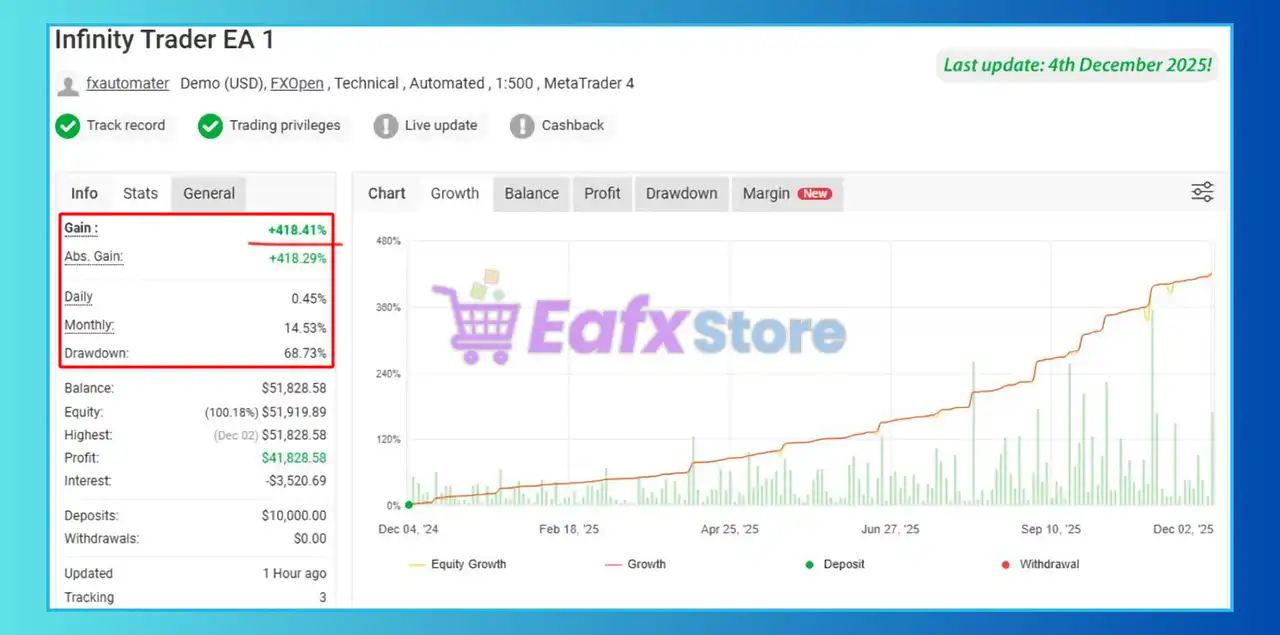
Infinity Trader EA MT4 Settings Explained – Complete Configuration Guide
Infinity Trader EA MT4 is a powerful automated Forex trading robot for MetaTrader 4 designed with advanced recovery systems, trend filtering, AI support modules, customizable risk management and intelligent time-based trading controls.
The EA combines precision scalping, recovery trading, and multi-layer protection features to help traders manage market volatility efficiently. With flexible trade execution settings and built-in news filters, Infinity Trader EA MT4 is suitable for both conservative and aggressive trading strategies.

Infinity Trader EA MT4 Full Settings Explanation
Below are the details of the parameters in the advisor’s trading system settings table:
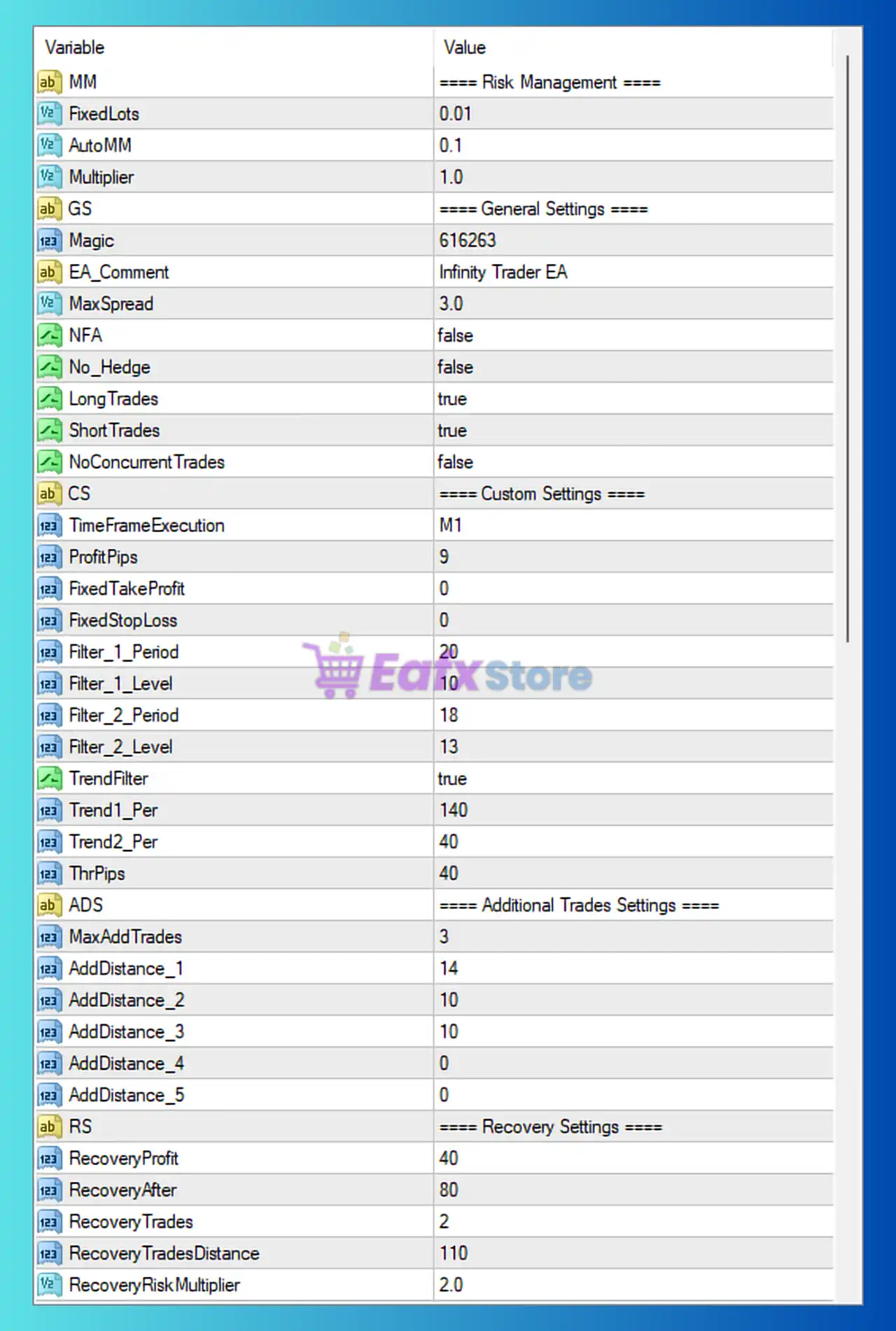
Risk Management Settings
🔹 FixedLots = 0.01: Sets the fixed trading lot size to 0.01 lots.
🔹 AutoMM = 0.1: Enables automatic money management with a risk coefficient of 0.1.
🔹 Multiplier = 1.0: Lot multiplier for scaling or recovery trades is set to 1.0.
General Settings
🔹 Magic = 616263: Unique magic number used by the EA to identify and manage trades.
🔹 EA_Comment = Infinity Trader EA: Comment attached to all trades opened by the EA.
🔹 MaxSpread = 3.0: Maximum allowed spread for opening trades is 3.0 pips.
🔹 NFA = false: NFA compliance mode is disabled.
🔹 No_Hedge = false: Hedging functionality is allowed.
🔹 LongTrades = true: Enables Buy/Long trades.
🔹 ShortTrades = true: Enables Sell/Short trades.
🔹 NoConcurrentTrades = false: Allows multiple concurrent trades.
Custom Settings
🔹 TimeFrameExecution = M1: EA executes trades using the M1 timeframe.
🔹 ProfitPips = 9: Profit target per trade is 9 pips.
🔹 FixedTakeProfit = 0: Fixed Take Profit is disabled.
🔹 FixedStopLoss = 0: Fixed Stop Loss is disabled.
🔹 Filter_1_Period = 20: First filter indicator period is set to 20.
🔹 Filter_1_Level = 10: First filter threshold level is 10.
🔹 Filter_2_Period = 18: Second filter indicator period is set to 18.
🔹 Filter_2_Level = 13: Second filter threshold level is 13.
🔹 TrendFilter = true: Enables trend filtering for trade confirmation.
🔹 Trend1_Per = 140: Primary trend filter period is 140.
🔹 Trend2_Per = 40: Secondary trend filter period is 40.
🔹 ThrPips = 40: Threshold in pips for trend validation is 40 pips.
Additional Trades Settings
🔹 MaxAddTrades = 3: Maximum additional recovery trades allowed is 3.
🔹 AddDistance_1 = 14: Distance for first additional trade is 14 pips.
🔹 AddDistance_2 = 10: Distance for second additional trade is 10 pips.
🔹 AddDistance_3 = 10: Distance for third additional trade is 10 pips.
🔹 AddDistance_4 = 0: Fourth additional trade distance is disabled.
🔹 AddDistance_5 = 0: Fifth additional trade distance is disabled.
Recovery Settings
🔹 RecoveryProfit = 40: Recovery basket profit target is 40 pips.
🔹 RecoveryAfter = 80: Recovery mode activates after 80 pips drawdown.
🔹 RecoveryTrades = 2: Maximum recovery trades allowed is 2.
🔹 RecoveryTradesDistance = 110: Distance between recovery trades is 110 pips.
🔹 RecoveryRiskMultiplier = 2.0: Recovery trade lot multiplier is 2.0.
Time Restriction Settings
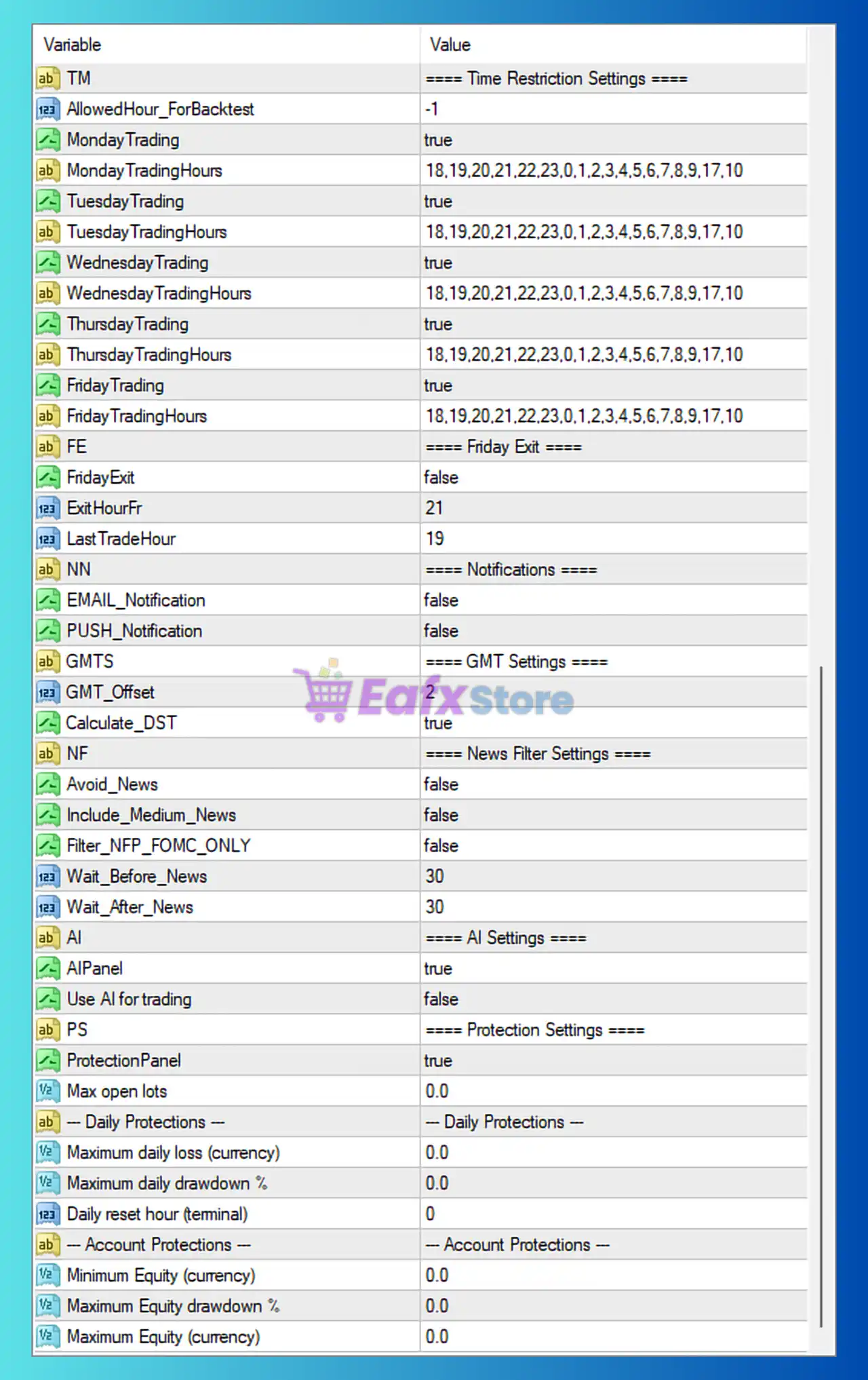
🔹 AllowedHour_ForBacktest = -1: No hour restrictions applied during backtesting.
🔹 MondayTrading = true: Trading is enabled on Monday.
🔹 MondayTradingHours = 18,19,20,21,22,23,0,1,2,3,4,5,6,7,8,9,17,10: Allowed trading hours for Monday.
🔹 TuesdayTrading = true: Trading is enabled on Tuesday.
🔹 TuesdayTradingHours = 18,19,20,21,22,23,0,1,2,3,4,5,6,7,8,9,17,10: Allowed trading hours for Tuesday.
🔹 WednesdayTrading = true: Trading is enabled on Wednesday.
🔹 WednesdayTradingHours = 18,19,20,21,22,23,0,1,2,3,4,5,6,7,8,9,17,10: Allowed trading hours for Wednesday.
🔹 ThursdayTrading = true: Trading is enabled on Thursday.
🔹 ThursdayTradingHours = 18,19,20,21,22,23,0,1,2,3,4,5,6,7,8,9,17,10: Allowed trading hours for Thursday.
🔹 FridayTrading = true: Trading is enabled on Friday.
🔹 FridayTradingHours = 18,19,20,21,22,23,0,1,2,3,4,5,6,7,8,9,17,10: Allowed trading hours for Friday.
Friday Exit Settings
🔹 FridayExit = false: Automatic Friday exit feature is disabled.
🔹 ExitHourFr = 21: Friday exit hour is set to 21.
🔹 LastTradeHour = 19: Last allowed trade opening hour is 19.
Notification Settings
🔹 EMAIL_Notification = false: Email notifications are disabled.
🔹 PUSH_Notification = false: Push notifications are disabled.
GMT Settings
🔹 GMT_Offset = 2: Broker/server GMT offset is GMT+2.
🔹 Calculate_DST = true: Automatically calculates Daylight Saving Time adjustments.
News Filter Settings
🔹 Avoid_News = false: News avoidance filter is disabled.
🔹 Include_Medium_News = false: Medium-impact news filtering is disabled.
🔹 Filter_NFP_FOMC_ONLY = false: NFP and FOMC-only filtering is disabled.
🔹 Wait_Before_News = 30: Stops trading 30 minutes before news events.
🔹 Wait_After_News = 30: Resumes trading 30 minutes after news events.
AI Settings
🔹 AIPanel = true: Displays the AI monitoring panel on the chart.
🔹 Use AI for trading = false: AI-assisted trading is currently disabled.
Protection Settings
🔹 ProtectionPanel = true: Enables the protection dashboard panel.
🔹 Max open lots = 0.0: No limit on total open lots.
Daily Protections
🔹 Maximum daily loss (currency) = 0.0: Daily currency loss protection is disabled.
🔹 Maximum daily drawdown % = 0.0: Daily drawdown percentage protection is disabled.
🔹 Daily reset hour (terminal) = 0: Daily protection resets at terminal hour 0.
Account Protections
🔹 Minimum Equity (currency) = 0.0: Minimum equity protection is disabled.
🔹 Maximum Equity drawdown % = 0.0: Maximum equity drawdown protection is disabled.
🔹 Maximum Equity (currency) = 0.0: Maximum equity target protection is disabled.
Conclusion
Infinity Trader EA MT4 is an advanced automated trading system combining trend-following logic, recovery trading mechanisms, AI integration options and extensive protection settings for MetaTrader 4 users.
With flexible execution filters, dynamic recovery systems, and customizable trading hours, the EA provides traders with a highly adaptable framework suitable for various Forex market conditions. Its layered risk management and intelligent filtering tools make it a robust choice for both professional and retail algorithmic traders.
FAQs
❓ What is Infinity Trader EA MT4?
Infinity Trader EA MT4 is an automated Forex Expert Advisor designed for MetaTrader 4 with recovery trading and trend filtering features.
❓ Does Infinity Trader EA MT4 support hedging?
Yes, hedging is allowed because No_Hedge = false.
❓ Can Infinity Trader EA MT4 filter trades by trend?
Yes, the EA includes a built-in trend filter using customizable periods and thresholds.
❓ Does Infinity Trader EA MT4 include news filtering?
Yes, the EA includes configurable news filters with pre-news and post-news waiting periods.
❓ Can Infinity Trader EA MT4 manage recovery trades automatically?
Yes, the EA contains automated recovery trade logic with customizable recovery distance and risk multipliers.



