
🔢 Ultimate Bot MT5 Settings Explained – Complete Parameter Guide
Ultimate Bot MT5 is a multi-strategy automated trading Expert Advisor for MetaTrader 5 that combines several independent trading modules into one system. It supports configurable fixed lot or RiskFactor-based money management, optional recovery mode, volatility filtering, hedging, performance monitoring, and multiple strategy selectors for different currency pairs and markets. Understanding each parameter allows traders to customize the EA according to their broker, account type, and preferred risk profile.
🔢 Ultimate Bot MT5 Parameters Explained
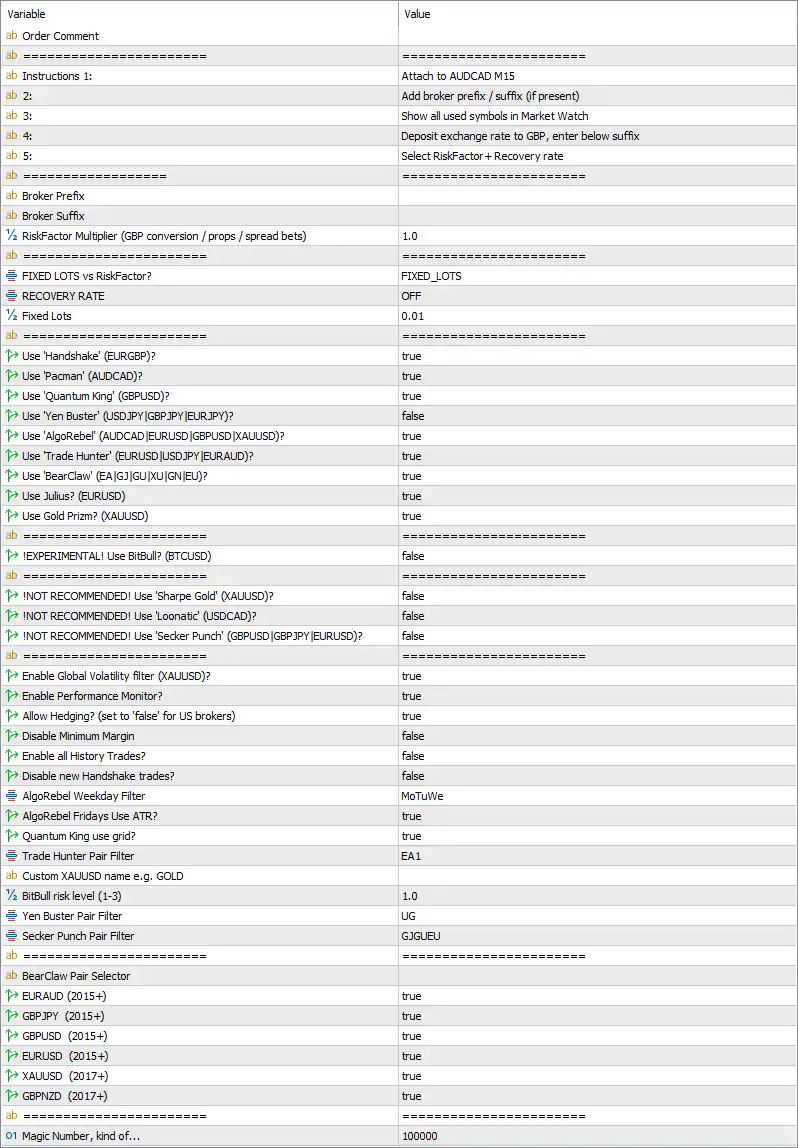
Below are the details of the parameters in the advisor’s trading system settings table:
🔶 Setup Instructions
🔹 Order Comment – Custom comment attached to all trades opened by Ultimate Bot MT5.
🔹 Instructions 1 = Attach to AUDCAD M15 – Attach the EA to the AUDCAD M15 chart.
🔹 Instructions 2 = Add broker prefix / suffix (if present) – Configure your broker's symbol prefix or suffix when required.
🔹 Instructions 3 = Show all used symbols in Market Watch – Ensure every symbol used by the EA is visible inside the Market Watch window.
🔹 Instructions 4 = Deposit exchange rate to GBP, enter below suffix – Enter the account conversion rate to GBP if your deposit currency differs.
🔹 Instructions 5 = Select RiskFactor + Recovery rate – Configure the preferred RiskFactor and Recovery settings before trading.
🔶 Broker Configuration
🔹 Broker Prefix – Enter your broker's symbol prefix if applicable.
🔹 Broker Suffix – Enter your broker's symbol suffix if applicable.
🔹 RiskFactor Multiplier (GBP conversion / props / spread bets) = 1.0 – Applies a 1.0 multiplier to RiskFactor calculations for GBP conversion, proprietary firms, or spread betting accounts.
🔶 Money Management
🔹 FIXED LOTS vs RiskFactor? = FIXED_LOTS – Uses fixed lot sizing instead of RiskFactor-based position sizing.
🔹 RECOVERY RATE = OFF – Recovery mode is disabled.
🔹 Fixed Lots = 0.01 – Every trade opens with a fixed position size of 0.01 lots.
🔶 Strategy Modules
🔹 Use 'Handshake' (EURGBP)? = true – Enables the Handshake strategy for EURGBP.
🔹 Use 'Pacman' (AUDCAD)? = true – Enables the Pacman strategy for AUDCAD.
🔹 Use 'Quantum King' (GBPUSD)? = true – Enables the Quantum King strategy for GBPUSD.
🔹 Use 'Yen Buster' (USDJPY|GBPJPY|EURJPY)? = false – Disables the Yen Buster strategy.
🔹 Use 'AlgoRebel' (AUDCAD|EURUSD|GBPUSD|XAUUSD)? = true – Enables the AlgoRebel strategy.
🔹 Use 'Trade Hunter' (EURUSD|USDJPY|EURAUD)? = true – Enables the Trade Hunter strategy.
🔹 Use 'BearClaw' (EA|GI|GU|XU|GN|EU)? = true – Enables the BearClaw strategy.
🔹 Use Julius? (EURUSD) = true – Enables the Julius strategy on EURUSD.
🔹 Use Gold Prizm? (XAUUSD) = true – Enables the Gold Prizm strategy for XAUUSD.
🔶 Experimental Strategies
🔹 !EXPERIMENTAL! Use BitBull? (BTCUSD) = false – Disables the experimental BitBull Bitcoin strategy.
🔶 Not Recommended Strategies
🔹 !NOT RECOMMENDED! Use 'Sharpe Gold' (XAUUSD)? = false – Keeps the Sharpe Gold strategy disabled.
🔹 !NOT RECOMMENDED! Use 'Loonatic' (USDCAD)? = false – Keeps the Loonatic strategy disabled.
🔹 !NOT RECOMMENDED! Use 'Secker Punch' (GBPUSD|GBPJPY|EURUSD)? = false – Keeps the Secker Punch strategy disabled.
🔶 Global Trading Controls
🔹 Enable Global Volatility filter (XAUUSD)? = true – Enables the global volatility filter for Gold trading.
🔹 Enable Performance Monitor? = true – Activates performance monitoring for the EA.
🔹 Allow Hedging? (set to 'false' for US brokers) = true – Allows simultaneous Buy and Sell positions when supported by the broker.
🔹 Disable Minimum Margin = false – Keeps minimum margin protection enabled.
🔹 Enable all History Trades? = false – Does not load all historical trades.
🔹 Disable new Handshake trades? = false – Allows the Handshake strategy to continue opening new positions.
🔹 AlgoRebel Weekday Filter = Mo|Tu|We – AlgoRebel trades only on Monday, Tuesday, and Wednesday.
🔹 AlgoRebel Fridays Use ATR? = true – Uses ATR filtering when AlgoRebel trades on Fridays.
🔹 Quantum King use grid? = true – Enables Grid trading for the Quantum King strategy.
🔹 Trade Hunter Pair Filter = EA1 – Applies the EA1 pair filter to Trade Hunter.
🔹 Custom XAUUSD name e.g. GOLD – Optional custom broker symbol name for Gold.
🔹 BitBull risk level (1-3) = 1.0 – Sets BitBull risk level to 1.0.
🔹 Yen Buster Pair Filter = UG – Uses the UG pair filter for Yen Buster.
🔹 Secker Punch Pair Filter = GJGUEU – Uses GJGUEU as the trading pair filter.
🔶 BearClaw Pair Selector
🔹 EURAUD (2015+) = true – Enables BearClaw trading on EURAUD.
🔹 GBPJPY (2015+) = true – Enables BearClaw trading on GBPJPY.
🔹 GBPUSD (2015+) = true – Enables BearClaw trading on GBPUSD.
🔹 EURUSD (2015+) = true – Enables BearClaw trading on EURUSD.
🔹 XAUUSD (2017+) = true – Enables BearClaw trading on XAUUSD.
🔹 GBPNZD (2017+) = true – Enables BearClaw trading on GBPNZD.
🔶 Identification
🔹 Magic Number, kind of... = 100000 – Uses 100000 as the unique identifier for managing the EA's trades.
🔢 Conclusion
Ultimate Bot MT5 is a comprehensive multi-strategy Expert Advisor that integrates several specialized trading systems into a single platform. Its configurable strategy selection, fixed or RiskFactor money management, volatility filtering, hedging support, performance monitoring, and individual pair controls allow traders to tailor the EA to different brokers, markets, and risk preferences. Proper configuration of each parameter helps maximize trading efficiency while maintaining consistent risk management.
🔢 FAQs
❓ What is Ultimate Bot MT5?
Ultimate Bot MT5 is a multi-strategy automated trading EA for MetaTrader 5 that combines multiple independent trading algorithms into one Expert Advisor.
❓ Can I enable only specific trading strategies?
Yes. Each strategy, including Handshake, Pacman, Quantum King, AlgoRebel, Trade Hunter, BearClaw, Julius, and Gold Prizm, can be enabled or disabled individually.
❓ Does Ultimate Bot MT5 support fixed lot sizing?
Yes. The EA supports both Fixed Lots and RiskFactor-based money management. In this configuration, Fixed Lots = 0.01 is selected.
❓ Is hedging supported?
Yes. The Allow Hedging option is enabled, allowing simultaneous Buy and Sell positions on brokers that support hedging.
❓ How does the Magic Number work?
The Magic Number (100000) uniquely identifies trades opened by Ultimate Bot MT5, allowing the EA to manage only its own positions without interfering with other Expert Advisors.