





Vertex Stag EURUSD EA MT4 (Original version)

Subscriptions for Special Plan
- 30 EA package is more economical!
- Special package with 99%
- Download 1 EA/Day

Subscriptions for Premium Membership
- Download Unlimited in 1 Year
- Get 100% Discount
- Get free access to all

Subscriptions for Gold Membership
- 1 Year Membership
- Get 100% Discount
- Access EA+Indicator+Course
Frequently bought together 🎁
Add these products to enhance your purchase



What is Vertex Stag EURUSD EA?
Vertex Stag EURUSD EA is a high-performance, single-pair Expert Advisor (EA) built specifically for EURUSD on the M5 timeframe, blending intelligent trend-following and hedging strategies to deliver consistent, risk-managed returns. Designed for modern traders seeking reliability, control, and performance, this EA transforms your MetaTrader 4 terminal into a smart trading machine.
Whether you’re a professional or an advanced beginner, Vertex Stag EURUSD EA offers automated trading with 5–15% monthly return potential, making it a robust choice for building capital with reduced manual effort.
🔶 Vendor Website: Click here
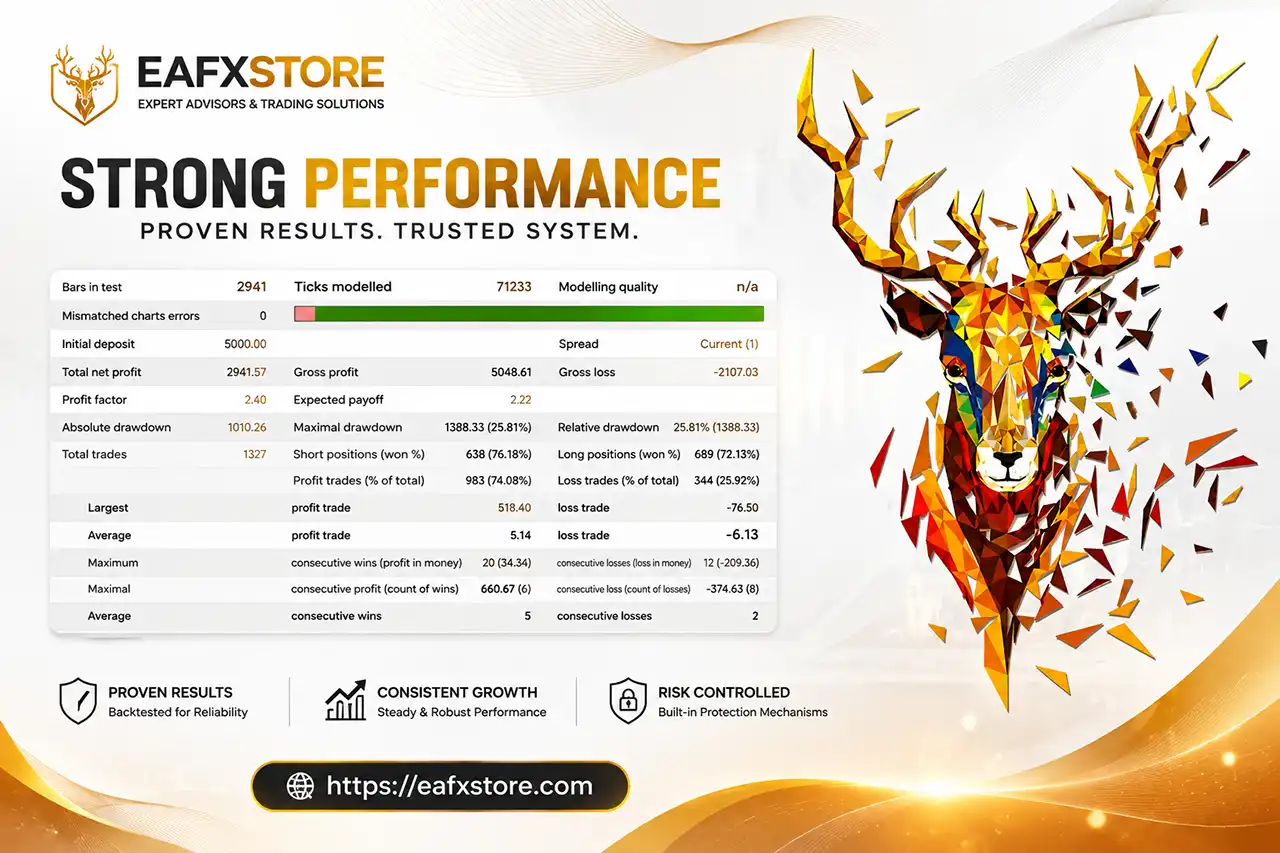
Vertex Stag EURUSD EA Backtest Results
Key Features of Vertex Stag EURUSD EA
🔹 EURUSD-Focused Expert Advisor – Specifically designed to trade the EURUSD pair on the M5 timeframe, offering tailored performance for one of the most liquid currency pairs.
🔹 Dual Strategy Logic – Combines the power of trend-following and hedging techniques for greater adaptability in volatile markets.
🔹 Consistent Monthly Returns – Targets 5–15% monthly gains under stable market conditions, making it suitable for consistent portfolio growth.
🔹 Low Leverage Requirement – Operates effectively with just 1:100 leverage, accessible for most traders.
🔹 Cent Account Friendly – Designed to work efficiently on cent accounts (minimum 100,000 cents or $1,000), making it ideal for beginner or risk-conscious traders.
Key Benefits
🔹 Reliable, Single-Pair Strategy – Maximize your edge on EURUSD with a strategy tailored to the pair’s unique behavior and liquidity profile.
🔹 Risk-Controlled Performance – The dual strategy approach helps balance performance and drawdown, especially in ranging or trending conditions.
🔹 Effortless Integration & Scalability – Designed for cent or standard accounts with minimal setup, scale up as your capital grows.
🔹 Lifetime Value with Broker Partnerships – Save on recurring fees and expand trading capability with unlimited account support on partner brokers.
Vertex Stag EURUSD EA Review
While specific reviews may vary, Vertex Stag EURUSD EA has likely garnered attention from traders seeking automated trading solutions, especially those interested in trading the EURUSD pair. Reviews may highlight its performance, ease of use, reliability, and overall effectiveness in generating profits.
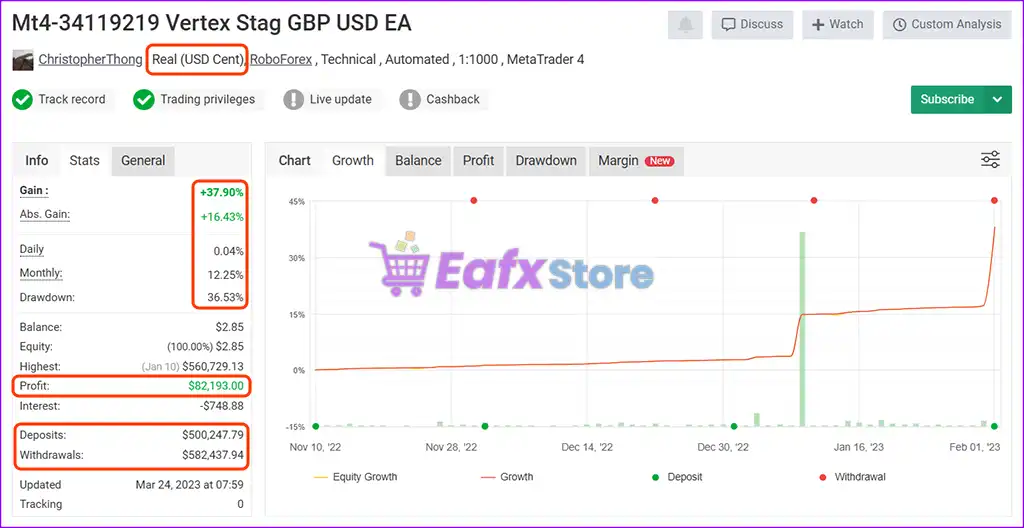
🔶 Vertex Stag EA is a technically automated trading robot developed for the GBP/USD currency pair, operating on the MetaTrader 4 platform with 1:1000 leverage on a USD Cent live account hosted by RoboForex.
✅ Initial Deposits: $500,247.79
✅ Total Profit: $82,193
✅ Monthly Growth: 12.25%
✅ Maximum Drawdown: 36.53%
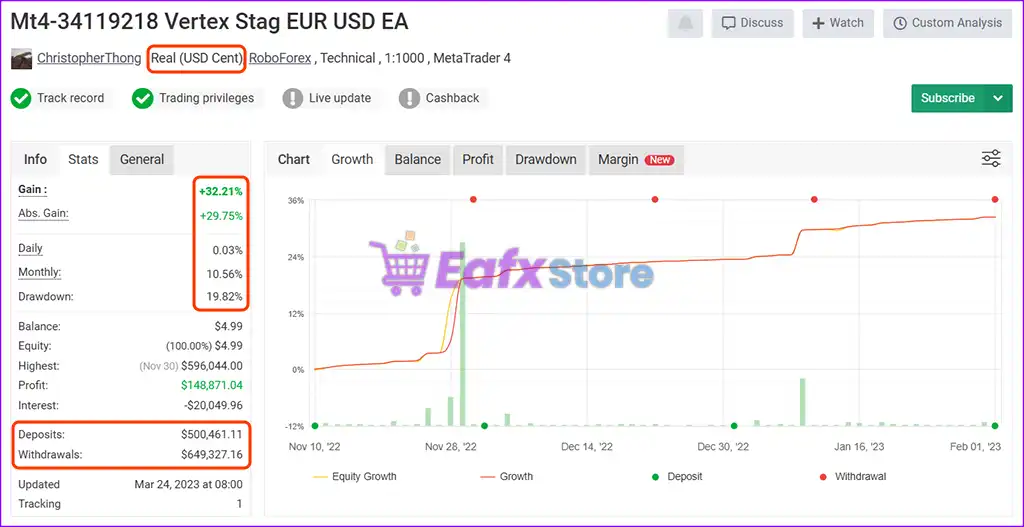
Vertex Stag EURUSD EA MT4 Live Signal Myfxbook
🔶 The Vertex Stag EUR/USD EA, automated robot tailored for the EUR/USD pair, executed on the MetaTrader 4 platform. It operates on a Real USD Cent account, utilizing 1:1000 leverage to maximize capital efficiency.
✅ Initial Deposits: $500,461.11
✅ Total Profit: $148,871.04
✅ Monthly Growth: 10.56%
✅ Maximum Drawdown: 19.82%
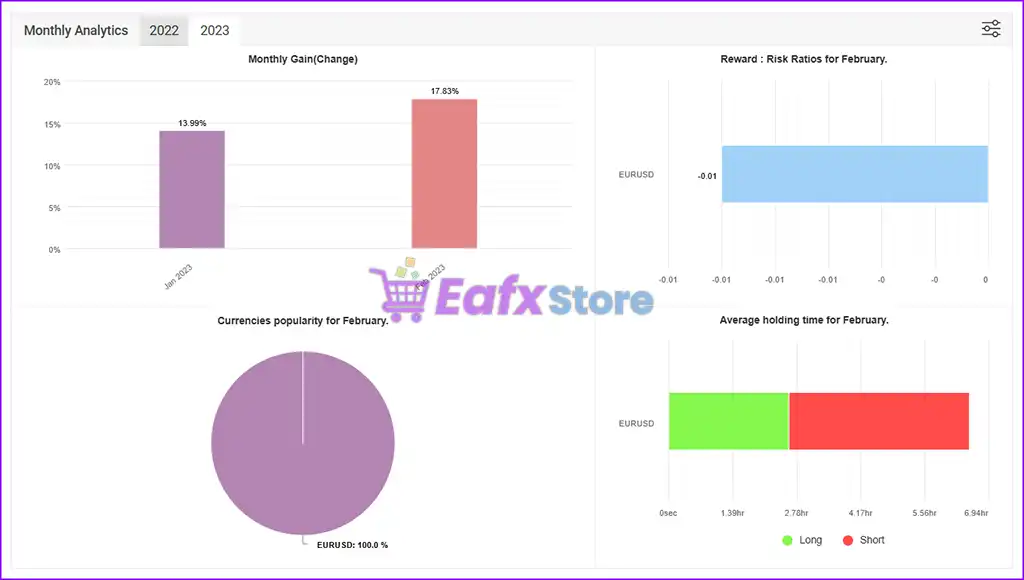
Vertex Stag EURUSD EA Live Signal Myfxbook
Trading Specifications
Recommended settings and parameters to pay attention to from developers and experts:
| Features | Type |
|---|---|
| Trading platform | MetaTrader 4 (MT4) |
| Minimum / Recommended deposit | $100 |
| Minimum / Recommended leverage | 1:100 |
| Time frames | M5 (5 minute chart) |
| Currency pairs | EURUSD, GBPUSD |
| Product type | NoDLL / Fix |
| Additional services | Unlock And Decompile |
| Recommended brokers | Exness Broker, Icmarkets Broker |
| Recommended VPS | MyfxVPS.com ( Blue VPS, Golden VPS). Lowest Latency, 2 week Free Trial, 100% Free for 12-18 Months. |
Product Download Package?
The download package of the product suite includes:
 Experts: Vertex Stag EURUSD EA.ex4
 Reviewed by David Easton
Conclusion
In short, Vertex Stag EURUSD EA stands out as a specialized, high-performance expert advisor for EURUSD on the M5 timeframe, offering traders a powerful blend of trend-following and hedging strategies for consistent, risk-managed results.
Built for the MetaTrader 4 platform, this EA delivers automated trading precision, scalable integration, and a user-friendly experience—whether you’re managing a cent account or a standard trading portfolio.
🔢 Vertex Stag EURUSD EA MT4 Settings Guide
Vertex Stag EURUSD EA is an automated Forex Expert Advisor designed for EURUSD trading, combining trend-based and counter-trend trading modes with configurable money management, compound/fixed-lot sizing, multi-level trade management, Stop Loss, Take Profit, trailing protection, and Stochastic/Moving Average filters.
The supplied configuration is highly customizable. It includes Trend and Counter Trend modes, Compound/Fix Lot options, a 1.7 lot multiplier, 12 maximum levels, 253.0 Stop Loss, 30.0 Take Profit, and technical indicator settings based on Stochastic and Moving Average calculations. The configuration also provides separate Buy/Sell controls and dedicated trading-hour settings.
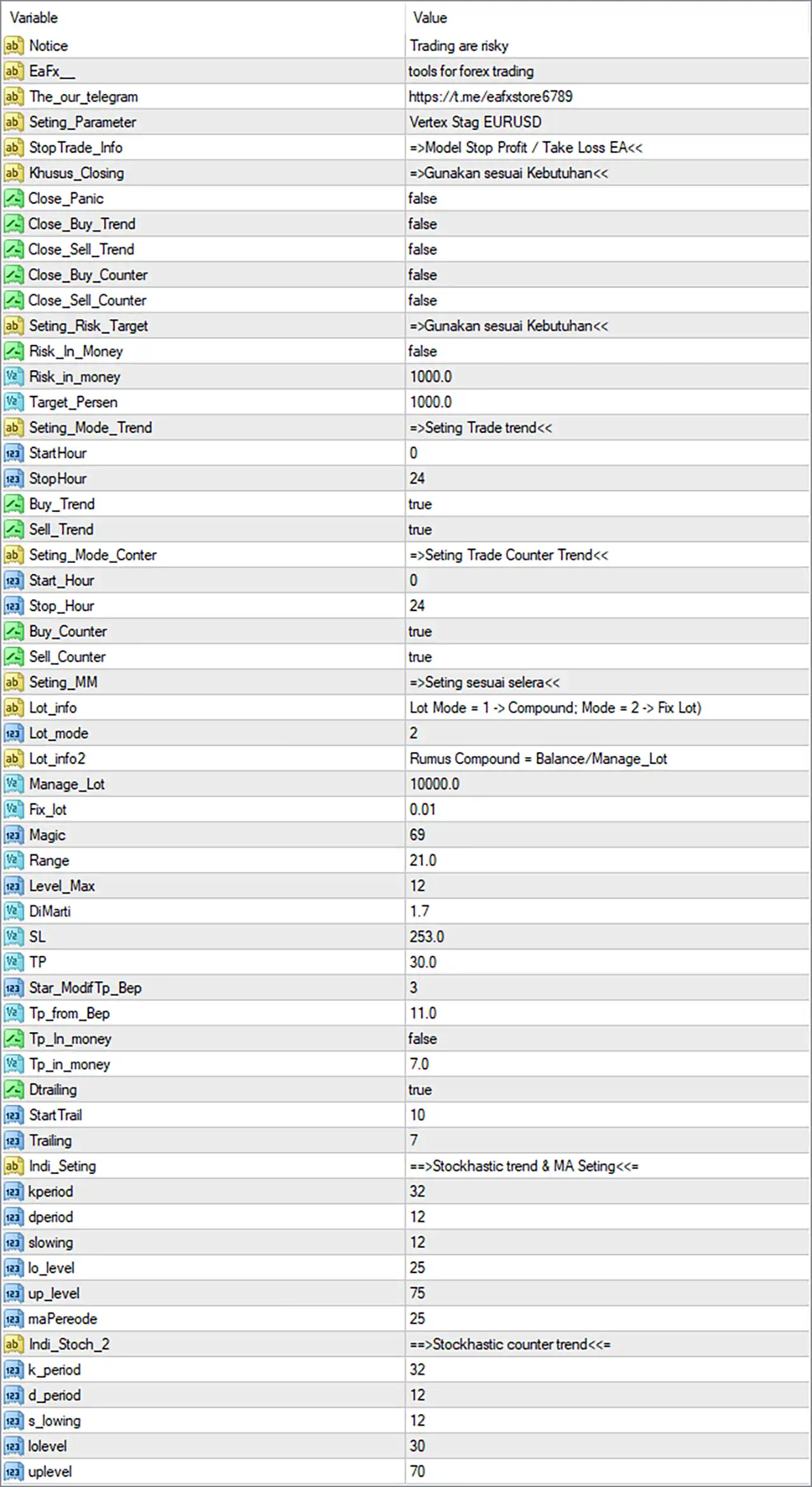
Vertex Stag EURUSD EA MT4 Settings Panel
🔢 Vertex Stag EURUSD EA MT4 Settings Explained
🔶 General & Information Settings
🔹 Notice: Trading are risky — Displays the EA’s risk warning, reminding users that automated trading involves financial risk.
🔹 EaFx_: tools for forex trading — Identifies the EA/provider information as tools for forex trading.
🔹 The_our_telegram: https://t.me/eafxstore6789 — Provides the Telegram contact/channel reference associated with the configuration: Telegram channel
🔹 Seting_Parameter: Vertex Stag EURUSD — Identifies the active settings preset as Vertex Stag EURUSD.
🔹 Stop Trade_Info: =>Model Stop Profit / Take Loss EA<< — Provides an informational label referring to the EA’s Stop Profit / Take Loss model.
🔹 Khusus_Closing: =>Gunakan sesuai Kebutuhan<< — Displays the instruction “Use according to needs”, indicating that the closing-related options should be configured according to the trader’s requirements.
🔶 Closing Settings
🔹 Close_Panic: false — Disables the Panic Close function.
🔹 Close_Buy_Trend: false — Disables automatic closing of Buy positions based on the Trend mode.
🔹 Close_Sell_Trend: false — Disables automatic closing of Sell positions based on the Trend mode.
🔹 Close_Buy_Counter: false — Disables automatic closing of Buy positions based on the Counter Trend mode.
🔹 Close_Sell_Counter: false — Disables automatic closing of Sell positions based on the Counter Trend mode.
🔶 Risk Target Settings
🔹 Seting_Risk_Target: =>Gunakan sesuai Kebutuhan<< — Provides a risk-target configuration note meaning “Use according to needs.”
🔹 Risk_In_Money: false — Disables money-based risk targeting.
🔹 Risk_in_money: 1000.0 — Sets the money-based risk reference value to 1000.0. Because Risk_In_Money = false, this parameter is not active in the displayed configuration.
🔹 Target_Persen: 1000.0 — Sets the target percentage parameter to 1000.0 according to the EA’s internal target-management logic.
🔶 Trend Trading Settings
🔹 Seting_Mode_Trend: =>Seting Trade trend<< — Identifies the Trend trading configuration section.
🔹 StartHour: 0 — Sets the Trend trading start hour to 0.
🔹 StopHour: 24 — Sets the Trend trading stop hour to 24.
🔹 Buy_Trend: true — Enables Buy trades under the Trend trading mode.
🔹 Sell_Trend: true — Enables Sell trades under the Trend trading mode.
🔶 Counter Trend Settings
🔹 Seting_Mode_Conter: =>Seting Trade Counter Trend<< — Identifies the Counter Trend trading configuration section.
🔹 Start_Hour: 0 — Sets the Counter Trend trading start hour to 0.
🔹 Stop_Hour: 24 — Sets the Counter Trend trading stop hour to 24.
🔹 Buy_Counter: true — Enables Buy trades under the Counter Trend mode.
🔹 Sell_Counter: true — Enables Sell trades under the Counter Trend mode.
🔶 Money Management Settings
🔹 Seting_MM: =>Seting sesuai selera<< — Provides the money-management instruction “Set according to preference.”
🔹 Lot_info: Lot Mode = 1 -> Compound; Mode = 2 -> Fix Lot — Explains the two available lot-sizing modes: Mode 1 = Compound and Mode 2 = Fixed Lot.
🔹 Lot_mode: 2 — Selects Mode 2, meaning the displayed configuration uses the Fixed Lot mode.
🔹 Lot_info2: Rumus Compound = Balance/Manage_Lot — Provides the compound calculation reference: Balance / Manage_Lot.
🔹 Manage_Lot: 10000.0 — Sets the money-management reference value to 10000.0, used in the EA’s lot-sizing calculation.
🔹 Fix_lot: 0.01 — Sets the fixed trading volume to 0.01 lots. Because Lot_mode = 2, this is the active lot-sizing value in the displayed configuration.
🔹 Magic: 69 — Assigns 69 as the EA’s Magic Number for identifying its trades.
🔶 Grid / Level & Position Management
🔹 Range: 21.0 — Sets the trading range parameter to 21.0 according to the EA’s internal trade-management calculation.
🔹 Level_Max: 12 — Sets the maximum number of trading levels to 12.
🔹 DiMarti: 1.7 — Sets the lot/trade multiplication coefficient to 1.7. This parameter can increase exposure when the EA’s internal multi-level trading logic applies it.
🔶 Stop Loss & Take Profit Settings
🔹 SL: 253.0 — Sets the Stop Loss parameter to 253.0 according to the EA’s internal price-distance unit.
🔹 TP: 30.0 — Sets the Take Profit parameter to 30.0 according to the EA’s internal price-distance unit.
🔹 Star_ModifTp_Bep: 3 — Sets the starting modification level for Take Profit / Break-Even management to 3.
🔹 Tp_from_Bep: 11.0 — Sets the Take Profit distance from the Break-Even reference to 11.0.
🔶 Take Profit Money Settings
🔹 Tp_In_money: false — Disables money-based Take Profit.
🔹 Tp_in_money: 7.0 — Sets the money-based Take Profit reference to 7.0. Since Tp_In_money = false, this value is not active in the displayed configuration.
🔶 Trailing Stop Settings
🔹 Dtrailing: true — Enables the EA’s trailing-stop functionality.
🔹 StartTrail: 10 — Sets the trailing-stop activation level to 10 according to the EA’s internal distance/profit unit.
🔹 Trailing: 7 — Sets the trailing distance/step parameter to 7.
🔶 Stochastic Trend & Moving Average Settings
🔹 Indi_Seting: ==>Stochastic trend & MA Seting<< — Identifies the technical-indicator configuration section using Stochastic trend and Moving Average settings.
🔹 kperiod: 32 — Sets the Stochastic %K period to 32.
🔹 dperiod: 12 — Sets the Stochastic %D period to 12.
🔹 slowing: 12 — Sets the Stochastic slowing parameter to 12.
🔹 lo_level: 25 — Sets the lower Stochastic threshold to 25.
🔹 up_level: 75 — Sets the upper Stochastic threshold to 75.
🔹 maPeriode: 25 — Sets the Moving Average period to 25.
🔶 Stochastic Counter Trend Settings
🔹 Indi_Stoch_2: ==>Stochastic counter trend<< — Identifies the separate Stochastic configuration used for Counter Trend trading.
🔹 k_period: 32 — Sets the Counter Trend Stochastic %K period to 32.
🔹 d_period: 12 — Sets the Counter Trend Stochastic %D period to 12.
🔹 s_lowing: 12 — Sets the Counter Trend Stochastic slowing parameter to 12.
🔹 lolevel: 30 — Sets the lower Counter Trend Stochastic threshold to 30.
🔹 uplevel: 70 — Sets the upper Counter Trend Stochastic threshold to 70.
🔶 Key Configuration Highlights
🔹 Trading Symbol: The preset is identified as Vertex Stag EURUSD, indicating a configuration intended for EURUSD.
🔹 Lot Mode: Lot_mode = 2, selecting Fixed Lot mode.
🔹 Fixed Lot: The configured fixed volume is 0.01 lots.
🔹 Compound Formula: The EA provides the formula Balance / Manage_Lot for its Compound mode.
🔹 Money Management Reference: Manage_Lot = 10000.0.
🔹 Magic Number: 69.
🔹 Maximum Levels: Level_Max = 12.
🔹 Trade Multiplier: DiMarti = 1.7.
🔹 Stop Loss: SL = 253.0.
🔹 Take Profit: TP = 30.0.
🔹 Trailing: Dtrailing = true, with StartTrail = 10 and Trailing = 7.
🔹 Trend Trading: Both Buy_Trend = true and Sell_Trend = true.
🔹 Counter Trend Trading: Both Buy_Counter = true and Sell_Counter = true.
🔹 Trend Trading Hours: 0–24, allowing the Trend mode to operate across the configured full-day period.
🔹 Counter Trend Trading Hours: 0–24, allowing Counter Trend mode to operate across the configured full-day period.
🔹 Trend Stochastic: K = 32, D = 12, Slowing = 12, Lower = 25, Upper = 75.
🔹 Trend Moving Average: MA Period = 25.
🔹 Counter Trend Stochastic: K = 32, D = 12, Slowing = 12, Lower = 30, Upper = 70.
🔶 Risk Management Analysis
🔹 Fixed-Lot Configuration: Since Lot_mode = 2, the EA uses Fix_lot = 0.01 rather than the compound calculation.
🔹 Potential Exposure Expansion: DiMarti = 1.7 is an important parameter because a multiplier of 1.7 can increase position exposure when the EA’s internal level-management logic applies it.
🔹 Maximum Levels: Level_Max = 12 means the EA can use up to 12 configured trading levels, subject to its internal entry and management conditions.
🔹 Stop Loss / Take Profit: The displayed SL = 253.0 and TP = 30.0 should be interpreted according to the EA’s internal unit. The screenshot does not explicitly state whether these are points, pips, or another distance measurement.
🔹 Trailing Protection: Trailing is enabled with StartTrail = 10 and Trailing = 7, providing an additional mechanism for protecting open positions.
🔹 Money-Based TP: Tp_In_money = false, so the 7.0 money-based TP value is currently inactive.
🔹 Risk-Based Closing: All four specialized closing switches — Close_Buy_Trend, Close_Sell_Trend, Close_Buy_Counter, and Close_Sell_Counter — are set to false, while Close_Panic = false also disables panic closing.
User Reviews
Only logged in customers who have purchased this product may leave a review.
1. What pair and timeframe does Vertex Stag EURUSD EA trade?
Vertex Stag EURUSD EA is specifically designed to trade EURUSD on the M5 (5-minute) timeframe, offering optimized performance for this highly liquid forex pair.
2. What is the trading strategy behind the EA?
The EA uses a dual-strategy approach that combines:
🔹 Trend-following logic to capture directional moves
🔹 Hedging mechanisms to manage risk during market reversals or consolidations.
3. What are the expected monthly returns?
Under stable market conditions, Vertex Stag aims for 5%–15% monthly returns, making it suitable for consistent account growth over time.
4. What leverage does the EA require?
It is optimized to work efficiently with low leverage, starting from just 1:100, which is accessible for most brokers and traders.
5. Can I use the EA on a cent account?
Yes! Vertex Stag EURUSD EA is cent-account friendly. It performs well on accounts starting from 100,000 cents ($1,000), which makes it a great choice for beginners or risk-averse users.
6. What kind of risk and drawdown should I expect?
Live performance results show a maximum drawdown ranging from 19% to 36%, depending on market conditions and broker setup. The dual strategy helps balance performance with risk control.
7. Is the EA beginner-friendly?
Yes. The EA is designed for both advanced beginners and professional traders. It offers easy setup, automation, and scalable deployment, especially on supported brokers.
8. What platforms and accounts does it support?
Vertex Stag runs on MetaTrader 4 (MT4) and works well with standard and cent accounts. It is compatible with most MT4 brokers, especially those offering 1:100 or higher leverage.
🔥 Get This EA for FREE with Our Membership! 🚀🚀
Unlock access to this EA, premium Indicators, and exclusive trading tools completely FREE with any of our Membership Plans! Thousands of traders already benefit from our VIP library—join them and level up your trading instantly. Choose Your Membership:
- SPECIAL – 1 Month Membership
- GOLD – 1 Year Membership
- PREMIUM – 1 Year Membership
-
 Original price was: $9,999.00.$249.00Current price is: $249.00.
 -
 Original price was: $30,000.00.$249.00Current price is: $249.00.
 -
 Original price was: $30,000.00.$249.00Current price is: $249.00.
 -
 Original price was: $5,000.00.$249.00Current price is: $249.00.
-
 2Original price was: $1,799.00.$69.00Current price is: $69.00.
 -
 10Original price was: $2,100.00.$69.00Current price is: $69.00.
 -
 3Original price was: $999.00.$69.00Current price is: $69.00.
 -
 0Original price was: $399.00.$59.00Current price is: $59.00.
There are no reviews yet.