

This guide walks through the inputs of Vertex Stag EURUSD EA MT4 with the values recommended for live trading. The set files that come with the EA already contain these settings, so you can load them in one click and adjust only what your broker or account needs.
🔢 Vertex Stag EURUSD EA MT4 Settings Guide
Vertex Stag EURUSD EA is an automated Forex Expert Advisor designed for EURUSD trading, combining trend-based and counter-trend trading modes with configurable money management, compound/fixed-lot sizing, multi-level trade management, Stop Loss, Take Profit, trailing protection, and Stochastic/Moving Average filters.
The supplied configuration is highly customizable. It includes Trend and Counter Trend modes, Compound/Fix Lot options, a 1.7 lot multiplier, 12 maximum levels, 253.0 Stop Loss, 30.0 Take Profit, and technical indicator settings based on Stochastic and Moving Average calculations. The configuration also provides separate Buy/Sell controls and dedicated trading-hour settings.
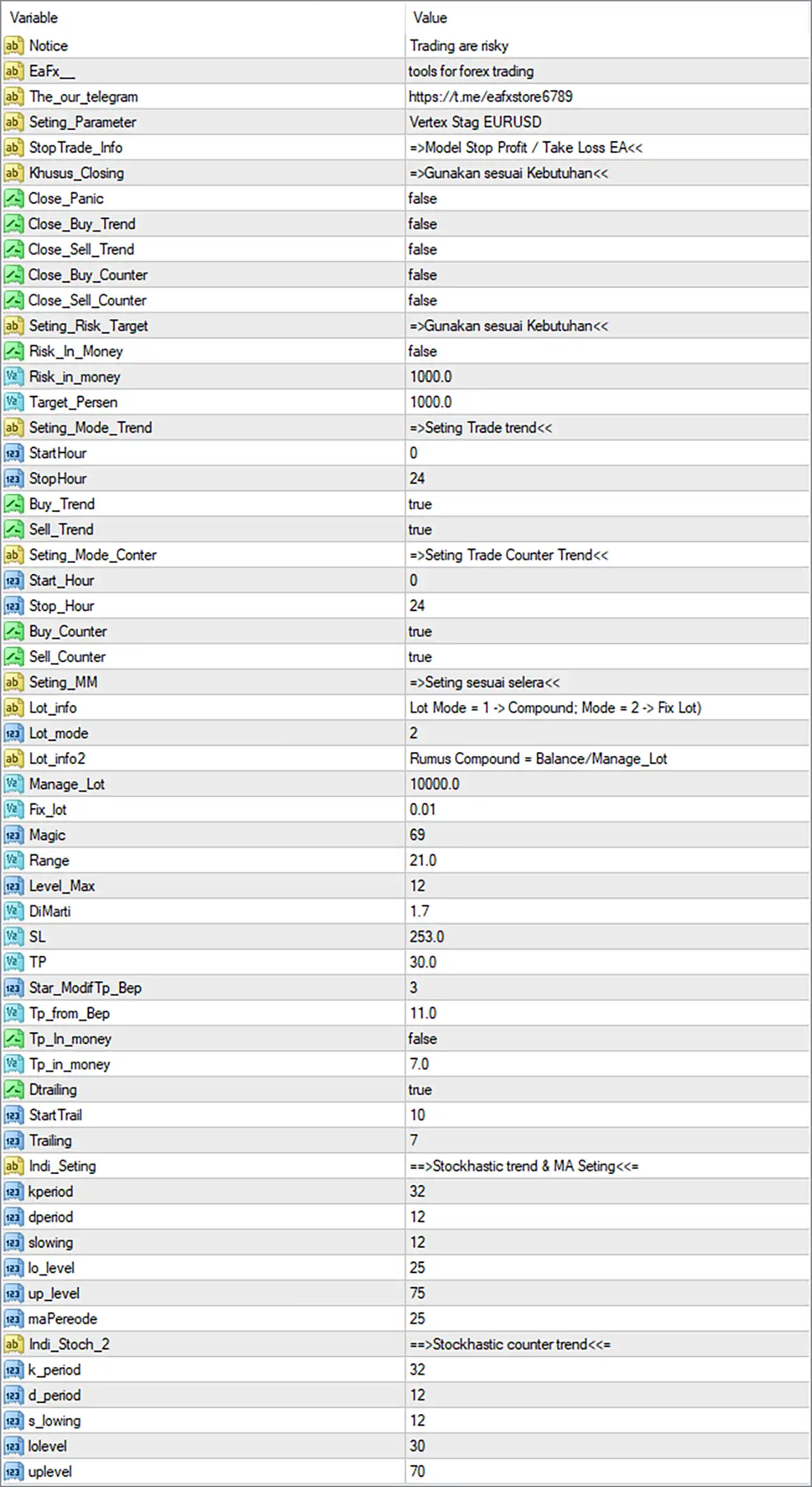
🔢 Vertex Stag EURUSD EA MT4 Settings Explained
🔶 General & Information Settings
🔹 Notice: Trading are risky — Displays the EA's risk warning, reminding users that automated trading involves financial risk.
🔹 EaFx_: tools for forex trading — Identifies the EA/provider information as tools for forex trading.
🔹 The_our_telegram: https://t.me/eafxstore6789 — Provides the Telegram contact/channel reference associated with the configuration: Telegram channel
🔹 Seting_Parameter: Vertex Stag EURUSD — Identifies the active settings preset as Vertex Stag EURUSD.
🔹 Stop Trade_Info: =>Model Stop Profit / Take Loss EA<< — Provides an informational label referring to the EA's Stop Profit / Take Loss model.
🔹 Khusus_Closing: =>Gunakan sesuai Kebutuhan<< — Displays the instruction “Use according to needs”, indicating that the closing-related options should be configured according to the trader's requirements.
🔶 Closing Settings
🔹 Close_Panic: false — Disables the Panic Close function.
🔹 Close_Buy_Trend: false — Disables automatic closing of Buy positions based on the Trend mode.
🔹 Close_Sell_Trend: false — Disables automatic closing of Sell positions based on the Trend mode.
🔹 Close_Buy_Counter: false — Disables automatic closing of Buy positions based on the Counter Trend mode.
🔹 Close_Sell_Counter: false — Disables automatic closing of Sell positions based on the Counter Trend mode.
🔶 Risk Target Settings
🔹 Seting_Risk_Target: =>Gunakan sesuai Kebutuhan<< — Provides a risk-target configuration note meaning “Use according to needs.”
🔹 Risk_In_Money: false — Disables money-based risk targeting.
🔹 Risk_in_money: 1000.0 — Sets the money-based risk reference value to 1000.0. Because Risk_In_Money = false, this parameter is not active in the displayed configuration.
🔹 Target_Persen: 1000.0 — Sets the target percentage parameter to 1000.0 according to the EA's internal target-management logic.
🔶 Trend Trading Settings
🔹 Seting_Mode_Trend: =>Seting Trade trend<< — Identifies the Trend trading configuration section.
🔹 StartHour: 0 — Sets the Trend trading start hour to 0.
🔹 StopHour: 24 — Sets the Trend trading stop hour to 24.
🔹 Buy_Trend: true — Enables Buy trades under the Trend trading mode.
🔹 Sell_Trend: true — Enables Sell trades under the Trend trading mode.
🔶 Counter Trend Settings
🔹 Seting_Mode_Conter: =>Seting Trade Counter Trend<< — Identifies the Counter Trend trading configuration section.
🔹 Start_Hour: 0 — Sets the Counter Trend trading start hour to 0.
🔹 Stop_Hour: 24 — Sets the Counter Trend trading stop hour to 24.
🔹 Buy_Counter: true — Enables Buy trades under the Counter Trend mode.
🔹 Sell_Counter: true — Enables Sell trades under the Counter Trend mode.
🔶 Money Management Settings
🔹 Seting_MM: =>Seting sesuai selera<< — Provides the money-management instruction “Set according to preference.”
🔹 Lot_info: Lot Mode = 1 -> Compound; Mode = 2 -> Fix Lot — Explains the two available lot-sizing modes: Mode 1 = Compound and Mode 2 = Fixed Lot.
🔹 Lot_mode: 2 — Selects Mode 2, meaning the displayed configuration uses the Fixed Lot mode.
🔹 Lot_info2: Rumus Compound = Balance/Manage_Lot — Provides the compound calculation reference: Balance / Manage_Lot.
🔹 Manage_Lot: 10000.0 — Sets the money-management reference value to 10000.0, used in the EA's lot-sizing calculation.
🔹 Fix_lot: 0.01 — Sets the fixed trading volume to 0.01 lots. Because Lot_mode = 2, this is the active lot-sizing value in the displayed configuration.
🔹 Magic: 69 — Assigns 69 as the EA's Magic Number for identifying its trades.
🔶 Grid / Level & Position Management
🔹 Range: 21.0 — Sets the trading range parameter to 21.0 according to the EA's internal trade-management calculation.
🔹 Level_Max: 12 — Sets the maximum number of trading levels to 12.
🔹 DiMarti: 1.7 — Sets the lot/trade multiplication coefficient to 1.7. This parameter can increase exposure when the EA's internal multi-level trading logic applies it.
🔶 Stop Loss & Take Profit Settings
🔹 SL: 253.0 — Sets the Stop Loss parameter to 253.0 according to the EA's internal price-distance unit.
🔹 TP: 30.0 — Sets the Take Profit parameter to 30.0 according to the EA's internal price-distance unit.
🔹 Star_ModifTp_Bep: 3 — Sets the starting modification level for Take Profit / Break-Even management to 3.
🔹 Tp_from_Bep: 11.0 — Sets the Take Profit distance from the Break-Even reference to 11.0.
🔶 Take Profit Money Settings
🔹 Tp_In_money: false — Disables money-based Take Profit.
🔹 Tp_in_money: 7.0 — Sets the money-based Take Profit reference to 7.0. Since Tp_In_money = false, this value is not active in the displayed configuration.
🔶 Trailing Stop Settings
🔹 Dtrailing: true — Enables the EA's trailing-stop functionality.
🔹 StartTrail: 10 — Sets the trailing-stop activation level to 10 according to the EA's internal distance/profit unit.
🔹 Trailing: 7 — Sets the trailing distance/step parameter to 7.
🔶 Stochastic Trend & Moving Average Settings
🔹 Indi_Seting: ==>Stochastic trend & MA Seting<< — Identifies the technical-indicator configuration section using Stochastic trend and Moving Average settings.
🔹 kperiod: 32 — Sets the Stochastic %K period to 32.
🔹 dperiod: 12 — Sets the Stochastic %D period to 12.
🔹 slowing: 12 — Sets the Stochastic slowing parameter to 12.
🔹 lo_level: 25 — Sets the lower Stochastic threshold to 25.
🔹 up_level: 75 — Sets the upper Stochastic threshold to 75.
🔹 maPeriode: 25 — Sets the Moving Average period to 25.
🔶 Stochastic Counter Trend Settings
🔹 Indi_Stoch_2: ==>Stochastic counter trend<< — Identifies the separate Stochastic configuration used for Counter Trend trading.
🔹 k_period: 32 — Sets the Counter Trend Stochastic %K period to 32.
🔹 d_period: 12 — Sets the Counter Trend Stochastic %D period to 12.
🔹 s_lowing: 12 — Sets the Counter Trend Stochastic slowing parameter to 12.
🔹 lolevel: 30 — Sets the lower Counter Trend Stochastic threshold to 30.
🔹 uplevel: 70 — Sets the upper Counter Trend Stochastic threshold to 70.
🔶 Key Configuration Highlights
🔹 Trading Symbol: The preset is identified as Vertex Stag EURUSD, indicating a configuration intended for EURUSD.
🔹 Lot Mode: Lot_mode = 2, selecting Fixed Lot mode.
🔹 Fixed Lot: The configured fixed volume is 0.01 lots.
🔹 Compound Formula: The EA provides the formula Balance / Manage_Lot for its Compound mode.
🔹 Money Management Reference: Manage_Lot = 10000.0.
🔹 Magic Number: 69.
🔹 Maximum Levels: Level_Max = 12.
🔹 Trade Multiplier: DiMarti = 1.7.
🔹 Stop Loss: SL = 253.0.
🔹 Take Profit: TP = 30.0.
🔹 Trailing: Dtrailing = true, with StartTrail = 10 and Trailing = 7.
🔹 Trend Trading: Both Buy_Trend = true and Sell_Trend = true.
🔹 Counter Trend Trading: Both Buy_Counter = true and Sell_Counter = true.
🔹 Trend Trading Hours: 0–24, allowing the Trend mode to operate across the configured full-day period.
🔹 Counter Trend Trading Hours: 0–24, allowing Counter Trend mode to operate across the configured full-day period.
🔹 Trend Stochastic: K = 32, D = 12, Slowing = 12, Lower = 25, Upper = 75.
🔹 Trend Moving Average: MA Period = 25.
🔹 Counter Trend Stochastic: K = 32, D = 12, Slowing = 12, Lower = 30, Upper = 70.
🔶 Risk Management Analysis
🔹 Fixed-Lot Configuration: Since Lot_mode = 2, the EA uses Fix_lot = 0.01 rather than the compound calculation.
🔹 Potential Exposure Expansion: DiMarti = 1.7 is an important parameter because a multiplier of 1.7 can increase position exposure when the EA's internal level-management logic applies it.
🔹 Maximum Levels: Level_Max = 12 means the EA can use up to 12 configured trading levels, subject to its internal entry and management conditions.
🔹 Stop Loss / Take Profit: The displayed SL = 253.0 and TP = 30.0 should be interpreted according to the EA's internal unit. The screenshot does not explicitly state whether these are points, pips, or another distance measurement.
🔹 Trailing Protection: Trailing is enabled with StartTrail = 10 and Trailing = 7, providing an additional mechanism for protecting open positions.
🔹 Money-Based TP: Tp_In_money = false, so the 7.0 money-based TP value is currently inactive.
🔹 Risk-Based Closing: All four specialized closing switches — Close_Buy_Trend, Close_Sell_Trend, Close_Buy_Counter, and Close_Sell_Counter — are set to false, while Close_Panic = false also disables panic closing.
Get Vertex Stag EURUSD EA MT4
Download Vertex Stag EURUSD EA MT4 with its set files, read the full product details and requirements here: Vertex Stag EURUSD EA MT4 →