


Wall Street Scalper MT5 Settings Guide
Wall Street Scalper MT5 is an automated trading Expert Advisor designed for Wall Street (US30) scalping. The displayed configuration focuses on BUY-only trading and provides controls for trade volume, Take Profit, Stop Loss, order activation, pending-order offset, trading hours, weekend restrictions, holiday pauses, news filtering, and Moving Average filtering. Traders can adjust these parameters according to their broker conditions, account balance, risk tolerance, and preferred trading schedule.
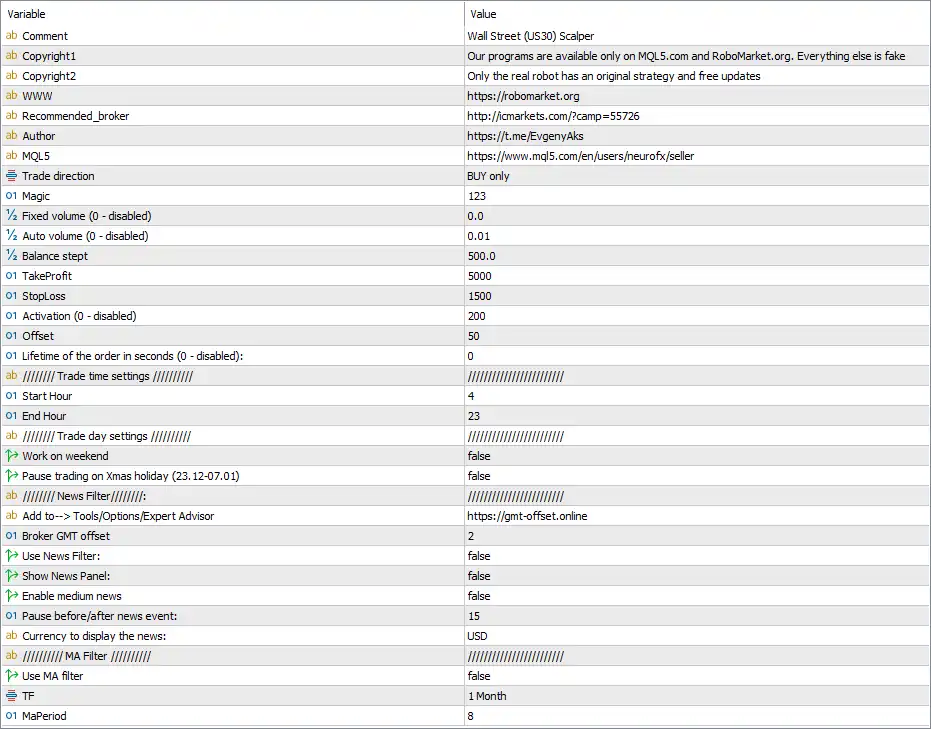
Wall Street Scalper MT5 Inputs and Settings
Trade Direction and Volume Settings
🔹 Trade direction = BUY only — Restricts the EA to opening BUY trades only according to the selected configuration.
🔹 Magic = 123 — Sets the Magic Number used by the EA to identify and manage its own trades.
🔹 Fixed volume (0 - disabled) = 0.0 — Controls fixed lot sizing; a value of 0.0 means this fixed-volume mode is disabled.
🔹 Auto volume (0 - disabled) = 0.01 — Sets the automatic volume parameter to 0.01; the EA can use this setting when automatic position sizing is active.
🔹 Balance stept = 500.0 — Defines the balance step used by the EA's automatic volume calculation.
Take Profit, Stop Loss and Order Management
🔹 TakeProfit = 5000 — Sets the configured Take Profit distance/value to 5000 according to the EA's internal calculation and broker symbol specifications.
🔹 StopLoss = 1500 — Sets the configured Stop Loss distance/value to 1500, providing a predefined loss-management level.
🔹 Activation (0 - disabled) = 200 — Sets the activation level to 200; the feature is active because the value is not 0.
🔹 Offset = 50 — Sets the order offset to 50, controlling the distance used by the EA when placing or managing its relevant orders.
🔹 Lifetime of the order in seconds (0 - disabled) = 0 — Controls how long an order remains active in seconds; 0 disables the lifetime limitation.
Trading Time Settings
🔹 Start Hour = 4 — Sets the EA's configured trading start hour to 04:00 based on the EA/broker time reference.
🔹 End Hour = 23 — Sets the configured trading end hour to 23:00, defining the end of the selected trading period.
Trading Day Settings
🔹 Work on weekend = false — Weekend trading is disabled because the parameter is set to false.
🔹 Pause trading on Xmas holiday (23.12-07.01) = false — The special Christmas/New Year trading pause from 23.12 to 07.01 is disabled.
News Filter Settings
🔹 Add to --> Tools/Options/Expert Advisor = https://gmt-offset.online — Provides the GMT-offset website indicated by the EA for configuring the required broker time offset information.
🔹 Broker GMT offset = 2 — Sets the broker's GMT offset to 2, which can be used by the EA when processing time-related news information.
🔹 Use News Filter = false — The news filter is currently disabled.
🔹 Show News Panel = false — The news information panel is disabled and will not be displayed according to this setting.
🔹 Enable medium news = false — Medium-impact news events are excluded because this option is disabled.
🔹 Pause before/after news event = 15 — Defines a 15-minute pause period before and/or after a relevant news event when the corresponding news filtering function is enabled.
🔹 Currency to display the news = USD — Sets USD as the currency for news events displayed or processed by the news module.
Moving Average Filter Settings
🔹 Use MA filter = false — The Moving Average filter is currently disabled.
🔹 TF = 1 Month — Sets the Moving Average filter timeframe to 1 Month when the MA filter is enabled.
🔹 MaPeriod = 8 — Sets the Moving Average period to 8 when the MA filter is activated.
Recommended Interpretation of the Current Configuration
🔹 Trading Direction: The current setup is configured for BUY only, meaning the displayed configuration does not enable SELL trading.
🔹 Volume Configuration: Fixed volume is disabled at 0.0, while Auto volume is set to 0.01 with a 500.0 balance step.
🔹 Risk Parameters: The configuration contains TakeProfit = 5000 and StopLoss = 1500, which should be interpreted according to the EA's internal point/distance calculation and the US30 symbol specification used by the broker.
🔹 Trading Schedule: The EA is configured to trade between 04:00 and 23:00, subject to the broker/server time interpretation.
🔹 Weekend Trading: Weekend operation is disabled with Work on weekend = false.
🔹 Holiday Trading: The Christmas/New Year pause covering 23.12-07.01 is currently disabled.
🔹 News Protection: The News Filter is disabled, together with the News Panel and Medium News options.
🔹 MA Confirmation: The MA Filter is also disabled, so the configured 1 Month timeframe and MA Period 8 do not currently act as an active trading filter.
Important Notes About the Settings
🔹 Broker Conditions: The actual meaning of values such as 5000, 1500, 200, and 50 depends on how the EA calculates distances and how the broker defines the US30 symbol's point and tick specifications.
🔹 GMT Offset: The value Broker GMT offset = 2 should correspond to the broker/server-time configuration used by the trading account.
🔹 Automatic Volume: Because Fixed volume = 0.0, traders should understand how the EA calculates Auto volume before using the 0.01 setting with live funds.
🔹 News Filter: Setting Use News Filter = false means the EA's configured news-protection parameters are not actively filtering trades under the current setup.
🔹 MA Filter: Setting Use MA filter = false means TF = 1 Month and MaPeriod = 8 are configuration values for the MA module rather than an active entry filter.
Conclusion
The Wall Street Scalper MT5 configuration shown in the Inputs panel is primarily configured for BUY-only US30 trading, with an automatic volume setting of 0.01, a 500.0 balance step, Take Profit = 5000, Stop Loss = 1500, and trading hours from 04:00 to 23:00. Weekend trading is disabled, while both the News Filter and MA Filter are currently turned off.
Before using these settings on a live account, traders should verify the EA's distance calculations, US30 contract specifications, broker GMT offset, minimum lot requirements, and volume-management behavior. Testing the configuration on a demo account can help confirm how each parameter behaves under the selected broker's trading conditions.
FAQs
❓ What market is Wall Street Scalper MT5 designed for?
Wall Street Scalper MT5 is configured for Wall Street (US30) scalping, as indicated by the EA's Comment field.
❓ Is Wall Street Scalper MT5 configured for BUY and SELL trading?
The displayed configuration is set to BUY only, so the current Trade direction setting does not enable SELL trades.
❓ What are the Take Profit and Stop Loss settings?
The displayed configuration uses TakeProfit = 5000 and StopLoss = 1500. Their exact market distance depends on the EA's internal calculation and the broker's US30 specifications.
❓ Does the current configuration use a News Filter?
No. Use News Filter = false, Show News Panel = false, and Enable medium news = false, so the news module is currently disabled.
❓ Does the Wall Street Scalper MT5 configuration use a Moving Average filter?
No. Use MA filter = false. The configured MA settings are TF = 1 Month and MaPeriod = 8, but they are inactive until the MA filter is enabled.


